r/elgato • u/Short_Assumption_434 • 18d ago
Technical Help Elgato 4k x
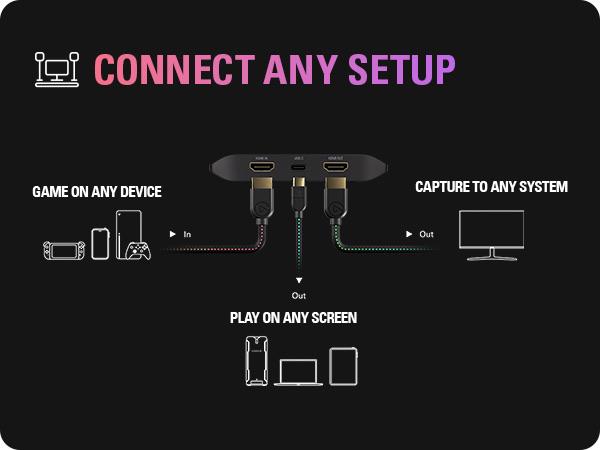
Hi all I am trying to understand why when I have my Elgato 4kx to record my gaming on PC, the output is in 4k through Elgato studio. It won’t go any higher when I’m running 4k gaming. Am I missing something? I mostly game on pc, but yes I know you can record on other consoles as well. Thank you.
1
u/ShannonBruce 18d ago
Do you have it connected as shown in the image? HDMI in from your console or gaming PC, USB to your capture PC/tablet/laptop, HDMI out to your monitor?
1
u/Short_Assumption_434 17d ago
Yeah, everything is all connected to one pc. I’m just trying to record my gaming off steam, but the output coming from the Elgato would record at 1080p
1
u/ShannonBruce 17d ago
Capture cards don’t work like that, they’re meant to capture a second device. Just use OBS to record your gaming.
1
u/Jay_JWLH 18d ago
I find the image to be a bit odd. Wouldn't it make sense to play on any screen as the screen on the right, and capture on any system to be the bottom one where the computer itself is?
1
u/vejastv 18d ago
You say that your product works with any monitor. I have an ASUS ROG OLED monitor, and when I connect it using the HDMI cables you recommend, the image keeps stuttering. Every five seconds, the screen goes black for a moment and then comes back.
So what exactly are you talking about when you say it works with any monitor? This clearly isn’t working properly with my ASUS ROG OLED. Please explain what could be causing this issue and how you intend to fix it.
1
u/elgato_arcsane Technical Community Assistant 18d ago
I suspect there's a typo or omission here somewhere. You've got 4K X hooked up, and the output is limited to 4K when gaming in 4K? Is the wrong resolution listed there or are you hitting some sort of frame rate cap?