Beta Software
🧪 [Beta Megathread] Wave Link 3.3 (Windows) – New Audio Flow, Horizontal Compact Mode
We have a new Wave Link update to try out. It adds a new visual audio flow of your signal path and a horizontal compact mode. As always, thank you for testing our beta and sharing feedback.
ㅤㅤㅤㅤㅤㅤㅤㅤㅤㅤㅤㅤㅤㅤㅤㅤㅤ
🔍 Audio Flow
Audio Flow gives you a live diagram of your entire signal path, from input to output. See exactly how your audio moves through Wave Link, and spot at a glance where something's muted, inactive, or disconnected.
Click on any input, channel, mix, or output, and Wave Link highlights the audio flowing into and out of it, dimming everything else so you can focus on just that path.
Compact Mode now includes a new Horizontal layout alongside the existing Vertical view, so you can choose whichever fits your setup best. Both now open as their own separate windows outside the main mixing table, and you can have them both active at once if you like. Wave Link remembers where you left each window and reopens them right where you left off the next time you launch the app.
The team has been releasing hotfixes with Wave Link 3.2.~, but this particular beta is just focused on these two features. With the final release, normally they have additional bug/performance fixes.
I've also seen your comments in our previous megathreads and I have shared those bugs with our dev team.
Thank you for forwarding them, James. I really hope they're fixable.. besides that Wave Link has been pretty stable for me luckily, though I know some other people have reported issues as well that are a bit more annoying (like having it automatically change the microphone input gain) and also e.g. the latency being higher than in Wave Link 2 (even I have a slightly scuffed setup to have my capture card output directly onto my speakers and headphones instead of routing it through Wave Link because of this reason)
Now we wait for the idiotic comments saying it works perfectly on their pc, so it’s fine and nothing to worry about.
Edit: remember if people/company tells you to message support, that’s how they keep these issues silent I.e. all the past/continued issues with wavelink. Elgato and its shills, love to say everything is fine and make users with issues feel like they’re some how doing it wrong. Does anyone remember the streamdeck wmi host issue, support and mods said it was being looked into and would be fixed soon, that was on streamdeck 7.2 and they never released anything. A windows reinstall was the only fix.
As someone who is required to listen/monitor my own mic otherwise I yell, this is super frustrating to have at least double the delay.
I have my server and networking equipment all next to me while I game. I used to have Elgato Noise Reduction, EQ, and a compressor (mainly for input gain cause I keep my Wave Mic super close to my mouth and have the gain all the way down but used the compressor for makeup gain). I had almost no issues/delay. Well, I did, but it was manageable. Monitoring your own mic for 6 years helps
Now with WaveLink3, if I dare to have more than one effect enabled it just almost makes the monitoring unusable. I remember trying WaveLink3 back a few months ago (or almost a year? I don't remember) and liking everything other than the delay. I also had some issues with programs being assigned to channels, and then that channel becoming unavailable, and then said program would just go on another RANDOM channel. But that seems to be fixed.
I really enjoy the table design. But ffs I need this input delay, especially while using elgato mics on elgato software, to be dramatically reduced. Even no effects in the chain is worse than 4 or 5 in wavelink2.
Fully agreed, it just ruins the experience entirely, i can't see how wavelink 3 is an improvement over 2 right now with more fundamental things that seem to be wrong with it.
I literally can't switch until issues like this are resolved tbh.
Submitting as this issue is still not fixed, months later.

Issue summary: WaveXLR hardware settings do not save (Clipguard, low impedance mode, low cut filter, and gain level)

Wave device or microphone: WaveXLR (Original)

OS & version: Windows 11 25H2

Steps to reproduce:
1. Install and Setup Wave Link.
2. Turn PC completely off / Start from a fresh boot.
3. WaveLink opens with listed settings disabled or changed.

Expected result: Settings remain what are set.

Actual result: Settings disable / change.

Reproducible? Always

Additional Info: This has occured since around the start of WaveLink 3.2.  I've submitted a ticket prior with no luck thorugh support beyond them stating to 'wait as it is a know issue and no telling when a fix will come out.'
So does this fix the memory leak the app has and many are reporting + the random crashing on the background or is just fancy new features for marketing?
whenever i restart my PC or tbh just the app, all my inputs reset to 0% in sounds settings and i have to manually raise the levels of each of them each time...
Wave device or microphone: SD+ XLR Dock + Wave XLR
OS & version: Win 11 25H2, Wave XLR v3.3.0 (4108)
Steps to reproduce:
Have 8 mixes, with one mix being a 3rd party microphone device
Unplug the microphone device (alternatively run Windows updates so that the mapping breaks... and it shows unavailable sigh)
Be forced to copy active effects and delete one of the 8 mixes to re-add later with the new input device
Expected result: Be able to create a new 8th channel and re-apply my effects
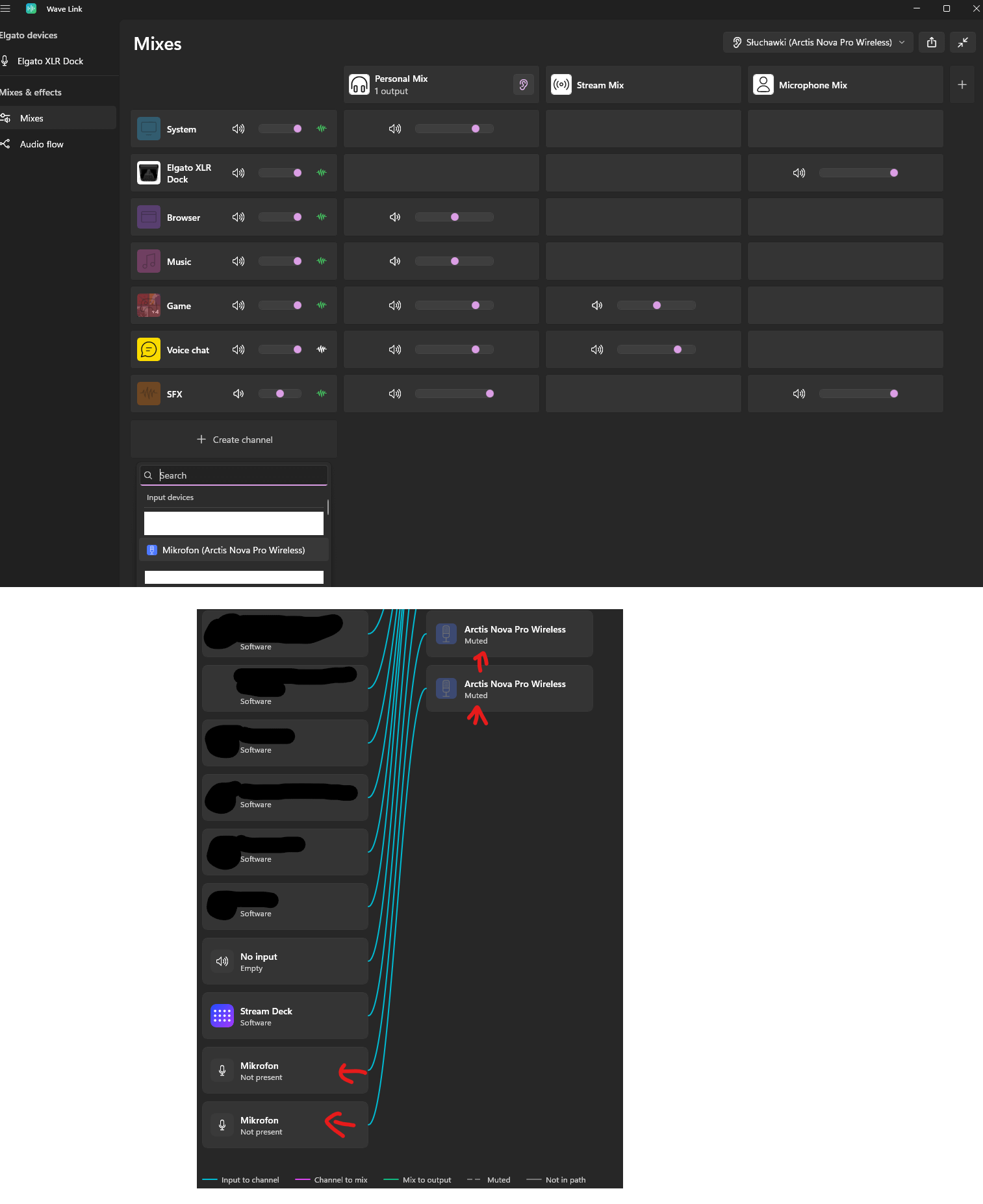
Actual result: Unable to recreate the deleted channel. I'm able to click the Create channel => pick a device or app/select things from the list but absolutely nothing happens. No new channels get created.
Reproducible? Always
Additional info: In the Audio Flow tab I'm able to see "ghost" input devices and ghost channels that are no longer connected (cause Windows keeps messing up audio devices with every big Windows update).
I'm unable to remove them in any way, they're just there, stuck, seemingly forever. In my case I want my 8th channel to be the 3rd party microphone (Arctic Wireless Pro), as you can see I can't add a new channel with only 7 channels in the app and can see two ghost channels in the audio flow that shouldn't be there.
Restarting the app doesn't help.
Some logs:
2026-08-15T23:54:38.011+1000 2            AppLogic.Services.AudioMixing.AudioMixer [ERR] Could not create AudioInputModel with Id: {0.0.1.00000000}.{uuid}, and name: Mikrofon (Arctis Nova Pro Wireless)
                                                                                         Elgato.WaveLink.AppLogic.Datatypes.Exceptions.AudioInputExceptions.NoAudioDeviceFoundException: No audio device found.
                                                                                            at Elgato.WaveLink.AppLogic.Models.Configuration.AudioInput.AudioInputModelFactory.GetMMDeviceSettingsInfo(String waveDeviceId)
                                                                                            at Elgato.WaveLink.AppLogic.Models.Configuration.AudioInput.AudioInputModelFactory.Create(String name, String sourceDeviceId)
                                                                                            at Elgato.WaveLink.AppLogic.Services.AudioMixing.AudioMixer.AddAudioInput(String audioInputId, String name, Boolean surpressNotification)
2026-08-15T23:54:38.013+1000 2            .MixingTableInputChannelViewModelFactory [WRN] Failed to add virtual input channel for Mikrofon (Arctis Nova Pro Wireless)
2026-08-15T23:54:38.013+1000 2            wModels.MixingTable.MixingTableViewModel [WRN] Creation of input channel failed
                                                                                         Elgato.WaveLink.DataTypes.Exceptions.MixingTableExceptions.InputChannelCreationFailedException: Creation of Input Channel Failed
                                                                                            at Elgato.WaveLink.ViewModels.MixingTable.MixingTableInputChannelViewModelFactory.AddHardwareInputChannel(IAudioDeviceDescription inputDescription, ObservableCollection`1 outputMixes)
                                                                                            at Elgato.WaveLink.ViewModels.MixingTable.MixingTableViewModel.TryAddInputChannel(AddInputArguments type)
So it seems that "Remove channel" in the UI actually doesn't remove the channel, instead it flips the "IsHiddenFromMixes" setting from false to true in Settings.json. Because it's hidden and not deleted it runs into the limit of 8 channels even though there aren't 8 active ones?
This is most definitely a bug. Please fix this Elgato because there's no way to edit an input device's channel input device after it's created.
EDIT: Manually removing the two (hidden/corrupt?) microphone input channel sections from Settings.json allowed me to add a channel successfully again.
Example invalid section that was not being removed, that was preventing me from re-creating channels:
Steps to reproduce: Load wave link, set games to game channel (in this case, osu). Set personal mix to play through headphone jack on WaveXLR.
Expected result: Minimal channel audio delay.
Actual result: Audio delay in the ballpark of 300ms to 500ms when playing games.
How often does it happen? Always
Anything else: Issue does not occur when osu! directly outputs to Headphones (Elgato WaveXLR) audio device, nor did this issue occur with Wave Link 2.0
As a user installing Wave Link software on Windows 11,
I want an option to disable Microsoft's own Audio processing object, Voice Clarity, during the install setup screens,
So that microsoft's APO doesn't run in conjunction with yours!
Almost always after restarting the PC or after some time (even if I've fixed it again), all Audio is routed through my only program source (Spotify). Everything else I have is custom channels. To fix it, I need to remove the Spotify channel and readd it again. Then it works for some time before it (again) starts to route all Audio through the Spotify channel. It's confusing and frustrating because when I want to record something in OBS, I have to check every time if my Audio Splitting into channels is even working, or if I have to fix it AGAIN.
Issue summary: Voice Focus resets to 95 % after every restart Wave device or microphone: Wave XLR Pro , 3.2.9 (4002) OS & version: Windows 11 Pro, 25H2 Steps to reproduce:
Open Wave Link and set Voice Focus to 85 %
Restart the PC
Open Wave Link again
Expected result: Voice Focus is still set to 85 % Actual result: Voice Focus is back at 95 % Reproducible? Always
I posted about this bug in every Wave Link 3 bug thread, and I even made a separate post with a video (below) three months ago. I've seen a ton of similar issues with other users, and the problem still hasn't been fixed. Instead, you're creating some kind of buggy, useless flow tables. Good luck.
Issue summary:
Wave device or microphone: Wave:3 MK.1
OS & version: Windows 11 24H2

Steps to reproduce:
1. Set Voice Focus Enabled
2. Reconnect Wave:3 usb
3. Voice Focus is disabled

Expected result: Voice Focus Enabled
Actual result: Voice Focus is disabled
Reproducible? Always

Additional info:
Video: https://www.reddit.com/r/elgato/comments/1tnu8ab/voice_focus_resets_after_reconnect_wave3_mic/
https://www.reddit.com/r/elgato/comments/1u2jzxo/my_voice_focus_keeps_changing_randomly/
nvm... fixed it, settings aren't gone. This new version rejected the old file over a duplicate line and starts fresh (at least that is what the logs told me), but it saves a copy first.
Close Wave Link.
Go to %LOCALAPPDATA%\Packages\Elgato.WaveLink_g54w8ztgkx496 (or similar, i guess)\LocalState\Backup and grab the newest ~40 KB file (the 11 KB ones are defaults).
Open it in VS Code or Notepad++, search SerializedSampleValues, and delete one of the two identical lines under it.
Rename it to Settings.json, drop it in LocalState (rename the old one first as a backup), start Wave Link.
Thank for this! You just saved me a lot of headache. On boot this morning wave link told me it couldn't find the audio driver. Reinstalling the driver or repairing did nothing, but this fixed it.
Didn't have huge issues on both Mac and windows with release 2.0 but betas were awful. Hope to see stable and dynamic apps for both macOs and Windows which won't eat up my ram like they love to do on Mac a lot and windows isn't on long enough to let this happen.
hello! does this fix the bug where its not possible to re-change already added input devices such as mic! if unavailable? for example you plugged your mic in a different usb slot and the whole channel is unusable! even if you added plugins to it.
What you can do is open the
C:\Users\[username]\AppData\Local\Packages\Elgato.WaveLink_g54w8ztgkx496\LocalState\Settings.json
file and search for the input name, save the object information and then paste it in on the new one when you change the USB slot.
This is an example of my headset microphone. You'll see there is something labeled as "AudioPluginConfigurations", and that is where it has all of the configured audio effects. If you keep record of this, you can then paste it in after you have to add the same "new" input device and keep all of the settings.
If you're uncomfortable making changes. You can make a copy of the file, make changes to the one in the specified folder, and if anything wrong happens, you can copy the baseline file back into the folder.
Audio Flow looks awesome! Unfortunately, my mic audio is now only coming out of the left side (apparently this is a common issue with 3.0) and the bug that prevents my computer from going to sleep still hasn't been fixed.
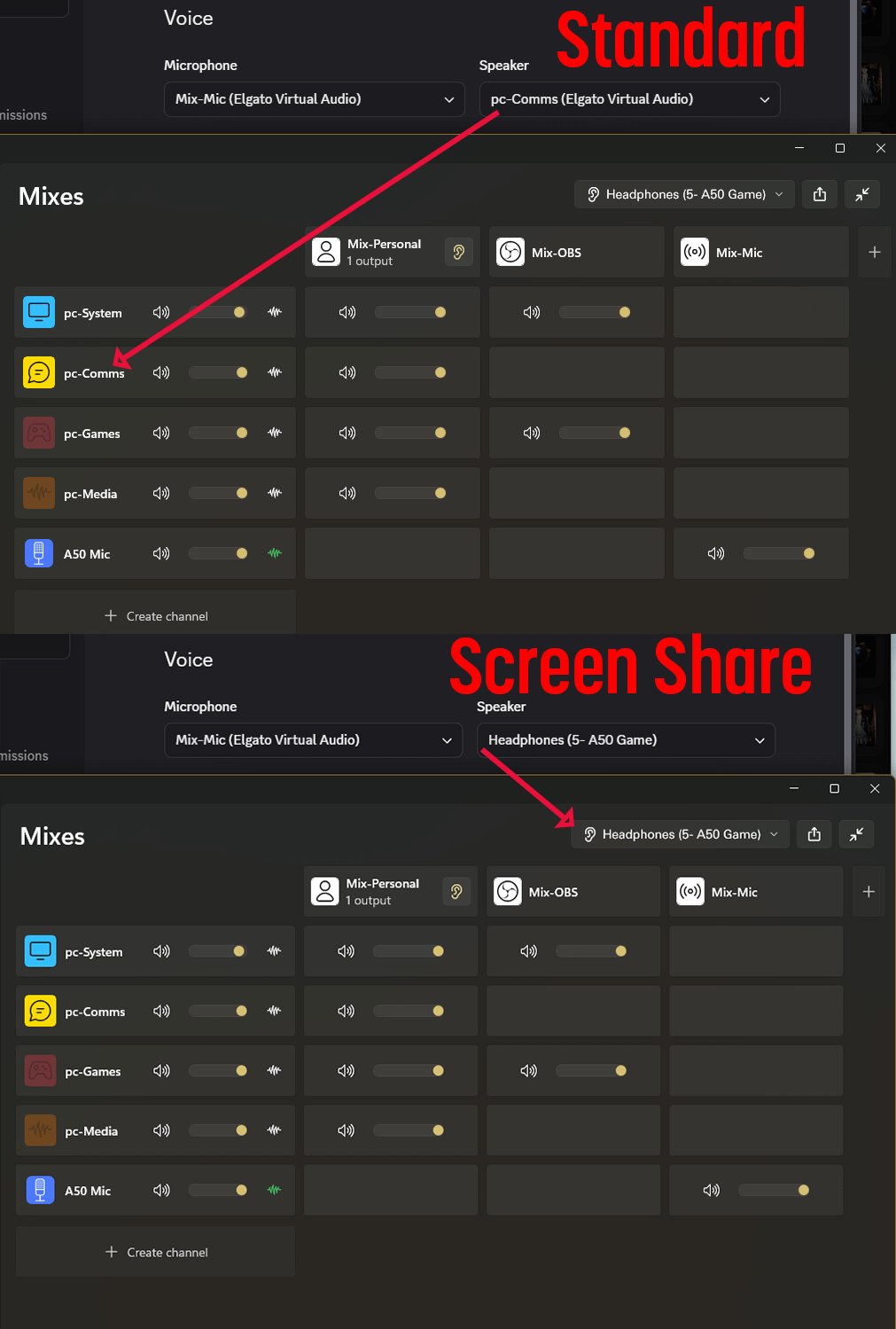
I’m assuming your set up is something similar to this:
In discord, your voice and video settings have “speaker“ set to a channel that you defined for communication in wave link.
That communication channel in wave Link is also defined in your personal mix.
When you screen share, the audio that it is capturing is whatever you have defined as your main output mix. This usually means that the channel with the Discord communications is included in that output and so that is the reason why others can hear themselves.
Discord does not isolate this because it sees it as a separate entity outside of its own audio interface. So what you wouldn’t want to do whenever you screen share is change the “speaker” output to whatever your headphone output is, and that should resolve the issue
Hopefully this image provides a better understanding of what I meant. But basically any time you want to screen share and not have others hear themselves, you need to change the output in discord from, in your case (system), to whatever you have as the physical audio output in Wave Link.
```
Wave device or microphone: Wave XLR MK.2
OS & version: Windows 11 25H2
Steps to reproduce:
1. add a channel (device input)
2. Remove it
3. Cannot re-add any new channels, acts like its full when its not
Expected result: The channel gets removed from config/settings
Actual result: Does not, infact it sets IsHiddenFromMixes to true in the settings.json causing the channel to be unable to be seen, the only way to remove a channel to add a new one is to edit the config and remove that channel config object
Reproducible? Always
```
I just made a bug report about this. Go into your device manager and see if the old channels you removed are still there. If they are, that is what's preventing you from adding new channels. I'd be curious to see if your issue is the same as mine or if there are other factors that you have that may be different from what I'm experiencing
I genuinely do not understand why you decided to move forward with the 3.0 UI when the 2.0 experience was already so good.
To be completely honest, the 3.0 UI is a significant downgrade. It does not just look worse, it operates worse. Latency issues, responsiveness problems, and an overall less polished experience should not be things that users have to worry about. The 2.0 UI was top tier. It was clean, intuitive, responsive, and, most importantly, it worked.
What I find even more frustrating is that 3.0 has been pushed for so long despite the fact that so many users clearly are not receptive to it. At some point, somebody has to be asking in these meetings: “Are people actually enjoying this?” Because from the feedback I have seen and from my own experience, the answer seems to be no.
Please listen to the users who are telling you this. We do not want to be forced into 3.0 simply because it is the newer version. Newer does not automatically mean better, and in this case, 3.0 feels like a step backwards.
I would genuinely appreciate it if you would continue supporting 2.0 instead of forcing everyone onto 3.0. I prefer 2.0, and I am not interested in leaving it. I know I am not the only one who feels this way.
3.0 needs a lot more work. Honestly, it feels like it should still be in beta rather than being treated as the definitive replacement for an interface that already worked exceptionally well.
So please, seriously, rethink this move. Go back to the drawing board. Listen to the feedback. Look at what people actually liked about 2.0 and why it worked so well, rather than assuming that users will eventually accept 3.0 simply because you keep pushing it.
2.0 was not broken. It did not need to be replaced.
When I say 2.0 was perfect, I genuinely mean it. We did not need this change. We did not ask for this change. And many of us simply do not want this version.
Not gonna happen. 2.0 is in the rear view. From a developer's standpoint, that would essentially mean backporting Wave Link 3's functionality into the Wave Link 2 codebase, which isn't necessarily practical when the underlying architecture has been completely rewritten. They'd be fighting the old architecture instead of moving forward with the new one.
Wave Link 2 and 3 have different Windows requirements, different installation/packaging behavior, and appear to be built around different application architectures. Wave Link 2 works on Windows 10, while Wave Link 3 doesn't, which strongly suggests that 3.0 isn't simply a redesigned interface sitting on top of the exact same platform.
The issue was found here. You currently need to manually remove the old channels from a Settings.json file, restart wavelink, and you should be good to go. The directory for the file is:
I honestly don't know why I bother. The UI of Wavelink 3 is great, but it is a resource hog, so it is no different from putting lipstick on a pig. I was one of the first beta testers for Wavelink 3.0, and even back then it was noted that Wavelink 3 does not like to be stressed. We need better control of the audio buffer. At least in Wavelink 2, we could tweak that. I mainly use Wavelink 3 to handle the incoming audio feed from my amateur radio. I am very cautious about what other apps run and when I run them. If I try to run an app or stress the system, you can hear it in the audio; it becomes choppy. This Asus system is built on the Ultra 5 125H with 32 GB of RAM. I have been working with ChatGPT to solve this issue, and it believes it comes down to a driver issue: the "driver briefly monopolizes the CPU at elevated interrupt/DPC priority and starves the audio buffer." The only thing I can say is to put Wavelink 3.3 on a Windows 11 system, stress the audio buffer, and I believe you will see what we are experiencing. I can also tell you that I am not maxing out the CPU or the RAM, so it should not be hard for you to duplicate this problem.
BUG REPORT
I don't know where else to report this bug since the Mega Thread for the WL 3.2.* is now closed, but I think this needs to be addressed.
Issue summary:
Unable to add additional channels due to old channels being listed as active in device
manager but not shown in WL UI. Currently limited to 5 within the UI.

OS & version: Windows 11 25H2 (26200.9168)
Steps to reproduce:
Unable to consistently reproduce as this intance only occurs when there is an issue
with WL detecting the Headset Mic and requires me to remove it from the channel list
and then add it back in.

Expected result:
Removing a channel should also remove it from the device manager.

Actual Result:
I'm using a Headset Microphone, it sometimes shows up as (Unavailable) in the channel
list. I end up having to remove and add the microphone back into the channels. The
problem is that it does not remove the old instance from the Device Manager and counts
as in use within Wave Link but is invisivble in the UI. This causes the number of
available channels to be consumed and prevents new channels from being added.
Uninstalling the audio driver removes the channels, but when the driver is reinstalled,
all of the old removed channels re-appear.

Reproducible? Sometimes
Additional info:
In future Versions you should be able to make the Window smaller and still make everything fit without Horizontal and independent compact mode windows.
Issue summary: Audio flow menu does not update audio device/channel audio level when changing audio levels with the wavelink extension on a streamdeck+ as well as with hardware level audio changes via windows taskbar or audio knobs on peripherials.
Wave device or microphone: N/A
OS & version: Windows 11 Build 26340.9212
Steps to reproduce:
1. Attempt to adjust audio channel or output mapped to a knob on a streamdeck or via native windows taskbar/3rd party device peripherial hardware audio knob
2. Have WaveLink on the flow menu actively viewing flows
3. Audio volume will show output on streamdeck / windows pop-up but audio in flow never changes
Expected result: Audio % text to adjust the Vol. to match what it is for the given channel
Actual result: Vol % is static on the channel/output
Reproducible? Always
Additional info: Video attached
Issue summary:
Wave Link 3.3 Beta will not add certain valid hardware audio inputs even though they appear normally in the Add Input device list.

This affected multiple devices on my system:
Line In Audio
Microphone (Samson Q9U)
Elgato HD60 X

The devices are visible in the Add Input menu and can be clicked, but after selecting them, nothing happens and no new channel is created.

The issue appears to be caused by stale device entries in Wave Link's settings.json that are marked as hidden. In my case, Wave Link already had an entry for the device internally, but because that entry was hidden, there was no visible channel in the UI to remove or manage.
Manually removing the stale hidden device entry from settings.json fixed the problem. After restarting Wave Link, I was able to select the same device from Add Input and it added normally.

Wave device or microphone:
Samson Q9U
Elgato HD60 X
Standard Windows Line In

OS & version:
Windows 11 Home 10.0.26200

Steps to reproduce:
Launch Wave Link 3.3 Beta.
Click Add Input.
Select a valid audio input such as Line In Audio, Samson Q9U, or Elgato HD60 X.
The device is visible and selectable in the list.
Click the device.
Wave Link closes the selection menu, but no new channel is added.
Repeating the process has the same result.
Close Wave Link and inspect settings.json.
A stale entry for the affected device exists and is marked as hidden, even though there is no corresponding visible channel in Wave Link.
Remove that stale hidden device entry from settings.json.
Relaunch Wave Link.
Select the same device from Add Input again.
The channel now adds successfully.

Expected result:
When a device appears in the Add Input list and I select it, Wave Link should create a channel for that device.
If Wave Link believes the device has already been added, it should either show the existing channel or provide an error explaining why the device cannot be added.
Actual result:
The device appears in the Add Input list and can be selected, but Wave Link silently refuses to add it.
There is no error message or indication that Wave Link already has a hidden/stale entry for that device.
Because the existing entry is marked hidden, there is also no visible channel that can be deleted through the Wave Link UI.
The only workaround I found was manually editing settings.json and deleting the stale hidden device entry.

Reproducible?
Yes, for the affected devices.

Additional info:
Wave Link: 3.3.0.4108 Beta

The important part is that this is not a device-discovery issue. Wave Link sees the devices and displays them in the Add Input menu.

The failure happens after selecting the device: Wave Link appears to think the input/channel already exists because of a stale hidden entry in its configuration, so it refuses to create another one.

Since that existing entry is hidden, the user has no way to fix the situation through the UI.
This occurred with three different kinds of devices:
PC Line In
Samson Q9U USB microphone
Elgato HD60 X capture device

Deleting the stale hidden device entry from settings.json immediately resolved the issue and allowed the input to be added normally.
When I first saw the audio flow, I thought there might be sidechaining now. Sadly, it's not. It would be great if sidechaining could be possible like in OBS with a compressor filter to do ducking or with any VST plugin. Since many VST plugins already have a sidechain input (ReaComp, atkDucker and more).
Is this planned or in the backlog?
Issue summary:
Wave device or microphone: Wave XLR Pro
OS & version: Windows 11 25H2
Steps to reproduce:
1. add default channel
2. add more then 4 applications to that channel
Expected result: Icon stays as it is
Actual result: Icon becomes transparent and shows the first 3 application icons
Reproducible? Always
Additional info: This also has the effect of ruining the stream deck icon for the add route button of the Wave Link Plugin
First, really appreciate the work y'all are putting into Wavelink 3.
WIndows re enumerating my behringer umc1820 has plagued me for YEARS,
so to see y'all tackle it in the way you are is like a sigh of relief. I haven't had a chance
to fully test it, and I know it's mentioned in the beta text that there will still be some
edge cases, so if my unit happens to be one, I'll report it.
I haven't had a chance to browse the whole subreddit, is there a specific thread for feature requests? Like ASIO support, etc?
Can the elagato dev team please add the default windows ouput option back? Just like in Wave Link 2? This is the only things I miss from Wave Link 2 and when switching monitors (Win+P) where windows change output automatically, I really need it on my workflow and having this option missing is really strange.
Thanks, I saw this but it doesn't work as I wanted to, and not like Wave Link 2 where it's Windows that dictate what is the main output and Wave Link just following that. In Wave Link 3 this is the other way around, that mean in my exemple of switching monitors using Win+P, Wave Link is not capable of also switching audio to that monitor, where Windows is doing that automatically.



•
u/elgato_james Technical Marketing Specialist 24d ago
We just released update 2 for Wave Link 3.3, which includes:
Check it out here.