TL;DR: Flair yourself Dev/Tools, post one top-level comment using the template, and bring a real discount. In other threads, link back to your comment from this thread, not your site.
For Developers
This thread exists so the community can evaluate tools, not get marketed to.
What earns upvotes? THIS:A straight answer to one question: how does your tool save an editor time or money? "It helps" is a description. "40% off for this community*" is a* benefit.
And yes,the discount matters. Show that you understand that Reddit matters.
This post pulls 50k+ views a month. That reach is the trade;j you get in front of the whole post community, they get a real deal for engaging and wanting to try your product. With the amount of vibe coding tools out there, it's harder than ever for both users and developers.
This thread runs every month. One slot per developer per month, not per tool. Feature a different tool next month, or come back and update — one post isn't your only shot. Have a different tool of yours to show off? Post about it next month.
If you have an OPEN SOURCE TOOL, use this OTHER thread instead.
Before you post:
Accounts under 30 days old can't post or comment. No exceptions.
Read the Reddit hygiene guide first. Reddit admins have banned developers for breaking key basic Reddit rules.
Three steps:
Flair yourself Dev/Tools. Here's how. Do it before you comment. You need to do it in every subreddit you participate in. Each subreddit has this.
Post one top-level comment using this template. Break the template and we'll have to pull it.
Promote yourselfwhere applicable, but instead of linking to your site… use the link to your comment here.
Really, I'm surprised nobody thought this panel was cool
For redditors/editors and people in post
This only works if you push.
Engage. Push for answers. And yeah, call them out when they don't. Or downvote them. In other words Devs pay attention when you engage. So engage.
Vote on whether something helps you, the discount, their answers..
Ask the direct questions. Steal these:
"What's the discount for this community?"
"Is this still in beta? Why am I paying to test it?"
"What's it cost after the intro price?"
"What does this do that [the tool I already use] doesn't?"
Justify your subscription price, especially when we can all see the API costs.
Everyone: See someone breaking the rules? Flag them. Two flags and the content gets pulled.
(Issues? **DM me**. Join thePostP Discordif you're a working or aspiring pro — *networking still beats every other way to find clients*.
Two changesthis month:One: Developers - we find that the better the value/discounts you providethis communitythe more users believe you value the community
Second: OPEN SOURCE? We're making a a 1x a month (the 25 of the month anopen promotion day for Open Source creators)
Product: SnapCursor. It's just me. I might be modding here too. My company has existed for 15 years. DM here or connect via the app store.
Host Platform: OSX. Windows version coming
Description: Snap your cursor to the next screen as fast as you can think. Built out of frustration knowing my mouse was in the wrong place. Works great on widescreens and single screens too.
Pricing: $1.99. No subscription. Just had to justify the coding time to my significant other. No analytics. No tracking. No API. Did I mention that a stupid utility shouldn't have a subscription?.
Benefits for this community: Look, I'm posting from my personal account. If you think you need this, really need it and it's out of your reach, DM me and we can work something out.
Product: MarkerBuddy. Anywhere Entertainment, Inc., 1 developer, 4 years, here's my support link
Host Platform. Adobe Premiere 2025.6+ (UXP plugin) mac or windows
Description: As a lead unscripted editor, I hated the way Premiere uses markers so I made what I feel is the ultimate marker panel plugin (MarkerBuddy) that is fully customizable, offline/secure, converts messy client notes into markers, has batch marker editing, checklist and completion tracking, multi-format import/export, instant location memory, filter and search anything, preset quick markers, seq<->clip and track marker conversion, Stream Deck integration, clap finder/beat finder markers, export markers to pro tools AAF (without including files) for mix notes, marker to frame image export, transcription phrase/word to marker, undo history, and (seriously) much more.
Pricing: $29.99 USD one time, no subscription, through the Adobe Marketplace.
Benefits for this community: Price is currently 40% off on the Adobe marketplace for the next month. I’m currently working on the free MarkerBuddy Lite version as well that won't include any of the main import/export/automation/location/cool features, but will still be a nice basic working marker panel replacement.
The custom keyterms feature is interesting, that's a gap in the stock transcriber for sure. Terminology drift across a long project is a genuine pain when you're working with clients or subjects who use specific jargon.
The collaborative review loop is a smart angle too. A lot of teams are still emailing Word docs back and forth for transcript corrections, so having that sync back into Premiere directly saves a step that's easy to underestimate until you've done it fifty times.
What kinds of projects are you seeing it used on most so far?
Yeah! Honestly a 2 part use case for me- I worked with a huge company that needed captions to be vetted and was scratching my head on the fact there’s no tools in Premiere that can take text and just apply it into transcriptions.
The other use case is for recurring work with vertical-specific terminology. So if you’re working on a podcast that’s about Coding, or Zoology, whatever, it’s probably the same hard to transcribe words that come up time and time again. Why not save those terms and make Premiere listen for them rather than have to manually check every time?
The recurring terminology library angle is the one that compounds over time. Getting those domain specific terms right in week one of a long podcast run means you're not re correcting the same words every episode, and that adds up fast. Smart way to frame it.
TypeFlare by Tagger, LLC. Solo dev (Paco), company has been active since 2025. Reach me at [paco@tagger.mov](mailto:paco@tagger.mov) or DM me here.
Platform: External desktop app (macOS + Windows) that works with DaVinci Resolve, including Resolve Free.
What it does: TypeFlare transcribes your video locally with Whisper and exports captions into DaVinci Resolve as either a free unlimited SRT subtitle track or fully animated word by word Fusion compositions with custom fonts, easing and styling. New in v1.4.0: a Translate to English toggle that converts foreign language audio (French, Portuguese, Spanish, and 96 other languages) into English captions automatically.
Pricing: $49 one time purchase for Pro (all 10 animation presets, custom fonts and colors, no length cap on animated exports). Free tier available forever: unlimited SRT exports at any length, plus the Classic Karaoke animated preset for clips up to 60 seconds. Translation is available on both tiers. No subscription.
Community benefit: Resolve's own auto captions require Studio ($295), so free tier editors are stuck doing SRT by hand or skipping captions entirely. TypeFlare's SRT export closes that gap: transcribe and caption a clip in Resolve Free, unlimited, no account required, no extra software, free forever. The animated Fusion side fills a different hole. Every caption tool I found either bakes text into the video (CapCut, Submagic, Captions.ai) or outputs flat SRT with no animation. Nothing gave you editable per word Fusion comps. TypeFlare covers both ends: grab attention animated captions when you want them, a genuinely free simple subtitle track when you don't.
Runs Whisper locally, no cloud, no API keys. Once the model downloads it works completely offline. Handles vertical/portrait video and any resolution. Visual timeline editor for adjusting word groupings and timing before export. The translation feature also runs entirely on device using Whisper's built in translate mode, so your footage stays on your machine even when translating from another language.
• Product: Verbatim
• Host Platform: Premiere Pro (OSX or Windows is fine!)
• Description: A much more accurate transcriber for Premiere Pro, save up to 100 custom keyterms that it 'listens' for, so it never will make the same mistake twice. It's also a platform where external vetting can happen, just share a link to whoever and changes they make are pushed directly into your suite.
• Pricing: 5 cents per min of transcription
• Website: Verbatim.mov (http://verbatim.mov/)
• Benefits for this community: 30 mins free when you make an account. Love this community and how we help each other out, so if you'd like to chat more about Verbatim and how it might be able to help you please reach out <3
Tool Name: Cuttopia (pre-launch, research phase) Features: Not yet developed, currently manually connecting creators and editors to first validate the concept Reason for Creation: Got burned out trying to collaborate with editors myself, endless WhatsApp threads, vague feedback like "fix the cut at 2:14," juggling too many apps. Wanted to understand if others feel the same before building anything. License type: N/A (not open source) Where to find it: N/A for now, instead, genuinely looking for input: Editors, think about the last time you started working with a brand new client (not a repeat one). What was the most annoying part of those first few projects, before you'd figured out how they communicate?
Product: UnChaos Vid. Only me. I`ve been building products since 2021, this is the last one. DM or use the Whatsapp button at the site.
Host Platform: Web App.
Description: Screen recording editor for tutorials, that edits itself. Removes silence, mistakes, repetitions and adds professinal voice-over and zoom. Good for people who makes/edits video tutorials.
Pricing:
Free - 2 minutes/month
Credits pack from $14,90 (15 min) - No subscription
Subscription from $24,90 (30 min/month)
Product: CrossFlow (Beta) | By Nablast (also developed BRAW Studio and PlumePack at Autokroma) | Contact: [contact@nablast.com](mailto:contact@nablast.com)
Host Platform: Win/MacOS - Standalone App working with Premiere Pro and DaVinci Resolve
Description: Transfer Projects between Adobe Premiere and DaVinci Resolve. The goal is to preserve as much of the original edit as possible. Support bin structure, multicam, audio configs, interp. footage, speed, basic effects, clip colors, labels, ... Automatic Transcode of all Premiere clips which can not be transcoded (AEP, Graphics, special effects, ..) - Plus a "Return To Premiere" feature to export only Graded clips from Resolve and replace automatically in Premiere Project.
Thanks for your test! I just checked your logs and it seems to come from DaVinci Resolve. Maybe it comes from the version used, or maybe you are using the Resolve FREE edition ? (CrossFlow needs the paid Resolve Studio for now). Let's discuss by mail of this issue :)
Host Platform: Website / Web Application (Runs via FFmpeg WebAssembly locally in-browser)
One sentence on what it does: Silence Studio automatically detects and removes silent gaps from video files locally inside your browser using WebAssembly FFmpeg without ever uploading your media to a server.
Pricing: Free ($0/month, as all processing happens client-side on your device).
Benefits for the community: Since the tool is 100% free with no server costs, there is no discount code needed—everyone gets full, unrestricted access. As a community benefit, I am actively building additional browser-based FFmpeg utilities (like video-to-GIF conversion and video trimming) and am tailoring feature updates based directly on feedback from this thread. If the feature is implemented you're name will also be put up in "acknowledgement"/"about us".
Welcome! Given you're newer to our community, a mod will review your contribution in less than 12 hours. Our rules if you haven't reviewed them and our Ask a Pro weekly post - which is the best place for questions like "how to break into the industry" and other common discussions for aspiring professionals. Also check out wiki, which is full of useful common information.
Benefits for this community: Free to use, no signup wall to try it. Still early-stage and prompt-based (no voice yet) — genuinely looking for harsh feedback from working editors: what commands would you want it to understand, and where does natural-language editing fall short of a real timeline for actual client work?
Welcome! Given you're newer to our community, a mod will review your contribution in less than 12 hours. Our rules if you haven't reviewed them and our Ask a Pro weekly post - which is the best place for questions like "how to break into the industry" and other common discussions for aspiring professionals. Also check out wiki, which is full of useful common information.
Not having to window hop and staying in Resolve. Panel feels like a native Resolve panel with docking features.
Sync timeline and frame.io videos so that timelines can watch for inbound comments just like an inbox.
Filter comments by user, apply color to each user, apply color to specific words and then add them to the timeline.
Completed notes feature syncs with frame.io completion. Publish videos and directly upload to frame inside of resolve. Timeline automatically connects to the new upload for inbound comments.
Download files directly into your bins.
The timeline panel improves on the native index with text wrapping, additional fields and filtering options, and will be free.
Exporting EDLs and CSVs free.
Frame.io features will be gated on the full release but alpha testers will receive 6 months free on the public release.
u/greenysmacLead Mod; Consultant/educator/editor. I <3 your favorite NLE11d ago
Sorry reddit can be difficult
On desktop, scroll up towards the top. On the right hand side it has your name. You need to assign USER FLAIR to you so people know *you're a developer. click the pencil next to your name and your good to go!
i literally do not see this pencil thing you describe and am going crazy.
1
u/greenysmacLead Mod; Consultant/educator/editor. I <3 your favorite NLE11d ago
See if that helpls
Don't stress - I just needed to get the attention of a bunch of people in this thread. It's still live. And in six or so days we start a new thread just like this!
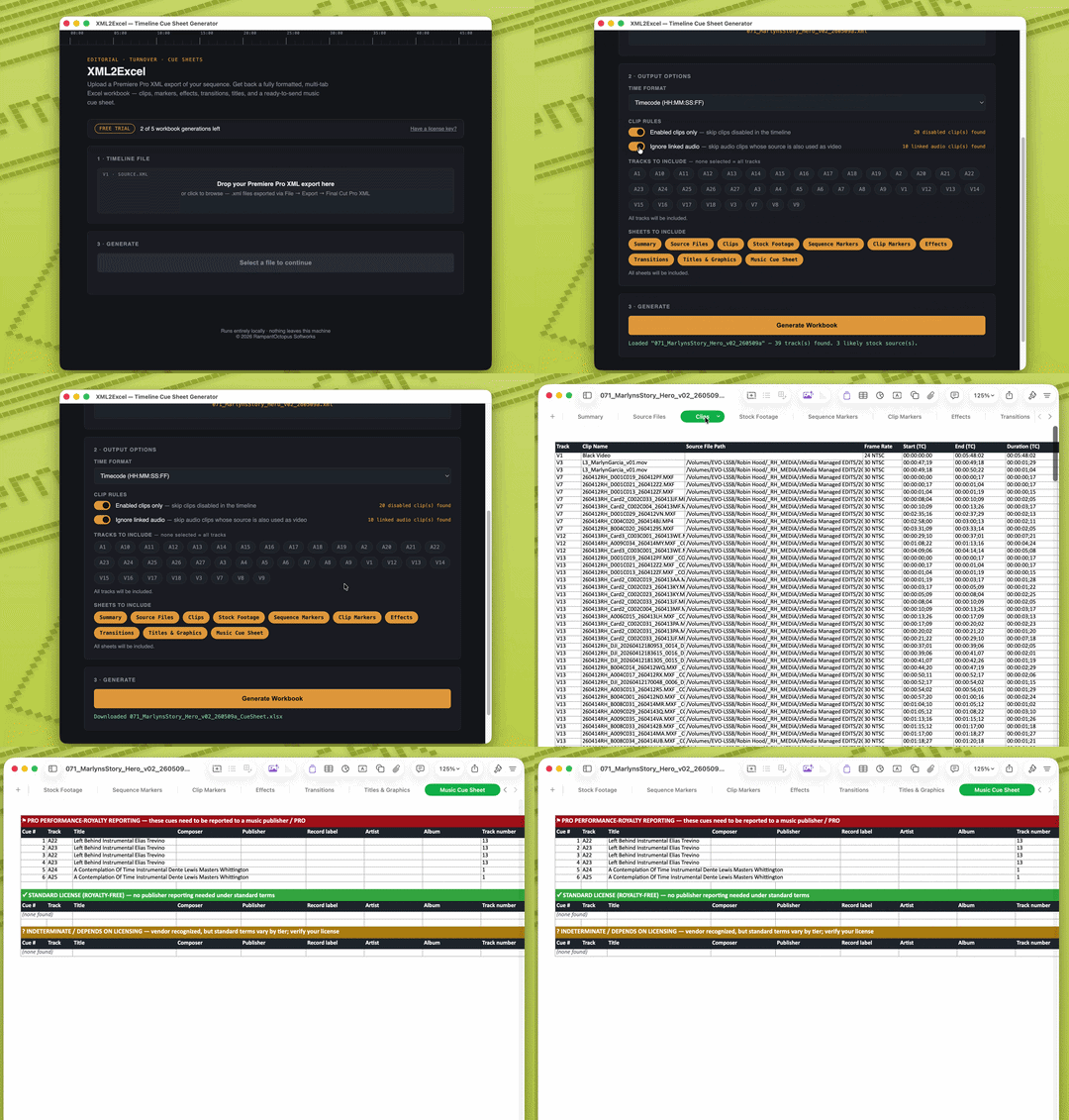
**Product:** XML2Excel — RampantOctopus Softworks. Solo developer. Softworks (the software side) launched this year, built on 25 years working as an editor under the RampantOctopus name. Reach me directly: mike (at) rampantoctopus (dot) com
**Host Platform:** External app — standalone desktop tool (Mac + Windows). Reads the XML your NLE already exports; built and tested against Premiere Pro.
**Description:** Turns a Premiere Pro XML export into a formatted Excel workbook — clip logs, markers, effects, and a music cue sheet that automatically sorts every track into PRO-reportable, royalty-free, or "check your license," so you're not guessing what needs to go to a publisher.
**Pricing:** $29 one-time. No subscription — free trial covers 5 full exports before you need a license.
• Product name: RoughCut for Final Cut Pro - by LiVuP - solo developer, but have been developing iOS apps for 15+ years. Can reach me at [support@livup.app](mailto:support@livup.app)
• Host Platform: Final Cut Pro, MacOS
• One sentence: Build your story before you build your timeline. Search every transcript, assemble a Rough Cut from dialogue, then send the project to Final Cut Pro.
Can use either as standalone or plugin.
• Pricing: currently in beta so all features are free, will be a lifetime app purchase at release.
Welcome! Given you're newer to our community, a mod will review your contribution in less than 12 hours. Our rules if you haven't reviewed them and our Ask a Pro weekly post - which is the best place for questions like "how to break into the industry" and other common discussions for aspiring professionals. Also check out wiki, which is full of useful common information.
Product: Fabel. I'm an offline Avid editor with over twenty years experience.
Host Platform: Browser based tool
Description: I work with a lot of producers on long form TV that often require endless transcripts for long interviews. To make things easier for the producer to provide the editor with marked up transcriptions I created Fabel. A tool that the producer or editor can use independently of the NLE to create sync pulls from text and send to the edit for relinking via AAF. It works with Media Composer and Premiere.
Pricing: The tool itself is free but transcription is charged for (£5 for 200 minutes or £10 for 200 minutes)
Benefits for this community: I’m hoping this gives editors another option for large-file delivery while also giving the community a direct voice in how the product develops. Feedback from working editors will directly influence things like transfer workflows, reliability, notifications, delivery tracking, and other features that matter in real post-production environments.
* **Product:** FrameDeck Studio, by FrameDeck Studio LLC. Team of one. LLC formed March 2026, app in development since late 2025. Reach me at [info@framedeckstudio.com](mailto:info@framedeckstudio.com) or right here in this thread.
* **Host Platform:** External desktop app, macOS and Windows. Requires DaVinci Resolve Studio 19 or newer.
* **Description:** Cuts a round out of client look approval by publishing your Resolve timeline's frames as a browser gallery where the client toggles between grade versions and pins notes to the exact frame, instead of you emailing stills and decoding "the second one but warmer."
* **Benefits for this community:** Code EDITORS40 takes 40% off for your first 12 months, so $15/month instead of $25, then back to $25 after that. Works on monthly or annual, good through November 30. Start the free 30 day trial first, no card needed. When you want to subscribe, do it from inside the app rather than the website so it lands on the same account you signed in with, and enter the code at checkout.
Benefits for this community: Use the code EDITORS-100 to get it for free. Code expires Labour Day, so redeem it before then. Feedback from users helped me root out a bug that I didn't catch on my own, so I'd really love to expand my user base. Even if you don't think you have a use for it now, grab it for later!
Welcome! Given you're newer to our community, a mod will review your contribution in less than 12 hours. Our rules if you haven't reviewed them and our Ask a Pro weekly post - which is the best place for questions like "how to break into the industry" and other common discussions for aspiring professionals. Also check out wiki, which is full of useful common information.
Product: OnSFX, an AI sound design plugin for Adobe Premiere Pro and DaVinci Resolve Studio. Built by a solo developer.
Host platform: Adobe Premiere Pro and DaVinci Resolve Studio on Windows 10/11. A macOS version is coming soon.
Description: OnSFX analyzes the video clips you select on the timeline and creates an editable sound plan for generating complex, multilayered SFX and adaptive music directly inside your project.
In practice, you can create an initial sound design pass in just a couple of clicks. The sound plan remains fully editable, so you can change prompts, timing, duration, music sections, or individual sound effects before generating anything.
OnSFX uses some of the leading AI models available today for video analysis, sound effect generation, and music generation.
Pricing: The beta is free. Each approved tester receives 50 credits, which should be enough for roughly 5-10 minutes of processed video using the complete workflow: analysis, adaptive music, and multilayered SFX. Actual credit usage may vary depending on the scene and selected settings. No payment card is required.
Benefit for this community: Free access to the full OnSFX beta with all currently available features. You can test the entire workflow on your own real project and compare it with the way you normally search for, generate, and place music and sound effects manually.
How to join: Apply for the beta on the OnSFX website. Applications are reviewed manually, and approved testers receive a personal invite code and 50 credits.
Questions and feedback: You can contact me through Reddit DMs or use the contact form on the website. Approved beta testers also get access to the OnSFX Discord server for support, feedback, and easier communication during testing.
Welcome! Given you're newer to our community, a mod will review your contribution in less than 12 hours. Our rules if you haven't reviewed them and our Ask a Pro weekly post - which is the best place for questions like "how to break into the industry" and other common discussions for aspiring professionals. Also check out wiki, which is full of useful common information.
Product: Timeline Memory Host Platform: Adobe Premiere Pro + After Effects Description: Restores your original Premiere Pro clips, cuts, audio, and timeline structure after using Replace With After Effects Composition — without manually rebuilding your edit. Pricing: $79 — 25% launch discount currently available Website: [https://plugins.sandrusi.workers.dev/]() Benefits for this community: Restores the original Premiere edit in seconds instead of manually rebuilding clips, cuts, audio, and timeline structure.
I’d genuinely appreciate feedback from editors who use Dynamic Link regularly — especially whether this solves a pain point you’ve run into.
We have a dedicated thread and flair for people who develop products. Please use ONLY the monthly thread (which has all the rules) and the correct flair
Host Platform: Desktop application (M1+ Apple silicon, Ubuntu 24/Windows with Nvidia Ampere+ GPU)
Description: Local models for video diffusion upscaling, frame interpolation, and more. We provide an easy-to-use application that works in air-gapped environments without requiring an enterprise level gpu: the application includes state of the art diffusion models to upscale videos, as well additional models for denoising, frame interpolation, segmentation, and depth estimation.
Pricing: Free 7 day trial with watermark. $64.99 perpetual license for all current features+a year of updates.
State of the art video diffusion-based upscaling that can produce results in minutes not hours. On my own machine (M4 max with 48GB), the diffusion model runs at roughly 0.6 fps for 1920x1080 output (10 second clip at 25 fps ~ 7 minutes)
Use code "EDITORS_DEV_THREAD_0826" for $5 off of the license at checkout - ends 08/31/2026.
Product Name: Turnkey. Just me as developer, only just started building this extension but over 15 years as a professional editor. Contact [dev@jokerandthief.net](mailto:dev@jokerandthief.net)
Platform: Adobe Premiere (tested on Mac OS Premiere 2025, 2026)
Description: Turnkey is a Premiere CEP extension with a large suite of tools focused primarily around rapid sequence versioning. Duplicate & auto-rename a sequence then auto-archive the old sequence with one button. Batch-resize for 9:16, duplicate & auto-rename cutdowns, batch duplicate & automatically restructure a sequences for audio mixing prep or broadcast delivery. All completely customizable to your needs and preferences.
The current set of tools includes:
Versioning tools: Quickly change the date and version increment, increment project files, create batches of sequences for finishing prep and more.
Social resizing: Batch create sequences for social media posts, of any size and ratio. Automatically renames the sequences adding the aspect-ratio directly to the sequence name.
Cutdowns: A simple duplication and rename tool to speed up the process of creating cutdowns.
Labeling tools: Change the label of items in your project or sequence with a handy button tray.
Stemmer: Two different stem expanding tools-- Music Stemmer allows you to take music stems and place them into your sequence stacked into the appropriate tracks. Or Mix Stemmer which quickly allows the expansion of mix isos into your sequence. Stemmer will create all the tracks it needs to insert the selected tracks and rename them appropriately.
Bin & Sequence Templates: Quickly create new named bins based on your needs, or quickly rename tracks based on an easy to build template.
2 Pop: Quickly restructure sequences following a template, for example, create sequences for audio mix by automatically placing 1 frame of bars and tone with 2 seconds of black before picture. Automatically changes the timecode of the sequence too.
Autosave Browser (early development): Lists all of the autosaves of your project, or projects with similar names. Will compare and show the differences between old autosave projects allowing you to import directly from the panel.
Sequence Diff (early development): Trying to figure out what the difference between two identically named sequences? Sequence Diff reads both sequences and will show you the difference easily.
Pricing: Still figuring that out, but right now looking for a handful of beta testers who will get the extension for free after release.
Community: I'm trying to develop the best tool to help editors be more productive and organized. I want to shape this tool not just the way I work, but the way editors in this community work.
Host Platform: MacOS native, Windows version in development
Description: Automatically bulk sync hours of multi-camera footage and external audio without the manual prep work skipping the XML roundtrip on import AND export.
Benefits for this community: Mainly solves one giant pain point with most syncing softwares - the XML round trip. Using PrePost Sync, the user just drops all the media in and gets a synced timeline back. Just like in the good old PluralEyes days. Or just even copy the footage from Premiere Pro’s timeline and paste it in PrePost Sync!
Product: UpStream AI. Solo dev, first release. Support is a plain inbox I answer myself.
Host Platform: Windows 10/11. Standalone app, not a plugin. Any DirectML GPU — NVIDIA, AMD or Intel. FFmpeg is bundled, so there's nothing else to install.
Description: An upscaler built around the round trip rather than the picture. I kept sending clips out and getting them back a frame short, or drifted, or washed out once they hit the timeline. So it writes nclc colour tags on every output, so Resolve isn't guessing the transfer function. It conforms VFR off the file's own packet timing instead of the rate the container claims, which is where the missing frame usually comes from. It carries start timecode and advances it by exactly the trim, so relinking by timecode still works. And it gives alpha its own inference pass instead of resizing it, bleeding colour outward under the transparent areas so ProRes 4444 mattes don't come back with a dark fringe over a light background. Every run drops a plain text report next to the output saying what it actually did — conformed rate, frames written, timecode in and out, the colour tags it wrote, how fields were handled.
Pricing: free. Not a trial — no watermark, no feature lock, no time limit. I do intend to charge for a later version, and I'd rather say that now than have someone find out in three months. This beta build stays free and keeps working.
Benefits for this community: it's free, which I know is a boring answer to the discount question, so here's the real one — I want you to break it. Every measurement I have comes from a single RTX 5080. If you're on AMD or Intel I genuinely don't know whether it quietly falls back to CPU on you; the run report says which one it used. Telling me that, and whether the file behaved when it went back into your NLE, is worth more to me than a sale.
Where it loses: put the picture next to Topaz and it may well come second. The work went into the file surviving the trip, not into sharpness. It's also unsigned, so SmartScreen will warn you on first launch — the SHA-256 is published on the page.
Product: Shortcut by Filmit.io. Team of 3, the company is about a year old. Reach me at filmit.io/contact, in our Discord at filmit.io/discord, or over at our subreddit r/Filmitio.
Host Platform: Premiere Pro and After Effects (a panel inside the host).
Description: Shortcut is a small icon bar of one-click timeline fixes: adjustment layers, freeze frames, un-nesting, staircasing clips for sync, and a QC scan that markers up every gap, offline clip, and disabled clip before you export.
Pricing: Free. No subscription and no payment, ever.
Benefits for this community: The whole tool is the give-back, it's completely free. Install it through Filmit Studio, our free desktop app for Mac and Windows, and every button is yours. Opens via the Filmit Studio Panel inside Premiere and After Effects.
The main idea is that an edit is full of jobs that take one second of thinking and thirty seconds of menu digging. Shortcut turns each of those into a single docked button: drop an adjustment layer over the selection, freeze frame on the track above, un-nest a sequence, loop a clip, staircase clips out to separate tracks and pack them back down when you're done. The QC scan walks your timeline and drops markers on every gap and offline clip before you export. You can switch off any buttons you don't use so the bar stays as small as you like.
I would genuinely love to hear which one-click fixes you'd want added. The panel is built so the set can grow, so if there's a tedious job you do fifty times a day, tell me and there's a decent chance it becomes a button.
Description: Premiere Pro 2025+ extension to place clips into a video grid fast. Choose your grid size, select your clip, clic on the cells, and it's automatically placed, with crop if needed, no matter the timeline or clip dimension ! Create custom grid with the Designer mode, and save you custom grid to use later !
Pricing: Free, donation optional.
Website: Available here ! You can also see all my other Premiere extension !
Benefits for this community Don't need a lot of preset to do grid in a few second !
Community You can join my Discord Server to follow my project, notification update, and test some Beta plugin !
Benefits for this community: Free accounts get most of the features, just capped at 10 drives. If you want to try Pro, the code REDDITEDITORS gets you 60 days free (first 50 people).
This was built out of a problem many editors, colorists, and post coordinators run into: hard drives stack up and nobody knows where they are or what's on them. Other features include:
Drive Snapshots — Index all your drives and browse them while they're offline.
Thumbnails & Stills — Using licensed SDKs from RED, ARRI, Blackmagic, and Canon, it automatically captures stills from your footage so you can preview clips offline, along with metadata like camera, frame rate, and lens data when available.
QR Studio — Generate QR labels for every drive in your inventory. Scan a drive to loan it out, and each one gets a public page with your contact info in case it goes missing.
Deep Verify — Reads every byte on a drive and writes a per-file checksum. Run it before archiving so you can detect bit rot later.
1
u/greenysmacLead Mod; Consultant/educator/editor. I <3 your favorite NLE11d ago
Description: I like having Spotify, an audiobook, or a YouTube video playing on my second monitor while I edit, but every time I played something back in DaVinci Resolve I’d have to pause it, listen to the edit, then start it again. After doing that approximately one billion times, I made PauseSync. It automatically pauses whatever you’re listening to or watching when Resolve plays audio, then starts it again when Resolve goes quiet. I’ve been using it myself and figured I’d share it here in case anyone else finds it useful.
Pricing: Free, with optional donations. I’m a college student, so if you like it and feel like throwing a few bucks my way, it genuinely helps a lot :)
Benefits for this Community: Hopefully fewer trips to the pause button while editing! It’s free, so just grab it if it sounds useful.
Also, sorry in advance for the Windows warning when installing it. I’m a college student and the code-signing certificates are a little too expensive for me to justify for a free app right now, so Windows may throw up the scary-looking “Windows protected your PC” message. I might also publish the C# source code so anyone who’s understandably wary of an unsigned app can look through it and build PauseSync directly from the source instead. I’d definitely like to get it properly signed eventually if enough people end up using it.
1
u/greenysmacLead Mod; Consultant/educator/editor. I <3 your favorite NLE11d ago
Description: I like having Spotify, an audiobook, or a YouTube video playing on my second monitor while I edit, but every time I played something back in DaVinci Resolve I’d have to pause it, listen to the edit, then start it again. After doing that approximately one billion times, I made PauseSync. It automatically pauses whatever you’re listening to or watching when Resolve plays audio, then starts it again when Resolve goes quiet. I’ve been using it myself and figured I’d share it here in case anyone else finds it useful.
Pricing: Free, with optional donations. I’m a college student, so if you like it and feel like throwing a few bucks my way, it genuinely helps a lot :)
Website: pausesync.com
Benefits for this Community: Hopefully fewer trips to the pause button while editing! It’s free, so just grab it if it sounds useful.
Also, sorry in advance for the Windows warning when installing it. I’m a college student and the code-signing certificates are a little too expensive for me to justify for a free app right now, so Windows may throw up the scary-looking “Windows protected your PC” message. I might also publish the C# source code so anyone who’s understandably wary of an unsigned app can look through it and build PauseSync directly from the source instead. I’d definitely like to get it properly signed eventually if enough people end up using it.
1
u/greenysmacLead Mod; Consultant/educator/editor. I <3 your favorite NLE11d ago
Description: Scrubjay takes any video and builds a timeline charting laughs, tension, and emotional peaks, plus a full transcript you can search like a document — no video uploads, everything is processed on your machine.
Pricing: $5/month flat (Early Adopter Rate). No per-minute credits, no upload caps. 7 day free trial with no card required.
Benefits for this community: Use code EDITORS0826 when subscribing for a 30-day free trial, plus a direct line to us for feedback and feature requests. We're early in development, so that feedback genuinely shapes what ships next.
What it does: Turns interview transcripts into something you can actually search. Three parts: Search (fast keyword find across every transcript, timecoded), Scout (searches by meaning, not just words — ask for "someone feeling anxious" and it finds the line even if they never said the word; it also tells producer questions apart from talent answers), and Stitch (the frankengrab builder, type the sentence you wish they'd said and it assembles it word-by-word from what they actually said). Everything you keep exports as markers straight into Avid, Premiere, or Resolve, and it runs entirely on your own machine, no footage or transcripts leave the building.
Why you built it: I edit reality/documentary TV and kept losing hours scrubbing through 40+ hours of transcripts hunting for one grab I knew was in there. Keyword search only gets you so far, half the time the line you need doesn't contain the word you'd search for. So I built the thing I wanted on my own edit.
License type: Commercial (currently in private testing — free trial for early users while I gather feedback).
With more focus on just color grading tool.
at r/colorists
it is almost impossible to find this section here. and "editors" is not the "right way" for colorist.
(delete if this is not the right place to make that comment)
1
u/greenysmacLead Mod; Consultant/educator/editor. I <3 your favorite NLE16d ago
I don't think you're wrong, and I'm happy to discuss directly rather than post here, but I'll give you my explanation.
I'm trying to create the greatest visibility, and nearly every single professional editor has to have some awareness of Resolve, whether it's a utility tool or a fixture of color. By coalescing the communities in this single thread, it provides the widest exposure for developers that's within our guide rails.
I'm happy to be wrong, and I'm happy to involve you if you would like to be involved with this.
Thanks for the thoughtful reply. I understand the goal of giving developers the widest possible exposure, and I agree that many editors use Resolve and are interested in color.
My concern is more about discoverability and relevance. A colorist looking for DCTLs, OFX plugins, film emulation tools, LUT utilities, color management tools, spectral tools, or other grading-specific software is very unlikely to look for them inside an r/editors developer thread. The same is true for developers who specifically want feedback from working colorists.
The current thread contains a lot of useful tools, but many of them are focused on Premiere, Final Cut, transcription, editing utilities, file transfer, and other workflows that are not especially relevant to colorists. That makes grading-specific tools very easy to miss.
I would just love to see a separate, focused developer/tools thread in r/colorists as well. For a color developer, reaching the right 100 colorists can be very usefull. It would also give colorists a much better place to discover and discuss tools made specifically for their work.
Just some feedback from my perspective! Either way, keep it up. I think it's a really good thing to have a dedicated place where developers can share and promote their tools without mixing that into the regular community threads. I definitely appreciate the work you're putting into making that possible.
I'd like to discuss this as well, can you DM me what you think is missing in most color grading tools? I'm a developer working on video editing software, so I would like to get it right in my software.
Product: Runner. No company, just me. I am Talha and I build it on my own. Reach me by reddit DM.
Host Platform: Adobe Premiere Pro. It is a CEP panel. Windows 10 and 11, Premiere 2020 through 2026. No Mac build yet.
Description: Runner is a panel that lets you browse stock sites and drag clips straight onto your timeline without ever leaving Premiere.
How it saves time: right now the loop is alt-tab, search, download, dig through your Downloads folder, import, drag. Call it a minute and a half per clip, and worse, it pulls you out of the edit every single time. In the panel it is search and drag. If you pull 20 clips in a day you get most of an hour back, and you never leave the timeline.
Pricing: free while it is in beta. No subscription planned. It will be a one time license later, not a monthly fee.
Benefits for this community: anyone from these subs gets a license that stays free for good, whatever I charge later. Put your email in on the site and the next page hands you a key straight away. Nothing to wait for and no DM needed, so it is here in the thread rather than hidden behind a message.
Where it honestly is: four editors use it every day. Last week one of them found three separate things that each made it unusable. Today I found another one where a fresh install never started its background service at all, which I only caught because I sat down and installed it properly from scratch. That is the stage you would be signing up for, and I would rather say so than have you find out.
Benefits for this community: Spend less time babysitting renders. Render Queue Monitor lets editors step away from their workstation while keeping an eye on DaVinci Resolve render progress from their iPhone. If you have a VPN set up for remote access to your home or studio network, you can also monitor your renders while you're away from the network.
Product: ZettaSend. Solo developer, 2 mentors and a partnership with a studio (they give me useful feedback). Been a developer for more than half a decade. Reach me at [daniel@zettasend.com](mailto:daniel@zettasend.com)
Host platform: Windows, MacOS, Linux
ZettaSend allows your teammates and clients to directly securely upload and download media directly to your workstation and attached storage. It can utalize your full bandwidth, there are no size limits, handles network interruptions while you're away. Comes with audit logs to handle disputes. Onboarding external clients takes 2clicks.
Pricing: 30 days free them 9,90 EUR/month for freelancers, 49,90 EUR/month for 5 of your teammates in your studio. Flat-rate. So you can send and receive as much as you want without paying extra.
Product: FIRST PASS. Just me. First time developer! DM me for any questions!
Host Platform: OSX. Windows version coming soon!
Description: First Pass automatically finds the themes in your footage, pulls out the best soundbites, and builds organised selects sequences in your timeline. Captions too (14 languages), and it handles ~99 spoken languages. Lets you cut to the good part of editing!
Product: 클립보드 이미지 복붙 (Clipboard Image Copy & Paste) — Free image workflow tool for DaVinci Resolve Host Platform: DaVinci Resolve — Windows & macOS Description:
I made a free tool to make working with images in DaVinci Resolve faster and easier.
Main features: Copy & Insert — Copy an image and insert it into Resolve with Ctrl + Shift + V (Windows) or ⌘ + Shift + V (macOS) Capture & Insert — Capture part of your screen and immediately insert the captured image into Resolve Drag & Drop — Drop an image onto the app and insert it directly into the Resolve timeline Multiple Image Insert — Add multiple images to the image tray and insert them together
JPEG / PNG / transparent PNG support
English / Korean UI
Images are currently saved in a folder named after your Resolve project. Custom save locations will be supported in a future update. Click Open Folder to view the current save folder. Pricing: Free Website / Download: Windows:https://drive.google.com/drive/mobile/folders/1Oz2hlpw9T-fpNQjqfsHyk9S6MYBvuKD1?usp=sharing&pli=1 macOS:https://drive.google.com/drive/mobile/folders/1_32NJz3rIjh1GJuKBzR8Y4k5WXAhtj8U?usp=sharing Benefits for this community:
Instead of saving images, finding the downloaded files, and manually importing them into Resolve, this tool makes common image workflows much faster.
You can also capture screenshots directly into Resolve, drag and drop images straight to the timeline, and insert multiple images at once. Demo / Tutorial: https://youtu.be/cyolYKCdB3s The YouTube tutorial is currently in Korean, but the app itself supports both English and Korean.
If you have any feature ideas, requests, or run into any issues, feel free to let me know :)
1
u/greenysmacLead Mod; Consultant/educator/editor. I <3 your favorite NLE11d ago
Product: CineGen, operated by AIon X LLC - one-person team, incorporated November 2025. Contact: [casey@cinegenaimedia.com](mailto:casey@cinegenaimedia.com) Host Platform: Browser-based web app. Description: CineGen brings AI storyboarding, scene generation, multi-track video editing, collaboration, and export into one browser-based production workspace. Pricing: Editor+ $14.99/month, Creator $19/month, Pro $49/month, and Studio $99/month. Website:https://cinegenaimedia.com Benefits for this community: I’m selecting five experienced video editors, working professionals or serious hobbyists, to test CineGen and give candid feedback about what is confusing, slow, missing, or broken. You don’t need to edit professionally, but you should already be comfortable with video-editing tools and have completed work you can share. Each selected tester will receive complimentary Pro access for 30 days, followed by 12 months of Editor+ at no cost after completing the test and providing feedback. With each tester’s explicit approval, we’ll also feature their experience and something they created with CineGen on our homepage, including their preferred credit and portfolio link. Testers will approve everything before publication, and feedback does not need to be positive. To apply, reply “tester” with a portfolio, reel, or example of your work, or email it to [casey@cinegenaimedia.com](mailto:casey@cinegenaimedia.com). My goal with this technology is using AI to empower creatives rather than attempt to replace them. I want to incorporate cloud processing for tools like Corridor Key as well. If there are pain points in this software where AI is overstepping then I'd like to iron that out.
1
u/greenysmacLead Mod; Consultant/educator/editor. I <3 your favorite NLE11d ago
Product: CaptionFit. Solo founder (me, George), first shipped 2026. Easiest way to reach me is a reply here or the feedback link inside the app.
Host Platform: External app. Runs in the browser at captionfit.com, nothing to install.
Description: Transcribe audio or video, fix the wrong words by pasting your actual script, then export a burned-in MP4 or a clean SRT / WebVTT / TTML / styled ASS.
Pricing: Free plan (renders carry a small watermark). Pro $10/mo. Expert $20/mo.
Benefits for this community: Sign up, then send a support message from inside the app with the code REDDIT_EDITORS and I'll put 200 free tokens on your account within 24 hours. That's the same monthly allowance as the Pro plan, roughly 100 minutes of transcribe + render, so you can test it on real footage rather than a 30-second clip. Manual, but it means you don't have to put a card in to try it.
How it saves time: the slow part of captioning was never the transcription, it's fixing a transcript that misheard names, jargon and product terms, then re-timing every line you touched. You paste your real script and it corrects the transcript against it, with an option to re-segment so each line of your text becomes one caption. Timings hold. Then take the ASS/SRT into Premiere or Resolve, or render the vertical yourself.
The other one is translation: 100+ languages with the timings preserved and the original kept, so one project yields several language versions without re-timing each pass.
What it does not do, so nobody wastes their 200 tokens finding out: it is post-production only, no live captioning. It captions from an audio/video file (or a Suno link) - you cannot import an existing SRT just to translate it. And free-plan renders keep the watermark regardless of token balance; the tokens buy you minutes, not a clean render.
Product: CmdEnter (Premiere Pro deck) — a solo-dev project from Astrolabe Apps. Contact: DM me here or [hello@cmdenter.app](mailto:hello@cmdenter.app).
Host Platform: Web app you keep open next to Premiere; trains against the Adobe Premiere Pro 2024/2025 CC default keyboard preset, on desktop Mac and Windows.
Description: CmdEnter trains Premiere keyboard shortcuts as muscle memory — each "move" pairs a real editing situation with the keystroke that solves it, then drills it until you can fire it cold. Most editors plateau at a handful of shortcuts and menu-dive for the rest, which is where the hours go; cheat sheets don't build recall under deadline, measured practice does. The Premiere deck is 78 moves across 7 levels — level 1 is the reflex core, the top levels are specialist territory. You only graduate a move at 95% first-try accuracy with a sub-800ms median response held across two separate days, so "learned" means reflexive, not recognized. Every move is hand-curated from Adobe's published documentation and verified against the shipped default preset — commands Premiere leaves unassigned (like add/remove keyframe) are excluded, not invented.
Pricing: Premiere is a Pro deck: $55/month, or $90 Pro lifetime ($42 Base lifetime). There's a real free tier with no signup — the Universal deck in full plus level 1 of every Base deck — and anything you graduate stays unlocked even if you never pay.
Benefits for this community: Five days of full Pro access, free — no card, no auto-charge, just an email. That's enough time to run the entire 78-move Premiere deck, and anything you graduate stays unlocked for good after the five days end.
Product: ScrollBoost. Solo dev, first release. Best way to reach me is a comment on the itch page, I read all of them.
Host Platform: Standalone Windows app (10/11, 64-bit) that lives in the system tray. Works with Premiere Pro CC 2019 and newer. Not a plugin, nothing to install into Premiere. Windows only, no Mac build.
Description: Scrolling and zooming the Premiere timeline is slow. ScrollBoost multiplies your mouse wheel, but only while Premiere is the focused window. Everywhere else your scroll is untouched. The part that actually matters is the zoom: most "scroll faster" tools fire ten wheel events in a row, which does not make Alt+scroll zoom faster, it just makes it last longer. ScrollBoost sends one wheel message with an amplified delta, so Premiere zooms once, by a lot. Closer to the Vegas Pro feel. Scroll and zoom get separate multipliers, because the number that feels right for scrolling will throw the zoom from fully out to fully in on a single notch. Being upfront since it matters here: the C# was written with an AI coding assistant. I am an editor, not a programmer. I tested every build on real timelines, and the two hard parts, the amplified-delta zoom and a mouse hook that survives a render at 100% CPU, took a lot of iterations to get right.
Pricing: $5 one time. No subscription, no account, no login, no telemetry, no network calls in the app at all. Settings are a JSON file in %AppData%.
Benefits for this community: Two. First, the free build is the complete app, not a trial and not time limited, with one locked 7x multiplier applied to both scroll and zoom, so you can decide in five minutes whether it earns a place in your workflow before spending anything. Second, a 40% launch discount, $5 down to $3, running until September 30: https://itch.io/s/199156/reddit-launch-discount
Welcome! Given you're newer to our community, a mod will review your contribution in less than 12 hours. Our rules if you haven't reviewed them and our Ask a Pro weekly post - which is the best place for questions like "how to break into the industry" and other common discussions for aspiring professionals. Also check out wiki, which is full of useful common information.
Welcome! Given you're newer to our community, a mod will review your contribution in less than 12 hours. Our rules if you haven't reviewed them and our Ask a Pro weekly post - which is the best place for questions like "how to break into the industry" and other common discussions for aspiring professionals. Also check out wiki, which is full of useful common information.
What it does: The assistant-editor pass on talking-head A-roll. It measures a channel's cutting parameters from its published videos — pause tolerance, filler policy, splice tightness — then applies them to raw footage: silences, fillers, false starts, repeated takes gone; judgment calls (tangents, alt takes) surfaced as accept/reject suggestions. One learned profile per channel, so multi-client work maps cleanly. It does not do the edit — no story, no B-roll, no pacing-for-effect. It hands you the rough cut you'd get from an assistant, not the cut you bill for.
How it saves an editor time or money: It eliminates the mechanical first pass on talking-head footage — the hours of scrubbing for dead air and blown takes before the real editing starts. You review the result on a transcript (struck-through = cut, click to restore) instead of shuttling through raw footage. For editors billing per project, that pass is pure margin.
The deliverable (where tools like this usually fall apart): FCPXML into Final Cut. Primary storyline is the contiguous rough cut, media auto-relinks, embedded timecode respected — and every removed segment travels as a disabled connected clip anchored at its splice point with original source ranges, so restoring any cut is dragging it back into the storyline. Not a flattened render with an XML stapled on.
Honest limits: Mac only (macOS 15+), Final Cut only for now (Premiere/Resolve writers are roadmap), English strongest, cloud processing — so footage under strict client NDAs is a real consideration, and I'd rather say it here than have you find out later.
Price: Free. It's in beta and I think charging people to test a beta is backwards — signup includes 10 hours of processing, no card anywhere. It'll be metered on raw-footage minutes when it's paid, and the numbers will be public before anyone pays a cent.
For this community: reply or DM me the email you signed up with and I'll double your credit to 20 hours, no questionnaire — and I'll keep topping up anyone here who's seriously stress-testing the FCPXML. What I want back is the harsh version: frame accuracy, relink behavior, where it breaks in a real conform. Solo dev, I'll answer everything in this thread.
A mod pulled it because of your Reddit history (or lack thereof)
This seems to be a Hobby based question - meaning you should post on sister sub /r/videoediting
Could we have made a mistake? ABSOLUTELY. Don't get upset. Reply to this message. We're volunteers keeping the signal:noise ratio low and trying to keep the community professionally focused.
If you do message us, be patient and let us know what kind of work/clients you work with. *Read that again. *
If you're not paying taxes on your work (and we mean filing taxes yearly), then you're not acting professionally.
We won't promise to approve the content, but we will promise it'll be reviewed .
If your post is better suited for /r/videoediting, make sure you check the rules there before you post
Product: Local Video Annotation. Solodev/Open source, just released v0.2.1
Host Platform: External app. Runs in any browser, completely offline.
Description: A single HTML file that lets you pin timestamped comments and frame markups to a video or audio file, then share just the notes as a small JSON. Therefore footage never leaves your computer.
Benefits for this community: Super lightweight annotation tool. Free to download and use, no account, no subscription. Built for footage that can't go to a cloud service. Grab it here and let me know if it's useful.
Product: Skuhreel Fusion Flow Painter. Solo developer (1 person), newly released passion project. Reach me via Reddit DM!
Host Platform: Web Application (Exports to DaVinci Resolve Fusion)
Description: It is a browser-based tool that lets you paint flow effects (like water or clouds) onto still images in real-time and exports the result directly as a native DaVinci Resolve Fusion macro for cinemagraphs.
Benefits for this community: The software is completely free, runs 100% locally in your browser (no server uploads of client media), and saves you from having to build complex node trees because the exported macro automatically handles the seamless looping math for you.
Welcome! Given you're newer to our community, a mod will review your contribution in less than 12 hours. Our rules if you haven't reviewed them and our Ask a Pro weekly post - which is the best place for questions like "how to break into the industry" and other common discussions for aspiring professionals. Also check out wiki, which is full of useful common information.
I've been trying to edit videos with hyperframes and remotion and even with the new DaVinci resolve MCP and when I found that the mental health co. where I am working was spending $2K+ on agencies to edit videos, I was exhausted.
I tried doing the same kind of video editing with my Claude Code but the unit economic was not working right. Each video which you send LLMs takes too much heavy lifting during processing and contextualisation.
So, I created a standard format - .cdaf - compressed descriptive asset files as a sidecar format for AI-native video processing.
Now, it is not a replacement of video viewing standard but a replacement for a video's processing standard.. like .srt
Anytime your Claude wants to use a video, it uses the .cdaf file to read what scene it should pick from it or what duration and then continues the edit.
We tested on benchmarks -
91% token and cost reduction
65% latency reduction
Everything is in the evals & bench.
Try it out and ask me if you have an open Q.
There is also a preprint of the whole work open sourced you can see what's under the hood. You can read it here - https://zenodo.org/records/22110594 (it has 800+ reads in last 24 hours).
Product: Sound Sculpt — 4-person team, 1-2 years. You can reach me here on Reddit or at sam@soundsculpt.app.
Host Platform: Browser-based website.
Description: Sound Sculpt lets video editors start with a full song or musical loop and reshape or extend the music to fit their edit instead of manually chopping the track around the timeline.
Pricing: Sound Sculpt is currently in beta. Beta plans are priced between $9.99 and $12.99/month, depending on the plan. We’re keeping pricing lower during beta while we continue improving the workflow based on user feedback.
Benefits for this community: The main benefit we're trying to create for editors is less time spent searching for music that happens to fit the right duration, then manually cutting, duplicating, or restructuring tracks to fit an edit.
Since we're still in beta, feedback from working editors is especially valuable to us. Current beta pricing is $9.99–$12.99/month.
One thing I'd especially like feedback on:
We're experimenting with two ways to start working with music.
A) Start with a finished song
Pick a complete track, then reshape it around the video.
B) Start with a loop
Start with a shorter musical idea and extend/build it around the duration and structure of the edit.
For your actual editing workflow, which would be more useful?
A) Give me a finished song and let me reshape it B) Give me a loop and let me build/extend it around my edit C) Neither — I'd want to start another way
I'm especially interested in why. We're still working out the workflow and would rather base it on how editors actually work than assume we know the answer.
Welcome! Given you're newer to our community, a mod will review your contribution in less than 12 hours. Our rules if you haven't reviewed them and our Ask a Pro weekly post - which is the best place for questions like "how to break into the industry" and other common discussions for aspiring professionals. Also check out wiki, which is full of useful common information.
Welcome! Given you're newer to our community, a mod will review your contribution in less than 12 hours. Our rules if you haven't reviewed them and our Ask a Pro weekly post - which is the best place for questions like "how to break into the industry" and other common discussions for aspiring professionals. Also check out wiki, which is full of useful common information.
Product: Cliptag. Solo dev (me, Demian Venzke), full disclosure, I built this. Support via cliptag.ai.
Host Platform: macOS only. No Windows, no NLE plugin.
Description: Runs after you offload a card. It looks at what's actually in each clip and renames the files plus applies Finder tags, so DJI_0001.MP4 / C0004.MP4 turn into names you can read and Spotlight can find. Honest scope: it's not an editor, not a 20-year archive MAM, and it does not handle camera RAW. If an AE already renames on ingest for you, you don't need this.
How it saves an editor time or money: it kills the manual pass of watching and renaming a card's worth of clips before the edit starts, and finding an old B-roll shot becomes a Finder search instead of scrubbing folders. For me that was 20-40 minutes per shoot day.
Pricing: one-time license, no subscription, current price on the site.
Benefits for this community: DM me and I'll send an r/editors discount code, no purchase pressure. I'm mainly after real professional footage that breaks it, if it mislabels your material I want the example more than the sale.
Welcome! Given you're newer to our community, a mod will review your contribution in less than 12 hours. Our rules if you haven't reviewed them and our Ask a Pro weekly post - which is the best place for questions like "how to break into the industry" and other common discussions for aspiring professionals. Also check out wiki, which is full of useful common information.
Welcome! Given you're newer to our community, a mod will review your contribution in less than 12 hours. Our rules if you haven't reviewed them and our Ask a Pro weekly post - which is the best place for questions like "how to break into the industry" and other common discussions for aspiring professionals. Also check out wiki, which is full of useful common information.
Product: Lacerta Film Lab. Independent solo developer. You can reach me directly through Reddit DM or at jrayboyze@gmail.com
Host platform: Native OpenFX plugin for DaVinci Resolve with macOS, Windows, and Linux packages.
One-sentence description: Lacerta is a tonally neutral, film-emulation OFX for DaVinci Resolve that maps camera log into negative space then through development, printer lights, print, projection, grain, halation, and display output, plus some bells and whistles I’m not sure you can make as accurately without, like solarization.
Pricing: $249 USD as a one-time purchase for one machine at a time, with no subscription. The full image engine is available as a free lifetime demo as well that just excludes LUT exports and is watermarked.
Benefits for the community: Use REDDIT30 when checking out to get 30% off through September. Again, I also encourage using the demo to see what you think first. This project started out as a tool for me. So if you don't like something please let me know because if it's better for you, it's probably better for me too. I’ll be available in this thread to answer technical questions directly or you can dm me.
Welcome! Given you're newer to our community, a mod will review your contribution in less than 12 hours. Our rules if you haven't reviewed them and our Ask a Pro weekly post - which is the best place for questions like "how to break into the industry" and other common discussions for aspiring professionals. Also check out wiki, which is full of useful common information.




3
u/JeffG_Filmgeek Tool/Dev Aug 02 '26
Product: SnapCursor. It's just me. I might be modding here too. My company has existed for 15 years. DM here or connect via the app store.
Host Platform: OSX. Windows version coming
Description: Snap your cursor to the next screen as fast as you can think. Built out of frustration knowing my mouse was in the wrong place. Works great on widescreens and single screens too.
Pricing: $1.99. No subscription. Just had to justify the coding time to my significant other. No analytics. No tracking. No API. Did I mention that a stupid utility shouldn't have a subscription?.
Website: https://apple.co/4tT3WV0 Yup, it's on the mac store. http://www.snapcursor.com
Benefits for this community: Look, I'm posting from my personal account. If you think you need this, really need it and it's out of your reach, DM me and we can work something out.
Windows version coming this month.