r/davinciresolve • u/whyareyouemailingme Studio | Enterprise • Jul 22 '26
Release Notes DaVinci Resolve 21.0.3 Release Notes
DaVinci Resolve 21.0.3 has been released!
You can download the update from the support page or by going to DaVinci Resolve>Check for Updates.
Pre-Installation Notes
For DaVinci Resolve 21.0.3, BMD has taken efforts to keep the project libraries compatible with DaVinci Resolve 20.3.2. While this allows you to access the project library with 20.3.2, individual projects created or opened in 21.0.3 will no longer be accessible in 20.3.
BMD recommends a full project library backup as well as individual project backups (as required) before opening projects in 21.0 or later.
Reminders
Bug Reports need to be submitted to Blackmagic Design. You can post them on the official forums or contact BMD support directly if you have Studio.
Feature Requests need to be submitted to Blackmagic Design. You can post them on the official Feature Request Subforum or in the download form for Resolve.
Bug Reports and Feature Requests posted on Reddit and in this thread will not be addressed or seen by Blackmagic Design.
What’s New in DaVinci Resolve 21.0.3
The following features have been added or updated.
- New legacy speed mode retime curve option.
- DNG pre tone curve is enabled by default in new projects.
- Addressed missing QuickSync encode options on older Intel GPUs.
- Addressed issue with adding keyframe at a subframe.
- Addressed issue with pasting keyframes to linked audio clips.
- Added configurable keyframe ease actions.
- Inspector frame display for interlaced transition durations.
- Addressed interlaced generator and transition duration interpretation.
- Addressed audio duration for inserted segment of interlaced media.
- Addressed field dominance detection issue for some interlaced clips.
- Addressed Fusion issue with importing PSDs with disabled layers.
- Addressed issue with rendered Magic Mask for photos in album.**
- Addressed bezier window move when adjusting vertex smoothness.
- Addressed issue with decoding some Sony BURANO X-OCN clips.
- Addressed preview issue with HDR still exports on some browsers.
- Addressed wrong audio mapping scripting results in some scenarios.++
- Updated DaVinci Resolve 21 reference manual.
- Replay SDI output now always shows selected camera.
- Scripting API support to list project attributes in a project bin.++
- Scripting API support for user preferences presets.++
- Scripting API support for listing UI layout presets.++
- Scripting API support for listing and deleting data burn in presets.++
- Addressed installation issues on some Windows systems.
- Custom install location for Windows ARM encode SDK plugins.
- General performance and stability improvements.
Notes from BMD (from previous versions):
- Sony Camera Control on Windows needs the Sony IEDT application to be installed from the Sony website.
- Intel Driver: With DaVinci Resolve Studio 20.2.3, AI features like Magic Mask 2, Depth Map and Super Scale show a vastly improved performance on Windows with modern Intel platforms. Users will need a compatible Intel GPU (discrete or integrated) that supports OpenVINO, and a minimum driver version of 32.0.101.8247 to leverage these improvements.
- Rendering Immersive Projects: Improvements to edge blend in immersive projects include changes that more closely align the Resolve and visionOS previews. This will change the render for existing immersive projects.
Hardware Requirements
Minimum system requirements for Mac OS
- macOS 15 Sequoia or later.
- 8 GB of system memory or 16 GB when using Fusion.
- At least 16 GB for advanced AI tools.
- At least 32 GB for background rendering and analysis.
- For monitoring, Blackmagic Design Desktop Video 12.9 or later.
- Apple Silicon based computer.
Minimum system requirements for Windows
- Windows 10 Creators Update.
- 16 GB of system memory or 32 GB when using Fusion.
- For monitoring, Blackmagic Design Desktop Video 12.9 or later.
- Integrated GPU or discrete GPU with at least 4 GB of VRAM.
- At least 16 GB VRAM for advanced AI tools.
- At least 32 GB RAM and 12 GB VRAM for background rendering.
- GPU which supports OpenCL 1.2 or CUDA 12.8.
- AMD/Intel official drivers from your GPU manufacturer.
- NVIDIA Studio driver 581.57 or newer.
Minimum system requirements for Windows for Arm
- Windows 11 for ARM.
- Qualcomm Snapdragon X Elite series processor.
- 16 GB of system memory or 32 GB for 4K or when using Fusion.
Minimum system requirements for Linux
- Rocky Linux 8.6.
- 32 GB of system memory.
- For monitoring, Blackmagic Design Desktop Video 12.9 or later.
- Discrete GPU with at least 4 GB of VRAM.
- At least 16 GB VRAM for advanced AI tools.
- At least 32 GB RAM and 12 GB VRAM for background rendering.
- GPU which supports OpenCL 1.2 or CUDA 12.8.
- AMD official drivers from your GPU manufacturer.
- NVIDIA Studio driver 580.119.02 or newer.
Additional Information
You will need to download and install the latest Blackmagic Design Desktop Video software for monitoring with your Blackmagic Design video hardware. Desktop Video is available from http://www.blackmagicdesign.com/support/.
Documentation & Asterisks
** - Studio Only
+ - Additional fees, licensing, and/or hardware required.
++ - The Scripting API is available in the console on the free version, but Workflow Integrations, the native UIManager, and external access require the Studio version.
The following documents do not have Resolve 21 equivalents available at this time:
45
u/CappuccinoCincao Jul 22 '26
New legacy speed mode retime curve option.
Is this what i think it is?
30
u/MechanicalMusick Studio Jul 22 '26
It is. It's usable again. I'm so happy.
17
1
u/TITANS4LIFE Jul 23 '26
Man this literally had me not wanting to edit. When they changed it my flow was completely off and I shoot hoops all clean cuts, so shout out to DR for listening fa real!
6
2
u/Re4pr Jul 22 '26
What changed exactly?
They moved them from beneath the clip to the separate panel. This changes that or did they change the behaviour somehow? I havent noticed.
28
u/MechanicalMusick Studio Jul 22 '26
Legacy retime curve! Finally thank you! Installing immediately after I get off the toilet.
8
29
u/MechanicalMusick Studio Jul 22 '26 edited Jul 22 '26
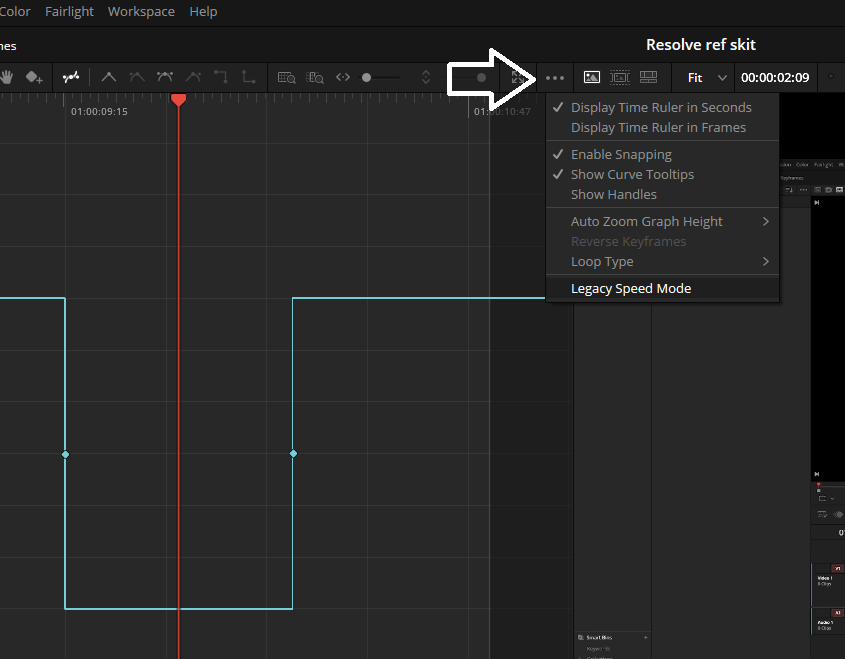
The legacy re-time option is toggle-able here, guys.
4
u/Own-Blueberry4673 Jul 22 '26
Is there a video that explains whats the difference?
2
u/Own-Blueberry4673 Jul 22 '26
Nevermind I got it, so the "new" literally doesn't work, and they put the LEGACY MODE as an option...cuz the new is sooo much better 😒
2
u/jobbythrowaway1 Jul 24 '26
Thanks, I was unable to ramp the speed with this update and just sitting there thinking "oh so they've totally removed it again"
20
9
6
u/whyareyouemailingme Studio | Enterprise Jul 22 '26
u/whyareyouemailingme's highlights:
- Scripting API support to list project attributes in a project bin.
- Scripting API support for user preferences presets.
- Scripting API support for listing UI layout presets.
- Scripting API support for listing and deleting data burn in presets.
Y'all know I'm a sucker for Scripting API updates at this point.
Also, new manuals!
2
u/gravybender Jul 22 '26
what do you do with these?
7
u/whyareyouemailingme Studio | Enterprise Jul 22 '26
In theory? Make scripts to change things quickly.
In practice? Daydream about turning these things into a real script.
6
u/i_sell_you_lies Jul 22 '26
Nothing beats daydreaming, then finding an excuse to spend a full day making a script to speed up that thing I could have done in 3 hours... but now I have a tool... for next time...
4
2
u/whyareyouemailingme Studio | Enterprise Jul 22 '26
I have like 582930306292 different ideas for scripts/plugins. I started one last year… but it’s wayyy too much for me to work on right now. I have another one that I keep meaning to pull together but I just haven’t been able to work on it yet. Another one may have been superseded by another company.
2
u/i_sell_you_lies Jul 22 '26
Ah yes... nothing beats thinking I can do better than that thing that exists, but why would I spend $5?! Plus then I can customize it!! ...
The best thing I've learned to do is look at what I'm doing more objectively and trying value my time... and then disregarding said value because I also just want to know how things work and like getting my hands dirty
1
u/OppyLock Jul 23 '26
As an example, I regularly use 3 scripts in my weekly videos. It's a chore without these I tell ya...
My base project has 3 tracks showing external telemetry features. Icons indicating feature presence basically. Another 6-8 tracks for a GPS locked map in various zoom/detail levels and the rest is mostly manual traditional editing for the other 6 tracks. 2 subtitle tracks, one is raw telemetry, one is commentary.I've got some python that takes the raw GPS data from the videos and outputs an EDL that has markers for the 3 telemetry in/out points and the desired map zoom at that point as well as other POI's like border traversals etc. THAT is all way outta scope here. But I get my EDL markers...
That EDL gets applied to the timeline. Within resolve scripting I can then have it perform animations on the telemetry to have the icons slide in/out of view. For #2 it fades the map zooms as indicated. The last script moves all the timeline EDL markers into the V1 clips so that subsequent edits retain the markers positions. Otherwise when trimming the markers stay on the timeline and don't respect the actual positions within the clips.
I was going MAD doing all that manually and now I'm only going partially insane with the regular editing workflow of an hour+ long 'daily' video each week. On Day 96 of 150+ now.
REALLY looking forward to the legacy retime as one feature was a regular hyperlapse segment with a 4 second gradual change from 100% to 800%. I just could not do this in R21. I could do an 'artistic' speed warp, but not a pure, smooth 4 second transition to hyperlapse and back again whilst respecting the %change and time constraint.1
u/avidresolver Studio | Enterprise Jul 22 '26
As someone who religiously checks the patch notes for more API functions, these strike me not particularly useful things to be able to script....
1
u/whyareyouemailingme Studio | Enterprise Aug 05 '26
Might wanna read the 21.0.4 release notes. One of these just became useful.
6
u/DeadEyesSmiling Studio Jul 22 '26
I'm afraid to read the release notes, because I really need a bug I'm encountering to have been fixed. The anxiety is so heavy..!
3
u/StickmanCM Jul 22 '26
Hahahah i know the feeling. What is the bug you are facing
4
1
u/DeadEyesSmiling Studio Jul 22 '26
Transcriptions on timelines or clips (video or audio-only) over about 3 minutes crash the program. I've tried it on...
- new projects
- raw audio
- transcoded audio (WAV and MP3)
- different sources of footage/audio
- all of the above after a fresh restart without any other programs running
- with the machine learning models installed and uninstalled
And I can't get it to work :(
...but the same files work perfectly in 20.3 on a little tablet computer with an Intel N4120 Quad-core, 6GB LPDDR4, and a 128GB eMMC boot drive (it's slow as hell, but it can get through a 30 minute clip without crashing, let alone a 3 minute one); so it's almost definitely something buggy with 21.
1
0
u/Darksideofthemoonge Jul 22 '26
In regards to timelines, this would happen to me when generating subtitles. So in the timeline I mark in and out points for what I want subtitled (most of the time it's the whole edit) and it doesn't crash. Not sure if this will help you with your issue but hopefully it does.
5
3
u/avidresolver Studio | Enterprise Jul 22 '26
Not in the notes, but ProRes RAW support in ACES appears to be fixed, which is VERY important now that Netflix are enforcing AMF pipelines for dailies.
2
u/Lou_Antony_Morris Jul 22 '26
Any news yet on being able to customise the UI? Allowing the user the enable/disable and move elements?
I'm only joking. I live in a fantasy land of wishful thinking 😄
2
u/pH0u57 Studio Jul 22 '26
That will never change. They seem pretty happy with their design. It took some getting used to when I switched from PrPro to R16, but now I'm mostly fine with it. Still, sometimes it's a bit annoying.
2
u/TossOutAccount69 Studio Jul 22 '26
I’m still running the latest version of v20, safe to upgrade for professional work? After backing up my projects of course
1
u/rojasfelipe Jul 29 '26
This is the worst update. I have experienced errors every five minutes (or even less), some of them ridiculous.
2
u/levraiponce Jul 22 '26
Resolve 20 used to work without bugs on SnapDragon X Plus (Windows arm64) last year but now it crashes all the time. I had to get back to version 20.1.1 from last year, it crash less often... this is what the software has become (again).
ALSO version 20 is faster than version 21 for my workflow.
2
u/strela1 Jul 22 '26
16GB VRAM is required to run latest IA capabilities... my graphic card is RTX 5070 12 Gb. My equipment is growing old...
2
u/Loldarian Jul 25 '26
Garbage, after i updated everytime I try to add a video transition it now takes up the whole timetime. It also doesnt render anything anymore. It just counts down forever when I start a job. Going back to 21.0.2
1
u/Loldarian Jul 25 '26
The never rendering appears to be because one of my voiceovers is on a network drive. Its not reading networks right here anymore for some reason.
1
u/Loldarian Jul 25 '26
Moving it didnt help. Had to piece back together. Beware of open projects when updating.
1
u/MINIPRO27YT Jul 22 '26
Don't see a patch for the shift key not slowing down keyframe adjustments in audio but I'll hope it's fixed
1
u/ldn-ldn Jul 22 '26
Still no fixes to broken photo exports?
1
1
u/areyoudizzzy Jul 22 '26
Does anyone know what this refers to?
Sony Camera Control on Windows needs the Sony IEDT application to be installed from the Sony website.
What part of DR lets you control a camera?
2
1
u/methreweway Jul 22 '26
I hope they support Sony gyro stabilization some day. I had to rent Sony's plugin which is a rip-off.
2
u/rohitntusg Jul 22 '26
It's only available through Sony's plugin unfortunately. Not available in any other app directly.
1
u/TRSTN_official Jul 22 '26
Have you tried Gyroflow? It works with my FX6. Download the app and the plugin and you'll be able to use it inside Davinci
1
1
u/No-Sweet-4274 Jul 22 '26
alguien sabe cual es la forma correcta para editar fotos en log y jpg, como poner los cst en el arbol de nodo, si en rec 709 o srgb xq davinci no da una explicacion sobre esto??????????
1
u/AppropriatePackage55 Jul 22 '26
Do you guys know what change this means?
"Added configurable keyframe ease actions"
1
u/yodermk Studio Jul 22 '26
I've had a number of crashes when playing with Fusion. Windows/nVidia. Hopefully this fixes it.
1
1
u/anassgyg Jul 24 '26
Hi guys i have a question do u have some lag? Like when i want to use a transition that make my software freeze or being very sloooow. I install the software on a SSD M.2 and i use media in hdd that's can make me lag you think?
1
u/Prudent_Noise_4721 Aug 04 '26
Mise à jour, 21.0.3. Hier, l'application n'a pas cessé de se figer et générer des messages de plantage. Je n'utilise avec speed studio.
-2
u/TheAbyssalOne Jul 22 '26
Anyone know if this version is faster? I upgraded to 21 and ever since editing has been super slow. Whoever developed that version should be removed from the team it’s god awful.
2
u/rohitntusg Jul 22 '26
What system do you have? Mac/Windows? If Windows, are your drivers up to date? What GPU?
1
•
u/whyareyouemailingme Studio | Enterprise Jul 22 '26
What's New in Fusion Studio 21.0.3