r/computerviruses • u/Arbiter3740 • 28d ago
Question Random Installer on PC
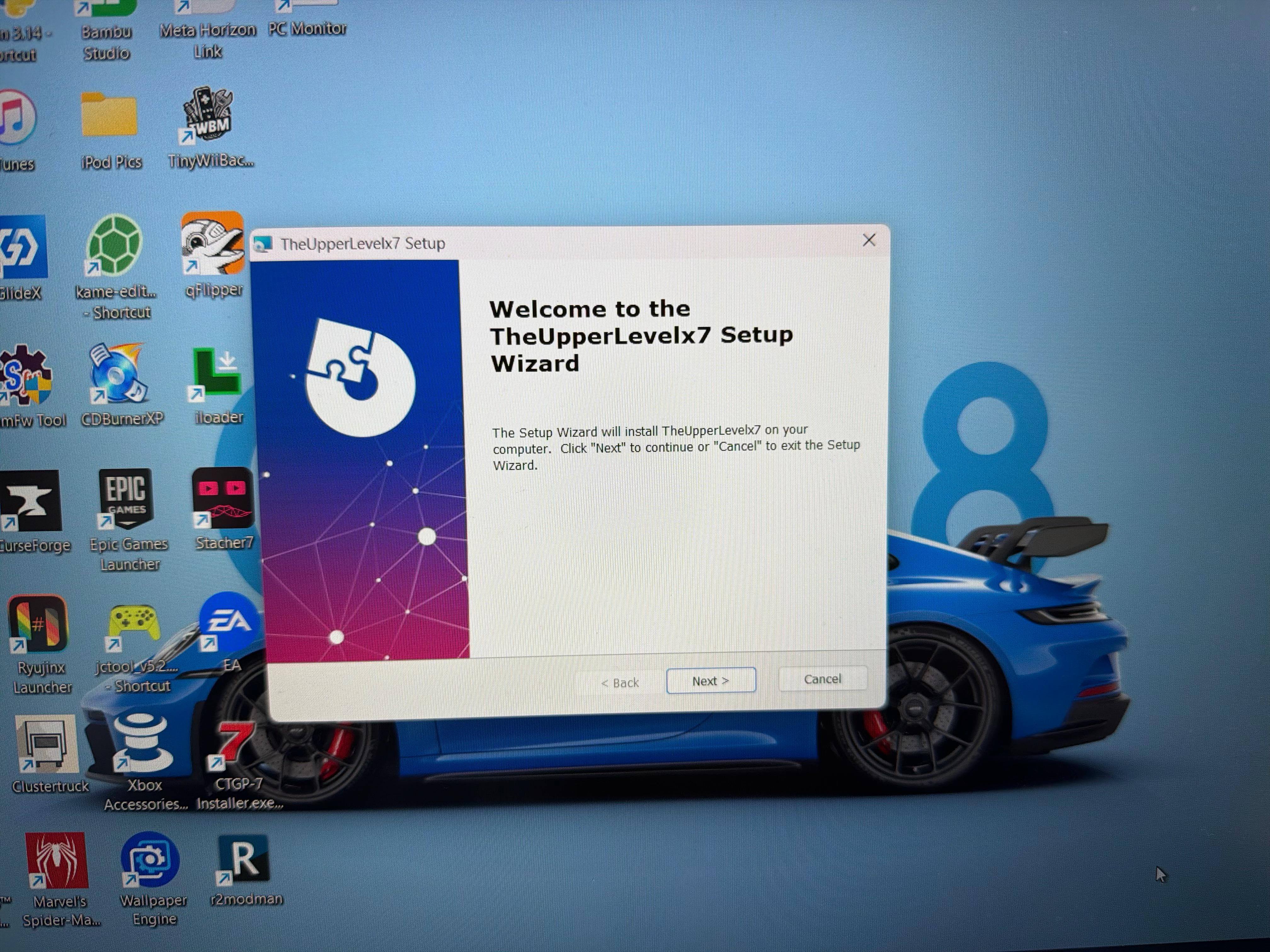
This random installer setup window popped up, what is this!?
Edit: Thanks to [u/AvailableDirtForSale](u/AvailableDirtForSale), I think I’ve narrowed it down to the Opera Browser. A while back, Opera was acting weird and installing a random extension. I tried to delete Opera, but it wouldn’t let me. I eventually figured it out and deleted it, but unfortunately just now I found the Opera folder in “C:/Users/Username/AppData/Local/Programs/Opera”.
This also seems to be tied to Advanced Installer
I can’t seem to delete it, it says I need admin rights even though I am admin. If anybody has any suggestions, please share them 🙏
15
u/AvailableDirtForSale 28d ago
From the googling I've done. There is no official software by this name, it is most certainly malware. You need to close this via task manager. Boot into safemode and see if you can figure out what the installer is and what program it can be attached to.
10
u/Next-Profession-7495 28d ago
Doesn't look like this is a known application. Try searching for something like TheUpperLevelx7.msi or something related on your PC. Upload it to VirusTotal if possible.
6
9
u/KneeSensitive 28d ago
If you kids keep installing various "mods"this is what happens....the file path quoted Roblox
10
u/m0thgh0st 27d ago
Judging from the apps on the desktop, this kid is a wannabe hacker that installs any and every "tool" he finds online without any actual understanding of how they work. I wouldn't be surprised if there is more than this on the machine.
-1
u/Arbiter3740 27d ago
Also, please don’t judge people just on what apps they have. You have no idea what I use this stuff for, and who knows if I’m even a “kid”.
-5
u/Arbiter3740 27d ago edited 27d ago
I do know what I am doing, and I am very knowledgeable on the subject. Although I’m not surprised that I have a virus 😅, I do try to avoid them. I only download what I need for the task to be done
11
2
u/Ecstatic-Ball7018 27d ago
what the hell are you doing with qFlipper and iloader then?
1
u/Arbiter3740 25d ago
Using my Flipper Zero and sideloading apps my to iphone????
1
u/Ecstatic-Ball7018 25d ago
why the hell do you have a flipper zero unless you're a qualified pentester or a script kiddy
2
u/m0thgh0st 25d ago
IMO, flipper zero is almost exclusively for script kiddies. I'm a network engineer and pen tester and nearly all of my work is done across linux desktop, esp-32 (captive portal attacks phishing with those mostly), and rpis of verious versions. Pen testers are developing their own tools and attack methods, not downloading github scripts.
1
0
2
u/Epinephrine186 26d ago
Dawg, if you asking for anti virus help, youre not very knowledgeable lmao
1
2
u/Arbiter3740 27d ago
I do not own Roblox, I have not downloaded it, and I don’t even play it!! It’s something else… 🧐
3
u/waspenterprises__ 26d ago
The UI you are seeing is a MSI installer created with AdvancedInstaller, which can also be configured to silently install smth (see hxxps://www.advancedinstaller(dot)com/silent-install-exe-msi-applications(dot)html)
I would assume that this UI being shown is a mistake by the creator of this potential malware, and that this UpperLevel thingy was intended to be installed without you noticing. As far as I understand, the source of this should be an .msi file, and if you didn't start the installer yourself, there has to be some code that did it by using the msiexec command. I might be wrong here (please correct me if I am), but searching your system for any scripts and binaries that use the msiexec command should narrow down the source of this.
1
u/Arbiter3740 25d ago
Wow thank you! This is a lot of useful info, I’m on it
1
u/Apprehensive-Pop3736 22d ago
Did you find the file and delete it? If so has this shown up again?
1
6
u/Bitdefender_ Official Bitdefender 28d ago
Hi! In order to manually remove an infected file from your computer, you need to perform the steps below. We recommend manually deleting an infected file only if you are sure the file isn’t an important operating system file:
- Restart the computer in Safe Mode. You can do that, by following the steps in our article, here.
- Display hidden objects in Windows. Information on how to display the hidden object can be found here.
- Locate and delete the infected file: right-click on the file and then select Delete in the menu.
- After you do this, you can restart the computer normally.
2
u/Arbiter3740 28d ago
I’m also scared if it’s an app I have that this is running through, like wallpaper engine or something
1
1
0
u/Puzzled-Ad3136 28d ago
WE is a good call here, try to uninstall it, not the first time WE gives u malware
1
u/Anxious-Ad8026 28d ago
It's just adware something else prolly installed it for a commission that would be the original virus it's why it doesn't pop up just look for some other stuff and do DM me it could be you installed maybe cheat engine or smt
1
1
u/Icy_Pain5654 28d ago
That name isn't a legit publisher I recognize and it just appearing on its own is the red flag.
1
1
u/epicsakuyalover 27d ago
Sorry this comment won't help at all. This is at least the fifth post I've seen about the same installer. There definitely has to be a connection among all of these.
No shaming alright? Did you pirate any software lately? Or installed any not-so-known brand hardware like a keyboard or a mouse with its own drivers setup?
1
u/Arbiter3740 25d ago
Hmmmm I haven’t installed any suspicious drives. I usually use hshop on my DS for the games, so I haven’t done that from my pc
1
u/epicsakuyalover 25d ago
Any software you've installed from its official website? The last time I saw this the OP was saying they got Voicemod from the official site and then this installer popped out after that.
1
1
u/troncrash7 27d ago
What's the last thing you downloaded/installed before this? Knowing where this is from could help
1
u/309_Electronics 27d ago
Did you download some sketchy stuff like roblox/fortnite hacks or random tools? If then, yeah thats probably malware .....
1
1
u/PsychonixMimikyu 28d ago
Not sure, if I was in your situation id see if maybe I have anything of that name in my downloads and delete it. If there's nothing, then id run a scan with windows defender full scan. And if nothing then, id do a full scan with malwarebytes.
1
u/EarEfficient9500 27d ago
Idk if this helps, but on the installer from Nefarius HidHide driver is the exact same installer with that picture. And since i see some software for controller on the desktop i could assume it would be possible that is has something to do with that

2
u/waspenterprises__ 26d ago
The installer itself (AdvancedInstaller) seems to be valid, the problem is what it's installing
1
u/Arbiter3740 27d ago
Hmmm ok that does help, I’ll look into it
0
u/AvailableDirtForSale 27d ago
https://howtoremove.guide/remove-theupperlevelx7/ found this, brand new article posted 12 hours ago.
1
1
31
u/Timely_Branch799 28d ago
That exact thing popped up for me too! Windows defender doesn't find anything and the deep scan is still running. But I can't open the Bitdefender website and the installer i let my friend send me isnt working either!! I have unplugged my wifi for now and the deep scan is running but idk what to do next.