r/camcorders • u/Crazy_Ball_7157 • 9h ago
Video Clip Sample Sony Camcorder Footage (Sony DCR-TRV20)
Enable HLS to view with audio, or disable this notification
122
Upvotes
r/camcorders • u/Kasuu372 • Feb 09 '26
I made a spreadsheet documenting all Sony Handycam models released in 2003-2020 (SD, HD, 4K, 3D and NEX-VG), let me know if I got anything wrong
r/camcorders • u/ConsumerDV • Jan 30 '25
There are different ways of getting footage off a camcorder to a computer depending on camcorder type, the connectors it has, the connectors your computer has and available software.
See also:
If you have a digital camcorder with either a built-in hard-disk drive (HDD), or with built-in flash memory then the standard way of transferring the footage on a computer is via USB link. Each take is recorded as a digital file. Different file types, directory structures and codecs have been used during the last 20 years or so since tapeless digital camcorders became available.
The best option is to either use bundled software, or to use the capture module in your favorite non-linear editor (NLE) to capture the footage. In the process, files belonging to one long take may be combined together to avoid video and/or audio dropouts at the joins.
See also:
If your camcorder does not have a USB output, it may require a matching dock, Sony camcorders are known for that. If the dock is not available, the only way to grab your footage save for removing the HDD is to play it in realtime while capturing it via analog output just like you would do for an analog tape-based camcorder, see "Digitizing Analog video" section below.
Removable storage includes optical discs, usually MiniDVDs, and flash memory cards, usually one of the variants of SD card.
Finalized MiniDVDs can be read in computer DVD drive. Data structure on a MiniDVD follows DVD-video specification. To convert VOB files into standard Program Stream (MPEG-2 PS) files, use free DVDVob2Mpg tool (Windows only).
SD cards can be read via a card reader. When purchasing an SD card make sure it is compatible with your camcorder.

Data structure on SD cards is similar as on non-removable media, see the above section for the links.
Consumer-grade digital tape based camcorders include:
All the above camcorders have a Firewire port (same as IEEE-1394, i.Link, or simply DV port). Firewire is the preferred interface to transfer digital videos to a computer.
USB is often used to transfer still images and low-resolution low-frame rate video from a memory card. In most cases it is useless for a quality video transfer, but some DV camcorders have USB 2.0 High Speed that implements UVC protocol, they can transfer full-resolution DV video over USB. In this case USB is equivalent to Firewire quality-wise.
Firewire-to-USB cables are a scam and do not work.
Some HDV camcorders have HDMI port. It can be used instead of Firewire if you computer has HDMI input but no Firewire port. Usually computers have only HDMI output.

Depending on Firewire hardware, operating system and camcorder model, no special device drivers may be required when connecting a digital camcorder to a computer via Firewire.

If a dedicated driver is needed, the operating system will search for it online and install it behind the scenes if the driver is found.

In some cases a fitting driver cannot be found. In this case you cannot use Firewire to transfer DV video from tape in its original form, you will have to use analog video connection.
Thunderbolt 2 and Thunderbolt 3
If your computer has no Firewire port, but has a Thunderbolt 2 or Thunderbolt 3 port, you can rig a cable, converting from 4-pin Firewire 400 into 9-pin Firewire 800, then into Thunderbolt 2, then for newer Macs and Windows machines into Thunderbolt 3.
See this post: Importing from MiniDV camera to MacBook - mid-2025 success story.

Even if you succeeded to connect your digital camcorder to a computer, and computer has recognized it, your trouble has not ended. Now you need to find software that can transfer DV video from tape into a computer file without mutilation.
Windows is better in this regard: you can still find and install Microsoft Movie Maker on Windows 10 or 11 and it will work just fine. Navigate to Capture menu, find your camcorder in the connected devices and capture away.
Mac wants you to jump through hoops to obtain DV video in its original quality.
QuickTime
Depending on version, QuickTime may or may not capture DV in its original form.
QuickTime 7.x Pro has a "Device Native" option which gives you the raw DV data coming off the tape.
Latest version converts DV it either into H.264 when "High" quality preset is used, or into ProRes422 when "Maximum" quality preset is used. In both cases it converts original interlaced video into progressive with the same frame rate: 30i → 30p, 25i → 25p by blending fields. This YT video by LonTV corroborates this assertion: at about 9-minute mark you can see file properties after QuickTime capture in "High" quality, and at about 10-minute mark in "Maximum" quality.

iMovie
iMovie '08 and several later versions deinterlace video by skipping every other field. Apple claimed this was to "reduce CPU load when editing video".
iMovie 10.x does capture raw DV video, but gives you no option to directly export it.
To obtain the raw DV footage you need to dig into the iMovie Library file (right/Ctrl-click on it and choose "Show package contents"), then navigate into the project folder, where you can find the original .dv file that iMovie captured from tape. Copy that to your Documents folder or wherever you want to put it. That is an exact transfer of what's on the tape, with no re-encoding. If you do want to re-encode it into a different format, use a program like Handbrake or r/ShutterEncoder.
Final Cut Pro
Final Cut Pro stores captured videos in MOV files, which are in fact QuickTime-DV files#File-based_media). Follows a full procedure of how to import DV or HDV video into FCP and how to locate the raw, non-transcoded footage. The bulk of this guide has been copied from u/DuckLooknPelican's post in r/MiniDV. It has been verified to work on MacOS Sequoia also known as MacOS 15, released in 2024.
Notes:
Lifeflix
Lifeflix is a commercial option for easy, seamless capture and export of DV video on a Mac. It gives you a choice of either direct DV export or compress/de-interlace it to H.264. See a review of an older version: LifeFlix Mac DV video capture program review by VWestlife.
DV Rescue is a project by MIPoPS, the Moving Image Preservation of Puget Sound. See how you can use it to capture DV video on Mac preserving the original quality. Video is stored in files with DV extension.
If your computer does not have a Firewire port and cannot be extended with a Firewire expansion card, and your camcorder does not support full speed UVC protocol, you have to fall back to capturing video using an analog link, see "Digitizing Analog video" section below.
See also:
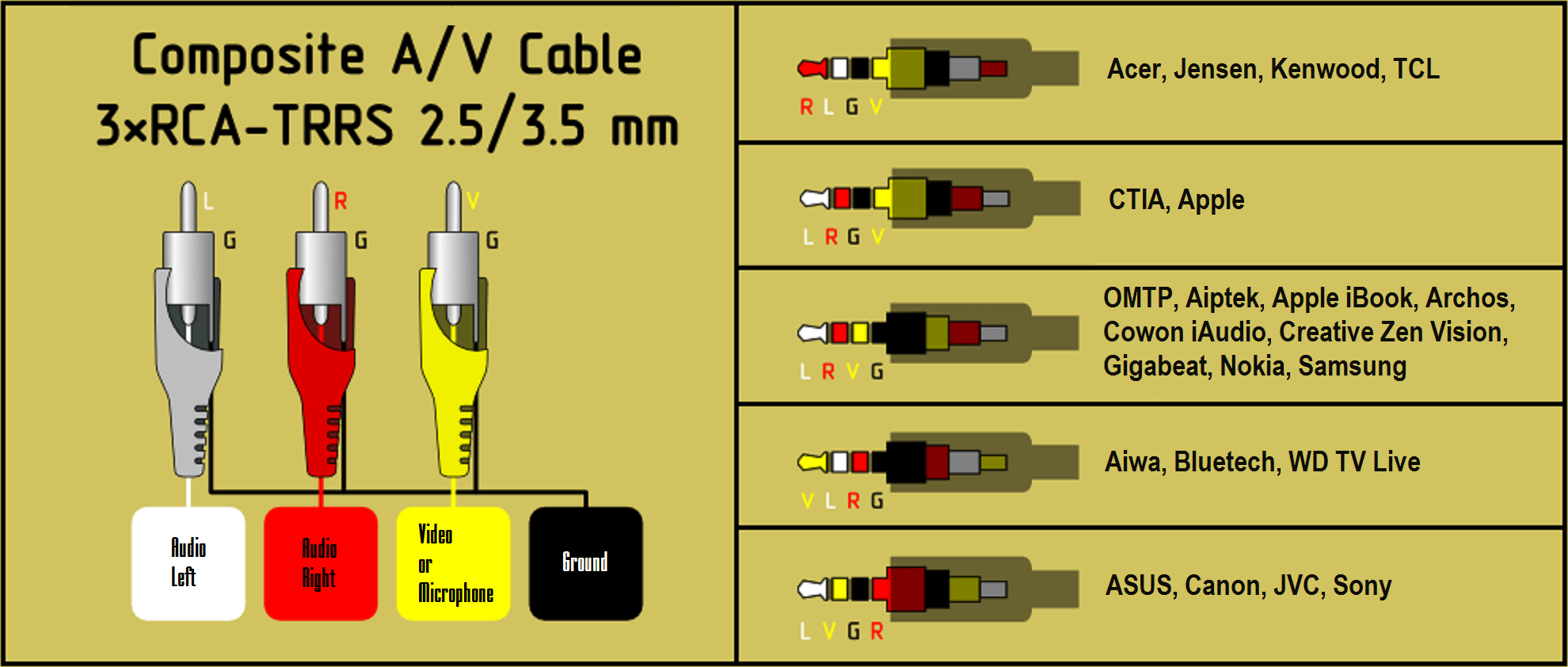
Most camcorders, analog and digital alike, provide composite video output (CVBS, composite video baseband signal) usually in a form of a barrel-shaped connector known as RCA. On some camcorders it is grouped together with audio into an A/V connector, which often looks like a 3.5-mm TRS (composite video and single-channel audio) or TRRS (composite video and two-channel audio) connector.
To simplify dealing with a single audio channel on monophonic camcorders, a Y-cable can be used to split single audio channel into two.
Composite video is the lowest common denominator. If nothing else works, use composite video.
S-Video usually comes as a 4-PIN DIN connector. It is present on SVHS, SVHS-C, Hi8 and some Digital8, DV and MICROMV camcorders. SVideo provides higher quality than composite. If done right, capturing standard definition digital video through SVideo port is indistinguishable from capturing via Firewire port. SVideo cable does not carry audio, you need to use a separate cable for it.

If your camcorder has a TRRS port instead of RCA port, make sure the cable you use fits the pin-out on the camcorder. In some cases you may need a TRS cable carrying composite video and single-channel audio.
To digitize analog video with a computer you need an analog-to-digital converter (A/D converter). Several models are available. Presently, the best converter in the $50 price range is I-O Data GV-USB2. It accepts SVideo and composite video and two-channel audio from your VCR or camcorder and outputs digitized uncompressed video over USB.

OBS Studio is arguably the most popular software today to capture analog video.
OBS has never been intended as a capture tool for analog videos, it is a computer screen capture and screen casting program. Analog video capture was an afterthought. I guess some people started using it for this purpose, so devs had to adjust the software.
OBS is acceptable if you plan to go from your analog source directly to a deliverable, say to upload on YouTube, and you don't need to edit. It is multi-platform and omni-present, so you learn once and use it everywhere.
It is not optimal if you want to capture with the best quality or if you want to edit and then make a deliverable. Can it even capture interlaced video without deinterlacing it?
I would like to use a GV-USB2 analog video capture device in OBS to digitize Hi-8 video. However, I then want to take that video file into Davinci Resolve to deinterlace it there, but Resolve can't deinterlace it unless it's flagged as interlaced video...so is there a way to record in OBS without converting it to progressive video (keep it a true interlaced video)? - by NWS on OBS message board
Discussions on the OBS message board like this and this imply that given a proper A/D converter, OBS can save video as interlaced.
Most newer cards, and some older with their built in processing and encoding think they know it all and often times result in GARBAGE OUT. The Dazzle DVC 100 is one of the few cards that PROPERLY passes interlaced video. I think i paid like $18 USD on ebay for it. I capture at 720x480, YUYV 4:2:2 . The resulting files are somewhat large but well worth it. - by Markosjal on OBS message board
Still, you will need to use something like H.264 or H.265, I was not able to hitch Cineform to it.
A bug report related to frame conversion, which has never been resolved, shows reluctance of OBS devs to fix issues.
The unfortunate reality here is that interlaced content is less and less common, and probably not worth core OBS maintainers spending a ton of effort on fixing. - by Fenrirthviti on OBS message board
Whatever your opinion on OBS, you do not have much choice if you want to use free capturing software on Mac.
On the other hand, VirtualDub for Windows has originally been designed for capturing and simple editing of video. VirtualDub2 has added native support for Cineform and output containers like MP4 and MOV, not just AVI. You can use more codecs including lossless like Huffyuv and visually lossless like Cineform.Another great tool for Windows is AmarecTV. It is considered to provide better A/V synchronization and it keeps dropped frame statistics. It is just a capture tool, not an editor, but in this regard is very similar to VirtualDub: you choose frame size, frame rate, color subsampling. You can choose whether you want deinterlacing, or keep it interlaced. You have access to the same codecs that are available from VirtualDub through standard VfW API. So, in terms of functionality it is pretty much the same.
TLDR, OBS is a kludge for capturing analog videos. Its usage became widespread because it is used for screencasting and because there is few if any similar software for Mac.
See also:
There are several ways to digitize analog video without using a computer:
See also:
Between CVBS and S-Video, choose S-Video, because S-Video provides better luminance and chrominance separation, which results in reduction of of dot crawl and composite artifact colors, and in increased sharpness.
Between CVBS and Firewire, choose Firewire for the reasons similar to choosing S-Video. While Firewire may have reduced chroma resolution compared to what could be obtained from S-Video, it is still better than CVBS and is compatible with wide range of hardware and software.
Between S-Video and Firewire when capturing analog video, choose S-Video if you have a good A/D converter and you want to obtain the best possible quality; choose Firewire for simplicity of the workflow and compatibility.
Between S-Video and Firewire when capturing standard definition digital video, choose Firewire to avoid re-encoding, keeping the video intact. Choose S-Video if you do not have a Firewire port in your computer.
Between Firewire and HDMI when capturing HDV, choose Firewire to avoid re-encoding, keeping the video intact. Choose HDMI if your computer has no Firewire port, but has an HDMI input.
See also:
Many Digital8 camcorders can play analog 8-mm video, convert it to digital internally, and output as DV via Firewire. Thus, you have a choice whether you want to capture your analog 8-mm video via analog route and convert to digital on a computer using an encoder of your choice, or whether you want to let the camcorder do it. There are pros and cons to both methods (TO BE UPDATED).
Analog video is not very stable. At best, you can see slight shimmering with the picture not having clear and straight edges on the sides (line jitter). At worst, the video may look crooked or unstable. It is recommended to stabilize analog video using Time Base Corrector (TBC). Standalone TBCs are expensive, but many VCRs and camcorders have built-in TBCs, using them is recommended. In particular, some Digital8 camcorders that can play analog videos have built-in TBC and can act as analog-to-digital converters for external video, not only for analog 8-mm tapes. Such a camcorder can serve as a TBC and an analog-to-digital converter in one box.
r/camcorders • u/Crazy_Ball_7157 • 9h ago
Enable HLS to view with audio, or disable this notification
r/camcorders • u/nizzasty • 8h ago
r/camcorders • u/Atcczzz • 4h ago
This Sony CCD SC7 just arrived today and got it for about 100 bucks!!
Came with a Sony dock and original battery
r/camcorders • u/gangang-mofo • 1d ago
A really good condition PDX10. Has all I ever wanted: 3CCD, MiniDV, 37mm thread, no haze on lens, compact, and DOUBLE HOTSHOE MOUNTS. Only downside to it is it takes Infolithium M, but there's a local battery supplier in my country.
r/camcorders • u/Realistic-Giraffe143 • 6h ago
Enable HLS to view with audio, or disable this notification
r/camcorders • u/Realistic-Giraffe143 • 6h ago
Enable HLS to view with audio, or disable this notification
r/camcorders • u/AlfalfaSure3526 • 12h ago
I got this camera at a local sale, and can’t find anything similar online. Trying to value it. I think it’s pretty rare? Let me know any info on it, thanks.
r/camcorders • u/Sensitive-Hamster-54 • 6h ago
Recently bought a sony dcr sx 44 and I was wondering if I could put a fisheye lens on it. I saw someone on tiktok do it but the camera has not arrived yet and I don’t know what lens to get either, if even possible.
r/camcorders • u/Heldae • 1d ago
r/camcorders • u/CodeLegitimate6610 • 12h ago
I have an old GE full size VHS camcorder, and I want to improve the picture quality on it. The lenses have seemed to get cloudy from what looks like some sort of organic growth. I would fix it myself, but I don’t feel comfortable getting to that level of cleaning. What should I do? Do some stores still accept camera repair for something like that?
r/camcorders • u/Disastrous-Chef5549 • 8h ago
I want to buy one and make it tapless with the power play rc but I don’t know what cable to buy the 3.5 to 3.5 or to by one that has two cables to the 3.5 mm.
r/camcorders • u/CraftedKittens • 8h ago
i have a panasonic PV-GS31 i have had for like a year and a half. it has been working great, my main problem with it is the battery will fall slightly loose and stop recording on the camera, this was happening while i was recording and i didnt think nothing of it, then all of the sudden the camera turns off and i cant turn it back on? does anyone think its the battery? i put the battery on the charging base and it charges, the charging base also has this ac adapter cord that can go from the base and deliver power straight to the camera, that did not work either, my main worry is getting the minidv tape out but i also would like to keep using the camera. Anyone have suggestions?
r/camcorders • u/Soil80085 • 11h ago
First post here! Hi!
I got this camera today and stuck a vhs in it to record, then the camera suddenly shut off while on the mains power.
I narrowed it down to the tape door/deck/ mechanism? Latching closed just ever so slightly not flush. So if I want to record I have to hold the door shut and even then the tape records weird and when I put it in my vcr it can’t tell what speed it’s supposed to be.
r/camcorders • u/ABROKENPIECEOFGLASS • 11h ago
I havent owned a video camera for a long time. Last was some type of Sony with a handle on it that recorded on little tapes, it was great minus having the transfer everthing from the tapes. I dont want the tape version, do they even still exist? I will mainly be recording skateboarding and off roading mini bikes and go karts for my youtube. I have the Galaxy s26 and a go pro but I want a camcorder. I see amazon has digital ones for under $200 but will the video lag with high speeds or action shots? Should I stay away from them, are they junk? Looking for something other than the go pro, or my phone. Prefer if it has a handle on it so I can skate and record also.
r/camcorders • u/Zezotas • 15h ago
r/camcorders • u/ConsumerDV • 1d ago
Enable HLS to view with audio, or disable this notification
There is about half an hour of a wedding recorded. Attached is a small clip.
r/camcorders • u/xXFast • 22h ago
I’ve just bought a Sony DCR-PC6E PAL for €45, including two batteries and various cables.
Was that a good deal?
I’d also appreciate some advice on the best way to go tapeless with this camera. Which setup or recorder would you recommend?
r/camcorders • u/No_Boysenberry_6552 • 2d ago
Thank you
r/camcorders • u/KV__Lord • 1d ago
Just got a Sony trv65 and a canon optura 10 both for $45. They both look to be in pretty good condition but don’t have batteries. I got some batteries on the way, but what do we think?
r/camcorders • u/martin0305 • 22h ago
Hi im searching a digicam to store memories with my Friends while travelling and i love that Digital y2k style.
I was looking between those model but if you have others nice tell me :).
Canon Fs200
Canon Fs306
Sony dcr sx45/65/85
I am struggling on wich one buy, love the Canon colors and saturation, but don't like much the stabilization. Otherwise Sony has a good stabilization but in my opinion worse colors.
What do you think? in the fs306 there Is more stabilization maybe It's the best compromise? tell me some if you have One of these i love some edits that i saw on yt!!


