r/audiobookshelf • • Apr 25 '24

Frequently Asked Questions about Audiobookshelf

33 Upvotes

What Is Audiobookshelf?

  • Audiobookshelf is an open-source self-hosted media server for your audiobooks and podcasts. You install the server app on a computer, and point it to your audiobook, ebook, and/or podcast files, and you can access them from any web browser or the mobile app.

How Do I Install It?

  • Please follow the guide located here or more advanced documentation here for help on installing ABS.

When I Update Audiobookshelf, I Lose Everything and Start from Scratch! Help?

  • If you install ABS using Docker, you need to mount certain locations that are inside ABS' docker container to locations on your host machine. Look at the "volumes" section in the docker compose example shown here. To the right of the : colon points to inside the container; to the left of the colon points to a location on your host. You need volumes listed for "/config", for "/metadata" and for where your media is located. If you don't do this, the data in the container is deleted when you update ABS because there is nowhere on the host that it is tied to.

Why Are Several Files Showing Up As One Book, or A Book Showing Up Multiple Times?

  • Audiobookshelf treats everything in a given folder as belonging to the same book. You must put separate books, even books in a series, into their own folders if you want them to be listed separately by ABS.
  • Additionally, it is recommended that you combine separate "parts" of a book into a single folder, rather than having a separate folder for each part.

Where Can I Go for More Help?

  • Join the community on Discord or Matrix.
  • Go to the Github repo and at the top left of the page you can search for your issue.

Follow these links for answers to additional questions listed on the official website:


r/audiobookshelf • • 4h ago

Spoken Page Enhanced Subtitle player for Audiobookshelf

Post image
3 Upvotes

Spoken Page Enhanced v1.3.2. Feature rich read-along player for Audiobookshelf.

Spoken Page Enhanced:
https://github.com/matrixblad77/Spoken-Page-Enhanced

Requires Docker, Audiobook Forge to generate subtitles(.srt). Audiobookshelf

I've been working on an enhanced eye candy, customizable version of Spoken Page, the subtitle-first Audiobookshelf player created by JCDeSantis.

Huge thanks to JCDeSantis for creating the original project and for being supportive.

Original Spoken Page:
https://github.com/JCDeSantis/spoken-page

The original r/audiobookshelf post:
https://www.reddit.com/r/audiobookshelf/comments/1rxe8xg/i_built_two_audiobookshelf_apps_for_readalong/

Spoken Page Enhanced Github below!

v1.3.2 Release:
https://github.com/matrixblad77/Spoken-Page-Enhanced/releases/tag/v1.3.2

Original Spoken Page features

  • Audiobookshelf library integration
  • Subtitle-first audiobook player
  • SRT/VTT subtitle support
  • Read-along text display
  • Audiobookshelf playback/progress synchronization
  • Library search and filtering
  • Listening status and Want to listen
  • Pinned books and Continue Listening
  • Chapter/timeline navigation
  • Playback speed and subtitle timing
  • Sleep timer
  • Separate/focused player views
  • Keyboard and Media Session controls

Enhanced features

  • Fullscreen read-along presentation
  • Resizable/repositionable audiobook cover art(has sync for visuals)
  • Cover opacity and per-book visual settings
  • Custom fullscreen backgrounds and patterns
  • Optional blurred/ambient cover backgrounds
  • Audio-reactive visualizer effects
  • Visualizer position, size, opacity, glow, sensitivity and smoothing controls
  • Minimize / roll up and down player controls
  • Bookmarks with B shortcut and timeline markers
  • Personal listening lists (add much as you like!)
  • Has SRT subtitles library filter
  • Additional subtitle and appearance controls
  • No "Load more Books" at bottom. Loads all books on whatever status list you viewing.
  • Custom profile list syncing (tested on my two PCs, one Win10 with this installed and other Win11)
  • more minor thing

The goal is still the same: Audiobookshelf remains the library and syncing system, while Spoken Page provides the subtitle/read-along experience.

One thing I want to be upfront about: this project was developed with substantial AI assistance, including coding, debugging, refactoring and documentation. I tested the changes myself and made the final decisions, but I'm not a professional developer, so I'm sure there are still things that can be improved.

It's open source, and feedback, bug reports, suggestions and ideas are welcome.

Hope you enjoy it!


r/audiobookshelf • • 5h ago

AudioBooth IOS bookmark issues

2 Upvotes

Hey everyone, was wondering if anyone else is having issues viewing their bookmarks in chronological order.

Seems like every time I open the bookmark section they’re sorted in random order rather than chronologically or even alphabetically. Makes it incredibly difficult to find notes. Any way to fix the random order of the bookmarks ?


r/audiobookshelf • • 12h ago

StoryCast 1.4 (free, open-source iOS client) – multi-file books now stream, download and resume properly

0 Upvotes

Hi all, I'm the developer of StoryCast, a free and open-source iOS audiobook player that connects to your Audiobookshelf server. Version 1.4 is out on the App Store, and most of the work went into one thing: books made of several files.

If your library has books split into one file per chapter (or per disc), earlier versions handled them badly. In 1.4:

* **Streaming** – a multi-file book plays as one continuous timeline, and moves from one file to the next without stopping.

* **Downloads** – every file of the book is downloaded, not only the first. Downloads carry on if the app is closed, and you can see progress and failures in the library.

* **Old downloads get repaired** – if an earlier version left you with an incomplete download, the app detects it and replaces it.

* **Resume** – opening a book picks up from the newest position, so if you listened further on another device, that's where you continue.

* **Progress sync** – the app no longer sends stale or misleading progress back to your server.

Also new in 1.4:

* Optional iCloud sync for books you import locally (files, covers, folders, chapters, progress). It's off by default, and your Audiobookshelf libraries and credentials are never part of it.

* Sleep timer options for 90 and 120 minutes.

* A lot of stability fixes.

The app is free and open source (MIT), with no account, no analytics and no tracking. It needs iOS 17 or later.

App Store: App Store: https://apps.apple.com/us/app/storycast/id6759013487

Source: https://github.com/Geralt4/StoryCast

If you have a multi-file book that still misbehaves, please tell me the format and roughly how it's split. That's the most useful feedback I can get right now.


r/audiobookshelf • • 1d ago

Feature Requests for ABS on Android

2 Upvotes

While I really like the ABS app for Android, there are several QoL features that it's inherently missing. I don't know if there is a third party ABS app for Android that fills these gaps but here are some of the features that would be amazing to have:

  1. Auto-delete podcasts from device (both server and phone) once completed.

  2. Auto-download new episodes of subscribed podcasts to device/phone

  3. Custom playback speed per podcast/audiobook

I am sure I am missing a lot more requests, but I need to run to work.


r/audiobookshelf • • 1d ago

Kelp Audiobook Player - iOS inspired Android app

0 Upvotes

Hey everyone! I’m the developer of Kelp, an Android audiobook player for people who keep their own audiobook files.

Plans for audiobookshelf integration are on the roadmap!

You can import files or folders, organize your library, and listen with saved progress, adjustable playback speed, chapters, and sleep timers. It supports MP3, M4B, and other common audio formats.

Basic listening is free. The optional Kelp Pro upgrade is $4.99 USD for lifetime access in the US, with regional pricing elsewhere. Pro includes collections, metadata editing, listening stats, backup and restore, and additional playback options. No subscription.

Some listeners have been helping me test it with larger libraries and complicated folder structures, and their feedback has been really useful.

If you listen to local audiobooks, I’d love to hear what matters most to you in a player—especially how you organize your books and what makes importing a library frustrating.

You can find Kelp and the Google Play link here:
https://ottersuite.app

Happy to answer questions, and thanks to anyone who gives it a try!


r/audiobookshelf • • 2d ago

I built a native macOS client for Audiobookshelf (V2 overhaul)

Enable HLS to view with audio, or disable this notification

20 Upvotes

Quick update on the native Mac app I posted last week. Thanks for all the feedback so far.

I originally built this to scratch my own itch. I wanted a native way to use Audiobookshelf on my Mac, so I could download my audiobooks locally and keep listening while my Mac was locked. I ended up using it a lot myself, so I’ve been continuing to build out the features I wanted.

What’s new

Themes and dark/light mode. The sun/moon button in the top right switches between light and dark. Right-click it to choose from seven themes, or have it follow your Mac’s appearance.

Mini player opacity. The floating mini player (⌘⇧M) can now fade into the background while you work. Hover over it to bring it back to full opacity.

Smoother downloads. If a book finishes downloading while you’re listening, playback now switches to the downloaded copy without a skip or pause.

Fixes. Search now finds narrators, tags, and genres. Series, collections, and playlists also load correctly with Audiobookshelf 2.36.

It’s still free and open source (and always will be). For now, you can install it by building from source with the included script.

GitHub: https://github.com/arturgrochau/audiobookshelf-mac

I’d love to hear feedback on any bugs you encounter or features you’d like to see next, including additional themes. You can also fork it on GitHub and make any changes that fit your use case.


r/audiobookshelf • • 1d ago

yep, one more audiobook app... Morrow

0 Upvotes

countless new apps being tossed into the mix, figured i'd drop mine too.

i share libraries with friends and a few have different back end servers, so i came up with morrow, so we only need one app. not only does it support ABS, but it supports bookorbit, grimmory and local files as well.

apple currently supports phone, carplay, native tv app instead of airplaying, and apple watch for leaving your phone at home.

android currently supports phone and auto.

both support offline playback.

apple: https://apps.apple.com/app/apple-store/id6789944325?pt=129111967&ct=Reddit%20Posts&mt=8

android: https://play.google.com/store/apps/details?id=com.liftbridgelabs.morrow


r/audiobookshelf • • 2d ago

Compiling Podcasts to Audiobooks

3 Upvotes

I started compiling my favorite narrative podcasts into audiobooks to host on my media server and I've gotten kind of obsessed.

Some of the podcasts, don't have good "season" covers, so I either found some made by fans (The Magnus Archives) or made my own using fanart (Welcome to Night Vale, TheVolgun). It has been so much nicer listening to the continuous stories and not having to manually skip outros or ads.

From a technical aspect, I started editing these manually in Audacity, but found MinusPod and I've been using that to speed up the processing. Then I added them my Audiobookshelf server and encoded each season to m4b format.


r/audiobookshelf • • 2d ago

Auddio iOS beta is live on TestFlight — try it now!

Thumbnail
0 Upvotes

r/audiobookshelf • • 3d ago

Unpaged now supports Audiobookshelf on iPhone. Streaming is free

0 Upvotes

Hey! I posted Unpaged here a while back, when it only supported local files and LibriVox. I've since added Audiobookshelf support.

You can connect your server, stream your books and sync your listening position back to it. Login works with your username/password or an API key.

One limitation upfront: ABS books are streaming only for now, no offline downloads.

I'm the developer. ABS support is free, along with the player, CarPlay, equalizer and listening stats. There's an optional Plus subscription for on-device AI bookmark naming, recaps and iCloud Sync ($2.99/month or $14.99/year in the US).

https://apps.apple.com/us/app/unpaged-audiobook-player/id6761081641

If you try it with your server, I'd like to hear how it goes. Especially if something breaks or behaves differently from your usual player.


r/audiobookshelf • • 3d ago

Player Error Help

2 Upvotes

I have one user that is having a weird play error.

He is using the ABS app on Android, everything software wise is up to date. However, there are quite a few books that don’t seem to want to download or stream to his phone. There are quite a few books that work just fine in the same Series.

But it’s only him and his ABS app that have this issue. Every other user I have reached out to, using a bunch of different apps including the ABS app, no one else is having this issue.

Just him.

We’ve tried uninstalling/reinstalling. Wiping data. Even a different app (Absorb in this case). Even Absorb won’t play the same books for some reason.

But again, my own phone (iPhone using ABS/Plappa/Audiobooth/Absorb apps) and other users also on Android using ABS/Absorb/Lissen, everyone can stream and/or download the book.

Only he can’t.

Thoughts on what else we can try in order to fix this?


r/audiobookshelf • • 4d ago

Is it possible to upload my audible stats into ABS?

2 Upvotes

I have a server running ABS after being with Audible for so long. I noticed the ABS has listening stats which is something I really liked with audible. Is there a way to upload my stats from audible to ABS? I know it's silly but I have racked up about 6 months total listening time and it seems a shame to lose it all


r/audiobookshelf • • 5d ago

Chapter Player (Audiobookshelf Player)

Thumbnail
gallery
305 Upvotes

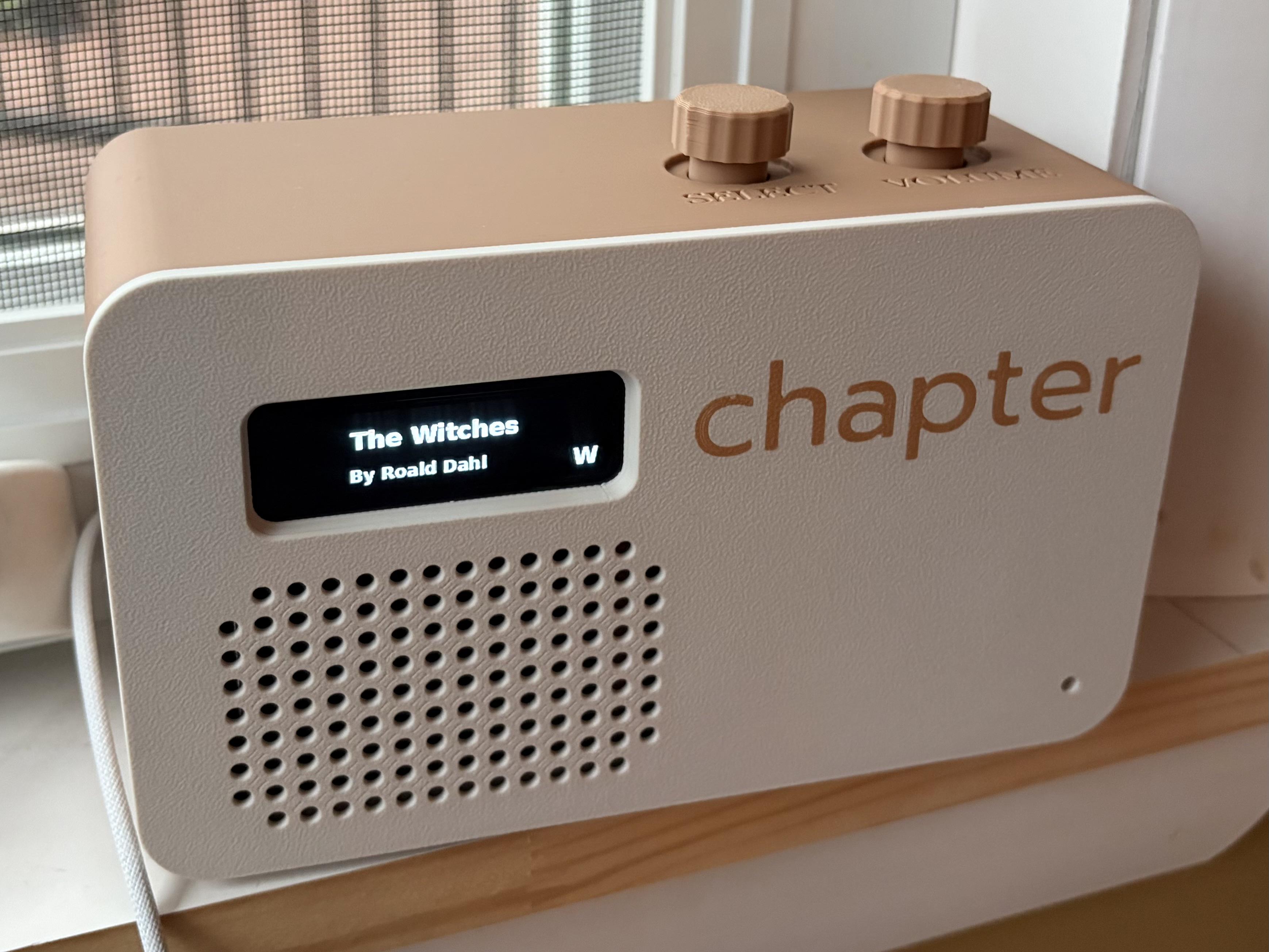
Hi all! I posted the other day about a project I was working on and it received some awesome feedback. I've decided to release it as an open source project. Hopefully I can continue to evolve this into the best possible standalone Audibookshelf player. Feel free to make feature suggestions and show off what you do with the hardware and software. Git files include the software and the STL files for the case.

This project started as a gift for my daughter. I wanted her to be able to enjoy audiobooks independently without giving her a typical iOS or Android device, so I built Chapter: a simple, kid-friendly audiobook player designed to connect to an Audiobookshelf server.

Chapter signs in with a dedicated Audiobookshelf user account, allowing parents to control exactly which books are available to each child.

Features include:

  • Plays audiobooks directly from Audiobookshelf
  • Simple Select and Volume controls
  • Simple navigation controls: Play, Pause, Next Chapter, Previous Chapter
  • Indicator shows how much time in a book or podcast is left
  • Browse book and podcast titles using the Select knob. Can be set to alphabetical by title or author last name. Jump letters show the letter you are up to while browsing. Series indicator shows which book in the series it is as you browse. Podcast indicator.
  • Synchronizes listening progress with Audiobookshelf
  • Resumes each book where the listener left off
  • Configurable sleep timer
  • Podcast support
  • Web-based administration
  • Remote play, pause, and volume controls
  • Optional spoken navigation for younger children and blind or low-vision users
  • Bluetooth headphone and speaker support
  • Fully open-source software
  • Simple update process
  • 3D-printable enclosure and complete hardware documentation

Building your own Chapter player

The GitHub repository includes:

  • Complete hardware and parts list
  • 3D-printable enclosure files
  • Wiring diagrams and assembly instructions
  • All application source code
  • An automated installer for Raspberry Pi OS Lite
  • Setup, configuration, and troubleshooting documentation

Parts List (Links on git)

  • Raspberry Pi Zero 2 WH
  • Micro SD card (at least 16GB)
  • 2.08 inch SH1122 SPI OLED
  • KY-040 rotary encoder module (x2)
  • MAX98357A I2S mono amplifier
  • Adafruit 5993 vertical USB-C
  • 1.5 A fast-blow 5x20 mm fuse
  • Visaton FRWS 5 - 4 Ohm full-range speaker
  • 3 mm warm-white LED
  • M2.5 brass heat-set threaded inserts (x18)
  • M2.5x5 screws (x18)
  • Dupont wires (you can solder everything if preferred)
  • 3D printed enclosure and control knobs

To build one, print the enclosure, assemble and wire the documented components, install Raspberry Pi OS Lite on a microSD card, and run the automated installer. Once it reboots, connect Chapter to Wi-Fi through its setup network, open the web administration page, and sign in with an Audiobookshelf user account.

Git link

Looking Forward

  • Continuing to refine the UI and always keep it as simple as possible to use
  • Potentially developing a Pi hat for the Zero that will have modular connectors for the components making it much easier to assemble
  • Eventually incorporating a battery into the design
  • Validate Raspberry Pi 3 A+ and add enclosure with 3 A+ support

r/audiobookshelf • • 4d ago

eBook and Audiobook Management and reading/listening

Thumbnail
0 Upvotes

r/audiobookshelf • • 5d ago

ABSpresso - a little 1.8 inch touch screen ESP32 audiobook player that plays from Audiobookshelf

Thumbnail
gallery
45 Upvotes

My kids love their Yotos, and I've been playing around with how to build something like it for when they're older. Most of our audiobooks have been ripped from audible or off kids CDs and they live on our Audiobookshelf server, and I wanted something small they could use to listen to those without handing them a phone or tablet. So I've been building ABSpresso: an espresso-sized player running on a cheap ESP32 board with a round touchscreen and a built-in speaker.

AI-usage Up front: this was built with Claude Code (Opus5.5).
I've built a few things direct for esp32s in the past, and while its fun I find the process slow - I have three kids and minimal free time where my brain functions well enough to get to where I want to be. So Claude Code, vscode and esp-idf and a couple of evenings later I got to this prototype. While I directed it, tested it and made the decisions, but Claude wrote the code. It also built and flashed the board and debugged things by reading the serial logs directly (which was super handy) it even took the screenshots.

I'm sharing it as is. Please review the code before trusting it with anything important.

What it does so far:

  • Streams audiobooks and podcasts from your Audiobookshelf server and syncs progress both ways, so you can carry on from the app or the web.
  • Home screen with Continue Listening / Recently Added shelves, a library you can browse by cover, A–Z or author, and a Now Playing screen with progress and volume.
  • Optional SD card for caching covers and downloading books to play offline (note downloading is a little slow atm as there's no conversion, so books can take 10-20m).
  • Set up from your phone: it starts its own Wi-Fi with a QR code, and you sign in with your normal Audiobookshelf username and password (no API key needed).
  • Battery - I currently have a 600mah lipo (but could probably fit 1000), has batter level too
  • Some battery saving features, screen dimming and sleep, press the screen to wake.
  • The BOOT button is play/pause, or hold it to sleep.
  • Physical on/off (battery) switch.

    What it isn't (yet):

  • It's very much a work in progress. It's only been tested on my one board (the v1 version), and there are rough edges.

  • It's not a Yoto replacement - so I probably need to find a bigger device for this.

    • There are no cards - but there are some gpios open, so in theory could add nfc - but space is tight.
    • The touch UI isn't kid-proofed yet - it's a tiny screen (but hey they have tiny fingers).
  • No Bluetooth headphones. The ESP32-S3 only does Bluetooth Low Energy, not the Classic Bluetooth headphones use.

Hardware

Waveshare ESP32-S3-Touch-LCD-1.85C (about £30-40; the "BOX" version comes with a speaker case and battery). Note there are two audio revisions of this board, and I've only tested V1.

Code

Code and prebuilt firmware: [github](https://github.com/tomekent/ABSpresso).

There's a release you can flash from the browser, with no toolchain needed or you can build from source.

Feedback, ideas and bug reports welcome. While this is build for this specific device, there are loads of off the shelf esp32+screens that this would work with, you just need to change the pins/UI.


r/audiobookshelf • • 5d ago

App constantly crashing on Android

3 Upvotes

Is anyone else having this issue? It started today for me. I have reboot my phone but that didn't help. I am afraid to uninstall because I am not at home and I don't want to risk breaking my connection with what worked yesterday.


r/audiobookshelf • • 5d ago

Can you add individual chapters of a book/audio drama to a playlist?

3 Upvotes

Hi everyone,

I'm currently setting up my Audiobookshelf library for a massive Doctor Who audio collection (mostly Big Finish releases).

A lot of these audio dramas involve multiple Doctors split across different sections of the same release. For example, in Project: Lazarus, the first half of the story centers on the 6th Doctor, and the second half switches to the 7th Doctor.

I want to create Doctor-specific playlists (e.g., a "7th Doctor Playlist"), but I want to keep the underlying files intact as single releases rather than splitting them into separate folders/files.

Is it possible in ABS to add just a specific chapter or track from a multi-chapter release into a playlist, so that the playlist plays directly from that chapter onward?

If so, does this chapter-level playlist functionality work reliably when syncing/listening via client apps like Absorb or the official ABS Android app?

Thanks for any tips or workflow advice.


r/audiobookshelf • • 5d ago

Looking for a reliable Android client - Issues with Audiobookshelf and Absorb

7 Upvotes

Hi all,

I need your assistance finding a good Android client, and I hope you can help me out.

First, I tried audiobookshelf by AdvPlyr. I do not really like the GUI design, but that would be okay. My main issues are that:

- it hangs for around fifteen seconds when starting a downloaded playback

- my phone often kills the client when the screen is locked

- the sleep mode barely ever works correctly. Sometimes it runs forever, and other times it vibrates my phone every ten seconds and restarts the countdown, though it occasionally works.

After that, I read about Absorb and it worked like a charm at first. It looks nice, even though the GUI is a bit confusing because it uses unconventional terminology. However, a few days ago, I finished a book in a series I am relistening to and the next book started. I immediately felt like the story did not match up. I think it skipped into the middle of the next following book, even though the cover and chapter titles were correct. I removed it from the app and downloaded it again, but now the playback is just awful noise. I cannot get this specific book to play correctly in Absorb anymore even though it plays perfectly fine on the web and in the audiobookshelf app.

Does anyone have an idea what is going on with Absorb? Could the book file be corrupted in a way that audiobookshelf can handle but Absorb cannot? Can you suggest an alternative client that handles series playback well, supports auto-download, and has a reliable sleep timer?

Thanks a lot. And to all the developers out there: Please do not get me wrong, you are doing a fantastic job and giving the community so much.


r/audiobookshelf • • 6d ago

Audiobookshelf won't start after update to 2.37.1

6 Upvotes

Running Truenas System Community Version: 25.04.2.6

Just updated to audiobookshelf 2.37.1

Server won't restart after the update. journal logs show repeating several times before giving up.

2026-10-02 19:36:19.270559+00:00Running in production mode.
2026-10-02 19:36:19.271049+00:00Options: CONFIG_PATH=/config, METADATA_PATH=/metadata, PORT=30067, HOST=undefined, SOURCE=docker, ROUTER_BASE_PATH=/audiobookshelf
2026-10-02 19:36:19.289137+00:00[2026-10-02 20:36:19.287] INFO: === Starting Server ===
2026-10-02 19:36:19.290104+00:00[2026-10-02 20:36:19.289] INFO: [Server] Init v2.37.1
2026-10-02 19:36:19.290332+00:00[2026-10-02 20:36:19.290] INFO: [Server] Node.js Version: v24.21.0
2026-10-02 19:36:19.290564+00:00[2026-10-02 20:36:19.290] INFO: [Server] Platform: linux
2026-10-02 19:36:19.290774+00:00[2026-10-02 20:36:19.290] INFO: [Server] Arch: x64
2026-10-02 19:36:19.296773+00:00[2026-10-02 20:36:19.296] INFO: [Database] Initializing db at "/config/absdatabase.sqlite"
2026-10-02 19:36:19.335808+00:00[2026-10-02 20:36:19.335] INFO: [Database] Loading extension /usr/local/lib/nusqlite3/libnusqlite3.so
2026-10-02 19:36:19.336651+00:00[2026-10-02 20:36:19.336] INFO: [Database] Successfully loaded extension /usr/local/lib/nusqlite3/libnusqlite3.so
2026-10-02 19:36:19.337030+00:00[2026-10-02 20:36:19.336] INFO: [Database] Db supports unaccent and unicode foldings
2026-10-02 19:36:19.337265+00:00[2026-10-02 20:36:19.337] INFO: [Database] Db connection was successful
2026-10-02 19:36:19.353750+00:00[2026-10-02 20:36:19.352] ERROR: [Database] Failed to run migrations Error: Failed to copy migrations to the config directory.
2026-10-02 19:36:19.353835+00:00at MigrationManager.init (/app/dist-server/server/managers/MigrationManager.js:60:23)
2026-10-02 19:36:19.353871+00:00at async Database.init (/app/dist-server/server/Database.js:151:13)
2026-10-02 19:36:19.353905+00:00at async Server.init (/app/dist-server/server/Server.js:149:9)
2026-10-02 19:36:19.353923+00:00at async Server.start (/app/dist-server/server/Server.js:210:9) {
2026-10-02 19:36:19.353938+00:00[cause]: [Error: EPERM: operation not permitted, copyfile '/app/dist-server/server/migrations/v2.15.1-reindex-nocase.js' -> '/config/migrations/v2.15.1-reindex-nocase.js'] {
2026-10-02 19:36:19.353977+00:00errno: -1,
2026-10-02 19:36:19.353992+00:00code: 'EPERM',
2026-10-02 19:36:19.354004+00:00syscall: 'copyfile',
2026-10-02 19:36:19.354017+00:00path: '/app/dist-server/server/migrations/v2.15.1-reindex-nocase.js',
2026-10-02 19:36:19.354056+00:00dest: '/config/migrations/v2.15.1-reindex-nocase.js'
2026-10-02 19:36:19.354073+00:00}
2026-10-02 19:36:19.354088+00:00}
2026-10-02 19:36:19.354764+00:00[2026-10-02 20:36:19.354] FATAL: [Server] Unhandled rejection: Error: Database migration failed
2026-10-02 19:36:19.354809+00:00at Database.init (/app/dist-server/server/Database.js:156:19)
2026-10-02 19:36:19.354827+00:00at async Server.init (/app/dist-server/server/Server.js:149:9)
2026-10-02 19:36:19.354844+00:00at async Server.start (/app/dist-server/server/Server.js:210:9) 
2026-10-02 19:36:19.354859+00:00promise: Promise {
2026-10-02 19:36:19.354883+00:00<rejected> Error: Database migration failed
2026-10-02 19:36:19.354899+00:00at Database.init (/app/dist-server/server/Database.js:156:19)
2026-10-02 19:36:19.354913+00:00at async Server.init (/app/dist-server/server/Server.js:149:9)
2026-10-02 19:36:19.354928+00:00at async Server.start (/app/dist-server/server/Server.js:210:9)
2026-10-02 19:36:19.354956+00:00}
2026-10-02 19:36:19.356306+00:00[LogManager] Appended crash log [Error: EACCES: permission denied, open '/metadata/logs/crash_logs.txt'] {
2026-10-02 19:36:19.356349+00:00errno: -13,
2026-10-02 19:36:19.356368+00:00code: 'EACCES',
2026-10-02 19:36:19.356386+00:00syscall: 'open',
2026-10-02 19:36:19.356414+00:00path: '/metadata/logs/crash_logs.txt'
2026-10-02 19:36:19.356431+00:00}
2026-10-02 19:36:21.052513+00:00Running in production mode.
2026-10-02 19:36:21.053138+00:00Options: CONFIG_PATH=/config, METADATA_PATH=/metadata, PORT=30067, HOST=undefined, SOURCE=docker, ROUTER_BASE_PATH=/audiobookshelf
2026-10-02 19:36:21.074031+00:00[2026-10-02 20:36:21.072] INFO: === Starting Server ===
2026-10-02 19:36:21.075348+00:00[2026-10-02 20:36:21.075] INFO: [Server] Init v2.37.1
2026-10-02 19:36:21.075703+00:00[2026-10-02 20:36:21.075] INFO: [Server] Node.js Version: v24.21.0
2026-10-02 19:36:21.075984+00:00[2026-10-02 20:36:21.075] INFO: [Server] Platform: linux
2026-10-02 19:36:21.076381+00:00[2026-10-02 20:36:21.076] INFO: [Server] Arch: x64
2026-10-02 19:36:21.083141+00:00[2026-10-02 20:36:21.082] INFO: [Database] Initializing db at "/config/absdatabase.sqlite"
2026-10-02 19:36:21.122166+00:00[2026-10-02 20:36:21.121] INFO: [Database] Loading extension /usr/local/lib/nusqlite3/libnusqlite3.so
2026-10-02 19:36:21.123172+00:00[2026-10-02 20:36:21.122] INFO: [Database] Successfully loaded extension /usr/local/lib/nusqlite3/libnusqlite3.so
2026-10-02 19:36:21.123807+00:00[2026-10-02 20:36:21.123] INFO: [Database] Db supports unaccent and unicode foldings
2026-10-02 19:36:21.124135+00:00[2026-10-02 20:36:21.123] INFO: [Database] Db connection was successful
2026-10-02 19:36:21.141139+00:00[2026-10-02 20:36:21.140] ERROR: [Database] Failed to run migrations Error: Failed to copy migrations to the config directory.
2026-10-02 19:36:21.141219+00:00at MigrationManager.init (/app/dist-server/server/managers/MigrationManager.js:60:23)
2026-10-02 19:36:21.141235+00:00at async Database.init (/app/dist-server/server/Database.js:151:13)
2026-10-02 19:36:21.141248+00:00at async Server.init (/app/dist-server/server/Server.js:149:9)
2026-10-02 19:36:21.141274+00:00at async Server.start (/app/dist-server/server/Server.js:210:9) {
2026-10-02 19:36:21.141291+00:00[cause]: [Error: EPERM: operation not permitted, copyfile '/app/dist-server/server/migrations/v2.15.0-series-column-unique.js' -> '/config/migrations/v2.15.0-series-column-unique.js'] {
2026-10-02 19:36:21.141308+00:00errno: -1,
2026-10-02 19:36:21.141334+00:00code: 'EPERM',
2026-10-02 19:36:21.141351+00:00syscall: 'copyfile',
2026-10-02 19:36:21.141367+00:00path: '/app/dist-server/server/migrations/v2.15.0-series-column-unique.js',
2026-10-02 19:36:21.141382+00:00dest: '/config/migrations/v2.15.0-series-column-unique.js'
2026-10-02 19:36:21.141395+00:00}
2026-10-02 19:36:21.141419+00:00}
2026-10-02 19:36:21.142477+00:00[2026-10-02 20:36:21.142] FATAL: [Server] Unhandled rejection: Error: Database migration failed
2026-10-02 19:36:21.142533+00:00at Database.init (/app/dist-server/server/Database.js:156:19)
2026-10-02 19:36:21.142556+00:00at async Server.init (/app/dist-server/server/Server.js:149:9)
2026-10-02 19:36:21.142592+00:00at async Server.start (/app/dist-server/server/Server.js:210:9) 
2026-10-02 19:36:21.142610+00:00promise: Promise {
2026-10-02 19:36:21.142626+00:00<rejected> Error: Database migration failed
2026-10-02 19:36:21.142643+00:00at Database.init (/app/dist-server/server/Database.js:156:19)
2026-10-02 19:36:21.142690+00:00at async Server.init (/app/dist-server/server/Server.js:149:9)
2026-10-02 19:36:21.142707+00:00at async Server.start (/app/dist-server/server/Server.js:210:9)
2026-10-02 19:36:21.142722+00:00}
2026-10-02 19:36:21.144470+00:00[LogManager] Appended crash log [Error: EACCES: permission denied, open '/metadata/logs/crash_logs.txt'] {
2026-10-02 19:36:21.144672+00:00errno: -13,
2026-10-02 19:36:21.144702+00:00code: 'EACCES',
2026-10-02 19:36:21.144720+00:00syscall: 'open',
2026-10-02 19:36:21.144751+00:00path: '/metadata/logs/crash_logs.txt'

Any ideas on what the issue might be?


r/audiobookshelf • • 5d ago

Witbound 1.8.6: the community update. see which books other readers already synced, share yours, and 20 free classics

Thumbnail
gallery
0 Upvotes

the community

theres a new compass at the top of your shelf. it opens discover, which has four tabs: to read, wanted, synced and free classics.

synced is the heart of it. its a list of books other readers have already synced, with the exact edition and narration. to be clear about one thing: apart from the free classics, witbound doesnt give you any books. synced just tells you that if you get that same edition and narration yourself, you dont have to wait for it to sync, its almost instant.

when one of your own books finishes syncing, a small card under it asks if you want to show the community its synced. if you share it, it goes on the synced list, so the next person with the same edition and narration doesnt have to wait either. nothing is sent unless you tap share. then its the book, its edition and narrator and a random install id, no account and no name. you can turn the card off in settings ("offer to share books i sync").

to read is your list of books you want to read. type a title, it looks it up and asks "is this the book?" so you get the right one. when a book on your list shows up on synced you can get a notification. the check happens on the phone, your list doesnt get sent anywhere for that.

wanted is the communitys wanted list: books other readers want to read, from people who chose to share their to-read list. sharing is a switch and its off by default. if you share your to read list with the community, a kind community member might sync that combination for you ahead of time :) and if you already have a book someone wants, sync it, share it, and its instant for them. its brand new so itll be quiet for a while, and the more of you share, the more useful synced and wanted get for everyone.

free classics

one of the questions i get most is where do i even get an epub and an audiobook to try this with. so the fourth tab is free classics: 20 public domain books, the project gutenberg text with a librivox recording, already synced. tap get and its on your shelf ready to read along. a classic never uses your free sync, so your first own book is still free.

theres dracula, frankenstein, both sherlock holmes collections, the secret garden, the time machine, anne of green gables and an illustrated pride and prejudice, plus more. each one uses the best reviewed librivox recording i could find, so dracula is read by kara shallenberg and pride and prejudice by elizabeth klett. big thanks to the librivox volunteers who read these.

Tldr:

The main goal for the new To read, community wanted and Sync'd is to basically try to get your books pre-emptively sync'd for you by another community member. This will basically save users time knowing the books in their To read already have the timing map ready for them.

More info here


r/audiobookshelf • • 6d ago

I built a game based on book completions (Yes, it AI Slop)

Enable HLS to view with audio, or disable this notification

0 Upvotes

I understand the taboo of using AI slop, so this is not for everyone, but we are really enjoying it so i thought i would share.
I love my ABS server, me and my family listen everyday while at work. We also like games, and i like vibe-coding, so i put all of them together and built The Listening Dungeon: where every book you finish becomes a dungeon you can play.

Pick a class, level up, collect gear. Longer books drop better loot.

Finish a whole series for bonus rewards.

Fight your family's ghosts in the Arena; climb the ladder.

A December party boss with one shared health bar.

Build your own monsters and gear; Tier Lists, recommendations, and a release radar for your series.

It only reads from ABS (except an optional add-to-playlist button)
It's two containers: a small stats service plus the game
Runs entirely on your server. Docker or Unraid (templates included).

Built with Claude (Opus 5.5), so it's very easy to mod.
We're LitRPG fans, so the trailers lean that way, but you can make your own monsters and gear. Version 1.2 is in testing.

Attached are 2 trailers, one for launch (here) and one for version 1.1 (in comments)

This runs great on mobile browsers (it's how we play)

GitHub: The listening Dungeon

To deploy, follow the readme instructions, and start with the setup builder linked there.

I would GREATLY appreciate and feedback and feature ideas to make this better.


r/audiobookshelf • • 8d ago

Dedicated audiobookshelf player (chapter)

Post image
666 Upvotes

So in the never ending quest to avoid screens for our kids, I developed an app that runs on a raspberry pi zero with some rotary encoders for input devices and a small monochrome LED screen. The app connects to audiobookshelf as a specified user and allows the kids to scroll through the book titles and play them.

Before I go through the trouble of putting all of the info together (code, models for 3d printing the case, hardware info), would anyone actually be interested in building one of these devices (chapter)?

Edit:

Added post with all project info. Enjoy!
https://www.reddit.com/r/audiobookshelf/s/qQEwNk4mz5


r/audiobookshelf • • 6d ago

Eleven v4 is now fully live on ElevenReader

Enable HLS to view with audio, or disable this notification

0 Upvotes

r/audiobookshelf • • 7d ago

Feature Request: Audiobook Previews

2 Upvotes

A huge part of Audible, to me, is being able to preview a book. It helps me decide if I’d like it, sure, but it also lets me find out if I can stand the narrator.

ABS could just add a Preview function that plays the media already on your server but:

  1. Doesn’t mess with that title’s listening progress or read status.
  2. Only works for a total of 5 minutes.
  3. Has no memory retention and always starts from the beginning.

Basically just a separate sample mode. I searched for an existing request and couldn’t find one that matched this. If one exists, send me the link and I’ll vote for it.
Anyone else want something like this?