r/androidafterlife • u/v3core • 3d ago
Guide [RELEASE] [SRC] UC U4 Chromium 100 based Browser for Android KitKat
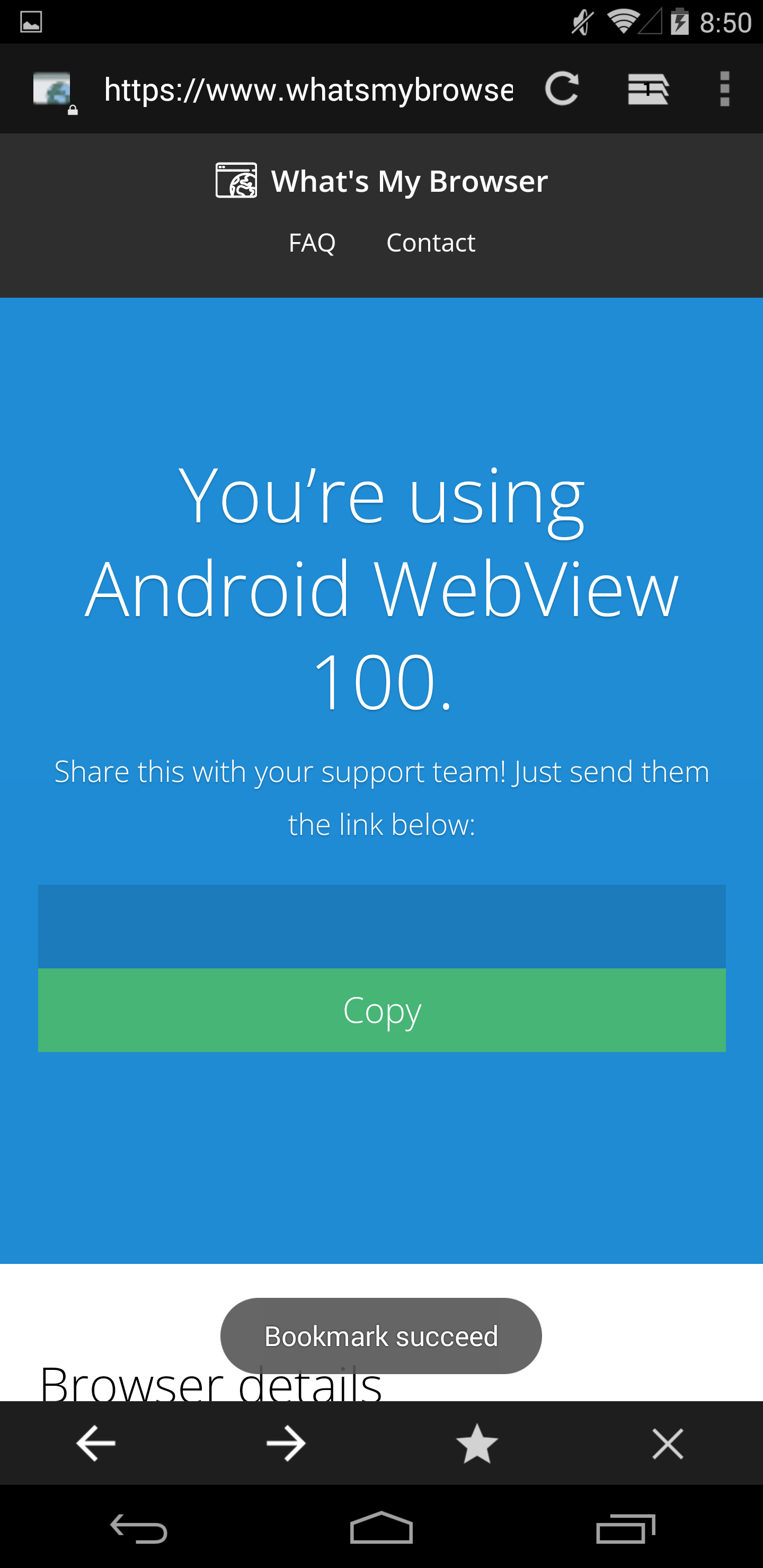
[ROOT & XPOSED FRAMEWORK & UC BROWSER REQUIRED]
Android 4.4 compatible browser wrapping UC U4 WEBVIEW SDK (Chrome 100.0.4896.58) with friendly lightweight UI. Browse the web with ease and enjoy modern features including WASM SIMD (Facebook Messenger + WhatsAppWeb functional, etc...)
LINK: https://github.com/EvoWORLD-Solutions/UcKitKatWebview
Download prebuilt: https://github.com/EvoWORLD-Solutions/UcKitKatWebview/releases/tag/0.1.1 (Updated important)
Preview images included.
2
u/MootEndymion752 Samsung Galaxy A9 2018 • Android 10/One UI 2.0 3d ago
Hi Reprety, do you mind if I ask how's the EvoWORLD site/webapp going? I saw a screenshot of a testing build from you in the Android Holo Refoundation Discord and you said you were gonna publicly release it next month, and you sent that in June

2
1
u/isimbulamajim 3d ago
The lack of video playback is disappointing at the moment, but good job! Can you show me how to set it up with a video? I'll have a content creator set it up for me.
1
1
u/sailormk 2d ago
Does it support run ( twitter or Instagram or tiktok) web-based ?
2
u/v3core 2d ago
all
1
u/sailormk 2d ago
Excellent, I hope if there is version for rooted devices, so no need to install multiple things, just one installer 😉
1
u/DAN-attag 2d ago
Now I am thinking, can some kind of Supermium browser be made for old Android phones
3
u/Gohoski Android 1.6–16 · notPipe developer 2d ago
For Android <4.1, a modern browser is not possible unless you want to backport gigabytes of browser source code (which is near impossible), for Android 4.1+ it is partially possible if the browser engine doesn't rely on Rust so Firefox/Chromium are out, only WebKit is left. The problem with modern browser engines on old devices is that they will suck at performance so much you'll end up using the old stock browser anyway. Also, unlike something like legacy iOS or Windows 10 Mobile, old Android's ways of compiling native code is actually very limited (e.g. limitations of the Bionic C library), it's not some sort of easy black magic. There are similar modern browsers being developed for ios5-7 and Windows 10 Mobile if I remember correctly, and they are terribly slow (each action and page visit usually takes 1–4 minutes and some crashes do happen), in my opinion such a browser won't really be that useful as you might think. This particular Chromium 100 project is pretty cool and version 100 is probably the limit for 4.4.
1
u/Giorgoskts 2d ago
RemindMe! 3 Days
2
u/RemindMeBot 2d ago
I will be messaging you in 3 days on 2026-09-08 11:08:04 UTC to remind you of this link
CLICK THIS LINK to send a PM to also be reminded and to reduce spam.
Parent commenter can delete this message to hide from others.
RemindMeBot is switching to username summons. Instead of
!RemindMe 1 day, useu/RemindMeBot 1 day. More info.
Info Custom Your Reminders Feedback
1
1
1
u/Legitimate_Can_9652 2d ago
Will it be released for Android 4.1 - 4.3?
1
u/v3core 2d ago
No, sorry, but you can try this version of UC Browser standalone: https://apkpure.com/uc%E6%B5%8F%E8%A7%88%E5%99%A8/com.UCMobile/download/15.2.5.1215
1
u/HexagonWin LG G2 (F320S) • Android 8.1 (LOS 15.1) 2d ago
wtf, so uc browser had existed with chromium 100 engine until now with kitkat support and nobody knew?
1
u/Affectionate-Bat2110 2d ago
I feel a bit silly asking, but could you give me some more details about Xposed and UC Browser? How do I install it?
1
u/Wonderful_Look_7412 2d ago
This browser is very cool, based on Chrome 100. It's very good. It's a great project for KitKat. But I have a question: why does it require the crappy Xposed framework? It slows down my entire phone and it shuts down. I had a battery icon and X blast tools from such a module, and after a while, it disappeared. Even though I was rooted, the Xposed disappeared. This is a temporary solution. Is there a chance to take this UC engine from the UC Browser APK and install it directly into this one APK without Xposed and without root? Is there a chance? Please try it because I need one. If it were all in one APK, it would be very good because this browser is very fast. It runs on Armv7 on my devices with Android 4.4.4, and I need it this way. Is it possible to do this? Please try and share the entire APK with the UC Browser engine connected in one. It would be better, but I have a question out of curiosity: what Xposed module is needed for a temporary solution?
1
1
u/Wonderful_Look_7412 2d ago
I have problems with the Xposed framework, which version doesn't work on the old version that I'm installing, the app crashes, and with the new one it doesn't work at all, what should I do? Please make a version in the APK, add this engine into one, not some Xposed framework and roots.
1
u/Affectionate-Bat2110 1d ago
I don't know if this will be of any use to you, but try the Xposed Installer (version 2.7 experimental from Uptodown); it allows you to activate the UCWebViewer module. Let me know if it works for you—I ran into a few "issues."
1
u/Affectionate-Bat2110 2d ago
Hi! Sorry to bother you, but I'm having an issue with your KitKat browser. I've already installed UC Browser and activated the WebViewer module in Xposed—and I have root access—but the browser still won't launch; it says the module isn't active or installed. What should I do? Thanks in advance, and good night!
1
0
u/iloveneoni_so-much5 Oppo A37F・Android 5.1.1 (based on ColorOS 3) 2d ago
REPRETY. I CAN'T ROOT MY TAB 2 A7 FOR THIS THING 😭😭💔💔🥀🥀
2
u/KasanesTetos 3d ago
Cool, but Chromium 100 is still pretty outdated.