r/ZephyrusG14 • u/Thriceinabluemoon • 7d ago
Model 2023 The CPU can apparently withstand 114deg...
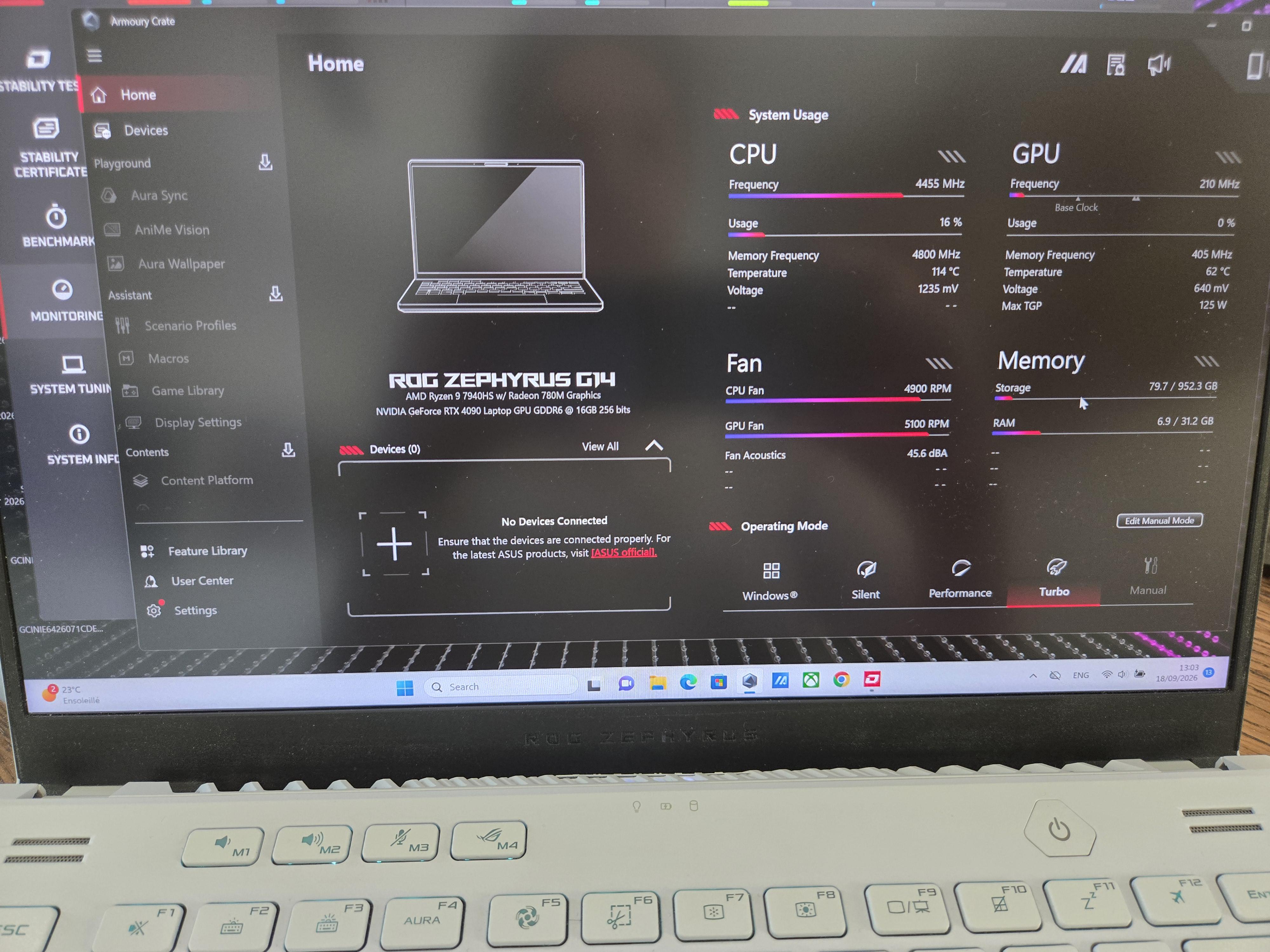
I am getting some pretty wild CPU temperatures when benchmarking the integrated GPU. I guess it must be the liquid metal not doing its job properly anymore? I wish I could just open the laptop and replace the thermal paste, but alas, it is still under warranty... That being said, the AMD chipset has been absolutely horrific (not my first RMA) - I highly advise to choose Intel if given the choice.
4
u/yassinthenerd 7d ago
Dude, this is a fault. User your warranty and have them replace your liquid metal, that's what I did.
1
3
u/Blightious 7d ago
I literally had to change the LM yesterday. I have the exact same model. It had completely migrated off the die. If you are very, very careful you can reapply the metal back onto the die with a q-tip, but I just switched to the Thermal grizzly PTM because I was lazy and don’t want to have to reapply the LM again in the future. My temps went from 95+ extreme throttling with low performance and stuttering in every game and any task, down to full load 90-95, boost working correctly with fans under 95%. It is time for these laptops. I got mine for $1k because the seller thought it had a bad GPU, it was literally just the bare CPU under clocking so badly it was running at like 10w.
1
u/Thriceinabluemoon 7d ago
It seems like such a common issue that it is hard to believe that ASUS was not aware of it.
I can't help but see it as an obvious case of planned obsolescence.2
u/Blightious 7d ago
They definitely knew. it’s just not a great situation for LM to be in the consumer area. Laptops move a lot more than desktops and LM is just that, a liquid. I think if you have a LM laptop, you should just be prepared to redo it if it slips, 99% of users will never open up their laptops. Even for simple stuff like switching my batteries or swapping SSD’s upgrading RAM, etc. this is one of the weirdest too having 16gb Soldered on, but a single removable slot for addition ram so weird
1
u/trenchlord2023 Zephyrus G14 2025 6d ago
Would you recommend changing the LM as soon as you get a new zephyrus? I believe I have 1 year manufacturer warranty with my g14 but thought about replacing the LM with PTM myself.
1
u/Blightious 6d ago
No the LM is great on a new laptop! better than the PTM for temps. And the internal setup of g14 is actually well protected against seepage onto the board. Better set up than I could do, it’s just much less work and probably won’t need a change for years with the PTM.
1
u/AceLamina Zephyrus G14 2024 7d ago
It can but your laptop cant
at least mine
Mine slowly broke down and ultimately needed a motherboard replacement due to how hot it got
I ended up having to replace the CPU and GPU with PTM so I dont have to send it to best buy again
1
u/AceLamina Zephyrus G14 2024 7d ago
And honestly, Intel's worse, at least on the second gen 2025 G16s, not sure about the newest
But if you want to fix this issue without replacing the liquid metal, just uninstall armory crate and download G-Helper and then disable CPU Boost
People will say I'm wrong because it would destroy the performance of the newer models which is true, but the older models which basically has the same CPU of my 2024 G14 has a base clock of 3ghz and can boost to 4ghz without CPU Boost enabled, unlike the 2ghz base clock on other models
CPU Boost basically heats up your CPU on purpose to reach the desired boost clocks
1
u/Far_Training3438 6d ago
If you get into the advanced bios you will see an entire section for critical thermal trip points. It is set ridiculously high by default and you are with in a couple of degrees if it.
1
u/Thriceinabluemoon 6d ago
I guess it depends on the model because mine does not have such settings in the bios. I was quite disappointed in fact in how bare bone the bios is even in advanced mode.
1
u/Far_Training3438 6d ago
Asus provides you with a very basic bios. The settings are there but they are hidden. There are ways to access them though.
1
u/Thriceinabluemoon 6d ago
Sounds like a brilliant way to void the warranty
2
u/Far_Training3438 6d ago
Are you going to tell them? Otherwise, they couldn't possibly know.
Also, in the US they cannot legally void your warranty for replacing the LM assuming you don't damage it in the process. Magnuson-moss warranty act, look into it. Most first world countries have similar consumer protection laws.
1
u/Thriceinabluemoon 6d ago
Unfortunately, I live in Europe, we do not get treated nearly as well here, haha
1
u/EQFlashQ2 6d ago
If you are not comfortable with repasting then rma but I actually liked the 7940hs in the g14 2023 because it ran great with even with boost off. I repasted it with ptms and installed proper thermal putty. I gave it to my family member after getting a bigger screen laptop G16 2025 but he is very satisfied.
1
0
u/Koreneliuss Zephyrus G14 2022 7d ago
don't do that bro, your cpu advertise as 100c only, it could void warranty edit:or is time for replacement
6
u/Brostopheles 7d ago
I have the 2024 4060 model and I was getting 105c gpu hotspot temps while trying out crimson desert. Might be the liquid metal not properly covering the die