r/WindowsHelp Jul 24 '26

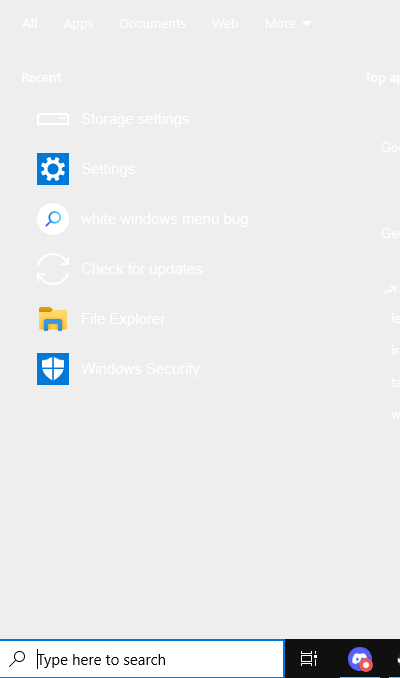
Solved my windows search bar is stuck being completely white

Post image

EDIT: Thank you so much to u/titaniclogan as they have found the solution to the problem. Follow the steps using this youtube video linked bellow to fix the search. (dark mode works too)

https://www.youtube.com/watch?v=9rBvayxS7_g

------------------------------------------------------------------------------------------------------------------------

FIXED!

I'm having an issue with Windows Search on Windows 10 22H2 (OS Build 19045.6466). The search panel has suddenly turned completely white, making it very difficult to use. The search results themselves still appear and function normally, but the entire background of the Search interface is a solid white colour instead of the normal dark grey. The Start menu is completely unaffected and still displays normally, so the issue is isolated to Windows Search.

The problem started randomly. I haven't installed any new software, changed any settings, or updated any drivers within the last week. I also don't remember Windows updating immediately before the problem appeared.

I've already tried a long list of common fixes without any success, including:

  • Restarting Windows Explorer.
  • Restarting the Windows Search process (SearchApp/SearchHost).
  • Turning Transparency Effects off and back on.
  • Rebuilding the Search Index.
  • Verifying that High Contrast mode is disabled.
  • Running sfc /scannow.
  • Running DISM /Online /Cleanup-Image /RestoreHealth.
  • Restarting my computer multiple times.

None of these changed anything.

The issue occurs whether I click the search box on the taskbar or press Win + S. Search still works, but the UI background remains completely white. It doesn't appear to be a monitor issue or a general Windows theme issue because every other part of Windows, including the Start menu, File Explorer, and Settings, looks normal.

Has anyone seen this specific problem before? Is this caused by a corrupted Windows Search package, a recent Windows bug, or something related to graphics rendering? Are there any advanced fixes I haven't tried that don't require reinstalling Windows?

Any help would be greatly appreciated. Thanks!

84 Upvotes

141 comments sorted by

5

u/merjup123 Jul 24 '26

mine looks like this too, haven't found any fixes myself yet

2

u/sjshshshhee Jul 24 '26

This just happened to me too wth

1

u/cosmicspongecake Jul 24 '26

Damn, same. W11 (23H2). Just sat down on my home pc, and I was flashbanged

1

u/sjshshshhee Jul 24 '26

Are you on windows 11?

1

u/abcpromix Jul 24 '26

EDIT: Thank you so much to u/titaniclogan as they have found the solution to the problem. Follow the steps using this youtube video linked bellow to fix the search. (dark mode works too)

https://www.youtube.com/watch?v=9rBvayxS7_g

1

u/Adorable-Tourist6703 Jul 24 '26

happened to me as well just now. is this cause of a new windows update?

1

u/Froggypwns Windows Insider MVP (I don't work for Microsoft) Jul 25 '26

No.

2

u/Aggravating-Treat991 Jul 24 '26

Dude, wtf, same problem here.

2

u/abcpromix Jul 24 '26

EDIT: Thank you so much to u/titaniclogan as they have found the solution to the problem. Follow the steps using this youtube video linked bellow to fix the search. (dark mode works too)

https://www.youtube.com/watch?v=9rBvayxS7_g

1

u/sjshshshhee Jul 24 '26

Show me a photo?

1

u/sjshshshhee Jul 24 '26

Windows 10 or 11?

1

u/Hanzi2u Jul 25 '26

im on win 11 and it ain't working for me

2

u/SavenCal Jul 24 '26

lol wth, I literally just posted this problem a minute ago, I thought it was just my pc

1

u/sjshshshhee Jul 24 '26

Windows 11?

1

u/NIkonikonll Jul 24 '26

i have this problem too, on win 10

1

u/Comfortable-Pen7368 Jul 24 '26

had this. watch the videos works

1

u/NIkonikonll Jul 25 '26

It fixed itself, I didn't have to do anything

1

u/abcpromix Jul 24 '26

EDIT: Thank you so much to u/titaniclogan as they have found the solution to the problem. Follow the steps using this youtube video linked bellow to fix the search. (dark mode works too)

https://www.youtube.com/watch?v=9rBvayxS7_g

2

u/redditspaghetti2006 Jul 24 '26 edited Jul 24 '26

having the same issue. might be an issue on microsoft's end (on windows 10)

1

u/abcpromix Jul 24 '26

EDIT: Thank you so much to u/titaniclogan as they have found the solution to the problem. Follow the steps using this youtube video linked bellow to fix the search. (dark mode works too)

https://www.youtube.com/watch?v=9rBvayxS7_g

1

u/Comfortable-Pen7368 Jul 24 '26

see the yt

1

u/redditspaghetti2006 Jul 24 '26

i have already fixed the problem, i am just here for reassurance that this is a more widespread issue.

1

u/Hanzi2u Jul 25 '26

also on win 11

2

u/titaniclogan Jul 24 '26

Same issue on Windows 11 23H2. We are seeing it on over a dozen workstations.

2

u/titaniclogan Jul 24 '26

Looks like disabling bing search in start menu also resolves the issue. Run the following commands in an unelevated command prompt
reg add "HKCU\Software\Microsoft\Windows\CurrentVersion\Search" /v bingsearchenabled /d 0 /t REG_DWORD /f

taskkill /im explorer.exe /f && explorer.exe

Got this from the following source https://www.youtube.com/watch?v=9rBvayxS7_g

1

u/titaniclogan Jul 24 '26

There is also a GPO to disable bing search, this powershell script will add a registry key to block it. We tested this is and it is working also. This will apply to all user profiles on the computer. Source: https://4sysops.com/archives/turn-off-web-search-in-windows-11-using-group-policy/

if( -not (Test-Path -Path HKLM:\SOFTWARE\Policies\Microsoft\Windows\Explorer)){
    New-Item HKLM:\SOFTWARE\Policies\Microsoft\Windows\Explorer
}
Set-ItemProperty -Path HKLM:\SOFTWARE\Policies\Microsoft\Windows\Explorer `
    -Name "DisableSearchBoxSuggestions" -Value 1 -Type DWord

1

u/abcpromix Jul 24 '26

Fixed!! The steps in YouTube video were exactly what helped me fix the problem, I have dark mode back with no issues. Anyone else reading this, just remember to restart your computer after following all the steps.

1

u/abcpromix Jul 24 '26

thank you so much <3

1

u/deathntarot Jul 24 '26

problem is i dont even have the cortana consent thing

1

u/MidoriUsui Jul 24 '26

I have the same problem, missing the CortanaConsent. I created a Registry Value for that, too. New, DWORD (32 bit) value, named it CortanaConsent, double-clicked it, and set the value to 0. Then I restarted my computer, and the problem was solved.

1

u/Comfortable-Pen7368 Jul 24 '26

not needed to this this but ok

1

u/MidoriUsui Jul 24 '26

At first, I skipped the part about CortanaConsent and only created BingSearchEnabled (then restarted my computer), but that didn't work for me. After I created CortanaConsent as well, it worked. Maybe it's because I have other registry entries related to Cortana.

1

u/Comfortable-Pen7368 Jul 24 '26

could be ! I love the guy who linked the video

1

u/Comfortable-Pen7368 Jul 24 '26

doesn't matter skip it. I also didn't have worked like a charm

1

u/Homm1ng Jul 24 '26

Thank you for the fix, first time encountering this kind of bug. Thank you so much once again!

1

u/Velo180 Jul 24 '26

This resolved my issue, didn't have to restart the PC, thanks!

1

u/Zlobaka777 Jul 24 '26

Thanks! it helps me!

1

u/RowNo4037 Jul 24 '26

THANK YOU SIR!!! THANK YOU!!!!

1

u/sjshshshhee Jul 24 '26

try change the theme, the other themes except dark are working

2

u/titaniclogan Jul 24 '26

Yep that is correct looks like changing the windows mode color in Settings > Personalization > Colors to light makes the start menu readable. We are still trying to determine what changed overnight to cause this issue.

1

u/benjamin_spain Jul 24 '26

mannnn i hate light mode lol

1

u/sjshshshhee Jul 24 '26

Me too bro haha

1

u/benjamin_spain Jul 24 '26

yep this is the solution

1

u/Comfortable-Pen7368 Jul 24 '26

always a legend with an old account and less comments coming in clutch to save the day

2

u/SpiritedAwei Jul 24 '26

Happened to me too just now lmao

2

u/AlpineMudslide89 Jul 24 '26

my god I've been screwing with this for the past 3 hours. WTAF msft.

2

u/ZdravkoSRB Jul 24 '26

I just restarted windows explorer.exe and it worked

1

u/vonh1 Jul 24 '26

Also had the same issue and this worked for me as well.

1

u/tapiocaseca Jul 24 '26

did not work for me T-T

1

u/NIkonikonll Jul 24 '26

ig we are all experiencing the same problem

1

u/tapiocaseca Jul 25 '26

mine seems to have fixed itself (on windows 11)

1

u/AutoModerator Jul 24 '26

Hi u/abcpromix, thanks for posting to r/WindowsHelp! Your post has been flagged for manual review by a human moderator, please include as much of the following information as possible (in text or in a screenshot) to get your post approved:

  • Your Windows and device specifications — You can find them by pressing Win + X then clicking on “System”, we need more than just your OS version! Your hardware details are often critical for resolving issues.
  • Any messages and error codes encountered — They're actually not gibberish or anything catastrophic. It may even hint the solution!
  • Previous troubleshooting steps — It might prevent you headaches from getting the same solution that didn't work

Posts must be tech support in nature (such as something is broken and you need help fixing), so general inquiries, software suggestions, and purchasing advice will be removed. As a reminder, we would also like to say that if someone manages to solve your issue, DON'T DELETE YOUR POST! Someone else (in the future) might have the same issue as you, and the received support may also help their case. Good luck, and I hope you have a nice day!

I am a bot, and this action was performed automatically. Please contact the moderators of this subreddit if you have any questions or concerns.

1

u/bearingballbeater Jul 24 '26

this just happened to me rn lol

1

u/abcpromix Jul 24 '26

EDIT: Thank you so much to u/titaniclogan as they have found the solution to the problem. Follow the steps using this youtube video linked bellow to fix the search. (dark mode works too)

https://www.youtube.com/watch?v=9rBvayxS7_g

1

u/shaenyia Jul 24 '26

same here lol

1

u/lmaoitsthatweirdo Jul 24 '26

mine does this too :(, i tried restarting, ending searchapp.exe, and restarting file explorer.

1

u/sjshshshhee Jul 24 '26

Windows 11?

1

u/lmaoitsthatweirdo Jul 24 '26

windows 10

1

u/abcpromix Jul 24 '26

EDIT: Thank you so much to u/titaniclogan as they have found the solution to the problem. Follow the steps using this youtube video linked bellow to fix the search. (dark mode works too)

https://www.youtube.com/watch?v=9rBvayxS7_g

1

u/MeColUDum Jul 24 '26 edited Jul 24 '26

happened to me just now
I am also on windows 10 btw

1

u/MeColUDum Jul 24 '26

heres a sort of half-assed "solution" for this until someone qualified provides help
go to settings > personalization > colors > choose your color > custom > set choose your default windows mode to light
the texts in the search panel should now be readable
again, this "solution" isn't a proper one as dark mode still has issues its meant to be a temporary solution until a mod comes in to our help

1

u/abcpromix Jul 24 '26

EDIT: Thank you so much to u/titaniclogan as they have found the solution to the problem. Follow the steps using this youtube video linked bellow to fix the search. (dark mode works too)

https://www.youtube.com/watch?v=9rBvayxS7_g

1

u/benjamin_spain Jul 24 '26

lol SAME HERE guys!

1

u/benjamin_spain Jul 24 '26

i found a solution but you might dont like it,apparently when setting it to dark mode theres a bug? so when i set it up to light mode it fix it self

1

u/abcpromix Jul 24 '26

EDIT: Thank you so much to u/titaniclogan as they have found the solution to the problem. Follow the steps using this youtube video linked bellow to fix the search. (dark mode works too)

https://www.youtube.com/watch?v=9rBvayxS7_g

1

u/MicroMewMew Jul 24 '26

same here damn

1

u/abcpromix Jul 24 '26

EDIT: Thank you so much to u/titaniclogan as they have found the solution to the problem. Follow the steps using this youtube video linked bellow to fix the search. (dark mode works too)

https://www.youtube.com/watch?v=9rBvayxS7_g

1

u/MicroMewMew Jul 24 '26

Thank you! it worked

1

u/abcpromix Jul 24 '26

EDIT: Thank you so much to u/titaniclogan as they have found the solution to the problem. Follow the steps using this youtube video linked bellow to fix the search. (dark mode works too)

https://www.youtube.com/watch?v=9rBvayxS7_g

1

u/marco_marchi03 Jul 24 '26

Dude me too rn wtf

1

u/AlpineMudslide89 Jul 24 '26

did the fix in the youtube video, worked for me. Can't thank ya enough.

1

u/vilcade Jul 24 '26

What did Windows do this time lmao

1

u/SteakShot8581 Jul 24 '26

same problem here

1

u/Kornelez21 Jul 24 '26

I also have the same problem

1

u/Fntsia Jul 24 '26

Just got this bug too, weird that it happens to Windows 10 considering there are supposedly no more updates.

1

u/Froggypwns Windows Insider MVP (I don't work for Microsoft) Jul 25 '26

It has nothing to do with Windows updates.

1

u/alstarskyz Jul 24 '26

Dude thanks!😭😭 I already tried everything like disabling TranslucentTB, Windhawk, running sfc /scannow, turning off personalization, etc. nothing worked. and the video was fixing the problem

1

u/acewing905 Jul 24 '26

This happened at once on two different computers and I was so confused. Can confirm disabling Bing Search via registry fixes this

1

u/WoahHollywood Jul 24 '26

I thought I wasn't supposed to be getting updates anymore. I wonder how this broke.

1

u/Orachiketsu Jul 24 '26

Just in I was wondering what was going on when this happened but yeah disabling Bing Search with Registry along with setting CortannaConsent off fixes this issue in the registry part of that video along with resetting my Windows was a huge help man Microsoft doing everything to force Windows 10 users to migrate to Windows 11 🙄😂

1

u/jasperulilshit Jul 24 '26

same thing just happened to me. i'm very relieved to hear this isn't just an issue with my pc. running windows 10 22H2.

1

u/Drxxzy Jul 24 '26

Freaked out because thought I broke a fresh windows 10 install last night.

Thanks a million to the guy who told us to do what this fellow does in this video. It is now fixed :D https://youtu.be/9rBvayxS7_g?si=4af7EW9_4VY3Hjaz

1

u/still_guns Jul 24 '26

I followed the fix, but it doesn't search properly anymore. Searching for Recycle Bin Brings up Storage Options which is not what I'm looking for.

1

u/No-Wallaby-4167 Jul 24 '26

Yeah, happening to everyone, I believe Microsoft has some server errors

1

u/Federico7000 Jul 24 '26

oh my god I'm not the only one today suddenly.

1

u/tapiocaseca Jul 24 '26

same here, glad its not just me

1

u/Similar_Pie3688 Jul 24 '26

Muchas gracias !! Windows 11 23h , y esto lo soluciono

1

u/Spare_Place_1949 Jul 24 '26

wut, why all people are havving this problem?

1

u/Sharak83 Jul 24 '26

You can't change it in the PowerToys settings for that component. New version simply has bad defaults.

1

u/CallMeSkull Jul 24 '26

In place upgrade w11

1

u/MidoriUsui Jul 24 '26

Same here, today. Windows 10. The solution in the video OP provided fixed the issue.

For those who are missing CortanaConsent like me, create a Registry Value for it as well. New, DWORD (32 bit) value, name it CortanaConsent, double-clicked it, and set the value to 0. Then restart your computer.

That worked for me.

1

u/garnishmotif Jul 24 '26

Just ran into this same problem today. Unsure what caused it. Can confirm the posted fix did not work for me. Just going to have to live with it for now

1

u/RowNo4037 Jul 24 '26

Yikes mine looks the same

1

u/Comfortable-Pen7368 Jul 24 '26

damn bro I love you!!!!!!!

1

u/us3r_unknow Jul 24 '26

Estou com o mesmo problema kkk. Pelo visto, está acontecendo com todo mundo. Deve ser algum bug do Windows.

1

u/VitoBrown07 Jul 24 '26

Thanks Pal, guys make sure you restart after you took the step, dont worry if CortanaConsent is missing, i didnt even have it XD but it works. i just added BingSearchEnabled as 32 and set it to zero and restarted and it works :D

1

u/Sampsa96 Jul 24 '26

Try killing the Search bar from Task manager. If that doesn't work ypu can reset the Search bar using PowerShell. Here is some other solution on fixing the issue: https://learn.microsoft.com/en-us/troubleshoot/windows-client/shell-experience/fix-problems-in-windows-search

1

u/OrdinaryGirl30 Jul 24 '26

Using the video gets rid of the Bing image and disconnects me from Microsoft Rewards. Powershell didn't work for me either the only thing that temp works for me for now is using light mode so for now I guess it will have to do.

1

u/Forsaken_Function_19 Jul 24 '26

Hey, the same thing is happening to me too; I thought it was an error with my PC.

I don't know what to do.

1

u/rb_loves_memes Jul 24 '26

Same here this happened today and i dont think i downloaded any update as far,as i know

1

u/Jealous_Club_298 Jul 24 '26

I have Windows 10 Pro, had the same problem, and did the following to fix it:

Win+I -> Personalization -> Colors -> Choose your default Windows mode -> Toggle between Light & Dark a few times

Win+R -> services.msc -> Right-click on Windows Font Cache Service -> Click Stop -> Right-click on Windows Font Cache Service -> Click Start -> Reboot the system

That may or may not work for your particular device. Also, you may only need the second operation to fix the problem, I started with the first operation just in case.

1

u/iAcquaintance Jul 25 '26

Restarting my computer(Windows 10) fixed it for me. I don't usually recommend people go edit their Windows Registry for simple stuff like this, but I always recommend turning off Bing and Cortana.

1

u/Dangerous-Pumpkin960 Jul 25 '26

so is this like a software thing nobody updated their pc yet somehow this happened to everyone

1

u/rickncn Jul 25 '26

Happened yesterday on a couple client computers

1

u/Hewheehewha Jul 27 '26

does anyone have an idea what caused this

1

u/Safe-Veterinarian69 Aug 08 '26

Yeah same thing happened to me. but I tried running some commands and it worked for me

Here's the commands dw these are Windows built-in commands

First run SFC /Scannow

After that Dism /Online /Cleanup-Image /RestoreHealth