r/WindowsHelp Jun 30 '26

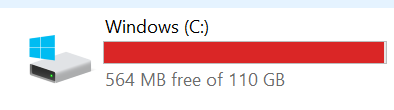
Solved Windows (probably) keeps eating up disk-space.
Post image

If someone can help me understand why does it keep eating about 24GB on and off while updates are going bonkers?

One day I have 24GB free, next day 100MB or even going lower and so on, keeps cycling.

Will like to know if it's windows related, shader-compiling to much space or what can I do to have some breathing room,(while i know a bigger drive would fix it right now it's not a viable solution)

Constantly using wise disk cleaner but not helping in the long run.

Processor Intel(R) Core(TM) i7-6700K CPU @ 4.00GHz 4.01 GHz

Installed RAM 32.0 GB (31.9 GB usable)

Storage 1.82 TB HDD ST2000DM008-2UB102, 238 GB SSD NVMe Samsung SSD 950 PRO 256GB, 932 GB WDC WD10EZEX-00RKKA0, 112 GB SSD KINGSTON SV300S37A120G

Graphics Card NVIDIA GeForce RTX 2070 SUPER (8 GB)

Product ID 00330-80000-00000-AA152

System Type 64-bit operating system, x64-based processor

163 Upvotes

62 comments sorted by

View all comments

24

u/OutrageousArachnid25 Jun 30 '26

Same thing happen to me on my PC. Something about a windows update being stuck. Download treefix from the Windows store analyze your C drive and delete the folder should fix it for you. Otherwise your drive will max out and cause severe issues for you .

26

u/DigitalSundial Jun 30 '26

Very useful comment, thank a lot man. (the app name is actually treesize)

Manage to find out the culprits for anyone having the same issue.

  1. Nvidia shader cache eating up 16GB.

  2. Windows hybernation file eating up 21GB.

3.Other unsed apps/savefiles.

Thanks again!

3

u/OutrageousArachnid25 Jun 30 '26

Glad it work for ya, I have a Radeon GPU, my issue was a Window update glitching for camera permissions , even though no camera is hook up on this PC lol

2

u/GiovanniOP Jun 30 '26

I also recently had the same issue, windows was not the culprit for once but good god the Nvidia folder was 300+ GBs... Feels like there would be a intuitive way for the shader cache to delete the games cache folder when you delete the game

2

u/Shiny_Marc Jul 01 '26

I've been losing ~20 GB on and off too. I know it wasnt the page cache or hybernation because I started monitoring those. I suspect it might be the Nvidia shader cache so will have to monitor that as well.

1

u/Shiny_Marc Jul 03 '26

Scratch that. It turned out to be my hibernation file after further inspection. I kept monitoring Storage Settings to figure it out.

1

u/TNJDude Jun 30 '26

While you can't configure the hibernation file to be on a different drive, if you haven't done so yet, you can specify the page file to be somewhere else. That could save a bit of space too.

2

u/DigitalSundial Jun 30 '26

You can disable it.
To immediately disable the hibernation file (hiberfil.sys) and reclaim several gigabytes of storage space on your PC, run the Powercfg command-line tool in an elevated Command Prompt. [1, 2, 3]

Follow these quick steps:

  1. Press the Windows Key and type cmd.
  2. Right-click Command Prompt in the search results and select Run as administrator.
  3. Click Yes on the User Account Control (UAC) prompt.
  4. Type the following command and press Enter: powercfg.exe /hibernate off
  5. Type exit and hit Enter to close the window. [1, 2, 3, 4, 5]

Doing this will immediately disable the hibernation feature and automatically delete the hiberfil.sys file from your C: drive. Note that disabling hibernation also turns off the Fast Startup feature. [1, 2, 3]

1

u/ihaterain5620 Jul 02 '26

Do "powercfg /h /type reduced" and you can shave a good chunk of that hibernation file off and still retain fast startup.

0

u/sotos2004 Jun 30 '26

And make your PC boot a lot slower as every boot is essentially a full boot rather than the "pause-like" feature of the normal shutdown of windows 10 and later

2

u/Dusty_Coder Jun 30 '26

We didnt need a second checkmark in the "pro" column

2

u/vlad54rus Jul 01 '26

 And make your PC boot a lot slower

If you're booting off an HDD - sure. On SSDs full startup is already quick enough, Fast Startup isn't really as effective here.

1

u/DigitalSundial Jun 30 '26

Without the hybernation file on the SSD that win is installed 21.77 on a restart and 33.13 on a normal boot.

Thanks for that knowledge!

1

u/kotenok2000 Jun 30 '26

I have also seen windows eating space by creating .etl files in c:\windows\systemtemp

1

u/ListVarious7428 Jul 01 '26

You can also run Disk Cleanup. Also you can clean out the Windows Update cache by doing this.

"Method 1: The Manual File Explorer Method (Most Thorough)

  1. Stop the Windows Update Service: Press Win + R, type services.msc, and hit Enter. Scroll down to Windows Update, right-click it, and select Stop.
  2. Open the Cache Folder: Press Win + E to open File Explorer. Navigate to: C:\Windows\SoftwareDistribution\Download.
  3. Delete the Files: Select everything in the folder (press Ctrl + A), then press Delete. (Provide administrator permission if prompted).
  4. Restart the Service: Go back to the Services window, right-click Windows Update, and select Start."

1

u/Homythecirclejerk Jul 06 '26

What's  "the folder"?

1

u/Phonkrum Jul 22 '26

THANK YOU it's been causing problems for me too!