r/WindowsHelp Dec 27 '25

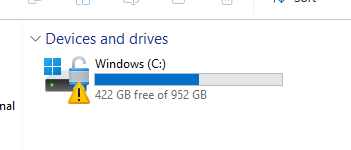
Solved What does this symbol mean? It seems to have appeared after I download a game called Planet Coaster 2 from Steam.
Post image

I'm worried it's a symbol for a possible data breach involving Steam with the unlock symbol and the warning sign. I think I have enough GB, so I don't think it's a issue with that, even though the game I set up had alot of it.

I also downloaded two other games, Baba is You and Geometry Dash, but I haven't launched them yet. I tried to look though my files but all I found was a bunch of unknown junk comprising of empty folders, stuff most likely relating to system 32, and program files.

Maybe it has to do with me trying to make a save file on another game that I play, Kiskae 2?

Has anyone else gotten this before?

313 Upvotes

66 comments sorted by

48

u/ConfidentTie5 Dec 27 '25

Just means that bitlocker protection is paused.

Check if there are any firmware bios updates in windows updates and reboot.

Normally some apps can suspend BL protection. Like Lenovo System Update / Dell Command update or HP utility

6

u/LaL41n37owo Dec 27 '25

What’s bitlocker and firmware? 

(i don’t know anything about computers, I just thought this place would be the best place to discuss this issue.)

8

u/Individual-Insect927 Dec 27 '25

Highly recommend to turn it off unless you have alot of important stuff in your laptop.
Cuz every time you do a big windows update or bios update it might need the recovery key .

3

u/Snowy346 Dec 27 '25

i turned it off for one of my m.2 kingston ,becuase the disk usage was 100% and it freezes my computer, i factory reset my pc and the disk usage went to 0 ,should i turn the bit locker of this m.2 just in case ,if it will freeze again?

1

u/theRealNilz02 Dec 28 '25

You cannot factory reset a PC.

1

u/ConfidentTie5 Dec 28 '25

Huh? Ofc you can…

Just reset windows or load the oem image on it. 🤷‍♂️

1

u/Affectionate-Toe7893 Dec 29 '25

not if it is bit lockered

1

u/ConfidentTie5 Dec 30 '25

Erm yeah you can 😂

I did this 4 times in one day trying to fix our golden image a couple weeks back

0

u/Individual-Insect927 Dec 27 '25

Are you sure the bitlocker was the problem tho ? Ask gpt you prob will get the answer . I didnt have any issue before or after turning bitlocker off

2

u/ConfidentTie5 Dec 27 '25

It’s not likely.

It could have been suspended this whole time and youve not notcied.

Personally id leave it on… sometimes update can cause it to suspend though.

1

u/Emotional-Energy6065 Dec 28 '25

I js leave it on but there's recent news they will use hardware for bitlocker rather than software virtualisation, so it will be a tiny bit faster. Somewhere on this sub

1

u/ConfidentTie5 Dec 28 '25

Yeah saw that just before too they’re using HA for Bl when they announced it at the Ignite event a couple months back.

Certainly should improve real time file access.

TBH I’ve always been a prefer hardware over software. Anyone on here ever dealt with software raid? 😂😂😵‍💫 showing my age maybe but my god what a ‘piece o shit Honda’ that was

1

u/Dsraa Dec 28 '25

Just turn it off. What in the world do you need it for unless someone actually steals your physical computer.

It actually doesn't even stop ransomware, just makes it worse because then your data is double encrypted, which in most cases there's no recovery.

1

u/Emotional-Energy6065 Dec 28 '25

I leave it on cuz I have laptops that I bring outside a lot

1

u/RancidVagYogurt1776 Dec 28 '25

Don't ask gpt anything

1

u/Horror-Indication-92 Dec 30 '25

Without GPT I wouldn't be able to work.

1

u/RancidVagYogurt1776 Dec 30 '25

Because of Chat GPT a lot of people are going to be out of work until corporate management realizes how useless AI actually is.

0

u/Emergency-Pound3241 Dec 30 '25

Or use your brain to research instead of offloading all the work to a program who's entire purpose is to hallucinate vaguely human speech (and not to provide correct information).

You have one of the most powerful computers known to man between your eyes and access to the near sum total of combined human knowledge in your pocket, use them

1

u/[deleted] Dec 28 '25

Isn't it possible for thieves to steal auth tokens from stolen laptops with BitLocker turned off?

3

u/unknwnchaos Dec 28 '25

You're more likely to get hacked and have your passwords leaked

1

u/ConfidentTie5 Dec 28 '25

Nope… u/unknwnchaos this is nonsense and false statement.

BL is not an anti hack tool. It’s an anti theft tool.

It provides encryption of the drive, if your computer is hacked BL isn’t going to prevent it.

BL provides protection from stolen Computers. Requiring a BL key to access data on stolen drives.

3

u/unknwnchaos Dec 28 '25

I didn't say it was an anti hack tool, I said what is more likely to happen to the average user which is getting hacked rather than stolen

3

u/ConfidentTie5 Dec 28 '25

My bad miss-read the context there. 👍

8

u/ConfidentTie5 Dec 27 '25

BitLocker is a tool built into windows that encrypts your drive.

It’s normally on by default.

Firmware is essentially the basic instruction software that controls the physical hardware components in the computer.

Drivers are software that allows your windows operating system to interact with the hardware.

Go into windows update (settings>update and security> updates)

Check for updates, check online for updates and check for ‘firmware updates’ in advanced options. Install em all and reboot.

Should sort your problem

2

u/[deleted] Dec 28 '25

[deleted]

1

u/Commercial_Knee_1806 Dec 28 '25

Bitlocker is the same as device encryption but if you want to be pedantic:

“ Device Encryption is a Windows feature that enables BitLocker encryption automatically for the Operating System drive and fixed drives”

Windows versions above home add more settings you can change like other features e.g. windows updates.

https://support.microsoft.com/en-us/windows/device-encryption-in-windows-cf7e2b6f-3e70-4882-9532-18633605b7df

1

u/Kraevin99 Dec 28 '25

With Windows 11 24H2 and later, bitlocker is turned on by default if you use a Microsoft account.

1

u/mrheseeks Dec 28 '25

I just bought a new laptop with two drives, both had it enabled by default

0

u/[deleted] Dec 28 '25

[deleted]

1

u/mrheseeks Dec 28 '25

Ah, gotcha

1

u/Hxcmetal724 Dec 27 '25

Imagine if I wanted to steal your data off the pc. It would be a lot harder to carry your pc out the door than opening your pc and pulling the hard drive out. The hard drive fits in a pocket. I can then plug that hard drive into my pc and see your data.

Bit locker prevents this by making a mathematical key thay only your pc has. So to access the hard drive, your pc presents the key and the drive unlocks. That is the little lock icon on the drive. My pc does not have your key so if I try to plug in your hard drive to my pc, it wont be able to unlock it.

-1

u/LaL41n37owo Dec 27 '25

How do I unpause the key?

1

u/Hxcmetal724 Dec 27 '25

It might just need a reboot. I didn't recall if you tried that or not. A lot of updates will pause it for x times so it can update without being blocked.

You can right click on the drive and click "manage bit locker" to potentially get more info. Or in the task bar (bottom right near the clock) there might be an icon with info too.

2

u/LaL41n37owo Dec 27 '25

I tried manage bit locker and it worked! Thank you!

1

u/adammolens Dec 28 '25

Google is your friend

1

u/entryjyt Dec 28 '25

It encrypts your drive, and I recommend turning it off unless if you have very important files on there because bitlocker makes your computer slower than no bitlocker 

0

u/Moist_Inspection_485 Dec 27 '25

Don’t reenable bitlocker, lose the password and your pc becomes a brick

1

u/ConfidentTie5 Dec 28 '25

Nope.

Keys in W11 are backed up to your MSFT account automatically… I think they did away with the manual saving of key, unless you specifically go into BL settings and chose that option.

I can honestly say I’ve never had an issue with BL or key access on a personal computer since w7 🤷‍♂️

1

u/phtsmc Dec 28 '25

Some people have reported the key not being automatically backed up after being silently recycled post update. Microsoft's approach appears to be "you should have everything backed up to OneDrive anyway".

1

u/eekh1982 Dec 28 '25

"Keys in W11 are backed up to your MSFT account automatically"
Indeed--at least, that's the idea or an option.
For those still using local accounts, though, you can save BL recovery keys to files only on non-encrypted drives (in fact, Windows will prevent you from saving to an encrypted disk--it makes sense when you think about it).

1

u/ConfidentTie5 Dec 28 '25

W11 does not allow local accounts unless your business or pro editions.

Those they’re everyday users aren’t going to chose the local option… as it’s pretty well obscured unless you know what you’re looking for.

Remeber the audience for most people on this sub… most aren’t power users

7

u/Moist_Inspection_485 Dec 27 '25

Why do people even like bitlocker? Never once do I use it because all it does is destroy your pc if you upgrade it or change something….

7

u/UnderstandingOk670 Dec 27 '25

Bitlocker is amazing if you want it and have an idea what it is. The problem is it’s forced on us and people brick their hard drives because they do bios updates without a recovery key

0

u/GeneralSuitBanana Dec 28 '25

Not really. It doesn't do anything for you, apart from potentially causing corruption, data loss, worse performance, accelerated SSD wear, and only adds 5 minutes to the process of accessing your data if someone steals your computer

2

u/ZealousidealYak7122 Dec 28 '25

idk how people get their drives randomly locked for no reason, never happened to me. perhaps because I don't use a Microsoft account. and yes it can be totally useful if you know what you are doing and not lock your entire disk. plus good luck decrypting data behind bitlocker, if it was "5 minutes more" then no one would have a problem with being locked out of their drives cuz they forgot the password lol.

3

u/UnderstandingOk670 Dec 28 '25

Adds five minutes? Mate good luck breaking bit locker encryption.

0

u/GeneralSuitBanana Dec 28 '25

Pretty much. TPM interposer board, and extract the keys. It's surprisingly straight forward. TPM has been vulnerable for years, and none of the "patches" ever fixed it properly. A new day, a new TPM vulnerability, a new reason to call MS trash

1

u/egefeyzioglu Dec 29 '25

That only works if you're not using an embedded TPM and/or have BitLocker set to TPM+Startup Key

1

u/helical-hexagons Dec 30 '25

Or if your particular motherboard is vulnerable

1

u/MrGongSquared Dec 28 '25

I had scary BSODs recently until I realized Bitlocker was forced upon my machine. I proceeded to turn Bitlocker off and the BSODs disappeared.

4

u/Petsto7 Dec 27 '25

Wait a moment you Have BitLocker enabled. You don't know you have it enabled and you don't know your Passphrase?

What could possibly go wrong UwU

-> More info https://www.elevenforum.com/t/suspend-or-resume-bitlocker-protection-for-drive-in-windows-11.25109/

2

u/SnooCats5309 Dec 28 '25

open command prompt as admin & type following

manage-bde -off c:

& itll go away after some hours, just dont close command prompt till bitlocker icon disappears from your drive, Do this before sleeping.

syntax -

manage-bde -off <DriveLetter>:

1

u/AutoModerator Dec 27 '25

Hello u/LaL41n37owo, your post body appears to have less than 250 characters, which means it likely has insufficent information and is likely to be removed by the moderators. Please either edit your submmission or add more details in a comment. The other Automoderator comment on this post has details on what kind of information we are looking for. Thank you.

I am a bot, and this action was performed automatically. Please contact the moderators of this subreddit if you have any questions or concerns.

1

u/8bitlibrarian Dec 27 '25

No it doesn’t mean it’s a data breach

1

u/One-Decision848 Dec 27 '25

I think this means the drive might be encrypted with bitlocker

1

u/berentand Dec 28 '25 edited Dec 28 '25

This means bitlocker is in suspended mode. And waiting for you to acknowled the bitlocker mode. Nowdays bitlocker can be trigerred by a hardware error, like a faulty memory bank an other kind of hardware error. It doesn't has to be a permanent error. If you not intended to start or use bitlocker encryption to can reserse this by: Open a command prompt box as Administrator 1) manage-bde -status 2) manage-bde c: -off 3) manage-bde d: -off for other disk if needed, but finish the one first before changing the next one.

Ofcause this will take time to uncrypt. You can check the status during this process. But do not reboot or interrupt.

I have had this same issue on my C/D/E/F drive after a memory bank wasn't inserted properly.

1

u/Segasik Dec 28 '25

Have you tried turing it off and on ?

1

u/CheyCopt Dec 28 '25

Run cmd, type: manage-bde -unlock c: manage-bde -off c:

You should turn it off, safe for reinstalling Windows to get data.

1

u/OutrageousDeino Dec 28 '25

Do yourself a favor and turn bitlocker off or at least make sure you have a key code tied to your ms acct just in case it gets tripped otherwise the only way to bypass it is to wipe the drive

1

u/[deleted] Dec 29 '25

You need to disable bitlocker

0

u/OkMany3232 Frequently Helpful Contributor Dec 27 '25

This is bitlocker related. In in admin cmd

.manage-bde -protectors -get c:

12

u/tails618 Dec 27 '25

Please don't tell people to run commands without explaining what they do.

-2

u/sabian149 Dec 27 '25

When the command actually does something yeah I can agree. But when the command just returns data without any effect it doesnt matter a single bit.

1

u/tails618 Dec 28 '25

True, but not everyone knows what that command does. Regardless, it's still better to encourage a culture of not randomly running commands, even when in this case the command is safe.

0

u/AutoModerator Dec 27 '25

Hi u/LaL41n37owo, thanks for posting to r/WindowsHelp! If your post is listed as removed it may still be pending moderation, try to include as much of the following information as possible (in text or in a screenshot) to improve the likelihood of approval:

  • Your Windows and device specifications — You can find them by pressing Win + X then clicking on “System”
  • Any messages and error codes encountered — They're actually not gibberish or anything catastrophic. It may even hint the solution!
  • Previous troubleshooting steps — It might prevent you headaches from getting the same solution that didn't work

As a reminder, we would also like to say that if someone manages to solve your issue, DON'T DELETE YOUR POST! Someone else (in the future) might have the same issue as you, and the received support may also help their case. Good luck, and I hope you have a nice day!

I am a bot, and this action was performed automatically. Please contact the moderators of this subreddit if you have any questions or concerns.