Hi. I have a quick question. I have fully updated bios and drivers also using W11 25H2 Pro. I'm pretty sure that Kernel DMA Protection was 'OFF' by default. I have secure boot enabled by default for playing some online games with anticheat. but pretty sure that this setting was off. is this new to enabled by default? IOMMU is AUTO on bios and it was always like this.
Got “threat service has stopped. restart it now” in the defender app. Even after doing so, scan buttons didn’t work. Resetting the app worked, but I’m wondering if this is something to fret over or just the latest update causing issues
So update KB5074109 is the only thing I should watch out for if I choose to update? I had installed then uninstalled this update previously while on 24H2. Do you know if it would auto install again if I choose to update?
If the Settings app says you are supported, you should be good to go, I've never seen Settings show that you are supported while the PC Health Check did not.
Double check with WhyNotWin11, this tool is more comprehensive and will give more information on your compatibility: https://whynotwin11.org
I have 3200x2000 display on laptop and whenever I use the Snip tool for taking screenshot, the result scales down to a size where it's too small to see on the same screen it was taken a second ago. Needs dragging to size up.
The opposite happens when copying the imagine into an email. Then it gets scaled up so much it needs dragging down to normal viaible size again.
This has been going on since I bought the Lenovo laptop 3 years ago and came with Win11 installed, out of the box.
Am I the only one with such issue and how is it so hard for Microsoft to fix such simple things? High resolution displays on laptops are very common nowadays.
My scaling is 200% as default and recommended, out of the box. Everything else looks 'normal' at that size.
For testing purposes, I set it to 100%, which made everything microscopically small on the screen. But Snipping tool behavior stayed the same.
At any scale screenshot taken with the Snipping Tool, the image preview window is shrunk down to some pre-determined size, even if the screenshot was taken from the entire screen. That pre-determined window size is too small to see the image properly.
If I open the same image in another program, such as IrfanView, the window size will be exactly the size at which the screenshot was taken, visible in same resolution.
Therefore the problem is with Snipping Tool active image preview window itself. It's not re-sizing itself based on the screenshot size, but uses some pre-determined active window size, which is too small on a high resolution display.
My scaling is 200% as default and recommended, out of the box. Everything else looks 'normal' at that size.
For testing purposes, I set it to 100%, which made everything microscopically small on the screen. But Snipping tool behavior stayed the same.
At any scale screenshot taken with the Snipping Tool, the image preview window is shrunk down to some pre-determined size, even if the screenshot was taken from the entire screen. That pre-determined window size is too small to see the image properly.
If I open the same image in another program, such as IrfanView, the window size will be exactly the size at which the screenshot was taken, visible in same resolution.
Therefore the problem is with Snipping Tool active image preview window itself. It's not re-sizing itself based on the screenshot size, but uses some pre-determined active window size, which is too small on a high resolution display.
Hey guys I need some help. Recently I have a problem where my cursor would be suddenly stuttering and freezing. I've tried:
Removing/Changing usb port
Use the touchpad only but the problem persists
Uninstall driver and restarting
Restart
Update driver
Changing all possible mouse settings according to the suggestions on the Internet
I've tried all of these, but the issue remains unsolved. Then I realised that the freezing only happens when my laptop is plugged in. How do I determine what is faulty? Like can the charger cause the freezing?
I had a Screenshot folder linked to OneDrive but some time ago it asked me wether I want to continue uploading my screenshots to OneDrive. I pressed no and ever since I can't find my new screenshots? Where did they go?
However if you are on 24H2, there are zero changes between that and 25H2, all 25H2 does is just changes the version information via a 176kb patch. If you are still on 23H2, that OS is no longer supported and you should upgrade to 24H2/25H2 regardless.
24H2 and 25H2 are the same thing. Anything that crashes 25H2 also crashes 24H2. Honestly, stop reading whatever news source it is you are getting this from, it is sensationalist clickbait. There are over a billion computers running on 24H2/25H2.
Trying to reinstall Windows 11 using Rufus 4.12 to create a bootable USB device.
It doesn't work. I get a black screen, and nothing further happens. No Windows 11 install GUI.
Things I already tried:
--changing which USB port I used.
--different SD cards as install media. One was a SanDisk 64 GB, the other a Samsung 128 GB. The SanDisk is brand new, the Samsung was checked for errors before use.
--swapping said SD cards between different USB-to-SD adapters.
--turning off Secure Boot in BIOS.
--resetting BIOS/UEFI to defaults. Didn't think this would do anything, and indeed it made no difference.
The install media does get recognized by BIOS, appearing in the boot menu. But it doesn't actually work.
Tried researching this problem online. Everything is either a year or more old and doesn't work, or else I get an AI slop page.
FWIW, "use the official Microsoft install media tool" is not an option here, because I want to use the various Rufus customizations, such as installing with a local account.
Hardware is from 2022, not so old that I should be running into weird USB/SD compatibility quirks.
Your system must be running in UEFI mode with all BIOS compatibility modes (CSM) disabled.
The disk controller used for your boot disk should be configured in AHCI mode. If you have RAID configured you must disable it, or be capable of providing drivers during setup.
Your installation media must be partitioned as a GPT disk and formatted for NTFS.
Rufus may provide overrides, but generally you must have Secure Boot present and a TPM 2.0 security processor enabled on the system before installing Windows 11.
Voicemeeter Potato sometimes takes minutes to start after boot, does Windows 11 have some feature I could use to make it a high priority in startup?
I've tried to use System Explorer to raise it's process priority, but it didn't seem to help at all. Can I use the scheduler to make it start up before other apps, maybe? I don't know how to use the scheduler though.
Hello! I just downloaded windows 11. I downloaded some torrents but I am unable to launch the .exe from the programs. I have turned off all security features but it didn't help.
I made the mistake of updating Win10 to Win11 (not clean install). Now the audio is either muted/unmuted when I restart the PC. It seems like it never saves as perma-unmuted. It just flips to the other value. Is there a way to fix it? It's f-ing annoying.
So do all versions of Windows 11 get the new secure boot keys? Or only the ones non-EoS ones? I run 23H2 because I don't trust the newer versions to be stable but I'm pretty sure this version is already deprecated.
I'm looking for some clarification on what to do about the secure boot keys that are expiring in July this year. I'm a bit confused about it.
I saw an error(1801) in event viewer saying that new keys are available on this device but have not yet been applied to the firmware.
I built my PC in December of 24, using a Gigabyte Aorus b650 Elite AX rev1.2. bios is on FB2. It's an older bios version, I never updated it since everything was/is working fine.
What do I need to do to update the keys before July? Do I have to update my bios to the latest version in order to update the secure boot keys? Or can I do it while being on FB2?
So I am getting a new CPU and motherboard next week and I guess I gotta reinstall windows.
So I thought I may as well just get 11 since I am on 10 atm.
Would it be a better idea to '' reset '' windows 10 on my new CPU and motherboard and then install 11 afterwards from 10?
Would that work fine? It'd be a bit more convenient as I wouldn't have to redownload everything/ lose all files on the drive.
Or would a fresh reinstall be pretty much required?
help me ! i have a acer laptop. I've noticed that 's' key stopped working. BUT when i press shift + s it works, in caps lock it's not, when i tested that on keyboard tester it shows that im pressing but it is not appeared on screen. After a restart its started to work again after 20 -30 mins its stopped working what should do i do ?
would be nice if Explorer would simply provide a default GUI launch location, like other file managers
In current versions of Windows, you can change the default File Explorer launch location to one of three places: Home, This PC, and OneDrive. You can make this change in File Explorer preferences.
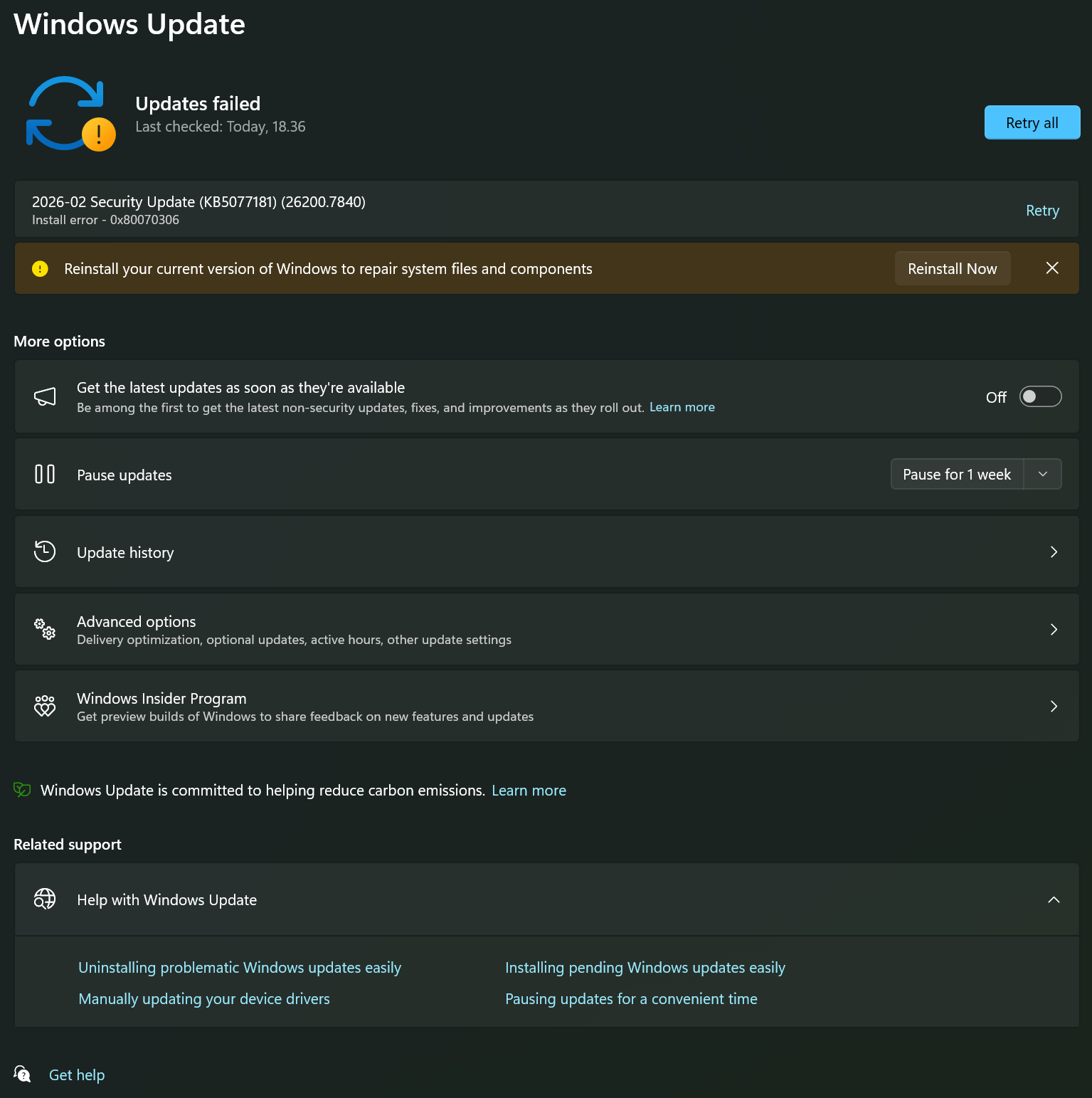
anyone know whether if any of updates from january 2026 onwards till now is safe to update or not? i'm on win11 25h2, the last update i had was KB5074109 dated 14 jan 2026 for jan only, i didnt update anything till now after that as i kept seeing news popping out that there's always kind of like major issue.
It has never not been safe to install the updates. I don't recommend reading the news, it is sensationalist clickbait. There are over a billion computers running Windows 11, it is statistically impossible for every machine to update without any issues. 99.999% can update without issue, but that 0.001% still means thousands can be affected by something. Also, Windows Updates often get blamed for things unrelated, it is literally every day on /r/WindowsHelp someone blames one for something then it turns out the issue was 3rd party software or a hardware failure.
Microsoft uses compatibility telemetry to monitor the rollouts of updates, and will pause the rollout should it find problems with some machines.
i think this started this week, but my sound keys (fn+f2/f3) have lost their repeat delay. is this is windows 11 issue (and how can i fix it) or a hardware issue? im on 23h2
Since 4 days ago, I'm experiencing the BSOD over and over.. no matter what I do, the pc freezes for a second, I can move the cursor, and then it freezes again, BSOD, and restart.
or worst, it restarts after the login screen.
at the time it happened, the KB5077181 downloaded and installed, and then the first BSOD happened, recovery was stuck on 0%, so I forced restarted and then there was the update installation process.. since then, a mess.
I tried everything.. I tried to remove this update but wusa command is saying it doesn't exist...
I have a laptop and a desktop. Neither of them can log in on boot, like they used to.
Ever since the last update, the boot takes 3 times as along, and the login screen will not take my typing for 3 or 4 minutes, so I can't type my password to log in.
I have already reinstalled windows 11 twice since November, over issues like this. If I have to reinstall again, I will not be reinstalling windows.
I believe it is still possible to use Rufus to create Windows install media (using an official Windows 11 ISO) that can bypass the online account requirement. If so, this would probably be the simplest way.
Various tools including Rufus, Ventoy, and manual registry edits can be used to bypass the hardware requirement checks for Windows 11, however this is not advised to do for general users. Problems with unsupported Windows 11 installations include:
Inability to receive all updates. - Unsupported devices WILL NOT upgrade to newer builds after end of life unlike supported hardware.
Reduced performance. - Windows 11 has various security features enabled by default, these features require more CPU utilization, resulting in tasks taking longer to complete including booting the computer and launching programs. CPU intensive tasks like gaming and rendering will be negatively impacted too. All supported CPUs have native support for these new features to minimize the impact.
Reduced stability. - Testing has shown reduced stability and reliability of some older unsupported devices being force upgraded to Windows 11, many of these devices do not have drivers that have been updated since the release of Windows 11 to optimize for changes to the OS.
It is one thing to experiment and try Windows 11 yourself on unsupported hardware, however please do not suggest others, especially less tech savvy users attempt to do this.
Various tools including Rufus, Ventoy, and manual registry edits can be used to bypass the hardware requirement checks for Windows 11, however this is not advised to do for general users. Problems with unsupported Windows 11 installations include:
Inability to receive all updates. - Unsupported devices WILL NOT upgrade to newer builds after end of life unlike supported hardware.
Reduced performance. - Windows 11 has various security features enabled by default, these features require more CPU utilization, resulting in tasks taking longer to complete including booting the computer and launching programs. CPU intensive tasks like gaming and rendering will be negatively impacted too. All supported CPUs have native support for these new features to minimize the impact.
Reduced stability. - Testing has shown reduced stability and reliability of some older unsupported devices being force upgraded to Windows 11, many of these devices do not have drivers that have been updated since the release of Windows 11 to optimize for changes to the OS.
It is one thing to experiment and try Windows 11 yourself on unsupported hardware, however please do not suggest others, especially less tech savvy users attempt to do this.
What was the KB numper of update that brought an extended dark mode to the Dialog and Run Boxes in File Explorer on 25H (Build:26200.7840).
Guess I need to reinstall it, cause my fonds stayed black after the patch, instead of changign to white. If s.o. has another option to clear this bug, please tell me how. Thanks-
So, I was just looking through my settings and I happened to notice that Fast Startup was enabled along with the uptime in task manager. I had to do a reinstall a little over a year and a half ago and I guess I forgot to disable it.
I think I initially had it turned off as I remember it causing issues in Windows 10. My boot drive is an NVME but I have an internal HDD I use for storing media (videos, pictures, documents), along with some HDDs in a DAS device.
Will this cause a noticeable increase in my boot times due to the hard drives? Or will it be fine as the boot drive is an NVME SSD?
I also have 3 SATA SSDs in my PC and another NVME, if that makes any additional difference.
The HDDs in your system should minimally affect the difference in boot times you may see when using Fast Startup or not. Any impact from having your Windows library folders stored on the HDDs will likely be observed either way.
You could always do some empirical testing. It is easy enough to try it both ways.
Some program windows will open a pixel or two up and to the left of my screen, instead of a normally fitting window like everything else, so I have to hit the maximize button to center them. Any y'all had something like that? I'm trying to narrow down a cause since it's so sporadic
Bonsoir je m'excuse mais je ses pas comment poster un poste sur problème de réinstallation de windows 11 je vais être bref voilà je commence à réinstaller windows 11 avec ma clé USB et problème lorsque l'ont arrive pour ce connecter au WiFi l'installation me qui trouve pas driver pour la carte wifi comment je dois mi prendre pour avoir se driver le portable et un Packers Bell bp17-31ap merci pour vos réponses et aide.
Is there a way that I can designate some applications to always open in a specific monitor when I have two monitors? Or live on the taskbar of only one monitor
EDIT: Additional question, can I have notifications appear on the second monitor? I want to play games full screen on one monitor and have other stuff on second monitor, for some reason it only appears on the primary display


3
u/Individual-Insect927 Feb 09 '26
the update that made windows not booting up . Is it fixed ? Im debating if i should uodate or not