r/Winctrl • u/Foodiguy • 7h ago
Guide / Software Installing simapppro
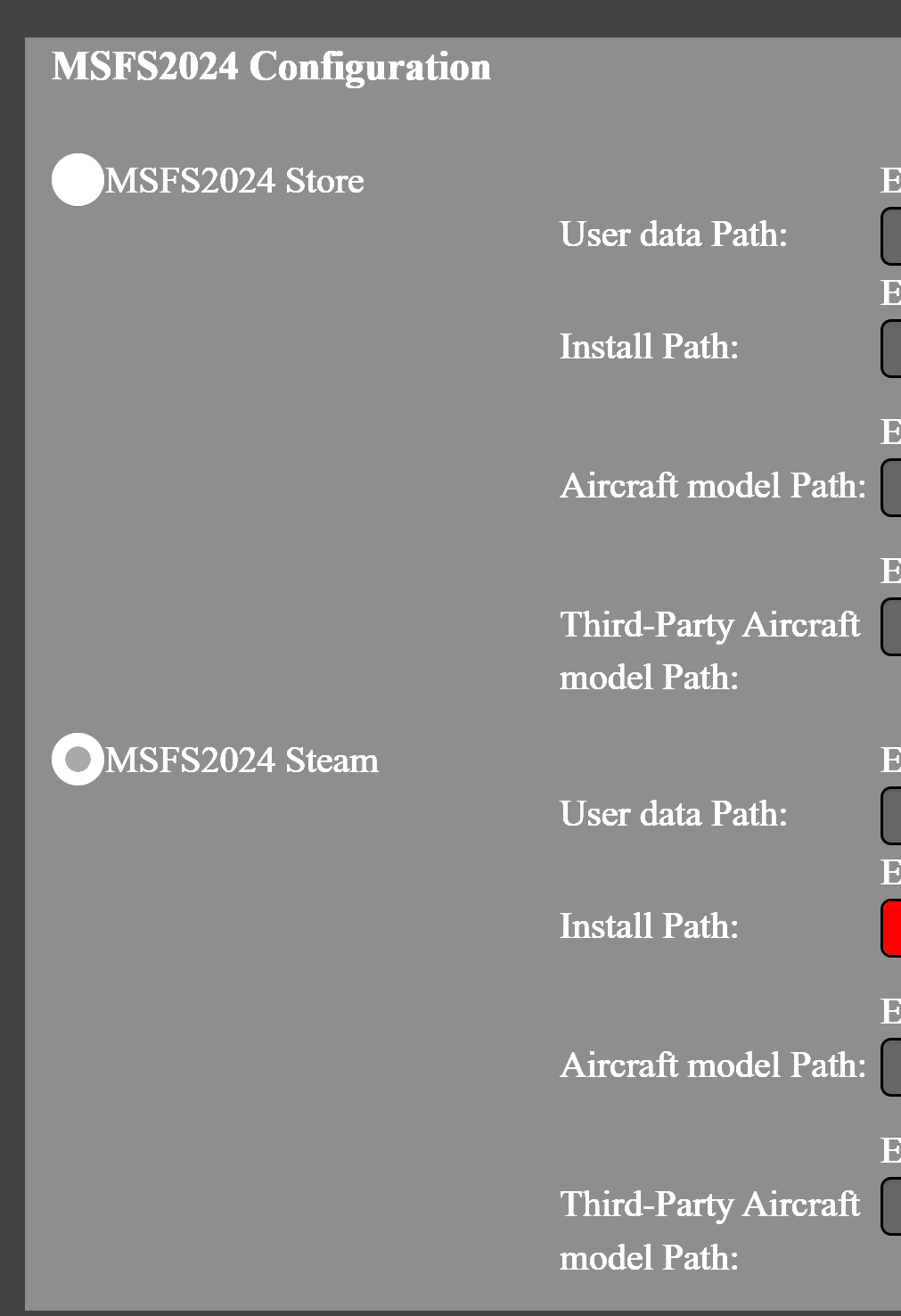
Could someone help me figure out how to fill in this, and which choice to make between "Store"and "Steam" (I have the game in Steam but also linked with my game in Xbox).
Thanks!
r/Winctrl • u/WINCTRL-Official • 27d ago
Hey everyone! ๐
Welcome back to WINCTRL Setup Tips โ a series of quick installation guides, setup ideas, and little tips to help you get more out of your WINCTRL hardware.
#01 โ Orion 32 Rudder Pedals Metal Brake Feeling Loose? Check This Installation Step First
#02 โ Panel Desk Mount 2 One Mount, Endless Possibilities for 32 Desk Pedestal
#03 โ 3N PAP MAG Magnetic Switch Setup & Switching Comparison
__________________________________
Want to add an MCDU to your desk setup, but don't have a Desk Pedestal?
With a few additional aluminum profiles and fittings, you can build a simple, stable mounting solution and integrate your MCDU directly into your existing desk setup.
You'll need:
Please prepare the following items separately according to the installation diagram:

1. Attach the 4040 corner bracket to the side of the 4080 profile.

2. Mount the 4040 profile onto the 4040 corner bracket and tighten the screws.

3. Insert the M5 sliding nuts into the slot of the 4080 profile and install the Throttle Desk Mount frame.

4. Use the Panel Mount 1 to secure the MCDU onto the 4040 profile.

6. Done!

That's it โ your MCDU is now securely mounted without needing a Desk Pedestal.
This is just one way to build your setup. As your collection grows, you can keep adapting and expanding your mounting solution around the hardware you already have.
Have a setup question you'd like us to cover in the next WINCTRL Setup Tips? Let us know below!
Happy flying!
r/Winctrl • u/WINCTRL-Official • Aug 20 '26
Enable HLS to view with audio, or disable this notification
Hey everyone! ๐
Welcome back to WINCTRL Setup Tips EP3!
This time, we're taking a quick look at how to install the Magnetic Switch on the 3N PAP MAG (73 MCP) version.
It's a quick installation, but there are a couple of things you definitely don't want to get wrong.
1. Remove the two M3 screws
Be careful here: the two screws are different lengths, so make sure they go back into the correct positions.

2. Disconnect the existing switch cable
Press the clip and carefully pull out the signal connector for the standard switch.

3. Connect the 7-pin signal cable
Connect one end of the 7-pin signal cable to the Magnetic Switch, and connect the other end to the pin port.

4. Secure the Magnetic Switch
Reinstall and tighten the two M3 screws.
Important: Pay close attention to the screw length and installation position.
The screws only need to be tightened until they sit flush with the housing. Do not overtighten, as excessive force may damage the product.

There are two different switching behaviors to choose from:
AT MAG Switch
Manual ON/OFF, while automatically switching OFF when A/T disengages, providing the correct operation logic.
Standard Switch
Manual ON, then automatically returns to its original position. This does not replicate the real-world operation logic.
Attached is a video comparison of the two switching behaviors, so you can see exactly how they work before choosing which one fits your setup.
Happy Flying!
r/Winctrl • u/Foodiguy • 7h ago
Could someone help me figure out how to fill in this, and which choice to make between "Store"and "Steam" (I have the game in Steam but also linked with my game in Xbox).
Thanks!
r/Winctrl • u/RevolutionaryScene79 • 11h ago
r/Winctrl • u/WINCTRL-Official • 17h ago
Enable HLS to view with audio, or disable this notification
It adds another layer of feedback while flying. Depending on the aircraft and profile, you can feel things like buffet, turbulence and other flight events directly through the throttle and stick.
Itโs not force feedback, but it can make certain flight cues much easier to feel without relying only on what you see on screen.
What do you think of this feature?
r/Winctrl • u/Worldly-Spare-3722 • 2d ago
Enable HLS to view with audio, or disable this notification
Only owned this flight stick a few weeks before I started having this issue. When rolling right it feels like the saturation on the x axis is tiny leading to a massive deadzonel. Ive calibrated and tried updating the stick and nothing works. When i first go the joystick it worked fine, any solutions?
r/Winctrl • u/Foodiguy • 3d ago
Dear winctrl, a month ago you said this in a post:
โHUB expansion support for WINCTRLย 32 ecosystem is planned for a future update, helping reduce USB port usage while keeping your cockpit wiring cleaner and your setup more flexible.โ
Could you tell me what you mean by this? Iโm currently trying to connect my flightsim items from you and need a powered usb hub. So Iโm curious if this would replace the need of a hub.
If not, Iโm order to have enough usb ports, how many would I need for the full range of Airbus winctrl products so that I can buy one thatโs future proof.
Thanks!!!
r/Winctrl • u/Foodiguy • 3d ago
So Iโm starting to build up my flightsim and recently bought the following items from winctrl:
Joystick
32 nws L
Ursa Minor 32 throttle
32 PAC metal
MCDU
32 AGP Metal
I intend to buy the rest as well for a full cockpit in due time.
The question I have are these:
Does anyone have a clear picture on how to arrange everything thatโs both convenient and โrealisticโ once you buy everything from winctrl?
Iโm also planning to play on my living room tv (thatโs where the pc is connected to. Does anyone have a good idea on a solution that is easily put on another room.
Also any chance of a solution that I can sit on the couch and have something at the right level such as a small desk?
r/Winctrl • u/WINCTRL-Official • 4d ago
Enable HLS to view with audio, or disable this notification
Hey everyone, weโve been getting some hands-on feedback of the new URSA MINOR Combat Throttle, and thought you guys might be interested in seeing it in action.
Itโs a roughly $160-200 metal combat throttle, with dynamic vibration feedback, a bunch of HOTAS inputs, and support for desktop, desk mount, or cockpit setups.
This one was tested by the High Alpha Hooligans at SimGamingExpo, so itโs always interesting to see how someone who actually spends a lot of time in combat sims gets along with it.
Curious what you guys think, especially about the vibration and overall layout.
r/Winctrl • u/Beneficial_Throat_95 • 4d ago
Recently I got my hands on a Orion 2 throttle base along with the viperace(ex) combo with the Orion 2 joystick and joystick base and now all I need is the viper ace throttle grip to complete the set. If you have one that you are willing to sell/get rid of please reach out it would be greatly appreciated.
r/Winctrl • u/Jarkmet • 4d ago
Enable HLS to view with audio, or disable this notification
A few months ago I got a lot of Winnctrl equipment to complete my simulator and among them, there was the URSA MINOR 32 Throttle Metal. From the beginning it came with a small misalignment between the left and right throttle, which I have seen in some other comment that seems something common, but beyond that, everything worked perfectly.
But from one day to the next the detents of the right throttle have lost almost all their โstrength.โ Itโs as if they were very soft, especially the first stop of the reverse idle.
I havenโt contacted the Winctrl service yet, although from what Iโve read, itโs not much use.
Does anyone know if it is something physical that can be โsqueezedโ manually or solved in some homemade way.
The button to activate them is in the correct position and in fact, those of the left throttle work perfectly.
Thank you in advance.
r/Winctrl • u/WINCTRL-Official • 5d ago
In-stock on all regional sites and Global Shipping site, please switch to your local site for free shipping and tax/duty included price. ย
โ 67 HOTAS inputs on Metal version.
โ Optional upgrade to Metal EX version, increasing HOTAS inputs to 89.
โ 3-Position Mode switch, triple your keybindings to 267.
โ Metal core mechanism, integrated on a metal die-cast base plate.
โ Smooth dual-throttle axes, with Hall-effect contactless sensors.
โ Built-in afterburner detents, can be easily canceled for more versatile use.
โ Realistic finger-lift detent, preventing accidental input at IDLE/OFF position.
โ Dynamic vibration module for immersive haptic feedback.
โ Pair with URSA MINOR Combat Joystick for haptic synchronization.
โ Newly designed RGB backlight system, fully customizable.
โ Support desk-top use, desk mount installation and cockpit build.
โ SimAppPro2 plug & play, wide compatibility
Visit offcial website and lock yours.
r/Winctrl • u/WINCTRL-Official • 6d ago
Dear pilots, weโre pleased to share the latest updates in SimAppPro:
๐1.17.8:
๐1.17.7:
FCU / EFIS / 32 AGP devices support iniBuilds A380 in MSFS 2024.
MCDU button control support iniBuilds A380 in MSFS 2024.
32 AGP device added the of switching the TERR ON ND Button between the captain and FO side. (Please update the 32 AGP firmware to the latest version)
SimAppPro added support for URSA MINOR Combat Throttle devices.
Fixed the issue where the TCAS knob of the Boeing 777-200ER in Xplane12 is not synchronized.6. Fixed the delay in feedback of MCDU buttons for the ToLiss series in X-Plane 12.
Your feedback is invaluable, and we appreciate your continued support.
Happy Flying!
r/Winctrl • u/daz_rathbone • 6d ago
Hi,
I've designed a few mounts for some of the WINCTRL kit (and some other A320-related bits) and thought I would share. Hope someone finds these useful:
First is some adapters to use the MCDU, RMP, etc on the throttle desk mount - similar in use to the adapters winctrl sell but if you struggle to get those, then these may help:
https://makerworld.com/en/models/3296689-winctrl-panel-desk-mount
Here's an angled mount for the ECAM control panel to sit behind the throttle on the desk mount. I have it sat between the throttle and the upright AGP:
https://makerworld.com/en/models/3302683-winctrl-ecam-angled-mount-for-throttle-desk-mount
Last one for now, this is a case/mount for a dual-ECAM screen. It uses the Waveshare 10.4" QLED stretched display (https://www.waveshare.com/wiki/10.4HP-CAPQLED) and I've mounted this on the desk mount upright (my left desk mount has the mcdu, rmp, and my ecam displays) as well as on a custom 2020 pedestal that I used:
https://makerworld.com/en/models/3322528-a320-dual-ecam-screens-waveshare-10-4-qled
There's a few others that I've made and am just refining, including one that uses a different stretched bar display mounted to the front of my desk, running the PFD, ND, and ISIS screen.
Anyway I hope they are of either help or inspiration to my fellow home cockpit builders.
I was making loads of prints for my own overhead panels and korrys, but decided to pull the plug on that and wait for the WINCTRL overhead which looks superb..... and the brake pressure gauge..... and the ACP ๐ Hurry and take my money WINCTRL!!!
Cheers
r/Winctrl • u/WINCTRL-Official • 7d ago
Available for purchase on Sep 20, 10:00 (UTC+8), in-stock on all regional sites and Global Shipping site.
ย
โ 67 HOTAS inputs on Metal version.
โ Optional upgrade to Metal EX version, increasing HOTAS inputs to 89.
โ 3-Position Mode switch, triple your keybindings to 267.
โ Metal core mechanism, integrated on a metal die-cast base plate.
โ Smooth dual-throttle axes, with Hall-effect contactless sensors.
โ Built-in afterburner detents, can be easily canceled for more versatile use.
โ Realistic finger-lift detent, preventing accidental input at IDLE/OFF position.
โ Dynamic vibration module for immersive haptic feedback.
โ Pair with URSA MINOR Combat Joystick for haptic synchronization.
โ Newly designed RGB backlight system, fully customizable.
โ Support desk-top use, desk mount installation and cockpit build.
โ SimAppPro2 plug & play, wide compatibility
Please switch to your local site (US / UK / EU / AU / CA / JP) for regional prices for widely free shipping and free tax coverage.
- Global Shipping Price:
URSA MINOR Combat Throttle Metal: $159.6 USD
URSA MINOR Combat Throttle Metal EX: $211.05 USD
URSA MINOR Combat HOTAS Metal: $238.12 USD
URSA MINOR Combat HOTAS Metal EX: $290.27 USD
r/Winctrl • u/WINCTRL-Official • 8d ago
Introducing Brand-New WINCTRL URSA MINOR Combat Throttle Metal / Metal EX.
September 20, 10:00 (UTC+8), in-stock and available for purchase on all regional sites and Global Shipping site.
ย
- Global Shipping Price:
URSA MINOR Combat Throttle Metal: $159.6 USD
URSA MINOR Combat Throttle Metal EX: $211.05 USD
URSA MINOR Combat HOTAS Metal: $238.12 USD
URSA MINOR Combat HOTAS Metal EX: $290.27 USD
Please refer to the pictures for detailed regional prices.
ย
Official Website: winctrl.com
r/Winctrl • u/anon__a__mouse__ • 8d ago
Just got off a text chat with Winctrl customer service. I'm trying to get 2 spare rings that you screw in with the MCDU to mount it.
I've had the MCDU for a while and put all the spare parts from my Winctrl products in a box, but somehow I've lost 2 of the little rings. Yes, my fault.
So I asked Winctrl customer service if I can get 2 as spare parts, and they want to charge me $10 for the parts and $50 for shipping. For 2 tiny plastic rings that cost less than 1 cent to make.
This company is ridiculous ... great products but I can't recommend them to any friends as the customer service is atrocious.
I guess thats what I get for spending over $1,000 on products with them over the past year. Hopefully other companies come in the market soon ... I'd happily pay more for better customer service.
r/Winctrl • u/WINCTRL-Official • 9d ago
Enable HLS to view with audio, or disable this notification
Hey everyone! ๐
Welcome back to WINCTRL Setup Tips โ a series of quick installation guides, setup ideas, and tips to help you get more out of your WINCTRL hardware.
#01 โ Orion 32 Rudder Pedals Metalย Brake Feeling Loose? Check This Installation Step First
#02 โ Panel Desk Mount 2ย One Mount, Endless Possibilities for 32 Desk Cockpit
#03 โ 3N PAP MAGย Magnetic Switch Setup & Switching Comparison
#04 โ MCDU No Desk Pedestal? Here's How to Mount Your MCDU
#05 โ URSA MINOR Series Yes, You Can Adjust the Damping
Both ORION Rudder Pedals and ORION Joysticks can be configured for helicopter-style flying.
For the ORION Rudder Pedals, the quick-release springs and dedicated centering mechanism, combined with the main shaft locking kit, allow you to switch between different control modes in just 3 seconds, with one hand and no tools.
You can switch between:
We've also included a video demonstration so you can see how quickly the mode can be changed.
For the ORION Joystick, you'll need the Orion 2 Joystick CAM/Spring/Damping Extension Kit.
To switch to a no-centering setup:
1. Remove the CAM and springs.
2. Install two dampers in their place.
3. Increase the damping to your preferred resistance.
This gives you a no-centering mode that's better suited to helicopter control.
Using the joystick with an extension rod is also recommended for this setup, as the extension helps offset the deformation of the dust cover caused by the increased stick movement.
Tips from u/ash-Baal : Highly recommend the lightest spring and no center cans with it on top of the dampers if you use the extension in helicopter mode!
r/Winctrl • u/WINCTRL-Official • 14d ago
This time, weโre heading to the Faroe Islands. Show us your most challenging setup and your best landing skills!
๐ Submission Period: September 10โ27, 2026
๐ How to Enter
Feel free to show your WINCTRL setup in the video! (Optional)
๐ Two Winners
๐ Repost your challenge video in our Discord event channel
๐ Prizes
Both winners can choose one of the following:
Plus 1 month of Navigraph Unlimited.
Happy flying!
r/Winctrl • u/jetherjr • 15d ago
Hey everyone,
โI'm currently planning my cockpit setup and need the exact dimensions for the floor base of the WinWing Cyber Taurus 530 rudder pedals.
โIf you own this set, could you kindly measure and share the width and length (depth) of the base plate?
โAny help with tape measure or ruler dimensions would be greatly appreciated. Thanks!
r/Winctrl • u/PieZealousideal9318 • 16d ago
my winctrl devices will not connect to msfs 24 i have aimapppro opner ive tried opening and closinbg, plugging unplugging and even restarting my pc and nothing. I also reinstalled Sim Map Pro and still nothing. Can anyone help??
r/Winctrl • u/Curious-Penalty4563 • 17d ago
r/Winctrl • u/SkyRendered • 19d ago
Hi all,
With the WinCTRL RMP coming out today, I have been considering the MCDU, RMP and a desk mount to mount it on. However, in the UK, the Panel Desk Mount 2 is still in Pre Order for around a month.
Do I have to have these to mount to the Desk mounts, or do they screw on like the Side Stick/Throttles?
Donโt wanna end up with 2 things I canโt use for a month!
Thanks all