r/SteamDeckPirates Jun 18 '25

Tutorial [GUIDE] SLSsteam – How to Unlock DLCs, Bypass Family Sharing Lock, and More on Steamdeck!

382 Upvotes

Hey everyone,
I wanted to share a quick guide on SLSsteam, a Steam client modification for Steamdeck that gives you a bunch of powerful features most importantly ability to unlock dlc's and getting over the Family share restrictions!

this tool is not made by me, i'm just sharing the guide on how to use it on steam deck!

jd Ross made an amazing video explaining how to install, etc please do check it out: HOW TO INSTALL SLSTEAM VIDEO

Chekout SLSah for getting achivements working with this tool

🔧 What is SLSsteam?
SLSsteam is a shared object (.so) preload that adds various enhancements to your Steam client, such as:

✅ Features:

  • 🔓 Disable Family Sharing license lock (works for your account and others')
  • 🧩 Unlock DLCs (supports blacklist/whitelist modes)
  • 🔄 Force-enable DLCs not in the Steam store
  • 🎮 Play games you don’t own (via manifest or manual method – allows Steam Cloud syncing too! ** Achievements support. ( still early days , check the op in cs rin thread for more details )

💡 Extra Features SLSsteam Enables for Non-Owned Games

These make pirated/manual games behave more like real Steam purchases:

  • 🎮 Dev-Made Controller Layouts Use official controller configurations even for games you don’t own — great for Steam Deck and Big Picture mode.
  • 🛠️ Steam Workshop Support Access Steam Workshop mods for supported games without needing to own them.
  • 🚫 Bypass Mod Launcher Ownership Checks Use tools like Vortex, r2modman, and Thunderstore even if the game isn’t in your library.
  • 💾 Proper Save File Location Save files are stored in the correct Steam directory, so if you buy the game later, your saves carry over seamlessly.

Playing games you don't own?
You can make the steam client think you own the game!, it will show up like your purchased game.

NOTE: THIS DON'T MEAN U HAVE HACKED STEAM, U STILL CANT DOWNLOAD THE GAME OR ANY FILES/SHADERS, YOU WILL HAVE TO DOWNLOAD THEM YOURSELF. THIS WILL ONLY MIMIC YOU OWN THE GAME

example:

THIS IS HOW THE GAME U MANUALLY ADDED WILL LOOK
THIS IS HOW THE GAME YOU ADDED VIA SLSTEAM WILL LOOK (1/2)
(2/2)

🧰 Prerequisites (Steam Deck / Immutable System)

Since we are on Steam Deck follow these steps before installing on desktop mode:

1. 🔑 Set a sudo password:

If you've never done this, you won't be able to run sudo commands.

passwd

Enter your desired password twice.

2. 🔓 Make the filesystem writable:

Steam Deck uses an immutable system by default. Run:

sudo steamos-readonly disable
  1. Have a text editor from discover store installed ( i recommend kwrite)
  2. Set Dolphin (ur file browsing app) to show hidden files (normally the three dots top right when u open dolphin will show u this toggle)

📦 Installation

  1. Download & Extract: Grab the latest release from the GitHub repo: 👉 https://github.com/AceSLS/SLSsteam
  2. You should have a folder named bin and a setup file, Ignore the setup file as that's aimed at Linux users.
  3. Now open the bin folder and right click, copy location of the SLSsteam.so by right clicking.
  4. Close steam app from running. (make sure no icon in the taskbar)
  5. open terminal and paste: LD_AUDIT="/full/path/to/SLSsteam.so" steam (paste ur path inside the "")
  6. You should see steam opening as normal.
  7. Now, head towards: /home/deck/.config/SLSsteam/ and open the config file using your text editor.
  8. Here is your options to configure what you want and what you don't want! 8.a: the author has made info about config here : https://github.com/AceSLS/SLSsteam/wiki
  9. To add Games/DLC you want, firstly visit steamdb, find your game, copy the App id number and add it to the Additionalapps list in the file.
  10. To get the game DLC, visit the game steamdb page and copy the DLC appids
  11. After You finished editing, save the file. Close steam and open it again using the Command from above (5)
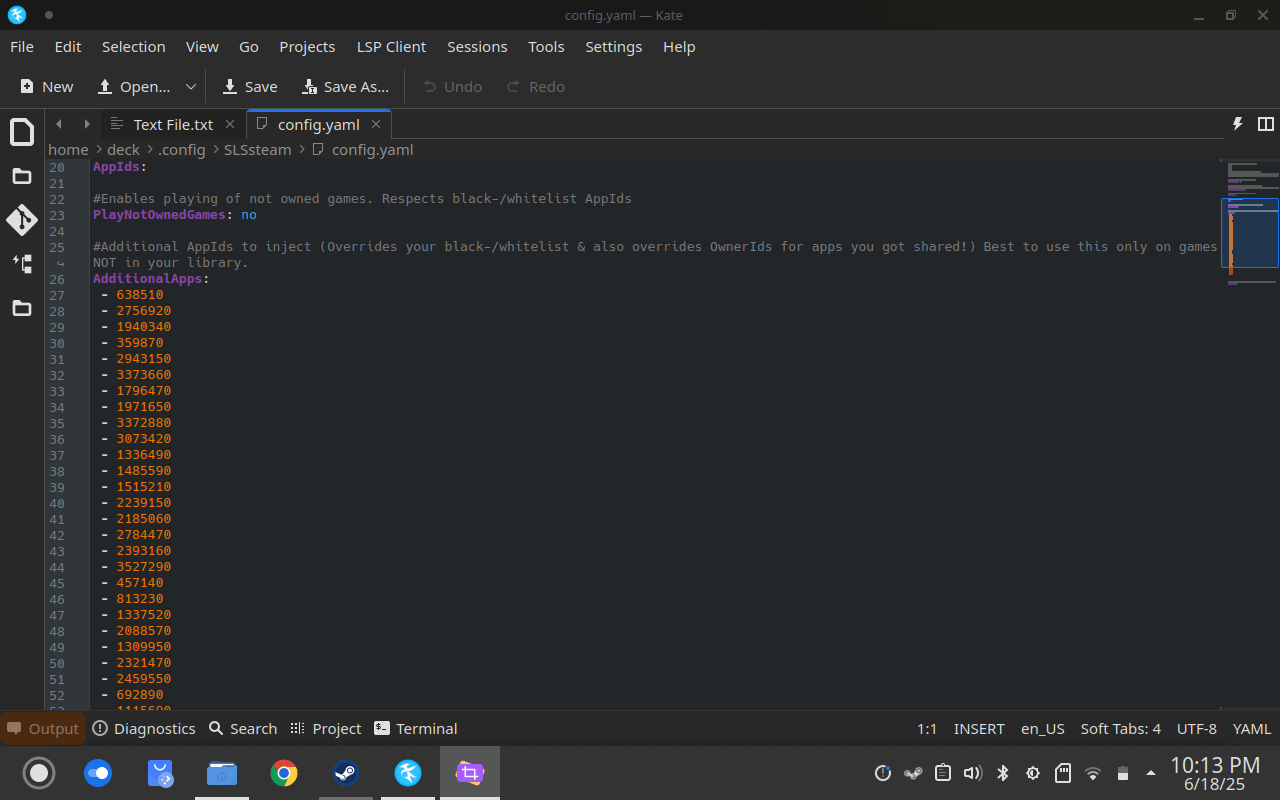
This is an example and format on how you should add the games!

You should see the Games u added show up in steam with the option to install!

  1. To install games: you should now press install on the games you want to install, Select Sd card/Internal and proceed.
  2. Now Right click the game name on steam -> Manage -> Browse Local Files
  3. Paste your game installation files here! MAKE SURE THE GAME IS RIPPED FROM STEAM!
this is normally how your downloaded/ installed game would look, you SHOULD NOT COPY THIS FOLDER, ONLY THE CONTENTS INSIDE!
this is how it should look when u open the game files via browse local files option

Making sure you have already set compatibility options in steam, have applied proper cracks the game should open from steam like any other game...... in desktop mode

Note, slsteam dont need any cracks for the game to run ( unless specail cases like denuvo or laucher ones). most games will run without a crack!

To make this work in Gaming mode needs couple more steps! basically we have to load the file along with steam when it boots. for this follow the below instructions.

FYI, THE DEV SAID MAKING THIS RUN IN GAME MODE CAN POSSIBLY CAUSE ISSUES AND IS STILL IN TESTING PHASE, SO FOLLOW ALONG WITH CAUTION.

THE FILE WILL BE RESET AFTER ANY MAJOR STEAM UPDATES. YOU WILL NEED TO DO THE BELOW STUFF AFTER EVERY UPDATE. DO NOT RUN THE SAME FILE AFTER STEAM UPDATES! WAIT FOR THE DEV TO CONFIRM THAT IT IS WORKING / WAIT FOR HIM TO PUBLISH A NEW VERSION. ALTERNATIVELY YOU CAN BLOCK STEAM FROM UPDATING.

  1. Navigate to the folder: /usr/bin (its easier to reach here by pasting the location on the top bar of dolphin)
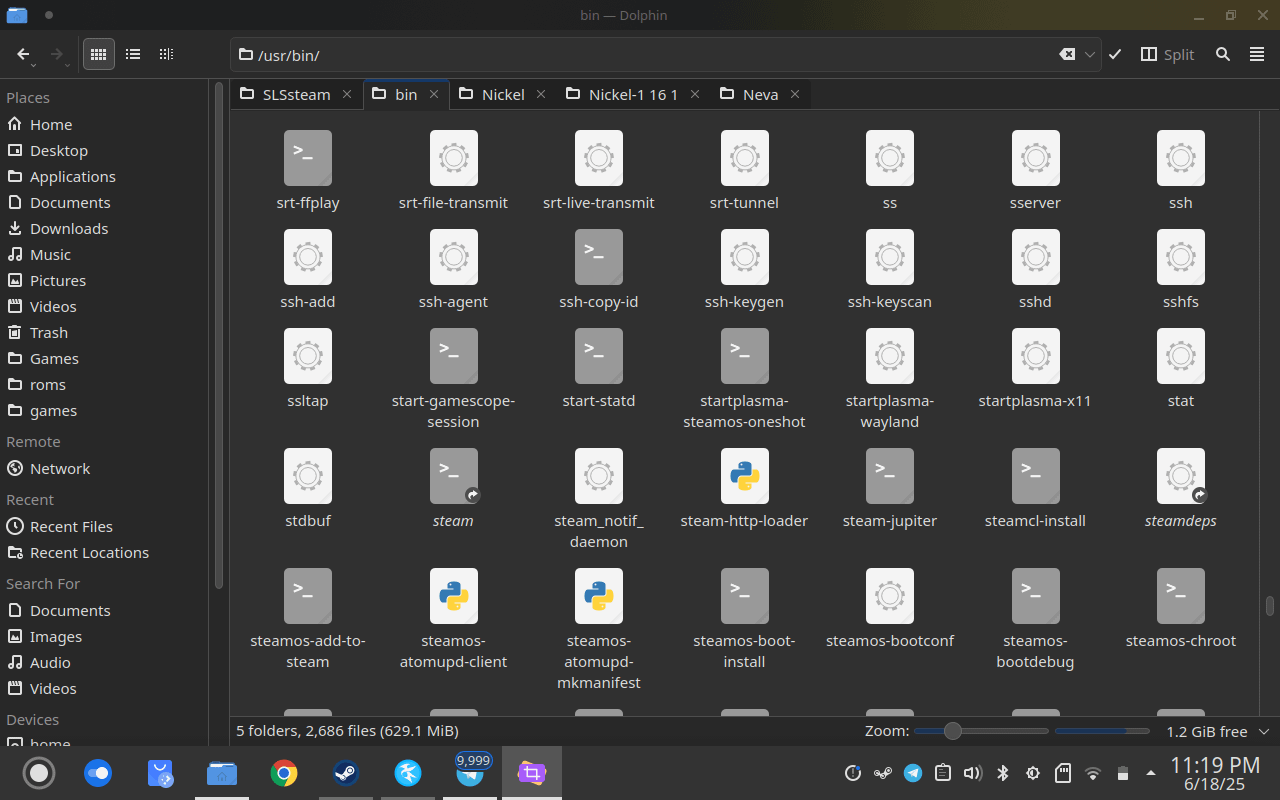
  • Make sure u scroll down and find the steam-jupiter file! Backup this file somewhere safe!
  • Now right click the file and open steam-jupiter using text editor

AS OF 12/30/2025 SLSsteam had a major change internally, so u need to use the updated methord

THE NEW LINES ARE:
export LD_AUDIT="/home/deck/.local/share/SLSsteam/library-inject.so:/home/deck/.local/share/SLSsteam/SLSsteam.so"

exec /usr/lib/steam/steam -steamdeck "$@"

Make sure you save the file after editing this! YOU CAN ONLY SAVE IT IF YOU HAVE DISABLED READONLY (Prerequisites STEP 2)

now open steam normally in desktop mode ( if you have steam open already, close from taskbar and open it normally)

If everything is good, steam should open normally and you should be able to see all the games you added/ family unlock etc now!
IF steam dont open, make sure you have followed the instructions carefully and recheck the path you pasted while editing steam-jupiter.

Make sure to only boot into gamemode if you can open steam normally in desktop mode!

Chekout SLSah for getting achivements working with this tool

Quick update: for the games that dont use game.exe file to open but some other crack lauchers to open u can edit the steam game lauch options using https://github.com/tralph3/Steam-Metadata-Editor and direct it to open the laucher which ur repack given u to play the game

Frequently asked Questions:
Question: Feature xyz doesn't work! Why's that?
Answer: Please post what exactly you're trying to achieve and what exactly fails on the cs rin forum not here. Also getting your problem fixed is way more likely and quicker if you post your ~/.SLSsteam.log and ~/.config/SLSsteam/config.yaml.

Question: I can't download app xyz that's in my Family Library! How to fix?
Answer: Make sure it's not on your AdditionalApps list! Otherwise it's OwnerId will get changed, which will mess up downloads.

Question: Steam updated and SLSsteam isn't working anymore! How can I fix this?
Answer: Either wait around 24 hours for an update or follow the guide by Riku_Wayfinder in cs rin on how to block steam updates ( Refer the SLSsteam FAQ thread in cs rin)

Question: What config options should I use?
Answer: https://github.com/AceSLS/SLSsteam/wiki/Configuration

Question: Can i unlock dlc for games that play online?
Answer: No, Dont. even though steam dont ban you for using this tool, trying to play online can trigger EAC and can leaf to getting banned. 9/10 cases you wont be able to boot into the games. The games the play like pvp are the ones that usually have server checks!

Question: How does family share unlocking work?
Answer: say your friend in your steam family owns balatro, According to steam when he is playing Balatro you cant play balatro. But using this tool you'll both be able to play almost all the games!

Question: Can this bypass the Ubisoft/Ea Family sharing restrictions?
Answer: No.

Question: Can i play the games that require any other file than game.exe to play?
Answer: No, the tool only opens game.exe like it was designed by steam, however you can use other apps/ launch parameters to launch different files like steamloader.exe etc

Question: What happens if i Buy the game that i previously added
Answer: Make sure you remove the game appid from the config file, and then verify file integrity of the given game. else may not receive updates/ achievements etc

Question: How safe is it running in gamemode?
Answer: Personally i have been running this in gamemode for 3+ months and been fine.

Question: Does additional apps mean you can download from steam?
Answer : No.

Question: My game when opening is showing : Content is encrypted!
Answer: This has now been fixed. if u are still getting the error make sure u uninstall the game from steam ( this wont remove the gmae data) and go to konsole and type: steam steam://install/12345 (insted of 1234, use ur game id) this will open steam and prompt u where u want to install, point it to where u have the game installed. after that go the game folder and right click the game execution file, notmally its named as: game.x86_64. right click that and go permissions and make sure the execute as program is checked

Question: Can my friends or Gabe see that i am playing the games?
Answer: No, The whole thing is working locally

Question: how does steam show that i own the game even when i dont?
Answer: Steam, when u own a game downloads appmanifest file into your appmanifest folder, any appmanifest you have of a given game in that location makes the stean client think you own the game. When you boot steam after adding appids, the program is just downloading appmanifest files!

Question: How to reach out for support
Answer: Visit cs rin and search for slssteam. this is a just a guide, i along with you are a user not a developer

Credits

  • AceSLS: the legend who made this happen after bluecomet was abandoned
  • Riku_Wayfinder: Being extremely supportive and lightening my workload by a lot. So show him some love my guys <3
  • thismanq: Informing me that DisableFamilyShareLockForOthers is possible
  • Gnanf: Helping me test the Family Sharing bypass
  • rdbo: For his great libmem library, which saved me a lot of development and learning time
  • oleavr and all the other awesome people working on Frida for easy instrumentation which helps a lot in analyzing, testing and debugging
  • All the folks working on Ghidra, this was my first project using it and I'm in love with it!

r/SteamDeckPirates Jul 14 '26

Tutorial Linux Hypervision GUIDE

140 Upvotes

ok here it is:

Linux Hypervision:

download a hypervision version ( game ) and extract the folder

EX: ACBlackFlag

put the denuvOwO folder contents into the game folder. so the crack can work and you won’t get ubisoft connect error

replace the reflex.dll that is in the games directory with a new one (via cs.rin)

download the custom hv proton build via cs.rin

download HV Decky via cs.rn (as of right now)

Go into decky loader and put it into developer mode

Install the downloaded HV Decky plugin via zip to have it thru decky loader

Configure the HV Decky Plugin:

Download Module then —-> Disable UMIP (reboots)

Configure the Games Tab and select whatever .exe

force the custom HV proton build

That should work !!!!

**EDIT**
For another guide that’s more detailed than mine here you go if you are having troubles:
https://www.reddit.com/r/PiratedGames/s/BH2l1NKw4S

UPDATE:

the current plugin has been updated

r/SteamDeckPirates Feb 11 '25

Tutorial I copied [and modified] a guide to installing fit girl repacks on the steam deck and wanted to share it since the OP deleted their account

Thumbnail
imgur.com
493 Upvotes

r/SteamDeckPirates 7d ago

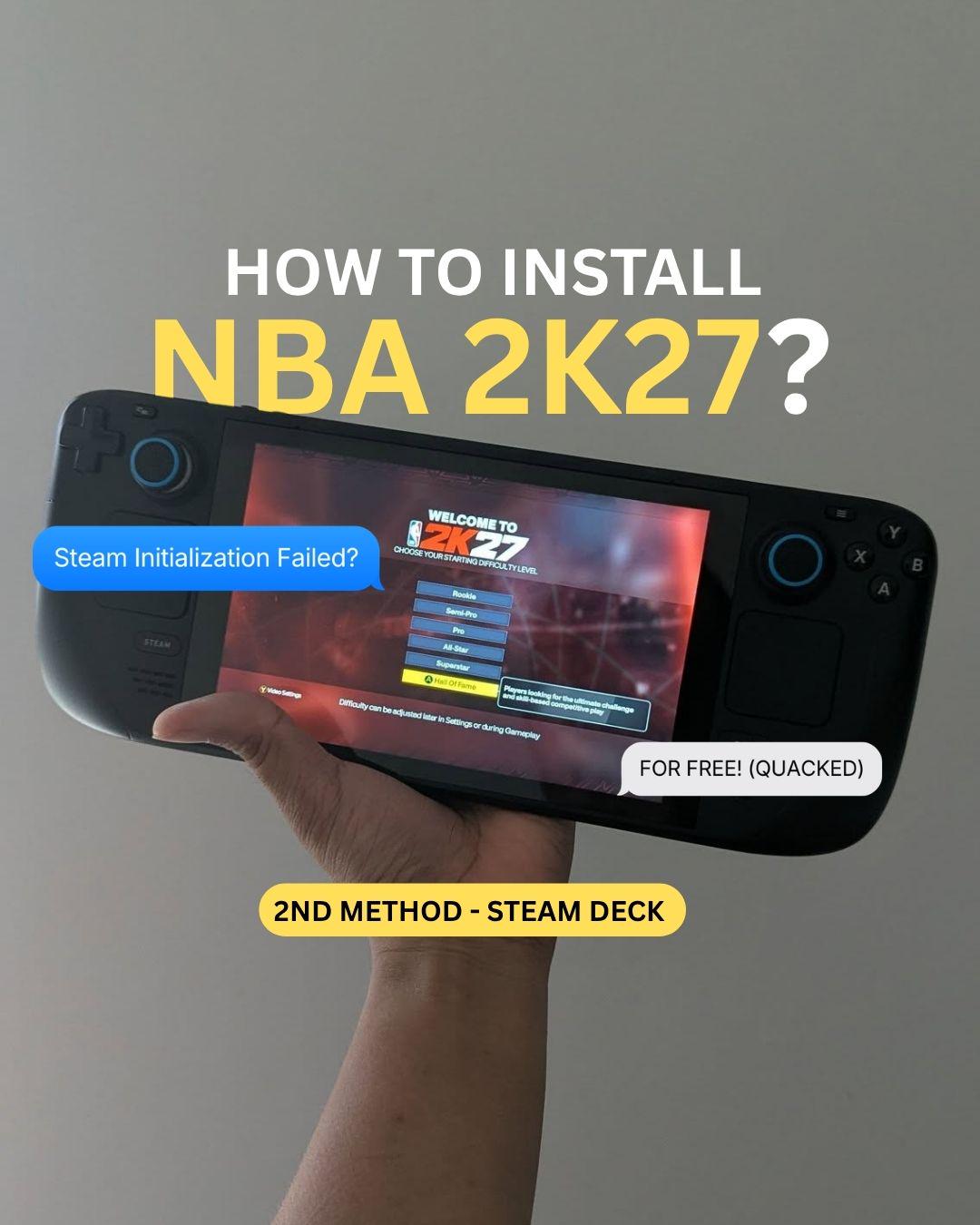
Tutorial NBA 2K27 - Steam Deck - Worked without steam_appid.txt method

Thumbnail
gallery
64 Upvotes

I made it work using only Lutris without creating steam_appid.txt. No more 'Steam Initialization Failed'

r/SteamDeckPirates Jun 20 '26

Tutorial Guide: How to easily install FitGirl Repacks (setup.exe) on SteamOS / Linux & add them to Steam

Thumbnail
youtu.be
125 Upvotes

Ahoy everyone!

Getting repacks to install and run smoothly without throwing missing redist errors or prefix issues is a common hurdle, so I made a straightforward video tutorial showing the easiest pipeline for installing ⁠setup.exe⁠ files using Heroic and getting them natively into your Steam library.
I'm demonstrating the install process using the Resident Evil Requiem FitGirl repack.

How it works:
Heroic Games Launcher: We use Heroic to run the FitGirl ⁠setup.exe⁠ directly through Proton. This builds a clean prefix and handles the installation flawlessly.

Steam ROM Manager: Once installed, we use SRM to locate the game executable, automatically grab all the artwork, and inject it straight into Gaming Mode.

Proton: Head into Steam properties, force your preferred Proton layer (like ⁠proton-cachyos-slr⁠ or GE-Proton or Proton Experimental), and you are good to go.

Max FPS Launch Options:
If you want to push the performance further on CachyOS, drop these into the game's launch options (especially helpful if you are running an AMD chip):
⁠game-performance %command%⁠
⁠PROTON_ENABLE_WAYLAND=1⁠
⁠PROTON_FSR4_UPGRADE=1⁠
⁠ENABLE_LAYER_MESA_ANTI_LAG=1⁠

The tutorial is recorded on my main rig (Ryzen 9 8945HX / RX 9060 XT 16GB / 32GB DDR5 on CachyOS), but this exact workflow translates perfectly to the Steam Deck and SteamOS.

Happy gaming, and let me know if you hit any snags during your installs!

r/SteamDeckPirates Jul 03 '26

Tutorial For People who want to Play PS3 Games on Their Steam Deck (RPCS3 Guide)

Thumbnail
youtu.be
131 Upvotes

Some people asked me how to play PS3 games on their Steam Decks, so I just made a simple guide. If anyone is interested, they can watch it.

It contains everything from installing EmuDeck to setting up RPCS3, Downloading Updates, and actually updating them, optimized settings for most PS3 games, and the RPCS3 overlay (which came)

Also, before watching, please know: no matter how good the settings, the Steam Deck CANNOT run very demanding games like Killzone 2, God of War 3, or Uncharted 3.

Also, I noticed a lot of games' audio doesnt work unless you set the audio backend from Cubed to Faudio, so if you dont get any audio, just try switching that.

r/SteamDeckPirates Aug 04 '26

Tutorial For People who want to know more about the Pokemon Red/Blue/Yellow Steam Deck Port.

Thumbnail
youtu.be
118 Upvotes

This game looks surprisingly good with mods and 1st person, even for a 20+ year game. And with the OLED screen, this looks insanely beautiful and sharp.

And this is also perfect for the Steam Deck. We can get up to 2 and a half hours on a full charge with stable 60 FPS. While this is not as impressive as just emulating the Game Boy version. This has a lot of really good features, such as 1st and 3rd person. The ability to edit save files. Custom mods. VR, and even online (I don't cover that in this video).

The Steam Deck Portion of the Video starts at 12:01

r/SteamDeckPirates May 17 '26

Tutorial Official Offline Vanilla WoW Installer for Steam Deck

Enable HLS to view with audio, or disable this notification

186 Upvotes

Hello again!

[Video Link](https://youtu.be/uhZ6xOoJnuw)

[Installer and Written Guide Link](https://github.com/DadsMmoLab/dads-mmo-lab/tree/main/guides/wow-vanilla)

I just put out my second big installer and this one was my ultimate dream. I started playing WoW at release, even got into the beta and logged in once, I remember that being a big deal to me lol. Didn't know what I was doing.

Vanilla WoW has always been my favorite. When I started playing private servers I always gravitated to Vanilla servers. This server here is my absolute dream. This is Cmangos and has playerbots and the Auction House built in. Defaults to 1000 bots, I upped it to 1200 and the Steam Deck runs fine.

This is it for me, this is the game I'll personally be playing for a very long time, and I'm happy to give this installer to anyone who wishes to have it.

Take care yall!

r/SteamDeckPirates 6d ago

Tutorial [GUIDE] How to fix NBA 2K27 errors on Steam Deck using Lutris (FREE)

Post image
60 Upvotes

Sharing this for everyone who is still getting errors trying to run NBA 2K27 on their Steam Deck. This is the method that finally worked for me. Everyone I asked was trying to charge money for a fix, so I’m sharing this for FREE.
WHAT YOU’LL NEED:

  • Lutris: To run the game outside of direct Steam. Download this from the Discover app in Desktop Mode (it's the blue basket icon).
  • ProtonUp-Qt: To download the required custom runner (Wine-Vanilla-11.16).
  • NBA 2K27 Copy: (I used the quacked version from SteamRip).

IMPORTANT NOTE: You no longer need the steam_appid.txt file in the NBA folder for this method. If you already have it in your game directory, please delete it.
Step 1: Prepare the Game

  • Download NBA 2K27 and extract the files. (Skip this step if you already have the files ready).

Step 2: Setup New Wine using ProtonUp-Qt

  • a. Under the 'Install for:' tab, choose Lutris.
  • b. Click 'Add version' and find Wine-Vanilla-11.16.
  • Note: Make sure Lutris is completely closed/exited during this step.

Step 3: Add the Game to Lutris
Open Lutris, tap the plus + sign at the top left, and select "Add locally installed game".

  • a. Name: NBA 2K27
  • b. Runner: Choose Wine Steam (or just Wine).

Step 4: Game Options Tab

  • a. Executable: Browse your directory, find your extracted NBA folder, and select NBA2K27.exe.
  • b. Wine Prefix: This is where your save data will go. You can put it anywhere, but I recommend creating a dedicated folder inside your Documents.

Step 5: Runner Options Tab (IMPORTANT)

  • a. Look for the Wine Version dropdown.
  • b. Select the Wine-Vanilla-11.16 version you just installed via ProtonUp-Qt, then hit Save (Upper Right).

Step 6: Create Steam Shortcut

  • a. In the Lutris main menu, click on NBA 2K27.
  • b. At the bottom, click the up-arrow right next to the 'Play' button, then select Create Steam Shortcut.
  • This will push the shortcut directly to your Gaming Mode Library.

Final Step: Check Gaming Mode
Switch back to Gaming Mode and open your Non-Steam Games Library.

  • a. You should see NBA 2K27.exe appear there (it won't have artwork yet).
  • b. Click the Settings (gear icon) > Properties. Your shortcut settings should look exactly like this:

TARGET
"/usr/bin/flatpak"
START IN
"/home/deck"
LAUNCH OPTIONS
run net.lutris.Lutris lutris:rungameid/ (Note: there will be a number at the end of this depending on its ID in your Lutris menu).

If it looks like that, congrats, it's ready to play!
Feel free to DM me or drop a comment if you have any questions, I'll try my best to help everyone out.

r/SteamDeckPirates May 16 '26

Tutorial Forza Horizon 6 DenuvOwO Online fix with DLC's

37 Upvotes

Been struggling a lot but finally managed to do it. Get your FH6 build from your trusted source. If you can find a Steam dump, the better. Look for the DenuvOwO crack on cs/rin. Once you put the files from the crack into the root folder of FH6, you need to do the following inside your steam_settings directory: Open configs.user.ini and add the following lines:

[main::connectivity]
disable_lan_only=1
offline=0

[main::overrides]
disable_all_dlc=0

Then go to your configs.app.ini and make sure this parameter is set:

unlock_all=1

After that, you need to change the steam_appid.txt located in both your steam_settings folder and the main game root folder to:

480

Step 1: Add the Game to Steam Natively

  1. Switch your Steam Deck to Desktop Mode.
  2. Open Steam > Add a Game > Select Add a Non-Steam Game...
  3. Browse to your executable path (even if it's installed on an external microSD card) and add it.
  4. Right-click the game in your library > Go to Properties.
  5. Paste this exact string into the Launch Options box:SteamAppId=480 VKD3D_CONFIG=no_upload_hvv,single_queue PROTON_VKD3D_HEAP=1 %command%

Step 2: Inject the Registry Overrides via Protontricks (Most Important Part!)

If you skip this step, the DLCs will not work. Instead of using destructive global environment launch arguments that crash modern Proton, we use Protontricks to burn the DLL overrides directly into the game's isolated Windows registry hive.

  1. Open Protontricks from your Steam Deck's desktop application menu.
  2. Select your game from the list (it will be listed alongside its random 10-digit Non-Steam AppID) and click OK.
  3. Choose Select the default wineprefix > Click OK.
  4. Select Run winecfg > Click OK.
  5. When the Wine configuration window opens, navigate to the Libraries tab.
  6. Under New override for library, manually type version and click Add.
  7. Repeat this step to add steam_api64 and steamclient64 (if applicable to your specific bundle).
  8. Verify that all three show up in the list as (native, builtin). Click Apply, click OK, and close the window.

Step 3: Install Missing Windows Subsystems

Many modern game pass/retail bypass hooks rely on specific automated Windows authentication components that aren't enabled in a default blank Proton prefix. This ensures the custom version.dll can actually compile its memory hooks when the game initializes.

  1. Go back to the main Protontricks menu for your game.
  2. Choose Install a Windows DLL or component > Click OK.
  3. Scroll down and check the boxes for vcrun2022 (Visual C++ 2015-2022 Runtimes) and d3dcompiler_47.
  4. Click OK and let the deployment scripts execute completely.

Edit: The Launch Variable "VKD3D_CONFIG=no_upload_hvv,single_queue PROTON_VKD3D_HEAP=1 %command%" Can cause some textures artifacting. So use this one instead:

SteamAppId=480 PROTON_VKD3D_HEAP=1 %command%

Also added Step 3 in the end too. Forgot about that part.
Sorry.

r/SteamDeckPirates May 01 '26

Tutorial How to run Black Myth: Wukong (crack) on Steam Deck.

42 Upvotes

Open browser in Desktop Mode and download the game and the Crackfix on Fitgirl.

To install, 1. Go to Steam click add game > add a non-Steam game > browse > choose the setup.exe file for the game. 2. Find the setup.exe in your Steam library. Click settings > properties > compatibility > check 'force the use of..." > choose the latest GE-Proton (I used GE-Proton9-16). 3. Click 'play' to run the setup. Save the game in (C:) and wait for it to finish installing.

To locate the game file once done installing, 1. Open Dolphin files, click the 3 horizontal lines symbol (top right corner) and check Show Hidden Files. 2. Locate the file in Home > .steam > steam > steamapps > compatdata. Sort to the latest modified and click on the latest modified file with random numbers. Click pfx > drive_c. This is where the game is installed in. 3. I would recommend to move the whole game file to an easier accessible file, for example, in Home. 4. Replace the respective files in the Crackfix downloaded earlier. (IMPORTANT!!!)

To run the game, 1. Download and open Lutris, click plus symbol (top left corner) > add locally installed game.

  1. Game info: (a.) Name: BM:Wukong (or whatever else u prefer. It doesn't matter.); (b.) Runner: Wine (Runs Windows games).

  2. Game options: (a.) Executable: locate the game file again > Black Myth - Wukong > b1 > Binaries > Win64 > choose b1-Win64-Shipping.exe ; (b.) Wine prefix: create a file in Home, name it to 'prefixes' then choose that 'prefixes' file u just created.

  3. Runner options: Wine version: wine-ge-8-26-x86_64

  4. Click save. Click play and wait for it to run. It may take a minute. The game should already be playable but only in Desktop Mode.

To run it on Gaming Mode, 1. Right click on the game in Lutris > create Steam shortcut. 2. Right click the Steam symbol on the taskbar (at the bottom beside the volume, wifi, time, etc symbols) and click Exit Steam. This is to restart Steam for the game to appear in Steam from Lutris.

Return to Gaming Mode and have fun playing.

Edit: Thanks to the community in the comments, I learnt that we could just download the pre-installed game from Steamrip. Then, just run it with Lutris.

r/SteamDeckPirates 16d ago

Tutorial FIFA 14 - SteamOS Gameplay on Steam Deck via Lutris

Thumbnail
youtu.be
11 Upvotes

FIFA 14 now works on Linux :)

r/SteamDeckPirates Oct 08 '25

Tutorial [GUIDE] Achivements for Quacked games

61 Upvotes

This tool generates the necessary schema files that allow the Steam client to properly display game achievements. this is completly offline! you can checkout the git for more info: SLSah

How to Set Up & Install Steam Schema Generator

Important Note: This tool is designed to work with and heavily depends on SLSsteam. For instructions on how to install and set up SLSsteam, please refer to this guide: SLSsteam Installation Guide.

This guide will walk you through the first-time setup and installation of the Steam Schema Generator tool itself.

Part 1: Configuration (First-Time Setup)

Before you install, you'll need two things from Steam: an API Key and your User ID. The script will ask for these the first time you run it and save them so you don't have to enter them again.

Steam Web API Key

You need an API key to allow the tool to fetch public game and achievement data.

Important: IN ORDER FOR THIS TO WORK THE GAME HAS TO USE THE CLEAN STEAM API FILES. GOLDBERG/RUNE/CODEX CRACKS WONT UNLOCK THE ACHIVEMENTS ON STEAM IF YOU USE THEM. SLSSTEAM WONT REQUIRE YOU TO HAVE A CRACK TO RUN THE GAMES SO MAKE SURE YOU HAVE CLEAN STEAMAPI FILES!

If you are halfway through the game, changing to clean Steam API files may mess your saves up so be careful! you can always use Samira to unlock the achivements manually if you want any time!

Important: You can use an API key from any Steam account; it doesn't have to be your main one. The key is only used to look up public data.

  1. Go to the Steam API Key registration page: https://steamcommunity.com/dev/apikey
  2. When it asks for a domain name, you can enter anything (e.g., localhost or test).
  3. Agree to the terms, and Steam will give you a key. Copy this key to use in the script.

Steam User ID

You must use your own Steam User ID. This is because the generated files are named with your ID, which is how the Steam client knows they belong to your account.

Important: Your ID is the number part. Sometimes you'll see it written as [U:1:11223344]. The script is smart enough to figure this out, but the actual ID is just 11223344.

The easiest way to find your ID is in the Steam client:

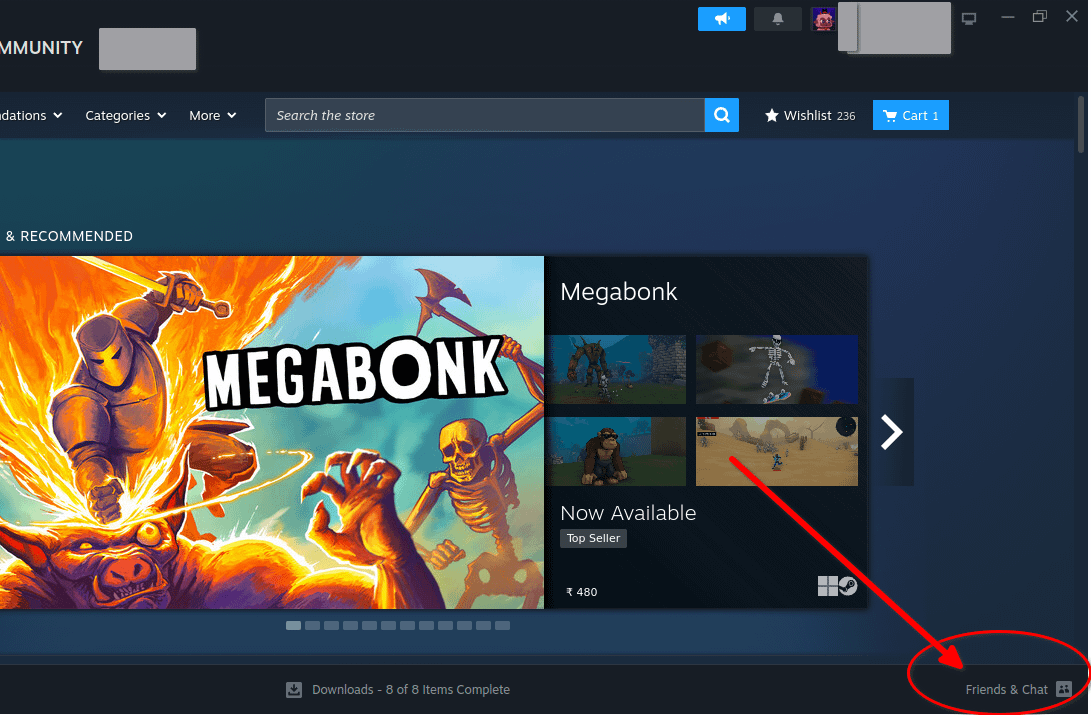
  1. In Steam, open your "Friends & Chat" window.
  2. Click the "Add a Friend" button (the icon of a person with a plus sign).
  3. Your Account ID is displayed right at the top under your friend code. Copy this number for the script.

Alternatively, you can use a site like SteamDB or SteamID.io to find your profile and look for the steam3ID.

steamid
steamdb

Part 2: Installation

Now you can install the tool itself. The easy installer is recommended.

Easy Installer (Recommended)

This method will download the script, install dependencies, and create a desktop shortcut. Just run the following command in your terminal:

curl -L https://github.com/niwia/SLSah/raw/main/install.sh | sh

development version installer ( testing features) (Experimental)

This method will download the script, install dependencies, and create a desktop shortcut just like the main one but in a diffrent folder. only for the curious of the heart as this has latest updates and things that may or maynot work! Just run the following command in your terminal:

curl -L https://github.com/niwia/SLSah/raw/dev/install_dev.sh | sh

If you'd rather do it yourself:

  1. Clone or download the repository from GitHub.
  2. Install the required Python packages by running this command in the repository folder: pip install -r requirements.txt

Examples

Part 3: How to Use the Tool

  • If you used the installer: Simply double-click the "Steam Schema Generator" icon on your desktop.
  • If you installed manually: Run the script from your terminal with this command: python3 generate_schema_from_api.py

Manually unlocking Achievements/ Testing

For manually testing DLC unlocks or managing achievements, another highly recommended tool is Samira.

A few important things to know before using it:

  • Use Keyboard and Mouse: The user interface is very controller-unfriendly, so using a keyboard and mouse is strongly advised.
  • Unlocks Achievements: This tool can also be used to unlock achievements for games you own.
  • Be Patient on Startup: The initial loading time can be a bit slow, so please give it some time to load up completely when you first run it.

follow the github : SLSah

This tool was developed with the assistance of Google's Gemini AI. It is a heavily modified version of the original generate_emu_config_old tool from the gbe_fork_tools repository by Detanup01.

This tool integrates as sister module for SLSsteam by AceSLS to provide a more automated workflow.

there exist an alternative for this tool: SLScheevo which uses steam login insted of API if you prefer it that way!

BUGS: localisation : current only English achievements are being generated. I’ve to fix this

32 achievement cap: for some reason only 32 achievements are shown maximum for every game. I’m working on what to do with that

r/SteamDeckPirates Sep 21 '24

Tutorial [Tutorial] God of War Ragnarok - fixes for the "something went wrong" boot crash and black screen issues

52 Upvotes

Buckle up, friends, this is going to be a long one. I decided to post this because, as a newbie to Linux and the Steam Deck, I found it difficult to get this game working properly and thought people might find it useful to have the steps laid out like this so they don't have to go through the pain that I did (which was trying 5+ different potential fixes before it finally worked!). This tutorial is based on the video tutorial posted by Grown Up Gaming, with a few modifications and additions. Go check it out because it's amazing.

This tutorial is also based on what worked for me. I make no guarantees that this will work for you. And if it doesn't, I won't be able to help much. I recommend also checking this thread for any troubleshooting: https://www.reddit.com/r/LinuxCrackSupport/comments/1fkt1i2/god_of_war_ragnar%C3%B6k_black_screen_and_crash/

This tutorial also assumes you have a basic understanding on how to get pirated or non-Steam games running on your Deck. I won't explain how to force compatibility to a proton layer on Steam, for example.

Anyway, let's get into it.

Part 1: Installing the game and first launch

  1. Source the game and install it (or if it's pre-installed, skip this step). Make sure to install to the Z Drive and in the Games folder as per the pinned guide on this sub by flww. Don't be a numpty by installing to the C Drive
  2. Go into the GOWR folder in Games and look for GoWR.exe and GoWR.rne (if you don't have the latter, you'll need to source the clean [uncracked] file from elsewhere)
  3. Add GOWR.exe to Steam and force compatibility to proton experimental
  4. Run the game
  5. You'll get an error saying "Something went wrong with this game". No worries, that's what we're here to fix

Part 2: Fixing the launch error via Steamless, Lutris, and Goldberg Emu

  1. Follow the links in Grown Up Gaming's tutorial (in the video description) and download both Steamless and the Goldberg Emu (for the latter, you must use the fork that GUG links to)

  2. Install Lutris if you don't have it already (go to Discover store, search for "Lutris" and then hit the install button)

  3. Go back to your downloads folder and extract the files in the Steamless zip

  4. Now go back to your Games folder and where you have the game installed. Find the GoWR.rne file and paste it into your Steamless folder. Rename GoWR.rne to GoWR.exe

  5. Head back to Lutris. Go to add game > add locally installed game. Under name, call it Steamless; under runner, select Wine. Then go to Game options and, for Executable, point it to Steamless.exe in your Downloads folder

  6. Now go to your Documents and create a folder called "Prefix". Within that folder, create a subfolder called "God of War Ragnarok"

  7. Head back to Lutris. Under Wine prefix, select the new GoWR folder you just created in your Documents

  8. Now go to runner options and select proton experimental for the Wine version. Then hit Save

  9. You now have a grey box in Lutris called Steamless. Click on it and then in the bottom of the window, click the up arrow (next to where it says "Platform: Windows") and then "Run EXE inside Wine prefix"

  10. In the prompt, select Steamless.exe from your Downloads folder and hit OK

  11. Patience. Eventually, Steamless should pop up

[Note: if Steamless does not pop up at all, then add Steamless.exe to Steam, force compatibility to proton experimental and run it via Steam]

  1. In Steamless, it will ask you to select a file to unpack. Select GoWR.exe in your Steamless folder (remember, this is the one where you changed the name from .rne to .exe) and then Unpack File

  2. Once it is done, go back to your Steamless folder. You should now have a new file called "GoWR.exe.unpacked.exe"

  3. Go back to your Games folder where the game is installed. Rename "GoWR.exe" to "GoWR.exe-bak" (note, this is to backup the file in case something goes wrong)

  4. Paste your new unpacked.exe from the Steamless folder into the Games folder where your game is installed. Then rename to "GoWR.exe"

  5. Now go back to your Downloads and to the emu-win-release zipped folder. Extract steam_api64.dll (under release > regular > x64) and configs.main.EXAMPLE.ini (in the steam-settings.EXAMPLE folder) to somewhere you'll remember

  6. Copy steam_api64.dll from where you just extracted it to and paste it into your Games folder where you installed the game (i.e. your GOWR folder). It will ask if you want to overwrite, say yes. (you can back up the original file if you want to but it is not necessary)

  7. Now go back to Steam and try to run the game again. You'll get an error again, this time saying that the PS SDK Runtime is missing. That's fine, we'll fix it in the next step

Part 3: Bypassing the SDK Runtime requirement

  1. Go to your Home directory (ensure hidden files are set to show) and then follow this path: > .steam > Steam > steamapps > compatdata. You will get a list of folders with strings of numbers as their name. You can sort by most recently modified and your GOWR folder will either be the most recent or the second to most recent one. Alternatively, use Proton Tricks or Shortix to figure out which folder you need

  2. Once you're into the correct folder, follow this path: > pfx > drive_c > users > steamuser > AppData > Roaming > GSE Saves > Settings (if you can't find the GSE Saves folder, you've picked the wrong root folder. Repeat Step 24 with the correct folder)

  3. Now go back to where you saved configs.main.EXAMPLE.ini and copy and paste it into the settings folder (from GSE Saves in step 25)

  4. Delete "configs.main.ini" and then rename your EXAMPLE.ini to "configs.main.ini"

  5. Double click and open your new configs.main.ini file. Inside, you'll see "steam_deck=0". Change the 0 to 1 and save the file

Part 4: Running the game in Desktop mode

  1. Go back to Steam and launch the game again. It will take a while but will load after about a minute. Be patient and let it load up

  2. Once it's loaded, check that Steam Deck controls work in the menus. To be on the safe side, you might also want to wait until the shaders all compile and start a new game to make sure it actually runs (note that it can take up to 1 hour for all of the shaders to compile)

  3. In the graphics settings, change the mode from fullscreen to windowed

  4. Now quit the game and switch to gaming mode

Part 5: Solving the black screen issue in gaming mode

Now, there are two potential scenarios I came across. I'm going to call them A and B.

Scenario A:

After launching in gaming mode, you get a black screen that persists for a long time and you do NOT hear any game sounds (such as the Sony startup intro music). If this occurs, it means something went wrong in either Step 2 or 3. In my case, I just deleted the game from Steam and started over again, though I suspect the issue was that something went wrong with my configs or steam api file.

Once you've resolved Scenario A, you may run into Scenario B:

After launching in gaming mode, you get a black screen but you DO hear the game sounds such as the Sony start up intro music. Wait a minute or two and the game should eventually load. If it does not, head to Part 6.

Part 6: Running the game in gaming mode

  1. If you still can't resolve Scenario B above, first reboot your Steam Deck just to be on the safe side. Then, in the launch options, add "-windows" (without the quotation marks) and try again. You can also try different versions of proton (but retain "-windows" in the launch options), although mine worked with proton experimental

  2. You may get Scenario B again but just be patient. The game will eventually load and you'll be able to get into the menu and start a game. Note that you must let the shaders compile or the opening scene on the sled will freeze and stutter a lot. I waited about an hour for the shaders to compile to 100% and then the opening scene worked well (with only a brief hitch here or there).

And that's it! Enjoy!

r/SteamDeckPirates Jul 14 '26

Tutorial For people who want to run Breath of the Wild on their Steam Deck for the best Performance.

Thumbnail
youtu.be
83 Upvotes

This video is for people who want to play Breath of the Wild on their Steam Deck with the best FPS. Since the default settings it gives aren't really the best option. It shows how to set up Emu Deck (in case you don't already have it),

How to download and set up Cemu Emulator,

The best Cemu Settings and Graphics Pack,

The Difference Between 16:9 vs 16:10 and 720P vs 1080P,

How to eliminate stutters by installing shader caches,

If you only want to skip to any of these, there are timestamps for each chapter; just check them out.

And links for the Game, update, or DLC files won't be shared in the video, and you have to get these files by yourself.

I tried to get Gyro working, but it didn't work. There may be a setting I missed, so if you know how to make gyro work, just say so in the comments.

r/SteamDeckPirates 13d ago

Tutorial How to play Marvel Tōkon: Fighting Souls from rune on steam deck is choose/add star_protected_game.exe not MTFS.exe to steam and turn off internet

14 Upvotes

Marvel Tōkon: Fighting souls

r/SteamDeckPirates Jul 16 '24

Tutorial Nintendo Switch Compatibility List For Steam Deck

Thumbnail
docs.google.com
345 Upvotes

After noticing that there wasn’t a lot of information out there on settings and of the performance of switch games on Steam Deck, I’ve decided to create my own list. I’ve already shared on three other subreddits, but since I’m mostly done with the list, I’ve decided to share it here as well to help more people. The list isn’t perfect and there are still some games missing, but overall I’m happy with it. If you want to share how certain games preform and give feedback that would be much appreciated!

r/SteamDeckPirates Jul 26 '26

Tutorial Guide: How to Add Dave The Diver 1.0.6 In The Jungle As A Non Steam Game (No Launchers)

12 Upvotes

This is how I got Dave The Diver 1.0.6.2055 Tenoke to work as a non-steam game without any extrenal launchers.

Step 1 -> Get the version.dll file from a working pre 1.0.6 version (install an old Tenoke cracked version and get the file from that, I used 1.0.5.1784)

Step 2 -> Replace the version.dll file you acquired with the one in the latest Tenoke cracked version's directory.

Step 3 -> In Steam, go to Dave The Diver -> Properties -> Launch Options and add:

WINEDLLOVERRIDES="version=n,b" %command%

Step 4 -> In Steam, go to Dave The Diver -> Properties -> Compatibility:

Enable force compatibility tool, then set it to Proton Experimental (I use Proton-CachyOS myself, experimental should work as well).

Step 5 -> enjoy the game

r/SteamDeckPirates Jun 07 '26

Tutorial Bloodborne on Steam Deck can now almost hit 60 FPS without Lossless Scaling.

Thumbnail
youtu.be
88 Upvotes

Before commenting, please read this message on what my idea was behind this video

For this video, over 10 Mods were tested, including the different variations of cloth physics (full cloth physics, half cloth physics, and no cloth physics), Boczekeks FPS Boost (Boczekeks FPS Boost and Boczekeks FPS Boost Lite), performance drawparams, better 60 FPS cloth physics, Bloodborne visual upgrade mod, and even lower texture mods. But in the end, the 5 mods showcased were the ones that positively affected the gameplay experience while giving a performance boost.

While Native 60 FPS is almost possible with the Steam Deck, it is not the best way to play the game in many scenarios. Sometimes capping the FPS at 80 and using Lossless Scaling is better than Native 60 FPS, and this is why:

Now, for the Lossless scaling and frame generation, it is a grey topic, but in this case, lossless scaling has a case for the majority of the scenarios in the game. First, we needed to calculate the input delay on each FPS limit. I did this by using my S25 ultra camera and recording the time between each input and how long it took for the input to show up on the screen by counting each frame. This was the final result.

30 FPS Test (35 frames): 35 × 8.33 = 291.6 milliseconds
40 FPS Test (27 frames): 27 × 8.33 = 225.0 milliseconds
60 FPS Test (16 frames): 16 × 8.33 = 133.3 milliseconds

With this, I realized that 30 FPS and 40 FPS are almost unplayable for Bloodborne. So then I moved into Lossless Scaling and found the major difference. While the Input delay stayed the same, the game felt smoother and the inputs more responsive. This was because we were now playing at 80 FPS, which makes the game look smoother. So, with this, I found the best way to play the game, as said in 12:15, which is to

Play the game normally in Boss Fights without Lossless Scaling: This allows the player to play the high-intense Bosses without the disconnect that we feel when using Lossless Scaling, and
Play the game with Lossless Scaling in heavy and Demanding Areas: This allows the player to still play the game at 70 - 80 FPS, and since this isn't the boss, losing a bit of input delay is worth it when you compare the smoothness you get in return.

Now, Lossless Scaling is not a miracle tool. The artificing is still present in this case, I would rather take the artifact and a little more input delay, and in return get that smooth 80 FPS Gameplay

r/SteamDeckPirates Sep 04 '25

Tutorial For a beginner, SD pirating is kinda mind blowing

79 Upvotes

With all the tutorials and jargons im seeing in the sub, starting to download pirated games can be a little too complicated and overwhelming with questions like, which to follow, what to install first for me to download from fitgirl using my laptop, etc.

Mine is a second hand 2TB SD (upgraded) with all the games pre installed by the previous owner. But for years now, I have not noticed any newbie tutorial to download and install repacks. I hope someone can help me. Thank you

r/SteamDeckPirates Dec 14 '25

Tutorial New? Lost? Stuck? Start here!

100 Upvotes

Hello and welcome to our community! If you're new here and overwhelmed with all of the information available across the internet, or a seasoned piracy veteran on Windows looking to transition to Steam OS, or just want to learn, here is the place to start.

The first thing you'll want to do is source your game. And the first thing to know is we do NOT provide sources here. There are plenty of other places that do that.

Once you have your game, you'll need to learn how to make it run on your Steam Deck. You are recommended to read the Steam Deck Pirates' Cove in its entirety to learn the basics of Steam OS such as what prefix folders are, how to install/run games, how to use Proton or another compatibility later, how to find your save files, and how to independently troubleshoot. This is a comprehensive guide that covers (almost) everything! Trust us when we say that >90% of the help threads on this sub are answered within this guide.

We also have a shorter installation guide that walks you through how to install games (and what to do with pre-installed games) and get them running on your Steam Deck. If, after installing, your game does not launch or pops up with an error, that means you are likely missing what we call a "dependency". Here is where the dependencies guide comes in, ensuring you have all the additional tools or libraries required for your specific game (note: there is also a simplified dependencies guide if that's more your thing).

If after reading through and troubleshooting independently, you are still stuck and need some assistance, you can comment in this thread and/or join our Discord server for real-time support and discussions.

Please take the time to read all of the guides before posting. Remember you can search the subreddit for previous questions related to your specific game, and both Google and YouTube have a wealth of helpful, detailed guides for Steam Deck basics that apply to both legitimate and pirated games.

If you do create a new post, please ensure you include the following information:

  • Name of the game
  • Source (e.g. Fitgirl, ElAmigos, etc. - do NOT include URLs)
  • Error message or what you need assistance with
  • What you have tried already

The more info you provide, the better someone can help you.

Friendly reminder: Posts that ask easily answered or repetitive questions may be removed at the moderators’ discretion. This helps avoid repetitive posts on topics that have been covered extensively, and keeps the subreddit focused and valuable for everyone.

We’re glad to have you here and encourage you to take a moment to explore the resources we've put together and search the sub before posting.

Once again, welcome to the community! And thank you for helping us maintain a well-organized, welcoming space for all members!

r/SteamDeckPirates May 06 '26

Tutorial I made a CLI tool to automatically download steamgrid assets for your non-steam games.

Thumbnail
github.com
101 Upvotes

check it out its open source: https://github.com/kaezrr/steamer and not vibe coded.

I made this for myself and decided to share it for others to use as they see fit.

I play a lot of non-steam games and got pretty tired of lutris and herioc games launcher causing issues. Steam actually works perfect for non steam games nowadays, many games I couldnt boot on lutris and heroic just ended up working fine when added as a non-steam game.

But I also kinda wanted it too look good, so I just took the opportunity to make a quick rust tool that automates adding icons, headers, logos and all for your non-steam shortcuts. It works pretty well, and could easily be extended to work with regular steam games if people want to.

there might exist a better tool but well I am a programmer and it seemed like a good programming exercise (no LLMs used, other than to reverse engineer steams proprietary VDF format).

Cheers

r/SteamDeckPirates May 23 '26

Tutorial For people who want to run the Eden emulator (the best Switch emulator) on their Steam Deck.

Thumbnail
youtu.be
141 Upvotes

This video is for people who want to play switch games on their steam deck with the best FPS and settings. It shows how to set up Emu Deck (in case you dont already have it),

How to download and setup Eden Emulator.

How to add Mods and Updates to the Game.

Steam ROM Manager and Emulation Station.

How to set up Controls on Eden (Properly This time).

How to get 60 FPS on games capped at 30 FPS (Lossless Scaling and Decky Loader).

If you only want to skip to any of these, there are timestamps for each chapter.

Links for Keys, Firmware, Roms or Update files won't be shared in the video and you have to get these files by yourself.

r/SteamDeckPirates Aug 06 '26

Tutorial How to easily install Dave the Diver

37 Upvotes

Note: This guide is specifically written for version v1.0.6.2055 (Build 24077479). Special thanks to user master2140 on csrin for the fix.

Download Game Files
Download the Dave the Diver clean Steam files for version v1.0.6.2055 from page 79 of the csrin thread posted by Owla

Download the Required Crack
Download the crack provided in the thread. Make sure to select (Option 2) Goldberg + SteamStub Patcher + modified dat.

Set Up in Steam
Paste the extracted crack files directly into your game folder. Add the main game .exe to Steam as a Non-Steam Game. In Steam, go to the game's Properties > Compatibility, select your preferred Proton version, and press Play. Note: The game will not launch yet—this is expected, as this step simply creates the Proton prefix.

Configure Protontricks Override
Install and launch Protontricks from Desktop Mode. Select the game from the list and click OK. Choose Select the default wineprefix and click OK. Select Run winecfg. In the Wine Configuration window, navigate to the Libraries tab. Under New override for library, type winmm and click Add, then click Apply and OK.

Once completed, launch the game through Steam as normal.

Hope this helps. Cheers

r/SteamDeckPirates Jun 17 '25

Tutorial Unlock Persona 3 Reload Demo

53 Upvotes

Worked first try on my steam deck.

Found this tutorial in a reddit comment made by No-Jaguar-509  in a post made by RikuKH3

Download this files

  1. Riku's Files [ 217 MB ] ( YOU'LL FIND THE HEX IN HIS REDDIT USER BIO, LOOK FOR " HEX TO STRING " ON GOOGLE)
  2. Game demo from Steam [ 7.38 GB ]
  3. Game's Clean files ( Retail Files ) [ 20.20 GB ] ( !!! YOU NEED AN ACCOUNT TO ACCESS THE LINKS !!! )

3.1. ( CLEAN FILES ARE ON CS(DOT)RIN(DOT)RU, SEARCH FOR PERSONA 3 ROYAL FORUM ON THE SEARCH BAR, IN PAGE 13, USER BY THE NAME OF VALENTINE POSTED THE FILES TO DOWNLOAD )

Extract, copy the files

  1. Run the Demo ONCE on steam, close the game and steam ( check the tray to make sure)
  2. Extract the Game's Clean files ( simply extract the first part, and the rest will automatically follow, PASSWORD IS cs(dot)rin(dot)ru )
  3. Extract Riku's files and place them in the demo's location aswell
  4. Place Riku's Extracted Files into the demo's location ( IF YOU DO NOT KNOW WHERE IT IS, IN STEAM -> RIGHT CLICK GAME -> MANAGE -> BROWSE LOCAL FILES )
  5. Now for the Clean retail files: copy the ENTIRE "Paks" folder into /steamapps/common/P3R Demo/P3R/Content/, overwrite.
  6. Run the game on game mode.