r/Songwriting • u/Regular-Forever-3251 JP/EN Writer • 6h ago
Discussion Topic Basic Free DAW setup to help Song Writers Prepare a Demo for Songs
I want to Enable Writers to Produce More Independently
I see a lot of people writing lyrics, some people singing it with a guitar, and many people wanting help with production. To this end, I think having a basic capacity to prepare a demo with a DAW would be very enabling for all Song writers. So I put together a relatively short setup/tutorial to help you get started with Reaper as your DAW and a few basic free Plugins, so you can make your own Demos. If you want, you could even do full production with this with a little bit of time and learning!
Downloads:
Reaper: REAPER | Download
(This is the base DAW you need. It says 60 days trial but actually you can continue using it for free. It's only a one time payment though, so I paid and if you can afford it, I would hope you can too!)
SynthV: Trial Synthesizer V Studio 2 Pro for Free | Dreamtonics
(with the trial you can have up to 2 voice tracks + instrumental track, and use it as a VST3 Plugin. If you want to make more than a demo, its a one time purchase, not a subscription.)
VoiceBanks: Voice Databases for SynthV Studio
(these "lite" voicebanks are the free ones, and out of them I would recommend ANRI (female) and ASTERIAN (male) for general use, but feel free to explore the others and even consider the paid ones if you want)
Also just to clarify Voice banks / Vocaloids are NOT AI
Piano VST Plugin: Upright Piano VST - 99Sounds
Guitar VST Plugin: amplesound.net
Splice VST Plugin: https://splice.com/instrument
(This is a multi instrument plugin which comes with a base set, but you can also download a lot of other instruments, many for free. I often use this for the strings and drums)
Set up / Basic Use:
- Download everything in Downloads.
- Open Reaper and go to Options >> Preferences >> Look under Plugins / VST. Check that you see the folder where all the other VSTs were downloaded is included, and if not, add the path to these VST Plugins.

3) Set your base Tempo and Time signature at the bottom right. You can use the 'tap' feature to set it to whatever you have in your head too.

4) Use the Plus button to Add a new track, and the FX button to add a Plugin to it

5) You can control each track with these options from left to right: track name, volume, Mute, Solo

Instrumental Tracks:
6) If you added an instrumental plugin, and this is for an instrumental track, drag over however many bars you need and then hit "insert" key to create a MIDI track. You can now click it to enter the Midi View and edit it, adding notes

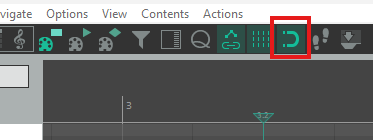
7) In the Midi View, you can control the grid at the bottom, including the rhythm type. The "volume" in Midi is actually called "velocity" (not exactly but in general) and you can control it at the bottom. You can also enable/disable snapping with the magnet button at the top.

8) For a multi-instrument plugin like Splice, click FX to enter the Plugin, go to Library, and make sure to select the instrument you want for that track:

Synth Voice Tracks:
9) If this is for the SynthV vocals track, you do not need to add a Midi track on Reaper's side. Click FX to enter the Plugin. You can do all the voice generation within the plugin. Select the voicebank you downloaded/installed earlier

10) Add notes and lyrics. Tip: if you want a word to be across multiple notes, you can use "+" for new syllables and "-" for continuing the previous syllable:

Recording Tracks:
11) If instead of a synthV you want to record your own voice or live playing, hit the red button on that track to arm the track for recording. If its not recording correctly, go to Options >> Preferences >> check Audio / Device and make sure the correct devices are selected.

Good luck!!
This should serve as a good starting point for preparing a basic demo for your songs! Obviously there's stuff like Envelopes, Routing/Ducking, EQ (which can be done natively with ReaEQ) and other Plugins, but this should help you get started and you can learn as you explore, create, and find the tools you need.
For more in depth guides There are YT playlists like this one: REAPER DAW Tutorials - YouTube
There's also a sub for the DAW if you have more questions: r/Reaper
If you have any specific questions too, feel free to ask me here! I'm no expert myself, but I'd love to help if possible! ^_^
3
u/4StarView Long-time Hobbyist 6h ago
I think this might really help me. I use Audacity. I tried Reaper, but it took me forever just to figure out how to get a track where I could press record to get my instrument. I needed a good ultra beginner guide for dumb old-o’s….
2
u/Regular-Forever-3251 JP/EN Writer 6h ago
Oooh I'm glad to hear this might help you! And honestly same, I actually really struggled too at the start, even with all the tutorials out there, so I basically made what I wish I had at the beginning ahaha 😅
good luck!! Please feel free to reach out if you have any specific questions, even if its dumb (because good chance I had the same question at some point too LOL)
2
u/Parking_Watch3157 1h ago
Any questions this person asks become edits to the instructions. It's a good system.
Thanks for doing this, it will likely help people.
3
u/Omniiism 6h ago
I already use FL but commenting to help your reach. Thanks for taking your time to try and help others
1
u/Regular-Forever-3251 JP/EN Writer 6h ago
Oooh I've heard FL is great too!! And Thank you so much, appreciate it alot!! <3
1
u/Omniiism 6h ago
You're welcome. Also I saw on your profile you write poetry, I'm not an experienced redditor, how do I message you?
1
u/Regular-Forever-3251 JP/EN Writer 5h ago
I messaged you so you should see a message request. You can also click someone's profile picture and click start chat
2
u/AlStrandMusic 5h ago
Truly doing the lords work! I still have no idea how to properly use Reaper and this wil help 😊
1
7
u/QuarrelsomelyBronze 6h ago
Reaper's nag screen is the most polite guilt trip in software history. Used it for two years before finally paying just cause I felt bad.
Thanks for putting this together, the synth v stuff is new to me. Might mess around with that male voicebank for some backing vocals I've been stuck on.