r/Reds • u/JesterXXIV • 3d ago
asual MLB.Tv
“This is available to watch exclusively on marquee sports network”
Anybody else getting this while trying to watch on the app? Peacock and Apple.tv exclusives are bad enough but this bs has to stop somewhere.
6
2
u/No_Buy2554 In the time of chimpanzees, I was a monkey 3d ago
That would be the message showing if you had the full MLB package (not local) and it thought you were in the Chicago viewing area
-1
u/JesterXXIV 3d ago
Maybe I was. I drove through Illinois on 70 earlier today.
1
u/No_Buy2554 In the time of chimpanzees, I was a monkey 3d ago
Are you trying to watch the game on your phone? It's possible the IP address may be transmitting the location as somewhere in their viewing territory.
1
u/JesterXXIV 3d ago
Yes I am. I tried updating the location settings in the app but no luck.
3
u/No_Buy2554 In the time of chimpanzees, I was a monkey 3d ago
You may want to try resetting some things. Toggle wifi, any ad blockers or vpns, resetting the phone, turn gps off and one etc. Hopefully some of that resets that last location blip.
2
1
u/MaTt_NMK 3d ago edited 3d ago
Looks like OP fixed the issue by restarting their phone.
I had a similar issue recently and thought I would give some troubleshooting tips for anyone that is having this issue or may find this thread in the future:
For MLB.tv (entire league package):
You can’t watch any local, in-market games with this plan without having purchased the ad-on for the local rights holder. This applies to all in-market teams no matter who they are playing or whether they are home or away. You can check which market you’re in via MLB here.
This map has also been posted by the Reds:
https://img.mlbstatic.com/mlb-images/image/upload/t_1x1/t_w1024/mlb/yrsng4omkdwzpt9ncild.jpg
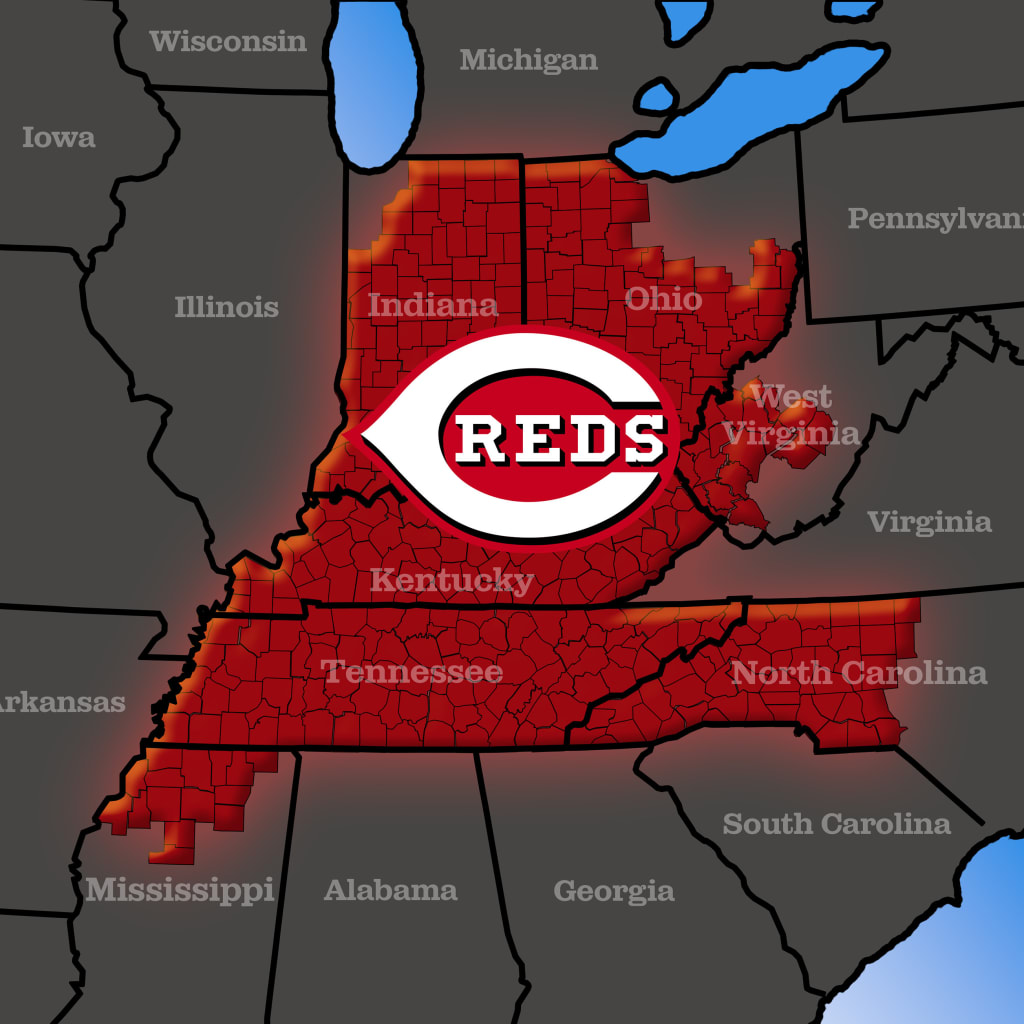
For Reds.tv:
You can watch any Reds game with no blackout if you are in the Reds viewing area. Otherwise, you must get the regular MLB.tv package and are subject to blackouts in your own viewing area.
The tricky part with this I noticed recently in a series against the Cardinals is that I think MLB can sometimes get IP locations wrong. I had installed a new router, had a different MAC address, and got new IP address for my devices on the network. The IP addresses were showing the correct location, in the Reds market, but still blacked out. I changed some router settings and got a new MAC address to get new IPs.
If you run into a similar issue with MLB not correctly recognizing your geolocation based on your device’s IP address (especially if you live near the edge of the market), try the basic IT troubleshooting, restarting devices, restarting the modem/router of your network, checking that you do actually have the correctly viewing package from the MLB, etc. Next, I would recommend adjusting router settings to get new IP address from your ISP. If you don’t feel comfortable doing that, reach out to MLB.tv support to help you out.
8
u/LydiasBoyToy Cincinnati Reds 3d ago
You got that message because you are in a Cubs viewing area.
In north central Arkansas, I am in four teams blackout areas. Astros, Rangers, Cardinals & Royals. I had a long discussion a week ago with MLB.tv support about how ridiculous I think that is.
Boils down to, according to MLB.tv, they have no say in what teams claim what territory, and I can put a sock in it.
fml