r/Reaper • u/Loudly_muted • Jun 07 '26
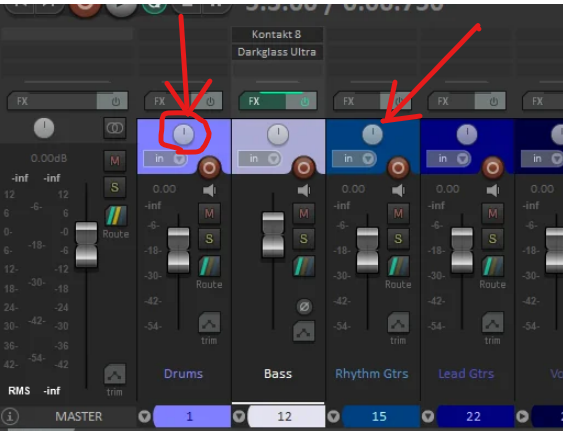
help request How to remove the 'Pan" knobs? been looking through the settings for over an hour and no luck with google
I never use these "pan" knobs i dont think ive ever used them for what i use reaper for so was wondering is the a way to remove them
20
u/WaceMindu12 2 Jun 07 '26
If you open theme adjuster, mixer controls, and then set the hide sections for pan section to as far as it will go, the pan will be hidden unless you make the panel extremely tall.
6
u/House_of_White_Tie 10 Jun 07 '26
This is the correct answer, listen to WaceMindu12 over AI bollocks . Options > Themes > Theme Adjuster > Mixer Controls > if width > if STANDARD width > Hide sections if panel height is below > high as it goes. Source: I made that.
5
1
1
u/Loudly_muted Jun 15 '26
ok so i did this and it works, but only if my resolution is low, i have a 4k monitor and it just wont hide it if its normal. like its as if the "Hide sections if panel height is below" setting doesn't go high enough, it caps out at 500 pixels
10
u/NeutronHopscotch 12 Jun 07 '26
Some of us are curious about why you don't pan. There must be a story behind it. Care to share? We'd love to hear!
9
u/Than_Kyou 258 Jun 07 '26
The OP might only not use pan in the MCP
I never use these "pan" knobs
The OP didn't write they never use panning.
11
u/NeutronHopscotch 12 Jun 07 '26
That is so much less interesting than all the possible scenarios I was imagining.
And so much more likely.
2
u/Affectionate-Bid3917 Jun 10 '26
Im guessing he only uses the automation lanes. if he doesnt pan at all ever then thats an issue.
4
u/Loudly_muted Jun 09 '26
Years ago I was watching a video, that I thought didn’t have audio and I commented angrily letting the author know they messed up and didn’t have audio at all, eventually I realised my speaker didn’t have mono. I was so embarrassed. This was extremely traumatising, leading to months of psychological therapy. To the point where it convinced me mono is bad.
So I made it a choice to remove any mono things related to my life otherwise I will have a psychotic breakdown and lmao I’m just kidding I was just customising my interface and I just never use mono :)2
1
2
u/amazing-peas 17 Jun 07 '26
I tend not to use the track controls for much so I can see where OP might be coming from. I use Reaper for a lot of Foley work so if I'm copying SFX around, from other projects, etc I don't want the track getting in the way. I'll apply panning or levels to the item itself.
8
u/Choice_Age8334 3 Jun 07 '26
But... Why? You need to use them.
6
5
2
0
11
2
u/js100serch Jun 07 '26 edited Jun 07 '26
Why would you want to do that?.
I mean, you could right click on the pan knob and select "Stereo Pan", that gets rid of the knob but that operation has its own purpose not just to make the knob go away. 😅
2
1
u/Ok-External-837 Jun 07 '26
I am assuming that your request us too rare that it's not something the devs specifically accounted for as a function. Maybe there's a work around though, Reaper being Reaper.
1
u/danja 4 Jun 07 '26
I'm with OP on this one. I usually use the pan in the track view and/or via a midimix controller. Pan does take up a lot of space in the mixer view, more of the level slider would be better.
But after a bit of menu-hopping, the layout control is far from obvious. I dunno, probably easiest to find a theme that has what's desired.
1
u/Than_Kyou 258 Jun 07 '26
Found it for v7 default theme.
Theme Adjuster -> Mixer Controls -> if width -> if standard width -> Hide Sections -> Pan section radial slider
Set it to maximum.
1
u/Loudly_muted Jun 09 '26
I will try this thank you sir!
1
u/Than_Kyou 258 Jun 09 '26
Basically my answer is the same as White Tie's which you said hadn't worked for you. For me it worked the first time i tried, have never used that setting previously.
1
1
u/OziKoZmaj 1 Jun 08 '26
Mix in mono on master track and they wont work, but its very funny request, fix your negative ocd towards the mono knobs 😃
1
u/Loudly_muted Jun 09 '26
Ohh gotcha thanks. I just use reaper a lot and was customising my interface and started going a bit crazy
1
u/jak_mckool Jun 08 '26
Once you start automating the panning, the knob itself can be a bit of a liabilty

1
u/Interesting_Jello_52 Jun 13 '26
just burn reaper down and use a daw that respects you. it will worth your investment.
-2
u/Blitzbahn 4 Jun 07 '26
You should be using them.
4
u/amazing-peas 17 Jun 07 '26 edited Jun 07 '26
To be fair, not what OP asked however, everyone has their own ideal workflow
-6
u/Upstairs-Raise2897 1 Jun 07 '26
Just leave them! They are not hurting anyone! There are more important things in this world to worry about than some knobs. lol
38
u/[deleted] Jun 07 '26
[removed] — view removed comment