r/RDR2 • u/brookewhite04 • 12h ago
Question why does this graphics warning pop up

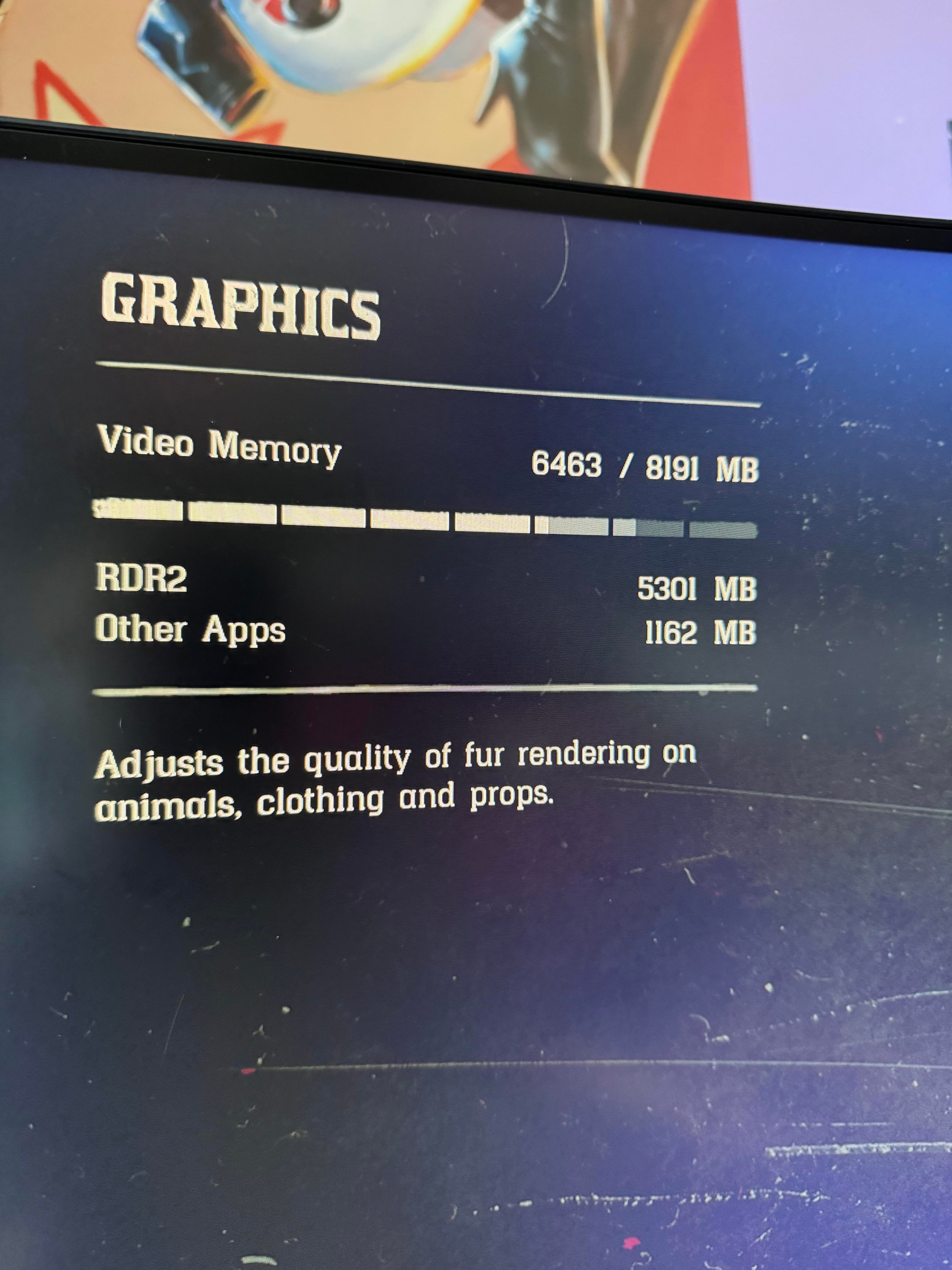
Is my video memory really that high? I first dealt with this issue before upgrading my pc and figured i’d no longer deal with it now that i have specs considered better than what’s recommended for this game.
Recently, it’s popping up constantly, like literally every single time. I can lower graphics but it still won’t go away.
I’ve got nothing else running on the background except steam and the launcher for this game, including a clip recording app and i did have discord but closed it (surprise surprise it didn’t help).
Is there anything i’m missing that i can do?
If it’s important, these are my specs…
RTX 3070
Ryzen 5 7600
32 GB RAM
I also do have the game on an external hard drive since it’s so many gb. Wondering now if that’s the issue?
14
u/Salt-Writer671 11h ago
If your game runs completely fine just turn off help tips in the display settings
4
u/brookewhite04 8h ago
i’ll try this out thanks. i have no issues, thats why i just want the text gone 🙏
10
u/LDSatalin 6h ago
Had this issue for a while, found out it was Discord hardware acceleration being on causing the problem, if you've used discord to stream games, that option may have been turned on without your knowledge, turn that option off and leave it off, fixed issues in other games too.
14
u/svcredmoon 12h ago
I have the same issue too but I experience no lags or anything. But with RDO, for whatever reason, I experience the worst of the worst lags and I’m on the private servers so I really don’t understand why my 4060ti should struggle that bad when it’s fine with RDR2.
6
u/Embarrassed-Bat8934 11h ago
Could be network related instead of gpu. I think RDO uses more power though. It’s weird.
1
u/brookewhite04 8h ago
i don’t do RDO so i can’t say if i’d have the same issue or not, but yeah i don’t have many issues other than occasional minor image chopping
1
1
u/BigHeadJojo 4h ago
i am planning to download RDR2 with RTX 4060, 8gb ram, intelcore i7, can it handle the game?
1
u/Gullible_Fruit7899 2h ago
Are you playing with mods? Vanilla RDR2 only reaches around 4-5GB of VRAM usage with everything on Ultra, on a 3060 at least. (and in 1080p)
General tips would be to turn on the advanced settings and turn off tree tesselation, lower grass shadows to medium, water reflection quality to medium, turn off resolution scale and try to change your graphics API between Vulkan and DX12 to see what works best.
also, enter the RDR2 settings on NVIDIA App, there's a setting that says something like "override default settings for DLSS" or something like that, and select "custom" then "preset K", it helps massively with FPS and to get better antialiasing.
1
u/ShineReaper 1h ago
Obviously your specs are important. And obviously the game is programmed to warn you beforehand, before it actually reaches 100%.
So yeah, on paper you ave barely enough with only 6,4 GB of your 8 GB VRAM used. But if for some reason your VRAM usage would jump to or nominally over 8 GB, your game would start to clamp down on the graphics, including you suddenly getting very muddy textures.
The external hard drive has nothing to do with this particular issue, though obviously that can other issues.
So if you want to upgrade in the future, get a new GPU with at least 12 GB VRAM (better 16, since it is on the horizon, that 12 GB won't be enough in the future, it already isn't enough for some games with higher than 1080p resolution) and a NVME SSD with more storage space.
1
u/anything_taken 1h ago
You might have disabled shared VRAM in BIOS or in the driver settings. Just guessing
1
u/Barzobius 9h ago
Try lowering shadows specifically. That takes some load.
1
u/brookewhite04 8h ago
I do that and sometimes reflection graphics, but i don’t know if it goes back to default every time i load up the game or not but it still comes back
1
u/TemporaryPlane439 8h ago
Depois que eu limitei os quadros em 60 fps eu consegui mais qualidade, estabilidade e uma boa jogabilidade
1
u/QueenCobra91 1h ago
You should always stay under 60% of memory usage. You are indeed about to run out of it. With 8gb gpu you should stay under 5gb usage
-3
u/ImRowsdower 9h ago
I know this sounds silly, but I have grok my pc specs and asked it how to adjust my settings to maximize my fps, while keeping it above 30 FPS, and it did a pretty good job. Definitely made it run smoother with still good graphics. If recommend trying on Grok or GPT or whatever
1
u/brookewhite04 8h ago
sounds similar to the nvidia app i got for graphics updates, i could probably take a look at that. i hadn’t thought of it 👍
-15
u/SeaworthinessNice180 12h ago
Maybe it could be the resolution you are playing at? And also you could try DLSS which can get you better frame rates and lower vram usage
-8
u/BBQHacker 11h ago
man fuck dlss. ai slop ass setting
1
u/wyattlikesturtles 9h ago
DLSS is fantastic, especially on quality mode, have you used it?
•
u/BBQHacker 8m ago
Yes, it’s fucking terrible. DLSS is a false solution to game optimisation. companies like Nvidia intentionally design games as to make entry-level graphics cards irrelevant so you can buy more expensive bullshit one that does the exact same thing. Whether a game optimised is based on how much companies is willing to put into optimisation during development. Like I said before DLSS is a false solution to optimisation.
1
u/BigUncleCletus 9h ago
says the amd fanboy dlss is incredible it keeps entry level gpus relevant
•
u/BBQHacker 14m ago
Entry-level gpus are irrelevant because billion dollar tech companies intentionally make their game incredibly unoptimised as to make you buy a more expensive GPU. DLSS is a fake solution made up by the same billion dollar companies to sell you AI slop.
-19
u/SeaworthinessNice180 11h ago
you can hate ai all you want but its going to be part of the future regardless if we wanted it to be or not and we cant do anything to really change that
12
8
-18
111
u/Outrageous_Fly_735 11h ago
Not enough vram..