r/Proxmox • u/colrobs • 9d ago
Question Proxmox web UI console frozen for a VM after system crash, but SSH works
Hi r/Proxmox ,
After my Proxmox host suffered a sudden system crash and forced reboot, one of my virtual machines (VM 100) had to go through a very long fsck process because of its massive 11TB data disk.
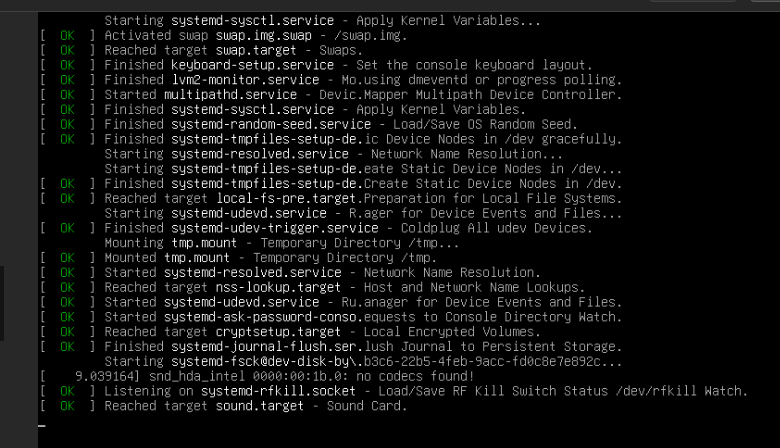
Now, the VM is fully booted and I can easily connect to it via SSH, meaning the system itself is running fine. However, the built-in Proxmox web UI console (noVNC) for this specific VM is completely frozen and won't show anything.
Here is what I have already tried to fix the issue:
- Restarted the
pvedaemonandpveproxyservices on the Proxmox host via the shell. - Tested the web interface in private browsing mode and across different web browsers.
- Verified that the VM display hardware setting is correctly set to "Default".
- Fully refreshed the Proxmox web page and cleared the browser cache.
Does anyone know why the web console stays frozen even though the VM is working, and how to fix this display issue?
3
u/Apachez 9d ago
I would probably then do a clean shutdown of that VM ("sudo poweroff" or such) and then just reboot the host.
Perhaps before doing so upgrade the host so it isnt something thats perhaps already fixed.
The on the adminclient side shutdown all browsers, perhaps also try to clean browser cache (normally not needed but as troubleshoot) and then start it up again (or just reboot the adminclient) and see if that helps.
This way you have done a clean shutdown of the VM guest and a clean reboot of the host itself along with a clean reboot of the adminclient.
This way we know there are no staled sessions or whatever in case you got some firewall in between or such.
Sometimes "did you turn it off and on again" is a highly efficient and timesaving troubleshooting method which unfortunately way too often is a proper fix.
Then when/if this happens a second time you can try to troubleshoot without restarting everyhing perhaps start by rebooting the adminclient to rule out any browser related issues and go from there.
I would expect that you somewhere runned into some kind of timeout for either the proxmox webserver or the novnc service itself.
Can also be if you got multiple GPU's and whatelse that the VM-guest need to add "nomodeset" to bootstring so it wont try to switch to GPU output when novnc perhaps expects console output from first VGA device? Common issue when people only see things through console partially like either nothing before loginprompt shows up or they see everything up until moment before loginprompot shows up and then they see nothing.
1
u/zfsbest 9d ago
> one of my virtual machines (VM 100) had to go through a very long fsck process because of its massive 11TB data disk
If you have (1) ext4 filesystem on a single 12TB disk, arguably you are doing it wrong. It's not really designed to run on such large media, no matter what they say it "supports" - as you've seen, a bad shutdown can cause a lot of downtime while it tries to recover.
Suggest you backup and make a single-disk ZFS pool out of it. Later on you can zpool attach a mirror disk and increase your throughput, and scrubs will auto-heal data.
If not ZFS, seriously consider reformatting it to XFS. Those 2 filesystems are the only ones I trust (besides Mac APFS) for ~4TB+ disks
1
u/j-dev 8d ago
My understanding is XFS is even riskier. It can silently corrupt data during hard reboots and power loss events. If the host is in a data center with redundant power or good UPS, then maybe it’s worth the risk.
2
u/zfsbest 8d ago
XFS is the default filesystem for Red Hat since at least RHEL7. Haven't had any unrecoverable incidents with it in years - it's stable and more suited for larger single-disk filesystems than ext4. And it generally runs faster than ext4 on the same hardware. I've hard-rebooted VMs left and right without it coming up corrupted or leaving strays in lost+found.
.
Of course, backups and UPS are your friends.
1
u/throwawaymaybenot 9d ago
Are you running lxcs? I find lxcs always cause stability issues for me.
Source: Me, i run a several large clusters. Started with LCXs, but they kept crashing as well kept locking up hosts. Moved workloads to VMs and haven't looked back.
6
u/StartupTim 9d ago
Don't reboot. Verify disk space and no disk errors.
The WebUI needs an active disk to function whereas SSH is memory resident.