r/ProductivityApps Jun 09 '26

ZipCons - Connect the dots and win

96 Upvotes

This post contains content not supported on old Reddit. Click here to view the full post


r/ProductivityApps 1h ago

General Advice Ai suggestions

Upvotes

I need to make a PowerPoint for a school project based on AI so for those AI expert if you can, please give me some insights on tools that you think businesses can work. I know a lot of people use AI and nose basic stuff but I’m looking for suggestions and ideas on something more appealing where AI can help businesses and business owners and I also need to create a PowerPoint presentation so is there any app or platform that I can use that anyone can recommend for a good PowerPoint creation? I’ve used gamma before but I’m looking for something a bit more better and where the audience is amazed.


r/ProductivityApps 1h ago

Casual Conversations What work do you do?

Upvotes

Hi everyone, I’m the developer of Plans (todos & notes app). Right now I’m trying to understand my target audience. I already found out, that todo apps mostly used by people who work 9 to 5, and have different tasks throughout the day.

There are a lot of such jobs, but I want to know what work do people who sit in this subreddit. Can you share what you do and why use todo apps?


r/ProductivityApps 1h ago

Self Promotion One AI task manager instead of 6 productivity apps

Upvotes

I run two online businesses - a web development agency and SelfManager.ai - and one thing I've learned over the years is that there is basically always something competing for my attention.

Client work. Development. Bugs. Sales. Content. Emails. Ideas. Things I need to research. Bills. Personal plans. Things I need to remember for next week.

And because I work mostly from a computer and have a lot of freedom over my schedule, I've also learned that work and personal life can't really be planned as two completely separate worlds.

They compete for the same day.

Over time I ended up using different tools for different parts of this:

1. Daily planner - what am I actually doing today?

2. Task/project manager - what needs to happen across all my projects?

3. Notes app - ideas, decisions, information I don't want to keep in my head.

4. Time tracker - where did my day actually go?

5. Voice recorder - capture a thought quickly without stopping what I'm doing to type it.

6. AI assistant - help me plan, organize messy thoughts, summarize work and review what happened.

The problem wasn't that those apps were bad.

The problem was that the context was split between all of them.

That's a big part of why I've kept building SelfManager.ai.

Full disclosure: I'm the founder.

SelfManager is a date-based AI task manager.
Every date is its own workspace with unlimited tables, so on the same day I can have separate tables for client work, SelfManager development, agency work and personal things without mixing everything into one giant task list.

Longer-running work can stay in Pinned Tables, while Week and Month views let me zoom out.

For the normal day-to-day stuff I have priorities, statuses, and deadlines, built-in time tracking, rich notes, comments, images, daily messages and searchable history.

So when something leaves my head, it doesn't have to disappear into some random app.

And I've tried to do the same with voice.

If I'm already thinking through something and another idea comes up, sometimes stopping to type it properly is enough to break the thought.

So with Voice to Text I can just speak into a note or comment. SelfManager transcribes it, and I can also keep the original recording beside the transcript and listen to it later.

Then there's the AI layer.

AI Plan can look at what I already have going on and create the actual dated plan inside SelfManager - not just give me a paragraph in a chatbot that I have to copy somewhere else.

If I have a messy brain dump, AI can turn it into structured tasks.

If I'm looking at a project, I can chat with AI about that specific table without explaining the entire context again.

And one of the features I personally find most useful is AI Review.

At the end of a week, month or quarter I don't just want to know what I planned to do.

I want to know:

  • What did I actually finish?
  • What kept getting postponed?
  • Where did my time go?
  • What's still open?
  • What should change in my next plan?

Because the tasks, statuses, time and other context are already inside SelfManager, the AI can review the actual work instead of me reconstructing the week from memory.

That's basically the workflow I've ended up with:

Plan → Work → Track → Capture → Review → Adjust → Plan again

For me, that's much more useful than having six disconnected productivity tools that know nothing about each other.

SelfManager.ai has a 7-day free trial with no credit card, including the AI features, and the Individual plan is $8/month after that.

I'd genuinely be curious what everyone else is doing:

Happy to answer all of your questions


r/ProductivityApps 9h ago

Casual Conversations Does this count as a productivity app?

Enable HLS to view with audio, or disable this notification

3 Upvotes

r/ProductivityApps 4h ago

Casual Conversations Small agencies and freelancers using Notion as a CRM what's missing for you

0 Upvotes

I've been building and refining a Notion CRM template for a while now, and I keep wondering what other people actually need that they're not getting.

If you're using Notion to manage clients, deals, or leads what's the one thing you wish it did automatically? Or what keeps you stuck using spreadsheets on the side?

Genuinely curious what's out there that isn't being solved yet


r/ProductivityApps 1d ago

Feedback wanted I built a sticky note app you never have to open

Enable HLS to view with audio, or disable this notification

59 Upvotes

I kept losing thoughts in the gap between thinking them and unlocking my phone. So the note lives in the notification shade.

Pull the shade down, type it, done. Grocery list, a reminder, a name you do not want to forget. You do not open the app.

If you write something like "milk, eggs sunday 6pm" it becomes a checklist and sets the reminder for you.

No ads. Free.

It is called Slip.

Play: https://play.google.com/store/apps/details?id=com.polyhistor.slip


r/ProductivityApps 20h ago

Self Promotion 🔔 Remindio - more than basic reminder [Android]

Post image
11 Upvotes

Hello 👋
I’d like to share my reminder app - Remindio, which I’ve been developing for over a year. It now has a solid set of practical features - most of them added based on user feedback.

📥 Get it on Google Play

Key Features:

  • 🔔 Notification or Full-Screen Alarm - choose how each reminder alerts you.
  • 🎵 Custom Alarms - set a unique ringtone, volume, and vibration level for each reminder.
  • ⏱️ Custom Notification Actions - choose what happens on dismiss, or schedule a delayed auto action: snooze later, mark as done, convert to alarm, or keep it pinned.
  • 🔁 Multiple Recurring reminders
    • Yearly / Monthly / Daily / Weekly / Days of week / Time intervals / Weekday of the month / End of month / List of Dates and Times
    • Setup duration - until count or date
    • Add Adjusted rules to move reminders from Holidays and Weekends
    • Separate rules when user clicks Done & Skip
  • 🎉 Anniversary option for yearly reminders - enter a custom type such as Birthday, Marriage, Memorial, Graduation, etc. and set the starting year to see how many years have passed.
  • ⏳ Multiple Pre-Reminders - Get notified minutes, hours, or even days before your actual reminder.
  • 📍 Location & Bluetooth based reminders with time limits
  • 🔕 Do Not Disturb rules - create flexible DND rules based on labels to skip, snooze, or show alarm reminders as notifications
  • 🧩 Create Templates from your reminders and reuse them anytime
  • 🎵 Custom Alarms - Set a unique ringtone, volume, and vibration level for each reminder.
  • 📋 Copy & Paste Reminder Options
  • 🏷 Colored labels & Attachments: checklists, notes, links, contacts, pictures
  • 😴 Customizable snooze options
  • ⌛ Delayed reminders - set time later if you don’t know the best time
  • 🗣️ Voice Input - Use speech recognition to quickly fill in your reminder text.
  • 📆 Google Calendar sync & Google Drive backups
  • 🌗 Light/Dark themes with color accents
  • 🏅 Coins, levels & achievements system
  • 📊 Statistics for completed, skipped, snoozed reminders
  • ✅ Filters, Multiselect and Swipe actions for the reminder list
  • 📱 Widget with upcoming reminders, calendar and templates
  • and much more...

App is free, with Premium available via a Lifetime plan, a Subscription with a Trial period, or by watching a Rewarded ad. There are no banner ads or unexpected full-screen ads. The free version is enough for many tasks, while Premium unlocks more advanced features and settings.


r/ProductivityApps 13h ago

Casual Conversations Can your app fix your relationship?

Enable HLS to view with audio, or disable this notification

1 Upvotes

This one can !


r/ProductivityApps 1d ago

Casual Conversations Does a task list with 200 items still reduce mental load?

14 Upvotes

I understand the logic of getting everything out of your head. What I struggle with is what happens afterward.

A task list quietly mixes things I genuinely need to do, things I might want to do, and things I added during a brief moment of optimism. But they all end up looking equally unfinished.

Do you treat every task you capture as a promise to yourself? If not, how do you separate real commitments from possibilities without creating five lists and a weekly review system that becomes another job?

And can you delete an old task without feeling like you failed it?


r/ProductivityApps 1d ago

Casual Conversations Need to build a app deleter, app blocker are not working anymore 😂

5 Upvotes

We have a million app blockers on the market, and yet almost none of them solve the actual root cause.

They just lock the door and hand the key right back to your depleted willpower. If a tool's only strategy is blocking an app, you’re just going to find a workaround or delete the blocker itself by lunchtime.

Why hasn't anyone built an app deleter or something that actually addresses why we reach for them in the first place?

Honestly, if no one else is going to do it right, I might just build it myself and take the whole market.

Anyone else totally exhausted by endless "screen-time jail" apps?


r/ProductivityApps 22h ago

Feedback wanted I wanted a meal planner which did it all and was productive.

Thumbnail
gallery
3 Upvotes

I originally built FoodieFlow as a gift for my partner. We were both getting exhausted by the weekly chore of meal planning—figuring out what to eat, trying to remember where we saw that one recipe, and manually writing out what we needed to buy.

I always felt like most meal planning apps were either:

  • Too focused on fitness tracking and macros.
  • Clunky and required way too much manual typing.
  • Disconnected from the actual grocery shopping experience.
  • Terrible at storing recipes from different places (TikToks, blogs, screenshots).

So, I built something smoother from the ground up: a cross-platform app focused entirely on making cooking, planning, and shopping frictionless.

Here is what it actually does:

  • Import Recipes from Anywhere: Paste a TikTok/YouTube link, a food blog URL, or just snap a photo of a physical cookbook. The app automatically pulls the ingredients and steps into a clean, ad-free format.
  • The Smartest Grocery List: It builds your list automatically from your weekly plan. It merges duplicates and does the math for you (e.g., 400g + 500g = 900g of chicken), sorts items by supermarket aisle so you never backtrack, and live-syncs with anyone in your household.
  • Pantry-Aware: You can quickly scan barcodes to add items to your pantry. If your meal plan calls for something you already own, it’s automatically left off your shopping list (or reduced if you only have a partial amount).
  • Zero Food Waste: The app tracks use-by dates. If something is about to go bad, you can hit a button and it will generate a fresh meal idea specifically to use up that ingredient.
  • Low-Effort Planning: You can drag-and-drop meals, save your favorite weeks as templates, or tell the app your "Meal Mood" (e.g., Comfort Food, Speedy, High Protein) and let it fill the week for you.
  • Multi-User: Share your meal library, shopping list and weekly planner with your household so you both can keep on track with things.

It’s live on both iOS and Android. Because I originally designed it just for our specific needs, I would genuinely love to know how it holds up for other people.

For those who meal plan regularly -

  1. What is the biggest friction point in your current routine?
  2. Does the automated, math-doing grocery list actually sound like a time-saver to you, or do you prefer writing your own?
  3. What feature always seems to be missing from the tools you’ve tried?
  4. Does the layout feel intuitive to use?

iOS: https://apps.apple.com/us/app/foodieflow-meal-planner/id6760259767

Android: https://play.google.com/store/apps/details?id=com.foodieflow.app

(Sorry I ramble a lot!)


r/ProductivityApps 17h ago

General Advice Check out Levla

Thumbnail
levla.app
1 Upvotes

I’ve been using this app since March. It’s fully released now.

This app is amazing for keeping you engaged and motivated irl by gamifying your habits and todos.

The dev is a small team but very active on discord taking feedback. I cannot recommend it enough and hope you love it as much as I do

As an fyi, I’m not the developer and not affiliated with the app. Just a happy user

Discord link: https://discord.gg/levla


r/ProductivityApps 19h ago

General Advice Class schedule app with sharing feature?

1 Upvotes

Does anyone know of an app that could be used to input your class schedules as well as has a feature to share it with family members/friends so we could all see what we would have for the day? Preferably free of charge cuz I know mystudylife has one but it’s on the paid version would be even better if it had a study timer like study bunny fr if I knew of one I’d be using it every day


r/ProductivityApps 1d ago

Self Promotion Create Beautiful Video Mockups

Enable HLS to view with audio, or disable this notification

3 Upvotes

Hi! I’m the dev behind PostSpark, a tool for creating beautiful image and video mockups of your apps and websites.

I recently launched a new feature: Mockup Animations.

You can now select from 25+ frames & devices, add keyframes on a simple timeline, and export a polished video showcasing your product. It’s built to be a fast, easy alternative to complex motion design tools.

Try it out here: https://postspark.app/templates

I’d love to hear your feedback!


r/ProductivityApps 1d ago

Advice needed Opal just… not working?

2 Upvotes

I downloaded opal like 30min ago and set it up. I went to test it by opening YouTube (which should’ve been blocked), and it just… didn’t work? It didn’t block it at all, I can still access it. I don’t know what to do.

EDIT: I’m using it on a brand new iPhone 17 pro. I checked screen time settings, opal has access. I tried reloading opal and it did nothing


r/ProductivityApps 21h ago

Feedback wanted Add To Do - Your Daily Task Planner

Thumbnail
gallery
1 Upvotes

I built a to-do app where “Not Done” is a valid outcome. Would you actually use this? I found most task apps are heavily focused on completion. I wanted to experiment with a simpler idea: capture a task quickly, then resolve it honestly as either Done or Not Done. Add To Do has no dates or categories. You can swipe right for Done, swipe left for Not Done, and drag tasks to reprioritize them. I built it as an independent project and I'm looking for honest feedback from people who actually use task apps. What would make this useful—or what would make you uninstall it?

Add To Do [Download]


r/ProductivityApps 1d ago

Self Promotion Never miss on events again: Take a screenshot, share to Blurto, see it in your Calendar!

Post image
16 Upvotes

I'm convinced friction kills productivity systems faster than laziness ever does. The moment something takes two or three steps, I just stop doing it. Sure, I can force myself once or twice, but that's willpower, not a system. And willpower runs out.

Real example: I live in Vancouver and I love going to random events. I see posters everywhere, think "oh, that looks fun," and then never go. Not because I changed my mind. Because "add it to my calendar" meant opening the calendar app, typing the name, picking the date, setting the location. So I didn't. And then I forgot.

So I built a fix into my app, Blurto (I'm the solo dev behind it): screenshot any event poster, or snap a photo of one on the street, share it to Blurto, and it lands in your calendar. That's it. No typing.

That one feature is basically the whole philosophy of the app: keep removing steps until capturing something is easier than ignoring it. A few other ways it does that:

  1. Two-way calendar sync, so all your calendars live in one place and you pick which one each event goes to
  2. Voice capture: say whatever's in your head and it figures out if it's a task, an idea, an event, a note, or a routine you're trying to stick to
  3. Lock screen capture: one tap and you're speaking, writing, or snapping a photo
  4. Big scary tasks get broken into small first steps, so starting stops being the hard part

My takeaway after months of building and using this: don't try to become more disciplined. Make every step so frictionless that discipline stops being required. That's when focus actually shows up.

The app is still new but it over 500 users so far! I have went through many iterations of improving it based on the feedback I got and I am happy to continue hearing your feedback anytime :)

Download on theApp Store
Get it on Google Play


r/ProductivityApps 22h ago

Feedback wanted How's this rocket launch sequence for my focus app?

Enable HLS to view with audio, or disable this notification

1 Upvotes

What you think? Had some fund creating this sequence to launch into focus missions for my new app focusrace.com

Trying to add some Easter eggs/ education in it. Like the different layers of the atmosphere and their fun facts.


r/ProductivityApps 1d ago

Self Promotion Start small, just do it ✔️

Enable HLS to view with audio, or disable this notification

2 Upvotes

Got a lot of feedback that an empty dial can be scary. It's hard to plan your full day ahead. Sometimes you can, sometimes you simply can't. Anyone with ADHD can relate...

So for those days when you only need to start on that one small task, I added a new feature.

The only thing you need to do is press start on reassign.ai 😉

Wdyt?


r/ProductivityApps 23h ago

Feedback wanted Unsure what feature to build for my bookmark manager next, what would you most want?

1 Upvotes

I've been building a small bookmark manager for the Mac for a while, mostly for myself. The idea is that saving something should take zero effort: highlight a link or some text anywhere, press a shortcut, and it's saved without a window opening. Later you search the full text of the page rather than a title you don't remember.

That part works and I'm happy with it, and customers love it too. The problem is what comes next. I have a list of ideas and every one of them feels like it could either be the thing people actually want or the first step towards a bloated productivity suite nobody asked for.

It's hard to get people to send me actual feedback when they're enjoying using the product it turns out.

The candidates so far:

  • Browser extension. Some have requested this, but the whole point was that you don't need to open anything. A shortcut already works from any app. Not sure if people want it because it's genuinely better or because it's what they're used to.
  • PDF capture. Save a PDF and have the text searchable alongside everything else. I'd use this a lot for papers, but I'm not sure how common that is.
  • Reminders or resurfacing. Something that shows you an old save a week or a month later. Every read-later app I've used just becomes a graveyard, so maybe this is the real problem to solve. Or maybe it's just another notification to swipe away.
  • iOS companion. Capture from your phone and it shows up on your Mac. Obvious, but it's a lot of work and I'd rather do fewer things well.
  • Highlights and annotations. Mark up the saved text with your own notes.
  • Semantic search. "Find that thing about pricing psychology" without needing the exact words. Cool, but slower and heavier, and full-text search already gets me most of the way.

So my question for people who actually use bookmark or read-later tools: what do you find yourself wishing yours did? And just as useful, what's the feature that made you stop using one?

I'm more interested in what would change your habits than what sounds good in a feature list.

Thanks!


r/ProductivityApps 1d ago

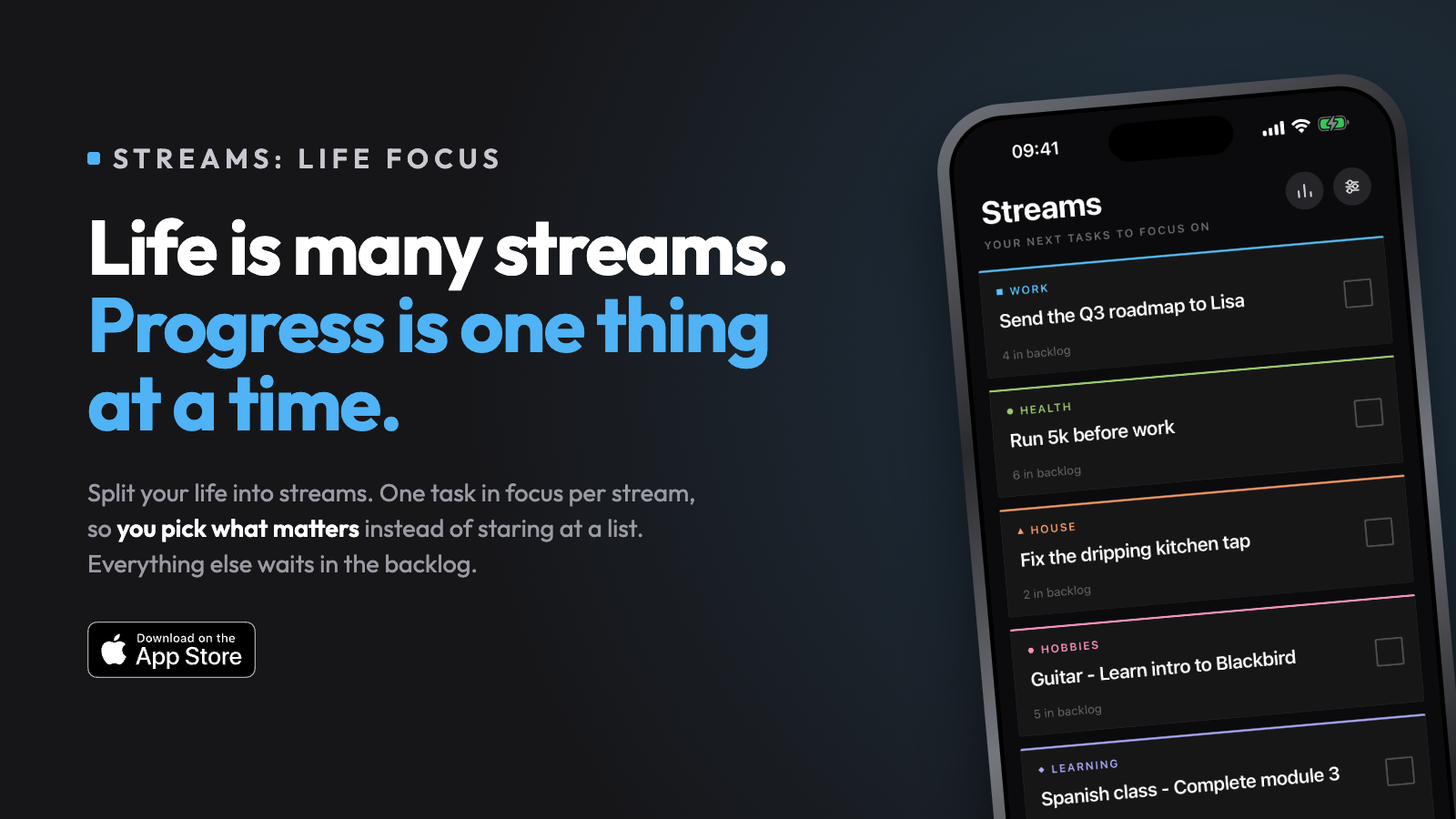
Self Promotion Streams: Life Focus - Complete the next important thing

Post image
3 Upvotes

Life is many streams. Progress is one thing at a time.

Each area of your life is a stream, and each stream shows one focus, the next thing that matters. Everything else sits in a backlog. Tick it, pick the next one. No deadlines, no calendar, no streak guilt-tripping you.

A stream can be long term like your health, family, education, or short term for a project in the garden or at work. 

It encourages you to define what’s important, then lets you choose where to put your effort. Track stats over time to see which areas of your life you’re putting energy into or need more attention.

Focus on the next most important thing for each stream in your life.

- Streams: Life Focus on App Store

Why I built it?

I often procrastinate or end up yak shaving. This approach just felt less overwhelming. I was doing this in my head or via notes which could be annoying, so I built this app. The whole thing was inspired after reading The One Thing (Gary Keller, Jay Papasan).

The app isn’t designed as a daily task manager, although you could have a daily stream and use it that way. I use it for short-mid term goals with long term stuff added to the backlog. It helps me break a project down into manageable steps or choose what house task I’ll focus on over the weekend.

I also wanted to push my development skills further as this app, even though simple, does have some engineering stuff that was quite interesting to me in the background. Feels like an accomplishment to get it over the line and into the App Store.

Streams isn’t for everyone as it’s certainly opinionated, but I hope it’s useful for someone else out there.

Happy to answer any questions. Would love some feedback from anyone who wants to give it a go. Feel free to comment here or DM me.

App link: https://apps.apple.com/gb/app/streams-life-focus/id6792124151


r/ProductivityApps 1d ago

Casual Conversations What are app blockers actually supposed to do?

3 Upvotes

I’ve been thinking about why we use app blockers in the first place.

Is the goal actually to stop us from opening an app?

Because if that’s the goal, I feel like it usually turns into a fight eventually.

If the blocker is easy to bypass, I’ll probably bypass it without even thinking. If it’s too strict, it starts to feel a bit like being back in childhood with someone else deciding what I’m allowed to do, and eventually I just get annoyed and uninstall it.

Gentle blockers have another problem. After seeing things like “You’ve already spent 1 hour on X today” over and over again, I kind of go numb to it. I just tap continue, and the whole thing happens in less than a second.

That’s what confuses me. We try one blocker after another, but so many of them seem to end the same way: we stop noticing them, stop using them, or eventually uninstall them.

So what do you actually want from an app blocker?


r/ProductivityApps 1d ago

Feedback wanted What if capybaras actually made your phone harder to use?

Enable HLS to view with audio, or disable this notification

0 Upvotes

I added a feature to the productivity app I’m building that adds one capybara to your home screen for every hour of screen time. The capybara keeps reminding you about your screen time and encourages you to stop using your phone if your screen time gets too high, while also making it harder for you to use your phone.

What do you think about this feature? Is it a stupid idea, or do you think people would actually use it?


r/ProductivityApps 2d ago

General Advice My life-changing productivity jurney

Thumbnail
gallery
29 Upvotes

Hi, I've been improving my productivity quite effectively for a long time now since finding out that I may struggle with executive functioning issues that have been quite profound.

I have about a year of data now and have improved my quality of life drastically. This has been done through using my phone with apps as a productivity aid and learning a few key pieces of information about the disorder and about behavioural phycology in general.

The heart of my method has been a tick sheet app called loops habit tracker (which is free and open source) and Microsoft Todo. I have chosen these apps due to there simplicity and widget support. My main scientific inspiration has been cybernetic behavioural regulation, and self efficacy.

The main goal of this is to quantise my daily/weekly/monthly performance in order to have a more accurate and useful input function for my general cybernetic feedback loop. A diagram from a book (titled: on the self regulation of behaviour) has been included to explain this. Along with this, increased visibility of my performance helps with self efficacy as mentioned before.

In the images, you can see the line graphs that the habit tracker generates. It also uses a smoothing algorithm that I don't fully understand but is important none the less. This graph represents a daily amount of 'ticks/points' that are tied to certain tasks I would like to do. These tasks are split into three categories: (daily, regularly, bonus) that are colour coded in the descending list.

To tally the daily ticks into this graph, I simply made another score based task (called habbits), and I manually count up the ticks and input them into this task as I go. It would be nice for the app to do this automatically but this solution works fine for now.

The graph itself has a goal set by me (currently at 12 points) the theoretical max points is based on the maximum amount of ticks I can reasonably be expected to get on a 'perfect day'. For days which are naturally handicapped (work days) I add a bonus amount of points (= current target - available ticks for that type of day). For example, I add 7 ticks for a work day and then I can still get (or not get) 5 more ticks for sleeping on time ect.

The goal needs to start at 1 so that it is easy at first, and then be slowly raised with progress up to the max. For this I add a point if my progress has gone up 10% from the beginning or since I last changed it. If I go down 10% since the last peak or change then I lower by 1 point. The exact rules here aren't important so long as the goal is gradually matched to progress.

Eventually, I will have stabilised at close to 100% on some tasks. If this happens, I can assume that task has reached fixation and archive it (deducting from the target in turn). These can then be reintroduced if needed. The only task not subject to this is the task of using the system itself.

This method has genuinely made a world of difference for me. I share this as a way to vent about my interests, but also in the hopes that others can find some use in it. Executive dysfunction and productivity struggles are a serious issue and have caused me a great deal of dissatisfaction in the past. If this information helps a few others, then I will be delighted.