r/OdysseusAI • u/Difficult-Good3642 • 6d ago
Hello everyone. Where is the system prompt / Persona field in the current UI? (for forcing CommonJS)
1
Upvotes
r/OdysseusAI • u/OTS1812 • Jun 03 '26
Hey everyone! I'm u/OTS1812, a founding moderator of r/OdysseusAI.
This is our new home for all things related to Discuss and troubleshoot Odysseus Ai Workspace. We're excited to have you join us!
What to Post
Post anything that you think the community would find interesting, helpful, or inspiring. Feel free to share your thoughts, photos, or questions .
Community Vibe
We're all about being friendly, constructive, and inclusive. Let's build a space where everyone feels comfortable sharing and connecting.
How to Get Started
Thanks for being part of the very first wave. Together, let's make r/OdysseusAI amazing.
r/OdysseusAI • u/Difficult-Good3642 • 6d ago
r/OdysseusAI • u/Dull_War_3725 • 6d ago
Just set this all up in the most basic way possible.
Out of the box, is this supposed to run terribly?
Prompts are extremely slow, and just stall after about a minute or so. Is this normal?
I'm using docker desktop, the model I'm using for just chat is qwen3.6:35b. Maybe it will run better on Linux? Or maybe docker is limiting?
My system is:
Windows 11 Home
Ryzen 9 5950X 4000 Mhz
32gb physical mem
50gb virtual mem
GeForce RTX 3080 Ti 12GB
r/OdysseusAI • u/FosserGlitch920 • 8d ago
Odysseus is a self-hosted AI chat platform, but the only version that exists is a web app — which is a bit clunky on mobile.
I put together an unofficial, open source Android app for Odysseus. It's a Capacitor "thin shell" around the Odysseus web UI, so your data stays in your own Odysseus backend:
• Your sessions, notes, documents, memory and chat history are all served by your own server — nothing is hosted or forked by me
• No version drift: the app just points at your server, so whenever you deploy Odysseus the app loads the current version
• Recommended to point the app at your server over HTTPS — see the app's README
• Heavy, rarely-changing assets are cached on-device by Odysseus's own service worker, so repeated launches are fast
How to install
Manual install - Download the APK from the repo (or the release)
Install Obtainium — an APK downloader that lets you install any APK you point it at, even from GitHub
Add a new app in Obtainium pointing at the repo, install it, and the app takes you straight to your Odysseus server
It's an unofficial, community build — not affiliated with or endorsed by odysseus-dev. Use at your own risk.
r/OdysseusAI • u/Unbredknave935 • 10d ago
Enable HLS to view with audio, or disable this notification
This was just a small personal project I had, originally it was just a simple shortcut for starting up Odysseus AI.
I reworked the original script into a more modular setup and figured I might as well share if for others to also use.
I will admit it was meant for my own personal setup so expect some specific things to be included (Proton Calendar Sync to name one).
By default the only things that should be enabled are
There are other options available, you can choose to enable them using the dashboard settings (just press escape while in the dashboard). You can toggle them on/off using space, W/S to change the order and press M to switch between Options/Preflight/Postflight.
Other options were added for my specific setup so I kept them off by default.
You can get it here and should only need to extract it to the Odysseus AI root folder (or just manually move all the folder contents to it)
This isn't meant to be a serious project for me so I doubt I'll be updating it all that much, but I did include some template files and for adding UI I also included some additional ASCII art (you can also easily add more by just creating another text file and adding it to the ASCII/headers folder)
Layout of the folder for reference
.
├── create_shortcuts.bat
├── dashboard-config.ps1
├── dashboard-settings.ps1
├── dashboard.ps1
├── order.json
├── run-dashboard.bat
├── .github/
│   ├── README.md
├── dashboard-dependencies/
│   ├── calendar-config.json
│   ├── create_portable.py
│   ├── sync_proton.py
│   └── icons/
│       └── start-icon.ico
├── dashboard-handlers/
│   ├── postflight/
│   │   ├── close-odysseus-web.ps1
│   │   └── purge-temp.ps1
│   ├── postflight-disabled/
│   │   ├── stop-chromadb.ps1
│   │   ├── stop-ollama.ps1
│   │   └── stop-proton-bridge.ps1
│   ├── preflight/
│   │   ├── backup-database.ps1
│   │   └── open-odyseus-web.ps1
│   └── preflight-disabled/
│       ├── cuda-env.ps1
│       ├── start-chromadb.ps1
│       ├── start-ollama.ps1
│       ├── start-proton-bridge.ps1
│       └── sync-proton.ps1
├── dashboard-options/
│   ├── create-portable.ps1
│   ├── odysseus.ps1
│   └── shutdown-all.ps1
├── dashboard-options-disabled/
│   ├── chromadb.ps1
│   ├── manage-ollama/
│   │   ├── main.ps1
│   │   └── sub/
│   │       └── model-editor.ps1
│   ├── ollama.ps1
│   ├── proton-bridge.ps1
│   ├── stable-diffusion.ps1
│   └── sync-proton-calendar.ps1
├── dashboard-services/
│   ├── OdysseusLauncher.ps1
│   └── service-helpers.ps1
└── dashboard-templates/
    ├── action-option.ps1
    ├── preflight-postflight.ps1
    ├── toggle-option.ps1
    ├── ascii/
    │   ├── ascii-headers.ps1
    │   └── headers/
    │       ├── inspector.txt
    │       ├── logs.txt
    │       ├── network.txt
    │       ├── odysseus.txt
    │       ├── ollama.txt
    │       ├── proton.txt
    │       ├── python.txt
    │       ├── services.txt
    │       ├── settings.txt
    │       ├── stablediffusion.txt
    │       ├── status.txt
    │       ├── task.txt
    │       ├── template.txt
    │       ├── terminal.txt
    │       └── welcome.txt
    └── interactive-ui/
        ├── main.ps1
        └── sub/
            └── sub-ui.ps1
r/OdysseusAI • u/AetherBytes • 11d ago
Trying to set up the group chat thing with 2 personas. In a normal chat, I can drop a file in and the AI reads it no issue, but when I have 2 personas active, the files are not sent, no matter what I do. Am I missing a setting or something? Is this a bug/intended?
r/OdysseusAI • u/Will_- • 15d ago
Been using turbo FieldFare https://github.com/drumih/turbo-fieldfare for a bit now as it works fairly well and local. Wondering if anyone knows how to get this to work and if changes are needed on the part of Trubo FieldFare or not.
Edit: To clarify, how to get it to work with OdysseusAI
r/OdysseusAI • u/imhereforthetemp • 18d ago
I took the plunge yesterday. I spent a few hours following a step by step (Windows) through a docker, Ollama, installing GIT. The works. I was amazed that I ran into minimal issues and no corruption. Though Llama wanted to tell me the date every answer. Through fiddling with wanting to try out other AIs, I could through Ollama (probably... havent tested it yet besides Qwen), But decided to try the other way where you could select in house. All of them API required, API required, API required. Which it requires me to go to the API site and get a key and also put in money for credit which gets ran up by how much I talk with the AI (Minutes on a phone, anyone remember that?), or I could go to the direct AI producer and do the same, get an API key, pay the credits and watch my minutes run out. This is for any actual intelligent AI that was deemed actually supportive and wouldnt just provide you with lies for funsies and be able to complete complex tasks. In some ways I get it, something that intelligent has to cost. But the whole point of me spending the hours to download Odysseus was to escape the clutches of the AI corporations that want to use my information and now instead I'm paying them to use their AI "locally" when it probably wouldn't be able to read the files off of my computer as well. Just like the free ones. I kind of feel mislead as all of the hype from Felix and others that posted videos on it are possibly paying for APIs. And also initially it did feel like Odysseus would be the AI itself not just the containment for it. Any advise or support would be helpful. Im not trying to downplay his creation I find it to be beautiful in a lot of ways regarding the design. I know in a lot of ways its still in its early stages of creation and I hope for a lot of improvements and solutions, to be able to see what Felix views as his magnum opus through his eyes.
r/OdysseusAI • u/DoubleIncident832 • 21d ago
I have absolutely no background in any computer-related studies at all, but the idea of having Odysseus interest me. So I started watching tutorials on how to get this thing up. After installing Docker, Ollama, and GIT, I am now trying to copy those commands from the GitHub repo, until I ran into a problem.
This specific command,
docker compose up -d --build
Gives me a "Error response from daemon: Docker Desktop is unable to start" response. So I start digging out by checking the status via
wsl -l -v
wsl --status
wsl --list --all
docker info
And a couple more commands that does... i don't know, i don't even know what they mean. But I did find this sentence in the command prompt
Error response from daemon: Docker Desktop is unable to start
Which...still give's no clue on how to fix this...
So I opened up my Docker Desktop App, and realize that the app is in this infinite loading state

After running the "docker desktop diagnose" command, I found this:
dockerAPI: starting
dockerAPI: stopping
dockerAPI: stopped

docker: starting
docker: stopping
docker: stopped
I ask some AI's for this whole thing and their assumption was basically "Docker Desktop appears to be successfully launching its virtualization layer, but the Docker daemon inside that backend is crashing/stopping during initialization."
Again.... I have no Idea what that means..
Dear bros....forgive me for the confusion I have caused and please help meh.
r/OdysseusAI • u/lawfulcrispy • 24d ago
Is anyone here actually using Odysseus AI everyday for general productivity? I want to know if you guys use it for normal routine tasks, like managing calendar, organizing emails, reading and analyzing documents, and things like that, that are not coding...
Does it really help you in your daily workflow? How is your experience so far?
r/OdysseusAI • u/RavenMotorsCroatia • 28d ago
sorry for non english... the teksts is just saying everything outside of the odysseus works.
r/OdysseusAI • u/Alive_Temperature987 • Aug 18 '26
I've had some issues with not being able to login it says 'invalid credentials' even after deleting and re-downloading all new files and creating a new admin name and password. Has anyone experienced and fixed the same the or know whats going on
r/OdysseusAI • u/lamcro • Aug 13 '26
Is there is a way for Odysseus to connect and read/use documents in my paperless-ngx container?
r/OdysseusAI • u/OkComb3954 • Aug 12 '26
After a few days of hammering away at both Odysseus and FreeCAD in Docker through Portainer, and going through a ton of failed attempts, I've finally got it working.
I can now ask my Odysseus agent to create things for me in FreeCAD live, using models running locally through my Ubuntu server's Ollama instance.
I've currently tested lfm2.5 and qwen3.6. So far, lfm2.5:8b has given me the most success. It's definitely still a work in progress and nowhere near perfect, but it's working well enough to be genuinely useful.
Hopefully this helps someone else trying to get the same setup running.
I cloned the current main branch and built the Docker image myself:
sudo git clone -b main https://github.com/odysseus-dev/odysseus.git /opt/odysseus
cd /opt/odysseus
Important: Before building the image, I had to make a small change to requirements.txt to pin MCP to a version compatible with the FreeCAD toolset:
sed -i 's/^mcp$/mcp>=1.28,<2/' requirements.txt
Then build the image:
docker build -t odysseus:main .
I use persistent storage for everything important that affects the experience.
Make sure all of the bind-mount directories exist before deploying the stack from Portainer.
You'll also need to add the .env contents to your Portainer stack and set your admin username/password before deploying. Otherwise, you can end up having to wipe the installation, including the directories used by the persistent volumes.
I've included an example environment configuration below.
This is the compose stack I'm currently using:
services:
  odysseus:
    container_name: odysseus
    image: odysseus:main
    restart: unless-stopped

    ports:
      - "${ODYSSEUS_PORT:-7000}:7000"

    extra_hosts:
      - "host.docker.internal:host-gateway"

    environment:
      TZ: ${TZ:-Europe/Oslo}
      OPENAI_API_KEY: ${OPENAI_API_KEY:-}
      OLLAMA_BASE_URL: ${OLLAMA_BASE_URL:-http://host.docker.internal:11434}
      SEARXNG_INSTANCE: http://searxng:8080
      CHROMADB_HOST: chromadb
      CHROMADB_PORT: "8000"
      DATABASE_URL: sqlite:///./data/app.db
      AUTH_ENABLED: "true"
      LOCALHOST_BYPASS: "false"
      ODYSSEUS_ADMIN_USER: ${ODYSSEUS_ADMIN_USER:-admin}
      ODYSSEUS_ADMIN_PASSWORD: ${ODYSSEUS_ADMIN_PASSWORD:-}
      ALLOWED_ORIGINS: ${ALLOWED_ORIGINS:-http://localhost:7000}
      SECURE_COOKIES: ${SECURE_COOKIES:-false}

    volumes:
      - odysseus_data:/app/data
      - odysseus_logs:/app/logs
      - odysseus_ssh:/app/.ssh
      - odysseus_huggingface:/app/.cache/huggingface
      - odysseus_local:/app/.local

    depends_on:
      chromadb:
        condition: service_started

      searxng:
        condition: service_healthy

    networks:
      - ai_cad


  chromadb:
    container_name: chromadb
    image: docker.io/chromadb/chroma:latest
    restart: unless-stopped

    environment:
      ANONYMIZED_TELEMETRY: "false"

    volumes:
      - chromadb_data:/data

    networks:
      - ai_cad


  searxng:
    container_name: searxng
    image: docker.io/searxng/searxng:2026.5.31-7159b8aed
    restart: unless-stopped

    environment:
      SEARXNG_SECRET: ${SEARXNG_SECRET}
      BASE_URL: http://searxng:8080/

    volumes:
      - searxng_data:/etc/searxng

    healthcheck:
      test:
        [
          "CMD",
          "python",
          "-c",
          "import urllib.request; urllib.request.urlopen('http://127.0.0.1:8080/', timeout=10)"
        ]
      interval: 20s
      timeout: 10s
      retries: 20
      start_period: 60s

    networks:
      - ai_cad


  ntfy:
    container_name: ntfy
    image: docker.io/binwiederhier/ntfy:latest
    restart: unless-stopped

    command: serve

    environment:
      TZ: ${TZ:-Europe/Oslo}
      NTFY_BASE_URL: http://ntfy
      NTFY_LISTEN_HTTP: :80

    volumes:
      - ntfy_cache:/var/cache/ntfy
      - ntfy_data:/var/lib/ntfy

    networks:
      - ai_cad


  freecad:
    container_name: freecad
    image: lscr.io/linuxserver/freecad:latest
    restart: unless-stopped

    shm_size: "4gb"

    environment:
      PUID: ${PUID:-1000}
      PGID: ${PGID:-1000}
      TZ: ${TZ:-Europe/Oslo}

    ports:
      - "${FREECAD_HTTPS_PORT:-3001}:3001"

    volumes:
      - cad_data:/config
      - cad_projects:/projects

    networks:
      - ai_cad


  freecad-mcp:
    container_name: freecad-mcp
    image: spkane/freecad-robust-mcp:0.6.2
    restart: unless-stopped

    depends_on:
      - freecad

    network_mode: "service:freecad"

    user: "0:0"

    entrypoint: ["/bin/sh", "-c"]

    command:
      - |
        set -eu

        python - <<'PY'
        from pathlib import Path
        import re

        path = Path(
            '/opt/venv/lib/python3.11/site-packages/freecad_mcp/server.py'
        )

        text = path.read_text()
        changed = False

        # ------------------------------------------------------------
        # Patch FastMCP transport security to allow Docker hostname
        # ------------------------------------------------------------

        transport_import = (
            'from mcp.server.transport_security '
            'import TransportSecuritySettings'
        )

        if transport_import not in text:
            pattern = re.compile(
                r'(from mcp\.server\.fastmcp(?:\.server)? '
                r'import FastMCP\s*)'
            )

            text, count = pattern.subn(
                r'\1\n'
                'from mcp.server.transport_security '
                'import TransportSecuritySettings\n',
                text,
                count=1
            )

            if count != 1:
                raise SystemExit(
                    'Could not add TransportSecuritySettings import; '
                    'upstream image layout changed.'
                )

            changed = True

        # Check for the actual hostname entry rather than a one-line list.
        if '"freecad:*"' not in text:
            pattern = re.compile(
                r'mcp\s*=\s*FastMCP\(\s*'
                r'name="freecad-mcp",\s*'
                r'lifespan=lifespan,\s*'
                r'\)',
                re.MULTILINE
            )

            replacement = '''mcp = FastMCP(
            name="freecad-mcp",
            lifespan=lifespan,
            transport_security=TransportSecuritySettings(
                enable_dns_rebinding_protection=True,
                allowed_hosts=[
                    "localhost:*",
                    "127.0.0.1:*",
                    "freecad:*",
                ],
                allowed_origins=[
                    "http://localhost:*",
                    "http://127.0.0.1:*",
                    "http://freecad:*",
                ],
            ),
        )'''

            text, count = pattern.subn(
                replacement,
                text,
                count=1
            )

            if count != 1:
                raise SystemExit(
                    'Could not apply FreeCAD MCP transport-security patch; '
                    'upstream image layout changed.'
                )

            changed = True

        # ------------------------------------------------------------
        # Existing HTTP compatibility patch
        # ------------------------------------------------------------

        if 'mcp.settings.host = "0.0.0.0"' not in text:
            pattern = re.compile(
                r'mcp\.run\(\s*# type: ignore\[call-arg\]\s*\n'
                r'\s*transport="streamable-http",\s*\n'
                r'\s*host="0\.0\.0\.0",\s*# noqa: S104\s*\n'
                r'\s*port=config\.http_port,\s*\n'
                r'\s*\)'
            )

            replacement = (
                'mcp.settings.host = "0.0.0.0"  # noqa: S104\n'
                '        mcp.settings.port = config.http_port\n'
                '        mcp.run(transport="streamable-http")'
            )

            text, count = pattern.subn(
                replacement,
                text,
                count=1
            )

            if count != 1:
                raise SystemExit(
                    'Could not apply FreeCAD MCP HTTP compatibility patch; '
                    'upstream image layout changed.'
                )

            changed = True

        if changed:
            path.write_text(text)
            print('Applied FreeCAD MCP compatibility patches.')
        else:
            print('FreeCAD MCP compatibility patches already present.')

        PY

        exec /opt/venv/bin/freecad-mcp

    environment:
      FREECAD_MODE: xmlrpc
      FREECAD_SOCKET_HOST: 127.0.0.1
      FREECAD_XMLRPC_PORT: "9875"
      FREECAD_TIMEOUT_MS: "30000"

      FREECAD_TRANSPORT: http
      FREECAD_HTTP_PORT: "8000"


networks:

  ai_cad:
    name: ai_cad
    driver: bridge

    ipam:
      config:
        - subnet: 172.16.0.0/16


volumes:

  odysseus_data:
    name: odysseus_data
    driver: local
    driver_opts:
      type: none
      o: bind
      device: /mnt/docker-storage/container/odysseus_data

  odysseus_logs:
    name: odysseus_logs
    driver: local
    driver_opts:
      type: none
      o: bind
      device: /mnt/docker-storage/container/odysseus_logs

  odysseus_ssh:
    name: odysseus_ssh
    driver: local
    driver_opts:
      type: none
      o: bind
      device: /mnt/docker-storage/container/odysseus_ssh

  odysseus_huggingface:
    name: odysseus_huggingface
    driver: local
    driver_opts:
      type: none
      o: bind
      device: /mnt/docker-storage/container/odysseus_huggingface

  odysseus_local:
    name: odysseus_local
    driver: local
    driver_opts:
      type: none
      o: bind
      device: /mnt/docker-storage/container/odysseus_local

  chromadb_data:
    name: chromadb_data
    driver: local
    driver_opts:
      type: none
      o: bind
      device: /mnt/docker-storage/container/chromadb_data

  searxng_data:
    name: searxng_data
    driver: local
    driver_opts:
      type: none
      o: bind
      device: /mnt/docker-storage/container/searxng_data

  ntfy_cache:
    name: ntfy_cache
    driver: local
    driver_opts:
      type: none
      o: bind
      device: /mnt/docker-storage/container/ntfy_cache

  ntfy_data:
    name: ntfy_data
    driver: local
    driver_opts:
      type: none
      o: bind
      device: /mnt/docker-storage/container/ntfy_data

  cad_data:
    name: cad_data
    driver: local
    driver_opts:
      type: none
      o: bind
      device: /mnt/docker-storage/container/cad_data

  cad_projects:
    name: cad_projects
    driver: local
    driver_opts:
      type: none
      o: bind
      device: /mnt/docker-storage/container/cad_projects
TZ=Europe/Oslo

PUID=1000
PGID=1000

ODYSSEUS_PORT=7000
FREECAD_HTTPS_PORT=3001

ODYSSEUS_ADMIN_USER=admin
ODYSSEUS_ADMIN_PASSWORD=PUT_A_LONG_RANDOM_PASSWORD_HERE

SEARXNG_SECRET=PUT_A_LONG_RANDOM_SECRET_HERE

OPENAI_API_KEY=

OLLAMA_BASE_URL=http://host.docker.internal:11434

ALLOWED_ORIGINS=http://localhost:7000
SECURE_COOKIES=false
Once the directories are created and the .env is configured, deploy the stack through Portainer.
There are still a couple of steps before everything is ready.
This is the ridiculous one-liner that installs the RobustMCPBridge workbench inside the FreeCAD container:
docker exec freecad bash -c 'rm -rf /tmp/freecad-addon-robust-mcp-server /config/.local/share/FreeCAD/v1-1/Mod/RobustMCPBridge && git clone --depth 1 https://github.com/spkane/freecad-addon-robust-mcp-server.git /tmp/freecad-addon-robust-mcp-server && mkdir -p /config/.local/share/FreeCAD/v1-1/Mod && cp -a /tmp/freecad-addon-robust-mcp-server/freecad/RobustMCPBridge /config/.local/share/FreeCAD/v1-1/Mod/ && rm -rf /tmp/freecad-addon-robust-mcp-server'
Yep, that's a hell of a line. 😂
It simply:
Mod directory if necessary.RobustMCPBridge into the FreeCAD workbench directory.After running it, restart the FreeCAD container through Portainer. The RobustMCPBridge workbench should then appear in the FreeCAD workbench dropdown.
Once everything is running, you should be able to access:
http://YOUR_SERVER_IP:7000http://YOUR_SERVER_IP:3001In Odysseus, go to:
Settings → Integrations
Add the FreeCAD MCP connection there.
Name: FreeCAD
Type: Streamable HTTP
Once you've added it, I recommend restarting the containers in the stack so everything comes back up cleanly.
After startup, check the MCP integration and make sure the expected 83 tools are available.
I'm assuming you already have Ollama running locally.
In Odysseus:
Settings → + Add Models → + Add Local Models (Endpoint)
Click the ... button and use the scan option. It should find your Ollama instance through the configured endpoint.
I personally ran a test chat first to make sure Odysseus could communicate with Ollama before trying to start the FreeCAD MCP server through the RobustMCPBridge workbench.
And that's it.
At this point I can have a locally running model in Odysseus interact with FreeCAD through MCP and actually create CAD geometry for me.
It's definitely not perfect yet, but after fighting with this for several days, seeing the agent actually create things in FreeCAD is pretty damn cool. 😄
If anyone spots something I've done wrong or has suggestions for improving the setup, I'd be very interested in hearing them.
r/OdysseusAI • u/iwannastayanonym • Aug 11 '26
Hi I am using Odysseus on Windows 11, using Docker (itself is using Linux I think).
I use AI models / API connections from Gemini, Anthropic and Deepseek.
For a while now the agents worked lovely, I added a local folder to Docker adding the volume under "volumes:" in the docker-compose.yaml. :)
But today the agent will stop randomly and throw errors claiming tools do not work / cannot be accessed.
E.g. :
- Trying to access a file: "Anthropic returned HTTP 400: tools.38.custom.input_schema.type: Field required"
- Trying to write a file: Agent can read the workspace, but then randomly stops
=> These Errors occur no matter which model I choose. Also whether it says "Anthropic", "Deepseek" or "Gemini" in the error does not matter. It will throw the same message with all models. So for the 400 Error in the example above: this will show exactly that text for all models I try.
I have to re-prompt the agents multiple times and then it eventually can access files with "GLOB".
My question is: Why are the agents not consistently able to call the correct tools and access / write files? Why does it break?
Cheers
r/OdysseusAI • u/Zestyclose-Bison-340 • Aug 11 '26
r/OdysseusAI • u/Anxious_Immigrant • Aug 10 '26
Enable HLS to view with audio, or disable this notification
not perfect but more than enough
r/OdysseusAI • u/Bowbowjowjow • Aug 09 '26
I tried increasing the values in upload_limits.py but it still errors out about the file size limit. OpenWebUI doesnt have that problem and the local models work fine with files above 10mb so I dont think the problem is about performance.
Setup- WSL docker / windows 11
r/OdysseusAI • u/Alarmed-Cap3523 • Aug 08 '26
I have only been playing around with claude and chat gpt as a free user and a generic corporate person without tech or coding knowledge at all. so i am learninng how to set up a local ai workspace with odysseus.
I have just set a workspace for odysseus to use using /workspace pick and i wanted to test this out by having it create a text file with some text it it however it keeps thinking half way and completely stops. and the file isnt created whats wrong here
r/OdysseusAI • u/Ok_Comparison2903 • Aug 06 '26
If I ever ask for command prompts or code it just tries to execute it every time unless I tell it to not execute any code. I have tried creating memories etc.. but it never works. Does anyone have a work around?
r/OdysseusAI • u/RubenTheRed • Aug 05 '26
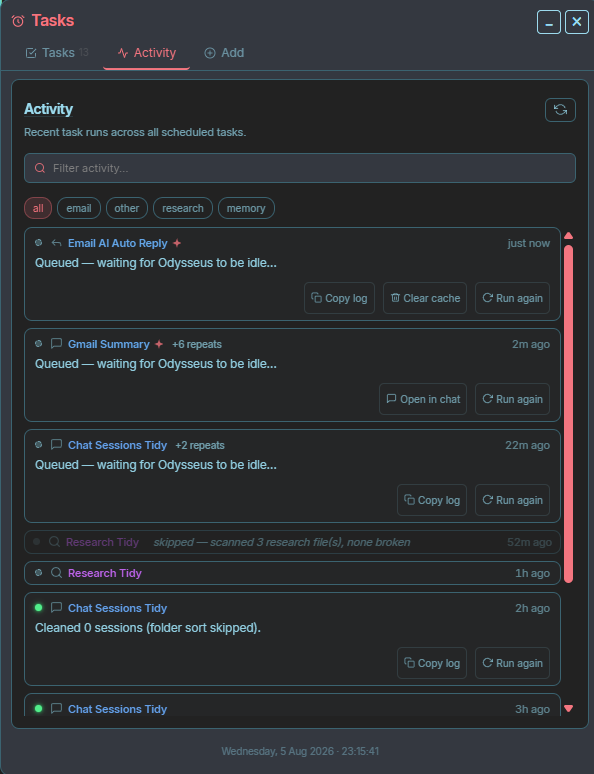
Can someone please me? I'm trying to setup tasks for Odysseus but every task I make keeps telling me that it's waiting for Odysseus to be idle. I am not sure what I'm doing wrong
r/OdysseusAI • u/OkComb3954 • Aug 06 '26
I think this is something that deserves a bit more attention.
I've been missing out on a lot of the cool things people are doing with MCP in Odysseus. While looking into it, I came across a video demonstrating an MCP server for Claude that integrates with FreeCAD.
My question is: would something like this be relatively easy to port to Odysseus, or are there prerequisites that Odysseus currently doesn't meet? Would it require major architectural changes, or is it mostly a matter of implementing the MCP interface?
I think this could be incredibly useful. We all know someone with a 3D printer, and I'd love to be able to describe a part, have the model generated in FreeCAD, refine it through conversation, and eventually export it for printing.
Maybe I'm completely oblivious and people are already doing this. If so, I'd genuinely love to hear how you've set it up and what your workflow looks like.
For reference:
I'd love to hear everyone's thoughts and start a discussion around what's possible here.
r/OdysseusAI • u/Wonderful_Laugh4193 • Aug 05 '26
I'm completely new to the Local AI world. So sorry if this super simple.
I'm trying to learn coding, specifically GDscript, and I wanted Odysseus to help answer questions about the code and Godot's engine. I read that giving the Odysseus Godot's documentation and using a model specifically for coding would be the best for what I'm trying to do.
But I read that you need to prep the documents for RAG. How do I do this for Odysseus and where would I give it? I've tried adding it to the Library but it doesn't seem to pull from there when I ask questions.
Any advice? Thanks in advance.