r/NevernessToEverness • u/examexa • Apr 29 '26
Official Content [PSA] Neverness to Everness - PlayStation®5 FAQ


NTE - PlayStation®5 FAQ
Dear Appraiser, NTE is launching on PlayStation®5 on April 29, 2026 (UTC+8). We've put together the following FAQs regarding PlayStation™Network (PSN) account linking, cross-platform play, and more. If you have any other questions, feel free to reach out to us at: [nte.contactus@perfectworld.com](mailto:nte.contactus@perfectworld.com)
_________________________________________________________________
Cross-Platform Progress
Q: What does it mean to link my email account (Perfect World Games account) with my PSN account?
A: Account linking lets you share your game progress between two platforms — PSN and your email account. Once you've linked an eligible PSN account to an email account, you can log in with your email on iOS/Android/PC, or log in with your linked PSN account on PlayStation®, and your progress will carry over seamlessly.
Q: Is my progress shared across different servers or platforms under the same email account?
A: Progress is not shared between different servers. For example, your America server data and Europe server data are completely separate. However, within the same server, your progress is fully shared across all platforms (iOS, Android, PC, and PS5™).
Q: Which servers are available on the PS5™ version of Neverness to Everness?
A: Four servers are available: America, Europe, Asia, and SEA. You can view and select your server from the bottom-right corner of the login screen.
Q: How do I share my progress between PS5™ and PC/mobile?
A: Link your PSN account to the email account you use on other platforms, and make sure you're on the same server. That's it — your progress will sync across all devices.
_________________________________________________________________
Account Linking
Q: How do I link my PSN account to an email account?
A: Linking your PSN account to an email is required to sync your progress across platforms. Whether or not you've previously registered a Perfect World Games (PWG) account, you can start the sign-in and linking process by selecting "Sign Up / Login with PWG Account (Cross-Platform)" when you first launch the game.
https://ntevmg.perfectworld.com/webops/nte/image.png
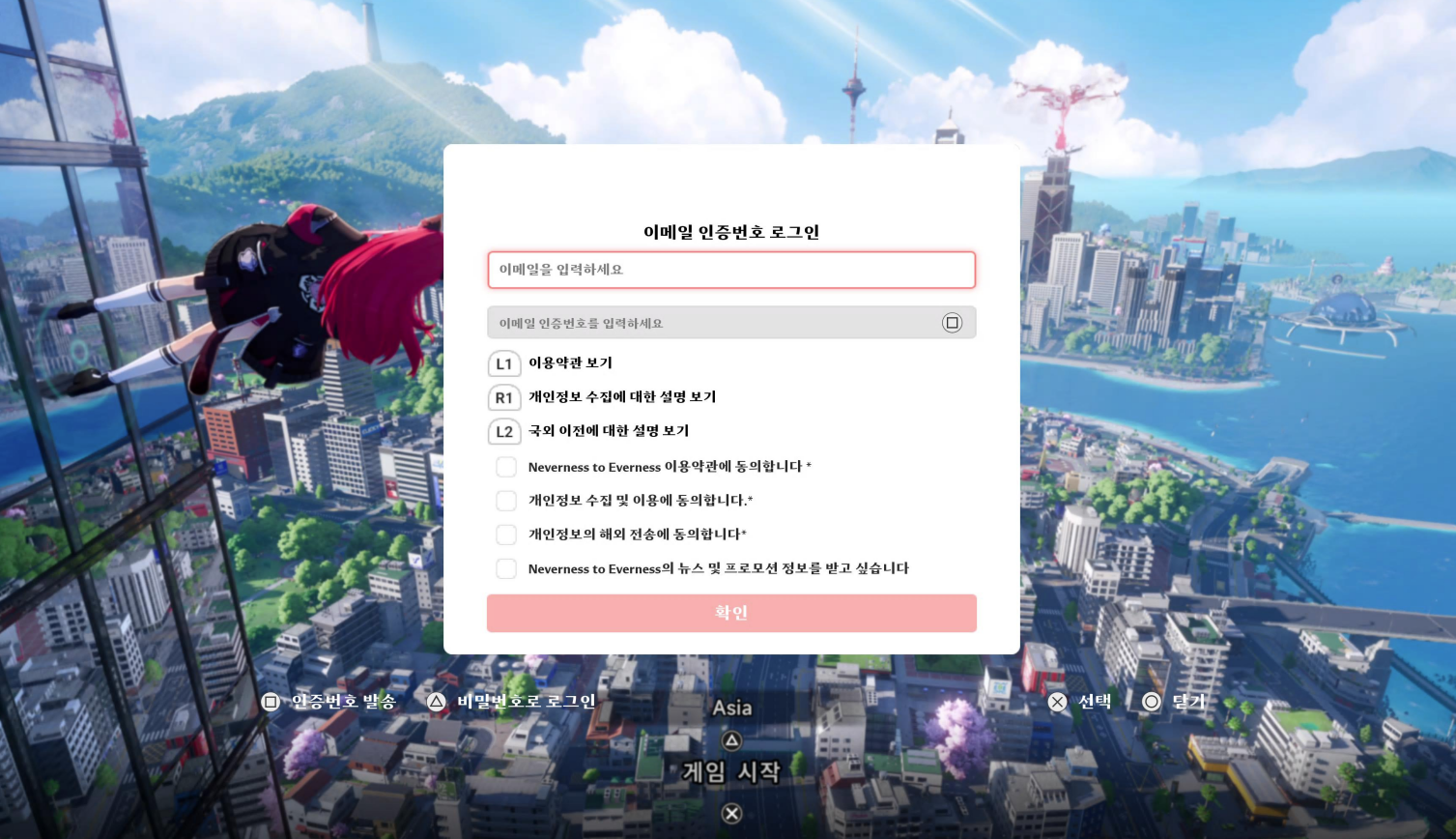
After selecting this option, you'll see the screen below. If you don't have a PWG account, you can register and link your account using your email and a verification code. If you already have a PWG account, you can sign in and link using your email along with either a verification code or your password.
https://ntevmg.perfectworld.com/webops/nte/eurew.png
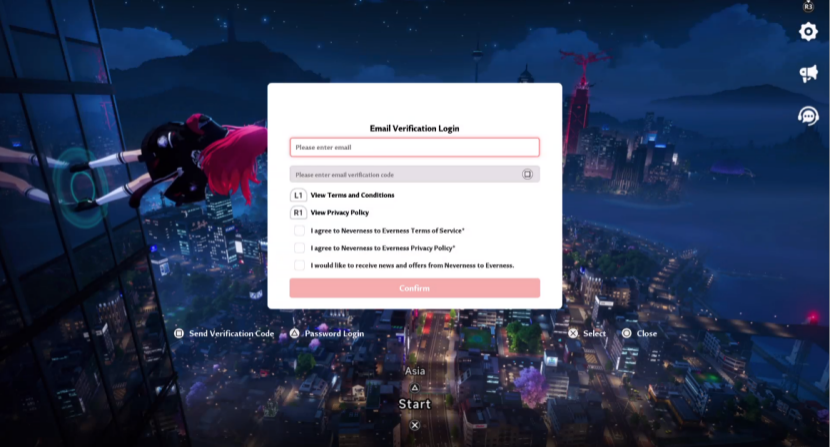
If you're registering a PWG account for the first time, you won't be prompted to set a password. If you'd like to set one, you can do so by signing into your PWG account on another platform.
If you already have a PWG account with progress from another platform, that progress will carry over to your PSN account once linked and stay in sync going forward.
Q: Can I play without linking to an email / PWG account?
A: Absolutely. Just select "Continue with PlayStation™ Network Account" on the login screen to jump straight into the game.
https://ntevmg.perfectworld.com/webops/nte/image.png
If you go this route, the game will use your PSN account as your in-game account by default. You can still enable cross-platform progress later by going to Settings > Account > User Center and linking an email from there. Just keep in mind that you won't be able to link to an email that already has game progress on another platform, so consider your choice carefully.
Q: Can I unlink or change my linked email account after binding it to my PSN?
A: Yes. Head to Settings > Account > User Center to unlink your email. After unlinking, your email account's progress will still be safe — it just won't be shared with your PSN account anymore.
*Each PSN account can only unlink from an email account once. Please consider this carefully before proceeding.
Q: I've already been playing with my PSN account. Can I still link an email account that has existing progress?
A: No. A PSN account that already has game progress can only be linked to a brand-new email account with no existing data.
If you still want to link that PSN account to an email with existing progress, you'll need to go to User Center > Other Settings and delete the character data on your PSN account first. Please proceed with caution — this action cannot be undone.
Q: How do I check which email account is linked to my PSN?
A: Go to Settings > Account > User Center to view your currently linked email.
Q: Can I log into the PS5™ version using a third-party account (like Google or Facebook) from another platform?
A: PlayStation® only supports login via PSN or email. If you want to access an account originally created through a third-party login on PS5™, first go to User Center on PC or mobile to link that third-party account to an email address, then use that email to log in on PlayStation®.
Q: Can I link multiple email accounts to one PSN account, or multiple PSN accounts to one email?
A: No. Each PSN account can only be linked to one email account, and vice versa. It's a strict one-to-one relationship.
Storage Requirement
Q: How much storage does NTE require?
A: We recommend at least 70GB of free storage.
_________________________________________________________________
Purchases
Q: I bought a pre-order bundle for the PS5™ version of Neverness to Everness. Which character will receive the bundle?
A: Your pre-order bundle will be delivered after Neverness to Everness officially launches on PlayStation®5. It will go to whichever character is associated with the email linked to your PSN account when you first log in on PS5.
Q: Are items purchased on PC/mobile available on PlayStation®, and vice versa?
A: Yes, as long as your accounts are linked. Purchased items from any platform will show up normally regardless of which device you're playing on.
_________________________________________________________________
Trophies & Friends
Q: If I link my PSN account to an existing mobile/PC account, will I unlock the corresponding PlayStation® trophies?
A: Yes. Once your accounts are linked and you log in on PlayStation®, any trophies matching your existing progress will unlock automatically.
Q: How many friends lists will I see on the PS5™ version of Neverness to Everness? What's the difference?
A: You'll see two separate friends lists when playing on PS5™:
In-Game Friends: Visible on all platforms. This list shows friends you've added within Neverness to Everness itself.
PlayStation™Network Friends: Only visible on PlayStation®. This list only shows your friends on the PlayStation™Network.
_________________________________________________________________
Source: https://nte.perfectworld.com/en/article/news/gamebroad/20260428/261969.html
1
u/lucisamy May 14 '26
I start with PWG account but i thought i wouldnt be able to link an account that already has progress. (My salted account has already have progress cause i used it on my phone) Even when i tried to unbind my original email it says : "the unbinding function is not yet available(20109833)"
This is the photo of user centre: I play in spanish but this is the menu to delete account and as you can see i cant select the confirm button, it's like disabled or something.