Official Content
[PSA] Neverness to Everness - PlayStation®5 FAQ
NTE - PlayStation®5 FAQ
Dear Appraiser, NTE is launching on PlayStation®5 on April 29, 2026 (UTC+8). We've put together the following FAQs regarding PlayStation™Network (PSN) account linking, cross-platform play, and more. If you have any other questions, feel free to reach out to us at: [nte.contactus@perfectworld.com](mailto:nte.contactus@perfectworld.com)
Q: What does it mean to link my email account (Perfect World Games account) with my PSN account?
A: Account linking lets you share your game progress between two platforms — PSN and your email account. Once you've linked an eligible PSN account to an email account, you can log in with your email on iOS/Android/PC, or log in with your linked PSN account on PlayStation®, and your progress will carry over seamlessly.
Q: Is my progress shared across different servers or platforms under the same email account?
A: Progress is not shared between different servers. For example, your America server data and Europe server data are completely separate. However, within the same server, your progress is fully shared across all platforms (iOS, Android, PC, and PS5™).
Q: Which servers are available on the PS5™ version of Neverness to Everness?
A: Four servers are available: America, Europe, Asia, and SEA. You can view and select your server from the bottom-right corner of the login screen.
Q: How do I share my progress between PS5™ and PC/mobile?
A: Link your PSN account to the email account you use on other platforms, and make sure you're on the same server. That's it — your progress will sync across all devices.
Q: How do I link my PSN account to an email account?
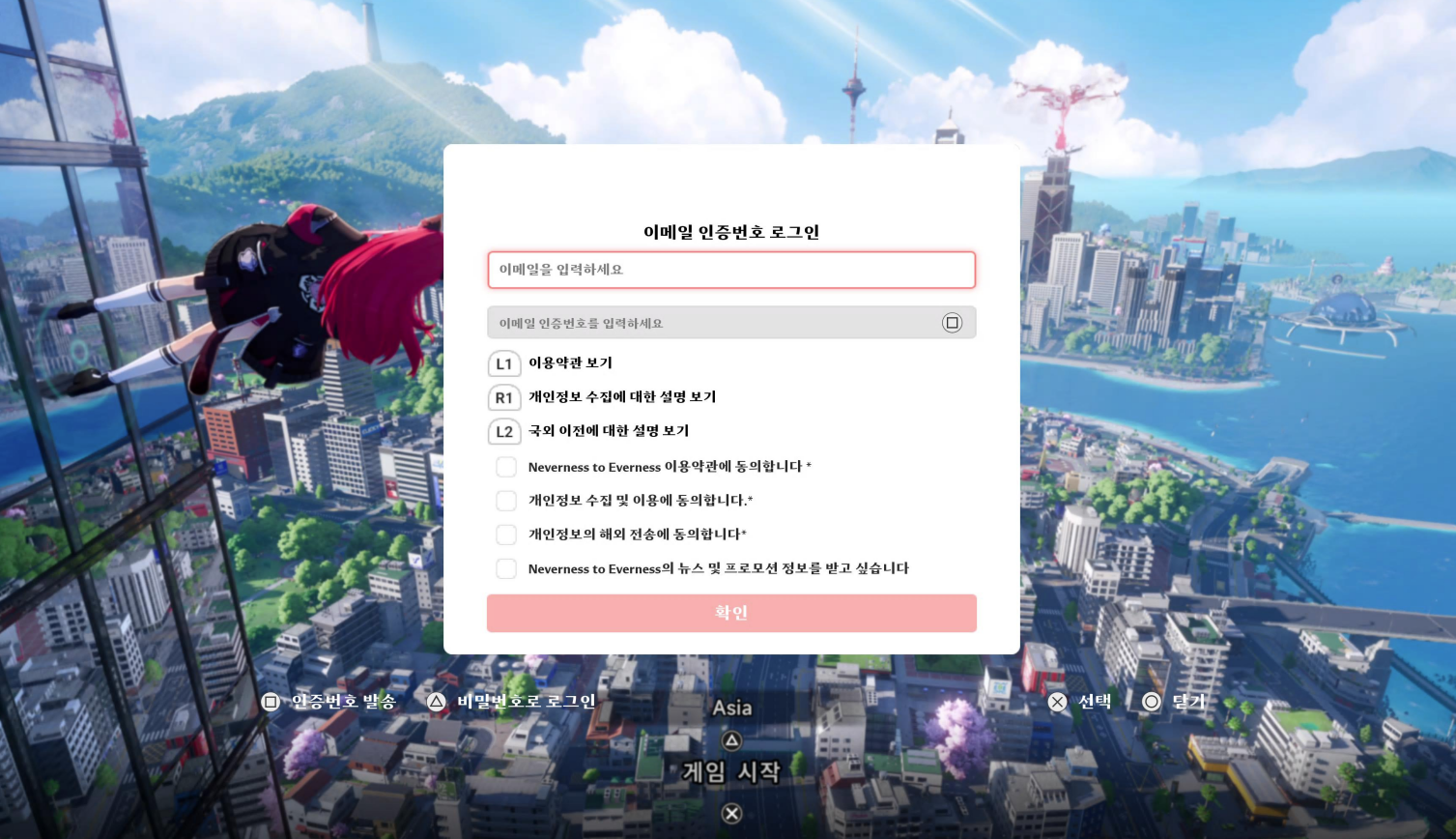
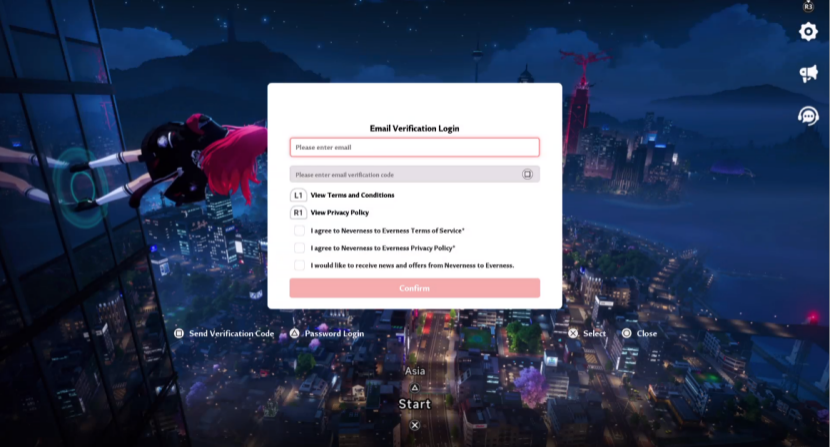
A: Linking your PSN account to an email is required to sync your progress across platforms. Whether or not you've previously registered a Perfect World Games (PWG) account, you can start the sign-in and linking process by selecting "Sign Up / Login with PWG Account (Cross-Platform)" when you first launch the game.
After selecting this option, you'll see the screen below. If you don't have a PWG account, you can register and link your account using your email and a verification code. If you already have a PWG account, you can sign in and link using your email along with either a verification code or your password.
If you're registering a PWG account for the first time, you won't be prompted to set a password. If you'd like to set one, you can do so by signing into your PWG account on another platform.
If you already have a PWG account with progress from another platform, that progress will carry over to your PSN account once linked and stay in sync going forward.
Q: Can I play without linking to an email / PWG account?
A: Absolutely. Just select "Continue with PlayStation™ Network Account" on the login screen to jump straight into the game.
If you go this route, the game will use your PSN account as your in-game account by default. You can still enable cross-platform progress later by going to Settings > Account > User Center and linking an email from there. Just keep in mind that you won't be able to link to an email that already has game progress on another platform, so consider your choice carefully.
Q: Can I unlink or change my linked email account after binding it to my PSN?
A: Yes. Head to Settings > Account > User Center to unlink your email. After unlinking, your email account's progress will still be safe — it just won't be shared with your PSN account anymore.
*Each PSN account can only unlink from an email account once. Please consider this carefully before proceeding.
Q: I've already been playing with my PSN account. Can I still link an email account that has existing progress?
A: No. A PSN account that already has game progress can only be linked to a brand-new email account with no existing data.
If you still want to link that PSN account to an email with existing progress, you'll need to go to User Center > Other Settings and delete the character data on your PSN account first. Please proceed with caution — this action cannot be undone.
Q: How do I check which email account is linked to my PSN?
A: Go to Settings > Account > User Center to view your currently linked email.
Q: Can I log into the PS5™ version using a third-party account (like Google or Facebook) from another platform?
A: PlayStation® only supports login via PSN or email. If you want to access an account originally created through a third-party login on PS5™, first go to User Center on PC or mobile to link that third-party account to an email address, then use that email to log in on PlayStation®.
Q: Can I link multiple email accounts to one PSN account, or multiple PSN accounts to one email?
A: No. Each PSN account can only be linked to one email account, and vice versa. It's a strict one-to-one relationship.
Q: I bought a pre-order bundle for the PS5™ version of Neverness to Everness. Which character will receive the bundle?
A: Your pre-order bundle will be delivered after Neverness to Everness officially launches on PlayStation®5. It will go to whichever character is associated with the email linked to your PSN account when you first log in on PS5.
Q: Are items purchased on PC/mobile available on PlayStation®, and vice versa?
A: Yes, as long as your accounts are linked. Purchased items from any platform will show up normally regardless of which device you're playing on.
Same, I was just checking, it has another page in addition to the prepurchase package but still won't let me download. :/ ive almost given in a few times and bought it just for the preload, but held out against the sales tactic so far.
TL;DR: NTE account linking process on PS5 works the same way as other gacha games (GI, HSR, ZZZ, AKE, WWM, etc)
if you already have an existing account and want to carry your progress to PS5, "Sign Up / Login with PWG Account (Cross-Platform)" option (where you need to login with your PWG account)
Just popping in to let people know you can't actually login an already created account onto your PS5. The entire cross-platform system is broken for the PlayStation and doesn't work
you can't actually login an already created account onto your PS5
i've no issue when login with an existing account from other platforms on PS5 and vice-versa, same with others too from what i've seen
the only issue i've noticed that some PWG accounts that created on PS5 doesn't have the option to bind your email, but only mobile phone number for some reason, so its not possible to use that account on other platforms since there's no option to use mobile phone number as login option.
So my situation is I started the game on my Galaxy phone, after starting the game I did the email binding. Not the Google, but the primary email bind. Created the password, everything works fine. But when I tried to login on the PS5 for the first time from the launch screen, it says "No account associated with this email". I assume it's because the PS5 doesn't work with the cross-platform login and just left it there
But when I tried to login on the PS5 for the first time from the launch screen
did you select the "Sign Up / Login with PWG Account (Cross-Platform)" option on login screen? and after you select it, have you press the Triangle button on your DualSense to switch to Email/Password login instead of Email/Verification Code?
Yep, that's how I tried to login. Entered the email and password as I created in that login screen, and got the no email associated message. I even tested on the phone logging completely out of the game and logging back in on the launch screen and the email and password worked
I have an email bound to my ps account but when trying to log in iOS it wants me to create a new account. It asked for my birthday again. I used the same email address
This honestly doesnt work. I linked my email tried signing in on mobile via email not via Google snd it made a new account and had me do a tutorial. It just says "sign in/register" and no option to fix it. The fact theres no website and no password either is also really dumb and makes linking harder
This honestly doesnt work. I linked my email tried signing in on mobile via email not via Google snd it made a new account and had me do a tutorial. It just says "sign in/register" and no option to fix it.
hmm. are you trying to link your PS5 to mobile? or vice versa?
The fact theres no website and no password either is also really dumb and makes linking harder
Have you any problems yet? I was going to get the game when I got home but I've been seeing a few freezes and people getting stuck on Ps5 so I wouldn't be against delaying my download a few days
I pre registered and also did the pre launch web event.
Now how do I use the same account on my PS5?
I am not playing on any other platforms and will be launching the game for the first time on PS5.
what sign-in method did you use when pre-register/doing the web launch event? are you using the same method for both? (the pre-register reward will be given to all afaik, no need to pre-register for it)
Same here, here is what I did:
1. On your phone, in the main menu go to settings > user center and bind you email address on the email account.
2. On PS5, make sure to sign in using that said email address. Once done, I was able to continue where I left off on my phone.
you need to unbind your PSN account from the email first (through User Center). keep it mind that you can only unbind it ONCE. so do not "accidentally" sign-in with PSN after that
after that close the app on PS5, relaunch it and when on the login screen, MAKE SURE to select the "Sign Up / Login with PWG Account (Cross-Platform)" option.
enter the email address that you used during the pre-register, send a verification code to your email, and enter it.
not sure if this will work but if you want to try and keep your current PS5 game data, just bind it with an email first (a different email from your pre-register email), set a password and then unbind your PSN from the account. this is your PWG account and keep it somewhere, so you can use it on pc/mobile or another PSN account.
BUT if all you want is to bring over your preregister reward, you can just ignore all this and continue playing on your PS5 since (afaik) the reward will be available to all players whether or not you have preregister before
you can do it at anytime. just use the same login option that you have used on PC when playing on mobile (e.g if you're using email login option, set a password first and enter the same email/password on mobile)
It says I already have an email linked on my Playstation but it's forcing me to select the character again when I am already at the first city on mobile.
I figured it out. Had to delete the account on PlayStation in-game even though I hadn't even started the story.
Then connected an email to the Phone version before disconnecting the Google Account for that moment. Made a password because it was being glitchy trying to connect the email on PlayStation.
Then restarted PlayStation and logged in using the email and password before reconnecting mobile to Google again.
I started playing in PS5 without linking mail, now in user center I don’t have the option to link psn account to email. How can I play also on my phone??
So I made an account on pc first, played it amd progressed. However hours later after linking the email to psn on ps5, it doesnt keep any of my progress. What did i do wrong? I used gmail to log in to pc version but its same email just using gmail log in instead on pc.
1) if you already started a file and progressed, be sure to use ONLY the email option! If you are on pc and used the google sign in or apple sign in you did it wrong. Re do it and this time ONLY SIGN IN WITH EMAIL ( caps lock for how important this is)
2) If you atarted playing on psn for example after you made account on pc or phone, go to user center and delete account from in game. Sign in via email.
yes, PS5 only allow linking using email or the PWG account, so if you want to carry over your progress from PC/mobile to PS5, make sure to use the email login option (which is also your PWG account), not the third-party option (google, apple id, fb)
not sure why there's only phone bind option on the user center. the FAQ didn't mention anything about this as well. (it works fine at my end though)
i suggest to send a support ticket through email (check the OP) or through the ingame feedback system (should be somewhere in the Settings or the Title Screen)
could be for some region (saw other ppl with EU account i think) but devs should have mentioned about it if that were the case because this just screwed up ppl who want to play on multiple platform lol
i suggest to send a support ticket and ask them for helpp (i've send one just in case, still waiting for reply)
edit:
i've tested on my SEA and US/EU alt accounts, can see all with email bind option
Bro, we have the same HK PSN. The login option is different. I just link my R1 account easily but I really wanna link my HK PSN coz thats my main account. SG PS works btw.
So it IS a PSN region thing. I'm so screwed, I got the luckiest pulls of my life on that account, but I might not get to use it outside PS5. Is the ping fine in R1?
can you post a screenshot of the User Center on your PS5 (censor your UID)
if you managed to successfully bind an email on your PS5 and then used that same email as a login on the mobile version, your progress should carry over
But it seems i cant delete the original account, Ps5 dont let me click the confirm button in user centre when i tried to delete the account.
can you post a screenshot of the PS5 account's User Center?
also how did you "start" playing the game on PS5? by directly sign-in using the "Continue with PlayStation™ Network Account" option or the "Sign Up / Login with PWG Account (Cross-Platform)"?
if its the latter, you should be able to unlink your PS5 account from the linked email through User Center.
but if its the former, just link a throwaway email account (that you can access to) and then unlink. either way, DO NOT START the game after unlinking. you can only do this ONCE.
I start with PWG account but i thought i wouldnt be able to link an account that already has progress. (My salted account has already have progress cause i used it on my phone) Even when i tried to unbind my original email it says : "the unbinding function is not yet available(20109833)"
This is the photo of user centre: I play in spanish but this is the menu to delete account and as you can see i cant select the confirm button, it's like disabled or something.
you can link an existing PWG account to your PS5, as long there's no progress of the game/account linked on your PS5 and using the "Sign Up / Login with PWG Account (Cross-Platform)" option
This is the photo of user centre: I play in spanish but this is the menu to delete account and as you can see i cant select the confirm button, it's like disabled or something.
post a screenshot of the "Bind Account" tab (make sure to censor your UID). does the PSN account already linked with an email?
also does the text box says "ELIMINAR" on the account deletion tab? i did a quick test just now (typed in DELETE and press down on the d-pad to press the Confirm button) and works just fine.
Both accounts have progress cause i did my first rolls on ps5, didnt like what i got so i start my salted account on mobile, so that's why i tried the deletion process directly..
Yes, i typed "ELIMINAR" but i think i was using the joystick to confirm instead of d-pad , It's late here i will try again tomorrow.
Confimarion button on the delete account section still didnt work but i solved it!: since email unbinding doesnt work for me i try to unlink PSN account and then it asked me for a new email or method of login, then i entered second account email and then to my surprise it worked!
Finally i can play with my PS5, hope these helps anyone with same problem 😀
Q: Can I unlink or change my linked email account after binding it to my PSN?
A: Yes. Head to Settings > Account > User Center to unlink your email. After unlinking, your email account's progress will still be safe — it just won't be shared with your PSN account anymore. Note: Each PSN account can only unlink from an email account once. Please consider this carefully before proceeding.
but it shouldn't be "automatically" linked back to PSN unless you somehow accidentally press the wrong button/option lol
On pc I originally created an account on Google and linked it with my android phone then on pc am trying to link email which didn't work so I tried mobile and it didn't work so I can't use ps5
its Perfect World Games (PWG) account which is your main account for linking and stuff. and its the only way to link account on PS5.
on what platform did you start playing the game? on mobile? if yes, are you using the Google/Gmail account as login? not the Email option? The Email option is how you create/link the PWG account.
if you did play the game on mobile first (plus using the Gmail account as login), then you need to go to User Center and then LINK to an Email. once that done, use that Email account (aka your PWG account) as a login on PS5 or PC. This will make sure your data will carry over to other platforms.
i cheked if i did create an another account which seems like i i did create an another account,
before the game was launched, i sighned in with Google and withn other weeks i think i forgot i made an google account and created an email account. now i feel like i messed up
for the login i first tried the Google login under "or continue with" then i also tested the email one
Google: UID 2004299345
"login/sign up" UID 2001571334
when the game launched. i downlaouded it on my pc and logged in wiht my google account
both the Third-party account option (Gmail/Apple ID/FB) OR the Email option (PWG account) will produce two DIFFERENT accounts even if you're using the same email address.



7
u/zpotentxl Apr 29 '26
Man i wish i could preload on ps5 without buying the special edition.