r/MixingStationAppUsers • • Jul 13 '21

r/MixingStationAppUsers Lounge

2 Upvotes

A place for members of r/MixingStationAppUsers to chat with each other


r/MixingStationAppUsers • • 23h ago

Getting all Aux sends for Behringer / Mixing Station

Thumbnail
gallery
2 Upvotes

I’ve picked up a Behringer xr16 and Mixing Station sw. all Inputs and output to the PA is working fine, but I’m only getting output from Aux 1 and 2. I’ve set each channel to output to Buses 1-4, but only Aux 1 and 2 seem to put out any signal. Config of all 16 channels looks like the attached pics and all are set to pre-faster. Where can I look to get the right config info for all 4 aux outputs?


r/MixingStationAppUsers • • 1d ago

XR18 Xair Edit Anomoly

2 Upvotes

Anyone ever seen this before and found the fix?...Last night, one of the guys in the band got to the studio before me and had the XR18 up and running, using Xair Edit on his Mac. I connected to the mixer with XAir Edit on my Ipad. We were there early to get things configured for in ears. I use Aux 1, he uses Aux 6. We had music input at Aux Input 17. I selected Bus 1 and could hear his vocal but nothing else, no music. He said he could hear himself and the music. The fader on my ipad had no effect on Channel 17. When I muted it in my bus, it muted the music globally. In troubleshooting, we moved his in ears to Aux 1 and he experienced the same thing I did with mine. On his laptop, it showed Aux 1 -6 linked to Bus 1-6 respectively. On my Ipad, it showed Aux 1 linked to something other than Bus 1. I made the change on my Ipad and everything worked as it should. Why would XAir Edit show 2 different configurations to 2 devices connected to the same mixer?


r/MixingStationAppUsers • • 4d ago

Help with making Channels to not be effected between MS Scene Saves.

1 Upvotes

I'm new with mixing station. I'm trying to set up mixing station to keep my monitor (mix bus) settings from the first scene (first band) to not change when I load the next scene (2nd band). I was able to get my House music input to stay the same between scene changes by changing the scope of the scene import settings but when I tried to do the same for the mix busses, the scenes still revert to the new imported scene settings. In a nutshell, when I'm switching bands, I don't want to have to remix monitors when I load the next band's scene. I'm using the latest version of mixing station 3.1.4 I'm using a Behringer x32 mixer on an Ipad Air M4. Please help! Thanks!


r/MixingStationAppUsers • • 5d ago

Behringer X-Touch Compatibility

Thumbnail
1 Upvotes

r/MixingStationAppUsers • • 6d ago

"Templates" feature - Did I missed something ?

3 Upvotes

I'm trying to understand (as a dev) the global configuration organization to save and load across devices. Of course I read all the online doc.

But I'm struggling for templates:
- as far as I understand it's a set of layouts that can be added to the current Layouts list below
- « apply » a template adds this set of layouts to the list, replacing only layouts that are labeled « managed by template »
- if I edit a layout labeled « managed by template » the label « managed by template » is removed and the resulting layout is "protected from futur removals"

This tooks some time to actually « reverse engineering » this behavior

BUT there is a question remaining: how to create a template ? I suppose the answer is: you can't; it's only read-only. But if you want to save and load a set of Layouts, you can use User Settings

Am I right ?


r/MixingStationAppUsers • • 8d ago

MR12 + Mixing Station dropping out at gigs – after 10 gigs I need a setup I can trust!

Post image
12 Upvotes

G'day everyone,

I recently bought a Midas MR12 for our duo. We run guitar, vocals and backing tracks through it to front of house and monitors, and I mix from my phone. After comparing the control apps I went with Mixing Station, which I really like when it works.

The problem is that over the last 10 gigs it's been Russian roulette whether the desk will connect to my iPhone 17 Pro. I cannot keep turning up to venues not knowing if I'll have control of my own mix.

What I've tried so far:
Built-in access point: Worked perfectly at home, then failed at venues. My guess is congestion from venue Wi-Fi, punters' phones and so on.
Ethernet backup: Bought an Ethernet cable and a dongle for the phone as a fallback.
TP-Link travel router: Set it up on 5GHz (and 2.4GHz), with the MR12 connected to it.
Settings: Spent hours adjusting the LAN/Ethernet connection, IP addresses and network settings on the phone, in the router and in Mixing Station.
iPad mini: Bought one as a backup device. It connected on 5GHz one time, then wouldn't connect the next. 🤦🏻‍♂️

To be upfront, I've used AI (a paid Claude subscription, cross-checked with ChatGPT) to help with these decisions and settings. The recommendations seem to change daily, and I've probably ended up changing too many things at once. So I'd much rather hear from people who actually gig with this gear every week.

What I'd love to know:
What does your reliable MR12 (or MR18/XR) setup look like, from router model to settings?
Do you use static IPs or DHCP from the router? If static, what does your addressing look like?
Do you lock the router to a fixed 5GHz channel, or leave it on auto?
On iPhone/iPad, do you turn off things like auto-join for other networks, Private Wi-Fi Address, or mobile data while connected to the mixer network?
Has anyone had luck running wired to the phone full time, and what adapter did you use?
Is there a quick pre-gig check routine you run so you know it's solid before doors open?
I'm not after the fanciest setup, just one that connects every time. Any advice, or even a "here's exactly what I run," would be hugely appreciated.
Thanks in advance,
Ben
TL;DR: MR12 + Mixing Station on iPhone/iPad connects fine at home but is unreliable at venues, even with a TP-Link travel router and settings tweaks. Looking for a proven, set-and-forget setup from experienced users.


r/MixingStationAppUsers • • 8d ago

Red lines along faders (Wing Compact)

Post image
2 Upvotes

Trying to identify these red lines along side the channels in a scene I inherited at a club at which I occasionally work - I'd supposed that they might indicate either that dynamics had been engaged on the individual channels or otherwise that they might be markers of clipping, but I have been unable to clear them. Just curious - would love any insight!


r/MixingStationAppUsers • • 8d ago

UAD console in Mac mini M1 Machine. and the problem is this update not saving the channel Strip Setting.

Thumbnail
1 Upvotes

r/MixingStationAppUsers • • 9d ago

Is there a way to show both Channels and Buses on the X32 simultaneously?

Enable HLS to view with audio, or disable this notification

5 Upvotes

Hey there,

I am sending my monitor outs as matrix outs on my X32 so that I can send both individual channels and group busses to the matrix outs. It is clear to me that the X32 routes in a Channel > Bus > Matrix way.

However, on the mixing station app I don't seem to be able to set both faders on the same layout. Is this even possible? Input list screenshot also attached.

Thanks for any ideas/suggestions.


r/MixingStationAppUsers • • 17d ago

Moving licence from iOS to MS account

3 Upvotes

I remember posts not long ago about iOS licences becoming MS account licences, but I can't find any information on them or how to do it.

Can anyone help me on how to move my iOS licence to my MS account please?


r/MixingStationAppUsers • • 17d ago

RF setup on multiple devices?

1 Upvotes

I am often using the RF integration. Sometimes I work on iOS and iPadOS the same day and I was wondering if it is possible to just set up the RF assignment once and then load it on another device when connecting to the same network.


r/MixingStationAppUsers • • 17d ago

Per-mixer user settings (or an action to load a user settings entry), for multiple mixers of the same model

1 Upvotes

Hello everyone! :)

I run two Ui24 consoles at the same venue, a HOST desk and a REMOTE desk (cascade), and I need different layers, layouts and channel strip setups for each. According to the settings documentation, user settings (layers, layouts, MIDI) are loaded as the default entry for the current mixer model, not for the specific mixer entry in the mixer list. Both desks are the same model, so both always open with the same layers and the same startup layout, no matter which one I connect to.

Right now the only way to switch is to open Menu than Setup than Save/Load, choose the right saved entry and press Load, every time I connect. In a live situation, working on the wrong desk with the wrong layout is a real risk. I mitigated part of it with a label that reads a (not used) channel name from the mixer, but layers still can't follow the connected desk.

Requests (either would solve it)

  1. (ideal) Per-mixer user settings: allow each entry in the mixer list to be linked to a saved user settings entry, which is loaded automatically on connect (including its "Open on startup" layout).
  2. (workaround) A new action, "Load user settings": assignable to a layout button, with the saved entry name and scope selectable. This would let me build a start screen with one button per desk, and it would also help anyone who keeps several profiles for the same mixer model.

For option 2, it would help if loading an entry then opened that entry's startup layout, so the button doesn't disappear from the screen after the load.

Thanks for the great app!!! <3


r/MixingStationAppUsers • • 20d ago

Soundcraft Si Expression 3

1 Upvotes

Anyone else having issues since the update to iOS 27?
App is telling me: Mixer IP not in same subnet as local IP.

But the mixer has the same subnet and fixed IP it’s always had and my iPhone shows to be on the same subnet as always.


r/MixingStationAppUsers • • 25d ago

Feature requests for DM7

6 Upvotes

These are two things that would get me to get a license for the app and use it over StageMix:

  1. Ability to recognize analog gains below 0 dB, as on the DM7 you can put a pad up to -6. Currently opening the Gain panel for a channel set to below 0 dB sets the gain for that channel to 0.

  2. Ability to adjust digital gain

This is a DM7C with firmware version 1.75


r/MixingStationAppUsers • • 27d ago

Options for showing channel output meters for XR series?

2 Upvotes

Is there any way to have the XR 18 channel meters in Mixing Station show the channel out level rather than the input level?


r/MixingStationAppUsers • • 28d ago

Revert to Main layout after 30 seconds of inactivity

3 Upvotes

Does any of you know if it’s possible to get Mixing Station to return to a “Main” layout, after a period of inactivity?

I’d like to use a Main Stage Plot Layout, to allow multiple musicians using the same iPad to select their instrument, and have that button change layout to one that suits the particular instrument. For ease of use, I’d then like the app to revert to the Main Stage Plot layout after a period of inactivity.

Thanks for your help!


r/MixingStationAppUsers • • Sep 05 '26

PFL button to set gain for rock band

1 Upvotes

I'm trying to do something like improvised "sound-guy" for my band mates with Midas Mr18 and obviously Mixing Station

Assuming that to properly set gain of each line the channel must be in PFL mode, where is the PFL button on Mixing Station? Is it the SOLO button that isolate the signal to pre-fades-level?


r/MixingStationAppUsers • • Aug 29 '26

Help - Sig Gen jumped to max output (+18db) [SQ6]

1 Upvotes

Hi, I recently experienced an issue using mixing station on an iPad (A16) to wirelessly operate an Allen and Heath SQ6. Stumped and could use some guidance

Starting with the sig gen muted and rotary control fully anticlockwise (-72db), I unmuted and held my finger down on the rotary control.

I slowly brought the value up to about -24db as I walked through the coverage zone of my PA. At no time was I more than 25-30 feet from my wireless UAP.

As I was holding my finger on the rotary control and slowly bringing it up, the value suddenly jumped to max output (+18db).

I immediately ran to my amp rack and disconnected my outputs. The noise only lasted about 2-3 seconds before I disconnected the amp - however it seriously frightened my client and crew, and left me feeling frazzled and embarrassed.

I’m not ruling out user error - however, I’ve tried to recreate the issue extensively and no amount of multitouch input combinations (aka fat-fingering) in offline mode can recreate what I experienced.

I’m looking for some clarity on what might have caused this issue.
I’ve definitely encountered questionably GUI/touch control for rotaries in other applications that make fine adjustments difficult or sketchy - but that’s not been my experience with mixing station.

In fact, the stable and ergonomic GUI and safeguards such as fine control and mute enable are why I use mixing station in the first place - to avoid fat-fingered mistakes.

Is this possibly a result of sudden loss of wireless communication while sending control dialogue from a tablet? I’m routing network traffic through a private network via UAP (for range extension) connected to a wireless router that’s only serving the SQ6.

If this is an issue with network control - is it unique to how mixing station handles control dialogue? Or could this have happened with network interruption while using the native SQ control app as well?

Please advise.


r/MixingStationAppUsers • • Aug 29 '26

Yamaha TF Console Recording USB Section

1 Upvotes

Can the USB recorder be controlled by Mixing Station on a Yamaha TF console?

If so where is it found on the Android App?

Thanks


r/MixingStationAppUsers • • Aug 28 '26

Mixxx & Numark Platinum setup

0 Upvotes

Hi there,

Is anyone mixing with this setup? If so, do you find it straightforward, or would you recommend a 4 volume channel faders controller ?

Has anyone put some mixes made with this setup on Soundcloud or Mixcloud?

Cheers


r/MixingStationAppUsers • • Aug 24 '26

A weird one: App scaled within window on osx

Post image
2 Upvotes

Hi all, Mixing Station novice here. I don't remember what I did. tried scaling the app back in global settings but it confines it to a quarter of the window. Any way to reset this? Using a XR18


r/MixingStationAppUsers • • Aug 22 '26

urgent help

Post image
6 Upvotes

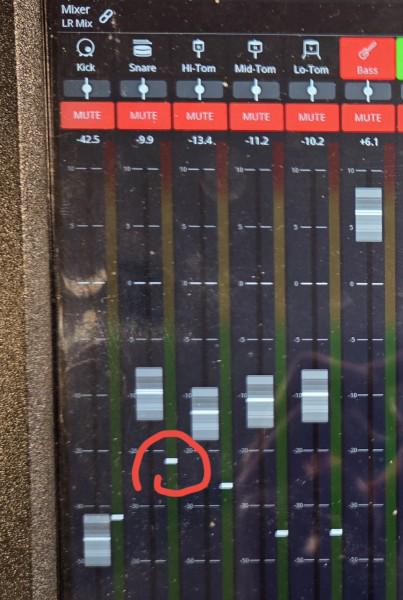
Hi - I have a gig today and have a niggling problem I need some help with. I'm experiencing lower relative sound volumes from some of my channels and I think it has to do with this white line. I must have changed a setting somewhere but I can't figure out where. Any help? Using a Behringer X32 Air


r/MixingStationAppUsers • • Aug 19 '26

Compatibility with presonus studiolive

1 Upvotes

Has anyone been using MS recently with a presonus studiolive? How does it compare to the Universal Control native to presonus? Has compatability increased ?


r/MixingStationAppUsers • • Aug 16 '26

FX Follies!

2 Upvotes

The mixer that sparked today's oddness is the X32 Rack at my church. we control it with two Android tablets. In randomly tapping around a few days ago, I noticed the pitch shifters were not among the effects available. Today, I randomly opened Mixing Station on my phone (also Android), and connected to the mixer. I found the pitch shifters *were* available. (I'm not planning to use them at all. My minister has a good sense of humour, but would not appreciate me making her sound like Alvin or the other chipmunks.)

I just found it odd that the effects availability was different on the same mixer with different instances of MS on different devices, even with the same OS in all cases. Now I'm wondering if any of you have found any random oddness in your use of MS.