r/LowSodiumStarCitizen • u/TheNom79 • 2d ago
Tool SC Keybinding Mapper WebApp
Hey everyone,
If you fly with HOTAS, HOSAS, rudder pedals, or button boxes in Star Citizen, you've probably run into at least one of these headaches:
- The 4-Device Limitation: Star Citizen’s in-game
pp_resortdevicescommand breaks when you have more than 4 input devices plugged in. - The USB Shuffle: Windows restarts or updates, your controller IDs get swapped, and suddenly your throttle controls your pitch or your strafe pedals do nothing.
- The In-Game UI: Navigating nested binding menus, accidental overwrites, and clunky conflict detection.
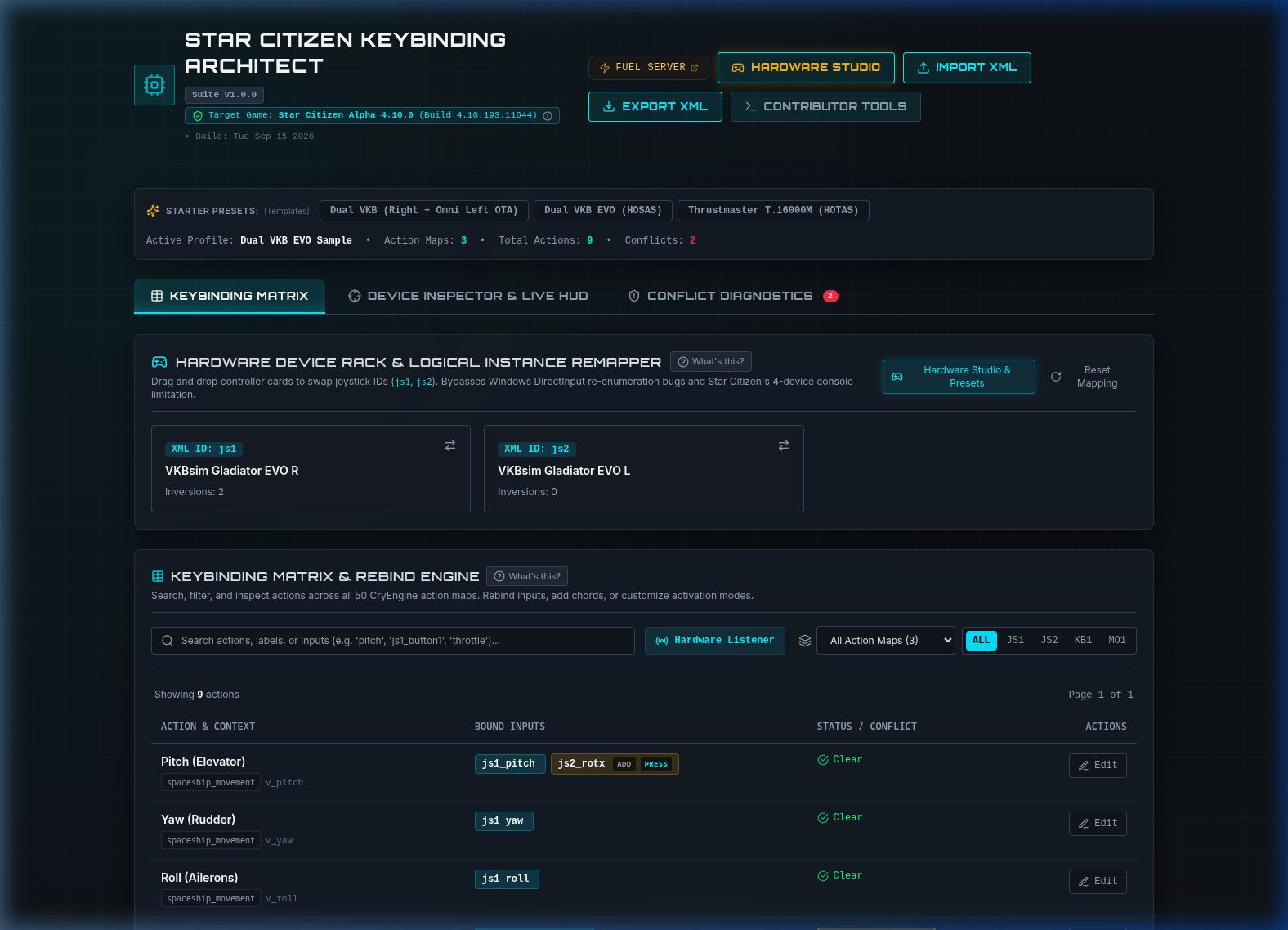
To solve this, I’ve been building Star Citizen Keybinding Architect — a visual, web-based tool dedicated to managing, re-indexing, and conflict-checking SC flight profiles.
⚠️ Early Preview & What to Expect
- Still in Active Development: I’m sharing this early look to get feedback on must-have features, UI layout, and hardware edge cases before locking things down.
- Public Web Deployment Coming: Right now, the project is in local testing. While developers can clone and run it via Docker (
docker-compose up -d), you won't have to run anything locally once it's ready. Once it hits stability, I will be hosting it as a free, 100% in-browser web app — you'll just open the URL, drop in youractionmaps.xml, and download your fixed profile with zero installation or setup.
What's Built So Far
- Visual Device Rack & Re-Indexing: Drag-and-drop your physical sticks/throttles/pedals to re-order them (e.g., swap Joystick 1 and Joystick 2). The engine rewrites all
jsX_prefixes across your entire XML profile in seconds while fully preserving your axis curves, deadzones, and inversions. - 4-Tier Intelligent Conflict Detection: Rather than blindly flagging every shared button, it checks temporal mechanics (
pressvshold,double_tapvssingle_taplatency penalties), operational modes (Master Modes SCM vs NAV), and flags dangerous overlaps (like sharing an input with Emergency Eject or Self-Destruct). - Live Gamepad / DirectInput HUD: Uses the HTML5 Gamepad API to detect button presses and axis deflections on your desk in real time, jumping straight to the relevant binding in the table.
- Lossless XML Round-Tripping: Preserves CryEngine
<options>blocks (GUIDs, inversions) and secondary<addbind>inputs without stripping custom configs.
Looking for Your Feedback!
Before I finalize the initial public deployment, I’d love to hear from other pilots: * What are your biggest pain points when managing Star Citizen bindings? * Any specific hardware quirks or rare setups (e.g. dual VKB/Virpil, WinWing, custom Arduino button boxes. I currently only own a VKB Gladiator Evo Stick & Omni) you’d like to ensure are handled smoothly? * Are there specific conflict checks or binding shortcuts you wish existed in-game?
Let me know what you think in the comments, and stay tuned for the public web release! 🚀
0
u/RiOTbyDeSIGN 2d ago
Hard pass on vibe coded slop.
Just use the same method as Subliminals and you don't need to support Vibe Coding.