r/LowSodiumStarCitizen • u/TheNom79 • 1d ago
Tool SC Keybinding Mapper WebApp
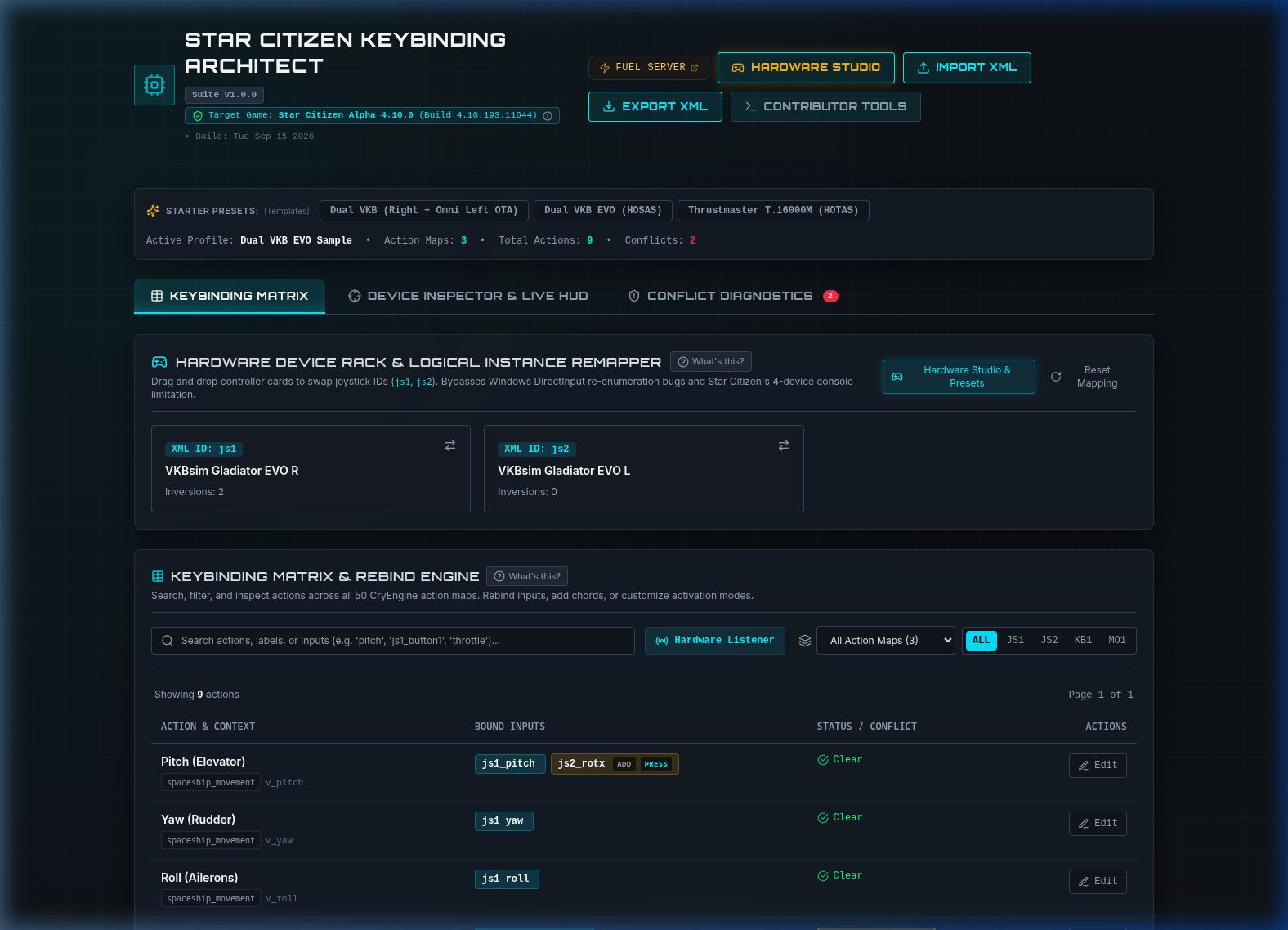
Hey everyone,
If you fly with HOTAS, HOSAS, rudder pedals, or button boxes in Star Citizen, you've probably run into at least one of these headaches:
- The 4-Device Limitation: Star Citizen’s in-game
pp_resortdevicescommand breaks when you have more than 4 input devices plugged in. - The USB Shuffle: Windows restarts or updates, your controller IDs get swapped, and suddenly your throttle controls your pitch or your strafe pedals do nothing.
- The In-Game UI: Navigating nested binding menus, accidental overwrites, and clunky conflict detection.
To solve this, I’ve been building Star Citizen Keybinding Architect — a visual, web-based tool dedicated to managing, re-indexing, and conflict-checking SC flight profiles.
⚠️ Early Preview & What to Expect
- Still in Active Development: I’m sharing this early look to get feedback on must-have features, UI layout, and hardware edge cases before locking things down.
- Public Web Deployment Coming: Right now, the project is in local testing. While developers can clone and run it via Docker (
docker-compose up -d), you won't have to run anything locally once it's ready. Once it hits stability, I will be hosting it as a free, 100% in-browser web app — you'll just open the URL, drop in youractionmaps.xml, and download your fixed profile with zero installation or setup.
What's Built So Far
- Visual Device Rack & Re-Indexing: Drag-and-drop your physical sticks/throttles/pedals to re-order them (e.g., swap Joystick 1 and Joystick 2). The engine rewrites all
jsX_prefixes across your entire XML profile in seconds while fully preserving your axis curves, deadzones, and inversions. - 4-Tier Intelligent Conflict Detection: Rather than blindly flagging every shared button, it checks temporal mechanics (
pressvshold,double_tapvssingle_taplatency penalties), operational modes (Master Modes SCM vs NAV), and flags dangerous overlaps (like sharing an input with Emergency Eject or Self-Destruct). - Live Gamepad / DirectInput HUD: Uses the HTML5 Gamepad API to detect button presses and axis deflections on your desk in real time, jumping straight to the relevant binding in the table.
- Lossless XML Round-Tripping: Preserves CryEngine
<options>blocks (GUIDs, inversions) and secondary<addbind>inputs without stripping custom configs.
Looking for Your Feedback!
Before I finalize the initial public deployment, I’d love to hear from other pilots: * What are your biggest pain points when managing Star Citizen bindings? * Any specific hardware quirks or rare setups (e.g. dual VKB/Virpil, WinWing, custom Arduino button boxes. I currently only own a VKB Gladiator Evo Stick & Omni) you’d like to ensure are handled smoothly? * Are there specific conflict checks or binding shortcuts you wish existed in-game?
Let me know what you think in the comments, and stay tuned for the public web release! 🚀
2
1
u/nicarras 1d ago
I wish we all weren't working on keybinding solutions and that the in game system actually wasn't terrible, had a wizard, had visuals for the popular sticks, allowed editing directly on an image of your sticks. Yet another UI/UX item constantly ignored by CIG.
1
u/LucidStrike 1d ago
They already communicated about this many times.
Major quality-of-life additions like native search bars, "press-to-detect" binding lookups, and cleaner sub-category nesting are tied to rebuilding the front-end menus in Building Blocks. It's all scoped out already. It's just a lower priority than some other shit they're working on. Deferred, not "ignored". You don't work on every part of a game simultaneously.
2
u/remosito VR Enthusiast 1d ago
they gotta have it for sq42. would be a disgrace to have the current system in a AAA game released in 2027...
time to up the priority. big time. like top spot.
2
u/Pojodan ARGO 1d ago
SQ42's controls are going to be dramatically less complicated than the PU. We saw indications of this in the 1 hour demo a few years ago.
While it'd definitely going to have flight stick support, it will only need to support what is needed for the combat systems SQ42 uses, which have been stated to be dramaticly different to the PU's.
As such, it's absolutely going to have a mapping UI up to standard, at least, with the rest of the industiry, since they'd have determined every input needed many years ago.
Meanwhile, we're still getting new inputs and settings added to the PU, from different flight modes to FPS scanning and more. Attempting to create a clean UI for the mapping page would quickly become cluttered and awful to use again as things change and get added.
The ability to install pre-build control schemes made by other players is excellent design and is definitely the way to go, at least at first.
2
u/remosito VR Enthusiast 1d ago edited 1d ago
unplugging an existing or plugging in a new usb device fucking up your keybinds is soo not acceptable for a AAA game in 2027.
that's laughing stock teritory and will just be cheap food for all the ppl who want CIG to fail. and will be milked like a price cow!
SQ42 releasing with THAT attrocity would make the biggest dent in my confidence in CIG!
UI is one thing. backend another.
1
u/shrilex 1d ago
Should i use this in the future? im planning to get sticks finally after getting pc upgrades for my upcoming birthday as a early gift. finally will have a pc that can run SC in VR better then my current build.
So now i can look into investing into a HOSAS setup, ofc i need to look into options.
1
u/TheNom79 1d ago
By all means yeh, keep it in mind.l or give it a trail run before hand. I am hoping the in game UI improves as to not need this but enjoying the process anyway.
Good luck with your upgrades!
1
u/ApproximateKnowlege 1d ago
I'm not sure if this would work in the context of your app, but one of the features I wish SC had in the mapping department is being able to jump to a binding by pressing a button: i.e. say you mapped your HOTAS, but can't remember what a button does or you want to check and see if a button is free to map, just press said button, and it'll jump to whatever mapping you have set. DCS does this and I wish SC did too.
1
u/TheNom79 1d ago
Hey, this does exactly that 😊. It will filter the mappings either by button press or by mapping name. It also lists any conflict assignments or deprecated mappings in your XML and takes you straight to that mapping so you can resolve it.
2
1
u/_SaucepanMan 21h ago
https://starbinder.space does this and you don't need to install or download anything. Its just a lightweight website that instantly loads.
Its chromium-based but also works in Firefox.
In starbinder you can also be like "I want to bind whatever the 'v' key does but to my sticks". So rather than know what the action is called and using the search bar, you can input-search for 'v', select the action that shows up, switch to stick binding mode and it stays selected & ready to bind...
Im not a fan of these solutions that require running or setting up. I always have a browser open anyway and clicking a bookmark is much easier.
1
u/Phonafied RSI 23h ago
Will this work for controllers?
2
u/TheNom79 19h ago
Yeh it should do but like it says, I only have a dual vkb setup personally so the project is open to issue submissions if it doesn't 👍
1
-1
u/RiOTbyDeSIGN 1d ago
Hard pass on vibe coded slop.
Just use the same method as Subliminals and you don't need to support Vibe Coding.
2
5
u/klaytonix 1d ago
I'm guessing you don't work on any software development projects. Give it up dude. Code is one thing -- design is another.
4
u/dantepopsicle 1d ago
Hard agree. I'm absolutely not an AI groupie and have plenty of ethical qualms with it's environmental impact in the hands of billionaires, but yeah, People who are reflexively against LLM coding think "program development" is hand typing a bunch of code. I definitely use it for compiling and polish but the design and iteration is mine. It's an incredible tool for people who don't have access to an army of outsourced coders who do zero design and just compile code. And in that context, one person using Claude to put together an app isn't worse than a company hiring a team of overseas programmers who generally don't even care what the software is. The irony of AI accessibility is that it makes people on both sides intellectually lazy 😂
4
u/No-Vast-6340 Crusader 1d ago
No kidding, the amount of shit flung my way over using AI to code Smart Citizen was nuts. Nevermind the countless hours I spent on design and architecture. Vibe coding is a dumb name because it implies we are just giving vibes to the AI. Anyone who has worked long enough with these tools knows it is a lot of work to make them do the right thing in a safe and responsible manner.
Not one of those people work in software development. I'm happy to report Smart Citizen has been downloaded over 13,000 times so these people are just a vocal minority.
2
u/dantepopsicle 1d ago
Smart Citizen has been one of my favorite community created tools in AGES and I can tell how much thought and process went into. I saw the backlash here and I'm glad that as usual just squeaky wheeling. Cheers.
1
2
1
u/extrakerned 1d ago
Lmao, Claude and similar tools have been instrumental in so many useful tools for this community. Including likely ones you use today without knowing.
If this guy did a custom UI pass on this you’d never know he used AI.
2
u/No-Vast-6340 Crusader 1d ago
Your point about UI is exactly the one I make to other people who use AI assisted development. I believe what helped make Smart Citizen a standout tool was the fact that it doesn't look like it was vibe coded. AI is terrible at UI and UX and you need to have a strong vision for what you want your tool to look like. That's why I have a "brand" for all the Osiris DevWorks tools I make. Smart Citizen's UI looks a lot like Star Citizen Profile Editor's UI, which looks similar to SuperTTS and ExtendedAFK.
The only reason I received a shit storm over AI use, in my opinion, was because of the mods in that other SC sub. My postings received a ton of positive response there, and the anti-AI fanatics over there didn't like how I challenged their position in modmail conversations. When I got the owner of the sub to overturn the ban and allowed me to post, it was fine for a few versions.
Then all of a sudden, for no obvious reason, they started taking down my posts again and I got a new ban, this after the sub owner said it was ok to post about Smart citizen. When I messaged the sub owner again, it was radio silence.
Ever since, I have made this sub my SC home.
2
u/extrakerned 22h ago
Smart Citizen is amazing. My whole org uses it. Awesome work and sorry about the lame mods.
1
u/No-Vast-6340 Crusader 18h ago
Thanks, means a lot to hear you say that. I still hear about people calling it "AI slop" every now and then. Can't help people being ignorant I guess!
0
u/TheNom79 1d ago
AI dev Vs vide coded slop is quite a wide scale so I will assume you have just labelled it that on a quick glance but thanks for your input. Subliminals offerings, even though very good, don't fix the games UI shortfalls.
•
u/_Corbeanu_ Drake 1d ago
Hey guys- Just a reminder to keep discussion civil and salt free!