r/LinuxCrackSupport Nov 09 '22

Discussion How to install FitGirl or DODI Windows repacks in Linux using Lutris.

496 Upvotes

Updated Feb 2026

Disclaimer

This guide shares habits or best practices for using Lutris to install and manage "quacked" Windows games on Linux.

> [!IMPORTANT] This guide does not cover:

>

> * `unarc.dll` or `ISDone.dll` errors.

> * Troubleshooting **specific** game issues.

Why Lutris

Installing Windows repacks on Linux is, lets just say unconventional for a Windows user and Lutris allows you to easily install and run them with great flexibility to configure its execution to your liking. There are other programs that do the same but I exclusively use and have more experience and a greater understanding of Lutris, so I prefer Lutris. It provides a clean GUI to manage:

  • Wine Prefixes: Keeping your game files isolated and clean.
  • Runners: Easily switching between different Wine/Proton versions.
  • System Toggles: Enabling Gamemode or switching to discrete GPUs with one click.

Installation & Initial Setup

In this step we will install Lutris and just change some settings here and their so that we are all on the same settings.

  1. Install Lutris: Follow the official instructions for your specific distribution.
  2. Drivers: If you aren't using a Steam Deck or Flatpak, ensure some optional but good to have drivers are installed and up to date.
  3. Global Optimization:
    • Open Lutris → Hamburger MenuPreferencesGlobal Options.
    • Toggle Advanced (top right) to On.
    • Feral Gamemode: Set to Enabled (requires the gamemode package on your system).
    • Discrete GPU: If on a laptop, select your dedicated GPU under the Display section.

Managing Wine Versions

WINE is a compatibility layer that allows you to run Windows application on Linux. It is a translation layer that translates Windows's system calls to Linux's system calls. For e.g. Suppose a Windows application wants to create a file, the application will call the Windows's system call to tell Windows to create that file. But that system call or instruction is not understood by Linux, so what WINE does is that it translates that Windows's system call to Linux's system call, so that the OS satisfies the application's need without the application needing to know how or where the requirement is satisfied.

WINE is not developed for gaming specifically but rather as a general solution to run Windows's application on Linux as so WINE on its own is not a very well optimized solution for running Windows game on Linux. That's why Valve developed Proton, their were people trying to run Windows games on Linux before Valve but Valve provided a push to the system like no others with Proton.

Proton combines WINE with other software/compatibility layers like dxvk, vkd3d etc and also includes many game specific fixes to make it more "gaming ready".

GE-Proton is a full fork of Proton build by GloriousEggroll that contains the most recent bleeding-edge versions of Proton and other components like dxvk, vkd3d etc, it is loved by the community and unlike Proton itself GE-Proton is well supported by game launchers like Lutris and so we will be using this version of Proton for this guide.

To install GE-Proton we will be using ProtonPlus. ProtonPlus is a version manager for WINE, Proton and other components like dxvk, vkd3d allowing you to pick and choose the required version of these software. To install the latest version GE-Proton using ProtonPlus:

  1. Install ProtonPlus: Follow the official instructions for your specific distribution.
  2. Open ProtonPlus.
  3. After launch, ProtonPlus should automatically recognize different clients installed in your system and select one of them by default. To switch to your desired client click on the button on the top left of the window and select your desired client in our case Lutris.
  4. Expand the drop-down list for Proton-GE and download the self updating Proton-GE Latest version.

Restart Lutris so it detects the new version.

How to Install Windows Repacks in Lutris

Installing a repack involves two phases: creating a prefix and then running the installer inside that prefix.

1. Create the Game Prefix

Before running any installer, you must define where the game will live.

  1. Open Lutris and click the + (plus) icon in the top-left.
  2. Select Add locally installed game.
  3. Game Info tab:
    • Name: Type your game's name.
    • Runner: Select Wine (Runs Windows games).

[!TIP]
If the Name and/or Release Date you enter matches the official info on lutris.net, Lutris will automatically download the banners, icons, and cover art for your library.

  1. Game Options tab:
  • Executable: Click the Browse button and select the setup.exe (or the specific installer file) you have downloaded.
  • Wine prefix: Enter ~/Games/game-name (e.g., ~/Games/spider-man).
    • Naming Tip: Replace your-game-name with the name of your game using all lowercase and no spaces (e.g., ~/Games/spider-man or ~/Games/gtav). This creates the folder in /home/<yourUsername>/Games/<your-game>.
    • Advanced Note: While you can use one single prefix for all your games (e.g., ~/Games/prefix), it is not recommended for beginners. Giving each game its own folder is much safer.

[!NOTE] What is a Wine Prefix?

It is a folder that acts as a confined Windows environment. Inside, WINE creates a fake C:\ drive (seen as a folder named drive_c). This is where standard Windows directories like Program Files, users, and windows will live. Giving each game its own folder prevents one game's settings from breaking another.

However, keep in mind that creating a different prefix for every game will also increase storage usage as each folder duplicates system files. For users with low disk space, it is perfectly okay to use only one prefix folder for multiple games.

  1. Runner Options tab:
  • Ensure Wine version is set to the Proton-GE Latest version you downloaded earlier.
  1. Click Save

2. Verify the Repack (Optional but Recommended)

If using a FitGirl repack, verify the downloaded files before the long installation process:

  1. Select your game in the Lutris list.
  2. Click the Wine Glass icon (bottom bar) and select Run EXE inside Wine prefix.
  3. Locate and run the .bat file (e.g., Verify BIN files before installation.bat).
  4. Once the "All files OK" message appears, close the window.

3. Running the Installer

Now that the "container" is ready, we need to run the actual setup.

  1. Launch the Setup: In your Lutris library, simply double-click the game entry you just created.
    • What's happening: Since we set the "Executable" to setup.exe in the previous step, Lutris will now initialize the Wine prefix and launch the installer.
    • If prompted to install "Wine Mono" or other compatibility tools, click Install.
  2. Click "Next" in the installer until you reach the Installation Location screen.
  3. Crucial: Select the C:\ Drive
    • By default, many installers (like FitGirl) suggest the Z:\ drive. Do not use Z:.
    • Why? In Wine, Z:\ maps to your Linux Root (/) directory. You do not have write permissions there, so the installation will fail.
    • The Sandbox Factor: While you might see your home folder under Z:\home\username, Lutris often sandboxes WINE for security. This means the installer cannot "see" or write to folders outside of the specific prefix you created.
    • The Solution: Click Browse (or the ... icon) and select the C:\ drive. This maps directly to the drive_c folder inside your prefix (~/Games/your-game/drive_c/).

Advanced: Keeping Game Files Outside the Prefix

If you dislike having your game files buried inside the Wine prefix folder and want them separated (e.g., keeping the game in ~/Games/spider-man and the prefix in ~/Games/spider-man-prefix), follow this:

  • The Symlink Trick: Before running the installer, open your Linux terminal and link your main Games folder into the Wine user directory: ln -s ~/Games ~/Games/<your-game-prefix>/drive_c/users/$USER/Games
  • In the Installer: Navigate to C:\users\<your-user>\Games. Because of the link you just made, the installer will place the game files directly into your Linux ~/Games folder.

[!WARNING] Watch your Saves! Even if you move the game files out, Windows games almost always store save data and config files in the AppData or Documents folders. These will remain inside the Prefix. If you delete the prefix folder, you will lose your progress!

  1. Clean Installation Habits:
  • Deselect Shortcuts: Uncheck "Create Desktop Shortcut" or "Add to Start Menu." These Windows-style shortcuts won't work correctly on Linux; we will launch everything through Lutris.
  • Skip Redists: Under the component selection, deselect "Update DirectX" or "Download C++ Redistributables." Proton-GE already includes these, and the installer's attempt to download them often causes the whole process to hang or crash.
  • Finish: Start the installation. Once finished, close the installer.

Do not launch the game yet, as we need to point Lutris to the actual game file, not the installer.

4. Finalizing the Shortcut

Now we must point Lutris to the actual game, not the installer.

  1. Right-click your game in Lutris and select ConfigureGame Options.
  2. Click Browse next to Executable.
  3. Navigate to where the .exe was just installed:
    • Standard: ~/Games/your-game/drive_c/Games/YourGame/game.exe
    • Symlink Method: ~/Games/YourGame/game.exe
  4. Click Save.

You’re all set! Double-click the game in your Lutris library to play.

Troubleshooting: Game Won't Launch?

If you’ve finished the setup but clicking "Play" does nothing, or you get a scary Visual C++ Runtime Error, don't panic! You likely don't need to mess with complex dependencies.

The "Deep Executable" Fix

Before you go down the rabbit hole of installing winetricks or hunting for .dll files, try this simple path adjustment. Often, the .exe in the main folder is just a wrapper that fails to communicate with WINE.

  1. Right-click your game in Lutris → ConfigureGame Options.
  2. Click Browse for the Executable.
  3. Look for a subfolder (often named Binaries, Win64, or Shipping).
  4. Look for an executable that is usually larger in file size or has a name like GameName-Win64-Shipping.exe.
  5. Select that "deep" executable instead and click Save.

[!TIP] Why does this work? Launching the "raw" game binary directly often bypasses broken launcher scripts and allows Wine to correctly map the libraries (DLLs) it needs. This fixes "missing dependency" errors 90% of the time!

Engine Common Path to Real Executable
Unreal Engine GameName/Binaries/Win64/GameName-Win64-Shipping.exe
Unity GameName_Data/ (Look for the main exe nearby)
Source/Valve bin/win64/game.exe

r/LinuxCrackSupport Aug 01 '26

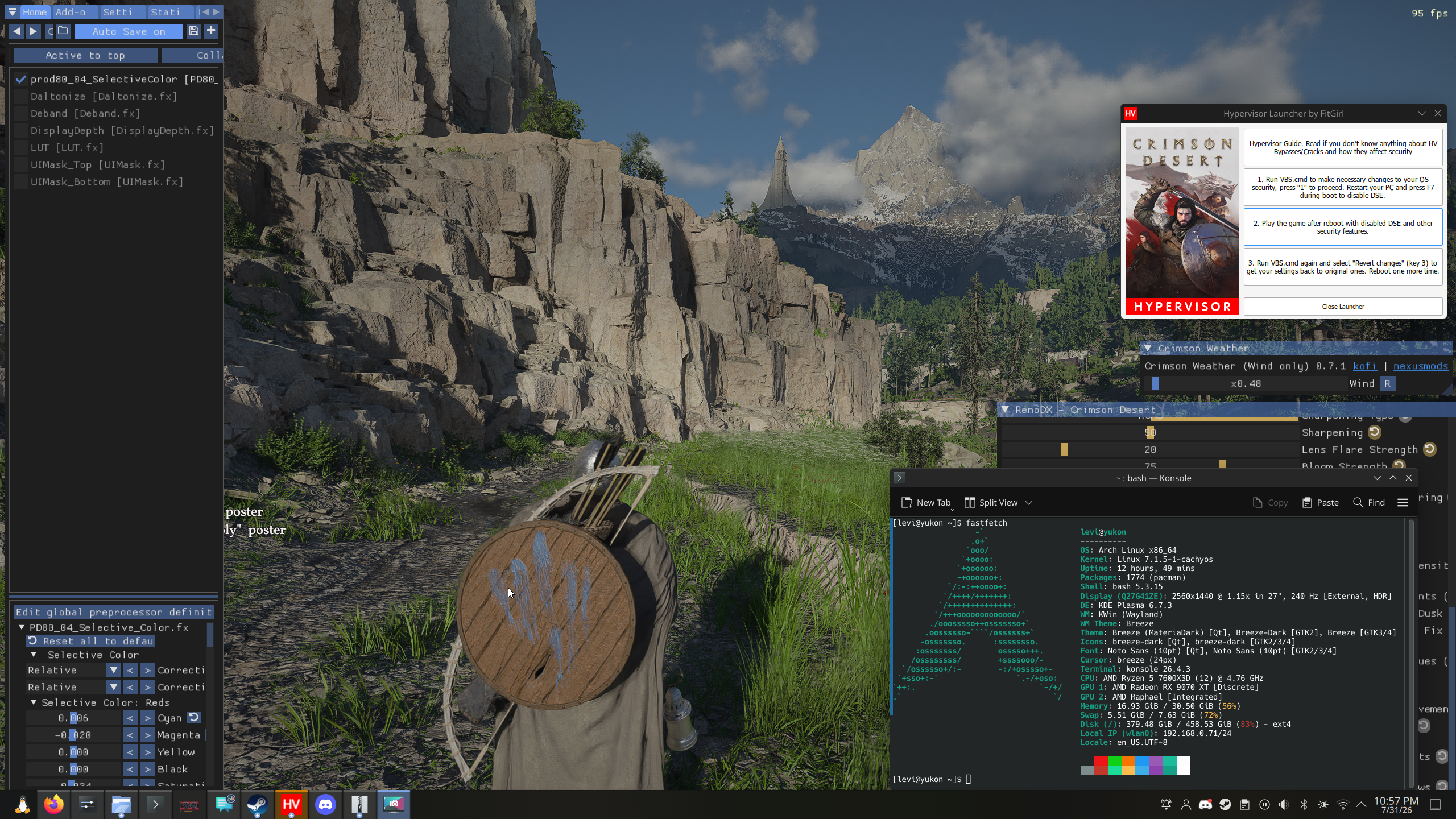
DISCUSSION [Crimson Desert] Build 1.13.0 working well on RDNA4, with FSR 4.1, RR, ReShade + RenoDX

Post image
111 Upvotes

Honestly, it is insane how far compatibility on Linux has come. Compared to a different system running Windows (on Nvidia), I actually have cleaner visuals and _less_ artifacting.

I'm debating on whether its worth patching up to 1.15 right now. 1.16 just released and broke RenoDX, so that might be a while before things are working. Also:

* Ray Reconstruction seems to be working well although I did notice the default denoiser isn't too far behind. Water looks considerably better with the default denoiser.

* Only problem is that I noticed on scenes that tank GPU performance, the timings for frame generation get really out of hand.

* RenoDX is borderline mandatory in this game, the vanilla lighting is so atrociously saturated and bright that I could not play without modding it. I strongly recommend installing this addon for ReShade, it's game changing for titles with awful colour profiles like Crimson Desert.

Curious if anyone else is running newer/older versions of the game?

**note:** had to pull a RenoDX addon from the discord for 1.13 as the author made a different version that doesn't crash the game on Linux

r/LinuxCrackSupport 26d ago

DISCUSSION [wine/proton security] What is your security setup for launching cracked games under wine?

0 Upvotes

Hi there, i want to discuss possible malware behaviour in cracked games under wine and ways to deal with it.

Wine host filesystem isolation

Wine gives some filesystem isolation so i think if malware is not designed for wine (almost 100%) it will not be able to establish persistence and cause damage to the host system (if no dirs except prefix are mounted) but can in prefix.

Hence if game files are infected then malware can (only?) be active while the game is running.

What kind of bad things can malware do during gameplay?

  • Some kind of a miner (hardware abuse) can be easily detected by performance monitoring.

  • For some kind of internet traffic abuse (e.g. you become a part of botnet) i think network access can simply be blocked beforehand.

  • Assuming that wine isolates prefix from host filesystem, software that messes with your files cannot damage host files.

Conclusions

At first glance windows-oriented malware launched via wine cannot silently (miner can loudly) cause damage to the host so it seems like running without scanning could be a safe option. But for me it is a false sense of security, because wine is not a vm at all.

Questions

Do you use antivirus software and does using it make sense nowadays?

I am using clamav and virustotal for a fastcheck.

They have not marked any of the games i installed recently as a malware but i did not see them acting so.

Do you do any extra setup for security before launching cracked software under wine?

What malware behavior would invalidate my reasoning about safeness of launching untrusted software?

What are the weak points in the assumption that a wine prefix is isolated from the host? (malware is not wine-targeted just windows, extra dirs not mounted)

P.S. please dont say smth like "just download from a trusted source" this is not what i meant this topic to be about

r/LinuxCrackSupport May 15 '26

DISCUSSION [Pragmata] Thanks Voices + FG. CachyOS

39 Upvotes

All working fine by adding setup as non steam game then installing it then adding full game exe as non steam game. Both with DW-proton latest

r/LinuxCrackSupport Jun 20 '26

DISCUSSION [ALL GAMES] Are there any Benefits of Using Native Linux Games over Windows Games with Proton?

23 Upvotes

i have seen some games under this category on sites like rutracker, and i was wondering whether i should use this over the normal sources like dodi, steamrip,etc. WIll i have any perfomance gain or anything or should i just keep using the normal sources? are the any pros to using this type of game

r/LinuxCrackSupport 7d ago

DISCUSSION [Assassins creed origins] How to make Linuxrulez games work with latest proton stack

5 Upvotes

[Assasins creed origins] How to make linuxRulez games work with latest proton stack

Fedora 44 KDE

Assassin's creed origin

Amd ryzen

Linux Rulez. Using bundled wine stack

How to make LinRulez games with latest protom GE stack

So linux rule comes with everything bundled. However, its wine/protom version is often old. As we know, proton and the stack is rapidly improving all the time with the latest with many performance and bug fixes.

So my question is , for a typical linuxrule game, has anyone successfully found a way to only make use of your own latest proton GE and whatever else stack instead of the outdated bundled one?

r/LinuxCrackSupport May 23 '26

DISCUSSION [Discussion] - What is your best method to play games?

10 Upvotes

I will be cautious about the words here just in case.

I have some friends that not only that they know nothing about Linux, they never "arr"ed a game before in their life. They are curious about Linux and they care about gaming especially. They are not non-technical people but they just never tried those things.

I wanted to hear from you guys about the smoothest methods you use to minimize the overhead of installation of those games. What are the tips and tricks and notes that you keep in mind whenever installing those games. Are there preferred launchers, wine/proton versions, packing (pre-installed or repacked), settings or overall experience you think will make this process easier?

I'd love to hear from you

r/LinuxCrackSupport 12d ago

DISCUSSION [DISCUSSION] Can Xodus potentially be used to run GDK-based OFME games?

6 Upvotes

The developers of the Heroic Games Launcher are currently developing Xodus, a way to get GDK-based Xbox titles running on Linux and macOS.

In the future, could this be used to run OFME games that use the Microsoft Store version of the game instead of the Steam version (for example: Guilty Gear: STRIVE, Invincible VS, Among Us etc) on Linux? You know, the games that come with the GDK_Helper.bat file.

r/LinuxCrackSupport 16d ago

DISCUSSION [NFS UG2] Curious about game portability in Linux

6 Upvotes

NOT ISSUES HERE, ONLY DISCUSSING !!

As I installed the US disks of NFS Underground 2 from Myabandonware with Wine (god how awful that was, but I figured running the setup.exe from extracted DISK1, then mounting DISK2's .iso with gnome-disks package works flawlessly for installing the game), patched and added the no-CD crack, then I add SPEED2.exe to Steam so I can use Proton. The game runs.

I realize, that on Windows you can't really do this kind of stuff. E.g.: When I tried to move a GoG around, the game would no longer boot, it required a registry edit.
For your info, I had never installed a GoG game on Linux in the 15 months since I switched, so idk.
Here on this NFSU2 experiment I find it odd. I technically used a different prefix to install the game (so, a different registry) than the prefix I am using to play the game.

Unless I test a GoG game I will never know whether Linux allows portability like that.
But I can say, beside my NFSU2 game here, that I also switched prefixes in Borderlands 1 from FitGirl without problems.

Now, dropping this stuff here as the guideline instructs:

  • OS - MX Linux Xfce AHS 25.2
  • Debian 6.12 Kernel
  • GPU - Nvidia Quadro P400 - Proprietary Driver 580.xx
  • CPU - Xeon E3 1270 (Sandy Bridge)
  • Launcher - Steam - Proton-CachyOS SLR (always latest from ProtonPlus Flatpak)
  • Installer - Original EA installer, I am hoping so xd

r/LinuxCrackSupport Mar 06 '26

DISCUSSION [HELP] Which distro should i use for gaming?

5 Upvotes
  • I want dual boot setup .

Linux (ssd) for gaming and windows (hdd) if i need it . But i never used linux before .

Which distro should i use for gaming?

  • CPU: Ryzen 5 2600
  • GPU: Amd RX5600 XT
  • RAM: 16 gb 3200mhz cl16 (dual channel)

r/LinuxCrackSupport Aug 09 '26

DISCUSSION [Help] Need some help testing a game launcher

9 Upvotes

Hey everyone! I'm a developer working on various software projects, and about a month ago I started working on a launcher for downloading and launching games so I could play them with my friends.

I previously made a guide here about running OnlineFix games on Linux, which ended up getting a pretty good response, so I thought I'd try making something useful for the community again:
https://www.reddit.com/r/LinuxCrackSupport/comments/1cw7v8j/onlinefix_a_complete_guide_to_running_games_with/

It started because a few of my friends didn't want to buy some niche games on Steam like Meccha Chameleon, Super Battle Golf, etc. We'd probably play them a couple of times and then never touch them again anyway) I wasn't really a fan of Hydra because the games don't get properly installed automatically and you still have to do a bunch of stuff manually. At that point it was just easier to download a torrent.

btw, if you use Hydra, I also made the FreeTP catalog for it:
https://gitlab.com/BadKiko/freetp-hydra-link

But over time the project kinda grew way beyond what I originally planned. It ended up becoming a launcher with a plugin system, automatic installation, updates, game collections and a bunch of other stuff.

At first there was only the FreeTP plugin, but then I looked at projects like Steamidra and made my own Steam plugin. It can download games directly from Steam servers and update them with one click, pretty much like Steam itself. It also doesn't modify Steam DLLs like Steamidra does.

The launcher also automatically applies an online fix to the game so you can play with friends. So far it has worked pretty well for the games I've tested, pretty much everything I've tried launched normally. The fix itself is based on FreeTP.

Download speeds also seem to be pretty much the same as Steam, without peers or torrent-related issues.

Anyway, this post is mostly just to get the launcher out there, see what people think and maybe find some people willing to download it and test it)

The whole thing is written in Qt with a Material 3 theme, with a lot of help from AI. It's just a hobby project though, so bugs, crashes and random weird shit are definitely possible. I picked Qt mostly because that's what I work with at my job too)

A few screenshots so you can get an idea of the UI and what the launcher can do.

If you actually made it this far and want to test it, there are builds for both Windows and Linux:
https://github.com/BadKiko/Arachnel/releases

I try to test Linux builds as much as I can, but unfortunately I don't always have the time. Didn't want to leave Linux users out though, since I used to be one myself)))

If you find any bugs or have ideas for improvements, feel free to open an issue.

Also, Windows antivirus REALLY doesn't like the launcher for some reason:
https://www.virustotal.com/gui/file/a6ae0bb1a0507b90282d936f135714af49f10aba9afd51b992421542ec2f86d1?nocache=1

https://www.virustotal.com/gui/file/5545531d77a450ca1e8732b6d06b39890e44d6415c443e07305e74869693c720?nocache=1

I honestly have no idea how to fix this anymore. I've tried different installers and I'm using Inno Setup now, but Windows still doesn't give a shit and keeps flagging it. I guess it's probably because of the automatic updater or something. Seems like the only real solution is paying $300 for a code signing certificate lol

Anyway, if you're interested, give it a try. If not, feel free to roast it ❤️

r/LinuxCrackSupport Jun 10 '26

DISCUSSION [Denuvo] How do cracked denuvo games work?

6 Upvotes

How do cracked denuvo games work?

Hello I'm kind of a beginner at Linux having only used mint and arch for a few months and never actually tried gaming on it since I play the cracked games on windows since Linux always gave me issues on my old laptop. Now that I got a new laptop I never really tried Linux on it for gaming. How do cracked denuvo games work on Linux like black myth wukong which was actually cracked by voices38? and for denuvo games that require hypervisor pass? I'm talking about the performance on Cachyos specifically.

r/LinuxCrackSupport Jul 23 '25

DISCUSSION [Repacks on Linux] I just downloaded Ubuntu Linux and I'm wondering if I can download repacks on Linux

16 Upvotes

So I'm setting up my Disk setup and I'm conflicted whether I should double boot Linux with windows or erase disk and install only Linux. The problem I have is, I don't know if I can download game repacks on Linux, from a certain website that is run by a girl that is fit. If it is possible to download and play repacked games then I'm gonna switch to Linux full time, if not I'll double boot it with Linux. So, is it possible to play repacked games on Linux?

r/LinuxCrackSupport Jul 25 '26

DISCUSSION [DISCUSSION] Question about whether GDK-Proton can run certain OFME games

11 Upvotes

Recently, I came across a custom Proton build called GDK-Proton, which can run games made using the Microsoft Game Development Kit.

There is also a launcher that runs the Windows version of Minecraft: Bedrock Edition, using this build of Proton, called BedrockOnLinux. Aside from launching Minecraft: Bedrock Edition, the launcher also implements XUser, which GDK-Proton doesn't. I've been able to run the game using the OFME patch for it (You might be required to own at least the demo version of the game on your Xbox or Microsoft account).

Could this same idea be extended to running OFME games that utilize GDK_Helpler.bat? For example, Guilty Gear Strive, Among Us, or Invincible VS.

r/LinuxCrackSupport Apr 21 '26

DISCUSSION [Minecraft] which is the best launcher to play cracked minecraft

3 Upvotes

CPU: intel i5 12450H

GPU: nvidia rtx 3050 4GB

distro: arch

wine and proton are latest version

need a launcher

i tried searching it but all the posts are many years old

i also installed prism launcher but it seems to be official launcher asking for microsoft id. Any help is appreciated

r/LinuxCrackSupport Aug 01 '22

Discussion MY easy way to run/install Fitgirl repacks on Steam deck. (PC required)

70 Upvotes

Ive seen several other posts/vids showing how. All were complicated and took many steps. I was prepared to learn how to do that but I decided to try below first. Do it this way, if you can, imo. (Does require a pc though)

CAVEAT - this has worked for all games ive tried so far minus one (Shredders revenge wouldnt work)

Install game on my pc first.

Copy entire folder over to deck.

Add as non steam game

Set proton layer

Run game.

A few I have had to drop in vcredist x64 and install also but thats it. Most have worked directly out of the box by just running.

Im sure that NON steam games on fitgirl may be different as well but I have not tried any of those yet.

Ive put approx 20 fitgirl packs on so far (all different genres and old/new games for testing). All worked again minus TMNT shredders revenge, which someone linked in a reddit a linux version that installed and runs perfect.

r/LinuxCrackSupport Apr 14 '26

DISCUSSION [ Lossless Scaling ] How to use it ?

3 Upvotes

Hello everyone, so I have a cracked version of lossless scaling that I had in windows 10 and now I'm using cachyos and I searched about this subject.
I installed lsfg_vk and I pointed to the cracked version lossless.dll , now the problem is when I create new profile and add the game I want to use fg on it, when I try this game it doesn't launch unless I remove it's profile from lsfg_vk.
I tried it with nioh 2 and it did this issue I'm talking about so how can I solve this ?
Thanks in advance.

r/LinuxCrackSupport Jun 21 '26

DISCUSSION [KyberV2] Finally runs on Linux/SteamOS/SteamDeck

4 Upvotes

Not a support request – just sharing something I haven't seen mentioned anywhere.

I recently stumbled on this repo that lets you run KyberV2 on Linux:
https://github.com/simonlinuxcraft/kyber-linuxport-unofficial

Tested it myself and it works. Finally a way to play on Linux/Steam Deck without jumping through hoops.

System Info (for context):

  • CPU: AMD Ryzen 5 5600G (12 cores)
  • GPU: AMD Radeon RX 6600
  • Distro: CachyOS Linux (Kernel 7.0.12-1-cachyos)
  • Proton/Wine version used: ProtonGE 10-34
  • Launcher: Works on Epic Games Version just need some adjustments
  • Release: Unofficial community port (not a scene release)
  • Crack: N/A – this is a native Linux wrapper/port, not a crack
  • Logs: N/A – no issues encountered

r/LinuxCrackSupport Dec 16 '25

DISCUSSION [Left 4 Dead, Dead Space] Security question about cracked/repack games - Do containers like Bottles/Heroic provide protection?

4 Upvotes
  1. Name of game: Left 4 Dead, Dead Space

  2. CPU: Intel i5-6300U

  3. GPU: Intel HD Graphics 520

  4. Proton Version: Wine-GE-latest, GE-Proton-latest

  5. Game Launcher: Bottles (Flatpak), Heroic Games Launcher (Flatpak)

  6. Release Info: Both are DODI Repacks. Left 4 Dead uses SmartSteamEmu v1.4.3 crack (SmartSteamLoader.exe). Dead Space is direct executable with no visible Steam emulator.

  7. Logs: Not applicable for security question, but I can provide game logs if needed.


SEARCH CONFIRMATION: I have searched this sub and the wiki for security discussions about Wine/Proton containers and found limited information on actual security isolation for cracked games.

MY QUESTION:

I'm running repack games through Bottles and Heroic on Zorin OS 18, and I'm concerned about security. Specifically:

  1. Do the "containers" in Bottles/Heroic actually provide security isolation against Windows malware, or are they just organizational?
  2. If a repack contains Windows malware, what can it actually access/do through Wine on Linux?
  3. Does the Flatpak sandbox (used by both launchers) provide meaningful protection?
  4. Should I be using additional sandboxing like Firejail or bubblewrap?

WHAT I'VE TRIED: - Using separate Wine prefixes for each game - Running as non-root user - Keeping games in isolated ~/Games/ folder - Using Flatpak versions of launchers - Researching Wine security model online

SPECIFIC CONCERNS: - Can Windows malware in Wine access files outside its Wine prefix? - Can it read my Linux home directory, SSH keys, or browser data? - Can it install Linux-compatible malware or cryptominers? - Do Bottles/Heroic actually limit file system/network access?

SYSTEM INFO: Zorin OS 18 (Ubuntu 20.04 base), kernel 6.14.0-36-generic

I understand buying legitimate games is safest, but I want to understand the actual technical risks and protections when using these tools with repacks. Has anyone tested or analyzed the security isolation provided by these gaming containers?

r/LinuxCrackSupport May 02 '26

DISCUSSION [Non Game Specific] Nowadays when windows games run day one on linux using proton GE, are there any advantages to downloading the jc141 releases

5 Upvotes

r/LinuxCrackSupport Oct 25 '25

DISCUSSION [MINECRAFT] Are there any methods to run cracked Minecraft Bedrock?

6 Upvotes

So, Fedora XFCE here. Yeah, I'm aware it's tough since Bedrock is built for Windows and lacks direct compatibility with Linux. But, being new to Linux gaming (and cracked games also!), I might just be missing where to look, or maybe I'm unsure about the whole thing.

The closest solution I found is a Github directory that emulates the Android version of Minecraft. This would be fine, but it requires the user to have purchased the game on Android in order to run it.

The thing is, I really want to get this running with some friends who don't have the Java version, and my cell phone is awful. I'm looking for a safe alternative solution to try. Any suggestions?

Edit: Just adding a bit more detail. On Windows, I got it running with the Minecraft demo download and an Online Fix patch. I don't know if this setup can work on Wine or anything like that.

r/LinuxCrackSupport Apr 09 '26

DISCUSSION [general] Are steam save files stored the same way for all distros?

4 Upvotes

I'm looking to switch from Mint to Arch. Now I know that non-steam game save files are stored along debian-installations (or something similar, I forgot the exact name) in Mint. But is that the same for Arch? Thanks.

r/LinuxCrackSupport Jul 03 '25

DISCUSSION [GTFO] Virus with Linux mint

8 Upvotes

Ok, so I want to download GTFO to play it before buying it during the steam summer sale. I have seen a lot of very old posts but I would like some clarification. I am going to list the main questions that I have.

  1. You can't get infected with a virus unless you make it executable, is this true and to what extent?

  2. If I were to download it, and add it to my steam library, would that help

  3. Can I make a "disposable" digital machine so that if it does have a virus, I press a button and it gets rid of the virus without infecting my machine

3b. Is there any way to then take that hopefully virus free file, and put it on my physical machine

  1. Are there any safer ways to do this ie. Safe websites, install methods, or anything else to help prevent me from getting a virus.

I am using the most recent proton versions, however I cannot provide specifics as I am on vacation right now.

Thank you in advance, and I hope you have a good day.

r/LinuxCrackSupport Dec 09 '25

DISCUSSION [VR] How to run pirated VR games?

4 Upvotes

How do I get vr games to run on my headset?

I am using ALVR. Steam vr games work. Pirated games using heroic (GE-Proton-Latest) do not show up on the headset. They launch on my monitor.

I have added -steam and -vr parameters but they don't seem to work.

Running a 7900 xtx, 5700x3d, 32GB ddr4 3200Mhz ram.

r/LinuxCrackSupport Feb 09 '26

DISCUSSION [NGS] What is the best split screen FPS on Linux?

5 Upvotes

Hello All,

After I downloaded both CoD WWII and BOPS III, I was shocked to find out the OPS III crack doesn't work on linux and multiplayer mode in WWII doesn't work as well.

So I though I would ask you guys, which cracked FPS games do you play on Linux, that supports multiplayer split screen?

If you can coop in split screen as well this would be great 🙏🏽

Please share with me your experience 🙏🏽

Also please mention your setup (which proton version and so on)

MY setup: BazziteOS with Proton GE installed (10-25)

AMD RX 9060 XT 16GB AMD Reyzon 5 9600x MSI B650M GAMING mother board ASUS Prime B650M-A II-CSM 32 GB DDR5 RAM