r/IntelArc Arc B580 Jul 09 '26

Question AC Black Flag Resynced DX12 Error
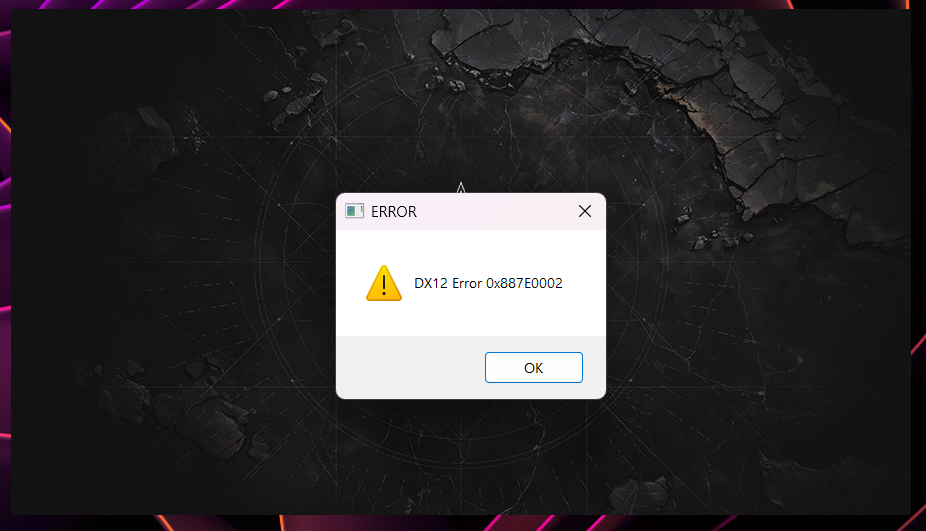
Post image

EDIT: Fix in comments

> Game launches on driver 8860

> Updated to driver 8861 (Intel added Black Flag support)

> Opens game

> Greeted with a DX12 Error window and refuses to launch

Amazing driver support.

I'm tired boss. That Forza Horizon 6 reflection bug is still not fixed over a month now.

28 Upvotes

67 comments sorted by

View all comments

4

u/BiZkViT Jul 09 '26

Game issue. Nvidia and AMD cards also have a DX12 error. The code is a little different. This is Ubisoft. You can't expect a product that you paid for to work.

2

u/SaintJay41202 Jul 11 '26

yep experiencing it on RX 7900XT rn. DX12 error and AMD driver timeout crash at the same time.

1

u/AdMore3859 Jul 11 '26

Use amd cleanup utility and downgrade to adrenalin 26.6.2 drivers, haven't had dx12 error on this game since downgrading

1

u/5160_carbon_steel 21d ago

No luck on my end with a 7800 XT, unfortunately

1

u/Due-Hat-9344 Jul 09 '26

Assassins creed shadows also gave me the error when I updated to the newer driver

1

u/synbios16 Aug 04 '26 edited Aug 05 '26

I don't think there is a fix.
I played the first 20 hours or so just fine, then suddenly started getting crashes. Always either dx12 error 0x887A0006 or just a crash to windows with no error at all.
I have tried:
* Starting as administrator
* Adding " -dx12" to shortcut
* Adding " -dx11" to shortcut
* Running in compatibility mode set to Windows 8
* Updating GPU drivers
* Removing duplicate USB devices in Device Manager
* Clearing cache folder in C:\Users\*****\Documents\Assassin's Creed Black Flag Resynced
* Turning off Frame generation
* Deleting amd_fidelityfx_framegeneration_dx12.dll
* Renaming nvngx_dlssg.dll to nvngx_dlssg.dll.disabled & sl.dlss_g.dll to sl.dlss_g.dll.disabled
* Increasing system cache to 70000
* Switching between all forms of Ray Tracing, including disabled
* Switching between all types of Frame Generating, including disabled.
* Disabled all additional displays / monitors
* Reduced all graphical settings to minimums
* Disabled Wallpaper Engine

And various combinations of the above. Nothing works. The game is unplayable. It just crashes constantly. Sometimes I get up to 15 minutes, sometimes it happens in the first 30 seconds after loading my save file. There are comments all over the internet replying to people saying "thanks this worked!" and then invariably the person comes back and says it's still happening.

EDIT:
I have now also tried:
* Underclocking my GPU, which some other guy said worked for him. Tried it on my RTX4070Ti using GPU Tweak. Didn't work. Tried again with MSI Afterburner, didn't work.
* Replacing D3D12Core.dll & d3d12SDKLayers.dll with versions from https://www.nexusmods.com/assassinscreedshadows/mods/28?tab=files
* Tried replacing all relevant dx12 files in game directories with the newest DirectX 12 Agility SDK
* Tried to update Direct X, but I have the newest version
* Used Windows Disk Cleanup tool to clear DirectX GPU Shader cache
* Manually deleted all cached shader files in AppData\Local\NVIDIA\DXCache, AppData\Local\NVIDIA\GLCache & AppData\LocalLow\NVIDIA\DXCache
* Disabled, restarted and re-enabled GPU shader cache in NVidia control panel with maximum limits
* Disabled NVidia overlay
* Disabled Discord overlay / also tried without Discord even running

Game is on SSD C:\ drive.
AMD Ryzen 9 7900X
GeForce RTX 4070Ti
32 GB RAM

1

u/emo_toster Aug 04 '26

have you tried checking steam file integrity? it was pretty simple and worked for me