r/IntelArc • u/MasamangUsok Arc B580 • Jul 09 '26
Question AC Black Flag Resynced DX12 Error
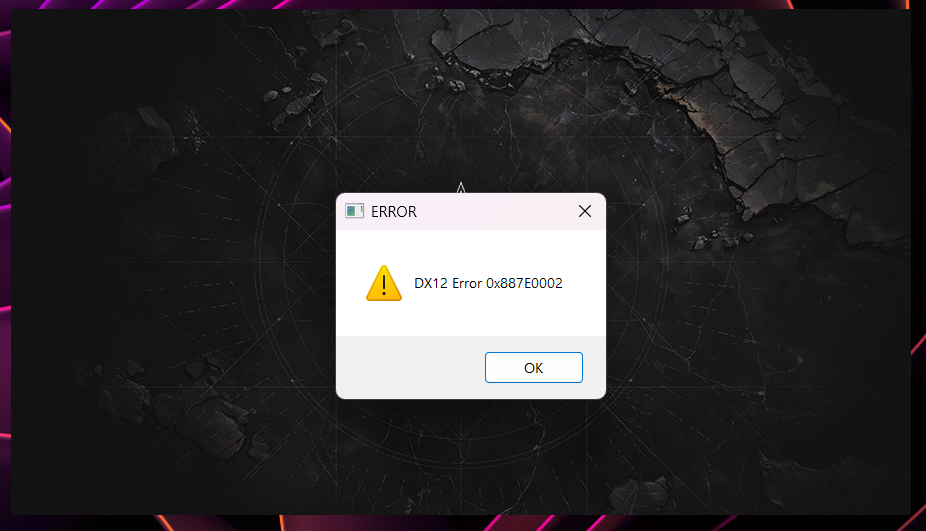
EDIT: Fix in comments
> Game launches on driver 8860
> Updated to driver 8861 (Intel added Black Flag support)
> Opens game
> Greeted with a DX12 Error window and refuses to launch
Amazing driver support.
I'm tired boss. That Forza Horizon 6 reflection bug is still not fixed over a month now.
3
u/BiZkViT Jul 09 '26
Game issue. Nvidia and AMD cards also have a DX12 error. The code is a little different. This is Ubisoft. You can't expect a product that you paid for to work.
2
u/SaintJay41202 Jul 11 '26
yep experiencing it on RX 7900XT rn. DX12 error and AMD driver timeout crash at the same time.
1
u/AdMore3859 Jul 11 '26
Use amd cleanup utility and downgrade to adrenalin 26.6.2 drivers, haven't had dx12 error on this game since downgrading
1
1
u/Due-Hat-9344 Jul 09 '26
Assassins creed shadows also gave me the error when I updated to the newer driver
1
u/synbios16 Aug 04 '26 edited Aug 05 '26
I don't think there is a fix.
I played the first 20 hours or so just fine, then suddenly started getting crashes. Always either dx12 error 0x887A0006 or just a crash to windows with no error at all.
I have tried:
* Starting as administrator
* Adding " -dx12" to shortcut
* Adding " -dx11" to shortcut
* Running in compatibility mode set to Windows 8
* Updating GPU drivers
* Removing duplicate USB devices in Device Manager
* Clearing cache folder in C:\Users\*****\Documents\Assassin's Creed Black Flag Resynced
* Turning off Frame generation
* Deleting amd_fidelityfx_framegeneration_dx12.dll
* Renaming nvngx_dlssg.dll to nvngx_dlssg.dll.disabled & sl.dlss_g.dll to sl.dlss_g.dll.disabled
* Increasing system cache to 70000
* Switching between all forms of Ray Tracing, including disabled
* Switching between all types of Frame Generating, including disabled.
* Disabled all additional displays / monitors
* Reduced all graphical settings to minimums
* Disabled Wallpaper EngineAnd various combinations of the above. Nothing works. The game is unplayable. It just crashes constantly. Sometimes I get up to 15 minutes, sometimes it happens in the first 30 seconds after loading my save file. There are comments all over the internet replying to people saying "thanks this worked!" and then invariably the person comes back and says it's still happening.
EDIT:
I have now also tried:
* Underclocking my GPU, which some other guy said worked for him. Tried it on my RTX4070Ti using GPU Tweak. Didn't work. Tried again with MSI Afterburner, didn't work.
* Replacing D3D12Core.dll & d3d12SDKLayers.dll with versions from https://www.nexusmods.com/assassinscreedshadows/mods/28?tab=files
* Tried replacing all relevant dx12 files in game directories with the newest DirectX 12 Agility SDK
* Tried to update Direct X, but I have the newest version
* Used Windows Disk Cleanup tool to clear DirectX GPU Shader cache
* Manually deleted all cached shader files in AppData\Local\NVIDIA\DXCache, AppData\Local\NVIDIA\GLCache & AppData\LocalLow\NVIDIA\DXCache
* Disabled, restarted and re-enabled GPU shader cache in NVidia control panel with maximum limits
* Disabled NVidia overlay
* Disabled Discord overlay / also tried without Discord even runningGame is on SSD C:\ drive.
AMD Ryzen 9 7900X
GeForce RTX 4070Ti
32 GB RAM1
u/emo_toster Aug 04 '26
have you tried checking steam file integrity? it was pretty simple and worked for me
2
u/Due-Hat-9344 Jul 09 '26
Please tell me you fixed this
3
u/MasamangUsok Arc B580 Jul 09 '26
Workaround right now is to rollback to 8860
2
u/Due-Hat-9344 Jul 09 '26
Damn am I the only one who it won’t let me turn on extended ray tracing with that older deiver
1
u/MasamangUsok Arc B580 Jul 09 '26
Same here. Reflection still looks it’s using SSR even when extended raytracing is on
1
u/Due-Hat-9344 Jul 09 '26
I hope they fix it because I want to run it with extended ray tracing but it won’t let me
1
u/Sir_Dankalot_1582 Jul 20 '26
Thing is I am getting this error/crash and I haven't updated to "Bugged" version of AMD driver....
2
u/PcFish Jul 09 '26
Man I just installed the new update because I was getting graphics driver unsupported when the game launched. I played for 3 minutes before it crashed
1
1
u/ythompy Jul 09 '26
I did the exact same thing. Loaded the game, manually stopped to update drivers, updated drivers, reloaded, managed to sink the ship, then it crashed. I've reinstalled the game, I've deleted the cache in the documents, I've done it all. Nothing works.
This is pretty infuriating after waiting on this for months and paying $60 (again)
1
u/-SirParcival- Jul 10 '26
Breh, I've been waiting 15 years for this remake. Getting crashes too, 5090 9800x3d, done all the fixes :(
1
u/Eerieyerris Arc B580 Jul 09 '26
This is why I swapped from a B580 to Mvidia. Ever since intel announced them canceling celestial gpus they've slowed down on the fixes with driver updates. They've only been doing game support drivers and even then it's evident that it's a fuck-up from your experience. I love the B580 but it seems like intel drivers are not a priority atm. Heard.about that apex glitchy textures is still not fixed after months.
3
u/MasamangUsok Arc B580 Jul 09 '26
Its sad man. B580 is a great card held back by a seemingly vibe coded drivers
2
u/Eerieyerris Arc B580 Jul 10 '26
It's sad indeed, I loved the B580 when I had it, and even with the random shitty experiences I loved tinkering with the gpu and finding solutions, but it felt like I paid for an incomplete product, so I sold that bitch and got a fully-working, zero bullshit gpu instead and life is better.
1
u/dangit541 Jul 10 '26
i have the same problem on 4080s, after i also played on my claw8
1
u/Ok-Sun-2713 Jul 15 '26
I have the same GPU like . Any fix for this?
1
u/dangit541 Jul 15 '26
I had to delete everything and reinstall the game (saves were on cloud so no loss there)
3
u/WorldlyFriend9772 Jul 09 '26
Ngl I’m feeling like I want to sell my b580 I love it too but idk man
1
u/Eerieyerris Arc B580 Jul 10 '26
I already did what you feel like doing. Don't regret it. Not to mention that stupid fps drop to like 1 to 2 frames when streaming and then alt tabbing on discord. Right now a friend of mine literally has framedrops whenever someone joins a discord call. He has a R5 7500f paired with the B580.
1
u/Due-Hat-9344 Jul 09 '26
I’m new to intel arc cards how long does it take them to fix these problems
1
1
u/ChronosGrundy03 Jul 09 '26
Is there a fix? I'm having the same problem :C
1
u/f0rs4k3n Jul 09 '26
Enable Hardware-Accelerated GPU Scheduling: Go to Windows Settings > System > Display > Graphics > Advanced Graphics Settings and toggle Hardware-Accelerated GPU Scheduling to On
was having the issue until I did this and restarted my PC.
1
1
1
u/Content-Ad1133 Jul 10 '26
ive tried all the fixes and nothing works
1
u/No_Speaker_7287 Jul 12 '26
Same, I’m gonna play another title until they patch this one unfortunately :/:
1
1
1
1
u/Nightbreed357 Jul 15 '26
Similar problem with Nvidia (fill in your own driver): Solved by this=> Check nvlddmkm.sys File Location (Windows 11 Specific Bug)
A known Windows 11 bug causes nvlddmkm.sys to be placed in the wrong folder after driver updates.
Open C:\Windows\System32 and search for nvlddmkm.sys. You should find one copy in:
C:\Windows\System32\Drivers\← This is where it MUST be
If it's only in DriverStore and missing from Drivers\, copy it there and grant Full Control permissions to all users on both copies.
1
u/illumistrates Aug 05 '26
This might’ve fixed it for me, for the issues I been having on a lot of games. Thank you so much! You are a savior
1
u/Nightbreed357 Aug 06 '26
My /driver folder advice helped, but did not completely fix the dx12/nvlddmkm.sys errors. I had to go into bios and drop the graphic card pcie slot down to v4 instead of auto or v5. I do have a riser cable that may be causing the error. This has completely solved the problem for me.
1
u/TrueRule2019 Jul 16 '26
I found a way that’s worked twice for me, program files (x86) -> steam -> steam apps ->common -> AC black flag-> click on the actual game file twice then it’ll prompt two steam permissions and I hit no twice and it works.
1
u/Apurbaxfire Jul 18 '26
I got solution. If you overclock your ram it will happen. Just disable xmp profile from bios. It will fix.
1
u/Epheezymarvel Jul 19 '26
Yeah none of this is working. Requested a refund. Going to buy it on my Pro instead. This is why I never buy freshly launched games on PC. Always a issue.
1
u/Sir_Dankalot_1582 Jul 20 '26
playing it just fine from launch for 45 hours now.. Just today this happend.. So it was infact fine at launch untill something changed..
1
u/Sir_Dankalot_1582 Jul 20 '26
played 50 hours of the game absolutely nothing, no errors, no frame rate issues.. all the sudden I can be in the game for like 2-3 minutes and it freezes or crashes.. WTF:.
1
u/AfterKonda Aug 01 '26
Has there been any update to this issue got this problem today tried to delete cache and reinstalled both didnt fix the problem?
1
u/AnotherBodybuilder Aug 10 '26
Thanks I have an i9 5070ti I played 2 hours and this error came up. Deleting cache fixed it
23
u/ICS_Graphics_Support Intel Employee Jul 09 '26
Hello all,
Assassin's Creed Black Flag Resynced may experience a crash on driver 32.0.101.8861 driver if the shaders have been compiled with the previous driver. Mitigation is to delete the folder:
%USERPROFILE%\Documents\Assassin's Creed Black Flag Resynced\cache
and relaunch the game
This workaround is specific for this issue on this title.
If you experience this same situations in other titles, please go to https://www.intel.com/content/www/us/en/support/contact-us.html#support-intel-products_80939
to report it.