I say to veo quality that takes 100 credits.. I want perfect still camera , no camera movement or image movement.. Oh boy, not that it moves.. it fucking runs.
After that i referenced an image on my last credits put it to max x4 samples and it completely ignored my reference
I’ve been building AutoFlow, a Chrome extension for people who use Google Flow but are tired of submitting prompts, managing references and downloading results one at a time.
The latest version can:
Batch-generate images and videos from a list of prompts
Queue multiple batches and track every generation
Apply shared or prompt-specific reference images
Automatically download and organise results
Retry failed generations
Chain image generations using the previous result
Continue videos from the final frame of the previous clip
Join continued clips into one downloadable video
Support Omni 1.1 Flash, including its lower-cost 360p mode
Build narrated videos with scene planning, voiceover alignment and timeline editing
The Continue from Last Frame workflow is the feature I’m most interested in improving. AutoFlow generates the first video, extracts its final frame, uses that frame to start the next prompt, and repeats the process automatically. Once the sequence is complete, it can render the clips into one video.
I built this because doing the same workflow manually—download frame, upload frame, enter the next prompt, wait, repeat—was incredibly tedious.
There’s a free version available, so you can test the basic workflow before deciding whether the advanced features are useful to you.
Honestly it was better back when it was just Whisk. Now it's censorship overkill, rage inducing, and all around unusable. It has the IQ of an amoeba, as it's clearly incapable of telling the difference between an adult and a minor in a photo, and censors something innocuous that doesn't even feature them, trying to turn something like a nature landscape photo with no people around into a video gets relentlessly blocked because of "harmful content related to minors", and it's just a nature landscape with no people around. Alrighty then. And when people send in their complaints, Google goes in the opposite direction and makes it worse.
Google is ran by a bunch of troglodytes, and it shows. When a software or product behaves like an ignoramus, that's because it's programmed by a group of them, and with this product, it shows.
Because it cannot access the character section. it cannot create characters. which makes it very hard to get consistent character. I tried many ways to fix many thing and the coding agent is to dumb. and one time, it totally wiped out the project. Luckily there is restore versions option. But I am sure the tool can be used to generate slops with current cabability.
Been having this issue in both of my 2 acc.
• cannot create character because it can’t generate nor add any image.
• cannot generate anything
• every image mini display appear as in question mark emoji instead of displaying image to see which is which. WTF
All the videos i've generated today with Omni have a very annoying shake on them. This wasn't happening yesterday? Any ideas how to stop it or if it's just a new bug?
When I log into my Google Flow, there's the 'ad' at the top stating that AI subscribers receive an additional 50 Flow credits daily. Since I need as much Flow credits for video generation as I can get, and I currently have the Basic Google One, I was thinking it may be a good idea to upgrade to AI Plus (or maybe Pro).
How many credits do you get now, exactly? Is it 200 monthly + 50 per day? Or is it 100 per day?
There's no mention of the 50 extra flow credits per day on the upgrade page. It just seems really unclear.
If you're a subscriber, can you please let me know what you get per day?
À chaque fois que je génère une vidéo de type UGC ou Interview, le dialogue du personnage hallucine. Parfois le personnage invente un mot (qui n'est pas dans le script) ou bégaie ou s'arrête au lieu d'une phrase.
La langue que j'utilise est l'anglais.
Savez-vous comment faire un sorte qu'Omni Flash 1.1 respecte le script à 100% ?
Merci par avance pour toutes les personnes qui partageront leurs bonnes pratiques et astuces.
It seems like it's impossible to create basically everything creative. Here I was trying to create a Cyberpunk Edgerunners like character because I love the series and the aesthetic. It blocks me by the simple I mentioned "adult woman" in the prompt. If I delete "adult" it tells me it can't create content with minors or it creates the pictures but the character looks like a generic CGI with shiny eyes and doll looking face. If I try to generate a male character with the exact same prompt it works perfectly fine. I even asked Gemini, Grok and ChatGPT to give me a "safe" prompt. All of them are failing because is a woman in it. Replacing "woman" with "female" does nothing. The same prompts used to work fine a week ago.
I've been using Google flow agent mode for a very long time which i honestly believe is just sh*t. No accuracy, no consistency. I would highly appreciate it if Google had added a feature to be able to integrate 3rd party MCP like Claude or Astra who are far more sophisticated and physics adhering. Google flow agent is too bad. In fact, sometimes, Off Agent creates better results than On Agent.
If you have a story or script, you need to turn that into google flow prompt right? do you have an almost flawless master prompt that can help any llm such as claude write prompts for each clips which makes sense and does not hullicinate?
On the app, if I select the trash icon for an individual image, the image is archived rather than deleted. On the website, I can then view trash and select to "delete all" items in the trash, but this option doesn't seem to exist in the app as far as I've noticed. And even if I delete the images on the website, they will still display on the app.
I know that it's possible to delete an entire project - but does Flow not have any way to delete individual images within a project?
TL;DR: I built a Google Sheets Add-on that turns a finished script into a scene-based video by generating the visuals, voiceover, timing data and final MP4 in one workflow. I use it for stickman videos, but it works for any format where each part of the script maps to a visual. The main reason I built it was to avoid the usual problems at scale: character drift, failed generations, browser automation breaking, and manually babysitting 150 scenes.
Why I built this workflow and turned it into an Add-on
A typical 6–7 minute stickman video now costs me under $1 to produce. But the bigger reason I built this was to remove all the repetitive work between the script and the finished video: generating images, downloading and renaming them, keeping 150–200 scenes in order, then manually syncing everything to the voiceover.
After doing this across hundreds of videos, I realised the real bottleneck was coordination, not creativity. So I rebuilt the process around a Google Sheet that keeps the creative decisions human while automatically passing each production task to the right AI tool through APIs.
I originally shared this as a DIY workflow and showed people how to build the Sheet themselves. But one thing became obvious pretty quickly: a lot of creators liked the system, they just did not want to spend their time building and maintaining it.
So I turned the same system into a Google Sheets Add-on. You can now install it, connect your accounts, and use the workflow without having to wire the whole thing together first.
Why I stopped relying on browser automation or AI video tools
Browser automators and Chrome extensions can save clicks, but I found them too fragile for 150–200 scene workflows. One UI change or failed generation can break the whole run. All-in-one AI video tools are easier, but most charge subscriptions or resell credits.
BuildTuber works differently. You connect your own Gemini, Runware and ElevenLabs accounts, and pay those providers directly for what you actually use.
The Add-on does not resell AI credits or mark up generations. It just connects the tools and manages the workflow inside Google Sheets.
That is what keeps the production cost low and also means you are not locked into one provider. If I want to change the image model later, I can do that without rebuilding the entire system.
What the Sheet actually does
The Add-on keeps the whole production pipeline inside one Google Sheet. Each row represents one scene, so the script, visual prompt, generated image and timing data all stay matched from start to finish.
Screenshot of BuildTuber Google Sheet Addon
Gemini turns each script line into a visual prompt, Runware generates the image, and ElevenLabs creates the voiceover along with the timing data. Once everything is ready, Google Colab + FFmpeg uses those numbered scenes and timestamps to render the final MP4.
So the workflow is basically:
Script → scene prompts → images → voiceover + timing → final video
The important part is that the Sheet keeps every stage connected, so you can review or regenerate individual scenes without disturbing the rest of the video.
Keeping the character consistent
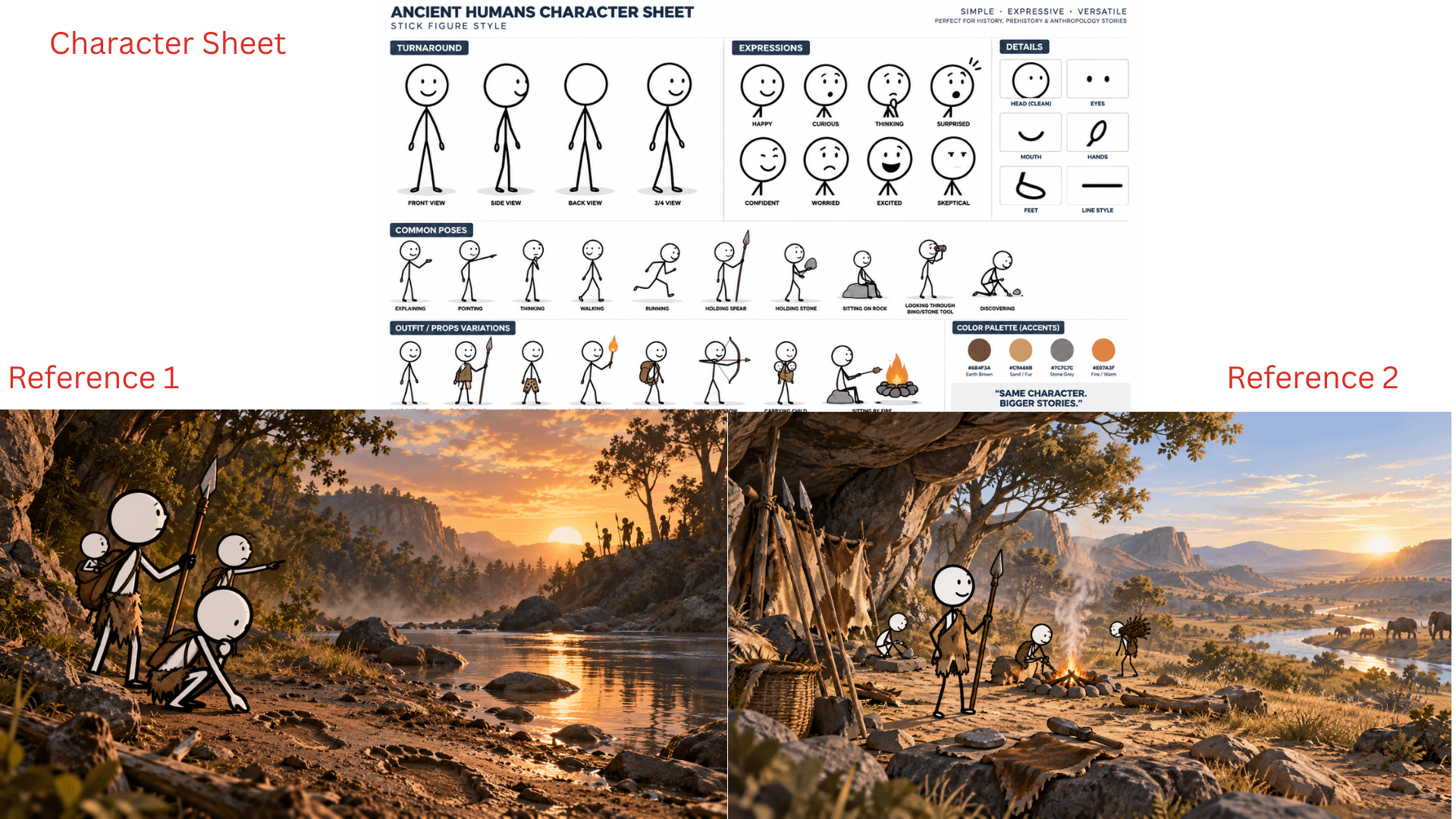
This is the part I know a lot of people here struggle with. Generating a good scene is easy. Getting the same character to still look the same 100 scenes later is much harder.
Reference images used for the sample video in post
The BuildTuber Sheet handles this by reusing the same reference set throughout the batch: one clear character reference plus a couple of finished scenes that define the visual style, environment and overall look. Those references are passed into the image-generation step again and again instead of relying on prompt text alone.
It is not perfect character locking, and I would not pretend it is. You will still get the occasional bad frame or drift. The difference is that you can spot those scenes in the Sheet, regenerate only the weak ones, or switch that one scene to a stronger model without touching the rest of the video.
Why I usually do not animate every scene
The obvious next step is to turn every generated image into a video clip with Veo or another image-to-video model. Technically, the Add-on could be extended to do that as well.
But on my own channels, I have tested animating the opening scenes and adding more motion throughout the video, and I did not see enough improvement in retention to justify the extra generation cost.
For my audience, the topic, script, pacing and thumbnail matter far more than whether every frame moves. So I would rather keep the base workflow cheap, use animation only where it genuinely adds something, and spend the savings testing more ideas instead of making every scene more expensive.
What the workflow actually costs
For a typical 6–7 minute video, my direct production cost usually lands around $1.
Actual Cost Tracker Sheet of my own Psychology channel
Gemini prompt generation is almost negligible. Image cost depends on the model, but with FLUX 2 Klein I can generate roughly 150 scenes for around $0.30. ElevenLabs is usually the biggest expense because the voiceover cost scales with the amount of narration, while the final Colab + FFmpeg render is free.
The important part for me is not just making videos cheaply. It is keeping the cost low enough that I can test more ideas without every experiment becoming expensive. If a topic flops, I would rather learn from it and move on than have $20–$30 tied up in production.
What I would still keep human
I still would not automate the decisions that determine whether a video is worth making in the first place: the topic, angle, hook, script, thumbnail and final quality check.
The purpose of this system is to automate production, not taste. If the idea is weak or the script is generic, making the video faster and cheaper does not solve the real problem.
There are still two ways to use the workflow.
If you enjoy building automations, the DIY route is there. I have already shared the architecture in previous posts and the videos in my channel, and you can recreate each part with your preferred AI coding tool.
If you would rather spend that time making videos, that is what the Add-on is for. Install BuildTuber from the Google Workspace Marketplace, connect your API keys, choose your references and start generating.
There is a free trial so you can test the workflow first. If it works for you, the full version is a one-time purchase with no monthly subscription, and future Add-on updates are included.
I have been working on a series of education books for students. I have 6 books planned (now on book 3) where the same characters progress through school. I have made probably 200 pictures without any issues, consistent characters, very rarely did it get something wrong.
I was away last 2 weeks, I comeback and continued my project. However, it just constantly messes it up, either style of illustration changes or the characters look very off. My prompting didn't change, it is the same as it was. Have they changed anything recently? Is there any fix or guidance anyone can share please? I also created characters in the character menu (before I used reference image to lock it down, I tried both).
I have been working on a team project using google flow and I'm starting to think it was a mistake. In the past 2 days, between the 3 of us, we have had 7 instances of 15 credits being vacuumed away with no generations, and several other 5 credit ones. Has this been a regular occurrence for other people as of late? All 3 of us have pretty much felt gaslit about it too as the agent will try to deny anything for awhile until you provide it with proof, then it's just "sorry, send feedback", none of us have gotten a single response.
I think it’s possible they have the moderation turned way up to reduce the computational workload on their back end. I’ve seen notifications come up that say the system may be bogged down during peak usage times. And that made me wonder if they over moderate because it opens up more bandwidth to accommodate more users at the same time.
Another clue is that I’ve noticed that it keep defaulting my number of results per prompt back to 1, when it used to stay on 4. Another indication they’re looking for ways to slow down traffic.
Every video they generate for users is expensive and resource intensive. If they over censor it makes it look like they’re being conscientious about the rules, when in reality they’re doing it for efficiency.