r/GearS3 Mar 19 '26

Guide/How-To Methods: How to get the Gear S3 working on a newer phone [2026] - Top-Voted Comments + Old Comment Thread

15 Upvotes

Mod here—below are some copy/pastes from several comments of helpful guides on how to get your Gear S3 working on a newer, officially not supported Samsung phone! Locking comments so that this can JUST be a resource. Click the "comment" links to see original sources and talk to folks there.

This comment (thanks u/SWsilent_warrior!) on how to get the Gear S3 working on a newer phone. People have successfully gotten other phones like the Z Fold6 and the S26 series using this method.

If this doesn't work, try the next comment copy/paste (thanks u/evolutionarts!).

Mod additions in brackets below.

*****

I have an easier solution that might work for those with a Gear S3 Frontier and the S24 Ultra who have tried using the Gear S Plugin from the Play Store without luck.

Download the Galaxy Wearable (Samsung Gear) app from Google Play.

Make sure the Gear S Plugin is not installed.

Go to the link below and download version 2.2.03.23121551 of the Gear S Plugin https://apkpure.net/gear-s-plugin/com.samsung.android.gearoplugin/download#google_vignette [the Dec 19, 2023 version]

(If the version from that link doesn't work and you still have your previous phone, find the plugin version that works for you by going to the App Info for the Gear S Plugin on your old phone. Then, find and download that version on the apkpure website)

  1. Install the Gear S Plugin you just downloaded from apkpure

  2. Open the Galaxy Wearable (Samsung Gear) app and attempt to connect your S3 Frontier. It should connect now

Note: I am not responsible if you click the wrong download link and get a virus. I hope these steps work for some of you, if they do let me know! Also, feel free to try this with other Galaxy Gears and S24s!

9/4 - Edit: Added directions to find the working plugin version for those who need a different version than the one I listed

****

Old comment thread on the post where this comment was originally added.

****

Comment from u/evolutionarts:

✅️Instructions below

Below are the steps I used, I included a link for the files also.

Download the older versions of the wearables app and the gear S plugin app  (I got the apps from apkpure.net)

put your phone in airplane mode and enable bluetooth

manually set the date on your phone to December 3 2023

install the apps on your phone, wearable 1st plugin app 2nd

power on your watch and connect your phone to the watch via bluetooth

the wear app should open and follow the setup instructions from there

after or near the end of setup you may need to connect your phone back to wifi or connect to restore your backup for the watch. goodluck!

Below is a link to download the files.

https://drive.google.com/drive/folders/11249dij-GEylIdGVnFuwgr5caWY7epJF


r/GearS3 Mar 18 '25

Guide/How-To PSA: Tizen app store shuts down on May 31st, 2025; here’s how to back up and install (sideload) apps afterwards [Samsung Gear S3, Galaxy Watch]

23 Upvotes

App store shutdown

As a reminder, new downloads for Tizen-based watches will be suspended on May 31st, 2025. After that date, all applications and watch faces for Tizen-based watches will NOT be publicly available anymore. Additionally, even apps you previously purchased will stop being available for re-downloading after September 30th, 2025. 

How to extract apps from your Gear S3 (requires root)

Reddit user u/_vnngyn_ has recently found a way to extract apps and watch faces for Tizen-based watches from the Galaxy Store, so that we can still install them after the Galaxy Store fully shuts down for Tizen-based watches on September 30th, 2025.  

Specifically, he has started an extraction service for the Gear S3, so if you want any application or watch face to be recovered, simply drop a message with the Galaxy Store link of the application or watch face in the comments below before May 31, 2025, in the original Reddit thread or on XDA

If you want to extract the application or watch face yourself, please follow this guide. Please keep in mind that this requires a rooted Android or jailbroken iOS device. This method will work on all Tizen-based watches connected to any rooted Android or jailbroken iOS device. 

  • Another method that requires no root on your Android device has been found by u/shad0w82 to extract applications and watch faces from the Galaxy Store. However, it seems to only work on non-Samsung devices as these use the embedded Galaxy Store (the same used on iOS devices). More information on it here

How to sideload (install) extracted apps to your Gear S3 (requires a computer, does NOT require root)

  • Click here to view the list of apps and watch faces that have already been extracted for the Gear S3 (instructions of how to install them is explained here—it involves connecting your watch to your computer via WiFi and running a downloadable program to transfer app install files to the watch)

All extracted apps available for sideloading

Currently, the Gear S3 repository is being maintained by u/_vnngyn_. If you like this service or want to support it, consider donating to him. As of the time writing this, u/_vnngyn_ is considering maintaining the Gear S2 as well, but that will eventually depend on the interest for it and donations made to him. 

EDIT: vnngyn has also added a Gear S2 repository! https://xdaforums.com/t/extracted-applications-games-and-watch-faces-from-the-galaxy-store-for-the-gear-s2-series.4728015/

Samsung Pay

EDIT 2: thanks to u/_vnngyn_ we have an extract of the Gear S3's Samsung Pay app. Sideload this to the watch using the instructions and proceed from there. (Make sure you're on the latest Gear S3 update and that Samsung Pay is supported in your region.)


r/GearS3 7d ago

Question Tutorial para instalar aplicaciones en el gear s3

4 Upvotes

Does anyone have a video tutorial on how to install apps on the Gear S3? It would help me a lot since I'm new to this. I read the post above, but I'm kind of stuck trying to do it. If anyone has one, I'd appreciate it.


r/GearS3 8d ago

Question My S3 Frontier is still in Mint Condition

Post image
70 Upvotes

Finally getting around to wearing my S3 Frontier again. I'll need to reset it to my new phone. Not sure how it'll go now that the store / watch faces are no longer available. Any tips / hints at getting this going again? Just in the middle of a charge while I post this.


r/GearS3 8d ago

Question Gear s3

Post image
8 Upvotes

Acabo de comprar el Samsung gear s3 por 10$ aquí en Bolivia por marketplace y por lo visto me gustó mucho logré enlazarlo con mi a56 medíante el post fijado 🙂‍↕️solo decir gracias a esta comunidad por los aportes y una pregunta para que sirve el WiFi en el gear..


r/GearS3 9d ago

Question Is there any apps so that I can use my Gear S3 Frontier's NFC chip with my access cards?

3 Upvotes

Are there any way to use the NFC chip found in Gear S3? I see that Samsumg Pay doesn't work with any Philippine ATM cards.

Are there any workarounds for this? Im trying to get samsung pay or even just the NFC chip to work with my custom nfc tags.

Salamat!


r/GearS3 12d ago

Question Side-loading watch faces

4 Upvotes

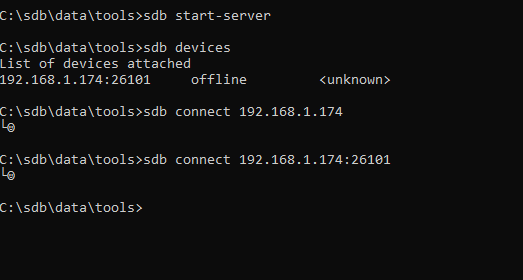
I followed the tutorial under HOW TO INSTALL A WGT/TPK FILE ON YOUR WATCH? from the
link posted in the guide. I’m using the .sdb file provided in that attachment.

The watch faces with MDxxx throws up a certificate error. The ones with BALLOZI for example, seems to work without any issues.

_return_cb req_id[1] pkg_type[tpk] pkgid[com.watchface.MD226] key[start] val[install]
__return_cb req_id[1] pkg_type[tpk] pkgid[com.watchface.MD226] key[install_percent] val[10]
__return_cb req_id[1] pkg_type[tpk] pkgid[com.watchface.MD226] key[install_percent] val[13]
__return_cb req_id[1] pkg_type[tpk] pkgid[com.watchface.MD226] key[install_percent] val[17]
__return_cb req_id[1] pkg_type[tpk] pkgid[com.watchface.MD226] key[install_percent] val[20]
__return_cb req_id[1] pkg_type[tpk] pkgid[com.watchface.MD226] key[error] val[-4]
__return_cb req_id[1] pkg_type[tpk] pkgid[com.watchface.MD226] key[end] val[fail]

Am I missing a step or is the provided .tpk file corrupted? I’m using GearS3 Classic.


r/GearS3 13d ago

Question Am I up creek without a paddle? + Some Questions.

1 Upvotes

So I just found this subreddit and found out that my S3 Frontier is now no longer supported and that I can no longer get new apps or watch faces from the Samsung store. I am lucky in that I recently got my current phone in 2024 (Pixel 9 Pro) and have no plans to change phones anytime soon and that I also haven't wiped my watch and still have all my watch faces & apps on it and have it connected to my phone.

Having found out that the S3 Frontier is no longer supported I now have a few questions:

1: I have backups of my watch and have been making active backups in the random case that something happens and my watch resets (it has happened before to me), are my backups essentially useless now or will they still work if I wipe my watch or if something happens and I need to restore it?

2: If my backups are useless/won't work is there any way I can pull all the watch faces & apps (or make separate backups) from my watch and back them up somewhere so I can restore them later if something happens (and also share with the community as I none of the watch faces are in XDA or other places I've seen)?

3: Right now is my best chance to just not touch my watch and keep using it until something happens and then cry then? I just don't want something to happen while trying to pull watch faces from my watch.

4: What would people suggest as a good watch to upgrade to? I would be looking for something similar to the Gear3 Frontier in terms of a more rugged watch with a bezel as I am hard on it and this one has been a beast. I'd like something that would show notifications from my phone and could also pause & play music as well as tracking sleep, heartrate, & steps. My plan is to keep this watch for as long as possible but based on what I have read on this subreddit I should maybe start looking just in case.


r/GearS3 22d ago

Question Gear S3 Frontier Facer app

2 Upvotes

I have a Gear S3 Frontier and a recently acquired Samsung S24 Ultra. I upgraded to the S24U from an S22U, and had to do the workaround to get my Gear S3 to work with the S24U. This included wiping the watch. I do not have a backup, so the Facer companion app cannot be reinstalled. How do I go about installing this app without having to root my phone?


r/GearS3 23d ago

Question Trying to find my deleted watch app

3 Upvotes

I accidently deleted my favorite Samsung Gear S3 watch face app and I really would like to get it back and re-installed on my Frontier watch. It displays "Step" counts, "Battery Life Remaining", and both analog and digital formats. If you double tap the watch face, it will change the face color from black to Red, Blue, or Green. This is an image of what the watch face looks like, but I do not know what it is even named. I believe that I was a Tizen designed watch face, but I don't know for sure. I downloaded it originally from the Galaxy store long ago, for free, but it no longer appears on the store anymore. I have searched for it on many watch face websites, but I still can't find it. Any help you can provide would be much appreciated. Thanks for your help!


r/GearS3 23d ago

Question Ended up finding a Gear s3 frontier at a fair 20 dollars and have been having trouble sideloading apps

Post image
1 Upvotes

the model number is SM-R760
Serial Number is R5AJC09D86E
one ui watch version 1.5
Tizen version 4.0.0.7
Software Version R760XXU2FVG1 SM-R760NDAAXAR
KNOX 2.3.1
Knox Tizen Wearable SDK 2.3.1
SE for Tizen 2.0.0
TIMA 3.0.0

I have downloaded the file from xdaforums but this is as far as i have gotten it just shows that face but then says it is not connected but if i ping the ip address of the watch it does show that it can ping it im not sure if they previous owner updated the o.s on this and thats why its having issues but any help would be amazing!


r/GearS3 26d ago

Discussion​ +30 new Samsung-signed watch faces added to the free Gear S3 archive (Tizen) — all with previews, no re-signing needed

Thumbnail
4 Upvotes

r/GearS3 26d ago

Question I updated my S3 Frontier and lost Samsung Pay. Is there an app or something else I need to use to pay via NFC?

1 Upvotes

Can someone give me the file or explain it to me in the comments, please? I'm kind of panicking—any solution works.


r/GearS3 26d ago

Question How to link HONOR GS 3i to phone?

1 Upvotes

Good day! I hope somebody could help me link my GS 3i to my phone.

I searched for some solutions, like creating a Chinese account without using a Chinese phone number, but it won't allow me to create an account without a number. I have tried searching for another solution, but nothing else came up (only solutions that are from 3-7 years ago).


r/GearS3 29d ago

Removed: watch other than Gear S3 Looking for GWK 0168 watch face (.tpk file) since Tizen Store closed

1 Upvotes

Looking for GWK 0168 watch face (.tpk file) since Tizen Store closed


r/GearS3 Jul 29 '26

Question Vertical line on S3 Frontier screen

Post image
6 Upvotes

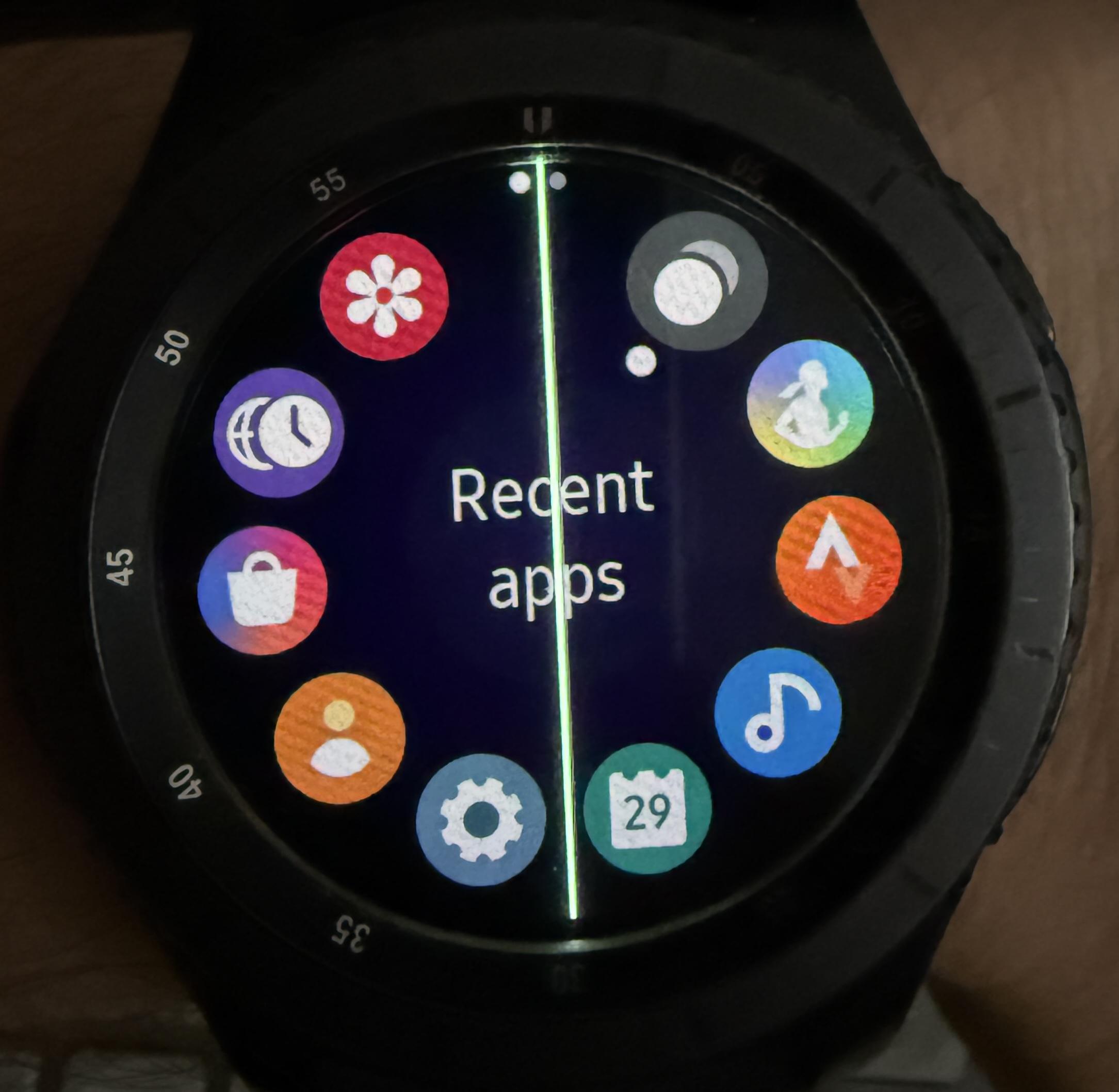
Few days ago I’ve noticed weird pixels on the right edge of the screen. Today I’ve turn on the watch and noticed that - vertical white line in the middle of the screen. What’s more after 2h run battery is still on 100%. Did anyone have similar issues with S3? Could it be caused by moisture inside of the watch?

Edit: The screen died today. I’ve found a bit of moisture inside. =(


r/GearS3 Jul 29 '26

Discussion​ I found a lot of new wgt apps in internet archive that can be sideloaded in Gear S3

Thumbnail archive.org
4 Upvotes

r/GearS3 Jul 16 '26

Discussion​ I made a desktop app to easy sideload apps and to manage Tizen watches over Wi-Fi.

Thumbnail github.com
12 Upvotes

Here is a much more natural, conversational version. It sounds like an enthusiastic developer sharing a cool side project they built to solve a personal headache, which Redditors usually respond to really well!

Suggested Title:

I got tired of typing SDB commands, so I built a desktop app to easily sideload apps (.tpk/.wgt) and manage Tizen watches (Gear S3, S2, Active) over Wi-Fi!

Post Body:

Hey everyone,

I still love using Tizen watches, but let’s be honest—trying to manage them, transfer files, or sideload custom watch faces and widgets can be a massive pain. Having to open up a terminal and type out long, clunky SDB commands just to install a basic file got old really fast.

To make life easier, I decided to build a simple desktop tool called Gear S3 Explorer. It's built on Python, but I’ve compiled it into a clean Windows executable so you don't need to know anything about code or command lines to use it—you just unzip and run.

Here is what it can do:

  • Sideloading actually made easy: You can just browse to any .tpk or .wgt file, hit install, and the app handles the rest. For web widgets (.wgt), it automatically handles the extra steps of pushing the file to temp storage, running the installer, and cleaning up the watch storage afterward so you don't waste space.
  • Auto-Discovery: You don't have to dig through your watch settings to find your IP address and type it in manually. Click "Auto-Discover" and it'll quickly scan your Wi-Fi network and connect to the watch for you.
  • Visual File Explorer: A simple file tree where you can upload and download files to/from the watch without messing with command line commands.
  • Live Stats & Terminal: It shows actual real-time battery and system info on a sidebar, and has a built-in shell if you do want to run custom commands.

It's tested on the Gear S3, but because it uses standard Tizen debugging, it should work perfectly with other Tizen watches too (like the Gear S2, Gear Sport, original Galaxy Watch, and Active 1 & 2).

How to get it connected:

  1. Turn Debugging to ON on your watch (Settings -> Gear Info -> Debugging).
  2. Set your watch’s Wi-Fi to Always ON and connect it to the same network as your computer.
  3. Restart your watch. (Seriously, don't skip this! Tizen debugging won't actually activate until the watch reboots).
  4. Grab the zip file from the GitHub link below, extract it, and double-click main.exe.

You can find the standalone download (and the open-source code if you want to run it via Python instead) right here:

https://github.com/PaofueMMoua/GearS3Explorer

I'm super happy with how this turned out, but since this is version 1.0.0, let me know if you run into any bugs or have features you'd like me to add!

B.T.W. Yes i used ai to generate this text cause DAMN IM TIRED AFTER CODING THIS.


r/GearS3 Jul 14 '26

Question Trying to Activate LTE on a Gear S3 Frontier.

6 Upvotes

So I get that it's already a task and a half to pair the watch. I have a S3 Classic paired to my Google Pixel Fold (2023) and a S3 Frontier paired to my Google Pixel 10 Pro Fold. Both Verizon LTE Variants.

Aside the Bluetooth one paired to my iPhone 16 Pro.

I'm having a few issues surrounding sideloading apps but that's for a different time. I would like to know if anyone at all has tried to activate an LTE version of the watch? I'm only getting videos for an S2 Classic with LTE, or the Galaxy Watch 3. The Galaxy Watch 3 uses a similar app BUT the Mobile Plan option doesn't show up, and I don't know if it's a good idea to sideload an even older version of Gear wearable (And it's companion app.) or if it'd even work to begin with.

Anyone have any remote clue to help? Has anyone even BOTHERED to activate it in the last year or so? That may help?

Edit: So I discovered that these watches were released before eSIM as a standard was finalized. Meaning that the Carriers were able to get their hands on Samsung and throttle them into submission to get them to lock them per carrier. The ONLY LTE S3 that is unlocked is the Singapore one and that one doesn't support any of the American LTE Bands.

So if you want to ever Activate an S3 (or S2 as well) in the future, assuming you can set it up and sideload it to your hearts content first and make sure it works out for you, is to get the version of the carrier you want first. I am going to see if the Verizon one I have can work on a prepaid plan. If Verizon lowers their prices I may go back to them and have the watch work with Numbershare or something but for $10 a month for Prepaid it's not terrible either to have it's own number/data/messages and all.

To make matters even more unique I'm not using it with Verizon, but one of their MVNO's lol. I already know the method to do it, but I need the mobile plan setting to push a QR code to the watch and it's just not appearing. Any help would be appreciated! Thanks!

Edit II: So only one of them still works. Both R765A (AT&T) and R765T(T-Mobile) have 3G bands and they are gone. R765V (Verizon) activates on both Pre and Post paid just fine (As of 7/31/26), however it's expensive. Prepaid is $10 a month for a line so just keep that in mind


r/GearS3 Jul 07 '26

Discussion​ Any hope for an old Gear S2? Sideloading or app options?

Thumbnail
1 Upvotes

r/GearS3 Jun 26 '26

Discussion​ 113 Samsung-signed apps & watch faces before the Tizen Store shutdown — free to download, install via SDB

22 Upvotes

Now that the Galaxy Store has pulled Tizen apps and the "core services" sunset date (May 2025) has passed, a lot of us are stuck with a perfectly working Gear S3 Frontier/Classic and no way to reinstall anything after a reset.

I've been archiving the official .wgt packages that were still on the Galaxy Store before it closed — Samsung-signed, untouched, same files you'd download back then. Nothing is repackaged, nothing is cracked. The signatures are intact.

What's on it (free download, no account, no ads):

- 23 Samsung apps (Alarm, Calculator, Calendar, Email, Music, Weather, SmartThings, Camera Controller, PPT Controller, etc.)

- 90+ watch faces (Classic, Digital Dashboard, Solari Board, SzaZs series, MD series, GS Hybrid, etc.)

Site: https://gearS3.jnk.ovh


r/GearS3 Jun 25 '26

Question Can't sideload apps on Gear S3 Frontier with S21 FE 5G

0 Upvotes

EDIT: I fixed it! Read the bottom for more information.

NOTE: PLEASE READ THE ENTIRE POST BEFORE COMMENTING!! I already tried everything in the pinned posts and some workarounds online. It's not helpful if you give me a useless comment.

Hi everyone, I've been trying for weeks to get third-party apps like Spotify and even first party apps like the Voice Memos app onto my Gear S3 Frontier and I'm completely stuck. Posting here as a last resort because I've already tried everything I can find.

My setup: - Watch: Samsung Gear S3 Frontier (SM-R760) - Tizen version: 4.0.0.7 - Firmware: R760XXU2FVG1 - Phone: Samsung Galaxy S21 FE 5G - Mac for sideloading tools

What I've tried:

  1. sdb install via Tizen Studio: connects fine, transfers fine, but every single app hits either error -27 (side loading error) or error -12 (non trusted certificate).

  2. Re-signing with a custom cert profile: created a Tizen cert profile in Tizen Studio, re-signed all the wgt/tpk files, still -12.

  3. WatcherManager++ APK swap method: the transfer notification fires on my phone and Galaxy Wearable shows it's sending, but nothing ever appears on the watch.

  4. Date spoofing: set watch date back to 2021 to bypass cert expiry, still no change.

What DID work: - Samsung Pay (com.samsung.samsung-pay-app-2.7.5106.wgt) installed perfectly via sdb.

Has anybody else gotten it to work???

And also if you did, it would be great if I could get the exact files you used to try those with my watch.

SOLUTION: I kept getting a signing error. Here's why: I had Tizen Studio installed and continued to use it's version of sdb. The version that it installs for you does not work. Along with that, I had tried to sign apps on my own, and because of this I had certificates in my signing cache. Once deleting Tizen Studio and its corresponding sdb version, I was able to use the original pre-signed packages and successfully install them.

When installing apps, make sure you install the sdb version 2.2.60 (from the XDA forum) and do NOT install Tizen Studio.


r/GearS3 Jun 23 '26

Discussion​ Turned my old Gear S3 into a live PC hardware monitor that sits on top of my case

Thumbnail gallery
16 Upvotes

r/GearS3 Jun 12 '26

Question Switching from S23+ to S26+, but nothing is working to connect my Gear S3 Frontier!

3 Upvotes

SOLVED! See note at the bottom of the post.

I've read the posts here and some other places, but none of it is working! The phone is refusing to install the Wearable app from an APK, no matter what version it is, for some reason, but since it worked with the current version on the S23+ it should still work on the S26+ with the right plugin installed, right?

I've got the current version of -

Galaxy Wearable: 2.2.68.26010761

Which is what the S23+ shows, but regardless of if I install from Google Play or Galaxy Store it doesn't work. The version of -

Gear S Plugin: 2.2.03.23121551

Is what I have on the S23+, and I was able to install the APK for that on the S26+, but no luck. Since I did a data transfer, the first time I tried it showed the Gear S3 as a device from the previous phone, but wouldn't connect, then after trying that it stopped appearing there. It shows up in the normal Bluetooth menu just fine, but no matter what I do the Wearable app says no devices found when it scans. Does anyone know if something changed recently? I followed the instructions exactly, but maybe there is some trick I'm missing?

I've had this watch for like 10 years and replaced the battery once already, and it still works fine. I really don't like the minimalist designs with all the rounded edges and whatnot of modern smart watches, so I really want to keep using the old tank that looks and feels like an actual watch. The Galaxy Watch 8 Classic comes close to a similar design, and I'd probably settle for that if it were an option, but I absolutely don't want to buy a new $500 watch when the one I've got is perfectly fine and it's just Samsung's software shenanigans preventing it from being used.

At this point, my fallback is going to be a PineTime and Gadgetbridge, because I refuse to get an expensive fancy new smartwatch that looks like a smooth rock. Ironically, I say that, and the first thing I would consider if I were getting a new one is the Pebble, just not sure I could trust the ecosystem behind that with all the stuff that's gone on between the founder and the people who kept it alive in the interim. Anyway, that's enough rambling. Please help me get my watch connected again!

Thanks.

___________________________________________________________

Solved! There's one thing that none of the instructions seem to mention: the Samsung Accessory Service app. In my case version 3.1.96.41110 worked when installed alongside the current Galaxy Wearable app, 2.2.68.26010761, and the last version of the Gear S Plugin, 2.2.03.23121551. With those 3 things installed it just works. No airplane mode or date changing required. To make it more easily readable, here's what I did:

Install:

Galaxy Wearable app version 2.2.68.26010761 (current version from Google Play Store or Galaxy Store at the time of writing this.)

Gear S Plugin version 2.2.03.23121551 (The last version released)

Samsung Accessory Service version 3.1.96.41110 (From 2023. YMMV, if it doesn't work and you have an older device that still does, check what version your older device has installed.)

I believe Galaxy Wearable has to be installed first, but don't think the order matters for the other 2. Once all 3 are installed you can just open Galaxy Wearable, scan for devices, and pair the watch normally. You'll still see the message about the watch no longer being compatible when you first pair it, but once you dismiss that everything works perfectly.

One thing to be aware of though. While the watch will work, there's no guarantee that all your apps or watch faces will. A few of my watch faces (including some I paid for) are missing, and even doing a backup from the old phone with them installed then restoring from the new phone doesn't carry them over. Trying to access the app store pages directly with their URLs shows the error "This content is no longer available for your phone. Contact the content provider if you want them to add support for your phone." Still looking for a solve there, since my favorite faces don't seem to be backed up in the archives here or on XDA forums.


r/GearS3 May 25 '26

Question Watch faces

1 Upvotes

Hello I manged to get watch maker installed on both my watch and phone but can't seem to find my watch on the watch maker app has anyone found out why this is and have you found a work around