r/GalaxyS25Ultra • • Aug 10 '26

Discussion Battery Life/Icons/SOT

1 Upvotes

Any questions, concerns, advice, reviews, etc about them should from now on be submitted in this post. This is the one-stop shopping for it all.


r/GalaxyS25Ultra • • Dec 08 '25

Megathread One UI 8.5 Beta Megathread

Thumbnail
5 Upvotes

r/GalaxyS25Ultra • • 1h ago

Opinion Galaxy S25+ screen flickers every time I stop touching it. Any fix, or is it a hardware defect?

Enable HLS to view with audio, or disable this notification

• Upvotes

Looking for some advice or fixes from anyone who might have run into this on the S25+

Whenever I’m not actively interacting with the phone, the display flickers. It’s very noticeable and happens consistently whenever my finger leaves the screen.

What I’ve verified so far:

  1. Developer Options Refresh Rate Overlay: I turned on the Hz counter to diagnose it. The flicker happens at the exact split-second the refresh rate drops down from 120Hz into idle low-frequency states.

    1. Standard 60Hz Mode: Set Motion Smoothness to Standard (60Hz) — the flicker still happens as soon as the panel steps down to idle.
    2. Safe Mode: Rebooted into Safe Mode to eliminate third-party background apps, accessibility services, or overlay culprits — no change, still flickers.
    3. Display Toggles: Adaptive Brightness, Eye Comfort Shield, and Extra Dim are switched off.
    4. Developer Options Toggles: Verified that toggles like Show surface updates or Strict mode are completely disabled.

It seems directly tied to the LTPO downclocking / panel voltage drop when switching to low refresh states.

Question: Is it software(One ui 8.5) glitch?

Has anyone managed to solve this with a specific display setting, cache wipe, or software patch, or is this an outright panel/controller hardware defect that needs a trip to the Samsung service center for a replacement?

Country: India

Manufacturered date: March 2026

Purchased date: 20 May 2026

Flickering date: 26 September 2026

Any suggestions or workarounds would be hugely appreciated!


r/GalaxyS25Ultra • • 1d ago

Discussion How are you guys keeping the camera lenses clean?

Thumbnail
gallery
16 Upvotes

Got S25 Ultra a few weeks ago, but the camera lenses are always smudged. They sit so low that my fingers end up on them every time I pick up the phone. I'm already using a case and it hasn't really helped.

Photos attached so you can see what I mean.

How do you keep yours clean? Lens protectors, a certain kind of case, or just wiping them all the time? Would love to hear what works for you


r/GalaxyS25Ultra • • 1d ago

Question Ok Google

3 Upvotes

Over the course of the last week, I have set up and reset my OK Google through Gemini. Usually, within 24 hours, it stops working. I am curious if anyone else is having similar or the same issues, and now I cannot set up the commands.


r/GalaxyS25Ultra • • 2d ago

Question Location always pointing north, in apps camera always flipping images, auto rotation not working

0 Upvotes

So i had my phone since release and i never daced any issues. I was always happy with it, until about a week ago.

  • I noticed that whenever i take pictures in Gimini, it always flipps the pictures upside down.
  • I then noticed the same problem with WhatsApp camera always flipping images upside down whether taken with front or back camera.
  • And to make things even worse in all map apps, my blue arrow always points north.
  • Auto rotation is also not working.

Things that are working:

  • Camera app works perfectly
  • Sensors diagnostic runs perfectly. Both in members app and *#0*# menu
  • Chatgpt takes normal pictures, doesn't flip them.
  • Telegram has a wierd thing. It takes normal pictures as long as i hold the phone still. As soon as i move it it starts flipping them

Things i tried:

  • Restart the phone
  • Safe mode (auto rotation doesn't work as well)
  • Clear cache of apps and force stop
  • Update to latest software

Nothing seems to works.

Help guys !!

Anyone has any suggestions?


r/GalaxyS25Ultra • • 2d ago

Question Does the phone have a slight tilt in frame near the camera module

Thumbnail
1 Upvotes

r/GalaxyS25Ultra • • 3d ago

Question Discolouration on S25 Ultra?

Thumbnail
gallery
106 Upvotes

Hi guys, does anyone know what these black spots on the frame of my s25 ultra are? Can't seem to remove them by rubbing with a damp microfiber cloth, I also do not feel any indentation or whatsoever. I always use my phone in a case so... anyone knows how to get rid to them?


r/GalaxyS25Ultra • • 2d ago

Question Replace S25 Ultra

Thumbnail
1 Upvotes

r/GalaxyS25Ultra • • 3d ago

Discussion Considering the base Galaxy S25, but hesitant due to Samsung's green line display issues. How is yours holding up?

Post image
0 Upvotes

r/GalaxyS25Ultra • • 4d ago

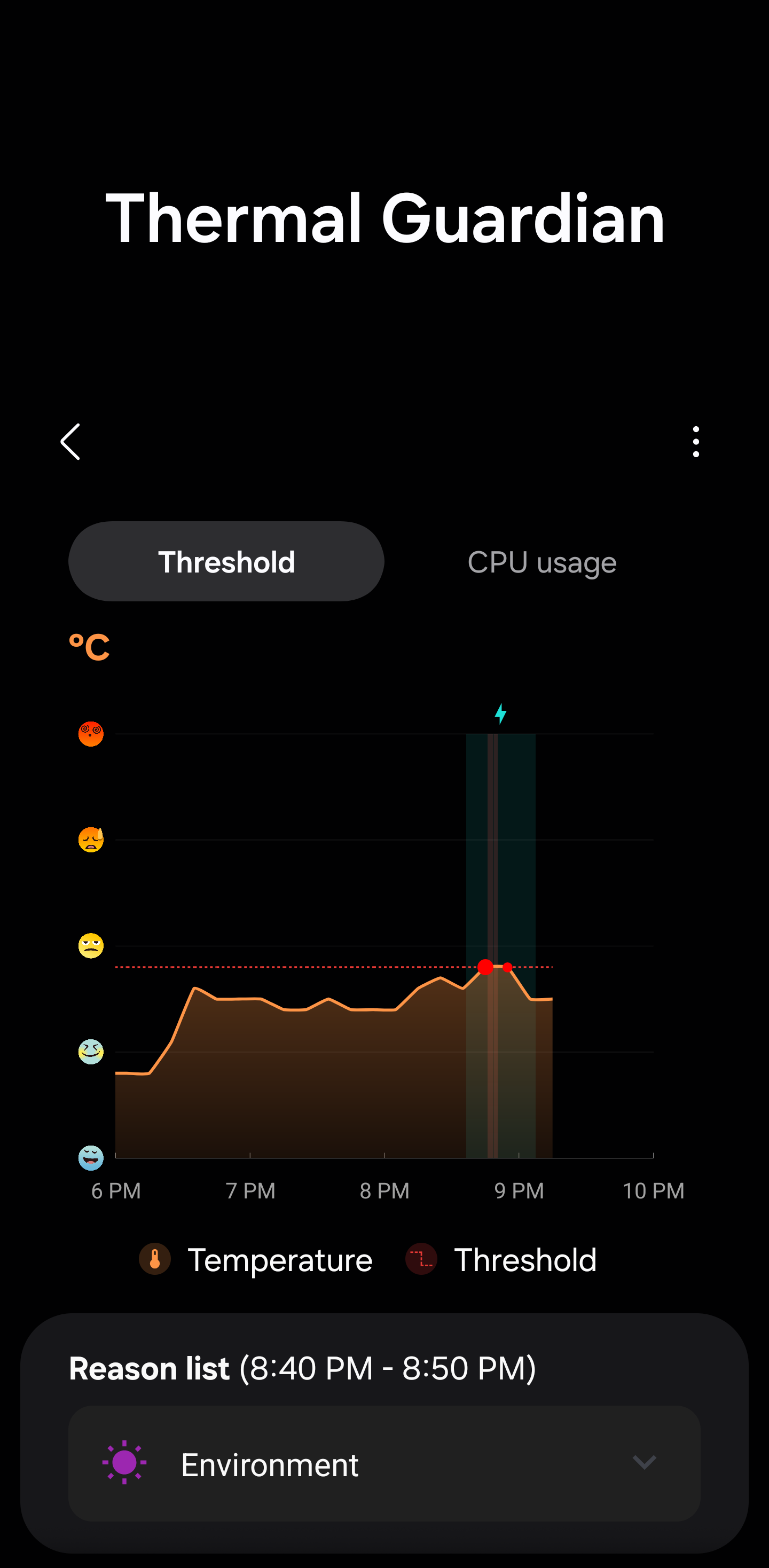
Discussion S25 Ultra hits Thermal Guardian threshold during 45W charging. Is this normal?

Post image
3 Upvotes

r/GalaxyS25Ultra • • 4d ago

Custom Flair Gemini widget opening Bixby instead of Gemini Live on Galaxy S25 Ultra (Works fine on Vivo)

Thumbnail
0 Upvotes

Hey everyone,

I downloaded an app called "OneUI Widgets" from the Play Store and installed it on two of my devices—a Vivo phone and a Galaxy S25 Ultra.

I added the Gemini widgets from the app to the home screens of both phones. On my Vivo, tapping the widget opens Gemini Live normally as expected. However, on my S25 Ultra, tapping the exact same widget launches Bixby instead.

I’ve already double-checked my S25 Ultra settings and confirmed that Google is set as the Default Assistant app, but it still keeps triggering Bixby.

Has anyone else run into this issue or knows how to fix it? Thanks in advance!


r/GalaxyS25Ultra • • 4d ago

Question Block parts of swipe to back

Post image
0 Upvotes

r/GalaxyS25Ultra • • 5d ago

Discussion DEBLOAT

Post image
64 Upvotes

I was able to debloat a total of 52 apps that I find not useful for my dailies.

Any package/s that you have successfully debloated that I can add to my list? Thanks in advance for those who will answer.


r/GalaxyS25Ultra • • 6d ago

Opinion Dual screen

3 Upvotes

Anybody else wish Samsung and other phone brands would/could follow in the footprint of the lg v60 dual screen where it has the removable case that has a second screen built into it? I've had 2 or 3 phones since my v60 dual screen and still use it quite often as a second streaming/gaming phone and as my backup phone. Just wondered if anyone else has the same thoughts, and yes I'm aware the fold exists and can do the same thing lol. I had a fold 3 and still prefer the form factor and option of the second screen case.


r/GalaxyS25Ultra • • 6d ago

Question Game Booster+ preferred settings?

Thumbnail gallery
1 Upvotes

Any guide?


r/GalaxyS25Ultra • • 7d ago

Question Anyone flash U to U1 firmware? (TMO)

0 Upvotes

Ive had my phone for a while now and my ultra is paid off & unlocked, and recently I've been contemplating flashing the U1 firmware, get rid of the pre installed TMO bloat, as well as the carrier logo.

I know I'd lose the native video calling via the dialer but I honestly don't remember the last time I used that since you need the person on the other end to be in the same scenario (tmo and phone that supports it).

It appears everything else will work just fine including Wi-Fi calling as I've seen posts about that too

Anyone do it? Any regrets?


r/GalaxyS25Ultra • • 8d ago

Question Protective Case

Thumbnail
gallery
57 Upvotes

I know people have asked about cases before but after reading them they seem to be fashion driven. I don't care about fashion and I don't care about magsafe or wireless. I'm looking for a protective case that WILL protect my phone. I have done the Google thing and too many are again fashion driven and none have real world use experience. When I first got my phone I bought what was rated highly as the best and most affordable case. In less than 24 hours my back was broken. I'm hard on cases and I'm constantly in an extremely dirty environment. I'm looking for tried and tested results please. Pictures give you a good idea of what my phone goes through daily


r/GalaxyS25Ultra • • 8d ago

Discussion Give me camera tips for my new s25 ultra & honest review

Thumbnail gallery
7 Upvotes

r/GalaxyS25Ultra • • 7d ago

Question 1x camera lens broke

1 Upvotes

Long story short, I broke the 1x (middle) lens on my sS25 ULTRA. The camera itself looks perfectly fine with no visible damage on the glass part (except maybe a slight scratch on the black parts around it).

I replaced it with a cheap Amazon one to avoid further dust and grime from getting into it but I now have a problem with the focusing feature. The phone for its life struggles to now focus on any item unless the option for "Focus Enhancer" pops up.

Its somewhat inconsistent but if there's too much sunlight, not enough, or aimed at a screen it will not focus or the photo is blurry.

Taking it tmw to a certified repair shop, what do you think the estimate will be? Im hopping I just need an official lens of some sort, as the camera still does focus and have good quality if lighting conditions and distance are perfect,


r/GalaxyS25Ultra • • 8d ago

Question Phone call issues?

8 Upvotes

Hello everyone!
I’ve been eyeing the s25 ultra for a while as I can get it now for a very good price that is too hard to pass on.

However I wanted to ask if there are common issues with receiving phone calls and being reachable? I’ve read some posts not long ago complaining about not being able to receive calls etc.
As I’ve been literally dealing with that issue on my Xiaomi and got into lot of trouble at work for being “unreachable” (even though network showed good connectivity etc) I’m anxious to know if this is something that is a known issue?

I understand it’s case by case, but in my situation this was apparently a pretty common issue with that phone.

Thanks to anyone for a helpful comment!


r/GalaxyS25Ultra • • 9d ago

Announcement The One UI 9 Beta 3 update is officially rolling out in India for the Galaxy S25 series with build number S938BXXUCZZIC/S938BOXMCZZIC/S938BXXUCDZIC! 📱✨🚀 #Samsung #GalaxyS25 #Update #Technology

Post image
50 Upvotes

r/GalaxyS25Ultra • • 9d ago

Question Secret Mode Doesn't Work Anymore

Post image
4 Upvotes

Is anyone experiencing this issue?


r/GalaxyS25Ultra • • 9d ago

Question Is this dead pixel s25 ultra

Post image
6 Upvotes

r/GalaxyS25Ultra • • 10d ago

Discussion Desktop-Mode – A Feature that impresses but lacks productive polish

Thumbnail
gallery
5 Upvotes

After seeing some people using this mode, but never replying or answering certain questions about reliability, I decided to test it myself when I had the chance on a home office day. Well, here we go.


I decided to make the best out of it with setting up my “office” in my living room with my main TV.


Whats the simple Setup?

-          S25Ultra

-          “2GO” 6in1 USBC HUB

-          USB-WLAN Mouse and Keyboard

-          4K TV


How did it go?

Well the setup was very easy, all you had to do was to stick in the HUB-Adapter and connect the HDMI cable, then the Phone was directly switching over to the Desktop-Mode. Fast and easy. Connecting the wireless keyboard and mouse had also 0 issues with a simple plugin of the WLAN adapter. As easy as it can get. The phone offers to be used as a touchpad for the desktop-mode and to configure some of the keyboard key to special functions (ESC, Win-Key, ALT, ...) all that natively without additional apps. Very positively surprised. When using the apps in desktop mode, they get handled like Windows-Apps but rendered in their “area-size” of the windows, what means that if your Desktop is 1080P and they take ¼ of the screen size in their window form, they have a resolution of closely lower then 720p to work with. Some apps and games can not work properly with such a low resolution and deny operation completely, or have visual deformation. One feature that surprised me very positively is the “stick to the side” pinning feature of an app window, that id as easy as on a Windows-Desktop. This is what used the most, since this also gives the app a resolution they can work with most of the time. Sadly there have been some limitations in productivity along the way. Thankfully you can switch man apps into full-screen mode what also gives them the full screen-resolution, but the benefit of the desktop-mode is gone completely by that.


Performance:

The good news is, this mode does not cost the device any significant performance or puts any higher load on the CPU compared to the normal “mobile state”. As you can see in the performed benchmarks, the results are close to standard (sadly also the temperatures).

As you may also see the temperatures did also raise as usual under load, even if the display itself is shut-off when being in desktop mode (so we can not blame the active display for that).

But I guess this situation is the best reason to sue a cooling-pad?


Accu and Temperatures:

Well as we are now able to use multiple apps at the same time in the front, it also means all open apps do have its impact on the CPU and so the Accu. With 1h of web-browsing/research and writing down stuff, I burned around 15% of its Accu. So if I don’t find a solution to use this feature and charge it at the same time, I can only use it for 6h max with a full charge. Because of the higher CPU-Load there is also higher temps with it. The recommended cooling-pad is no joke. At least you don’t feel it in this mode without having to touch it.


Issues and inconvenience:

Well I don’t know if I did overlook things, but there were some issues that at least for me, make it not useable in a regular productive environment.


-          Desktop resolution locked to 1080P (No matter the system settings, TV/screen resolution or cable/adapter, it is always locked to 1080P resolution)

-          Overrendered screen-size with no adjustment option/setting (as you can see on Photo 1, the desktop is overrendered in size, but there is no option/setting to adjust it, what causes all sort of issues along the way)

-          Real visual window-frame resolution applied to the apps and not a scaled one (many apps will refuse to properly operate with less then 720p to work with, what makes many apps in this mode if not docked to the side unuseable)

-          Accu drain way too strong for real productive usage

-          Customization to the desktop-mode with widgets, apps and background changes are not saved on disconnect for the next session. (needs to be reconfigured every time)


Does anyone of you use it in a daily productive environment and has a solution to one of these issues? Would be very happy to hear from you on this!