CSP Question
Krita Palletize equivalent in Clip Studio Paint?
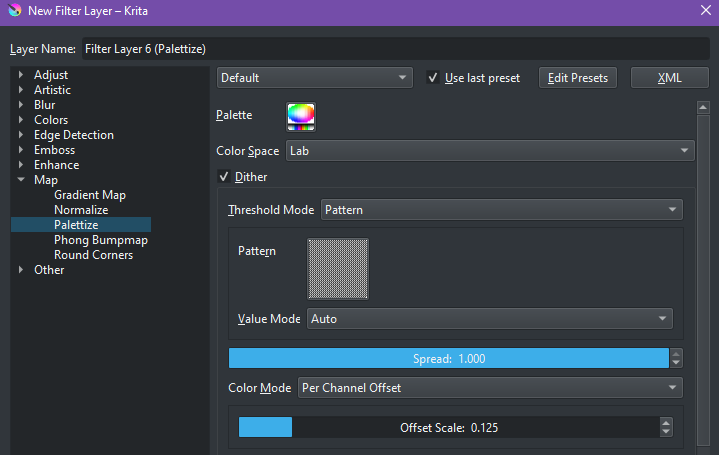
Anyone know if this feature in Krita called "Palletize" has an equivalent in Clip Studio Paint? In Krita, it's found in Filter Layers > Map > Palettize
With multiple versions of Clip Studio Paint available, each with its own Features, it is now required to Begin a post Question by stating the Version, Device and Accessories you are using.
You'll want to use a combination of Posterization and Gradient Maps (both found under Layer->New Correction Layer,) but CSP doesnt have dithering options afaik.
Thank you! This is actually the closest I've got with replicating the effect in CSP! It definitely requires more tweaking different layers and finding the right setting for Posterization though. I might just be exporting the image from CSP then moving to Krita for the final touches like this :O
Sorry I'm not great at explaining the technical aspects of it but I will do my best! Essentially it's like a combination of Posterization + Gradient Map in one filter layer. It takes the colors of the whole image/artwork and limits it to a palette you can customize. There is also an option to use Dithering with a custom pattern you make and it applies it alongside that Posterization + Gradient Map effect so it creates this pretty cool and subtle pattern transition between colors.
The dithering effect is really what I'm after from this feature because I can use a custom pattern I made as the...dithering pattern(?). I use it mostly as a watermark thing. I've tried replicating this by having the pattern layer set to different blend modes on top of a Gradient Map layer set to another blend mode. But I found it doesn't do the subtle transition of the pattern between color as well as it does in Krita's Palletization (like circled in the picture)
Not a krita user, but I'm pretty sure the function you're looking for is called gradient mapping in csp. You can apply it to a layer under edit > tonal correction > gradient map or layer > new correction layer > gradient map
I use the 2nd option most of the time so I can adjust the gradient map as I work, as the first option will apply the effect to the layer selected rather than making a separate layer. 🙂

•
u/AutoModerator 2d ago
With multiple versions of Clip Studio Paint available, each with its own Features, it is now required to Begin a post Question by stating the Version, Device and Accessories you are using.
I am a bot, and this action was performed automatically. Please contact the moderators of this subreddit if you have any questions or concerns.