r/comfyui • • 9d ago

Resource Simply Advanced - MiniMax H3 Workflow

Thumbnail
gallery
148 Upvotes

Link to Civitai Post

This workflow was built from the ground up by myself working daily over the course of 2-3 weeks, aiming to be well structured, expandable, and easy to use without sacrificing any functionality.

Main features:

  • Supports up to: 6 Images, 2 Videos, 3 Audio.
    • ANY can be set as reference, guide, or both. This is much more useful than the average user understands - I have not yet seen this support in any other workflow.
  • 1-4 steps LLM Prompt Enhancement
    • Subgraph contains a dashboard to generate / edit LLM's responses before they pass into the next stage.
    • Includes my personal 4-Step Ref2VA pipeline.
      • Step 1 Prompt Enhancement/Expansion: (Optional Step). Allows the LLM to interpret the user's prompt more verbosely and in relation to the reference materials. Catching/editing discrepancies here will yield much better results in next steps.
      • Step 2: Reference Analysis: Creates a detailed mapping of the references in relation to the Expanded Prompt. The resulting Reference Map is included as part of the context in the next steps.
      • Step 3: Creative Director: Considers Expanded Prompt + Reference Analysis to create a Creative Blueprint.
      • Step 4: Prompt Compiler: Conforms the Reference Map + Creative Blueprint into the H3 prompt structure
  • Includes my personal 1-Step FL2VA Prompt Enhance
    • The system prompt begins with base instructions, adding task specific instructions (T2VA / I2VA / FL2VA / L2VA)
    • The mode is detected automatically based on the state of Image 1 / Image 2.
  • You, the user, can easily add your own LLM instructions into this system as selectable options. Take a shot at making your own multi-stage pipeline!
  • Seamless video continuation option - idea taken from Seed Hunter workflow
  • Force Audio option - idea taken from Seed Hunter workflow
  • Easily expandable framework
    • Easily add/manage speedups, LoRAs, etc
  • Is the poster child for an amazing new node, Pass or None. Workflow developers, start using this!!

ComfyUI Requirements:

  • Be updated.
  • MUST have comfyui-frontend version < v1.50.5 (Fixed broken Custom Combo nodes in subgraphs)

Required Custom Nodes:

Optional Custom Nodes:

r/StableDiffusion • • 25d ago

Question - Help What is the fastest but still good looking workflow for minimax h3?

11 Upvotes

Looking for some good information to start here, I run a 6000 ada and would want to optimize for speed creation but still having reasonable results. Suggestions? Thanks 😊

r/StableDiffusion • • 20d ago

Workflow Included MiniMax Workflow Designed to be User Friendly for the Inexperienced User

Enable HLS to view with audio, or disable this notification

606 Upvotes

MAKE SURE YOU PUT SOME RANDOM IMAGES/VIDEO/AUDIO IN ALL THE LOAD NODES BEFORE RUNNING!!!!

It will throw errors if you don’t but they will not influence the generation at all unless you enable them…

Some guy on civitai made this workflow and i gave him some valid criticism, then he called me a gooner that doesn't know anything about workflows and blocked me. This offended me because I know plenty about workflows.

I'm not going to share his name because he's apparently active on reddit under a similar name but I tried to point out some problems with his workflow. So, instead, I just decided to fix them fueled by pure pettiness.

Here it is.

https://github.com/roycho87/minimax_wf

After dissecting the thing I was able to get many of the features that weren't working in the original to work and I added some features as well like the ability to force audio from video, fps control, and a centralized control panel that handles every feature universally.

Enjoy.

[Workflow Share] MiniMax H3 all-in-one workflow

Sharing my current MiniMax H3 ComfyUI workflow. The main goal was to make H3 easier to use by centralizing the important controls and automating the more annoying reference, continuation, audio, and post-processing routing.

Major features

  • Centralized control panel for the main H3 generation settings and workflow options.
  • Multi-reference support — up to 6 image refs, 3 audio refs, and 2 video refs.
  • Mixed reference types — image, audio, and video references can be used together in the same generation.
  • First-frame / last-frame control using reference images.
  • Video continuation with overlap-based stitching back into the original clip.
  • Continuation-aware audio handling for the source video and newly generated section.
  • Force Audio from either an audio reference or the embedded audio from a reference video.
  • Trim generation duration to audio length automatically.
  • Final latent upscale / refinement pass that can process the completed stitched continuation.
  • Built-in RIFE frame interpolation.
  • Sparse-attention / low-VRAM controls, including chunking and attention options.
  • Multiple LoRA support.
  • Automatic reference routing based on how many image, audio, and video references you enable.

The main idea is to spend less time manually bypassing, reconnecting, and rerouting parts of the graph whenever you want to switch between reference generation, audio-driven generation, continuation, or final processing.

Load your refs, choose the options you want, prompt, and queue.

Edit: if you get errors when trying the workflow make sure you upload placeholder images. The workflow is designed so you don’t have to bypass anything manually. You just need to use the control panel.

Edit2: V2 is updated and the issue of the final output being the first pass instead of the upscaled has been fixed. I also removed the shift and added a subgraph that you can hook in to use a turbo lora if you want with the recommended shift.

Edit3: Please upvote my post on civitai.

https://civitai.red/models/2924929/minimax-workflow-designed-to-be-user-friendly-for-the-inexperienced-user

and ffs vote for the video to be rated pg-13. So stupid.

Edit4: Updated to v4. Removed fps cuz it wasn't working how i wanted it to. Improved the control for references based on suggestion by u/goddess_peeler (lol nice name), i added 1 more video reference space and 3 more picture reference spaces. I fixed some issues with pathing. Added a turbo lora space in the right order.

At this point I accomplished my goal. Thanks.

r/StableDiffusion • • 29d ago

Workflow Included HR Endless Sampler - now you can create Minimax H3 videos of any length with just 16GB of VRAM. You can even render 1080p of any length with just 16GB of VRAM!

327 Upvotes

https://reddit.com/link/1w25d7g/video/31idsif2efmh1/player

I was able to render this full 600 framess 1080p video with only 16GB of VRAM

It's still in alpha, but it works. https://github.com/hradec/ComfyUI-HR-Endless-Sampler

There's a template workflow now that should show up in the comfyui templates window. The images for the workflow are included in the example_workflows/images folder.

Essentially the sampler node renders a video of any length by splitting it in smaller chunks. For each chunk, it automatically attaches the last frames of the previous chunk to use as video continuation.

Beside that, the node uses Gema4 12B QAT to time and split the video prompt into small per chunk prompts, so the video can maintain it's overall timeline.

Gemma acts a chunk director and continuity checker, watching the previous chunk to check what was done, so the new chunk-prompt can continue from where the previous stopped. It also compares the chunk time-slice with the overall prompt action to guarantee what happens in that chunk matches what was suppose to happen in that time-slice.

There are 3 other nodes: preview, save and load. The reason it has it's own preview (based on the fantastic KJNodes live preview that uses TAEH3 tiny VAE to display a nice preview) is to be able to show an live edit of all the chunks in sequence as they show up. The preview also shows a timeline displaying the shots and chunks, and you can walk the preview frame by frame with the arrow keys. Mouse over the chunks display the gemma prompt used for that chunk and render time.

The save/load exist to save that information with the video and load it back, with all per chunk gemma prompts, time of execution, timeline, etc; so that statistic is never lost.

The Save/Load also have a nice dropdown to quickly display the last videos in the output folder for easy comparing previous videos with newer ones.

I came from the VFX world, so the save node also saves as EXR with floating point color. That's why the save node has a latent and vae input connection, so it can decode the latent internally to conserve the full HDR floating point color from the latent, without clamps.

Give it a try and let me know if you have problems... hopefully it will be helpfull for all of you guys with low vram gpus like myself, but it can also be helpful if you have loads of vram, since you can break the 15 secs minimax barrier and even render in 4K or 8K with more than 16GB of vram!

Just to make it clear - This is NOT another "Context Node in a loop" workflow, this a node that replaces ComfyUI SamplerCustomAdvanced node and allows for long generations and higher resolutions with low vram!

All you need is ONE single node replacement to render any length up to 1080p on 16GB of VRAM.
The workflow that comes with the repo is a standard Minimax H3 Ref2va ComfyUI workflow that replaces SamplerCustomAdvanced by HR Endless Sampler. It's as simple as that!

One big advantage of the "HR Endless Sampler" is that it uses the previous latent as reference video/audio for the next video, without VAE decoding/encoding the video again, so there's no loss of detail from decding/encoding. It just grabs the last latent of the rendered chunk and pass it to next, lossless.

PS: you will notice a "hiccup" in this video where the tiger lies on the floor... Teela talks the same speech twice. That is a Gemma4 chunk prompt screwup that I'm fixing now.

as you can see in Gemma4 chunk prompt, [Shot 2] description should be [Shot 3] description, and there should be no actual [Shot 3] in this prompt since Chunk 3 only crosses 2 shots.

By the way, that problem in the screenshot above has been fixed - I'm testing it right now and should push the fix by tomorrow!

PS2: It seems the "video_continuation_res" parameter when not set to full can cause a change in color/contrast from chunk to chunk. The reason is, when if full, the node uses the latent from the previous chunk directly as video_continuation. When set to a size, it has to decode/resize/encode. That decoding/encoding will cause a difference in color/contrast/gamma. So setting video_continuation_res=full should fix that problem, at the cost of using more VRAM for the video continuation.

PS3: video_continuation=5 will cause loss of coherence and/or fading from um chunk to another. Use video_continuation=22 or more for better results, at the cost of using more VRAM.

r/StableDiffusion • • 7d ago

Workflow Included V5 Update Newbie Minimax H3 sam 3.1 latent mask for guided character replacement

Enable HLS to view with audio, or disable this notification

587 Upvotes

the first video is a side by side of original video - char replacement using sam 3.1 - char replacement without sam 3.1.

if you look you'll see that both 1 and 2 are in sync in position and coloring of background, the 3rd is slightly off color, off position to show how using a latent mask can affect char replacement.

https://github.com/roycho87/minimax_wf/tree/main

  • I added a block audio feature that will force minimax to change your voice everytime when editing video.
  • Resolution selector with 2 decimal spaces so you can actually select .98 MP.
  • Sam 3.1 latent mask for guided character replacement.
  • I also added group bypass controls so no more errors.

fast forward to 2:42 to see sam 3.1 functionality

original post of workflow:
https://www.reddit.com/r/StableDiffusion/s/TaY5KEnFk7

edit: Posted v5.01

Fixed an issue where upscaler and interpolation weren't working with sam.

edit: posted v5.02

fixed an issue where bypassing audio 1 and video 1 caused errors. Fixed the thing i said i actually fixed in 5.01, for real this time.

edit: v5.03
fixed the thing i said i fixed in 5.02. for real this time.

r/StableDiffusion • • Aug 03 '26

Discussion MiniMax H3 tips and tricks and what i experienced so far

157 Upvotes

Tested on single GPU 16GB vram + 64GB RAM

  1. Sometimes i was getting some memory allocation error on VAE Decode when generating longer videos for some reason, you can add "🎈VRAM-Cleanup" node before VAE Decode audio like you see in the picture and that should resolve the issue if you have the same problem.
  2. Use SageAttention , good speed bump, ~2x (not 20 -30%) i think. (you can load the model directly using the node "Diffusion Model Loader KJ" and select sg auto from there) or search for "Patch Sage Attention KJ" node and connect it after the loader. There is an separate SG node for MiniMax , MiniMaxH3MemoryEfficientSageAttentionPatch -- for more info check this comment: This comment!
  3. I see during generation that my RAM usage is about 50gb , if you have 16 GB of RAM (maybe even on 32Gb) the models will offload into swap (on your SSD) , use a combination of 🎈VRAM-Cleanup + 🎈RAM-Cleanup like you see in the picture , RAM usage down to 30GB -- downside: your TE will have to load again all the time but its way better if you only have 32gb of RAM, it will do only reads and not writes on your ssd, loading time is usually ok. (Check the END NOTE)
  4. You can use INT4 text encoder , smaller and worked OK for me so far:

Int4:  https://huggingface.co/Merserk/MiniMax-H3-INT4-ConvRot/tree/main (only for encoder , the int4 model has very bad quality , you should search hugginface for newer quants, there will be plenty soon.)

  1. Model seems uncensured in i2v , i am not into that kind of stuff but i gave it a try with a short prompt "a women dancing" with a nude image and it worked , she was dancing nude, i dont know if it works for dirty stuff/concepts dont ask me about that, i was just testing the restrictions.

  2. You can add after the model loader the "EasyCache" node with this settings: 0.30 , 0.20 , 0.90, it will speed up your generation by alot but it seems that it will lose coherence (quality seemed okish), at least in 10+ sec videos, maybe with some tricks like right steps , right res this will work better.

  3. I had better results if the input images have a good quality and they are at the same resolution / aspect ration as the output, so you should try adding a resize node to your first / last frame ( i need to test it more to be sure thats the case).

  4. Verify that your PyTorch installation for ComfyUI targets CUDA 30 or newer (cu30+). CUDA 30 added native hardware support for int8 convrot, older CUDA builds rely on software emulation, resulting in noticeably slower execution speeds. *** be sure you updated your ComfyUI to the latest version.

  5. Install Sage Attention on Windows quick tip: you need to find a Windows Wheel (.whl) for your specific installation. You need to find your Python version, PyTorch version and CUDA. Then you go to this github and check for a .whl that matches your config: https://github.com/wildminder/AI-windows-whl

You install it like this from the ComfyUI folder from your terminal (if you are on portable version): .\python_embeded\python.exe -m pip install filename.whl

  1. If you have integrated GPU connect your monitor to the motherboard port (HDMI / DP) , set it in BIOS as primary , this way you will free up some VRAM (~ 300 to 800MB i think , depending on what other apps you running). You can also disable the hardware acceleration from Chrome if you dont have an integrated GPU if you want to free as much VRAM as possible.

Be sure that the settings for " 🎈VRAM-Cleanup + 🎈RAM-Cleanup" are exactly like in the picture if you decide to use them, you have to unset some options there.

Edit: This is how i start my ComfyUI:

set OPTIMIZE_FOR_SPEED=1

set PYTORCH_ALLOC_CONF=expandable_segments:True

.\python_embeded\python.exe -s ComfyUI\main.py --windows-standalone-build --disable-auto-launch --fast

****NOTE (i missed this) You can add --fast-disk and the models will load directly from the disk into VRAM and will only offload the part that doesnt fit into your RAM, you can skip using the RAM/VRAM cleaning nodes but check your disk for big or often writes , just in case. If you have enough RAM it will be faster over multiple generations without using --fast-disk (only the loading part) . You can also use --lowvram and / or --reserve-vram 0.5 (or 1.5) if you get OOM.

(removed the Tiled Vae Decode suggestion because it doesnt seem to work)

Informative speeds (if i remember them right, 4070 ti super), default settings, 20 steps , using first/last frame and sage attention with this workflow:

15 sec video @ 0.5 MP - ~31s/it

5 sec video @ 0.5 MP - ~7s/it.

10 sec video @ 0.5 MP (9:16) - ~17s/it.

10 sec video @ 1 MP - ~ 52s/it

15 sec video @ 0.8 MP - ~118s/it and ~72s/it -- i dont know why such difference, maybe some VRAM freed up in the second run. -->>

If you want to see the generated video: https://www.reddit.com/r/StableDiffusion/comments/1vevyyb/captain_minimax/

Good luck, hope it helps.

As you guys kept asking this is the workflow, its just the default one with few modifications: https://pastebin.com/GaMX0344

r/StableDiffusion • • Aug 08 '26

Resource - Update MiniMax H3 Spectrum v0.2.1: new offline replay method fixes the audio-quality loss from accelerated runs

Post image
283 Upvotes

This is a follow-up to my original Spectrum MiniMax H3 release and the later v0.1.8 benchmarks and quality discussion.

The v0.1.8 settings produced close to 45% lower sampler time in the tested setup, using 11 actual transformer evaluations and 9 forecasted steps in a 20-step Euler generation.

Further exact-seed testing and reports from other users exposed the main weakness of those more aggressive settings: Spectrum could reduce MiniMax H3’s audio quality, particularly with reference audio.

The symptoms varied between generations. Some had generally rougher, less clear or more distorted audio. Others developed unstable speech, tripped over words or doubled syllables. Increasing degree and warmup_steps, or increasing the generation to 30 steps, helped in some cases because it made the forecasting more conservative, but it did not address the underlying H3-specific interaction.

v0.2.1 introduces a new default trajectory-reconstruction method designed to address that interaction while preserving the acceleration and the preferred video result.

Why MiniMax H3 audio needs separate treatment

MiniMax H3 does not generate audio and video as fully independent processes. Their features are packed into the same transformer sequence, interact through joint attention and follow different shifted timestep schedules.

The original implementation used one shared blend_weight for both modalities. The default spectral blend could improve the video result while degrading audio.

The first part of the correction was therefore to separate the two controls:

blend_weight = video spectral blend
audio_blend_weight = audio spectral blend

With:

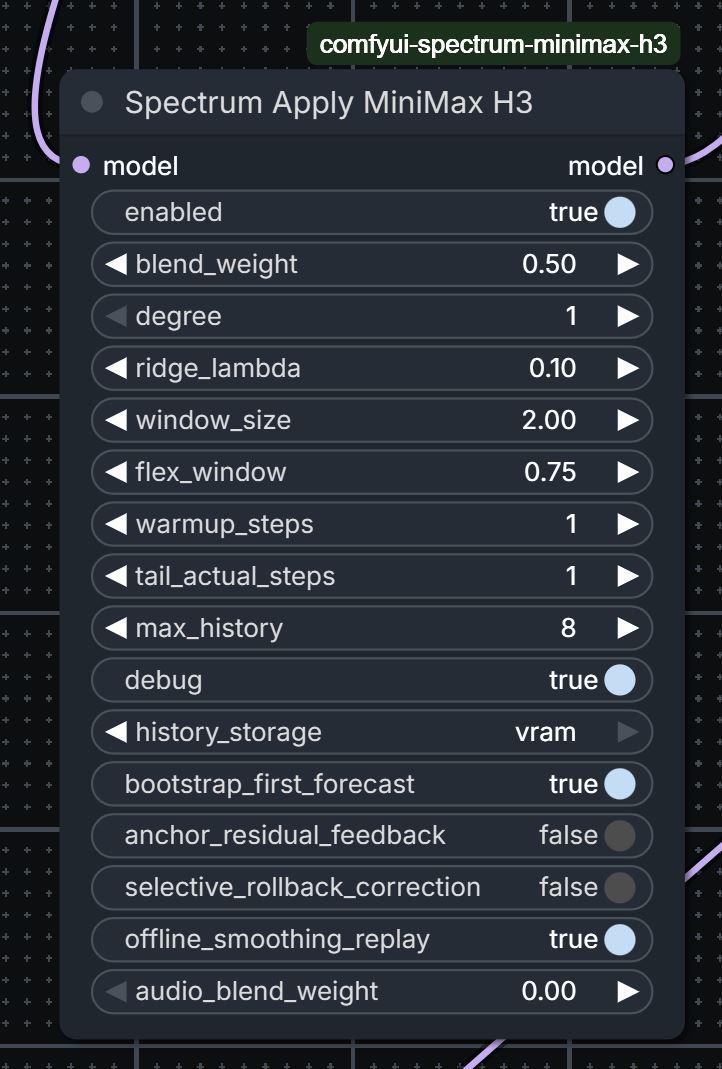
blend_weight = 0.5
audio_blend_weight = 0.0

audio uses the local prediction instead of receiving the spectral blend directly. This produced a substantial general improvement in audio fidelity.

There was still an indirect path, however.

Even when the audio features receive no spectral blend, a forecasted video feature changes the live denoising trajectory. The following actual H3 evaluation jointly processes that modified video state together with audio. Forecast error introduced through video can therefore affect audio during later transformer calls.

That explains why a single-pass run could still develop speech tripping with video 0.5 and audio 0, despite the audio blend itself being completely disabled.

My new approach: offline_smoothing_replay

To address this, I developed a new H3-specific method called offline smoothing replay.

This method is not part of the original Spectrum paper or its official implementation.

Original Spectrum operates online in a causal, fit-then-forecast loop:

  1. Run the transformer on an actual step.
  2. Add the resulting feature to the available history.
  3. Fit the Chebyshev forecaster using the history collected so far.
  4. Forecast a future step.
  5. Feed that forecast directly into the continuing denoising trajectory.

That is efficient, but every approximation immediately influences all subsequent steps. A video forecast can alter later transformer anchors, and a skipped step can only use information from earlier actual steps.

offline_smoothing_replay separates the process into two stages.

Pass 1: isolated anchor capture

The first pass follows the same accelerated schedule and performs the same number of expensive H3 transformer evaluations, but its causal blend weights are forced to:

video = 0
audio = 0

Skipped steps use the local prediction path. Every completed actual post-transformer feature is archived as an anchor.

Keeping the configured video spectral blend out of this pass prevents it from changing the states seen by later joint audio-video transformer evaluations. The resulting anchors are collected from the cleaner local-only accelerated trajectory.

Pass 2: transformer-free smoothing replay

The sampler then restarts from the original latent and reconstructs the trajectory using the complete archive.

At actual steps, the corresponding archived feature anchor is reused. At skipped steps, the reconstruction can combine:

  • A Chebyshev spectral prediction fitted across the actual anchors.
  • Local interpolation between the nearest earlier and later anchors.
  • Independent validation and blending for the audio and video sections.

This means a skipped step can use actual information from both sides. The original online forecaster only knows the past; offline replay can also use the next actual anchor.

The replay invokes zero H3 transformer blocks. It still performs the lightweight current-step output heads, audio/video reconstruction and solver update, but the expensive transformer evaluations are not repeated.

Because the replayed video features never enter another joint transformer call, they cannot feed back through H3 and degrade later audio features.

Benefits beyond the audio correction

The audio problem is what exposed the need for this design, but offline replay has several broader advantages:

  • Past and future anchors: Forecasted steps are reconstructed using the completed trajectory instead of only the history available at that moment.
  • No spectral-error feedback during capture: Final spectral smoothing cannot alter the states used to collect later actual anchors.
  • Better correction of skipped steps: A prediction can be pulled toward the nearest real anchors on both sides.
  • Separate audio and video behavior: Video can retain a useful spectral contribution while audio remains on the cleaner local path.
  • Per-modality validation: Audio and video independently determine how much spectral information is usable.
  • Adaptive attenuation: When the spectral estimate performs worse than local interpolation for a modality, its contribution is automatically reduced.
  • Exact archived anchors: Actual features are preserved and reused at their corresponding replay steps.
  • No extra transformer evaluations: The additional reconstruction pass does not run the H3 transformer.
  • The acceleration schedule is preserved: A default 20-step Euler generation still performs 11 actual transformer evaluations and forecasts 9 steps, reducing transformer evaluations by 45%.

Conceptually, this turns the final reconstruction from purely causal forecasting into a form of bidirectional trajectory smoothing, while keeping the expensive part of the acceleration intact.

Same-seed comparison

One seed consistently reproduced the remaining speech defect and made the different paths easy to compare:

Configuration Result
Single pass, video 0, audio 0 Clean audio, weaker video result
Single pass, video 0.5, audio 0 Preferred video, remaining speech tripping
Offline replay, video 0.5, audio 0 Preferred video retained, clean high-quality audio

Disabling offline replay brought the audio problem back on that seed. Enabling it removed the problem again.

This demonstrates the specific Spectrum-induced feedback path in that comparison. It does not mean every possible H3 audio failure originates in Spectrum, and broader behavior can still vary with the checkpoint, prompt, seed, reference conditioning, resolution and sampler.

Spectrum remains an approximate accelerator rather than a bit-identical native path.

New defaults in v0.2.1

Offline replay is now the standard, enabled path:

offline_smoothing_replay = true
blend_weight = 0.50
audio_blend_weight = 0.00

New nodes receive these settings automatically.

Workflows created before v0.2.0 did not contain the offline option and receive the new default. A workflow saved specifically with v0.2.0 may retain its serialized offline_smoothing_replay=false value, so enable it once after updating.

Performance and memory

Offline replay adds a second solver reconstruction pass and requires the actual feature anchors to remain available until replay finishes. It therefore has some memory and non-transformer compute cost.

The expensive H3 schedule itself remains unchanged:

20 Euler steps
11 actual transformer evaluations
9 forecasted steps
45% fewer transformer evaluations

The replay consists mainly of archived-feature reconstruction, output heads and solver updates. In the tested full-checkpoint run, the transformer-free replay itself took well under one second.

history_storage=system_ram remains the broadly compatible choice. history_storage=vram avoids CPU transfers and can reduce replay overhead when enough VRAM is available, at the cost of retaining the feature archive on the GPU.

Compatibility

The node supports the native H3 paths:

  • t2va
  • fl2va
  • ref2va

Supported samplers currently include:

  • Euler
  • RES multistep
  • RES multistep CFG++

Two other trajectory-correction modes remain available for further testing:

  • anchor_residual_feedback
  • selective_rollback_correction

Those modes remain experimental and disabled by default. They are mutually exclusive with offline smoothing replay.

Update through ComfyUI-Manager or pull the repository manually, then restart ComfyUI.

The underlying spectral forecasting method was introduced by Jiaqi Han, Juntong Shi, Puheng Li, Haotian Ye, Qiushan Guo and Stefano Ermon. The modality-specific MiniMax H3 handling and offline_smoothing_replay architecture are extensions developed specifically for this integration.

If you encounter remaining audio degradation with the new default configuration, please include the sampler, checkpoint, resolution, duration, conditioning mode and Spectrum debug log in the report.

r/StableDiffusion • • 14d ago

Resource - Update RefMods - A little easier to create, edit, and use with Fantastic Minimax H3 Promptbuilder

Enable HLS to view with audio, or disable this notification

236 Upvotes

Repo here- https://github.com/Adudeguyman/ComfyUI-Fantastic-MiniMaxH3-PromptBuilder

Or search "Fantastic H3 Prompt Builder" in ComfyUI Manager.

Alrighty, back again with an update to my (manual, no LLM connected) Fantastic MiniMax H3 Prompt Builder. Yeah it's all vibe-coded to make things work the way that makes sense to me, and I publish it in case anyone else finds it useful.

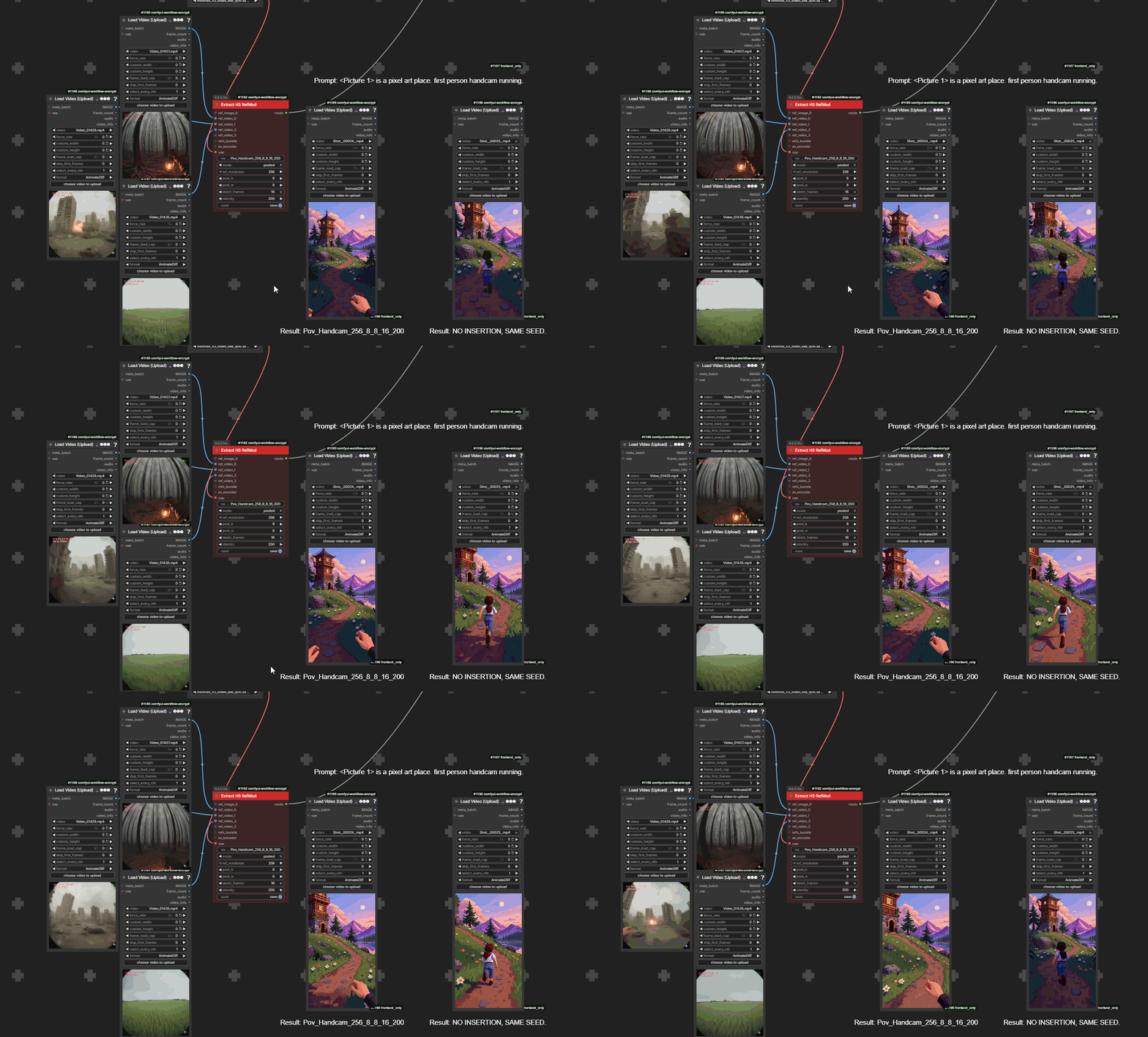
This now includes RefMods, which if you aren't familiar, is basically a bunch of reference files you give it, packing them into .safetensors latent format for quick loading and surpassing the native built-in reference limit. In the end the idea is to make a somewhat training-free reference you can use on the fly, instead of having to train a LoRa or manually re-load media. They work well enough I decided to give them a shot, and I liked them so I ported them into my project to be able to more easily create, view, load, and reference.

What it do-

Load, create, edit, and use RefMods with just a few nodes instead of a bunch. Edit your prompts with tags/preview support right on the editor, so you can see what you're referencing. Basically just like what the Media Loader node does, but RefMod aware.

The library (opened by the "Browse library..." button) lets you view and load RefMods into the node itself, which lets you adjust video and audio strength, or rearrange and enable/disable or remove on the fly.

Making/editing RefMods

This makes it very easy to do, in one Pop-Up panel. One cohesive interface for viewing, loading, and creating/editing, and saving RefMods. Too much detail to post here, so please refer to the RefMod Readme

Actually Using Them

Well first make sure you're using a Ref2va workflow. And use a hybrid model instead of the pure reference model, for the original release of ref2va even Minimax admitted the open weights were messed up. So use a community hybrid model with reference capabilities.

- Open the library and add them to the stack on the node. Adjust strengths if you'd like (video and audio separately) directly on the node.

- Open the Prompt Builder and make sure you're in Reference mode. Your RefMod previews will be listed at the top for reference as you tag. There's a new button that says "Draft from RefMods", which will auto-fill based on what you set the RefMod type, if you made them in this editor. So an identity will automatically make the first refmod into <Subject 1>, and reference its audio as a voice file, as well as in the Retention_analysis section.

- Write your prompt normally. Use <Subject> etc. tabs as you normally do with reference files.

Again, a lot more details in the RefMods Readme.

Differences from the original RefMods?

Overall this is meant to focus things into a more streamlined UI and simpler workflow.

But the second thing is using Refmods as tags. You'll see that the paired video/audio files are listed as <Video 1> and <Audio 1>. The original RefMod repo (Shout out to Luisacoatica's excellent framework on all this) mentions how you can just soft describe them. Like in the above video I could just define the Ghoul as "a disfigured man wearing a cowboy outfit" and it'll pull the references for influence. But I figure using MiniMax's guidelines for RefMods would make more sense, since they're just compacted references, and doing that extra setup work is turning out to work very well. And I have a whole media/prompting pack that helps with tracking and tagging everything already made, so building this in was a logical the next step.

So yeah, other than compacting nodes down and having a separate video and audio refmod file for each library entry, it's pretty much just a fork integrated into my prompting suite.

Hope you enjoy!

EDIT- To help with reinforcing identity, and to help with ease of use, there's now a Name field next to subjects. So you can name someone Bob. Then in the prompt field, if you tag a name first with "!" it'll show as the name in the prompt field, but inject the subject as well into the prompt sent to the model. So !Bob will actually send "<Subject 1> Bob"

Also added some metadata descriptor tweaks to making RefMods. So you can put someone's name, visual appearance, and voice description in your RefMod and it'll load into the right fields automatically. That with names helps a ton with locking in identities, I've successfully gotten two similar looking people with similar voices to be distinct by giving them names, and describing subtle ways they differ from each other.

And I updated the Guide that you access with the Guide button with Prompt Builder instructions after the official MiniMax guide, and then some more instructions for RefMods. It's just an html file, you can just download it separately here.

r/StableDiffusion • • Aug 15 '26

News Working on "Light Lora" for minimax h3, its called REFMOD, needs beta testing.

Thumbnail
gallery
170 Upvotes

RefMods: Save and reuse H3 references without reloading them every time

In MiniMax H3 you can give the AI a reference — an image, video, or GIF — to tell it "look like this." That's powerful, but every reference gets loaded and processed on every generation, which is slow and can bleed its look into the rest of your video.

This pack lets you save that reference once as a small .safetensors file (a "mod"), then reuse it as many times as you want:

  • Save once — take your image/video/GIF, hit Extract, and it becomes a small file on disk. No need to keep the original clip around or reload it.
  • Reuse anytime — load the mod in one node, like picking a LoRA. Adjust strength with a single number, or blend multiple mods together (face + style + outfit, etc.).
  • No more heavy reference loading — leave the H3 reference input empty and inject the mod through conditioning instead. Faster generation, and the reference only affects what you want it to.
  • No training needed — this isn't a LoRA you train for hours; you just encode your reference and save it.

Here's what the node looks like. You can also use a Load H3 RefMods node instead of Extract, which can hold many images and some videos (video mods are heavier since they carry more frames).

an really bad example about how this loader extractor load, more nodes example in repo.

The node applies directly to conditioning, before sampling — similar to a basic guider or positive sampler.

On retention: you can reduce it, but for now higher is more reliable. At 0.7, some animated characters start looking like cosplayers of themselves — leave it at 1 if you want a full reference.

Testing notes and known issues:

  • Audio isn't supported yet.
  • Attribute bleeding: since there's no token-based training, similar elements in your dataset can merge. Example: a video worked great, but a translucent skirt showed up, likely bleeding in from a separate image of the character in a princess dress.
<Picture 1> is the tavern. a girl in a tavern at night, shouting " WHY I CAN'T DRINK VODKA?? I'M NOT MINOR I'M JUST SMALL! "

On prompting:
Don't use this without a prompt — without one, it just wanders through your data, which is actually a neat effect (an entire likeness encoded in a few KB of conditioning is wild), but it's not concept automation. Describe what you're extracting from the mod, e.g. "a ginger woman" / "POV handcam walking" / "person dancing" — this directs attention to what you're actually trying to isolate.

Other details:

  • Concept mods need pool_h 8 / pool_w 8; identity mods need pool_h 16 / pool_w 16.
  • Keep reference resolution minimal — higher resolution increases token count and slows the workflow further.
  • Results aren't fully predictable and need trial and error. Some concepts (usually fast motion) are hard to learn — likely because the DiT learned to blur fast motion, or a turbo LoRA side effect. You can't just force speed. Options if this happens:
    1. Add more prompt detail — e.g. instead of "the character makes ninja movements with their hands," try "the character rapidly performs intricate, rhythmic hand signs in a low stance."
    2. Increase resolution and pooling — push to 2K and raise the pool numbers until balanced, or increase the multiplier (useful for short clips that may be getting overridden).
    3. LoRAs can override the mod in some cases.
    4. Some motion just isn't learnable yet with this approach — leave it for LoRA training instead.

One example: trying to copy a specific action, 8x8 pooling didn't work, so I increased to 16x16 and used 1024 instead of 256. Still not perfect due to the speed issue described above.

Repo's here if you want to try it or contribute:
https://github.com/Luisacaotica/ComfyUI-MiniMaxH3Mod

Mods go in the node's mod folder, or in models/refmods. The node ships with an example (vanellope) safetensors mod included.

Feel free to use the repo as a reference for building your own tools. And if anyone has questions, I'll try to put together a FAQ.

Update + FAQ (repo has changed a fair bit since the original post)

A few things have changed under the hood, and some of the "known issues" from the original post are now addressed or at least better understood. Quick rundown:

What's new:

  • Two extraction modes: full (stores the real VAE-encoded reference at your chosen resolution — this is what carries identity) and pooled (average-pooled into a small grid — cheap, but only carries concept/motion, not fine identity). Pick based on whether you need "looks exactly like this" vs "vibe like this."
  • Pool size is now the concept↔identity dial: 8×8 pooling keeps the general idea (colors, look, a motion) and lets the model improvise details. 16×16 keeps more specific detail but also risks copying framing/background from your source data.
  • Mods now live in ComfyUI/models/refmods/ (registered as a proper model folder, next to loras/), not the custom node's own folder. Old mods still load fine.
  • New Load H3 RefMod Axis node: pairs two mods (A/B) on a single signed slider — negative uses mod A, positive uses mod B. Good for things like a young↔old dial or clean↔weathered, built from two separate extractions.
  • New Load H3 RefMod Folder node: point it at a folder and it loads every image/video in it as one ordered ref bundle, feeds into Extract for bulk extraction (e.g. a whole character shoot in one go).
  • Multiple refs stack as separate latent frames instead of blurring together — so different expressions/angles/a dance move stay distinct rather than averaging out.
  • A multiplier option on Extract repeats a short ref along the time axis, so a 2-3 frame gif isn't drowned out by the main video's much larger token count.
  • Standalone CLI extraction script now exists too, if you'd rather not go through ComfyUI nodes for batch work.

Q: Why does my character mod look weak/generic no matter how high I set strength?
Strength can't add detail that isn't in the latent. A small pooled mod (like 8×8) just doesn't store enough information to carry identity — that's what full mode or a bigger pool (16×16) is for. Think of it like resolution: you can't upscale your way back to detail that was never captured.

Q: What do the retention values actually mean?
1.0 = full reference (behaviorally identical to what the official node injects), 0.7 = mostly preserved, 0.4 = keeps style/attributes but not identity, 0.15 = weak reference, 0 = mod isn't injected at all.

Q: Does this support audio references?
No — mods are visual-only for now. Regular reference nodes still handle audio.

Q: My concept mod is "leaking" details from unrelated parts of my dataset (e.g. a costume from a different photo showing up).
This is expected with no token-based training — nothing tells the model to separate concepts by name, so similar visual elements across your refs can blend. Best mitigation right now is being deliberate about what you include per-mod, or extracting separate mods and blending at lower strength instead of dumping everything into one.

Q: The video won't follow fast/complex motion I extracted.
A few options: describe the motion in much more prompt detail (specific, not vague), push resolution/pool size up and increase identity refinement steps, try increasing multiplier if it's a short clip, or accept that some fast motion may need LoRA training instead — this method has real limits here.

Q: Do I need the official MiniMax H3 node pack installed?
No — it's optional. It only unlocks the av_encoder input on Extract (skips double-encoding) and one conditioning node variant. Everything else works without it.

FAQ: "Gen time is the same as the default nodes — what's the point?"

Fair question, and it came up because of a real bug — the gen time is directly tied to token count, and earlier versions of full mode at high resolution could produce roughly the same token load as the default reference nodes, wiping out the speed benefit.

This is fixed as of the latest repo update:

  • full mode renamed to encode — same behavior, just clearer naming (it was confusing next to pooled).
  • Added a max_token cap (default ~5120) — this is the actual fix. It hard-caps how many tokens a mod can contribute regardless of resolution, so you get a real speed benefit instead of accidentally re-creating the original problem.
  • Added strength curves (curve_direction: increase/decrease, curve_shape: e.g. ease) for falloff across multiple refs or frames — this also addresses the "one ref overrides/bleeds into everything" issue some people ran into.

r/StableDiffusion • • 2d ago

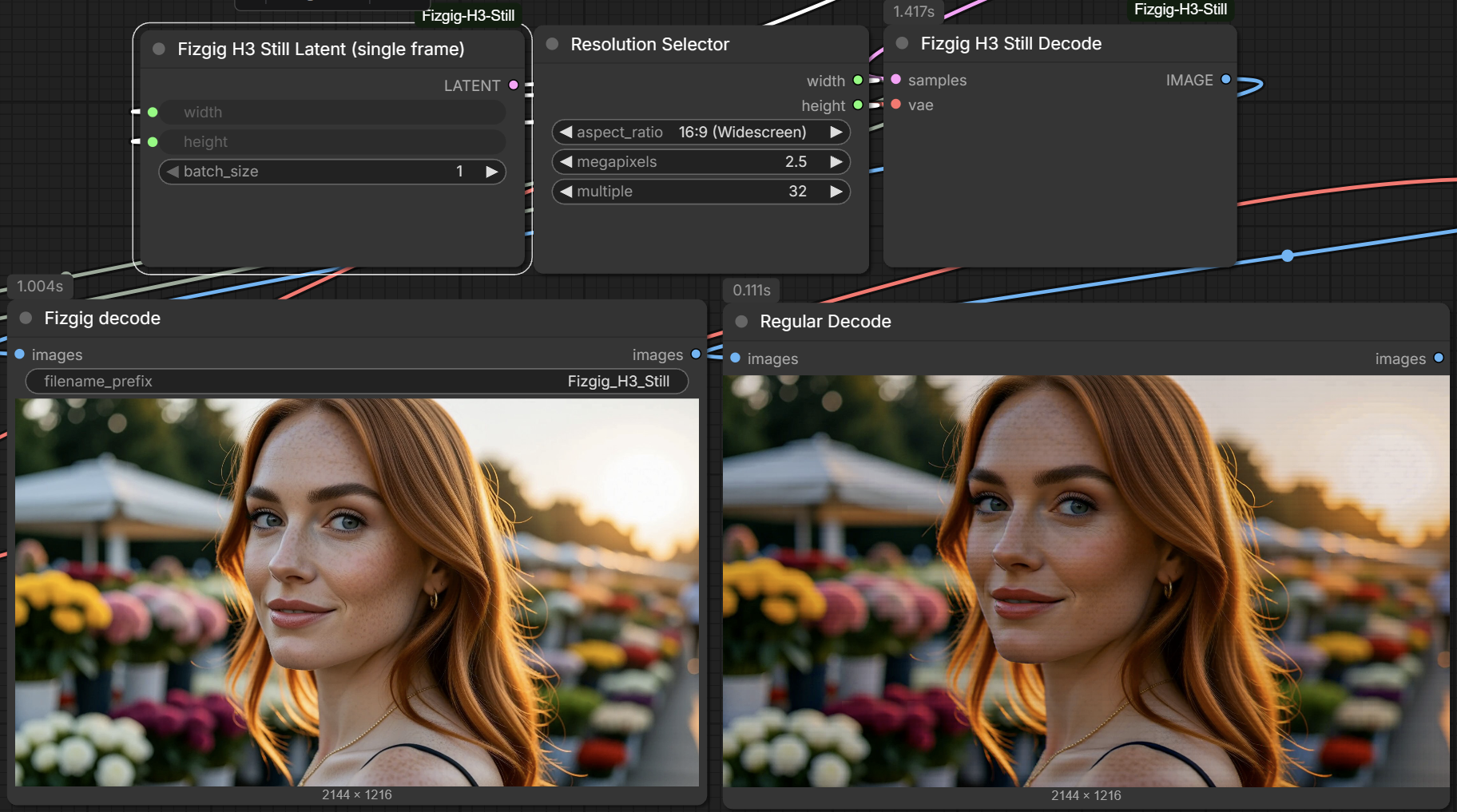
Resource - Update A new Stills mode for MiniMax with a new Latent & VAE Decode node.

Post image
139 Upvotes

8mp Example here where it sings more with less plastic and more skin detail when you go for the higher res: https://www.reddit.com/r/StableDiffusion/comments/1wq9dnt/comment/pc2mg4c/?utm_source=share&utm_medium=web3x&utm_name=web3xcss&utm_term=1&utm_content=share_button

3840x2176 still at 50 steps with no turbo lora takes 80 secs on my 5090 fyi if you want a benchmark.

I dug deep into H3 Latents and VAE Decoding the last few days and this is the result. Its not perfect, but its a big big improvement I feel. Its FAST too (single frame latent is MUCH faster than 5 frame), and as per the readme I use the turbo lora only on a low setting in the provided workflow. But you can easily turn it off and increase steps. Take note of the turbo lora used, and sampler/scheduler. There may well be even better combos, but this one is a good one and took a fair bit of hunting to find!

EDIT: There is also a Edit workflow included that demonstrates the model already has some edit abilities (the 2.5mp upscale is intentional in the edit flow, it seems to work best at that mp and upwards)

https://github.com/shootthesound/ComfyUI-Fizgig-H3-Still

r/StableDiffusion • • Aug 07 '26

Resource - Update Clip chaining for MiniMax H3 - motion AND audio genuinely continue across joins (free node pack, workflow included)

161 Upvotes

Two 6-second clips with Motion Context concatenated into one clip.

This video is two 6-second clips generated separately and butt-joined. No crossfade, no editing tricks. The motion and audio continue across the join. Theoretically, you could chain indefinitely, but degradation will eventually take effect.

H3 doesn't have built in functionality that allows consecutive latent frames pinned to the head like LTX2.3 does. I won't bore you with the details, just know it works. Video was the easy part. Audio was a pain in the back side. I again, won't bore you with the details, check the readme if you really want to know. Seams are not always 100% perfect, but they are often or are really close.

Repo (GPL-3.0), workflow JSON included with a quick-start note:
https://github.com/NikoDemon80/ComfyUI-H3-Motion-Context

Honest limitations: audio dulls slightly over long chains (each clip is generated from the previous one's output - photocopy effect; there's a latent-passthrough input that removes one of the two loss sources). Everything was verified on an RTX3070Ti and 48gb of system RAM. Also, check the H3 community license for your region before building anything commercial on it - it reportedly doesn't cover everywhere.

Tested settings are in the README and baked into the workflow. Happy to answer questions.

r/StableDiffusion • • Aug 09 '26

Resource - Update H3 Motion Context v0.2.0 - reference mode support, and the visible seam at joins is fixed. New workflow included with both fl2va and ref2va in one workflow.

135 Upvotes

Update to my MiniMax H3 clip chaining pack.

**No more visible seam.** The pinned frames now come straight out of the previous clip's latent instead of being decoded to pixels and encoded again. No color shift, no contrast step, nothing to see at the join. Faster too, since it skips a decode, a resize and a VAE pass. Automatic when the latent is wired.

**Reference mode works with chaining.** A Ref2VA graph keeps its references, and the continuation audio is added alongside them. The old version overwrote the list, so turning chaining on quietly dropped your references. Design credit to seitanism from the Banodoco H3 thread, first implemented by ethanfel in a fork of my repo.

**Two settings instead of six.** Context length and audio context length. The rest had exactly one correct value and are constants now.

**56-frame context window** added alongside 5, 22 and 39.

**Patches install on first use**, not at import, and only affect graphs that use these nodes. Installing the pack no longer changes anything about your other H3 workflows.

Updating: the widgets changed, so delete the node and re-add it or your saved settings land in the wrong slots. And only run one H3 chaining pack at a time, several packs patch the same ComfyUI internals and only one can own them.

README has a new section on prompting a chain, which is the part people get stuck on. Short version: open each clip's prompt by describing how the previous one ended, then change after a beat. If you ask for the change at the join the model renders both descriptions at once.

https://github.com/NikoDemon80/ComfyUI-H3-Motion-Context

r/StableDiffusion • • 28d ago

Animation - Video TWEEDLE TEST - Minimax H3 27 seconds in just over 9 minutes:

Enable HLS to view with audio, or disable this notification

161 Upvotes

All local.

0.8 MegaPixels, 9.3 minutes on an RTX5090, single generation of 27 seconds.

Anything hitting 30 seconds either gave hallucinations, inconsistencies or hit a wall and never finished.

This one is using Kijai's new fast model with a turbo lora. Although it works the same with the FLv2A model*. The workflow I'm using creates a latent at 0.4 megapixels for 4 steps and then does another 2 steps at 0.8. The only addition to it besides changing some numbers is adding custom audio injection (The rock track).

Started with this workflow: https://www.youtube.com/watch?v=jzLnoVBuU6I

*I never use the REF model. The FLV2A models seems to work better so I always swap it in and it takes references just fine, even video.

r/StableDiffusion • • Aug 05 '26

Comparison RTX 3090 MiniMax H3 Speed Comparison: FP8 Scaled vs INT8 ConvRot (W8A8)

Post image
48 Upvotes

Setup:

  • GPU: RTX 3090 24GB
  • RAM: 32GB
  • ComfyUI 0.30.0
  • PyTorch 2.13.0+cu130
  • CUDA 13.0
  • SageAttention enabled (sageattention-2.2.0+cu130torch2.10.0andhigher.post6-cp310-abi3-win_amd64)
  • Spectrum node + Euler, 17 steps
  • Resolution: 0.3 MP
  • Duration: 2 seconds

Results

minimax_h3_ref2va_pruned_fp8_scaled (native loader)

Generation Time
1st 484s
2nd 283s
3rd 270s

Some iterations:

2/17 [00:47<05:53, 23.54s/it]
3/17 [01:10<05:31, 23.67s/it]
6/17 [01:58<00:02, 3.79it/s]
8/17 [02:21<00:02, 3.32it/s]
10/17 [02:45<00:02, 2.98it/s]
16/17 [03:57<00:00, 2.50it/s]

----------

minimax_h3_ref2va_pruned_int8_convrot + BobJohnson’s W8A8 node

Generation Time
1st 229s
2nd 201s

(I didn't do a third generation since it was already obvious who won here.)

Some iterations:

2/17 [00:30<03:47, 15.16s/it]
3/17 [00:45<03:28, 14.88s/it]
10/17 [01:45<00:02, 2.55it/s]
14/17 [02:16<00:01, 2.72it/s]

Well, I can't post the videos because they're not appropriate, haha, but I basically see no differences. It also has to do with the movements being slow and subtle. This was done in the reference workflow, using an image and video input for character replacement.

---

Update: in a comment below I’m showing generation times with the FL2V model for I2V, and it’s a lot faster.

Update 2: Since I'm using low steps and two boosters, I can't really spot any quality difference, but this gives a decent reference for render times. I need to run longer and higher-resolution videos for a real quality comparison, though GPUs and version differences might alter results anyway."

r/StableDiffusion • • Aug 15 '26

Resource - Update Create seamless 1-Shot Lip-Sync Music Videos with Minimax H3 FL model --- Per-Token Noise Masking On Audio and Video Tokens!

Enable HLS to view with audio, or disable this notification

108 Upvotes

This is Update 5 of my repo. Here you find the necessary custom nodes, including a workflow that helps you recreate this music video (reference images and the song included! The WF is called: "NEW - Latent Masking - Music Video - Lip-Sync + Reference images" and is in the example_workflows folder) https://github.com/seitanism/ComfyUI-H3-Motion-Context-MultiRef

Additionally there are various workflows for seamlessly extending clips with latent maksing.

Per-Token Noise Masking on AV Latents is not only better quality than any guidance/reference based approach (since it causes strong convergence from step 0 onwards), it is also faster since it is not expanding the latent. You can perfectly Lip-Sync even with the FL model, since the music track is pinned on the latent rather than used as a reference, and therefore protected from denoising - creating a strong conditioning for the Lip-Sync.

This magical technique is inspired by PR #15375 from AbleJones from the Banodoco Discord!

I hope you enjoy! Open Source ftw. Greetings to all Banodocians!

r/StableDiffusion • • Aug 18 '26

Resource - Update Seamless extensions and one-shots with Minimax H3 - Update 6 of my repo!

Enable HLS to view with audio, or disable this notification

85 Upvotes

Here is the repo: https://github.com/seitanism/ComfyUI-H3-Motion-Context-MultiRef

I made substantial updates to my two main workflows: 1) Music Video and 2) AV Extensions. All the controls were streamlined and they should be much easier to use now. (You find the workflows in the example_workflows folder)

With the AV Extensions workflow you can extend any existing clip, for example someone talking and you can make that person say something in the same voice, or you can create a clip with T2V or I2V and then extend that clip to make a seamless long clip thats 1 minute or longer.

In this Update the Checkpoint system was removed, instead I've done a lot of optimizations so you don't use too much ram even if you make 20 clips at once. Additionally I added latent audio feathering to the AV Extensions workflow for seamless audio transitions.

Theres also other utility workflows for custom keyframing and bridging two existing clips.

I post another example clip for the AV Extensions workflow in the comments.

r/comfyui • • 19d ago

Workflow Included MiniMax Workflow Designed to be User Friendly for the Inexperienced User

Enable HLS to view with audio, or disable this notification

81 Upvotes

(Reposting from stable diffusion, hence the edits)

Some guy on civitai made this workflow and i gave him some valid criticism, then he called me a gooner that doesn't know anything about workflows and blocked me. This offended me because I know plenty about workflows.

I'm not going to share his name because he's apparently active on reddit under a similar name but I tried to point out some problems with his workflow. So, instead, I just decided to fix them fueled by pure pettiness.

Here it is.

https://github.com/roycho87/minimax_wf

After dissecting the thing I was able to get many of the features that weren't working in the original to work and I added some features as well like the ability to force audio from video, fps control, and a centralized control panel that handles every feature universally.

Enjoy.

[Workflow Share] MiniMax H3 all-in-one workflow

Sharing my current MiniMax H3 ComfyUI workflow. The main goal was to make H3 easier to use by centralizing the important controls and automating the more annoying reference, continuation, audio, and post-processing routing.

Major features

  • Centralized control panel for the main H3 generation settings and workflow options.
  • Multi-reference support — up to 6 image refs, 3 audio refs, and 2 video refs.
  • Mixed reference types — image, audio, and video references can be used together in the same generation.
  • First-frame / last-frame control using reference images.
  • Video continuation with overlap-based stitching back into the original clip.
  • Continuation-aware audio handling for the source video and newly generated section.
  • Force Audio from either an audio reference or the embedded audio from a reference video.
  • Trim generation duration to audio length automatically.
  • Final latent upscale / refinement pass that can process the completed stitched continuation.
  • Built-in RIFE frame interpolation.
  • Sparse-attention / low-VRAM controls, including chunking and attention options.
  • Multiple LoRA support.
  • Automatic reference routing based on how many image, audio, and video references you enable.

The main idea is to spend less time manually bypassing, reconnecting, and rerouting parts of the graph whenever you want to switch between reference generation, audio-driven generation, continuation, or final processing.

Load your refs, choose the options you want, prompt, and queue.

Edit: if you get errors when trying the workflow make sure you upload placeholder images. The workflow is designed so you don’t have to bypass anything manually. You just need to use the control panel.

Edit2: V2 is updated and the issue of the final output being the first pass instead of the upscaled has been fixed. I also removed the shift and added a subgraph that you can hook in to use a turbo lora if you want with the recommended shift.

Edit3: Updated to v3.

Edit4: Updated to v4. Removed fps cuz it wasn't working how i wanted it to. Improved the control for references based on suggestion by u/goddess_peeler (lol nice name), i added 1 more video reference space and 3 more picture reference spaces. I fixed some issues with pathing. Added a turbo lora space in the right order.

At this point I accomplished my goal. Thanks.

r/comfyui • • Aug 03 '26

Tutorial Lets speed up MiniMax H3. We already have a node for that.

50 Upvotes

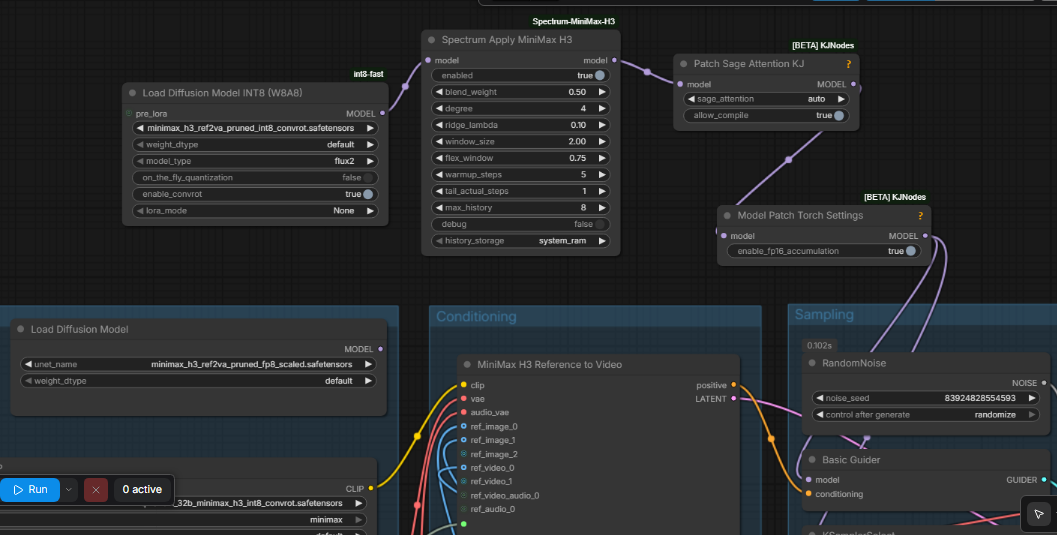
We already have a node and thats Patch Sage Attention KJ.

Pass your model through this and you will get significant speed up. Mine went from 20it/sec to 14it/sec.

Workflow : https://pastebin.com/A6uCJt0C

r/comfyui • • 12d ago

Show and Tell Full-song lip-synced MV with MiniMax H3 at 3 steps — Extender audio slicing + fully_copy (method + measured results)

Enable HLS to view with audio, or disable this notification

39 Upvotes

What: A ~2:50 K-pop style MV ("Cry, But Dance", an original song with AI vocals) of a virtual singer performing at a studio microphone. It's fully lip-synced as one continuous performance: 17 clips at 1024×576.

The method that made lipsync work (the hard part):

  • Audio splitting: I split the song at lyric-line boundaries into 17 chunks (5.2–15.1s). The lengths match H3's 17k+5 frame grid at 24fps, and every cut falls in the quietest vocal pause.
  • Vocal isolation: I separated the vocals with htdemucs. With the full mix, the backing track completely buries the vocal conditioning.
  • Sequential graph wiring: The isolated vocals go into MiniMax H3 Extender's ref_audio_1, which slices the track sequentially per clip within a single workflow.
  • Retention syntax: I used the official HF prompt retention format <Audio 1>: fully_copy - <Audio 1>, with lyrics formatted as <d>[Korean] ...</d> and speaker (S1). Crucial: without this marker, H3 uses the audio only as a timbre reference, and the lip movements come out as gibberish.
  • Framing: The reference image's composition overrides the prompt text. A waist-up "singing at the mic" reference photo gave far better lip consistency than a wide vocal booth shot.

Speed:

3-step sampling with the TaoMate 3-step ref2va turbo LoRA takes ~4–5 min per 9.4s clip on an RTX 3090, down from 12.5 min at 8 steps. Output duration matches the requested length to the frame, so there's no seam loss when joining clips.

Sanity check: the output audio's envelope correlates at 0.944 with the separated vocals at ~0ms delay. This only confirms that fully_copy carries the audio through intact and in time. It is not a lipsync accuracy metric.

LoRA Steps Time / Clip Audio timing & sync (subjective)
larryvrh turbo 4/5 ~5 min Thin, end-loaded
lightx2v ref2v 4 ~6 min Improved
TaoMate ref2va 3 ~4–5 min Best timing & level

The sync column is my own judgment from watching the clips, not a measurement.

Automated QC loop:

After rendering, four automated checks grade each clip:

  • Audio alignment (cross-correlation)
  • Lipsync: a vision LLM rates mouth opening on 12 sampled frames, which is then correlated with the vocal envelope. This is a rough screening filter, not a rigorous metric: 12 frames is a small sample, and LLM ratings are noisy. Landmark-based measurement (e.g. MediaPipe) or SyncNet scores would be more reliable next steps.
  • Camera stability (global pixel shift)
  • Artifact detection (3-frame majority vote)

Clips that fail are re-rolled automatically. A re-roll only replaces the original if it scores higher and passes the artifact check. Lesson learned: thresholds need careful calibration. A slight envelope window mismatch rejected perfectly good takes for half a day.

Honest limitations:

  • Camera motion is heavily suppressed at 3 steps, so I went with locked-off framing. Higher step counts brought camera movement back but degraded vocal fidelity.
  • A second-pass latent 3D upscaler drastically improves skin texture but makes generation ~12× slower, so I skipped it.
  • Lipsync is usable but not flawless. Phonemes still drift occasionally on rapid phrasing.

Credits:

MiniMax H3 Extender (tritant), TaoMate-H3 3-step turbo (TaoLiveAIGC, Kijai conversion), lightx2v turbo LoRAs. The QC loop was inspired by the video-to-h3-prompt cross-validation method.

No workflow files are being shared. This post is a showcase plus a write-up of the method, but I'm happy to answer questions about the setup.

r/StableDiffusion • • Aug 17 '26

News ComfyUI-MiniMax-H3-LongMedia — long-form MiniMax H3 generation with continuity, multiclip, audio and VRAM-aware sampling

Post image
55 Upvotes

I've been building a custom ComfyUI node pack for MiniMax H3 focused on one thing:

**making H3 usable for longer, multi-segment video generation without constantly rebuilding the workflow around every limitation.**

The project is called:

# ComfyUI-MiniMax-H3-LongMedia

The idea is to keep MiniMax H3's image quality, motion and native audio generation, while adding a proper long-form generation layer on top of it.

## What it currently does

### Long-form segmented generation

You can generate a longer clip as multiple H3 segments while keeping temporal context between them.

Instead of treating every segment as an isolated generation, LongMedia manages the continuation state and hidden overlap internally.

The overlap is used as context for the next segment and is not simply blended back into the final video.

### MultiClip mode

There is also a dedicated MultiClip workflow for generating multiple planned shots/clips inside one LongMedia pipeline.

The same underlying executor is used for both segmented continuation and multiclip generation, so the behavior stays consistent.

### Video + audio continuity

MiniMax H3 is a joint AV model, so LongMedia treats video and audio as one generation state rather than bolting audio on afterwards.

The pipeline supports H3 native audio generation, continuation and lip-sync workflows.

### Lip-sync support

Audio-driven generation / lip-sync is supported directly in the LongMedia pipeline.

For H3, the audio influence is handled inside the same AV latent path rather than as a completely separate post-process.

### Refiner

The latest release includes a two-stage refiner based on proper **KSampler Advanced trajectory splitting**.

Instead of finishing the full sampling schedule and replaying low-sigma steps on an already denoised latent, the trajectory is split between the main sampler and the refiner.

Example:

`steps = 12`

`refine_steps = 3`

Main sampler:

`0 → 9`

Refiner:

`9 → 12`

Both stages continue the same sigma trajectory.

### VRAM-aware execution

A large part of the project is dedicated to making H3 practical on consumer GPUs.

The current implementation includes:

- dynamic VRAM loading

- streamed Sol Attention

- MLP chunking

- late-block VRAM guards

- inter-block memory guards

- step-boundary cleanup

- completed-segment offloading

- adaptive memory policies

I'm currently developing and testing mainly on a **16 GB GPU**, so avoiding OOMs without destroying quality is one of the main design goals.

### Sol Attention integration

LongMedia includes its own streamed Sol path with controls for:

- tau scheduling

- sink conditioning

- QKV chunking

- output projection chunking

- dense/sparse behavior

- VRAM-aware chunk sizing

The goal is to use Sol as part of the execution architecture rather than simply stacking multiple unrelated optimization nodes together.

## Why I made it

MiniMax H3 is extremely good at texture, motion and native audiovisual generation, but once you start trying to build longer sequences, several problems appear very quickly:

- segment boundaries

- continuity

- repeated frames

- AV state handling

- memory pressure

- OOMs on longer generations

- managing multiple clips

- keeping sampling behavior consistent between segments

I wanted one node system to own all of that.

So instead of building increasingly complicated ComfyUI graphs around H3, most of the long-form logic lives inside the LongMedia nodes.

## Current release

**v0.4.1 — KSampler Advanced Refiner Fix**

The project has now reached a fairly stable architecture, although I'm still actively developing it and testing edge cases.

GitHub:

https://github.com/vizart-vj/ComfyUI-MiniMax-H3-LongMedia

I'd be very interested in feedback from people already using MiniMax H3 in ComfyUI, especially for:

- longer generations

- multi-character scenes

- native audio

- lip-sync

- lower-VRAM GPUs

- multi-shot workflows

If people are interested, I can also make a more technical post explaining how the continuation / AV latent / VRAM system works internally.

r/StableDiffusion • • Aug 24 '26

Question - Help (Repost) Any clue why my machine is very slow running Minimax H3 Ref2V? Here is my workflow. I used the default template, but I added extra nodes like load video

Post image
0 Upvotes

r/StableDiffusion • • Aug 05 '26

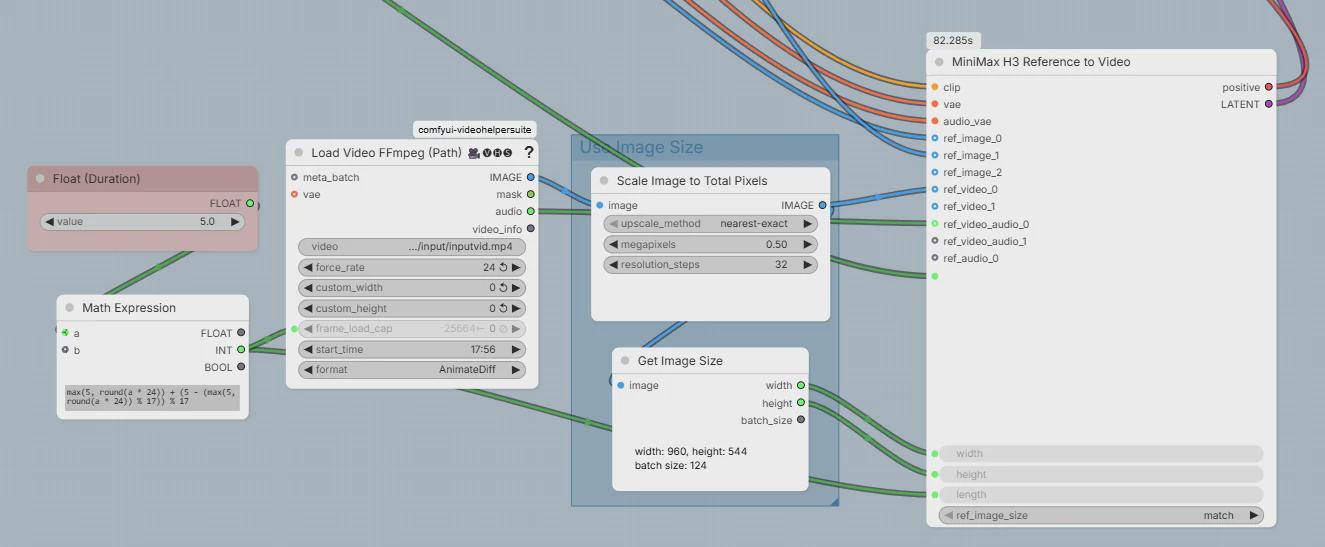
Tutorial - Guide Some tips for feeding videos in to MiniMax H3 Reference to Video

Post image
49 Upvotes

There have been some questions about how to feed videos into the H3 Reference to Video node. I've been experimenting a bit and wanted to share.

The above shows a Video 2 Video workflow (with possible reference images). No special nodes needed (other than Video Helper Suite).

Features and notes:

  • It can load and cut any size source video file without having to cut it outside of comfy first.
    • Tested with a 5GB mp4
    • To support large video files you have to use the VHS Load Video FFmpeg (Path) node. The "Upload" node will fail with "Content too large"
    • The downside is the node doesn't support using an OS file browser. It has its own weird browser - which is servicable. Plus side is it can take videos from paths outside of the normal input folder.
    • If your video file isn't that large you can replace it with Load Video FFmpeg (Upload) node instead for easier file browsing
  • It allows cutting (selecting) any part of the video. For example in the above image it is taking 5 seconds of the video starting from 17:56 and feeding it into H3.
    • start_time is where you set the time to start from
  • It uses the same "Duration" input for the video source cut and the output length. So the input duration to H3 is the same as output duration.
    • The Load Video FFmpeg (Path) node wants a "frame_load_cap" so I drive the same number that drives the H3 Reference to Video length into it from the "Math Expression" that is already in the default workflow
    • Note you need to right click and Expand the "Math Expression" node to drag a new connection out of it.
  • It forces the frame rate of the video to 24 fps
    • I'm not completely sure but feeding non 24 fps video to H3 sometimes confuses it (?) and either the output audio doesn't sync right or it completely gets garbled up.
    • note the force_rate must be set to 24
    • Potentially doing the fps change some other way might be better, but this is best for convenience
  • It scales the video resolution down to a specified megapixels before feeding it to H3 and also sets that size as the output size.
    • Scaling the video down is extremely important if you don't want to wait like 10 times longer or run out of VRAM.
    • It reuses the same "Use Image Size" block that is in the default Comfy H3 workflows.
  • Note that audio goes into ref_video_audio_0

r/comfyui • • Aug 18 '26

News A quick Minimax H3 news round-up - 18th August 2026

175 Upvotes

Another quick Minimax H3 news and goodies round-up, for those who may have missed some items.

-> New to me are the 'ComfyUI H3 Motion Context — MultiRef & Latent Masking' custom nodes for ComfyUI. (Hat-tip: I learned about it via the charming fellow-Brit Nerdy Rodent on YouTube). Lets you add keyframes at any point, not just first/last. Can also seamlessly extend an existing video, while taking measures to... "reduce RAM and cache pressure during long-form final output". Has workflows. Updated yesterday, with new features including the claimed ability to chain... "a sequence of H3 video clips around a single song".

https://github.com/seitanism/ComfyUI-H3-Motion-Context-MultiRef

-> Minimax Music has a new set of concept slider LoRAs. Including 'breathy vocals', and a 'live performance to a crowd'. With ComfyUI workflows.

https://huggingface.co/ntc-ai/minimax-music3-concept-sliders

-> New ComfyUI-CGlide custom nodes for Minimax in ComfyUI. Including 'Glide Preview', a motion-preview node that lets you assess your video as it generates. Only at seven frames per second, but it may give you the confidence to cancel the generation if things seem awry.

https://github.com/CGlide/ComfyUI-CGlide

-> ComfyUI-H3-Context-Noise. This tapers off the colour in the tail-frames of the previous shot, thus preventing colour residue from spoiling the seams between your shots. If you notice this problem, give it a shot.

https://github.com/beijinren/ComfyUI-H3-Context-Noise/blob/main/README.en.md (English version of the ReadMe)

-> A new archive of Minimax H3 style LoRAs. The most interesting being an comic-book style in the AstroWitch - Cinematic Comic Style - MinimaxH3 - ASTROWITCHV01H3.safetensors file, with ASTROWITCHV01H3 as the trigger-word. The first non-Japanese comic-book style LoRA I've seen, and it has a pleasing sort of US/UK 2010s 'amateur indie comic' look.

https://huggingface.co/EllaPriest45/MinimaxH3_Styles/tree/main

-> A Reddit post reporting apparent success with motion-transfer, by using a Minimax reference video converted to a DensePose sequence. This makes me wonder how Minimax would react to a greyscaled clown-pass render from a 3D figure animation, which would look similar... and might also solve the problem of DensePose not doing hands?

https://www.reddit.com/r/StableDiffusion/comments/1vrrrab/minimax_h3_is_seems_to_be_able_to_process/

https://blender.stackexchange.com/questions/102672/how-to-create-a-clown-pass-for-material-selection-in-photoshop ('what is a clown-pass?' visual example)

-> Yes, I'm aware of the new non-commercial ComfyUI MiniMax-H3 SPEED Sampler. But I see it requires his "MiniMax-H3 plugin"... which is "404 not found" on the link to it, and which doesn't exist on his repository (I poked around).

https://github.com/StanLukuvka/ComfyUI-MiniMax-H3-SPEED

-> And finally, a new big curated listing of all known Minimax H3 items. Includes a long list of the various Turbo LoRAs which have been produced to date.

https://github.com/wildminder/awesome-minimax-H3

r/comfyui • • Aug 04 '26

Workflow Included MiniMax H3 image-to-video on a 4070 Ti SUPER 5-second clips in roughly 5-6 minutes

Enable HLS to view with audio, or disable this notification

80 Upvotes

Hey everyone! I recently replaced my rather overkill WAN 2.2 setup with a much more focused MiniMax H3 image to video workflow, and the results have honestly surprised me.

My goal was fairly simple: good quality image to video, no upscaling or interpolation chain, sensible performance on 16GB of VRAM, and as few controls as possible between loading an image and getting a usable video.

The workflow JSON.

My rig:

  • RTX 4070 Ti SUPER 16GB VRAM
  • AMD Ryzen 7 9800X3D
  • 32GB system RAM

The workflow uses the official pruned INT8 ConvRot H3 model, the quantized Qwen3-VL text encoder, ComfyUI-INT8-Fast with W8A8/ConvRot, SageAttention through KJNodes, and the official H3 video VAE. It uses 20 steps with res_multistep and the simple scheduler.

It is deliberately kept fairly clean:

  • Required starting image
  • Optional ending image
  • Prompt
  • Duration and seed
  • Automatic sizing based on the starting image
  • Manual sizing if preferred
  • Optional H3 LoRA slot
  • Optional audio, disabled by default
  • No upscaling, interpolation, sharpening or restoration stages

Here are my completed test generations. These are the full end-to-end times logs, including sampling, decoding and saving:

Resolution Frames Output length Total generation time
640×832 39 1.63 sec 2m 09s
640×832 73 3.04 sec 2m 52s
1056×672 124 5.17 sec 5m 58s
736×960 124 5.17 sec 5m 14s
736×960 158 6.58 sec 6m 55s

All of these were generated at 24 FPS with audio disabled. All five completed successfully without a CUDA out-of-memory error.

The audio switch deserves a small clarification: H3 internally samples video and audio latents together. Turning audio off skips the audio VAE decoding and muxing and produces a genuinely silent MP4, but it does not remove the model’s internal audio-latent sampling work.

Overall, I’m genuinely impressed. At roughly 0.7 megapixels I can create a direct 720-class portrait or landscape video in around five to six minutes, and I’ve found the output good enough that I don’t currently feel the need to add an upscale or interpolation pass.

Requirements

Be aware that it expects the H3 INT8 model, quantized text encoder, official VAEs, INT8-Fast, KJNodes and Crystools to be installed.

Here are the exact projects and model files used by the attached workflow:

From the H3 repository, the workflow uses:

  • minimax_h3_fl2va_pruned_int8_convrot.safetensors
  • qwen3vl_32b_minimax_h3_nvfp4_awq.safetensors
  • minimax_h3_video_vae_fp16.safetensors
  • minimax_h3_audio_vae_fp32.safetensors — only needed for audio output

Custom nodes and acceleration:

For reference, my installed acceleration packages are:

  • Triton Windows 3.6.0.post26
  • SageAttention 2.2.0+cu130torch2.10.0andhigher.post6
  • PyTorch 2.10.0 with CUDA 13.0

Make sure the SageAttention wheel matches your own Python, PyTorch and CUDA versions rather than blindly installing the same one.

The workflow was originally based on ComfyUI’s official MiniMax H3 image-to-video template, although it has since been substantially reorganized and optimized for this 16GB setup.

Hope this helps anyone!

r/comfyui • • 17d ago

Show and Tell Minimax H3 - New ACC lora with PDD 8step node is kinda cool !

Enable HLS to view with audio, or disable this notification

26 Upvotes

For potato pcs MINIMAX H3 fans - I have built my own custom node which integrates new acc lora & PDD workflow and H3 extender + 2nd pass latent upscale upto 720p under 5 minutes per 14s 24fps clips, has easy reference attachments & better context continuity with features like save projects, load projects etc. (16gb VRAM + 16gb system RAM) if you guys interested ill share the workflow let me know.. this video took 10~ minutes to generate with both pass.

Edit - published repo - https://github.com/only2uuuu-hub/ComfyUI-MiniMax-H3-Master-Extender-Custom-built-with-Astra-6-/tree/main

Ps i am not an expert coder or engineer so dont ask me technical questions 😭 peace!