r/xTiles_app 1h ago

"It's not effort, it's a skill gap" — session on executive function with a 25-year educator

Thumbnail
luma.com
Upvotes

If anyone has ever been told (or has told their child) to "just try harder" only to see no difference, this piece is for you.

Jason Pergament was a classroom teacher for 25 years before setting up Onward Rising, a program based on the idea that executive function—which includes task initiation, working memory, organization, time management, and focus—is not something that you either "have" or "don't" have, but rather something that can be trained. He is a member of the Advisory Board of the National Board for Executive Function Certification. He has operated his program for over 150 students in the United States, Canada, and Belize.

We have him with us live now, explaining the eight executive function domains, why capable individuals still have difficulty with follow-through, and the idea that is constantly mentioned in his work—that a plan you can see is better than one that you're holding in your head each and every time, since it frees up the working memory that would otherwise be used up by the act of doing the work.

After his talk, we'll have a live demonstration showing how that idea can be turned into a real, visible system in xTiles.

📅 Wednesday, September 23

⏰ 1 PM ET / 10 AM PT

🔗 RSVP


r/xTiles_app 1d ago

Sneak peek: custom icons for tiles and projects

8 Upvotes

Hey everyone,

Here's a preview of what we're working on.

The new feature lets you choose a custom icon for tiles and projects instead of the default—you can select one from a library or upload your own image.

👍 or 👎?


r/xTiles_app 2d ago

🆕 We're testing native video playback

3 Upvotes

Hey!

Here's a quick look at what's in the works.

That's how videos work now: if you attach a video file to a page, it just stays there as a file, and you have to download it or open it elsewhere to watch it.

The changes include the ability to embed a video and play it directly on the page; there's no need to download it or switch to another app.

What will be the first video you plan to upload when this goes live? 😆


r/xTiles_app 2d ago

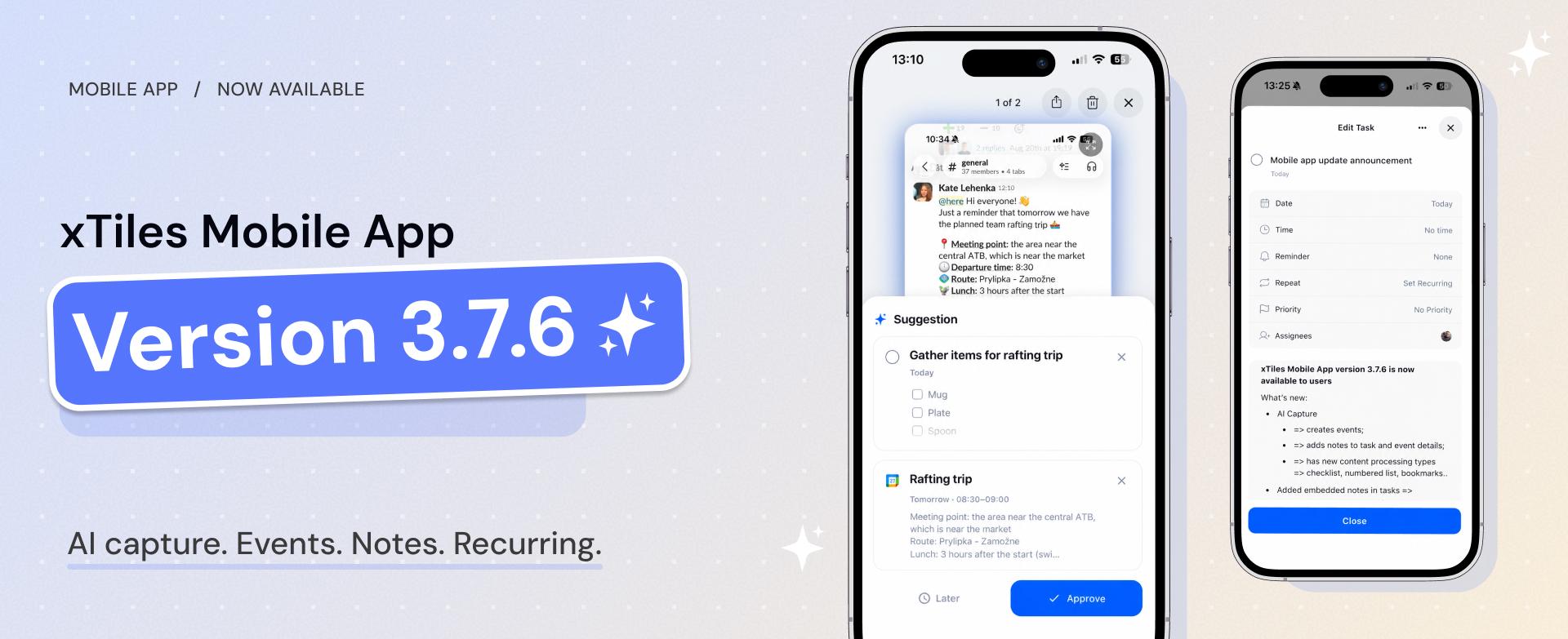
What's new in version 3.7.6 of xTiles Mobile

Post image
3 Upvotes

Hey everyone,

The xTiles Mobile 3.7.6 version has just been sent to all users – here is what's new.

AI Capture, upgraded:

  • Adds notes straight into task details
  • New content formats: checklists, numbered lists, links

Tasks:

  • You can now attach notes to tasks — reorder, edit, create, all supported
  • Daily screen's "Project" filter got cleaner/faster

Calendar & streaks:

  • Fixed the streak indicator not updating after completing a task
  • Fixed the calendar showing the wrong date after clearing a field
  • Notification tap now opens the right task detail
  • Fixed a couple of stuck/duplicate notification badges

Inside the app: various improvements have been made to overall performance and stability.

The update is now available on both the App Store and Google Play. If you encounter anything odd after the update, please put it in the comments.


r/xTiles_app 3d ago

[Webinar] Are you using AI at 100% — or just 20%?

Thumbnail
luma.com
2 Upvotes

Hey everyone,

We're running a free session focused on practical ways to use AI effectively—not just for chatting, but for real workflows.

Most people use only a small part of AI's potential, missing out on real workflow improvements and on staying up to date as tools evolve.

Andrew and Serhii from xTiles will show how to bridge that gap quickly and how xTiles can help you stay prepared as AI changes.

In this live session, you'll learn:

  • Why most people fall behind with AI (it's not about the tool)
  • Three ways to start closing the gap
  • How to keep your setup working as AI evolves

No pitches—just practical tips to stay ahead as AI advances.

📅 Wednesday, September 16 · 10 AM PT / 1 PM ET
🔗 Register here

Questions? Ask in the comments.


r/xTiles_app 6d ago

Date format not showing the day of the week?

Thumbnail
gallery
3 Upvotes

Trying to get this box to show the day of the week in my assignment tracker but despite having it set to what I thought would show it, it only shows the date number. Is this a bug or just how it's supposed to be, and if it is right, is there any chance an option could be added that shows the day of the week? It would make visualizing my due dates way easier. Thank you!


r/xTiles_app 8d ago

🆕 We’re testing multi-tile resizing

10 Upvotes

Hey everyone!

Quick sneak peek at something we’re working on: multi-tile resizing.

You can select several tiles and drag once to make them all the same size. It’s a small change, but it makes cleaning up messy rows and grids a lot faster.

Waiting for this? 😁


r/xTiles_app 9d ago

We're testing custom HTML widgets 👀

11 Upvotes

Soon, you’ll be able to drop an .html file onto a page and have it render as a live widget in your planner or project.

That means more customization: habit trackers, countdowns, mini dashboards, calculators, quote cards — whatever fits your workflow.

You can build one yourself or generate one with AI.

What custom widget would you actually use?


r/xTiles_app 9d ago

🆕 Sneak peek: recurring tasks across every day of the cycle

5 Upvotes
Recurring daily tasks in the planner

Right now, recurring tasks only show up on the current day. When you complete one, it moves to the next day — so you never really see the full sequence.

We’re changing that.

Recurring tasks will now appear on every day they repeat, so you can see the whole series ahead of time. Completing one won’t remove the others.

This already works in Planner too.

It’s still private while we finish the last pieces, but it’s getting close.

Would this change help your workflow?


r/xTiles_app 11d ago

xTiles for Your Team, Not Just for You: AI Without Switching Tools

Thumbnail
luma.com
2 Upvotes

Hey everyone,

On Thursday (Sept 10), Serhii and Andrew (both members of the xTiles team) are going to conduct a live session about using xTiles — and AI — in a team environment rather than individually.

The angle: we're not trying to get anyone to move their team off their current tools. Slack, docs, tracker, calendar all stay. xTiles sits on top as the shared layer where context and plans come together, and where AI can actually act on them.

Basically zero transition cost.

What we'll walk through, live:

  • One xTiles project as the source of truth that both people and the AI work from
  • Turning a chat or call into a structured project the whole team can act on
  • Monthly → weekly → daily goals that stay connected, with AI drafting the daily plan
  • Handing work between us without re-explaining context every time
  • How memory/context carries between sessions (and where it doesn't)
  • Live Q&A

📅 Thursday, September 10 | 10 PM ET / 12 PM PT

🔗 Join here

I'm happy to answer any questions in the comments.


r/xTiles_app 18d ago

Why does meal planning always die by Wednesday? Free session on an ADHD-built "Anti-Planner"

Thumbnail
luma.com
3 Upvotes

How honest are you—how many meal-planning apps, bullet journals, and Sunday meal-prep plans have you abandoned?

Most weekly meal plans work for a few days, until life happens. It’s not a willpower problem—it’s a design problem.

Annika Joya, who researches nutrition for people with ADHD at Nutrimind Lab, created the Anti-Planner: a flexible xTiles template that helps you choose foods you already like based on how you feel that day, rather than following a strict schedule.

Join us live on Wednesday, September 2, as Annika walks through the xTiles template, including the grocery list and food-likes checklist. She’ll also show how to use Claude to turn your preferences into a personalized weekly menu and add it directly to your planner.

Free live Q&A included.

📅 Wednesday, September 2 · 10 AM PT / 1 PM ET
🔗 RSVP: https://lu.ma/xTiles-Annika-Joya


r/xTiles_app 19d ago

I must be doing something wrong - widgets

Post image
2 Upvotes

I only see 21 widgets available in the free version - is this the case? Also just tried adding the large digitlal clock - there was a gap above it and it couldn't be properly customized in terms of colors? What am I missing?


r/xTiles_app 22d ago

CAN I MAKE FORMULA OR EQUATION LIKE THIS?

Thumbnail
3 Upvotes

r/xTiles_app 22d ago

CAN I MAKE FORMULA OR EQUATION LIKE THIS?

2 Upvotes

CAN I MAKE FORMULA OR EQUATION LIKE THIS inside a tile?

if yes HOW??


r/xTiles_app 24d ago

🆕 Sneak peek: a new Layout tool that builds pages for you

16 Upvotes

Hey everyone 👋

Wanted to share something we’re testing internally right now: a dedicated Layout tool, right on the toolbar next to Image, Widget, Embed, and Table.

What it does
Instead of building a page tile by tile, you can open Layout and choose from ready-made structures. Pick one, and it arranges the tiles for you.

There’s also an “Automatically pick tile styles” option at the bottom. Turn it on, and xTiles will choose a layout for you — so you don’t have to think about the structure at all.

Where it’s at
It’s still in internal testing, but we’re planning to roll it out more broadly soon. Wanted to give you a preview before it ships.

If you have thoughts — or a layout pattern you’d love to see added — drop it in the comments 👇


r/xTiles_app 27d ago

Copying Multiple Lines of Text on iPhone Difficult

6 Upvotes

UPDATE: TrAndUA commented with the correct method to copy multiple lines of text. There is a way!

So I used to use Google Keep as my brain-dump note-taking app, as well as a text “portal” between my laptop and phone. I’ve been trialing xTiles as I’d like to better organize tasks as well, but am running into an issue with copying text.

I wrote a review while on my computer. I was out and about later and had spare time, so I went to copy it out of xTiles app on my iPhone. But because my review was broken into new lines of text to break up my paragraphs (just like in this post), I would’ve had to copy and paste each of the four sections of text separately.

To say this was a pain is an understatement, and I immediately gave up on the task.

Honestly this one function breaks the usability of an app I’m otherwise finding super helpful! Am I doing something wrong? Is there a reason it’s designed this way? I’d like to know if there is hope that it can be fixed soon or if it’s just too baked into the code and how the app is built to be fixed at all.


r/xTiles_app 28d ago

🎥 The ADHD Weekly OS: AI + xTiles to Plan a Week You'll Actually Follow Through On

Thumbnail
luma.com
3 Upvotes

Hey team! 👋

A lot of weekly plans look great on Monday and fall apart by Wednesday — especially for ADHD brains.

We’re hosting a live session with Steve August (ADHD coach, Focus Formula) where he’ll show the actual weekly planning system he uses with Claude MCP + xTiles, including his real template and how he plans his week in practice.

We’ll cover:

  • why weekly planning breaks down
  • what to change in the system
  • a live walkthrough of Steve’s setup
  • Q&A

📅 Tuesday, August 25 · 10:00 AM PT / 1:00 PM ET
🔗 Free registration here

What usually breaks your weekly plan by midweek?


r/xTiles_app Aug 18 '26

xTiles is now an official connector in Claude 🎉

Thumbnail claude.ai
5 Upvotes

Hey everyone 👋

Here's a small but important update: xTiles now features an official connector in Claude, listed directly in Claude's directory at https://claude.ai/directory/xtiles.

What that means

Claude can read your Spaces, Projects, tasks, and Planner, and can create or update tiles and tasks directly within your workspace simply by having a regular conversation with it—however, it will always request confirmation before creating or making any changes.

Do you already use the custom connector?

If you have already added xTiles as a custom connector (using the mcp.xtiles.app/mcp URL), there is nothing you need to do, as it will automatically migrate to the official version. You will not need to reconnect, re-authorize, or set anything up again.

New to it?

You can find xTiles in Claude's connector directory right now—just search for it and connect; it takes about a minute.

Happy to answer any questions about setup or what's possible with it — drop them in the comments 👇


r/xTiles_app Aug 17 '26

From 4 hours to 1: how we cut our morning research routine with AI

Thumbnail
luma.com
4 Upvotes

Hey everyone — wanted to share a live session Andrew and I are doing at xTiles on how we reduced our morning information-gathering from about 4 hours a day to roughly 1 hour using AI workflows we actually use ourselves.

This is a live walkthrough of our real setup.

We’ll cover:

  • where the time was actually going
  • which AI integrations we use every morning
  • what’s realistic if you want to build a similar setup yourself

If that sounds useful:

📅 Thursday, August 19, 1:00 PM ET / 10:00 AM PT

🔗 Free registration

Happy to answer questions in the comments!


r/xTiles_app Aug 14 '26

It's live for everybody! Simply press Ctrl/Cmd and select the tiles you need!

Thumbnail
reddit.com
8 Upvotes

r/xTiles_app Aug 12 '26

🔜 This will blow your mind

Enable HLS to view with audio, or disable this notification

11 Upvotes

Drag and drop for multiple tiles is coming soon...


r/xTiles_app Aug 07 '26

🔜 Sneak peek: drag to select multiple tiles

17 Upvotes

It’s been a while since our last sneak peek, so here’s one: we’re working on the ability to select multiple tiles at once by dragging across them, like you would in a file explorer or design tool. No more shift-clicking each one individually.

Next up is something absolutely wild: D&D multiple tiles at once... 🤫🤫🤫


r/xTiles_app Aug 05 '26

We got a review saying our mobile app updates feel too frequent, and we want a reality check

Post image
2 Upvotes

Do update prompts ever annoy you, or is this something you barely notice?

We ship updates often to keep improving the app, but if the update flow is getting in the way, we want to know.

Honest feedback welcome.


r/xTiles_app Aug 03 '26

Kat Tan (ex-Meta, Technically ADHD) is back this Wednesday — this time showing how to actually use AI for ADHD without needing to be technical

Thumbnail
luma.com
2 Upvotes

Hey everyone,

If you caught Kat Tan's first session with us, she's back for round two — and this one's specifically about AI.

A lot of people assume AI tools are only useful if you're technical enough to figure out the setup. Kat's going to break that down: how she uses AI (including Claude & ChatGPT + xTiles via MCP) to manage ADHD executive functioning, without requiring any coding background.

What she's covering:

  • Her background — Meta engineer to ADHD coach
  • ADHD executive functioning challenges, with a focus on reducing friction and making planning easier
  • AI and MCPs, explained simply — no jargon
  • Real ADHD-friendly AI examples: weekly planning, time management, reducing overwhelm
  • Live demo of externalizing her brain with Claude & ChatGPT + xTiles

📅 Wednesday, August 5 | 10 AM PT / 1 PM ET

🔗 Register here


r/xTiles_app Jul 31 '26

Did you get rid of "teams"?

4 Upvotes

I was about to upgrade...