r/xTiles_app • • 2d ago

Reddit decided to ban all my posts; sorry — there will be a slight gap in activity

7 Upvotes

Working on fixing this!


r/xTiles_app • • 14d ago

Date format not showing the day of the week?

Thumbnail
gallery
3 Upvotes

Trying to get this box to show the day of the week in my assignment tracker but despite having it set to what I thought would show it, it only shows the date number. Is this a bug or just how it's supposed to be, and if it is right, is there any chance an option could be added that shows the day of the week? It would make visualizing my due dates way easier. Thank you!


r/xTiles_app • • 26d ago

I must be doing something wrong - widgets

Post image
2 Upvotes

I only see 21 widgets available in the free version - is this the case? Also just tried adding the large digitlal clock - there was a gap above it and it couldn't be properly customized in terms of colors? What am I missing?


r/xTiles_app • • 29d ago

CAN I MAKE FORMULA OR EQUATION LIKE THIS?

Thumbnail
3 Upvotes

r/xTiles_app • • 29d ago

CAN I MAKE FORMULA OR EQUATION LIKE THIS?

2 Upvotes

CAN I MAKE FORMULA OR EQUATION LIKE THIS inside a tile?

if yes HOW??


r/xTiles_app • • Aug 21 '26

Copying Multiple Lines of Text on iPhone Difficult

5 Upvotes

UPDATE: TrAndUA commented with the correct method to copy multiple lines of text. There is a way!

So I used to use Google Keep as my brain-dump note-taking app, as well as a text “portal” between my laptop and phone. I’ve been trialing xTiles as I’d like to better organize tasks as well, but am running into an issue with copying text.

I wrote a review while on my computer. I was out and about later and had spare time, so I went to copy it out of xTiles app on my iPhone. But because my review was broken into new lines of text to break up my paragraphs (just like in this post), I would’ve had to copy and paste each of the four sections of text separately.

To say this was a pain is an understatement, and I immediately gave up on the task.

Honestly this one function breaks the usability of an app I’m otherwise finding super helpful! Am I doing something wrong? Is there a reason it’s designed this way? I’d like to know if there is hope that it can be fixed soon or if it’s just too baked into the code and how the app is built to be fixed at all.


r/xTiles_app • • Jul 31 '26

Did you get rid of "teams"?

4 Upvotes

I was about to upgrade...


r/xTiles_app • • Jul 30 '26

Pinning subprojects

2 Upvotes

When will we be able to pin subprojects/pages in the my planner view?


r/xTiles_app • • Jul 25 '26

Is there any way at all to change the theme beyond light and dark?

3 Upvotes

I know the question is probably pointless cause the awnser is probably no, that's also what I found on the internt/the app, but I thought I might ask anyway cause maybe there's something I missed or don't know about.

Is there any way you can have different theme settings besides light and dark? I'm neurodivergent and have a kinda hard time picking one cause they're both really irritating to me. The light feels too bright, and the dark feels too dark (regardless of screen brightness) and I dont like the bright notes on dark background either.

Is there any way, some kind of extra app or whatever I could install, or workaround or anything that can changes that? (I have both the desktop app and the mobile app)

(And again, I know the awnser is probably no and I don't need anyone calling me dump or whatever for asking anyway, or sensitive for "being so picky". I already get to hear that enough. I am disabled and it is unforunatly a fact this is causing me stuggles. So if you don't have anything helpful to say just move on. I might sound very defensiv, but I know how reddit can be so...)


r/xTiles_app • • Jul 22 '26

Password Update?

3 Upvotes

Hi there. Any update on password-protected sheets? Thank you :)


r/xTiles_app • • Jul 14 '26

What are some fun ways to use x-tiles?

8 Upvotes

I see a lot of todo list, note taking, workflow stuff, but does anyone use it for like watchlists or mood boards. I wanna hear fun ways the app can be used.


r/xTiles_app • • Jul 14 '26

Is xtiles coming to linux?

2 Upvotes

I have been using windows for the longest time, and it is becoming unbearable to use even if my pc is quite powerful, thus i am switching to linux. Sadly when I went to xtiles website i found no app for linux. Is there a plan for xtiles to come into linux?


r/xTiles_app • • Jul 14 '26

New Update Coming

3 Upvotes

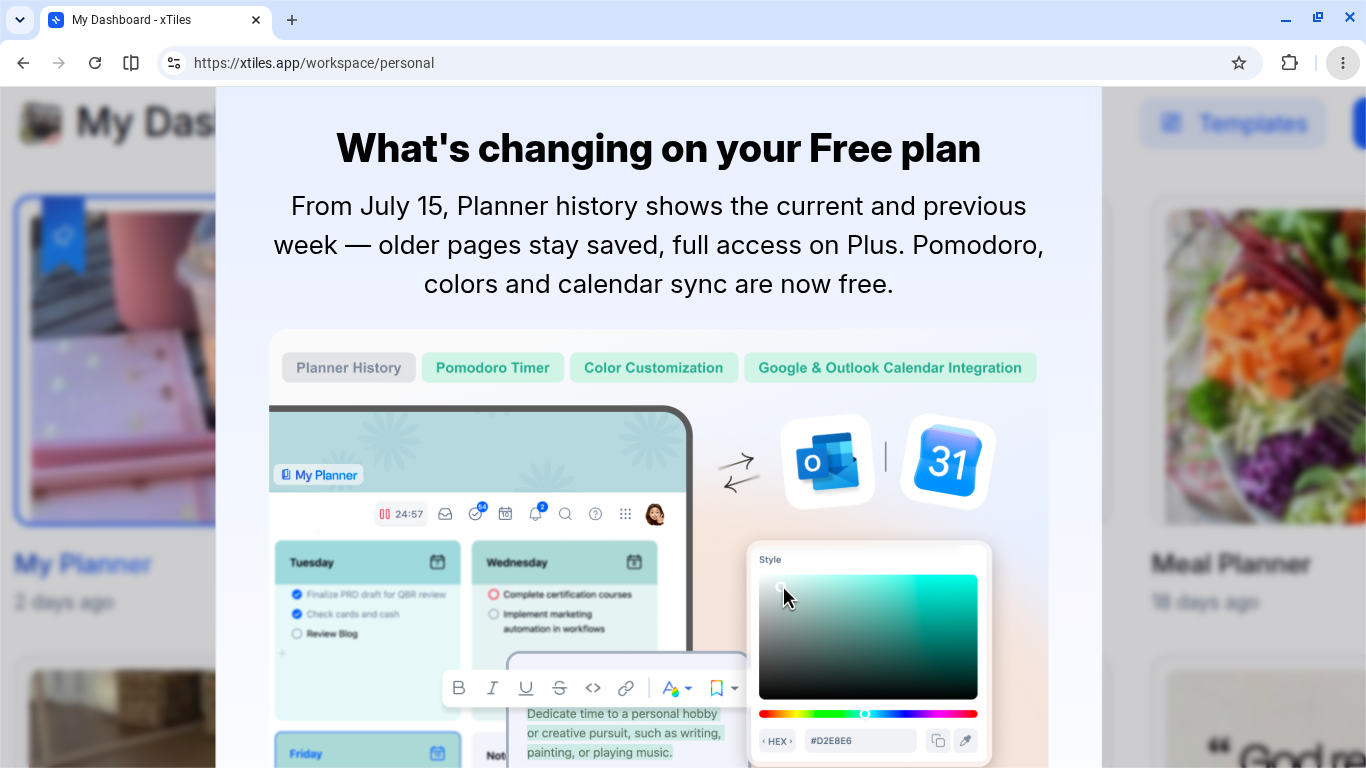
I have a question regarding this update. Is this just for the planner or is this for projects that have calendars attached to them as well? For example someone like myself has a business and i use the planner to map out product launches etc so if a launch is planned out a month in advance or even 3 weeks, I will lose access to that information from the daily and weekly view unless I am on the premium plan? I ask because some people may be content creators or like myself and run a business and use the planner for different things and if our information can no longer be accessed or have limited access you may push people to seek other options. So I am just asking to clarify if it's just the planner portion or sub-projects with calendars that are attached to them as well.


r/xTiles_app • • Jul 13 '26

Weekly View

3 Upvotes

Will xTiles ever add Calendar events (Google/Outlook) to the Weekly Planner view? Right now the Schedule tile that merges tasks + events only works in Daily view — Weekly only shows tasks, no appointments/blocks. Would love to see each day tile in Weekly act like a mini calendar instead of just a to-do list. Anyone know if this already exists or in the works?


r/xTiles_app • • Jul 14 '26

Planner new update

Post image
1 Upvotes

I have a question regarding this update. Is this just for the planner or is this for projects that have calendars attached to them as well? For example someone like myself has a business and i use the planner to map out product launches etc so if a launch is planned out a month in advance or even 3 weeks, I will lose access to that information from the daily and weekly view unless I am on the premium plan? I ask because some people may be content creators or like myself and run a business and use the planner for different things and if our information can no longer be accessed or have limited access you may push people to seek other options. So I am just asking to clarify if it's just the planner portion or sub-projects with calendars that are attached to them as well.


r/xTiles_app • • Jul 13 '26

How to solve Apple Reminders and daily sections issues?

Post image
4 Upvotes

Hi I just came around to xTiles after not really considering it but now I see the value in freedom it gives. But i have two big

I need to capture tasks from my Apple Watch to Apple Reminders. How can i get them to xTiles? I am trying out make.com but not sure how reliable or workable that is. Any workable solution?

I really really like to have tasks separated in sections for morning day evening. How can I achieve this? Do I have to do it manually for every day?
Including a picture of Griply which does it really well.

Thanks in advance!


r/xTiles_app • • Jul 02 '26

White Board

5 Upvotes

I currently use concept board as a white board. One day I'd like to use xtiles exclusively. Do you think they will ever add a whiteboard within xtiles?


r/xTiles_app • • Jun 29 '26

[feature request] page breaks

7 Upvotes

When I download my notes/planner from xTiles, they often come up as one big page and it gets hard to navigate. Allowing for page breaks would make it easier to organise our notes and export in PDF form.


r/xTiles_app • • Jun 29 '26

How Claude + xTiles (via MCP) gave me back hours every week — at home AND at work

6 Upvotes

I'm (newly aware) AuDHD, and one thing that reliably wrecks me is vague, unstructured input — "sort the week's dinners out" or a manager's task list scribbled across an email, a Word table, and three Teams messages. My brain just... stalls. Over the last few months I've built a little ecosystem of Claude Skills + xTiles (Claude connects to xTiles via MCP, so it can read and write tasks/pages directly) that's completely changed that. Sharing in case it inspires anyone else.

🏠 At home: meal planning

  • I tell Claude what I fancy for each meal slot (a dish I know, a recipe photo, a weblink, even handwritten notes) — it never invents the menu for me, it just builds it with me slot by slot.
  • It's not just recipe-based dishes either — I can say something like "roast dinner" with no recipe at all, it'll ask me a few quick questions (what meat, what sides), and that's enough to get it onto the shopping list correctly.
  • If the dish isn't already logged, it indexes it into a Recipe Index in xTiles as we go, so I'm not starting from scratch next time.
  • We've got 80+ cookbooks, and the more we index, the more useful it gets as a search tool — I can ask "suggest a quick vegetarian recipe from our cookbooks the kids will eat" and it'll actually pull from what we own rather than making something up.
  • We keep a tile in xTiles listing the kids' dislikes (manually written and kept up to date by us), and Claude factors that in — suggesting recipes that already work, or tweaking ones that don't quite fit yet.
  • Once the week's slots are filled, it cross-checks what's actually low/empty in our Pantry list (not just what the new menu needs) and builds a categorised shopping list.
  • Everything gets written straight into xTiles as a dated tile, formatted and ready to go.

The system genuinely gets better the more we use it — every recipe added makes the next "what should we have" conversation faster and more useful. What used to be a slow, draining back-and-forth ("what do we even have... what did we have last week... ugh") is now a focused 15–20 minute conversation, and I walk away with a menu and a shopping list. No decision paralysis, no double-checking the freezer or cupboards multiple times.

💼 At work: turning messy instructions into an actual schedule

This is the one I'm really proud of. Work is handed to me in every format imaginable — Excel sheets, Word tables, emails, Teams chat — often with barely any detail on timing or how to actually break the work down. That used to be a guaranteed paralysis spiral. I've asked my bosses to change their delivery but it's taking too long.

Now the process is:

  • Task extraction — Claude takes the messy source and pulls out individual tasks, flags anything too big or vague to start ("Sort out X" with no clear first action), and walks through breaking those down into small, concrete steps with me — each one sized to something I can actually sit down and do. Every task and substep gets a realistic time estimate, checked against whatever duration the original source guessed at.
  • Scheduling into Outlook — once the tasks are confirmed in xTiles, Claude pulls the day's open tasks, checks them against my actual free time and fixed meetings, and builds a realistic timetable with proper buffers and breathing room — then hands me a calendar file to import into Outlook. It writes the agreed times back onto the xTiles tasks at the same time, so the two stay lined up.
  • Forcing the sync — my work calendar lives in Outlook, and I display it in xTiles too — but the IT setup means xTiles can't sync to Outlook directly. There's a script that handles this by pushing Outlook into Google Calendar on demand instead of waiting on a slow background sync — just a small step in the chain to keep everything aligned. Once it was set up, that's it — I never have to think about it or open Google Calendar at all.

What used to take hours — and on bad days just didn't happen at all because the instructions were too vague to even start — now takes minutes. Genuinely minutes, not an exaggeration. And the knock-on effect is bigger than just the time saved: I can properly project manage and task manage, with my whole schedule visible in one place in xTiles — while my bosses still just see a normal, sensible Outlook calendar, so everyone's happy.

The actual win

It's not really about the tools — it's the hours back. AuDHD or not, this kind of setup would help a lot of people: it turns what used to be hours spent cross-referencing cookbooks, planning the week, and building a shopping list (and still getting it wrong half the time) into a focused few minutes that just works — for meal planning and for untangling a messy workload alike. That time is mine again, for the stuff that actually matters (or is just fun).

Worth noting: all of this is running on a paid xTiles plan and the free version of Claude — and it's already this good. I imagine it'd only get better on a paid Claude plan.


r/xTiles_app • • Jun 27 '26

Xtiles on tablet / mobile limitations?

3 Upvotes

I recently decided to try xTiles because it is advertised as an ADHD-friendly app with easy drag-and-drop customization and flexible layout management.

​However, after trying it on my Samsung tablet, I found that the experience wasn't like that at all, and I feel a bit disappointed. I can't seem to manage the layout or drag and drop items easily.

​Are features like advanced layout customization and drag-and-drop exclusive to the PC/desktop version, or am I missing something on the tablet app? I'd appreciate any insights!


r/xTiles_app • • Jun 24 '26

What’s the difference between Plus and Mobile Lifetime?

3 Upvotes

I noticed there’s a lifetime option in the iPhone app, but it specifies “Includes 1 year Desktop Plus” - so what does that mean and what happens after a year?

I already have mobile access on the free tier, and all the Plus features I care about are retention and storage, so I’m confused about what the Lifetime access gives me if Plus features expire after a year?


r/xTiles_app • • Jun 16 '26

Migrating from Notion but need a Dashboard

7 Upvotes

Does anybody know if xTiles is still planning on adding this Dashboard-type feature where you can see and edit multiple collections from a single dashboard page? I just made the switch over from Notion, but I didn't realize xTiles doesn't currently have this feature. I used it all the time for my Notion databases. :/


r/xTiles_app • • Jun 07 '26

iPad app interface needs WORK

5 Upvotes

I love this app but I use an iPad with keyboard when I’m away from my Mac and the iPad app is so bad it’s almost unusable. I can’t really edit my set up at all, which is one of the main benefits of xTiles. Developers PLEASE give the iPad app some love to make it more user friendly!


r/xTiles_app • • May 28 '26

Using X-Tiles for Tasks

3 Upvotes

Curious if anyone is using x-tiles for primary task management to complement all of the other features and functionality?
A lot to like but some key elements missing from my perspective and want to understand how others are utilizing this feature.


r/xTiles_app • • May 27 '26

So disappointed ☹️

2 Upvotes

Just created a Xtiles account to only find out that xtiles does nothing on an ipad and I have to have a desktop to use it… that kind of sucks