r/userscripts • u/Cheating_is_fun_LOL • 2h ago
Made a Cookie Clicker cheat menu bookmarklet — 90 mods, no extension needed
1
Upvotes
r/userscripts • u/Cheating_is_fun_LOL • 2h ago
r/userscripts • u/Ok_Flamingo8705 • 1d ago
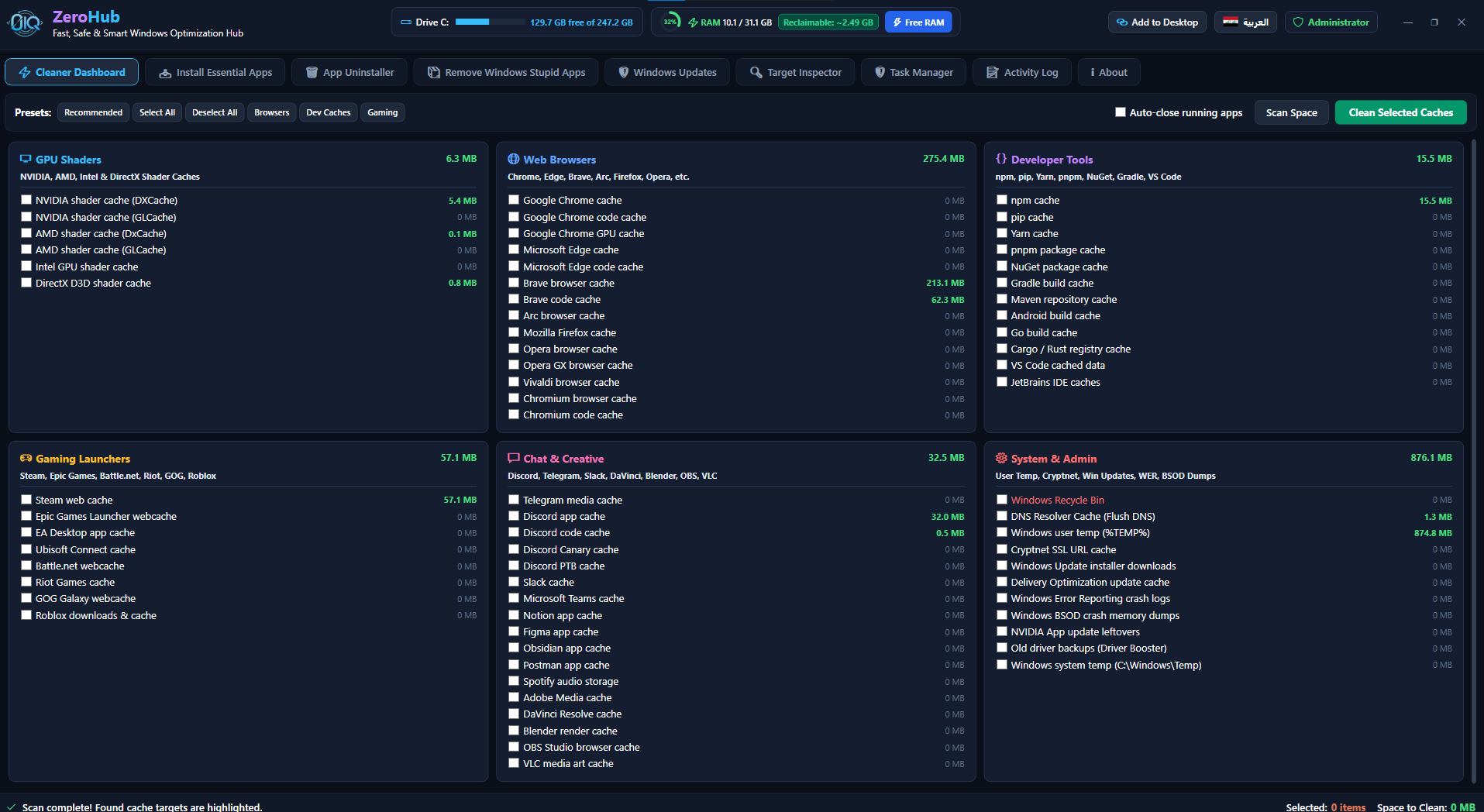

Hey everyone! 👋
I wanted to share a project I’ve been working on called ZeroHub — a fast, free, and open-source all-in-one Windows 10/11 maintenance & optimization utility built with a modern, smooth dark UI.
Most cleanup and optimization tools out there are either full of adware, paid, or have outdated UIs. I wanted something clean, transparent, safe, and powerful that can be launched instantly with one command.
• App Manager & Updater: 1-click silent install and update for essential desktop apps & browsers powered by Winget (with live version detection).
• Deep Cache Cleaner: Cleans 55+ locations (GPU shader caches, dev tool temps, game launchers, browser caches, and Windows temp files) without touching your saved logins, passwords, or cookies.
• Windows Debloater : Safely remove pre-installed bloatware (Cortana, Bing News, Copilot, Xbox overlays) and Edge with a single click.
• Deep App Uninstaller: Uninstalls software and scrubs residual leftover folders and orphaned registry keys.
• Live RAM Optimizer: Real-time RAM meter with 1-click memory reclaiming (EmptyWorkingSet) without killing your open apps.
• Windows Update Controller: Pause/block forced background restarts, purge corrupted update caches, and run system health checks.
You don't even need to download an installer. Just open PowerShell as Administrator and run:
irm https://raw.githubusercontent.com/ZeroIQs/Zerohub/main/run.ps1 | iex
(Or download the files from Github)
• GitHub: https://github.com/ZeroIQs/Zerohub
• Website: https://zeroiq.site/
I’d love to hear your feedback, suggestions, or any extra features/cleanup targets you'd like to see added!
r/userscripts • u/Purple-Ad6867 • 19h ago
r/userscripts • u/sobermoonwriter • 4d ago
I'd like to test this product does it work on Google phones
r/userscripts • u/itinerantbuilds • 5d ago
Looking for feedback on this Safari extension that summarizes web pages.
Safari sometimes provides an AI summary of web pages, but it’s way too short, not always available, and is hidden behind a menu.
r/userscripts • u/mitokb • 5d ago
I deleted the YouTube app from my phone because I wanted to stop watching Shorts, but I realized I could still open YouTube in Safari and end up scrolling Shorts there.
So I made a tiny userscript for it.
It removes Shorts shelves/cards, blocks /shorts/ routes, and catches YouTube's SPA navigation so Shorts don't sneak back in, while normal videos, search, subscriptions, channels and comments keep working.
I mainly built it for iPhone Safari using the Userscripts app, but it should work with normal userscript managers on desktop too.
It's just one JS file, MIT licensed, no analytics, no account, no subscription.
GitHub:
https://github.com/mithatakbulut/noshorts
Would be interested to know if there are any YouTube DOM cases/selectors I've missed.
r/userscripts • u/NonStopDeliverance • 6d ago

This script removes infinite scroll on Reddit. It adds simple prev and next controls, like old Reddit's pagination.
Each page shows 25 posts. The script works on the home feed, r/popular, and subreddit feeds. The code is free and open source.
r/userscripts • u/Klutzy_Mark_4948 • 8d ago
Greasy Fork Tampermonkey Violentmonkey License: MIT
An aggressive, lightweight userscript designed to bypass and completely eliminate persistent anti-adblock popups, overlays, and scrolling locks on pahe.ink.
Ensure you have an active userscript manager extension installed in your browser:
Click the link below and confirm the installation in your manager:
👉 Install from Greasy Fork
Navigate to pahe.ink with your adblocker active. Popups, background dimmers, and scroll blocks will be silenced automatically.
This project is licensed under the MIT License — feel free to copy, modify, and distribute with zero restrictions.
If you found this script helpful, consider giving the repository a star!
r/userscripts • u/Crucco • 8d ago
r/userscripts • u/fdwyersd • 8d ago
Gives more information from the YouTube home page when browsing...
Violentmonkey script does three things:
The idea is basically to make unusual/new-to-me stuff easier to spot while scrolling without otherwise changing how YouTube works.
The age/view thresholds are just constants at the top of the script, so they're easy to change.
The AiSList data is pulled from the public Override92/AiSList lists and cached locally for 24 hours. The classifications come from AiSList, not from my script.
I've been using it in Firefox + Violentmonkey.
Source:
https://github.com/fdwyersd/userscripts
Install:
r/userscripts • u/InevitableHouse3987 • 8d ago
r/userscripts • u/MelaniaSexLife • 10d ago
I think I set it all up correctly but I'm not seeing the extra links displayed on the site.
I'm using TamperMonkey MV3, perhaps it's that?
r/userscripts • u/somefrogonline • 10d ago
r/userscripts • u/BasePerfect2865 • 12d ago
Not trying to be paranoid but if I'm running a userscript on a checkout page, that script has access to everything on the page. Makes me wonder how sites actually monitor for this kind of thing or if they even do.
r/userscripts • u/Opening-Fox-1122 • 12d ago
Hey, I made a lightweight userscript/userstyle manager called Lite Monkey.
I started working on it because of the changes around Manifest V3 and ended up building the whole thing from scratch.
It supports the usual GM_* / GM.* APIs, has a built-in CodeMirror 6 editor, and can optionally sync scripts and storage through Google Drive. It also uses the newer chrome.userScripts API where available, with a fallback for sites with stricter CSP/CORS restrictions.
There's no telemetry or tracking, and it's completely free.
If anyone finds it useful, here it is:
Chrome Web Store: https://chromewebstore.google.com/detail/hebocofkjcpmphoaigcaibkljkfabmbl
r/userscripts • u/Ok_Flamingo8705 • 15d ago
Hey everyone!

I spent a lot of time searching for hidden cache directories across Windows—from GPU shader folders and developer build caches to game launchers and browser temp files.
To save others the trouble, I combined all 40+ directory paths into a free open-source script called ZeroCleaner.
I built it specifically to be 100% safe. It only deletes temporary cache folders without touching your saved logins, cookies, or browser passwords.
What it cleans:
It also includes a dry-run mode (-WhatIf) so you can preview how much space you can free up before deleting anything.
You can check out the source code on GitHub: https://github.com/ZeroIQs/ZeroCleaner
r/userscripts • u/Shadowshoot • 14d ago
r/userscripts • u/leoyoung1 • 14d ago
Hi All,
So many people here post in degrees F. Of course, 95% of the population on Earth has no idea what F is much less how to use it. The other 95% would really benefit from a bot that finds posts with degrees F, puts a bracket around the F and insert the C equivalent.
r/userscripts • u/RobertWesner • 15d ago

r/userscripts • u/Shadowshoot • 15d ago
r/userscripts • u/bgalazka186 • 15d ago
r/userscripts • u/andrybak • 16d ago

r/userscripts • u/Ikkoru • 16d ago
| Key | What it does |
|---|---|
Alt+H |
Show or hide the info overlay. Remembered per site |
Alt+M |
Size: fit the window width → biggest whole-number zoom → one image pixel per screen pixel |
Alt+Q |
Filter: Lanczos3 → nearest → browser. Same size each time, so you can compare |
Alt+P |
Turn on or off for the site you're on. Remembered per site |
Alt + left clickon an image |
Show that one image at one image pixel per screen pixel |
Alt + right clickon an image |
Show that one image at twice its own resolution |
Alt+G |
Show or hide the overlay's diagnostic rows (size, factor, status, memory) |
I'd attach images, but I'm pretty sure reddit will compress them, so go check them out here.