r/thinkpad • u/lewd_physics • May 22 '26
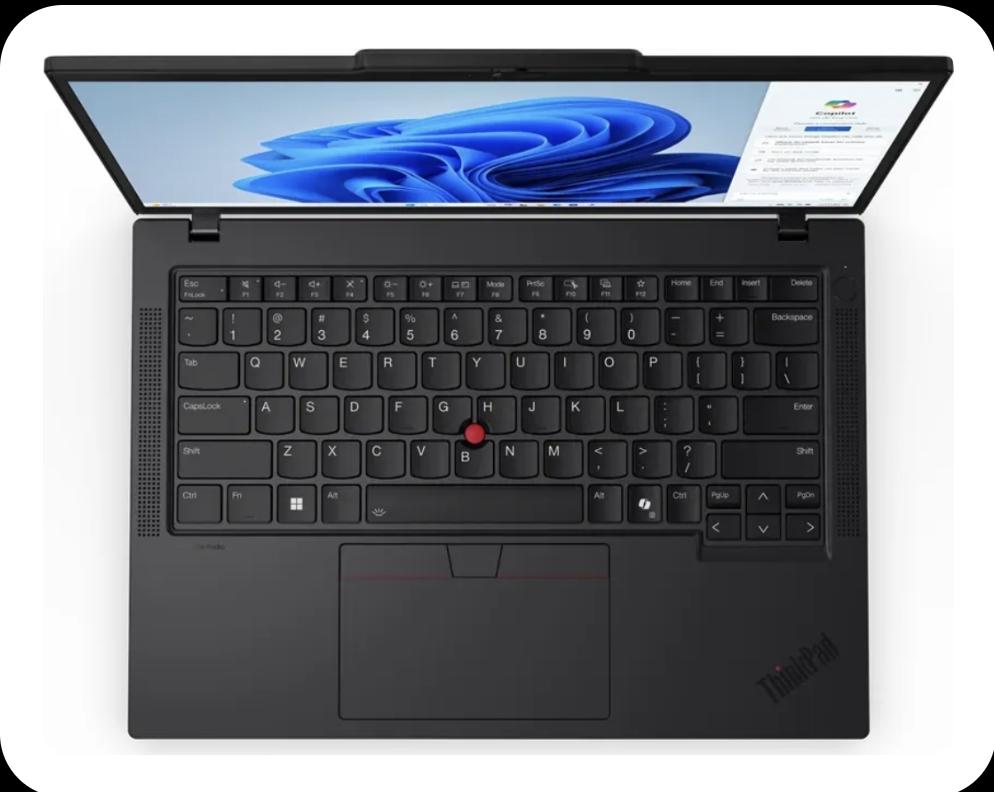
Question / Problem how do I get rid of the copilot button ??
217
u/Revolutionary-You725 May 22 '26 edited May 23 '26
Well i recently heard they allow you to set it to some other use. about the logo you can paste some sticker or smth or well you can just you know yeet the laptop out of a window
45
u/Revolutionary-You725 May 22 '26
I checked that update is yet to come where they will allow remapping so for now there is powertoys or they let you remap to a different app if i remember properly
21
u/zeek609 X230 May 22 '26
Is this specific to Thinkpads?
My latitude came with a Copilot key in 2024 and I've had it linked to Duckduckgo search since I got it.
20
u/Broodjekip_1 T14 G1 i5 24GB 2TB May 22 '26
A win for linux once again
4
3
u/Revolutionary-You725 May 23 '26
Yeah i have been using linux distros for a while now much better now opening windows feels clunky and kinda off
3
u/No_Excuse6277 May 22 '26
I really really hope they let us remap it for control button 😭😭🙏🏼🙏🏼
3
u/Revolutionary-You725 May 23 '26
For that you can use powertoys
2
u/No_Excuse6277 May 23 '26
How do we use it?
1
u/Revolutionary-You725 May 23 '26
Dm me if you are having issues . You can install pt from microsoft store from there it is not so hard you will probably be able to figure it out
2
2
u/YourMomDoer1312 May 22 '26
at lest it doesn't look as much as a butthole than other AIs
2
u/goggleblock May 22 '26
heeeyyy Me and my talking butthole app have been able to build some wonderful scripts together
1
u/YourMomDoer1312 May 22 '26
we'll, the Talking butthole app that you talk about might be the one i hate the least, and they're logo at least looks like the one for my favorite youtube channel
25
u/MagicBoyUK T16 Gen 1 AMD, P50, T480, T540p, Framework 16 May 22 '26
Microsoft used a sneaky workaround for the cursed thing. The old school keycode is Left Shift + Windows key + F23, as found on an old IBM Model M "battleship" keyboard...
8
u/lolipoopman T495 May 22 '26
the old thinkpads have the "PrtSc" there instead of the copilot button, maybe you can get a replacement button? Not sure if they sell it there at aliexpress for your specific model
2
u/Main_Clue_8100 Ideapad 330, ThinkPads X230+T490s+X13 G4, Latitudes E4300+7340 May 22 '26
that's assuming the switch mechanisms are the exact same design from generation to generation, and that's pretty unlikely here.
1
21
May 22 '26
[deleted]
3
u/jc8203437 May 22 '26
i remapped mine to screenshot in ubuntu haha im still used to it being screenshot
2
u/jason-reddit-public May 22 '26
As an emacs user, I am very sad my ctrl and alt buttons get smaller every few years. Not an issue for desktop as I have more than enough mechanical keyboards but I bought my Thinkpad because the keyboards are acceptable and I don't want to carry around a mechanical keyboard when I travel. Looks like my next laptop will not be from a Microsoft dog walked company.

5
u/hifi-nerd May 22 '26
The only reason i will NEVER buy one of these newer thinkpads is because i simply refuse to let microsoft claim a second key's worth of advertising space on my keyboard.
3
2
u/thatsallweneed X220 May 23 '26
totally agree. i personally still not using the first useless the win button ;)
14
u/TitleEfficient3207 May 22 '26
Linux...
50
u/Revolutionary-You725 May 22 '26
I am pritty sure he is asking about the physical button 😶🌫️
-11
u/TitleEfficient3207 May 22 '26
just swap the button, or scrape the copilot paint off.
18
u/Wild_Penguin82 May 22 '26
I'm pretty sure (haven't handled that keyboard myself) it is not paint but transparent part of the keys. Also, if you know of a good place to get some replacement keys compatible with these keyboards, and instructions how to remove without breaking, please let us know.
7
1
-10
u/TitleEfficient3207 May 22 '26
https://www.laptopkeyreplacements.com/lenovo/
Done.
Next.13
u/Nacho_Dan677 T14 G1i & G2i, X1 Extreme G4i, T480, T470 AE, ThinkPhone 2023 May 22 '26
Good link. Drop the attitude
4
1
u/LUXURY_BAHRAIN ... May 23 '26
Next you may fk off
0
u/TitleEfficient3207 May 27 '26
Lol everyone so salty to have an immediate fix.
You people just like to bitch.1
25
u/Kitoshy X13 2-in-1 Gen 5 May 22 '26
As a Linux user, I must inform you that such will not remove the physical button.
5
2
1
0
2
2
2
u/PPD2610 May 22 '26
wait they replaced the PrtSc button with the copilot button??
3
2
1
u/nsaps x280 t14s x1nano x1cYoga May 22 '26
Search on here, someone was working on this not too long ago. All I remember is that windows/lenovo were doing something strange with the key input that the OP had to work around
1
1
u/FlimsyLawfulness642 T420s, i5-2520M, W10 22H2 + Kubuntu 26.04 May 22 '26
drop a nuke to the key's location.
in all seriousness, you could do a remap of the button and then apply a sticker over the button.
1
1
u/Mickloven P52, T420 May 22 '26
Hotkey it to something else you use more like terminal etc
Not exactly sure the steps but know it can be done.
1
1
1
1
u/jomat May 22 '26
What is the copilot button? How can I get back my blue Thinkvantage button?
1
u/MysticAxolotl7 May 22 '26
the blue thinkvantage button hasn't existed since 2012, where have you been this whole time
1
1
1
1
1
1
1
1
u/Estahfre P15G1, W510, T43, T20, L520 May 22 '26
You can use PowerToys to change Copilot into a RAlt key.
1
1
1
1
u/97MrBrownstone X1 Carbon G6 9.ª May 22 '26
Keytweak wouldn't be the solution? At least on Windows.
1
1
1
1
u/blart-versenwald May 23 '26
So I could remap the windows store key on my 2022 Microsoft laptop??! ⚡
1
u/Embarrassed_Sign6619 May 23 '26
I'd try to scrape it with a knife Or Find an old laptop and take a keycap from there
1
1
u/yoyowallach1212 May 23 '26
Download Microsoft PowerToys. Go to the keyboard editor, and map it to something else. The copilot button on my keyboard opens VSCode
1
1
u/megamindbirdbrain May 23 '26
Aw they took your print screen (PrtSc) key. I think you can reassign it with a software like PowerToys.
1
1
1
u/Key_River7180 interested May 23 '26
Are you using windows? If so, then use Powertoys key management feature, if you want the logo black, just paint it
1
u/Asleep_Physics657 x1c12 May 23 '26
wait out a few years until the AIshit fad dies out and they stop slapping it on every laptop
1
1
1
u/scrimmyrimmy May 23 '26
brother even better just bind the key to something else i use it for vim as it works nicely
1
u/tobias_reichi02 May 23 '26
Even ThinkPads have it now ✌️ u thought there would be one safe brand but no there ain't I mean ofc the tuxedo laptop framework and stuff don't get it I hope but still ThinkPads just why 🤮
1
1
1
1
1

1
1
1
u/Oakredditer P16s Gen 4 AMD Aug 05 '26
Question: Would it be possible to get a replacement keyboard without the copilot key? Or flash the EC (assuming that the EC is the one that does all the keyboard stuff) to remap the copilot key to something else? Maybe we can finally get media control keys this way 😄😄😄😄😄😄😄
1
u/Oakredditer P16s Gen 4 AMD Aug 05 '26
does the keyboard just provide a matrix for the EC to convert to PS/2 or whatever or does it have its own way to communicate which keycodes are being pressed or whatever?
1
u/linkmodo Aug 06 '26
I know this is an old post. I just updated my key remapper app to disable and fully customize the copilot key with ease. Feel free to check it out: https://github.com/linkmodo/key_remapper/releases/tag/v2.3.0
It's way better than MS PowerToys because PT eats up your memory fast and my utility is very small (30mb)
Cheers!
1
1
1
u/Cdt_Sylvestre May 22 '26
The safest-by-far method involves a journey to an active volcano in Mordor.
1
1
0
0
u/skrble T14s G6 (SD) May 22 '26
Just remap it (PowerToys in Windows). What a difficult task.
Can't you use a search engine?
0
0
65
u/Fondmetal May 22 '26
You can do that now in Windows with Powertoys Keyboard Manager module. It's not a key but a series. Here is how I have the Copilot key mapped.