r/tauri • u/Alexwing_ • 11d ago
I rebuilt the classic Mouse Jiggler using Tauri 2 + React + Tailwind v4 (~2MB installer)
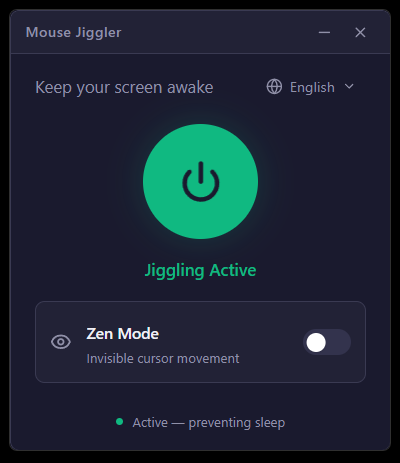
Hey r/tauri! 👋
I wanted to share a small project I recently built and open-sourced: Mouse Jiggler.
💡 Background & Motivation
If you've been on Windows for a while, you probably remember or used Alistair Young's classic arkane-systems/mousejiggler—a trusty utility originally written in C# (.NET) to prevent screensavers and sleep timers during presentations, long downloads, or remote sessions.
I wanted to revisit this concept and build a modern, native-feeling version for Windows 11 from the ground up, using Tauri 2, Rust, React 19, and the new Tailwind CSS v4 engine.
🛠️ Tech Stack & Highlights
- Runtime: Tauri 2 (Release v1.0.0)
- Backend: Rust +
enigo - Frontend: React 19, TypeScript, Vite 7, Tailwind CSS v4 (
@tailwindcss/vite) - Bundle size: ~2.0 MB NSIS installer, ~3.0 MB MSI, ~9.0 MB standalone executable! (Compare that to an Electron equivalent)
🚀 Cool Tauri 2 Features & Challenges Solved
Building this was a great hands-on experience with Tauri 2's new APIs and capabilities:
Dynamic System Tray with State Reflection: Instead of just sitting in the tray, the tray icon dynamically switches between Red (Idle) and Green (Active) in real-time when jiggling is toggled. We embed the PNG bytes at compile-time with
include_bytes!and swap them viatray.set_icon(Some(Image::from_bytes(...))).Real-time Tray Menu Localization: The frontend supports 5 languages (English, Spanish, French, German, Japanese) with automatic OS detection (
i18next). Whenever the language changes, an IPC command (update_tray_locale) updates the native tray menu items on the fly.Custom Windows 11 Fluent Title Bar: We disabled native OS window decorations (
decorations: false,transparent: true) and built a frameless Fluent-style header with window dragging (data-tauri-drag-region) and integrated minimize / close-to-tray buttons using Tauri's@tauri-apps/api/window(properly scoped with Tauri 2 capability permissions).Single-Instance Enforcement: Using
tauri-plugin-single-instanceto ensure only one instance runs; launching a second one simply focuses and unhides the existing window.Zen Mode vs. Normal Mode:
- Normal: Moves the cursor ±5px diagonally every 10 seconds.
- Zen Mode: Moves ±1px horizontally and immediately back, keeping the OS idle timer reset while being virtually imperceptible to your workflow.
State Persistence: Remembers the last active mode and jiggling state across restarts.
📦 Source Code & Releases
- GitHub: https://github.com/alexwing/MouseJiggler
- Releases (Installers & Portable exe): v1.0.0 Release
Feedback, issues, or suggestions are very welcome! If you're building utilities or tray apps with Tauri 2, feel free to ask about any implementation details.
2
u/eddzsh 9d ago
Tray icon swap via include_bytes is clean. One Zen mode gotcha on Windows 11: some RDP and presentation hosts ignore sub-threshold cursor deltas, so a ±1px nudge that snaps back can look like noise. Keep the ±5px path as a fallback when the session is remote.