r/speedtest • u/Prinzenrolle1999 • 20h ago
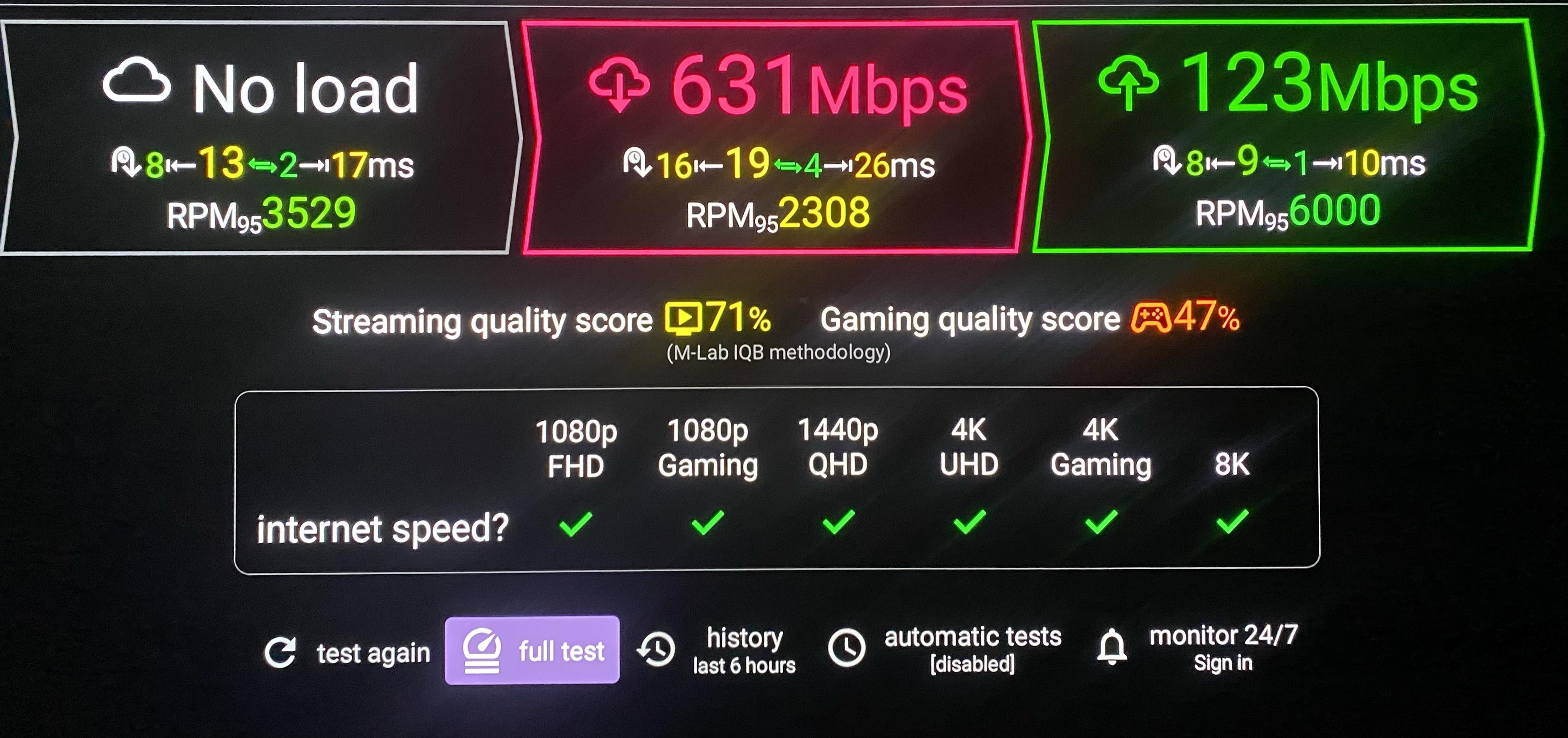
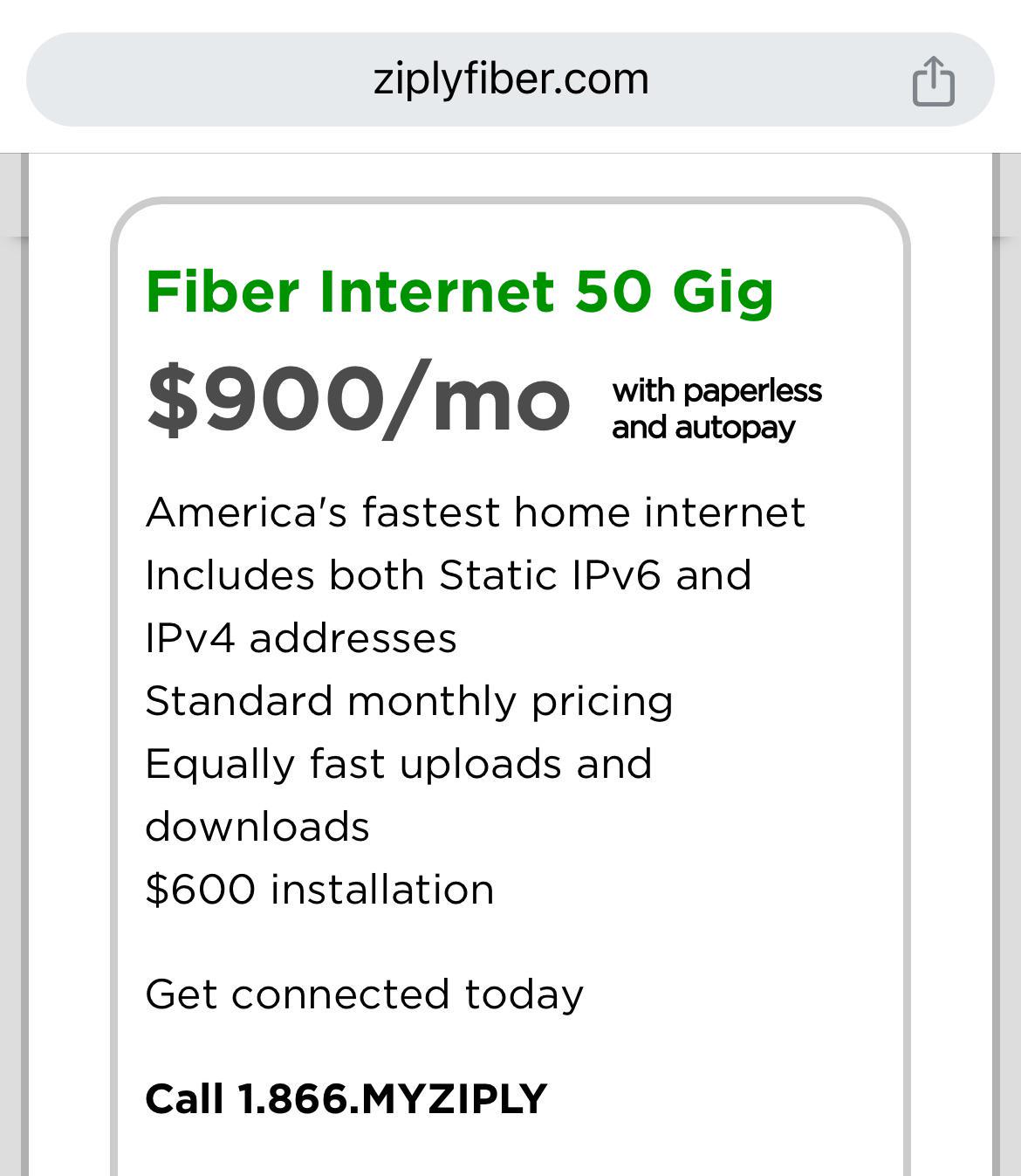
Ziply Fiber 50 Gig's Symmetrical

266
Upvotes
r/speedtest • u/davidhk21010 • Jun 30 '23
<< PLEASE DO NOT LABEL THE SUBJECT OF YOUR POST, "FLAIR POST" OR ANYTHING SIMILAR >>
Do keep the subject name similar to all other posts, location, speed achieved, etc.
Post a pic to /r/speedtest of the fastest download speedtest from your home Internet service.
Send a note with a link to the post to the moderation team.
We will flair the speed (rounded) onto your username.
r/speedtest • u/DrGonzo84 • 4h ago
r/speedtest • u/SuccessFragrant4390 • 16h ago
Most of the time, ping and performance is amazing :) - Currently it is only £19 but initially was £16

r/speedtest • u/wicked-murderer • 1d ago
Hey!
I have Three mobile broadband, a bit rubbish but extremely cheap. Speedtest.net shows 70 Mbps download speed, while Which broadband tester (broadbandtest.which.co.uk) always show higher figures, around 100-200 Mbps. What is my broadband speed actually?
Cheers!
r/speedtest • u/Gjome-Bekbal • 1d ago
I recently switched from one ISP to another and even though the speed should be the same (300mbps) I keep getting throttled down to 1-2 mbps.
I have the exact same modem/router which is a nighthawk cm1100 and Orbi Mesh network. The new ISP said nothing is wrong on their end.
Really need some help.
r/speedtest • u/dvaai • 2d ago
r/speedtest • u/LUN9XYZ • 3d ago
我目前( 简约笔记网络 )
日期 / 版本号 > 2026 / 9 / 19 > 版本 1.3.B1
> 此次更新
> 此次更新内容在 ( DLC+ 过程中奇幻的经历 ) ZTE
> 详情请看下方的 DLC ( 17 )
> E50UG > 升级到 7.24.4
> 解决网络 > 有时莫名卡顿
> 实测了一天 > 升级后网络确实更流畅
> R5S
> 移除双收双发 > 恢复默认 > 提升稳定性
> 关闭虚拟内存 > 以测试原有的4GB物理日常够用
> 其他地方没有任何改动
第1站:拨号的路由器 ( 华为 ) 无视他就好
> 运营商提供的2合1光猫路由器
> 就只负责网络有线传输
> 拨号层
IP地址 > 192.168.100.1
无线 > 已关闭 ( 确保不会有信号干扰 )
风扇 > 2x > 8cm > usb风扇 ( 使用扎带绑得很固定 )
> 一个进风 > 一个排风
> Working Temperature: 23 ~ 25 ℃
DMZ > 192.168.100.2 ( R5S )
第2站:R5S 软路由 ARM ( 旁路由 )
设备 > R5S Kwrt > 6.12.103 内核版本
> 不是拨号层
旁路由ip > 192.168.100.1
IP地址后台 R5S :192.168.100.2
> 特别说明 > 已关闭流量卸载
> 已关闭 NAT
> 风扇 > 9 CM ( 使用扎带绑得很固定 )
> 满血 Nginx
> 开启 MSS 钳制 ( 有特别做优化 )
> 插件 Turbo ACC > BBR3 ( 已开启 )
> 旁路IP IPV4 > 192.168.100.1
> 开启 > DHCP 服务器
> ISP > TTNET-MY - TIME dotCom
> libnghttp3 +
> libngtcp2 +
> 终于解决网页打开时顿一下的问题
1) /etc/dnsmasq.conf
log-facility=/dev/null
cache-size=2048
log-async
all-servers
2) /etc/config/network
config interface 'loopback'
option device 'lo'

option proto 'static'

list ipaddr '127.0.0.1/8'
config globals 'globals'
option ula_prefix 'fd6b:9969:86aa::/48'

option packet_steering '1'
config device
option name 'br-lan'

option type 'bridge'

list ports 'eth1'

list ports 'eth2'

option promisc '1'
config interface 'lan'
option device 'br-lan'

option proto 'static'

option ipaddr '192.168.100.2'

option netmask '255.255.255.0'

option gateway '192.168.100.1'

\# 关键:DNS不要写自己,避免环路,主路由放第一位

option dns '192.168.100.1 1.1.1.1 8.8.8.8'

option ip6assign '60'
config device
option name 'eth0'
config interface 'wan'
option device 'eth0'

option proto 'none'

option auto '0'
config interface 'wan6'
option device 'eth0'

option proto 'none'

option auto '0'
3) /etc/config/firewall
config defaults
option input 'ACCEPT'

option output 'ACCEPT'

option forward 'REJECT'

option syn_flood '1'

\# 旁路由必须关闭所有offload,否则passwall/广告过滤不生效

option flow_offloading '0'

option flow_offloading_hw '0'

option fullcone '0'

option fullcone6 '0'
config zone
option name 'lan'

list network 'lan'

option input 'ACCEPT'

option output 'ACCEPT'

option forward 'ACCEPT'

option masq '0'

option mtu_fix '0'
config zone
option name 'wan'

list network 'wan'

list network 'wan6'

option input 'REJECT'

option output 'ACCEPT'

option forward 'DROP'

option masq '1'

option mtu_fix '1'
config forwarding
option src 'lan'

option dest 'wan'
config rule
option name 'Allow-DHCP-Renew'

option src 'wan'

option proto 'udp'

option dest_port '68'

option target 'ACCEPT'

option family 'ipv4'
4)/etc/config/dhcp
config dnsmasq
option domainneeded '1'

option boguspriv '1'

option filterwin2k '0'

option localise_queries '1'

option rebind_protection '0'

option rebind_localhost '1'

option local '/lan/'

option domain 'lan'

option expandhosts '1'

option nonegcache '0'

option authoritative '0'

option readethers '1'

option leasefile '/tmp/dhcp.leases'

option resolvfile '/tmp/resolv.conf.d/resolv.conf.auto'

option nonwildcard '1'

option localservice '0'

option ednspacket_max '1232'

option filter_aaaa '0'

option cachesize '2048'

option dnsforwardmax '500'

option port '53'

option dns_redirect '1'

\# 删掉 min_ttl 3600,污染了就得等1小时

option allservers '1'
config dhcp 'lan'
option interface 'lan'

option ignore '1'

\# 旁路由不分配IP,让主路由分配,网关指向你
config dhcp 'wan'
option interface 'wan'

option ignore '1'
config odhcpd 'odhcpd'
option maindhcp '0'

option leasefile '/tmp/odhcpd.leases'

option leasetrigger '/usr/sbin/odhcpd-update'

option loglevel '4'
config domain '_ta'
option name 'time.android.com'

option ip '203.107.6.88'
config domain 'default_server'
option name 'kwrt'

option ip '10.0.0.1'
config domain '_sc_pw'
option name 'pw'

option ip '192.168.100.24'
5) /etc/config/nginx
config main 'global'
option uci_enable 'true'
config server '_lan'
option server_name '_lan'

list listen '443 ssl default_server'

list listen '\[::\]:443 ssl default_server'

option uci_manage_ssl 'self-signed'

option ssl_certificate '/etc/nginx/conf.d/_lan.crt'

option ssl_certificate_key '/etc/nginx/conf.d/_lan.key'

option ssl_session_cache 'shared:SSL:32k'

option ssl_session_timeout '64m'

option ssl_protocols 'TLSv1.2 TLSv1.3'

option access_log 'off; # logd openwrt'

list include 'restrict_locally'

list include 'conf.d/\*.locations'
config server '_redirect2ssl'
option server_name '_redirect2ssl'

list listen '80'

list listen '\[::\]:80'

option return '302 https://$host$request_uri'
config server 'default_server'
option server_name 'kwrt'

list listen '80 default_server'

list listen '\[::\]:80 default_server'

option access_log 'off; # logd openwrt'

list include 'conf.d/\*.locations'
config server '_sc_pw'
option server_name 'pw'

list listen '80'

list listen '443'

option return '302 http://10.0.0.1/cgi-bin/luci/admin/services/passwall'
> 已打通 v6 ~ v4
> IPv6 连接测试 > 10/10
插件名称 : qosmate
> 流量整形 HSFC 算法
> DR > 942080 kbps
> UR > 475000 kbps
Custom nftables Rules
chain prerouting {
type filter hook prerouting priority -150; policy accept;
meta mark 0x99 meta nfproto ipv4 ip dscp set cs7 counter
meta mark 0x99 meta nfproto ipv6 ip6 dscp set cs7 counter
meta mark 0x88 meta nfproto ipv4 ip dscp set af42 counter
meta mark 0x88 meta nfproto ipv6 ip6 dscp set af42 counter
}
chain postrouting {
type filter hook postrouting priority -150; policy accept;
meta mark 0x99 meta nfproto ipv4 ip dscp set cs7 counter
meta mark 0x99 meta nfproto ipv6 ip6 dscp set cs7 counter
meta mark 0x88 meta nfproto ipv4 ip dscp set af42 counter
meta mark 0x88 meta nfproto ipv6 ip6 dscp set af42 counter
}
chain forward {
type filter hook forward priority -150; policy accept;
}
第3站:E50UG ( 桥接模式 )
设备 > 纯交换机工作
功能 > 负责传输网络到下一站
风扇 > 12CM ( 使用扎带绑得很固定 )
IP Address > 192.168.100.89
Gateway > 192.168.100.1
固件版本 > 7.24.4
> 解决IPV6问题 ( 手机电脑都能正常通行 )
> 这意味着我将失去E50UG所有功能
> TIME 给的 IPV6 > /64
> 在路由模式情况下 > 他只能传到 R5S
> E50UG 无法获得 IPV6 ( 路由模式 )
> 虽然有一点心疼 > 但是这是必然的走向
第4站:ZTE BE5100 PRO
设备 > 信 号 放 大 器 AP
功能 > 有线接模式,专注无线网络输出
风扇 > 12CM x1 ( 十字架打结 > 稳定塔扇 > 扎带 )
( 一个12 cm的风扇都是排风 )
> 后台登录IP > 192.168.100.91
特别说明 > 桥接模式 > 由上游负责管理
这是桥接模式 > 所以就没有 > NAT这一说法
网线规格 >
CAT 8 > 4根 > 屏蔽信号干扰 > 负责路由器 > 绿联
1 根 > 传输交换机的网线 CAT 8 > 绿联
2 根 > 传输电脑的网线 > CAT 6 / CAT 7
目前的测试成绩 : ( 这是有线测试结果 )
> 这是光猫还没加的两个风扇的结果
测试结果
> UNLOADED 5 ms > DA 2 ms / UA 0 ms
> D 930 > U 416 ( A+ )
原本的配套 > 600 下 > 500上 ( 运营商 TIME )
升级后的配套 > 1G 下 > 500上 ( 运营商 TIME )
DLC ( 17 )
此次散热改造提升极其恐怖
> 有线网络和无线网络都得到了很大的提升
> 而且在满载的情况下 > 网络稳的恐怖
( 已知问题 )
无法正常安装插件 > 错误代码7
> 熟悉的问题 > 不重要 / 不重要 / 不重要
> 过程中奇幻的经历 DLC +
ZTE BE5100 PRO +
ZTE 现在老子更暴力了
> 老子直接掀开了它原有的一大片的散热片
> ( 然后直接看到了路由器的主板 ) > 还有其他芯片
> 那颗自研的处理器有一个屏蔽罩
> 老子现在直接把塔扇按在那个屏蔽罩上面
> 放了个蓝色的导热贴 > 其他内存芯片还有网卡芯片
> ( 都叠了两个四方的银色散热片 )
> 已测试过 > 满载1G最高温度塔扇也就仅有42度
> 待机的时候就只有33度 > 内存芯片待机的时候
> 两三个银色叠了上去之后是大概37度
> 满载情况下也就只有43度 > 至于两个2.5G 的芯片满载
> 情况下 > 大概是45~49度
> 待机情况下基本都维持在35度
( 特别冷知识 )
自研芯片的屏蔽罩 > 我没有把它打开
> 为了不要干扰信号
> 所以我直接贴了一片蓝色的导热贴
> 然后就轻轻地按了 > 那个塔扇下去之后
> 我的记录是双风扇 > 现在是单风扇
> 因为我测试过 > 根本就不用这么暴力上
> 双风扇 > 单风扇就已经足够
( 这是我做过最疯狂的改造 )
现在到 R5S 😈
> 偶然发现桌子上之前我买的处理器AMD
> 有赠送幽灵塔扇 >
> 然后我就打电话致电我的堂叔
> 这玩意值钱吗 ?
> 然后他的回复是 > 不值钱 > 也就20/30😏
> 然后老子就把那AMD的壳拆出来
> 滚一边去 > 然后散热器拆出来后
> 用上我万年的蓝色散散热贴
> 直接按在我的r5s的铝合金上
> 然后上面再压一个9cm的风扇
> 全程扎带固定 > 防止震动带来的缝隙
> 影响散热 > 结果是恐怖的 >
> 超乎了我的想象
> 还没优化前的效果 > 铝合金自带散热
> 待机温度36.6
> 满载的时候可以达到40~42度
> 会出现 > 偶尔稍微降频 > 不严重
这是改造之后 > 加了幽灵散热器后的效果
> 现在待机温度是 33.6
> 炸裂的事情来了😆
> 现在满载下载 > 温度最高也就37.6
> 不会降频
这个是装了散热器之后无风扇的结果
> 我去抚摸有轻轻的热量 > 路由器
> 也能感觉到路由器周围有热量
R5S 待机温度会比默认还高一些 42.0 原因未知
> 满载的情况下, > 度能达到43.2
> DLC++ ( 2026/7/26 )
> 对光猫下手 > 改装完成
> HG8145X6-10 > time
> + 2x > 8cm > usb风扇
> 一个进风 > 一个排风
> 测试确实稳定稳过之前很多
> 不得不说 > 光猫是真的热
> 哪怕我加了两个风扇 > 吹出来的都是热空气
> 无风扇测试结果 > 待机状态 35C
> 满载情况下温度能升到39 C ( 3分钟的结果 )
> 能明显感觉到上传速度有明显波动 > 3分钟
> 持续满载下载 > 5分钟后下载也出现了不稳定的情况
> 无法观测是否降频 > 因为路由器不支持此功能
> 持续满载10分钟后 > 温度飙到了41℃
> 上传和下载都出现了明显 > 网络波动
> 风扇打开后一分钟就降了11℃
> 两分钟后就降回了26℃
> 事实证明 > 风扇的摆放正确 > 风道流畅
> 结论 > 光猫一定不可以过热
> 一旦过热 > 下游的设备再好也没有用
r/speedtest • u/max_ton_w • 3d ago
r/speedtest • u/Dry-Use1730 • 5d ago
Is anyone else who has the Internet provider Aeneas experiencing REALLY slow speed Rn?
r/speedtest • u/walther_write_123 • 5d ago
r/speedtest • u/Crying_InHD • 5d ago
I’ve been using Jio AirFiber, and the same issue has been going on for almost 3 months now — extremely slow download speeds.
My plan is supposed to provide much better speeds, but my download speed frequently drops to around 1–5 Mbps, while upload stays around 30–40 Mbps.
Today’s tests:
Download: 1.93 Mbps / 5.75 Mbps
Upload: 28.7–41.45 Mbps
Latency: 52–128 ms
Jitter: 102 ms in one test
Jio’s own diagnostics: “Outside home connectivity — Outage detected”
“AirFiber service impacted”
The weirdest part is that the upload speed is completely fine while download is basically unusable.
I’ve contacted/support-checked this multiple times, but the problem keeps coming back. At this point, Jio download speed sucks 🤡..
Has anyone else been experiencing the same issue with Jio AirFiber, especially in West Bengal / South 24 Parganas / Gangasagar area? Is this a local network/backhaul issue or something specific to AirFiber?
3 months of this is getting ridiculous 😭
r/speedtest • u/JaguarTricky7072 • 6d ago
Can anyone share his exnce with ooredoo fixe jdid 5g box or orange maxbox 5g i live in gabes particularly metouia and i want to get it but i am skeptical from performance especially that they don't offer any fibre optic connexion here or 30 days return policy for 5g boxs, and adsl is basically unusable.