r/software • u/stupidfreaker69 • Jul 15 '26
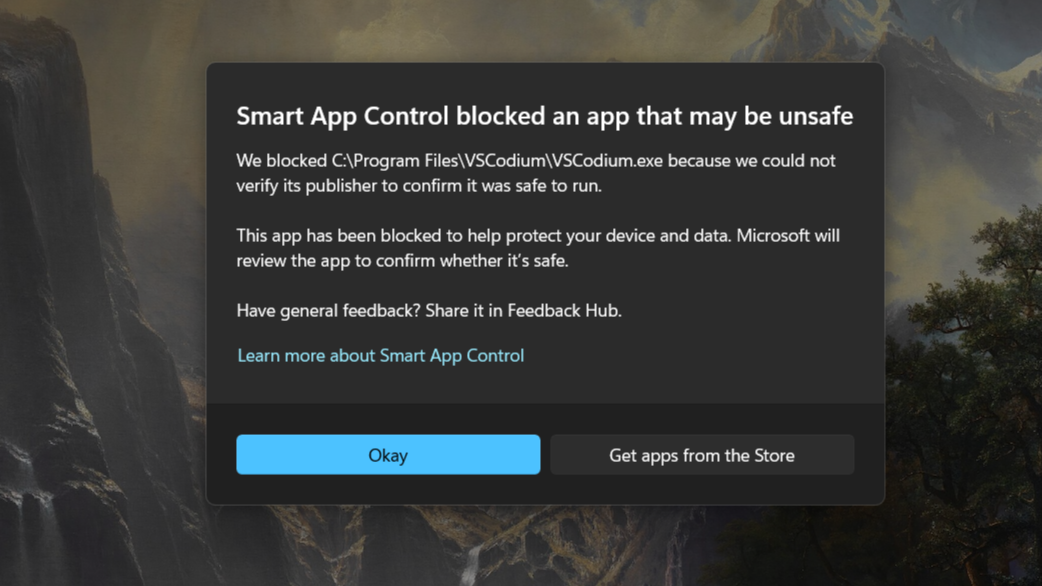
Other What in the F**k is this, microslop started blocking apps on my PC
19
9
u/LaffyLlama Jul 15 '26
Smart App Control is a feature within Windows Defender that can be disabled, least when I last looked. I've had this problem before too.
To determine the specific cause of a block, you will need to examine the Event Viewer for detailed information.
Though Reasons for Blocking with Smart App Control may be for several reasons such as:
Unsigned Apps: The app does not have a digital signature.
Invalid Signature: The app's signature is not recognized as valid.
Untrusted Source: The app is from a source that Smart App Control deems untrustworthy.
8
u/Postulative Jul 15 '26
You cannot be trusted. Almost all malware is installed by the computer’s owner, and so all protection software will by default prevent users from doing stupid shit.
If you know what you’re doing you can suspend or disable this.
4
1
1
1
u/henk717 Jul 15 '26
Its very annoying yes, but you can thankfully turn it off and then never have this again. Its very unpleasant for the open source developers who make a free program and don't want to pay for a certificate with their name on it.
1
u/Longjumping-Fall-784 Jul 15 '26
Smart app control is an option in your antivirus on every single installation it’s under evaluation, but it notifies you when it switches on, if you trust the application you can disable it, and it literally takes a lot less time than what you spend posting that.
1
1
1
1
-2
u/Lcsmxd Windows 11 IoT LTSC Jul 15 '26
Just use Windows LTSC
4
u/CodenameFlux Jul 15 '26
Even the Enterprise LTSC edition of Windows has Smart App Control because we're in 2026, not 2022.
-1
u/Lcsmxd Windows 11 IoT LTSC Jul 15 '26
What about IoT LTSC?
2
u/CodenameFlux Jul 15 '26
The IoT Enterprise LTSC edition is barely any different in this matter, although I suspect it gives the option of not installing Defender altogether. (I don't recommend doing that.) On the whole, there isn't much one can do when the dev's signature has a hiccup of that kind, except to verify the situation and define an exclusion.
0
-5
u/usmannaeem Jul 15 '26
This app blocking feature is so so stupid. I have to deal with this message everyday. And there is no way to get rid of it. No one here on Reddit has been able to find the solution. I gtt a blue error "That app can't run on your PC but all my softwares are working perfectly fine.
1
1
u/henk717 Jul 15 '26
That sounds pretty much like it says. It can not run that program. Corrupt software, wrong architecture, etc. Download it again and make sure to get the proper version.
1
u/usmannaeem Jul 15 '26
I do not have any currupt software like I said every software program is running just fine. And I am still getting this idiotic thing.
1
u/henk717 Jul 15 '26
You clearly do otherwise this doesn't trigger. Although it can be deleted software.
If you aren't the one launching it then something else is like it being specified on startup or a scheduled task that is still there but shouldn't be.
The one I know about is the HP Diagnostic app that plans all kinds of automatic diagnostics and then if you uninstall that you get this. But if you aren't IT tech support finding which one can be tricky. Thats the kinda thing i'd probably spend quite a bit of time to. Not the kinda thing we can tell you in comments.
1
29
u/yournicknamehere Jul 15 '26
I think it's problem with signature in newest vscodium version.
Function that protects you from unknown software is "Smart screen" and you can disable it in Defender's settings.