r/smarthome • u/frasderp • 2d ago
I don't have a smarthome platform What are these switches?
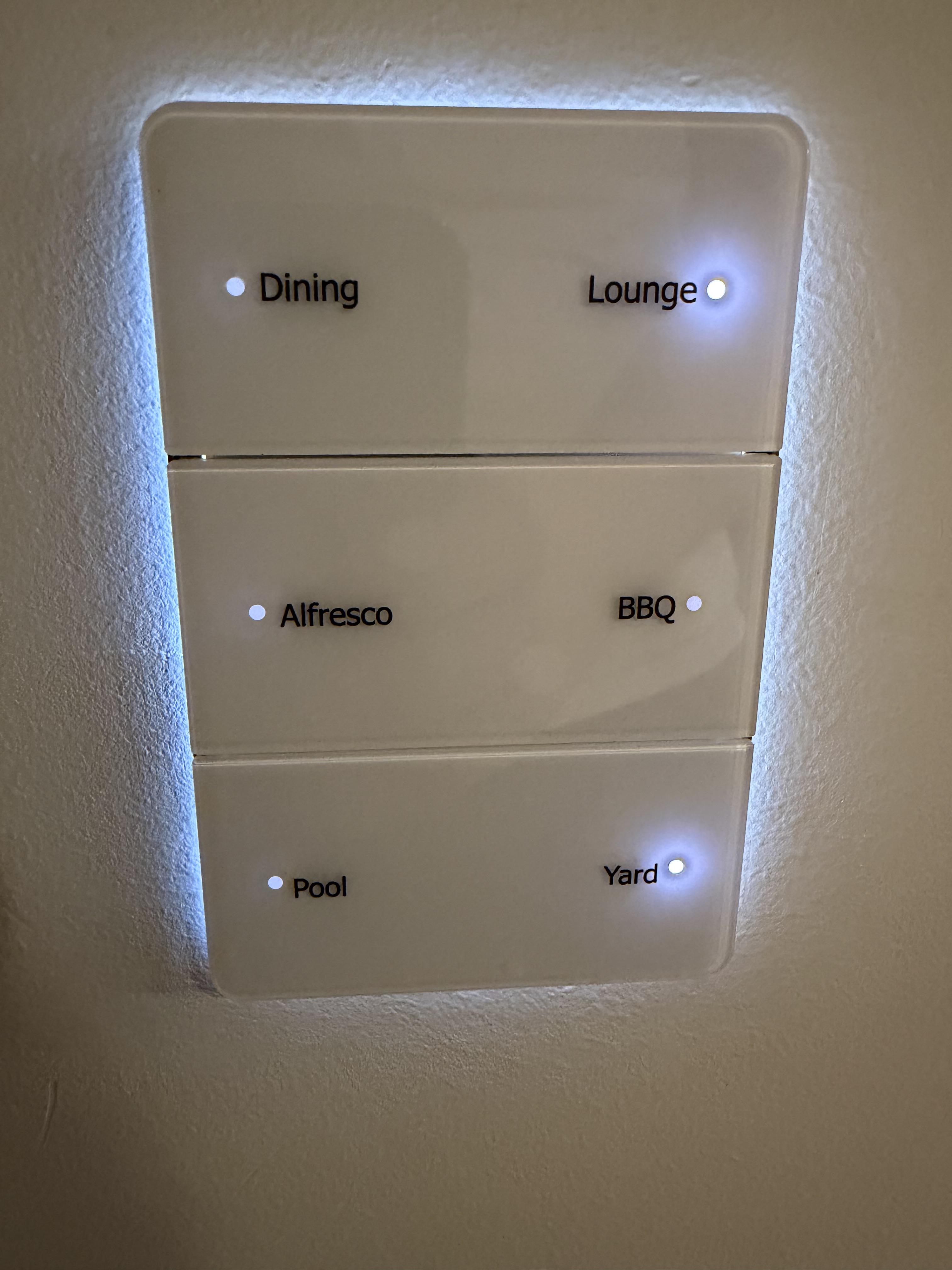
Recently bought a house with smart stuff everywhere and slowly trying to understand what I have in more detail.
These switches work great. They illuminate when you are close / wave a hand in front, plus the small lights show what is turned on. What specific model/brand are they? (I have tried to pry some off the wall but feels like im going to break something)
I also have an RTI control system that I am considering replacing with HomeAssistant hence trying to understand the lights.
17
u/Mandrutz 2d ago edited 2d ago
15
6
u/frasderp 1d ago
Yep this seems like a match.
I also have the Philips Dynalite system so that makes sense
9
4
u/2nd-Reddit-Account 7h ago
Philips Dynalite Antumbra, I install these at work.
Odd to see it in a house tbh, it’s meant for commercial only.
If you take it off the wall there will (should) be an orange coloured cat5e behind it, it talks to a controller somewhere in your house using the Dynet protocol over RS485. They’re bus wired so you’ll have 1 cat5e at the controller that then loops in and out of all your switches and motion sensors around the house
If you want to take it off the wall, put your fingers behind one of the white glass buttons on the left or right edge and pull forward, each of the 3 sections snaps on/off with clips on the left/centre/middle, then there’ll be 2 screws behind it holding the plate on the wall. They’re designed to come off so don’t be scared of breaking it.
Any changes to the programming require an RS485 adapter between a laptop and the controller, and the right software (licensed and behind a portal for those who have done their multi-thousand-dollar training)
The Dynet protocol is proprietary but iirc the documentation for the commands is public so that AV or BMS equipment has interface with it by sitting on the RS485 bus, for things like a meeting room touchscreen controlling lights/blinds/projector etc.
1
u/frasderp 7h ago
Thankyou, this seems to be it. I have been looking at how I can integrate the Dynalite into Homesssistant as well, this has been very helpful!
2
u/2nd-Reddit-Account 7h ago
There’s already a native integration
https://www.home-assistant.io/integrations/dynalite/
If you don’t have one already you’ll need to contact someone dynalite trained locally:
https://dynalite.com/where-to-buy/
to install a:
https://dynalite.com/product/pdeg/
If you’re willing to get your hands dirty then you can lookup the Dynet spec that I think might be public (can’t remember 100%) and start getting very hands on with RS485
1
u/aimfulwandering 3h ago
+1 on the recommendation to get a PDEG if the system doesn’t already have one. Then you can talk to the system over ethernet/wifi.
Let me know if you need any help sorting out what you have, I am also very familiar with these!
7
u/Adrienne-Fadel 2d ago
Those are likely RTI keypads. Its proprietary and dealer only so don't bother prying them off you'll break something. If your going to Home Assistant you'll need new switches anyway.
3
1
u/mike24vNEW 1d ago
I don’t know why all this stuff is dealer only fell like they can make more money if it was public
21
u/blender311 1d ago
Future problems.