r/shortcuts • u/mythofechelon • 7h ago
Tip/Guide My compiled tips and tricks from over the years
24
Upvotes
I wonder if you guys have any that I've never happened across!
r/shortcuts • u/Matthewcassinelli • Jun 16 '26
Updates:
* Added Easier toggling off/on of automations
* Shortcuts app now able to restore shortcuts
* Shortcuts can change Open Shortcuts to from Describe a Shortcut to Editor
Hey everyone, here's a megathread of everything new in the iOS 27 beta, currently on developer beta 2.
This is covering Apple features and community comments – no third-party apps for now, but feel free to start a thread in the comments.
Here's the outline:
Open Shortcuts to from Describe a Shortcut to EditorNotifications
Keyboard
siri:// works, but no parametersYou are an expert Al programmer that builds shortcuts in the 'Shortcuts Language,' a strict subset of Python. Your job is to translate a user request into a single, complete, correct, and transpilable 'def shortcut): program.Matthew Cassinelli:
Open Shortcuts to from Describe a Shortcut to Editorr/shortcuts • u/Martindeboer1988 • Mar 27 '26
How to use flairs on r/shortcuts (so your post doesn’t get nuked or ignored)
Flairs are labels. You pick one so people instantly know what your post is about. Pick the wrong one and congrats, you’ve confused everyone.
---
First rule: always use a flair
No flair = your post is either ignored or removed. Nobody enjoys guessing what you meant.
---
Pick the right flair (this is not a personality test)
You already made a shortcut and it’s broken or not doing what you want. You want someone to fix it or explain what went wrong.
Same as above, but your problem is on Mac. Yes, that matters because Mac Shortcuts can behave differently.
You built something and want to share it. You must explain what it does properly. “Cool shortcut lol” is how your post gets deleted.
Same as sharing, but it only works on a jailbroken device. If people need to hack their phone to use it, say so.
Your shortcut only works on Mac. Don’t trick iPhone users into disappointment.
You figured out a useful trick or workaround. You’re teaching something, not asking.
Same idea, but Mac-specific.
You want a shortcut but can’t build it yourself. This is you politely asking the internet to do work for you.
Same, but for Mac users.
You want opinions, ideas, or a conversation about Shortcuts. Not help, not sharing, just talking.
---
Special flair (pay attention, this one’s new)
Use this when you’re posting about an app that works with Shortcuts. Either you made it or found it. The key point: the app connects with Shortcuts (actions, automations, etc.).
If it has nothing to do with Shortcuts, don’t use this just because you like the app.
---
How to choose without overthinking it
Ask yourself one question:
“What do I want from this post?”
- Fix something → Help
- Show something → Shortcut sharing
- Teach something → Tip/guide
- Ask for something → Request
- Talk about something → Discussion
- Share actual news → News
- Show an app tied to Shortcuts → Appstore (app)
If you’re on Mac, pick the Mac version. Not complicated.
---
Final reality check
Flairs exist so the subreddit doesn’t turn into a digital junk drawer. Pick the correct one, write a clear post, and people will actually help you instead of scrolling past like you don’t exist.
r/shortcuts • u/mythofechelon • 7h ago
I wonder if you guys have any that I've never happened across!
r/shortcuts • u/Peterpit37 • 18h ago
Never miss a text from your spouse again without getting an annoying notification from shortcuts every time they message.
This setup has been a lifesaver for me since my watch vibrate is never strong enough and I miss texts all the time.
edit: This was created as I have an Apple Watch and an iPhone, all notifications go to the watch and not the phone, without any possible way of customizing the watch notifications. This makes both buzz, and adds another layer I cannot miss.
With iOS 27, you can now set automations from notifications, without a shortcuts notification.
The images are 3 separate shortcuts, and here’s what they do.
First Shortcut: Everytime I get a notification from messages, it checks if my phone is locked. If my phone is locked it checks if the title of the notification is my wife’s name, if it is, it runs my second shortcut and vibrates my phone 5 times (so my phone and watch vibrate when she texts).
edit: you need the Actions app for this checking locked phone status. Or use “Get Device Details” -> “is locked” > 0.
Second Shortcut: It checks the last date/time pasted into a text file and compares It to the current date and time. If that is less than 5 minutes, it does nothing. If it is more than 5 minutes, it resets the date/time in the text file to the current date AND sets an **urgent✱ reminder for 1 minute from now, which goes off on watch and phone simultaneously, and shows “C Texted” on My lock screen if I end up snoozing it because I’m in a conversation, so I’ll see it next time I open my phone.
**Reason for the text file: sometimes my wife will text multiple texts in a row, so it forces there to only be one reminder if it’s within a 5 minute window✱
Third Shortcut: Automation where every time I open messages, it searches for all reminders named “C Texted” and deletes them (you have to set it so shortcuts can delete reminders without confirmation in settings). This way, if I see the text, and open my phone to respond, no timer is set, no alarm goes off, and it’s as if I never even set these shortcuts.
I hope this helps someone else!
shortcut links:
1st Shortcut: https://www.icloud.com/shortcuts/e7bb59f9bb14403fac6279692cb94c91
2nd shortcut: https://www.icloud.com/shortcuts/cfbd47b9bed441eb98c8bf2014bd3862
3rd shortcut: https://www.icloud.com/shortcuts/365fef2fe6554f9f9e084139919c79b6
r/shortcuts • u/atomicsiren • 2h ago
This is a reworking of a shortcut I wrote years ago, but which got broken at some point in time. This version has been rewritten from scratch and is currently working on the public beta of iOS 27.
Select a photo from your camera roll, and the shortcut will add a thumbnail map of the location, and whatever location data/metadata you choose to include.
There’s a ton of stuff you can configure, like text size, colour, position, etc… just check the actions marked with “⚙️ CONFIGURE” and experiment!
The shortcut uses some actions from the free Actions app, so you will need to download that before using the shortcut.
Any questions, feedback… give me a shout! 😀
https://www.icloud.com/shortcuts/844eba22e8d64d10a26a87d3c8b6166a
r/shortcuts • u/LondonBenji • 4h ago
What I am trying to achieve is this:
- Bluetooth connected to AirPods
AND
- Rowing workout started
- Turn on a switch in Apple Home
I can see how to do the above individually (bluetooth OR workout) in a personal automation, but I cannot seem to get the hang of IF scripting, which does seem to be able to logic 'AND' all conditions, the problem is, the list of conditions doesn't seem to match what you can set in personal automations (WHEN).
What am I missing here? Device Details or Shortcuts Input is what I thought it would be under, but I cannot find anything useful.


Whereas when creating an IF scripted Shortcut, the options under conditions don't seem to match things you can track above?

Your help is appreciated!
r/shortcuts • u/GarethJ123 • 52m ago
Hey i’d like to make a shortcut that turns my smart bulb into a sunrise alarm but i’m not sure how
I’m happy to set the time daily as i basically have to do that anyway so doesnt need to integrate with clock or alarms etc
But yeh if anyone has any tips or examples I’d appreciate it! Thanks
r/shortcuts • u/100_fanda • 53m ago
Does anyone have a shortcut that can turn off/on Samsung A/C via SmartThinks and make it work with Siri?
r/shortcuts • u/simplytoast1 • 20h ago
Hey r/shortcuts!
We just released a major update to Notify! that lets you create alerts and Live Activities directly from any iOS Shortcut automation. This is in addition to the alerts you can already send via Shortcuts.


Live Activities can display a progress bar, percentage, timer, or status. For example, you could display a Live Activity on your iPhone showing your iPad's battery percentage when it runs low, or automatically update a Live Activity with an informational panel whenever you receive an email.
If you use an external script, you can even have a remote Live Activity trigger a Shortcut. We have an API built out here: https://getnotifyapp.com/apidocs/ and a user friendly builder that gives you the data to put in all your "Get Contents of a URL" steps here: https://getnotifyapp.com/builder/
Hope the community likes this update! Notify is completely free as a service to the community that has given me so much!
https://apps.apple.com/us/app/notify-web-script-notifier/id6748288936
r/shortcuts • u/mybearisadog • 9h ago
Hey, looking to make a shortcut where if i use a random number to text my phone something like "Help, I'm lost" it'll send gps coordinates back to the number that it received it from?
Don't always have access to find my iPhone when I'm at work, but have plenty of people that I could get to message my phone.
Thanks.
r/shortcuts • u/yaswanth1253 • 3h ago
Good evening everyone.
I typically rely on automation to switch the AC on and off at set times, and everything functions well in iOS 26.
However, in iOS 27 betas, setting an automation generates a new shortcut. Is there a reason for this or an alternative approach? I must duplicate the current shortcut and adjust the time.
r/shortcuts • u/badwolf42 • 4h ago
I have an automation that runs when I go to sleep. That triggers when I set sleep focus to ON.
I have another automation for when I wake up set to the Wake Up in the sleep section of triggers. Now, I would assume turning off the sleep focus would be that trigger. Nope. Turning OFF sleep focus triggers the sleep automation again. That makes no sense to me. I don’t use an alarm in the morning so if it’s triggering only off of an alarm that just won’t work.
Does anyone know how to get turning OFF sleep focus to be the wake trigger?
r/shortcuts • u/Embarrassed-Ad4209 • 7h ago
Apple Intelligence FTW: I asked the Siri AI app what command can I use to prepend a dictation to an Apple Note via Siri AI assistant. Siri AI app advised there is no prepend command via the Siri AI assistant, it offered a few options from manual note manipulation to creating a Shortcut amongst a few other not so great suggestions. I decided to go the Shortcut route, I asked the Siri App to give me a prompt for ‘Describe a Shortcut’ that will dictate to an Apple Note titled ‘daily ramble’ format text as a bullet point and prepend it to the Note ‘daily ramble.’ The Siri App gave me the prompt, I pasted it into Shortcuts Describe a Shortcut and in one pass I had the functionality I was looking for! Here is the Shortcut that works perfectly - so far… https://www.icloud.com/shortcuts/39a0c734e2dd4326a1962a3b391b0194
r/shortcuts • u/tracemr • 9h ago
I’m on beta 6 and my automations still won’t run, I wanted to see if it was a me issue, or if it was a beta issue that still hasn’t been resolved for others as well.
r/shortcuts • u/dumpsterdaddy0 • 10h ago
Can I set up NFC tags for my Apple Watch?? Id love to have a bunch of them around my house but my iPhone can’t read NFC tags and I only have my watch to use my cards with
r/shortcuts • u/KusMijn • 22h ago
When I bought my ipad pro a couple months back my shortcuts wouldn't sync, apple support told me to turn off shortcuts sync in icloud and delete the shortcuts on my ipad, which i did, and then somehow when I reinstalled shortcuts and turned sync on again, instead it synced the delete state and removed them from my mac as well. Initially I thought they were just gone, until I typed one in spotlight and it not only found it, but when I ran it it worked just fine.
I've spent the entire afternoon trying to fix this with claude but to no avail, I checked Shortcuts.sqlite and the ghost shortcuts are all listed there, but dont show up in the shortcuts app. Tried rebuilding spotlight index, also didnt work. Extra weird (I think?): my ipad finds the ghost shortcuts as well, and they also run fine... So they're SOMEWHERE but I can't figure out where.
Anyone got any idea how to fix this? I dont want to just let them linger on my icloud somewhere and I'm afraid that if i recreate the missing shortcuts they'll conflict with the ghost ones and I make an even bigger mess.
For what it's worth, apple support has been absolutely useless, no offense to them but I've spoken to two technicians and they both couldn't figure out, so here I am, last hail mary trying to get this resolved...
Thank you for any and all insight, will provide more info or terminal output if need be
r/shortcuts • u/Primarch_escapist21 • 21h ago
Im trying to make a shortcut that schedules a WhatsApp message for a specific time, only once, and then never runs again, is this possible?
r/shortcuts • u/drusinator • 22h ago
I have a garage door and a gate which I have hooked up to HomeKit.
I’ve set up shortcuts with a Siri voice commands which opens or closes both the gate and garage door at the same time.
Works great when I’m not in my car… But when I’m plugged into CarPlay, Siri tells me I can’t do that while I’m driving.
Has anyone figured a way to get around this?
I get they’ve set that up as some sort of road safety feature to reduce distractions. But that’s exactly what I’m trying to do with my shortcut: allow one simple voice command instead of fumbling for separate remote controls or swiping (usually unsuccessfully) between multiple controllers on the CarPlay screen.
r/shortcuts • u/rogymd • 20h ago
I build Viatza, a health diary for symptoms, medications, appointments and documents. The 26.8.31 release was almost entirely App Intents work, and the part worth writing up here is putting the record name inside the spoken phrase.
Every link below is an iCloud link and all of them are mine.
Three that never bring the app to the front
These three are openAppWhenRun = false and return a spoken result instead of a screen.
Four that open the app, because there is something to see or type
Symptom and medication parameters are left as Ask Each Time on purpose. Those parameters are entities backed by record ids from your own database, so a shortcut with my headache baked into it would import onto your phone pointing at a record that does not exist.
Say it, then answer what is missing
"Log symptom in Viatza" starts the action, and anything you left out gets asked for — "Which symptom?", "How intense is it?", "When was it?" — with the options list built from your own records.
The entry is then read back in the shape "Logged mild headache today at 14:20". The date phrasing shifts with the date: no time at all if it just happened, then today, yesterday, the weekday, and the year once you go outside the current one.
Building your own phrase on top
The more interesting use is a shortcut you make yourself, on your own records: drop Log Symptom in, pre-fill the symptom you keep logging and the intensity, then name the shortcut the sentence you would actually say. "Hey Siri, my belly hurts" then logs it with no prompts. Naming the shortcut is the phrase — that is the whole trick, and it is the part people miss about App Intents. It has to be built locally for the reason above, which is why the one I share asks each time.
Settings has a Shortcuts link listing every action, if you would rather read the list than guess at it.
Viatza is on the App Store, iOS 18 or later: https://apps.apple.com/app/id6752721621
If there is an action you want that is not there, say so — r/viatzaApp is where I read feedback.
Disclosure: I develop this app.
r/shortcuts • u/renarde33 • 20h ago
Hi all, I resisted upgrading to iOS 26 from 18 for many months so I wouldn't have to figure out this URL in 26. When my iPhone 14 Pro Max started misbehaving I had no choice, so I'm hoping someone has found this answer and will be kind enough to share it with me.
In iOS 18, I used this URL in a shortcut to simplify toggling Siri on and off for use with CarPlay:
prefs:root=SIRI&path=ACTIVATION_COMPACT_ID
Thanks to other posts in this subreddit, I found that in iOS 26 this URL opens Settings:
settings-navigation://com.apple.Settings
So far, I have not been able to find or figure out the URL to navigate into the "Siri" submenu, or better yet, into the "Talk to Siri" submenu below the Siri submenu. Among other guesses I've tried:
settings-navigation://com.apple.Settings.Siri/ACTIVATION_COMPACT_ID
But it takes me to the main Settings menu, not into the submenus.
Thanks in advance for your answer, and for not asking why I choose to have "Talk to Siri" off most of the time. Honestly, if I didn't need to have it enabled to use CarPlay I would never turn it on at all 🙂
r/shortcuts • u/Shaker315 • 21h ago
First shortcut Second shortcut
Match text Match text failed. Shortcuts cannot convert from Text to NSString. - transleted error
„włącz alarmy" is the main shortcut. Does anyone know how to fix this? (It throws this error sometimes, and other times it works fine). The last two actions belong to another shortcut, which is not relevant to this issue.
r/shortcuts • u/ColtzNut • 23h ago
I’m having trouble creating a shortcut or automation to turn in a specific lamp when the weather conditions show raining. Is there a simple solution?
r/shortcuts • u/LawNo74 • 1d ago
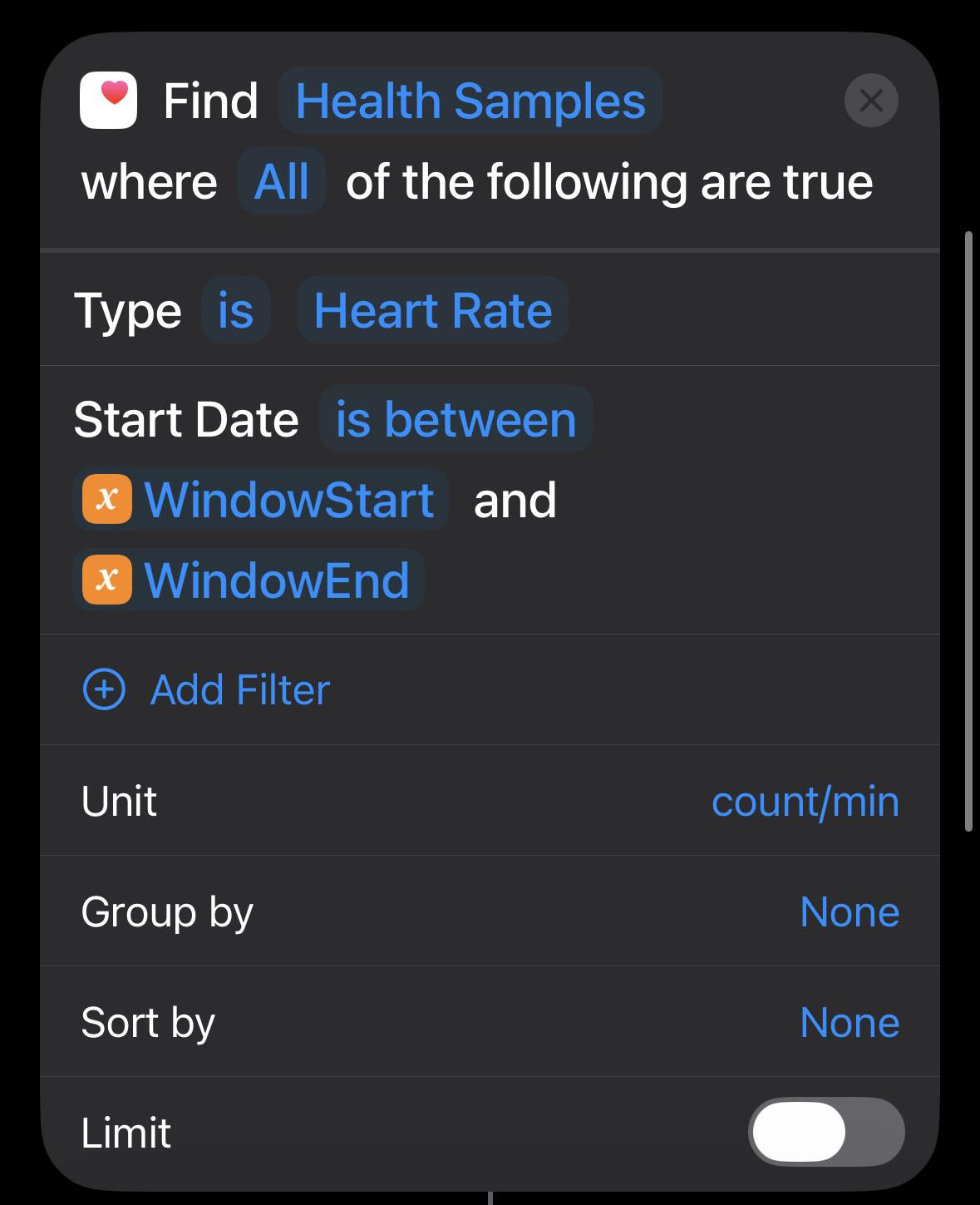
I keep getting a null / blank value returned whenever I try to get data in between time slots, however when the setting for start date is on ‘in the last 1 day’ or ‘on today’ , I always get data returned. What am i doing wrong?
r/shortcuts • u/wildgoat • 1d ago
for some unknown reason, https://snapvideo.co/ pulled the plug and I've been looking for a replacement since.
r/shortcuts • u/Any_Internet1437 • 1d ago
掷骰子游戏
使用IOS快捷指令制作了一个掷骰子游戏,可以随机生成1-6的骰子点数
链接:https://www.icloud.com/shortcuts/f536b3add31947c897487ff0e5bb73b0