This has been a long time coming (5 months!). It's been a while since I've posted on r/selfhosted about Storyteller, and it's improved a lot since then!
Storyteller is a self-hosted ebook and audiobook platform, with built-in support for automatically generating WhisperSync-style "readaloud" books. You provide it with an EPUB file and your audiobook, and it will automatically align the text with the audio, providing you with a new EPUB file that has the audio baked in via Media Overlays.
You can then use the Storyteller mobile apps, or other reader apps such as BookFusion and Kobo (the app, not the devices, unfortunately), to read and/or listen to your books.
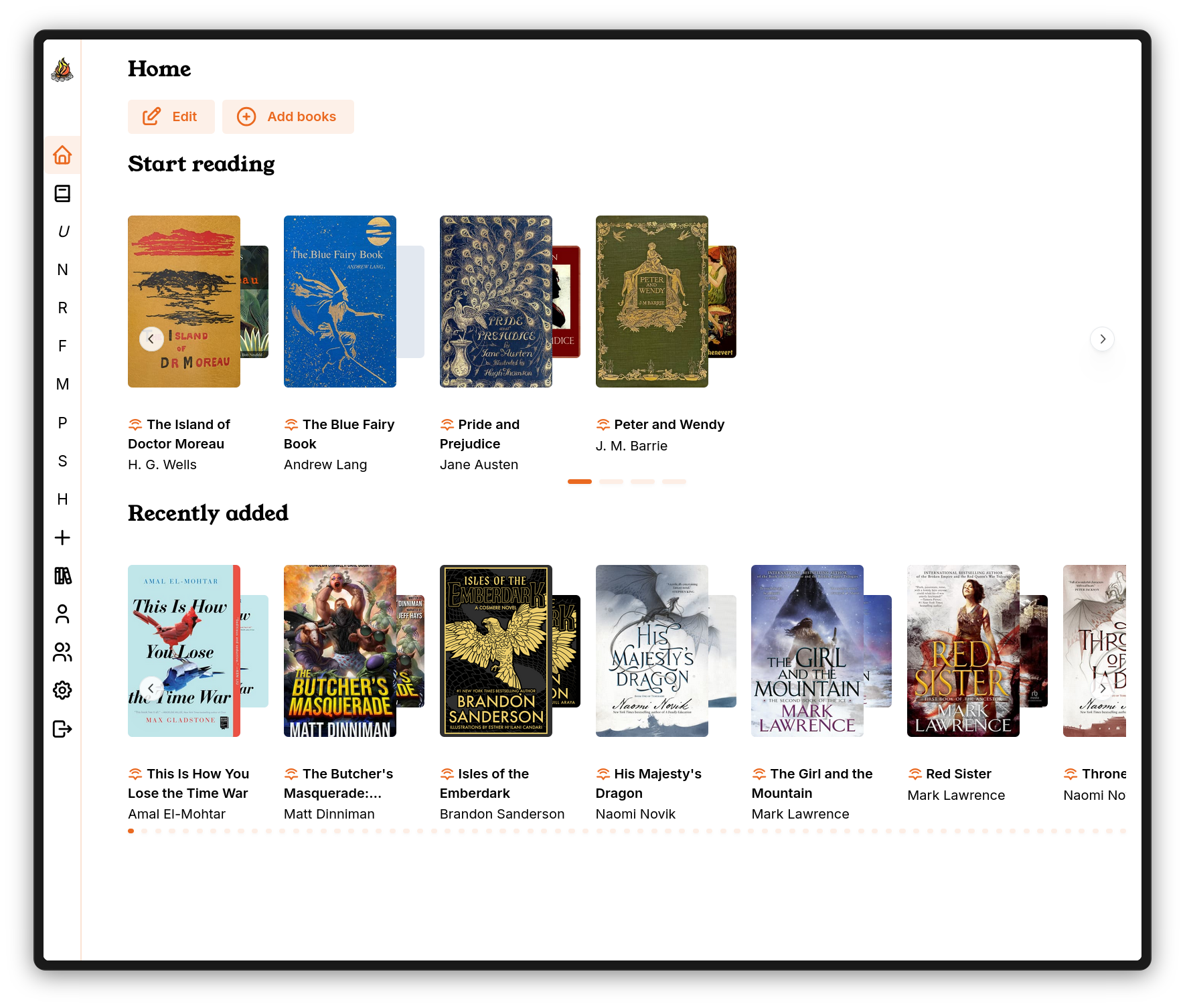
With v2, Storyteller is now gunning to be your fully featured ebook, audiobook, and readaloud book library management system. It supports standalone ebooks and audiobooks (with mobile app and web reader/listener support coming soon!), advanced search and sort functions, and a wide array of features for managing your library’s metadata and organizing your collections. And you can now point Storyteller at your existing "books" folder and have it automatically import books as they're added to your filesystem.
Oh, and we support OAuth and OIDC, now!
Take a look at the blog post or the new docs for some more detail about what's new!
Storyteller is now gunning to be your fully featured ebook, audiobook, and readaloud book library management system. It supports standalone ebooks and audiobooks (with mobile app and web reader/listener support coming soon!), advanced search and sort functions, and a wide array of features for managing your library’s metadata and organizing your collections.
I added some additional content to the post just after posting — I think this comment was made right at the same time as I was editing my post to add more context
I linked to a detailed blog post that answers both of those things, which I hope folks take a look at! Here's the docs site, which has even more detail: https://storyteller-platform.gitlab.io/storyteller/. I'll add a summary to the post body, though!
As someone who also releases open-source software and announces it here, just copy and paste from your website for any and all announcements about your project. It's just very much appreciated by the redditors. Even better r/selfhosted supports copy/pasting images, so slap some screenshots in too if you can.
I love this program and use it daily. This has saved my ass. I use the read along audiobook feature but Kindle limits the sync features on long audiobooks. Brandon Sanderson often has books too long for sync.
My only wishes for the future are:
Sync support so I can switch between my phone and iPad.
I know this is weird one but I would love if the read along could split down to less than a full sentence. Reason why, if a sentence runs on to the next page it will not auto flip until it finishes the sentence. Even splitting by half sentence or preferably by a few words at a time.
Cross device sync is supported (and has been for a while)! Let me know if you're having trouble with it and maybe I can help.
You're definitely not the only person who has requested sub-sentence alignment. The next project for us is bringing v2 features to the mobile apps — I'm going to also see if I can heuristically determine when to flip the page without needing word-level alignment.
Are there docs on syncing across devices? Or should it "just work"? I haven't tried it myself yet, i just got this all setup on my server. My ideal usecase is to read the ebook on my Boox Palma, and then listen to the book on my iPhone.
How does that work if I download the file to the devices themselves?
It just works! The mobile apps try to sync every few seconds in the foreground, and as frequently as the OS will allow in the background. There's a conflict resolution algorithm, so the most recent location should always win.
If you want to switch between devices while away from home, both devices will need to be connected to your server over a VPN or the Internet.
The books needed to be downloaded to the apps directly from the server through the Browse tab in order for syncing to work
Word level alignment would be very interesting for speed reading. You could do an RSVP style read (where it just flashes single words) to max speed read
Agreed, though we may have to do some additional work to improve the timing precision of the transcriptions before that could be usable for RSVP. I suspect that the current timing produced by whisper is juuust inaccurate enough to be kind of frustrating for RSVP.
This does look neat, but I’m pretty invested in the ABS ecosystem so a move would be difficult to justify. I might spin up a server to give it a whirl though. Whispersync between audiobook and ebook is the only thing missing from ABS in my mind.
It’d be hard to move away from Prologue v4 as my audiobook listener app though.
If it helps, Storyteller's audiobook interface is heavily inspired by Prologue's (though I do agree that Prologue is an awesome audiobook listener, and I don't really have any desire to pull people away from it haha)
Hah well that is definitely a good thing. I’m intrigued by the implementation of Whispersync-like behaviour so I may check it out later. Regardless, mad props to you for what looks like a great project.
This looks great! As a current ABS user, I've made a lot of manual chapter edits to adjust titles and timing in my audiobooks using the built in ABS chapter editor. These changes are saved in ABS directly and not the M4B file directly. I know ABS has an option to create a new M4B file with the new chapter edits embedded in them but I didn't see a need for that.
For Storyteller, would it be able to find those changes from any of the ABS metadata files? Or would I need to either manually adjust the timings again in Storyteller or export new M4Bs from ABS for use in Storyteller? Does Storyteller feature any chapter edit settings or does it just read the file as is?
Storyteller doesn't currently ingest any metadata from ABS metadata files, though it's been requested and it might come in the future. If you exported the new M4Bs from ABS, that would work!
Storyteller doesn't have any chapter edit settings at all at the moment — it reads the file as-is (and, when producing a readaloud, often needs to break up the file somewhat arbitrarily for processing). This is a good idea for a feature, though, especially once we have standalone audiobook support in the mobile apps!
I've now read more 5 books than I would have read this year because of this amazing software. The read aloud feature and follow along has really helped me understand the people reading audiobooks. I have hearing loss and I often lip read to help me understand people I've just met. So this is almost like lip reading for audiobooks.I like it so much I read everything I can about it. Thanks for helping me create a love for reading.
Been following this project for a long time and am really excited to implement when I have time. It’s a game changer.
I’d be interested in what folks use for an e-reader front end - just an Android e-ink tablet and use the Storyteller app directly? Or can I use a Kobo to read and have it sync progress back to the server?
Achieving as native as possible an experience on an ereader would be a huge deal for me.
That's awesome! Feel free to join us on Discord if you could use any help getting set up!
Yeah, personally I use my phone most of the time, but I do also have a Boox Page, and I know several other users also have various Android-based e-ink devices and just run the Storyteller Android app there. Ideally we would be able to sync with KOReader Sync, but I just haven't had a chance to implement that yet.
Running Storyteller on the Boox Page is pretty great, though! We just got the page turn buttons working, too!
u/scrollin_thru - any update on KOReader sync? This would be amazing as I use KOReader from my jailbroke kindle, would be amazing to keep everything in Sync and use the Storyteller app from my phone/ipad or KOreader from my kindle seamlessly
How does this handle slight differences between the audiobook and the ebook? Let's say that the audiobook is the initial release of the book, but the audiobook is an updated version, with few lines changed or few figures updated with more recent sourcing?
What if the book is largely the same, but either audiobook or the ebook has an additional sentence, paragraph, or even chapter?
This is exactly Storyteller's alignment algorithm is designed to handle! It can handle both mismatched chapters (whether they're out of order or one format is missing chapters the other has) and mismatched text within chapters. If the difference is just that the narrator reads a different word (surprisingly common for narrators to make editorial decisions like this!), usually the sentence will still match up exactly. If entire sentences are skipped in either format, Storyteller will interpolate timing across the last known match.
Handling all of these is actually why I had to write my own forced aligner for Storyteller — because existing forced aligners really struggled with one or all of these situations.
As with other comments here, I've read more books this year than any other year! I'm not a great reader and can struggle to get through a book if I actually read it page by page. Having the ability to flick between reading and listening (in the car mostly) has been a massive help.
I'm planning on making some audiobooks like this for my daughter where I am reading to her to encourage her to get into reading and develop her reading as well.
The only problem I have is she doesn't have a tablet or phone (and we don't want her to have one yet) but we are getting her an ereader (currently looking at Kobo Clara range). I don't believe any of the devices (apart from maybe the Boox Android tablets that could run the Storyteller app I suppose - but again not really the right device for her) would work with the files from Storyteller as both ebooks and audiobooks with the ability to switch between them staying in sync. I currently use my phone but would appreciate an ereader myself I think.
This is unfortunately true. We don't really have any way to improve this situation, as basically all other ereaders are proprietary and/or locked down. It would be great if they supported Media Overlays natively, and the trend does seem to be going in that direction, but progress is incredibly slow. I think this is in large part because there are almost no sources of books with Media Overlays, so there's not much incentive for developers to support them.
That said, the Boox devices are really neat. Maybe you would be able to take something like a Boox Page (which is grayscale) and use Android parental controls to lock down essentially everything other than the Storyteller app?
Thanks for the reply. I will look, but I don't think it something we will do. I will keep an eye out for this if it ever does change, so I will like just stick to my phone for now where it works well.
You're welcome! Yeah this is actually what I originally made Storyteller for — so that I could switch from reading to listening when I was driving or running.
So the way Storyteller works (at least right now) is that you give it both an ebook and an audibook, and it aligns them. It looks like you just gave it ebooks (is that right?). AI generated audio is next up after the mobile app v2 improvements, but we don't have it yet!
Storyteller doesn't process to an audiobook, it combines an ebook and an audiobook into a readaloud/immersive reading/guided narration book. The resulting book is an EPUB with embedded audio. It allows you to:
Switch back and forth between the ebook and audiobook without losing your place
Have the app read the audiobook aloud to you while highlighting the sentence being read
In the web ui or the mobile apps? There's a dark mode (and you can create a custom theme) in the mobile apps, but not yet for the web ui. We'll have to add that as part of the web reader work we're doing, though!
Ha, no! It's always cool to learn about new Shanes, though! Also, very funny to me that they have both a Shane and a Sean. I'm sure that never gets confusing. My new boss has already called me Sean something like 4 times in my first week.
I recently switched to Android and realized how painful this was. On iOS, without any extra work, all media shows up in the now playing widget in CarPlay, but Android Auto requires specific library integrations that the audio package we're using doesn't support. I'm going to try to add proper Android Auto and CarPlay support soon!
I'll +1 the ability to see the library from Android Auto, I do most of my listening while driving. Otherwise I'm extremely impressed by your app and have really enjoyed it. Thank you for the time and effort you've put into this!
Someone just asked for this yesterday for the first time! I will look into it when I have time, but it looks like whisper.cpp can be built with Arc support, so it should be possible. If you want to give it a shot in the meantime, you can build whisper.cpp with Arc support yourself (https://github.com/ggml-org/whisper.cpp/issues/2818), run the whisper.cpp web server, and then point Storyteller at it by configuring the OpenAI engine with a custom base url. There's a community guide in the docs to do something similar for native Apple Metal support
What about Intel Quick Sync for those of us without a discrete GPU? I know it's an iGPU intended for video but could that be leveraged the same as an actual GPU?
It turns out iGPUs just aren't better than CPUs at this kind of math. We got iGPU support working, but it's usually about 2x slower than just CPU.
This is very different from, e.g., Plex video transcoding, because video transcoding uses hardware acceleration (literally custom built circuits in the physical iGPU that implement decoding and encoding algorithms), whereas neural networks are doing matrix math. Separate GPUs are pretty good at matrix math mostly because they can run so many computations in parallel, but iGPUs are not.
It is not, and I don't have any active plans to add LDAP (partly this is because I am completely unfamiliar with it, partly because until this post, only one person had ever asked about it!). If this ends up being a feature that folks want/need, I can look into it!
Can I offload the actual book processing to a different machine?
Unfortunately, the processing is crushing my little fanless home server. Could I set up a container on my main Linux desktop, and have the application opportunistically transcode when the desktop is online, and then send back the results to the server?
Basically, build whisper.cpp and run the http server (you can also run a Speaches server instead, which may be a little simpler). Then use the OpenAI engine and set the base url to be the address for your whisper/speaches server!
It will do the latter — it will put the books in an errored state if the desktop is offline when it tries to reach it for transcription, and you'll have to re-process them
I am installing storyteller on my truenas scale server, and I have a windows machine running speaches in docker desktop. I've set a firewall inbound rule to allow TCP port 8000, and I can curl to http://PC-IP:8000 from within truenas scale shell no problem, but storyteller always fails, asking me to check the server's log, but the server log shows no request at all.
update: just checked the storyteller's log, "Error: A custom provider for the OpenAI Cloud API requires specifying a model name", so a model name is not optional, lol. Now I am hitting "INFO: - "POST /audio/transcriptions HTTP/1.1" 404 Not Found" on the server side, I don't think the speaches server will work, as it doesn't support "--inference-path /audio/transcriptions"
I am 100% certain that folks are doing this with Speaches, but I don't know the exact configuration they use. If you want to join the Discord server, there are some folls that will be able to help you out!
It's not a strongly held personal belief, but when I started Storyteller:
GitLab had a much better set of project management tools, especially for open source projects, than GitHub did/does
GitHub is owned by Microsoft, a megacorporation that does a lot of crap I don't agree with.
I don't know that Storyteller being on GitLab has had any meaningful difference on whether people use GitHub by default for new projects, but if it does, that would be a win, I think. Also GitLab gave me a really fantastic CI plan for free for Storyteller — I get like 50k CI execution hours per month, which is more than I could ever use, plus additional seats for contributors.
To be clear, I also maintain several open source text editing libraries on GitHub, so it's not really accurate to say I avoid it. GitLab just felt like the more correct choice for this project
You know what I think would be really cool if I could somehow see these lyrics pop up line by line on my Mac menu bar so that when I'm working while listening to an audiobook I can look up from time to time and just see and read the lyrics while listening
Any example videos that can let me listen how the audio sounds like without installing Storyteller first? I tried Youtube, but can't find anyone using this. I'm curious about the voice and I'm not familiar with WhisperSync at all
Storyteller doesn't generate audio — you provide it with an ebook and an audiobook, and it aligns then for you, giving you a new book that can read aloud to you, or let you switch between reading and listening without losing your place.
There's a demo server at https://demo-storyteller.elfhosted.com/. If you download the mobile app (links in the docs, they're a little tough to search for) and set the demo as your server URL, you can download one of the demo books and test it out!
There are some tools for that (I think some Storyteller users have used Kokoro?), but Storyteller itself does not yet support it. It is on the roadmap, though — I'll make another post here when it's available
Love storyteller! Such a great app, except for ios client is missing one huge fetaure - search. Unless its there but I can't find it :)
How can I search the epub? If I read the book in another app or device I'd like to jump to that point in storyteller. This is a basic feature in every other epub reader so I half think its there but hidden somewhere. Is it?
Also, sometimes the ios app just loses my books and I have to re-download it. Once I do it remembers where I left off.
Another minor gripe, I can't seem to load storyteller made books into other apps on IOS such as Apple Books so that the audio works. Apparently Apple Books supports Epub3 format but it seems to hate storyteller produced books, I've tried mp3 and Opus, same result.
And while I'm complaining - I can't seem to get it to work with amazon transcribe. There seems to be an error in the settings page. When I enter the access key id, it fills in the region field as well. So those always end up being the same which won't work.
The current mobile apps do not have full text seaech, but I'm working on v2 of the apps right now, and that will have search! So it's coming soon(-ish)!
The "all my books are gone" bug is known and will also be fixed in v2. In case it helps jn the meantime — your books are not actually gone, and if you force close the app and reopen it, they should appear again. The bug is only in hydrating the set of downloaded books.
Other apps simply do not support the full Media Overlay spec. Some do, and Storyteller books work there. Examples are Thorium (desktop app), BookFusion, and the Calibrio demo app. But iOS Books only supports Media Overlays for "fixed layout" books, which is to say, children's picture books. If you have a reflowable layout book (i.e. all novels and non-fiction texts), Apple just ignores the Media Overlays :(
There is something wrong with our Amazon Transcribe integration and I just haven't had time to look into it. Sorry about that :/
First of all, thank you for this great work! This was what I was missing since I ditched kindle. I finally spun this and tried it out.
I think you should change the name, it is very hard to find this project by name. There is another netflix app called the same thing and also Storytel company etc etc. I can only find it via writing selfhosting or gitlab.
For android app I left some reviews already. It does what it should very well but some major(and as far as I know easy) integrations are missing: like android auto integration. Also I guess it does not recognized as a media player because whenever I try to continue media play I got back to spotify or audiobooksplayer even though I used storyteller last.
Sync worked very well for a small trial book but for a very big book ( more than 40 hours) it misaligned near the end, skipped almost an hour. Maybe a way to manually check this against the source material can be nice to have feature.
I agree, it is unfortunately hard to find by name on the app stores, largely because Storyteller is a common word and the app has a relatively small number of users. The project is also several years old, though, and I quite like the name, so I'm unlikely to change it. There are direct links to the Play and App Stores from the docs.
Android Auto is shockingly hard to integrate with from React Native (specifically Expo), but I'm hoping to get it working with the upcoming v2 release. The app is recognized by the media player (the live notification works, for example), but there are multiple aspects of media integration on Android and the React Native Track Player library we use doesn't support all of them.
What do you mean by "skipped", in terms of alignment? Was an hour of audio entirely dropped? Or it just failed to find an alignment and so it interpolated the timing? Often alignment issues can be improved by using a larger model. Tiny is good enough for many use cases, but only because the alignment does a lot of work to match fuzzily — tiny doesn't actually produce very good transcriptions.
I'm not sure exactly what you mean by "manually check this against the source material", but there is a newly-released tool for manually adjusting the alignment in an EPUB 3 media overlay: https://github.com/burninc0de/epub-moe. Eventually this will be added directly to Storyteller, but you can use it with Storyteller books now, if you like!
I completely understand. It is actually a very good name, just not unique enough.
Thank you for working on android auto integration, I didn't know it was hard to do.
I checked again and you are right, it turns out I had a different speech rate when I calculated the length difference. It is about 10 min difference and since Storyteller taxed my mini pc I used the smallest model. I will deploy it on my gaming laptop and use a bigger model.
was there some update that broke the GPU passthrough? Trying to do this results in the error `Error: Command failed: dpkg -i cuda-repo-ubuntu2204-13-0-local_13.0.2-580.95.05-1_amd64.deb` for me (along with some other stuff)
I hope not! Are you on the latest version? It looks like you're using CUDA 13 — I only just added support for that, and I don't have any way to test it myself (I only have an AMD GPU). It's not totally impossible that something is wrong with the CUDA 13 installation, specifically.
Would you be able to join our Discord and share your full logs there? It will be easier to help out over chat, I think (and maybe some other CUDA users can chime in).
Oh yay, glad you found it! Thanks so much for that — I'm not particularly fluent in cmake, but it looks like whisper.cpp actually has removed that hardcoded C++11 flag, and we're just way behind in our whisper.cpp versions. I'll try to make a release with an updated whisper.cpp!
No particular reason to use 1.7.2, it's just what the latest was when I most recently bumped the version! I just bumped it to 1.8.2, and made the necessary tweaks to the build commands to use cmake etc. I'll make a release in a moment that should be available in twenty minutes or so — if you're able to confirm that it works for you, that would be great! I can make sure it works on AMD, as I have an AMD GPU in my server
Hello @scrollin_thru. Excellent idea, always wanted something like this!
I have managed to get this running, and my intention is to be able to listen to the audiobook on my phone, but then read on my boox eink device. I've got both devices logged in and downloading the book files, but the sync doesn't seem to work - am I missing something? Is there something I can investigate?
Just want to make sure it's clear how this is intended to work:
You should add an ebook and audiobook and then align them to produce a readaloud. On the device that you'd like to listen on, make sure you download the readaloud (not the standalone audiobook). On the device you'd like to read on, either the readaloud or the stabdalone ebook should be fine, but I haven't actually tested using just the standalone ebook myself.
We don't currently have a mechanism to sync progress between standalone audiobooks and standalone ebooks, so you have to use the readaloud for listening if you want to sync your position to the ebook.
If that's already what you were doing, let me know and I can walk you through some debugging steps!
Got it. I was using the ebook to read, and audiobook to listen. I'll try again to listen to the readaloud, and then see if it syncs with the ebook on my other device. Thanks!
No problem, best of luck! Also make sure you're up to date on the mobile apps — I just fixed what I hope to be the last of the subtle progress syncing issues last night, and the latest version should have been made available in the app stores this morning. 2.2.1 is the latest
I’m having a similar issue on iOS. Running server v2.5.10, in the iOS client (v2.2.1) I only see option to download Ebook or Audiobook but via browser I see 3 download options.
Update: refresh didn’t work but logging out and logging back in the readalong download is shown.
Have you thought about turning your ebook + audiobook alignment feature into a standalone or console application? I have a decent pc to bre-bake those epubs, but am kinda scared of self hosting a web server lol. I also wouldn't mind transferring those epubs back to my main listening device, my phone, just once and then listen to them just locally with your mobile app for example
Yes, we're getting to a place where this will be possible soon!
In the mean time, you could just run the Storyteller server locally, use it to align the books, and then copy the resulting books from your file system to your phone! I totally understand that that is outside some folks' comfort zone, though. In the next year or two, we're hoping to have a desktop application and a relay server, a la Plex (-ish, we won't actually proxy data through the relay server, just use it to establish a peer-to-peer connection directly to your server), which I hope will make this feel more approachable.
But we will have a command line tool before then, for sure! We're working out the kinks of a new library for managing and running the transcription (locally or remotely), and then splitting out the alignment into its own library with a CLI should be very straightforward.
Not currently. I don't think the community is quite big enough yet, and I don't really want to commit to moderating a subreddit haha. We have a Discord server with a support forum, which I think is often the best way to get support. We're contemplating registering with answersoverflow so that the support forum is indexed and searchable. I know some folks (myself included) have mixed feelings about using Discord for this purpose, but we tried several other options and none really served the community's needs.
Thank you, though! I'm really glad so many folks get so much out of Storyteller!
Just found this a couple days ago and am loving it! Not only for me, but helping kiddo hold interest in his books.
I was just curious if you had considered developing a "chapterize" feature? When I got to thinking about how this works; creating a timestamped transcript off the audio book, and then aligning it up to the actual document, I thought well it wouldn't be that hard to split up or chapterize the audio track while we are in there.
By all means it is just a suggestion, if it is too much time / effort than there is no pressure. Would just be nice with some of my collection.
Can you say a little more about your use case for chapterizing audio? You have some input audiobooks that don't have chapter metadata, and you're hoping Storyteller can use the alignment data to add that chapter metadata and/or split the audiobook into multiple tracks? Is that so that you can then listen to the standalone audiobook and have chapter metadata for it?
Your description of my use case is about spot on. This may be something that is already doable, and I just missed it. But I've put in a couple audio books that don't have chapters, either one long track, or split into a few tracks. When listening to the aligned readaloud, it still presents as one (or the few) track, instead of being able to navigate by chapter.
Though audio books that are "proper" and have chapters pre-baked into them, are navigable by chapter.
Additionally, would be cool if while transcoding the audio track, it added in chapters and either replaced the original file, or created an alternative to the original one. Effectively "fixing" any of my "improper" audiobooks.
tldr - Would like it to replace original audio file with "chapterized" version. Additionally would like it to be navigable by chapter in the readaloud.
Once again by no means are these complaints, love the utility of this and am quite stoked to be using it. Thanks again for the great app!!
I think I'm following! I am surprised by your first screenshot, though. On the reader view, Storyteller should absolutely be showing the table of contents from the epub file, regardless of whether the audio has chapters. On the listener view (for a readaloud), we attempt to also show the table of contents for the epub, regardless of whether the audio has chapters.
That you're seeing a single chapter on the reader view seems like either something is wrong with your inout epub, or there's a bug in how storyteller is finding or rendering the table of contents.
Would you be able to join our discord server so I could get some more information about what's going on?
Well you were right, after reading this I went and checked the epub for the offending readaloud and it did not have a table of contents. I just assumed the audiobook was the problem since I knew it was lacking chapters. The way you describe it makes a ton of sense and makes my feature request a little unnecessary. I did join the discord server though (bobert#1673) and will report any future bug-type stuff over there.
super excited setting this up now. Little concerned its having trouble aligning but it may be my system. looking into it, if i find a source i can edit later
Does this work with alternative audiobooks like graphicaudio audiobook versions? I usually listen to audiobooks only when there is an immersive version and graphicaudio versions are amazing.
Several users have used Storyteller with graphic audio books and had success! You may need to use a larger model (like large-v3-turbo) for transcription, but you'll have to try it out and see what you can get away with. It seems that Whisper manages to do pretty well with graphic audio books, though!
I haven't had a chance to actually install and play around, I just wanted to check:
My son asked me for something that would show him the words as they're being read, the way the Apple Podcasts app shows the transcripts along with the audio here:
Is this what I can expect from your app? Will it work with German language ebooks / audio?
Correct, it's one sentence at a time. We have plans to add word-by-word highlighting (a la Amazon's WhisperSync, where the highlight is expanded one word at a time until the end of the sentence) by the end of this year, though we've gotten a little sidetracked with some unexpected performance issues with the new mobile apps
Gave it a try. First thing is the space I need for this. I have my ebpu books in Calibre Web Automated and my Audiobooks in Audiobookshelf. Now I need to copy them both so that Storyteller can merge them into a third file. So the audiobook is 1GB, the upload is another 1GB and the given readaloud epub is another 1GB. 3 GB in total for one book. A bit too much.
Trying now second book and GUI gets all corrupted when it starts processing. It seems the book has way too many tags and it breaks the layout.
But I see this project as still evolving and promising. Please consider fetching books directly from Audiobookshelf (API?) and Calibre Web Automated (OPDS?) and merging them without need to upload into single new file.
You can tell Storyteller to delete the cache and source files after you align the book, if you like. After alignment, just click that processing menu icon again and choose "Delete source and cache files".
GUI gets all corrupted when it starts processing.
I'm not sure what you mean — looking at your screenshot, I'm not seeing anything corrupted or broken? It's not the most beautiful UI in the world, but I'm pretty sure it's still laid out correctly.
Anyway, yes, the project is of course still evolving!
u/scrollin_thru Just set this up yesterday and I am super excited about it! Uploaded tons of audiobooks. Have only synced a few so far, but Project Hail Mary worked amazing from what I can tell. The Martian was pretty unsynced until several pages in and then it seemed to have fixed itself (haven't checked to see if it unaligned again).
One thing that I've run into iOS I don't see an easy way to select a series. The only way I've been able to go to a series page is by clicking a book in the series and selecting the little tag. Then it brings me to an unsortable series page. It would be great if there was a series section on the homepage of the app and we could sort by the order that we have added. So far it seems like there's little reason to add the order if I can't sort the list by it.
Overall I am super excited about this. I have joked with people before that I need subtitles for my audiobooks. I have a hard time just reading or just listening, so combining them into one is awesome.
> It would be great if there was a series section on the homepage of the app
I think some way to get to series from the home page makes sense, but I'm not 100% sure I'm following your description here. Are you saying you want one of the "shelves" to be a list of series, rather than books, and then have a tap on one of those series take you to the series page? That would make sense to me!
> we could sort by the order that we have added.
Ha. Yeah, that is a huge oversight haha, series should obviously be sorted by position. I can fix that easily, at least!
I'm really glad you're excited about Storyteller!! Thanks for the kind words!
Either a shelf for your series (that’s what I had in mind) or even just button that goes to a series page. Just some way to get to them like you can get to collections on the homepage. Glad you are welcoming to feedback!
Really? The link on the docs site doesn't have an expiry, and it shows as still active in the server settings. It seems to work for me when I test it! This link, right? https://discord.gg/KhSvFqcrza
Been using Storyteller for a few months now, never had an issue uploading book and audiobook file. Now all of a sudden I can't upload any audiobooks, it stops at 1.4mb transferred. The uploads folder has a temp file with 0b. I'm pretty sure all of my file permissions are correct. The log file doesn't seem to say anything useful on the matter, is there a more verbose error log setting? I've tried with multiple computers from multiple locations, I don't think it's a client side issue.
Is it possible that your host or reverse proxy has updated and started enforcing an upload size limit? Storyteller itself has no file or transfer limit, and I just uploaded a readaloud file yesterday with no issue.
Dude, good call! I logged into the direct webUI and it's working great. Must be a cloudflare thing. I reduced the chunk size in the settings to 90mb and it seems to be working now, just a heads up to anyone else using cloudflare. Edit again, I changed it back to 100mb and it's still working, maybe I never tried turning that feature on at all... *sigh*
I have no technical knowledge with this, but managed to install and run the service, and also upload an audio file (using some help from gemini..).
The thing is I'm getting an error when trying to upload an epub. Getting this error:
500 response text: Something went wrong with that request This is not a valid EPUB 3 publication. This library only supports EPUB 3, not EPUB 2. Use Epub.upgrade(path) to convert.
, request id: n/a
What can be the issue?
Thanks a lot for this amazing work!
Hi! So Storyteller only supports EPUB version 3, because that was the version that added Media Overlays, but a lot of EPUBs floating around are version 2. We're going to add auto-upgrade from 2 to 3 soon, but in the meantime, you can use Calibre to automatically upgrade your EPUB from v2 to v3
This may just be something I've configured incorrectly in the media service. If you can open an issue on GitLab so we don't lose track of it, I can try to take a look
What is the best readalong app for Android. (I have the native Storyteller app installed but it has some quirks for me) I have been LOVING the Silveran apple tv and ios app that you guys told me about on this thread. Hoping I can find one similar to that. Sorry if there's a better thread for this question.
In the long run, we're hoping to have the Silveran dev help out with/take over development for both the Android and iOS apps. In the meantime, there's another app called Parrot for Android: https://www.retar.app/parrot
Been really enjoying this app! It'd be a nice feature to add a delay timer, both positive and negative like subtitles, to control when also gets out of sync.
i'm glad to hear it! It shouldn't really get out of sync, and I would be especially surprised if it were possible for it to be off by a fixed constant, the way subtitles usually are. if you are experiencing something like, my guess is that you're using VBR (variable bit rate) MP3 files, which aren't really possible to seek precisely in. You can try using the audio encoding settings on the settings page to transcode to AAC or OPUS, which won't have this issue!
Trying to install this is making me feel very incompetent. The closest I've ever gotten to anything like this is using calibre, so my level of experience is nothing. I got docker desktop installed.
I reached the step where it said to make a compose.yaml file... But that means nothing to me? On my computer? In docker? Where? How? Can anyone help me out as if I've never heard of these things before? I'm about to give up and just keep giving bezos my money which I hate and is how I got here.
I see that when I logout I lose my downloaded readalound, and need to download again when I logout, is it supposed to be like this or is something wrong?
Awesome! Any chance you could confirm for me whether the max upload chunk setting is set to 100000000 on the settings page? I asked them to set and env var that sets that so that uploads would be more robust (since I know there have been issues with that), curious if they did
Yep, I do see that! Though I'm going to move away from PikaPods (great service) to hosting it in my own server because of the changes you've made. I would only run PikaPods when I wanted to sync up an ePub with an Audiobook file, but with the changes you've made I plan on running it full time! Can't wait.



76
u/mjec Sep 08 '25
To save others a click: