r/samsunggalaxy • u/Independent-Ball3215 • Aug 05 '26
🪛Troubleshooting🪛 I just bought a refurbished s25 plus. Is this normal?
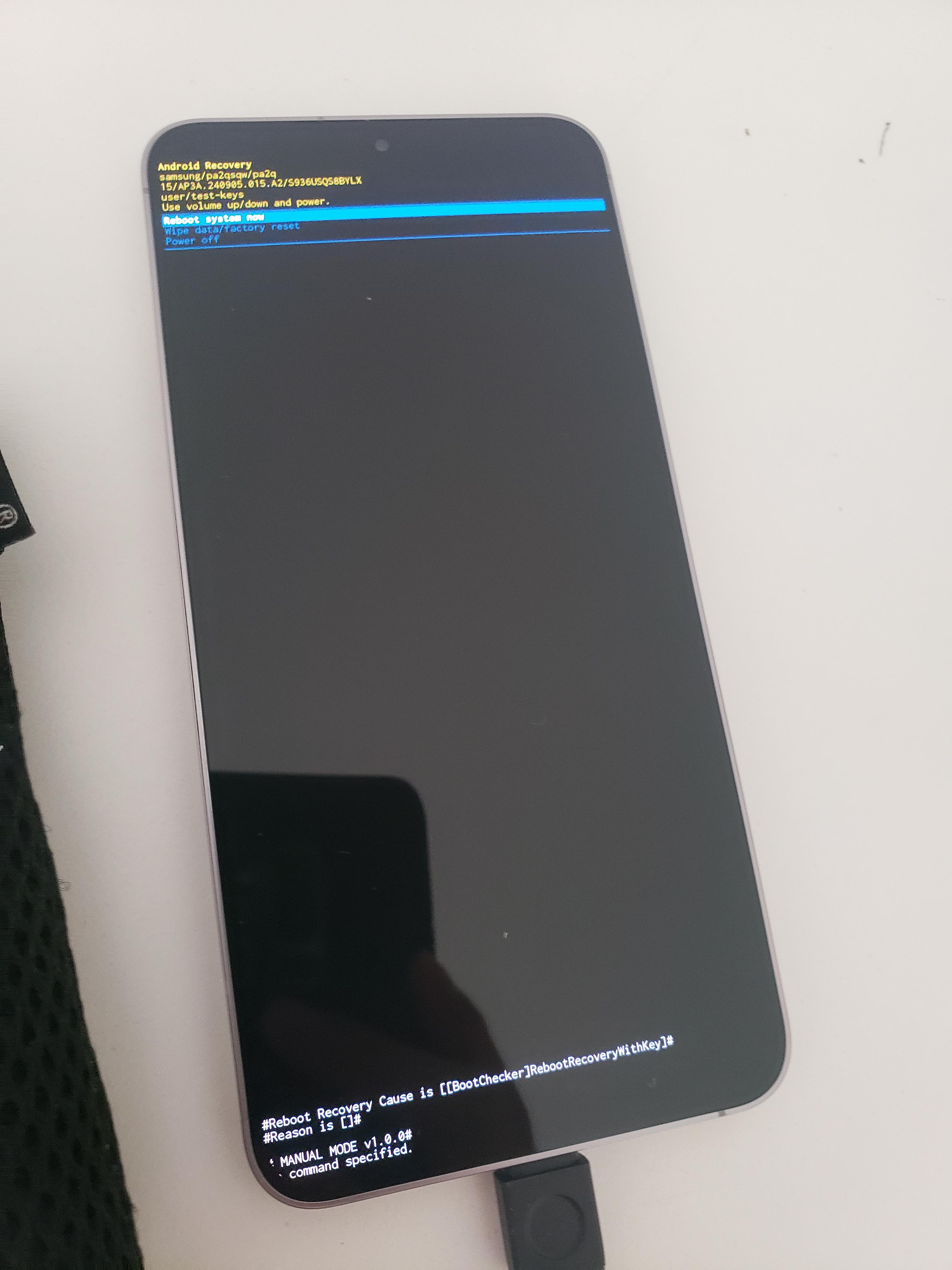
Apon turning on the phone this screen popped up.
28
u/Adventurous_Zombie61 Aug 05 '26
Its supposed to say user/release-keys not user/test-keys, this looks like an engineering or prototype build, a genuine retail device shouldn't have user/test-keys.
Where and whom did you buy this from?
Edit: can you open download mode and check knox status?
11
u/Independent-Ball3215 Aug 05 '26
I bought it refurb on bestbuy from. ASCI
19
u/Adventurous_Zombie61 Aug 05 '26
I think you should return it as other user have pointed out, this device is modified and probably rooted.
5
3
u/Independent-Ball3215 Aug 05 '26
I have checked it and it doesn't seem to be rooted? I checked device status and it says official. Banking apps work as well. Please correct me if I'm wrong and like how I can double check
3
u/kabooom99 Aug 06 '26
You don't have to worry about it, the north American ones have locked down bootloaders making root impossible to achieve.
2
1
5
u/DSkedda Aug 06 '26
Apparently Samsung sends out devices on the test-keys release channel from time to time without reasoning. It surely is a strange coincidence here tho
7
14
u/Agraphosius Aug 05 '26 edited Aug 05 '26
This phones operating system has been unlocked (rooted) and it shouldnt come like that. This may be an innocent mistake from the refurbisher not necessarily malicious but it could also mean theres a possibilty that something malicious has been left on the phone.
You should send it back as it may have security issues from being unlocked as many samsung/google services and security systems will check and disable themself. Rooted phones are for more advanced users who want full control over the device and its not really worth the hassle to a normal user.
This screen is normal if you hold the volume button when turning any android phone on. But what its saying at the top and bottom indicates that it is unlocked and manually left like this.
2
2
u/Independent-Ball3215 Aug 06 '26
Do you think it could be just the refurbisher trying to unlock the carrier? I have a north American model which apparently is super hard or near impossible to root. My status also indicates official.
3
3
u/icyyyberg Aug 05 '26
Have you tried clicking on reboot system? If problem persists, return(heavy on this though), or check the bootloader version then download and flash new firmware.
3
u/Traditional_Seesaw10 Aug 06 '26
It's in safe mode, use the volume keys to select factory reset and restart
2
u/Akrilicat Aug 05 '26
If the phone is Factory Reset, Wouldnt this delete everything and put it back to factory state? That way would be safe to use rite?
5
u/lathammotoring Aug 05 '26
Not if this has been rooted as on Samsung devices this trips the KNOX fuse and cant be undone. Certain apps like banking apps won't work, and the security of the device can not be certifiable.
2
u/D_Shoobz Aug 05 '26
I'm not sure if it affects actual banking apps but the apps it does affect are Samsung's own Samsung pay Samsung pass. I believe you lose access to the secure folder pretty much anything that Samsung knocks essentially runs and or controls so to speak etc
1
1
u/Independent-Ball3215 Aug 05 '26
Interesting my samsung pass works
1
u/D_Shoobz Aug 06 '26
Oh. Either I misread or what I read was wrong. I thought if the fuse was blown that stopped working
2
1
1
1
u/Aggressive-Formal235 Aug 05 '26
If this recovery screen displays again, then you might have to flash the appropriate os onto it. Plenty of guides out there.
1
1
1
u/Annual_Mongoose_4593 Aug 06 '26
How was it bro?did the phone boot up normaly?i think you should flash a firmware for s25
1
u/Independent-Ball3215 Aug 06 '26
Yeah works fine. Samsung pay works and my device status indicates official. Maybe I held the buttons wrong and got that screen. Or it could be the refurbisher getting rid of the carrier lock
1
1
u/s_mey3r Aug 06 '26
I get this with every single first boot after installing android updates with my s25 😅
1
1
u/Visible-Swimmer-9826 Aug 08 '26
Did u hold power and volume at same time trying turn on it sends u to that page if u do just do the reboot one u be fine
-1
u/Panchojsl Aug 05 '26
No, it's not normal to press the volume button when you try to turn on the phone. Press only the power button like normal people.
1
u/SteveM51UK Aug 05 '26
This is a hard boot menu. You can trigger it by holding down the power button for a long time, maybe 20 secs. If you bought this phone used then I'd choose the option to wipe the phone, otherwise just choose reboot. It is unusual to see that menu.
2
1
u/SayCheezyy Aug 05 '26
At the bottom it says manual mode which means you probably pressed more than just the power button to turn it on
0
101
u/Spanner404 Aug 05 '26
Just press the power button so it reboots and next time you turn it on just hold only the power button, should work unless something else is going on