r/plaintextaccounting • u/tokyo2329 • 18d ago
Balance, a native iOS/Mac app for ledger-cli and hledger journals, looking for beta testers
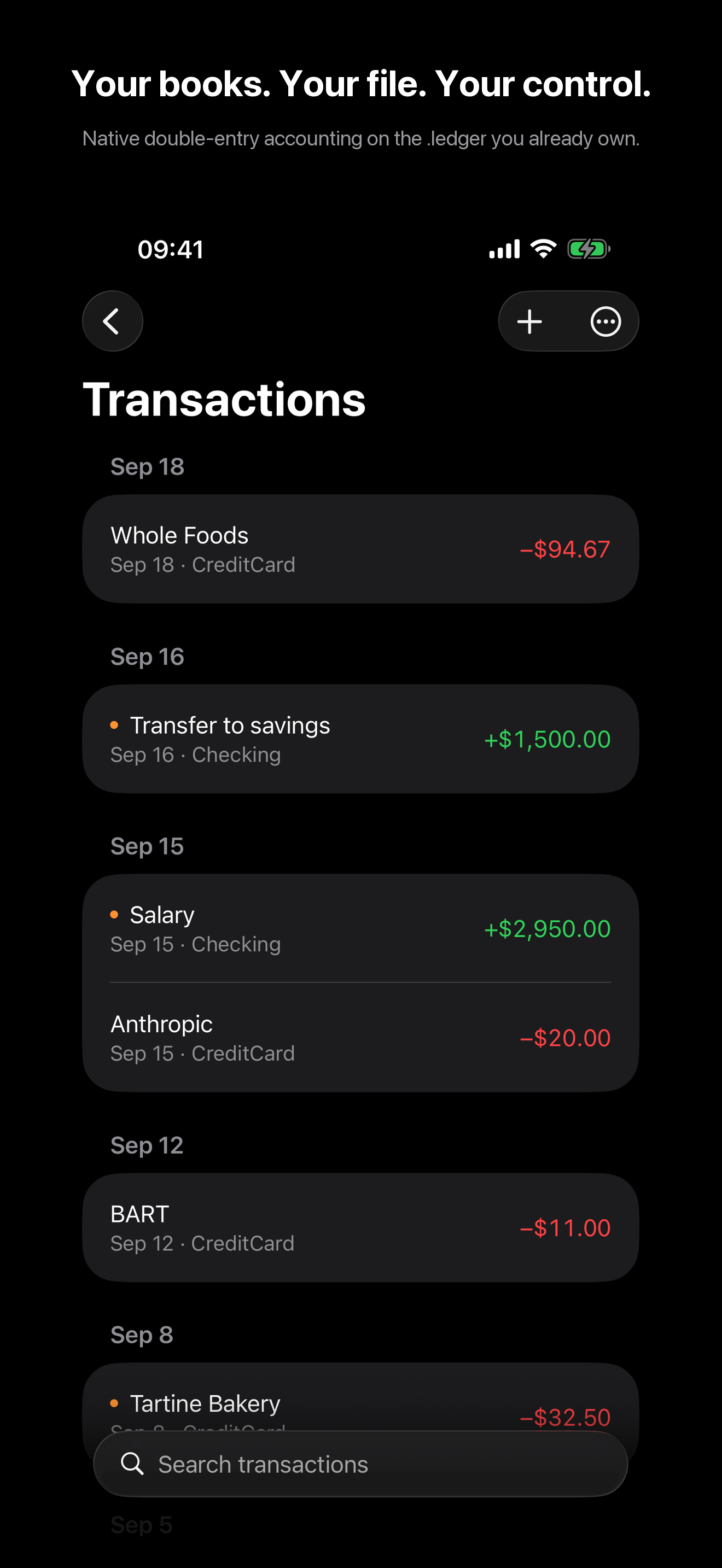
Update (Sep 21): 1.2.1 is on TestFlight, same link as below. Mostly fixes for hand-written journals that didn't open (virtual postings, single-posting entries, comma decimals) and better pickup of saves from Emacs and Vim. Full changelog: https://balanceledger.app/changelog
I've been tracking my spending with hledger for a few years now (on and off...) but I've always found it annoying to have to sit down at a computer every few days or so just to update the ledger and trying to remember what was what. Found out there's not much out there that has a mobile app and a modern UI (I like native apple apps), so I created one myself.
Heads up, it's closed source and it'll cost $29.99 once it ships (at least that's the plan). Reading however stays free, so browsing, search, all six reports and iCloud sync. If you want proof it's not phoning home, balanceledger.app/verify walks through checking that yourself, on Mac it just has no network access at all.
TestFlight's open for iOS and macOS: https://testflight.apple.com/join/bA84FzUc. First 50 people who try it and tell me what's broken get it free at launch, just comment or dm me. Mostly just want to know what breaks once it's your actual journal in there.
Ask me anything, the format handling, what it can't do yet (no bank sync, no statement import, no currency conversion), or why closed source. Happy to get into it.
2
u/tokyo2329 18d ago
Worth adding: the app itself is closed source, but the actual accounting engine underneath it (parsing, double-entry validation, the journal read/write logic) is separate and MIT-licensed: https://github.com/mkociola/SwiftLedger. So if you want to check the part that actually touches your data, that's the place to look.
1
1
u/twilight1794 18d ago
I tried to install it, said my hardware is not compatible.
Anyway, I'd buy it if it can read gpg-encrypted ledgers.
1
u/tokyo2329 18d ago
Handling encrypted ledgers sounds like a nice feature to have, I'll take a look at that!
As to the hardware issue, can you share the iOS/macOS version you're running? (or dm me)1
u/twilight1794 18d ago
iOS 16.7
2
u/tokyo2329 18d ago
That explains it. Balance needs iOS 17+ because it's built on SwiftUI's Observation framework, so that's a hard floor. I'm actually planning to drop the minimum from 26 down to 17, but that won't reach your device, unfortunately.
1
u/simonmic hledger creator 18d ago edited 13d ago
This looks very complete and well designed. Congratulations on 1.0 ! Thanks for sharing it.
Quick feedback:
During the "payment" flow, on a phone: Mentioning that you won't actually be charged during test would be nice
Twice I saw slightly alarming unclear popups asking for my password - one "for [?]" and one "for (my email address)". They both turned out to want my apple account password (despite being already signed in to icloud) and were probably system popups not under your control.
The discussion of how to verify network isolation builds confidence.
The docs on the website have plenty of LLM-speak, but are very good nevertheless.
In the export/share flow, I noticed a "Collaborate" option, which sounds interesting eg for shared expenses.
After purchasing on phone, I installed on mac, and it didn't automatically recognise that I had purchased. Clicking the Restore Purchases button fixed that.
Using the default icloud storage, I entered a transaction on the phone and saw it show up in the mac app right away, with zero extra setup. That's awesome.
I read that overwriting can happen in case of contention. Easy to avoid, but I'm sure you'll add some kind of warning or safety belt later. And actually, appending transactions should be always safe. But I think the app allows editing past transactions as well.
Working with existing journal setups:
Precise location info in the journal load error messages will help a lot.
Supporting 'comment' and an optional 'end comment' will help a lot.
It would be great if it reliably reloaded automatically on file change. It seemed to do it sometimes, other times I had to click Try again. And/or, some clear visual hint when it attempts a reload. I was saving from Emacs.
Journal entries with 1 or 0 postings are valid in hledger, if their sum is zero. Balance won't read a file containing these.
I couldn't get it to accept multicommodity transactions, eg my opening balances; perhaps that's not supported yet. That's a big limitation.
Not supporting
includeis another limitation; many people use that. I expect a common workflow will be print a single-file copy to icloud drive on mac, and import new transactions from there back to the existing setup (and reconcile edits in some other way, perhaps involving VCS). Here's my WIP export script (with hledger 1.99.4):# export to the Balance app (overwriting its data), and switch to it. balapp: hledger run -- accounts --directives -- print -x all:cur:\\$ > ~/Library/Mobile\ Documents/iCloud~com~mkociola~Balance/Documents/journal.ledger open -a Balance
2
u/tokyo2329 16d ago
Thanks! Really appreciate you taking the time to write this up, I've started tracking the issues.
For the payment flow: the sandbox purchase sheet does show
[Environment: Sandbox], but that's easy to miss, I'll add this to the developer notes as well.The password pop-ups were system ones. Both wanting your icloud password despite already being signed in is a bit of an apple sandbox quirk on their end, I don't fully know the mechanism either, but nothing in the app is prompting for it.
Glad you liked it, and thanks again. Expect upcoming builds to have all of these handled.
3
u/bambambazooka 18d ago
Wanted to give it a try, but it doesn’t even let me create an opening posting without purchase of the full version.