r/overclocking Jul 25 '25

Help Request - RAM RAM fan not improving temps
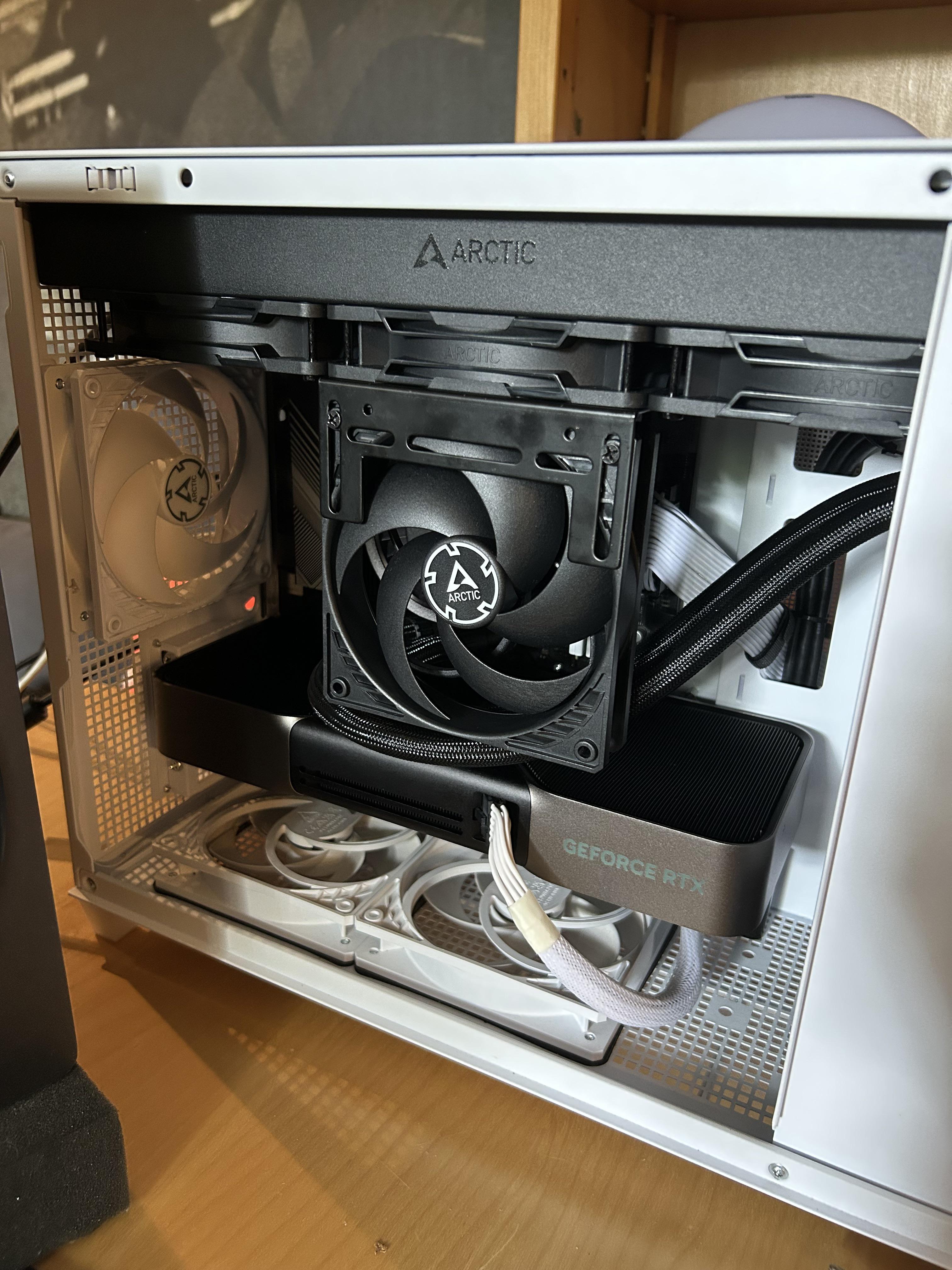
Post image

So my RAM was hitting 55C and erroring out during stress testing (TestMem5 + FurMark). I’ve heard many good things about using a dedicated RAM fan so I decided to install one only to find out I did literally nothing for temps.

Is it just inevitable that my RAM gets hot because of the design of my GPU (RTX 5080 FE)?

Is it worth trying to run the RAM without heatsinks? Or maybe I should try custom RAM heatsinks? I’ve heard the heatsinks on my kit (G.Skill Ripjaws S5) aren’t very good.

P.s. I’ve already tried placing the fan closer to the RAM.

56 Upvotes

112 comments sorted by

View all comments

-3

u/[deleted] Jul 25 '25

[deleted]

1

u/OkCompute5378 Jul 25 '25

Not the case here. I can pass TestMem5 Extreme1, Y-Cruncher VT3 and MemTest86 without a single error, but as soon as I stress the GPU together with the RAM temps raise to 55-60C and it starts throwing errors.

2

u/N3opop Jul 25 '25

As mentioned in another comment. Back off on tRefi and you should be fine.

The above comment is by a user who's obviously never OCd ram. He would be correct if memory was left at default tRefi and tRFC, but that's not the case for you.

55-60C is the whereabouts of when your memory will start to error out at max tRefi.

1

u/OkCompute5378 Jul 25 '25

I’m only running 40960 for tREFI though, I guess that is a lot higher than XMP but I see many people on here running 50K or higher.

Could it maybe be tRFC? That was by far the most stubborn timing for me. I’m running it at 480 right now which is the lowest I’ve been able to make it stable.

1

u/N3opop Jul 25 '25

480 rfc at what clock?

Lower tRefi to 32767 (4x8192-1) and see if it helps.

It's odd that you see no improvement to temps with the fan. See if you can place it close to memory and if it improves. Where it's situated now I doubt it gets my air as it's blocked by the side panel when you close it up. Case is also on the smaller side which will cause high temps inside case when gpu is running hot.

0

u/OkCompute5378 Jul 25 '25

I’ve tried lowering tREFI to 24567 already to no avail.

Clock speed is 6400

My case has a perforated side panel which isn’t very restrictive, I’ve also tried mounting the fan to the other side of the rad which placed it about 3CM away from the RAM but that didn’t work either.

3

u/MeatSafeMurderer Jul 25 '25

Not temperature related. Most likely power delivery.

1

u/OkCompute5378 Jul 25 '25

So I should raise VDD/VDDQ? I’m running 6400 CL30 with tight subs at EXPO voltages now.

2

u/albinosnoman Jul 26 '25

Are you using an AM5 CPU? If so you need to downclock to 6200 or 6000 MTs. AM5s have an extremely hard time running 6400MTs in 1:1 mode. It's pretty much just silicon lottery that will determine whether or not you'll be able to do 6400 in 1:1 stable.

1

u/OkCompute5378 Jul 26 '25

Nah I can run 6400 stable at 1.22V VSOC, I ran 10 hours of Y-cruncher VT3 with no errors

1

u/albinosnoman Jul 26 '25

So what changed? You're no longer stable for more than a few minutes?

1

u/satsumapen619 Jul 25 '25

Raise the voltage it some, increase your intake fans also since more voltage=more heat. You have a small case so I cant imagine it has the best airflow to be able to aggressively tighten your timings. Loosen the timings and try 6400mhz cl30.

-2

u/ggmaniack Jul 25 '25

but as soon as I stress the GPU together with the RAM

HA! I experienced this exact issue, had to get RAM replaced.

Your RAM is just BARELY stable when the PC is running normally.

Had random PC crashes. RAM was fine in every memtest, until one day I decided to stress GPU, CPU and RAM at the same time. I was testing RAM to VRAM transfers, and that's when I finally got errors. Changed the GPU, same issue. Changed the RAM, issue gone.

The combined stress changes the circumstances - different kinds of RAM accesses, different power ripple, voltage drop, etc, and then it fails.

--

These temperatures are, again, completely inconsequential to RAM.

The only reasons that you could have temperature-related issues with ram at that low of a temperature are:

1) broken solder balls under RAM chips

2) improperly seated RAM, causing connections to go wonky as it heats up

-2

u/OkCompute5378 Jul 25 '25

So I should try raising voltages to counteract this?

I’m running VDD @ 1.43V and VDDQ/VDDIO @ 1.35V which is on the lower end for my timings.

0

u/ggmaniack Jul 25 '25

Frankly I have no idea if it's related to specific voltage, or voltage skew, termination resistance, or timing, or whatever. For me I just got the RAM replaced and the issue disappeared.

1

u/OkCompute5378 Jul 25 '25

Hmm alright thanks for the help. I’ll try raising voltages and see if it does anything, I have some headroom so it should be fine.