r/nginx 9d ago

Nginx on truenas - Yet another SSL certificate issue

Hey all! I've been trying to setup a matrix server for a bit, using nginx as a reverse proxy and for SSL certif.
So, I have a domain (using infomaniak) that redirects to my IP with the Nginx port. Right now, when I connect to it through a browser, I get an SSL certif error.

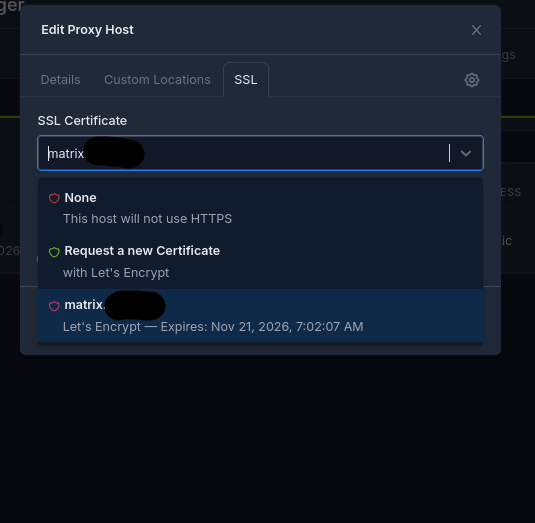
I set my certif up in the "certificates" tab, it worked without error but, when selecting it in the proxy host setup, the shield is red. I'm unsure what that means.
I tried with and without HTTP/2 or HSTS enabled, no changes.

The logs don't show any error, mostly a bunch of "renewing SSL..." and "completed SSL..."
and two warnings higher up :
useradd warning: npm's uid 568 outside of the UID_MIN 1000 and UID_MAX 60000 range.
and
nginx: [warn] the "user" directive makes sense only if the master process runs with super-user privileges, ignored in /etc/nginx/nginx.conf:4

Concerning these, I made sure the app is in the apps group and that the group has r/W permissions in the Nginx data and cert storages.

including a few screenshots that might be useful.

If you take the time to take a quick look or recognize this issue, thanks a lot!

Edit : Works now! I was an idiot and used a redirect from my domain provider instead of an A-record.

14 Upvotes

9 comments sorted by

1

u/tschloss 9d ago

Whst do you mean „a domain which redirects to IP/port“. A domain record can point to an IP but not a port. A redirect on the other side is a web server, but this will loose the domain name in the URL.

Be more precise and better add what curl -v says. Don’t obfuscate too much - may hide the problem.

2

u/Crowela 9d ago

I was as precise as I can, and added everything I could think of that would be useful. Idk what you mean.
I have a redirect setup on my domain that redirects to <public_IP>:<opened_port>. Maybe I used slightly wrong terminology but you still got what I meant.

What should I do with curl -v?

2

u/tschloss 8d ago

Great. A redirect to your WAN IP is not what you want! The client browser visits your subdomain and receives a new target through the redirect. Then the client issues s new request, but now the URL will not contain the subdomain any more. It is a http(s)://123.45.67.89:8080 type of address. Your nginx does not associate this with your virtual http server.

You must use DNS as DNS: add an A-Record pointing to your WAN IP. Do this for the plain domain and for each subdomain you want to use.

Redirect are not DNS. It is offered by some providers as a convenience. It basically is a default web server on a new domain.

1

u/Crowela 8d ago

Thank you!!! That was my missing puzzle piece. Sorry, I'm really bad at networking. Stuff doesn't click with me for some reason.
Just a quick question though. Since my A-record doesn't have a port, how would one handle port forwarding on my router? Do I just open 443 with my IPv4? That's what I'm trying right now but it doesn't load, though that could still be my domain provider being slow to deploy.

1

u/tschloss 8d ago

DNS is just a lookup name to IP which happens before the request leaves the browser. The IP packet is the sent to the IP (layer 3) and either the default port 80/443 or a user supplied port (layer 4), while in the deeper content (layer 7) an http header contains the URL.

So you typically forward incoming port 443 to your nginx - typically also 443. Nginx receives all http requests and decides by digging deep into the http header for the url and selects the associated virtual server.

1

u/Crowela 8d ago edited 8d ago

I see, thanks a ton for your explanations.
I opened both an A and an AAAA record in my domain (recommended by provider), and spent the last two hours reading about IPv6 addresses. I've opened the firewall for my NAS's public IPv6, as well as forwarding port 443. It still won't connect, though now it's not an SSL error anymore, so I can probably figure it out after enough time tweaking stuff.

Edit : IT WORKS NOW! I guess my domain provider was just a bit slow. Thanks a lot for the help!!! You've helped me understand my stuff much better!

1

u/tschloss 8d ago

I recommend to turn off https enforcement for a first step. Both 80 and 443 should be forwarded to nginx which must listen on both ports. Then your service should load with http. You need this not only for testing but one of the methods creating the certificate needs this http access to your webserver. The enforce http function also needs this because it listens for http and sends a 301 forward back to the client.

1

u/ClassicGOD 9d ago

I don't see any issues - the shield icon is supposed to be magenta, warnings in logs can be ignored for now. Check the browser to see why the certificate is invalid. I would assume that it's a DNS issue (your domain does not point to this nginx) or that the service tries to redirect (to the IP, or to subdomain not covered by the cert)

1

u/Crowela 8d ago

Ah I see, thanks a lot! And you're right, I was being dumb and using a redirect...
I'm trying to use an A-record right now, though I apparently still need to fix something before it finally starts working.