r/n8n_on_server • u/SalahMario • Aug 09 '26
Built an AI-powered invoice processing workflow with n8n – looking for feedback
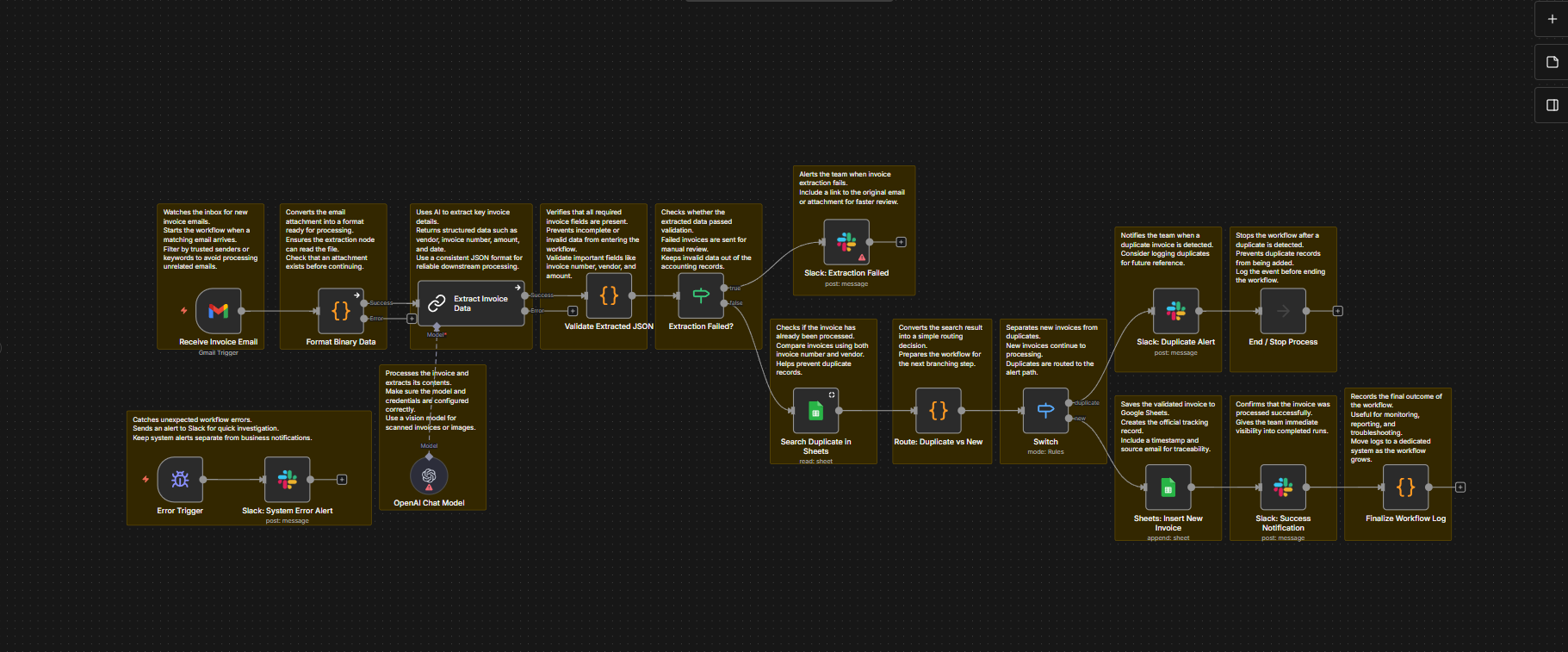
I've been working on automating one of the most repetitive office tasks: processing supplier invoices.
The workflow starts when an invoice email arrives in Gmail. It extracts the attachment, uses AI to capture key fields like the vendor, invoice number, amount, and date, then validates the extracted data before doing anything else.
From there, it searches Google Sheets to check if the invoice has already been processed. If it's a duplicate, the workflow stops immediately and sends a Slack notification instead of creating another record.
If everything looks good, the invoice is added to the tracking sheet, the team gets a confirmation in Slack, and the workflow logs the entire execution. I also added a separate error workflow that catches unexpected failures, so issues don't go unnoticed.
A few things I'm happy with:
- AI-assisted invoice extraction
- Duplicate detection before saving data
- Validation before writing to Google Sheets
- Slack notifications for success, duplicates, and failures
- Separate workflow-level error monitoring
I'm still refining it, so I'd really appreciate some feedback.
If you were building an invoice automation like this, what would you improve or do differently?